Data Comparison Tool in dbForge Studio for Oracle
The Data Comparison tool included in dbForge Studio for Oracle is packed with numerous
useful features that allow you to compare data in different tables, synchronize
data between target and source schemas, display results in a convenient UI etc.
Oracle Data Compare Tool will help you whenever you need to compare data in Oracle
databases.
Features
-
Comparing and synchronizing data in databases of virtually any size
-
Comparison of data between different schemas, comparison of views
-
Comparison results filtering
-
Convenient UI, easy for analysis and synchronization
-
Quick data synchronization of target and source schemas
See also
Comparing data between different schemas
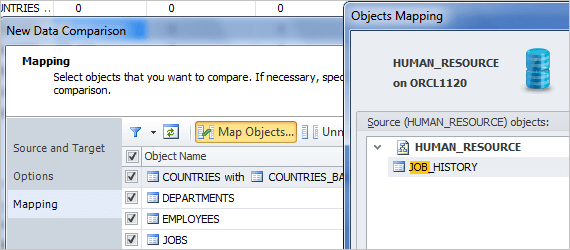
Use Data Comparison Wizard any time you want to compare data in two Oracle tables.
You can see the list of all available tables in the grid, select required ones to
compare, compare one or several tables at once, filter them, hide system ones in
the grid and select comparison options. Oracle Data Compare Tool maps tables and
columns that have the same name and owner for comparison automatically. However
you can map tables and views with non-equal names using custom queries.
Data Compare Tool - Mapping Objects
Analyzing data differences
When dbForge Studio has compared database structures, their differences will be
shown in the schema comparison document that can be saved. Records are grouped by
their status and displayed on separate tabs.
Data Compare Tool provides a number of options to manage the comparison results.
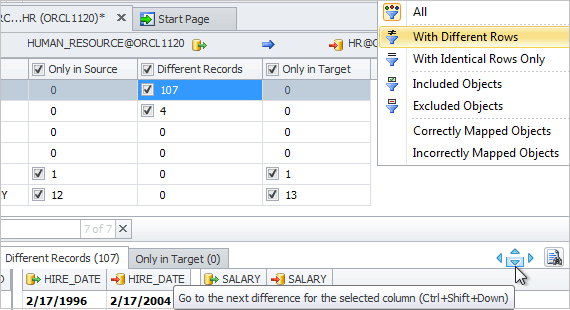
Schema objects can be filtered by differences. You can select what objects to show:
objects with different, identical records, only in source or only in target records.
You can also filter incorrectly and correctly mapped objects.
dbForge Studio for Oracle provides a possibility to view results of data comparison
in the form of a report. When data comparison is completed, you can generate a comparison
report.
Data Compare Tool - Filtering Schema Objects
Synchronizing data in Oracle schemas
When dbForge Studio has compared data in schemas, all objects that can be synchronized
are selected for synchronization. You can exclude objects you don't want to synchronize
to leave only required ones for synchronization.
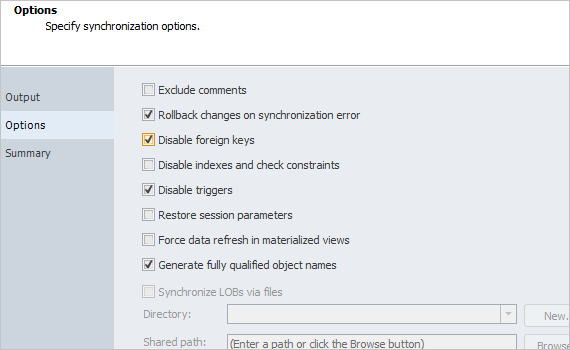
Data Comparison Wizard allows you to choose what dbForge Studio should do with the
synchronization script. There is also a list of options to customize the synchronization
process.
You can review the synchronization actions which will be in the synchronization
script and possible warnings generated by dbForge Studio that can affect the synchronization.
With the help of the command line you can automate the data comparison and synchronization
process.
Data Compare Tool - Synchronization Wizard
There are many alternative tools for Oracle database comparison and synchronization,
but you should choose the most appropriate one. Our Oracle database compare tool
can boast of convenient UI, comprehensive data comparison and synchronization wizards,
rich settings, high performance, and stable work.
Availability in editions of dbForge Studio for Oracle
|
Features
|
Express
|
Standard
|
Professional
|
|
|
|
Data Compare Tool
|
|
|
|