Entity Developer Overview

Entity Developer is a powerful ORM modeling and code generation tool for NHibernate, ADO.NET Entity Framework, LinqConnect, and LINQ to SQL. You can use Model-First and Database-First approaches to design your model and generate C# or Visual Basic .NET code for it. It introduces new approaches for designing ORM models, boosts productivity, and facilitates the development of database applications.

Code Generation

Visual ORM Model Designer with Code Generation

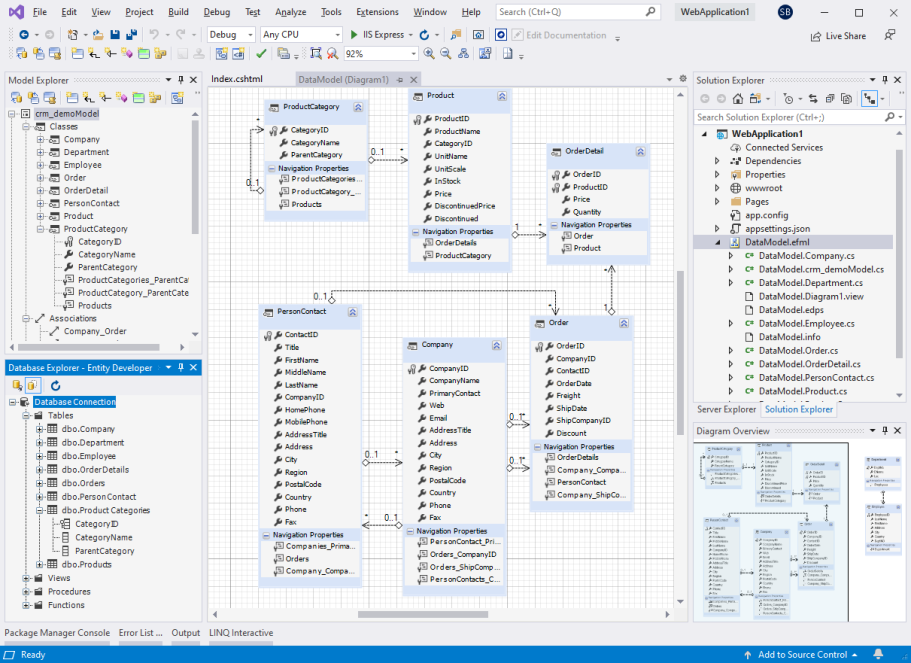
Entity Developer allows you to create and edit NHibernate, Entity Framework, LinqConnect, and LINQ to SQL models visually, without typing a line of XML code. It supports creating all kinds of mapping, such as table splitting, mapping entity to several tables, complex types, inheritance hierarchies, creating entities from SELECT statements and methods from SQL code, etc. Code generation is very flexible due to using T4-like templates, allowing virtually anything you may want for code generation. C# and VB code can be generated for your model out-of-the-box, and you may even create your own templates for other programming languages.

ORMs

Multiple ORM Support

Entity Developer supports NHibernate, Entity Framework, LinqConnect, and LINQ to SQL models. It offers a separate edition for each of the supported ORMs and the Professional Edition supporting all the three ORMs. Entity Developer for NHibernate and Entity Developer for Entity Framework allow designing NHibernate and Entity Framework models. See the Compatibility page for the list of ADO.NET providers, supported for these ORMs. Entity Developer for LINQ to SQL uses Microsoft SqlClient to connect to database. Entity Developer is also included to the professional edition of dotConnect for PostgreSQL, MySQL, Oracle, SQLite, and Salesforce and to LinqConnect.

Integration

Integration to Visual Studio

Entity Developer seamlessly integrates with Visual Studio 2008, 2010, and 2012. You may edit your Entity Developer models as Visual Studio documents, in the same way as EDM models. Entity Developer toolbars and tool windows behave as native Visual Studio toolbars and toolwindows, all Entity Developer functionality is available from Visual Studio menu. However, Entity Developer can be used as a stand-alone application, and it does not require Visual Studio to function.

Quotes

Let me say first, that the DevArt DotConnect for Oracle is fantastic. It solved the problem perfectly, which was to use LINQ with Oracle. The Entity Developer tool is amazing--I can make a data change and it compiles immediately.

Mark A. Abraham, Indiana State Department of Health

I have got to say that you guys are the most responsive group when it comes to fixing bugs. Many of the problems I have posted about have specifically been addressed in a subsequent release of your dotConnect for Oracle or Entity Developer products. This one wasn't even a complaint and you fixed it anyway. Thank you! Please keep up the great customer service, you guys are awesome!

Simon Kingaby, Piedmont Natural Gas
Send your testimonial!

Features

Approaches

Model First and Database First

Use any approach in your development - Model-First or Database-First.

Performance

Optimized Work with Large Models

Entity Developer provides optimized performance and convenient work with large models on all stages of development.

Queries

Data Viewing/Editing

Entity Developer allows executing LINQ or ESQL queries against the model, and view/edit data.

Validation

Model Validation

Entity Developer checks your model for errors asynchro­nous­ly while you edit it.

Code Generation

Code Generation

Code generation is very flexible due to using T4-like templates, allowing virtually anything you may want for code generation.

Validation

Property Validation

With Entity Developer you can tweak property validation visually, without typing code. You can use various validation engines.

Entity Developer