


Metro Database Access through LINQ and ADO.NET
Devart LinqConnect for Metro is a fully-functional high-performance ORM solution for Windows 8 Metro platform. With it you can develop Metro-style applications (Windows Store apps) with true ORM support for database access. Moreover, LinqConnect allows using ADO.NET interfaces for working with data, which were not available for Windows Metro before. And in addition, it offers its own managed embedded database engine based on C# SQLite to store data locally using a fully functional local relational database.
LINQ and ADO.NET Access
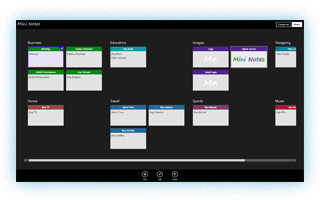
All LinqConnect ORM features - high performance, wide LINQ support, LINQ to SQL compatibility - are available for Windows Metro developers. LinqConnect brings you the possibility to use LINQ technology in your Windows Metro applications, which grants you such features as compile-time validation, IntelliSense, and your IDE's debugging mechanisms when building and testing your queries, etc.
Though Metro platform does not provide ADO.NET data access, with LinqConnect you can use ADO.NET in Windows Metro applications. With LinqConnect you can employ the flexibility and performance of the native database SQL language.
Portable Domain and Data Access Layers
LinqConnect provides the same interfaces for accessing data on all the supported platforms. This allows you to share the same data access layer and domain layer between your application ports to different platforms, such as .NET Framework, Mono, Silverlight, Windows Phone 7 and 8, and Metro. For example, if your application should use SQLite database and be ported to Metro, LinqConnect allows you to share the same code for working with data in desktop and Metro-style applications.
LinqConnect for Metro can be used in XAML C# and Visual Basic applications.
Embedded Database for Metro Applications
In many cases Metro style applications need to store some data locally.
Metro platform offers you to serialize and store data in XML format. However this
is not always convenient to store data in XML format. You need to parse the whole
file even if you need only part of the data, and XML format can be too inefficient
if someone needs to store a significant amount of data locally.
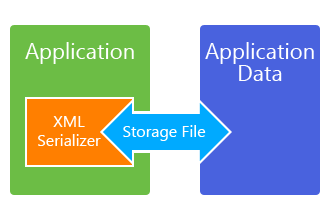
Storing data in a relational database offers you a number of advantages - such as transactions, constraints, indexes, and generally provides higher performance and lesser file size. Using relational transactional database also increases reliability of local data storage.
Metro platform does not provide SQL Server database, so if you need a reliable and convenient storage for local data, LinqConnect suits perfectly for these needs. It offers you embedded database functionality, allowing you to store data on the client side in an embedded database. LinqConnect for Metro contains the ready-to-use SQLite embedded database engine from C# SQLite project. You don't need to install any additional software, just use LinqConnect to work with a fully-functional relational database.
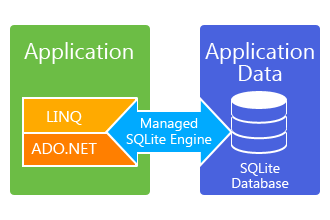
Small and efficient, and at the same time powerful SQLite database engine together with ADO.NET and LINQ interfaces for data access make LinqConnect a perfect choice to store data locally in Metro-style applications.
Connecting to Database in a Metro Application
(Two-Tier vs N-Tier)
Metro platform itself does not provide the way to access data from database servers directly. To access such data, Microsoft offers one of the following ways: use Web Services or ADO.NET Data Services that access data, materialize, serialize, and send them to your Metro-style application in XML or JSON format. These ways involve the creation of additional data access layer that causes overhead for data serialization on the service side and deserialization on the client side. In addition, this increases the network traffic of the application because it transmits data in an excessive XML form, while database servers usually return it in much more compact binary form.
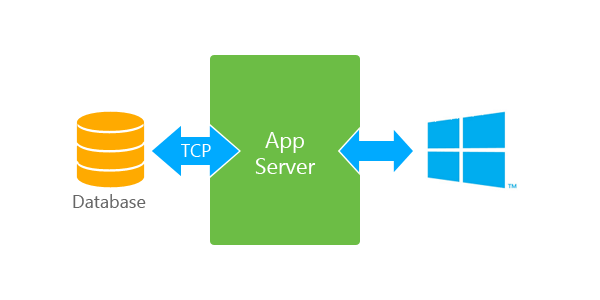
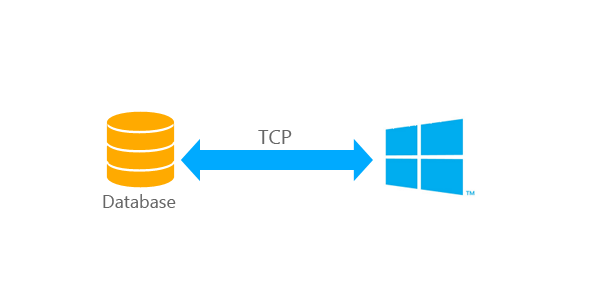
With LinqConnect you can connect to Oracle, MySQL, and PostgreSQL from Metro-style applications. It allows you to use ORM LINQ in Metro applications and to create truly Client-Server (two-tier) applications, that work with data directly through the TCP/IP protocol, when n-tier architecture is objectional. It offers the following benefits:
- No need to create an additional data access layer
- No performance overhead for data serialization and deserialization
- Lower network traffic
Windows Store Certification
LinqConect passes Windows Store certification. Our embedded database engine is 100% managed, so you don't need to recompile your applications for different platforms (ARM and PC).
C# 5.0 Features
LinqConnect for Metro features support of such C# 5.0 asynchronous programming features as async and await keywords. Some DataContext class methods have their analogues with the 'Async' suffix, which are executed asynchronously. IQueryable interface also provides Async analogues to its methods. This allows you to develop Metro applications with truly asynchronous data access.
Get Started Quickly
For beginner Metro developers, LinqConnect for Metro offers a simple tutorial , that demonstrates how to create a Metro application, storing data in an embedded SQLite database and displaying this data to the user. Additionally, LinqConnect for Metro provides demo projects, that help you to start developing Metro applications, using LinqConnect.