Oracle Data Access Components Overview
Oracle Data Access Components (ODAC) is a library of components that provides
native connectivity to Oracle from Delphi,
Delphi for .NET, C++Builder, Kylix, and Free Pascal.
The ODAC library is designed to help programmers develop faster and cleaner
Oracle
database applications.
ODAC is a complete replacement for standard Oracle connectivity
solutions and presents an efficient native alternative to the Borland
Database Engine
and dbExpress for access to Oracle.
Advantages of ODAC Technology
ODAC is a direct connectivity database wrapper built specifically
for the Oracle server. ODAC offers wide coverage of the Oracle feature
set, supports both Client and Direct connection modes, and emphasizes
optimized data access strategies.
Wide Coverage of Oracle Features
By providing access to the most advanced database functionality, ODAC allows
developers to harness the full capabilities of the Oracle server and optimize
their database applications. ODAC stands out as the set of components with the
widest support of Oracle functionality. It is the only component library to
support Oracle distributed transactions and implements support for controlling
statement caching, OCI pooling, and Oracle Advanced Queuing.
Native Connection Options
ODAC offers two connection modes to the Oracle server: connection through the
Oracle Call Interface in Client mode and direct connection over TCP/IP in
Direct mode. ODAC-based database applications are easy to deploy, do not
require installation of other data provider layers (such as BDE), and tend
to be faster than those that use standard data connectivity solutions.
Optimized Code
The goal of ODAC is to enable developers to write efficient and flexible
database applications. The ODAC library is implemented using advanced
data access algorithms and optimization techniques. Classes and components
undergo comprehensive performance tests and are designed to help you write
high-performance, lightweight data access layers. To see results of ODAC
performance tests, visit the ODAC performance
page.
Compatibility with Standard Data Access Components
The ODAC interface retains compatibility with standard VCL data access
components like BDE. Existing BDE-based applications can be easily migrated
to ODAC and enhanced to take advantage of Oracle-specific features like
alerts, pipes, and the direct-path interface. Project migration can be
automated with the BDE Migration Wizard.
How Does ODAC Work?
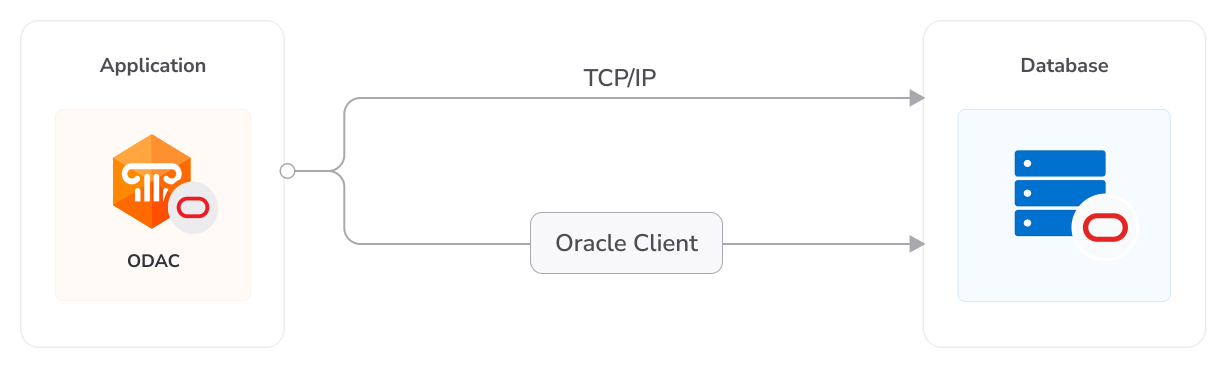
ODAC allows you to connect to Oracle in two ways: in Client mode, using
Oracle client software, or in Direct mode, over TCP/IP.
In Client mode, ODAC connects to Oracle through the Oracle Call Interface
(OCI). OCI is an application programming interface that allows an application
developer to use a third-generation language's native procedure or function
calls to access the Oracle database server and control all phases of SQL
statement execution. OCI is a library of standard database access and retrieval
functions in the form of a dynamic-link library.
In Direct mode, ODAC connects to Oracle directly without using Oracle client
software. In this mode, ODAC requires only TCP/IP support, and lets you build
really thin database applications.
In comparison, the Borland Database Engine (BDE) uses several layers to access
Oracle, and requires additional data access software to be installed on client
machines.
The BDE data transfer protocol is shown below.
BDE Connection Protocol
Using ODAC in Client mode allows your application to connect to OCI directly.
ODAC Connection Flow [Client Mode]
Using ODAC in Direct mode provides the optimal transfer route.
ODAC Connection Flow [Direct Mode]
Key Features
The following list describes the main features of Oracle Data Access Components.
- Direct access to server data. Does not require installation of other
data provider layers (such as BDE and ODBC)
- In Direct mode does not require Oracle client software and works
directly through TCP/IP
- VCL, VCL.NET, and CLX versions of library available
- Full support of the latest versions of Oracle
- Support for all Oracle data types
- Disconnected Model with automatic connection control for working
with data offline
- Local Failover for detecting connection loss and implicitly
re-executing certain operations
- Oracle Transparent Application Failover support
- All types of local sorting and filtering, including by calculated
and lookup fields
- Automatic data updating with TOraQuery, TSmartQuery, and
TOraTable components
- Unicode and national charsets support
- Distributed transaction support
- Oracle Advanced Queuing support
- Support for many Oracle-specific features, such as alerts,
pipes and direct path interface
- Advanced script execution functionality with TOraScript
component
- Support for using Macros in SQL
- Integration with OraDeveloper Tools for
performing advanced database development and administration tasks
- Easy migration from BDE with Migration Wizard
- Lets you use Professional Edition of Delphi, C++Builder, and Kylix
to develop client/server applications
- Includes annual ODAC Subscription with Priority Support
- Licensed royalty-free per developer, per team, or per site
See All Features
Connecting in Direct Mode
By default, ODAC, like most applications that work with Oracle, uses the Oracle
Call Interface (OCI) to connect to the Oracle database server. This is referred
to as connecting in Client mode, and it is the usual way to develop Oracle
applications with a third-generation language. All OCI routines are stored
in external libraries, so the executables for applications that work through
OCI are small. However, working through OCI requires Oracle client software
to be installed on target workstations. This is an inconvenience and causes
additional installation and administration expenses. Furthermore, there are
some situations in which installation of Oracle client is not advisable or
may even be impossible; for example, when deploying an application to remote
machines which do not have qualified administration.
To overcome these problems, ODAC Developer Edition and ODAC Professional
Edition include an option to connect to Oracle directly over the network
using the TCP/IP protocol. This is referred to as connecting in Direct
mode. Connecting in Direct mode does not require Oracle client software
to be installed on target machines. The only requirement for running an
ODAC-based application that uses the Direct mode is that the operating
system must have TCP/IP support.
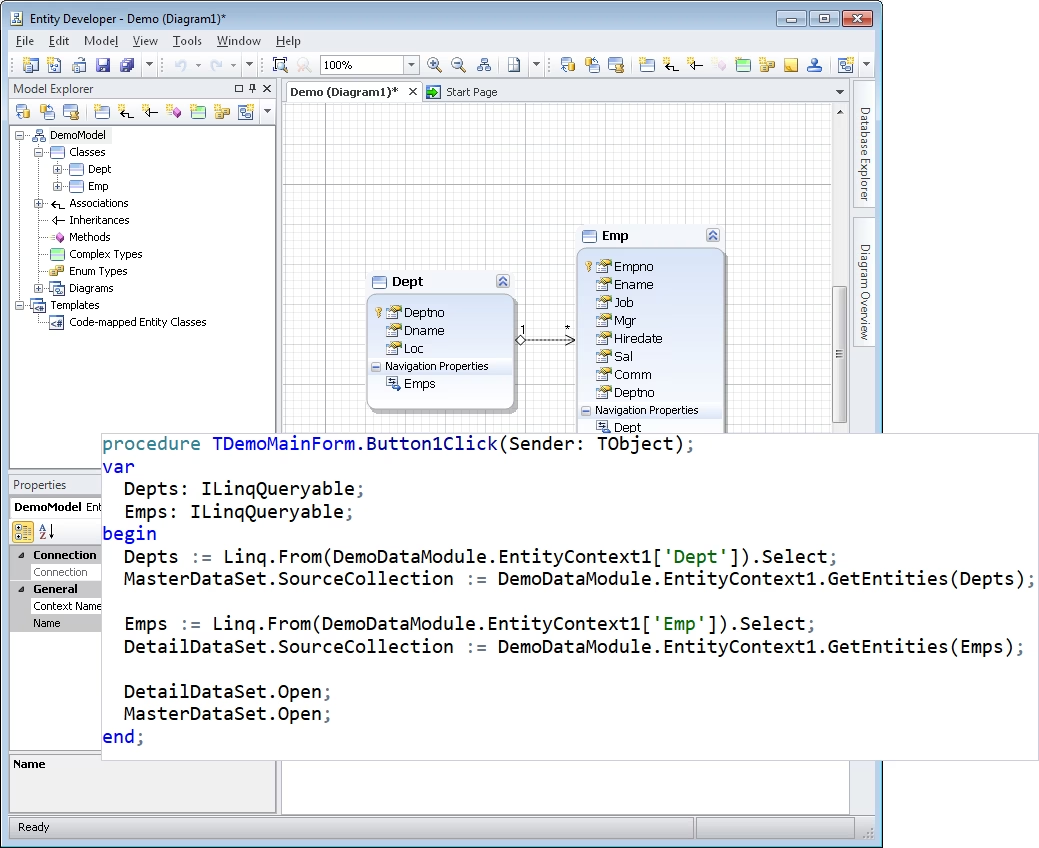
ODAC Design-Time View