Oracle Data Access Components Frequently Asked Questions
Couldn't find the answer to your question?
Take a look at our
support forum.
Answers
What are the advantages of ODAC compared to BDE?
BDE provides a more or less uniform way for accessing different
servers (SQL Server, MySQL, Oracle and so on)
ODAC is a set of components optimized for working specifically with
Oracle, and has a server-specific component interface and advanced
design-time support.
As a result, there are a number of reasons why ODAC may be better
than BDE for your Oracle-based application. Some of them are
enumerated here. For more information refer to the ODAC feature list.
- Incomparably higher speed of data access, fetching, and
processing
- Possibility to individually adjust and optimize execution
parameters for every query
- Complete support of PL/SQL
- Return of cursor from a stored procedure or anonymous
PL/SQL block (by parameter)
- Return of PL/SQL result sets from a stored procedure
or anonymous PL/SQL block
- Support for asynchronous execution of queries
- Possibility to break the execution of long-duration
queries
- Built-in system for debugging in run-time
- Convenient and simple-to-use standardized error
processing mechanism
- No need to install and configure BDE on client
machines during deployment
Installation and Deployment
I'm having a problem with installing ODAC or compiling
ODAC-based projects...
You may be having a compatibility issue that shows up in one or more of the
following forms:
- Get a "Setup has detected already installed DAC packages which are
incompatible with
current version" message during ODAC installation.
- Get a "Procedure entry point ... not found in ... " message when
starting IDE.
- Get a "Unit ... was compiled with a different version of ..."
message on compilation.
You can have such problems if you installed incompatible ODAC, SDAC,
MyDAC, IBDAC, or UniDAC versions.
All these products use common base packages. The easiest way to avoid
the problem is to uninstall
all installed DAC products and then download from our site and install
the last builds.
What software should be installed on a client
computer so that my
applications that use ODAC can run?
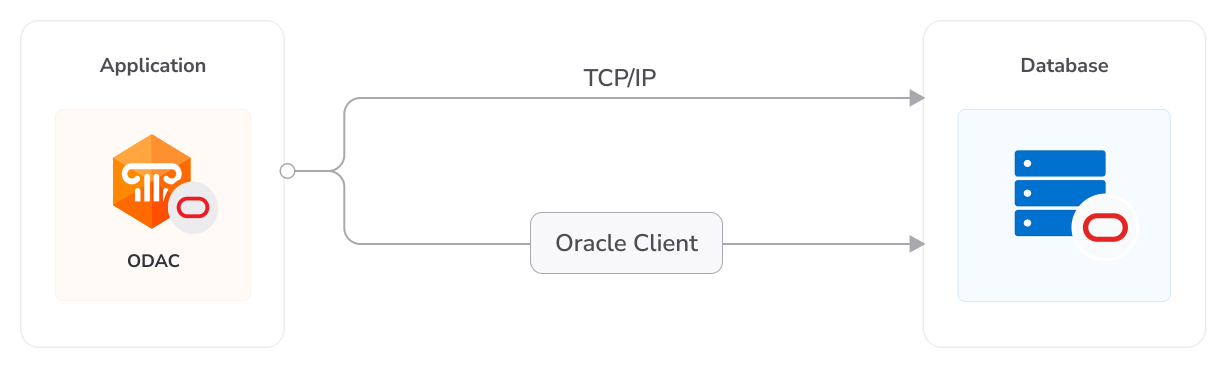
To use the full set of Oracle features, the client
computer has to have Oracle
client software (OCI) installed. If you do not want to install OCI,
you can use Direct mode, in which
ODAC communicates with Oracle server without intermediate libraries.
In order to use the Direct
mode, the operating system on the client computer must have TCP/IP
protocol support installed.
How can I quickly convert a project from BDE
to ODAC?
To quickly migrate your project from BDE you can
use the BDE Migration Wizard.
To start it, open your project and choose BDE Migration Wizard from
the Oracle menu of your IDE.
How can I compile an ODAC with Sources Edition
so that ODAC packages do not require BDE packages?
Find and comment the following line in the Odac.inc file:
{$DEFINE BDESESSION}
In this case ODAC will be compiled without the TBDESession component.
Core Lab renaming issue that conserns Delphi for .Net users
-
Please remove all CoreLab assamblies references from your project and add corresponding Devart ones
-
Please change all unit references in uses clauses from CoreLab to Devart (you can use standard renaming tool)
Licensing and Subscriptions
Am I entitled to distribute applications written
with ODAC?
If you have purchased a full version of ODAC, you are
entitled to distribute pre-compiled programs created with its use. You
are not entitled to propagate any components inherited from ODAC or using
ODAC source code. For more information see the License.rtf
file in your ODAC installation directory.
Can I create components using ODAC?
You can create your own components that are inherited from ODAC
or that use the ODAC source code. You are entitled to sell and
distribute compiled application executables that use such components,
but not their source code and not the components themselves.
What licensing changes can I expect with ODAC 6.00?
The basic ODAC license agreement will remain the same. With ODAC 6.00,
the ODAC Edition Matrix will be reorganized
and a new ODAC Subscription Program
will be introduced.
What do the ODAC 6.00 Edition Levels correspond to?
ODAC 6.00 will come in four editions: Standard, Professional, Developer,
and Trial. ODAC Professional Edition and ODAC Developer Edition are
available with Source Code.
When you upgrade to the new version, your edition level will be
automatically updated using the following Edition Correspondence Table.
Edition Correspondence Table for Upgrading to ODAC 6.00
| Old Edition Level |
New Edition Level |
| - No Correspondence - | ODAC Standard Edition |
| ODAC Standard Edition | ODAC Professional Edition |
| ODAC Net Edition | ODAC Professional Edition |
| ODAC Professional Edition | ODAC Professional Edition
with Sources |
| - No Correspondence - | ODAC Developer
Edition |
| - No Correspondence - | ODAC Developer
Edition with Sources |
| ODAC Trial Edition | ODAC Trial Edition |
The feature list for each edition can be found here.
I have a registered version of ODAC. Will I need to pay to
upgrade to future versions?
After ODAC 6.00, all upgrades to future versions are free to users with an
active ODAC Subscription.
Users that have a registration for versions of ODAC prior to ODAC 6.00 will
have to first upgrade to ODAC 6.00 to jump in on the Subscription Program.
What are the benefits of the ODAC Subscription Program?
The ODAC Subscription Program is an
annual maintenance and support service
for ODAC users.
Users with a valid ODAC Subscription get the following benefits:
- Access to new versions of ODAC when they are released
- Access to all ODAC updates and bug fixes
- Product support through the ODAC Priority Support program
- Notification of new product versions
Priority Support is an advanced product support program which
offers you
expedited individual assistance with ODAC-related questions from the
ODAC developers themselves.
Priority Support is carried out over email and has a two business day
response policy.
The ODAC Subscription Program is available for registered users of
ODAC 6.00 and higher.
Can I use my version of ODAC after my
Subscription expires?
Yes, you can. ODAC version licenses are perpetual.
I want an ODAC Subscription! How can I get one?
An annual ODAC Subscription is included when ordering or upgrading to
any registered (non-Trial) edition of ODAC 6.00 or higher.
You can renew your ODAC Subscription on the ODAC
Ordering Page. For more information, please contact
sales@devart.com.
Does this mean that if I upgrade to ODAC
6 from ODAC 5, I'll get an annual ODAC Subscription for free?
Yes.
How do I upgrade to ODAC 6.00?
To upgrade to ODAC 6.00, you can get a Version Update from the
ODAC Ordering Page. For more information,
please contact sales@devart.com.
Performance
How productive is ODAC?
From time to time we compare ODAC with other products, and
ODAC always takes first place.
For more information, please refer to the ODAC performance
comparison results posted on the
ODAC website
Why does the Locate function work so
slowly the first time I use it?
Locate is performed on the client. So if you had
set FetchAll to False when opening
your dataset, cached only some of the rows on the client, and then
invoked Locate, ODAC will have to
fetch all the remaining rows from the server before performing the
operation. On subsequent calls,
Locate should work much faster.
If the Locate method keeps working slowly on subsequent calls or
if you are working with FetchAll=True,
try the following. Perform local sorting by a field that is used in
the Locate method. Just assign
corresponding field name to the IndexFieldNames property.
How To
How can I enable syntax highlighting in ODAC
component editors at design time?
Download and install
OraDeveloper Tools. In addition
to syntax highlighting, OraDeveloper Tools provides a
lot of
additional features.
Alternatively, you can download and install the freeware
SynEdit component set.
How can I find out which version of ODAC
I am using ?
You can determine your ODAC version number in several ways:
- During installation of ODAC, consult the ODAC Installer screen.
- After installation, see the history.html file in your
ODAC installation directiory.
- At design-time, select Oracle | About ODAC from the main
menu of your IDE.
- At run-time, check the value of the OdacVersion and
DACVersion constants.
How can I stop the cursor from changing to
an hour glass during query execution?
Just set the DBAccess.ChangeCursor variable to
False anywhere in your program. The cursor
will stop changing after this command is executed.
How can I execute a query saved in the
SQLInsert, SQLUpdate, SQLDelete,
or SQLRefresh properties of a ODAC dataset?
The values of these properties are templates
for query statements, and they
cannot be manually executed. Usually there is no need to fill
these properties because the text
of the query is generated automatically.
In special cases, you can set these properties to
perform more complicated processing during
a query. These properties are automatically processed by
ODAC during the execution of the Post,
Delete, or RefreshRecord methods, and are used to construct
the query to the server. Their values
can contain parameters with names of fields in the underlying
data source, which will be later
replaced by appropriate data values.
For example, you can use the SQLInsert template to insert
a row into a query instance as follows.
- Fill the SQLInsert property with the parametrized query template
you want to use.
- Call Insert.
- Initialize field values of the row to insert.
- Call Post.
The value of the SQLInsert property will then be used by ODAC to
perform the last step.
Setting these properties is optional and allows you to automatically
execute additional SQL
statements, add calls to stored procedures and functions, check input
parameters, and/or store
comments during query execution. If these properties are not set, the
ODAC dataset object will
generate the query itself using the appropriate insert, update, delete,
or refresh record syntax.
My program allows users to edit records
directly in a DBGrid instance.
How can I disable record deletion?
If TOraQuery acts as TDataSet, it is very simple to prohibit
deleting, inserting and/or
updating of records. Simply clear the relevant property (SQLDelete,
SQLInsert,SQLUpdate).
The action with empty SQL statement will not be allowed.
How do I allow users to delete, insert, and
edit records (e.g. in DBGrid),
but ensure deletions are not represented in the database?
Assign the following PL/SQL block to TOraQuery.SQLDelete:
begin
Null;
end;
How can I tune the NUMBER fields definition
in ODAC?
There are three typed constants in the OraClasses.pas module:
IntegerPrecision, LargeIntPrecision and FloatPrecision. Using
the values of these
constants and the EnableIntegers and EnableNumbers options, the
Oracle NUMBER type is
mapped to ODAC field classes as follows.
|
Conditions
|
Field class
|
|
Precision <= IntegerPrecision, Scale = 0, EnableIntegers = True
|
TIntegerField |
|
IntegerPrecision < Precision <= LargeIntPrecision, Scale = 0, EnableIntegers = True
|
TLargeIntField |
Precision > FloatPrecision, Scale > 0, EnableNumbers = True
|
TOraNumberField |
|
In other cases
|
TFloatField |
The default values of these constants are:
IntegerPrecision = 9,
LargeIntPrecision = 0, FloatPrecision = 15
How to enable support of TLargeIntField?
Set the value of the global constant LargeIntPrecision to 18.
General Questions
What happened to the ODAC Net option and the
TOraSession.Options.Net property?
As of ODAC 6.00, the ODAC Net Option has been renamed to ODAC Direct mode,
and TOraSession.Options.Net has been replaced with TOraSession.Options.Direct.
You can configure ODAC to connect directly to Oracle over TCP/IP by setting
TOraSession.Options.Direct to True.
Note TOraSession.Options.Net has been retained for
backwards-compatibility.
This property is depreciated as of ODAC 6.00.
Use TOraSession.Options.Direct instead.
Are the ODAC connection components thread-safe?
In Client mode, ODAC is thread-safe. In Direct mode, we do not guarantee
complete thread safety and recommend setting up a separate Connection set
for each thread that uses ODAC.
Behaviour of my application has changed when I
upgraded ODAC. How can I restore the
old behaviour with the new version?
We always try to keep ODAC compatible with previous
versions, but sometimes we have to
change behaviour of ODAC in order to enhance its functionality, or
26.04.2008 avoid bugs. If either of changes is
undesirable for your application, and you want to save the old behaviour,
please refer to the "Compatibility
with previous versions" topic in ODAC help. This topic describes such
changes, and how to revert to the old
ODAC behaviour.
When editing a DataSet, I get an exception with
the message 'Update failed.
Found %d records.' or 'Refresh failed. Found %d records.'
This error occurs when the database server is unable
to determine which record
to modify or delete. In other words, there are either more than one record
or no records that suit
the UPDATE criteria. Such situation can happen when you omit the unique
field in a SELECT statement
(TCustomDADataSet.SQL) or when another user modifies the table
simultaneously. This exception can be
suppressed. Refer to TCustomDADataSet.Options topic in ODAC help for more information.
I would like to use MIDAS technology. Does
ODAC support the IProvider interface?
Yes. Check out the Provider property of the TOraProvider component.
What's the difference between TOraQuery,
TSmartQuery, and TOraTable?
All these components are inherited from TDataSet and have all
its capabilities. However, each component has a number of differences.
- TOraQuery represents the most general way of executing
queries and editing data.
It is the most universal component, while TSmartQuery and TOraTable
are designed for
convenience only.
- TSmartQuery includes all the functionality of TOraQuery component,
and provides additional
features: expand fields, that lets all data controls be aware of
all the fields belonging to
updating table an not only those requested in SELECT clause, and smart refresh (in Professional
and Developer editions only).
- TOraTable makes it unnecessary to write SQL statements to
perform both data updates and data
selection and emulates working with a local table. With TOraTable,
you do not have to use SQL at
all, and only have to specify the name of the appropriate table or view.
Can ODAC and BDE functions be used side-by-side
in a single application?
Yes. There is no problem with using both ODAC and BDE functions
in the same application.
I get an access violation when using the
TBDESession component.
This problem may occur if the BDE driver for ORACLE is not configured
properly. Run BDE Administrator,
go to the Configuration tab, select Configuration\Drivers\Native\ORACLE
in the tree, make sure that
the DLL32 driver property is set to SQLORA32.DLL.