When working on routine development, it's easy to neglect detailed database documentation. This oversight can limit team collaboration, and, over time, even developers may forget how the database is structured. High-quality documentation addresses these challenges.
Fortunately, modern tools make it much easier to document even large complex databases and keep that documentation up to date. In this article, we'll explore the most functional database documentation tools, free and paid, to help you find the solution that best fits your needs.
Database schema documentation tools: What to look for
Schema documentation is more than an inventory of tables or columns. Quality documentation goes beyond a simple list; it clarifies relationships, highlights dependencies, and shows the database architecture. It plays a critical role across the entire lifecycle of a project.
- Onboarding: New team members can quickly understand how data is organized and connected.
- Troubleshooting: Clear visibility into relationships and dependencies makes it easier to identify root causes.
- Refactoring: Modifying or optimizing schema parts is safer with an understanding of how changes affect objects.
- Migration: Documented dependencies help prevent problems when moving or restructuring data.
- Long-term maintainability: Documentation ensures continuity and prevents knowledge loss.
Relationships and dependencies
Efficient schema documentation reveals how tables relate and which objects depend on others; this is essential for understanding data flow and system behavior. Missing it often leads to costly errors during updates or integrations.
Comments, metadata, and object descriptions
Comments and object descriptions in a human-readable format provide better clarity than raw schema definitions, especially when it comes to understanding the business logic. Also, documented metadata (data types, constraints, ownership, and usage patterns) adds an additional layer of insight for database specialists.
In short, schema documentation should act as a guide to the database: besides mapping its parts, it must deliver a clear explanation of how and why everything fits together.
Key capabilities for SQL Server and relational databases
In environments like Microsoft SQL Server and other relational databases, documentation has to reflect both the structure and the behavior of the system.
Strong schema documentation should cover core database objects such as tables, views, indexes, primary and foreign keys, stored procedures, and functions. Just as importantly, it should describe the dependencies (e.g., which procedures rely on specific tables). A clear object hierarchy helps teams understand the architecture at a glance, from foundational data structures up to higher-level abstractions and business logic.
Support for tables, views, procedures, and functions
A schema documentation tool should provide comprehensive support for all major object types:
- Tables and views: It should clearly describe all columns, data types, constraints, and relationships.
- Indexes and keys: The information is necessary to clarify performance considerations and data integrity rules.
- Stored procedures and functions: Schema documentation must include the logic, parameters, and usage patterns.
Documentation should reflect dependencies and hierarchy, showing how objects connect. Without this, documentation becomes fragmented, and developers must piece together information manually.
Export, search, and audit-friendly documentation
Usability is as important as coverage, making documentation valuable in real-world workflows. SQL teams prioritize tools that deliver the following options:
- Documentation export: The ability to generate documentation in formats like HTML, PDF, or Markdown ensures that teams can save, share, version, and access it outside the database environment.
- Search functionality: Full-text search helps developers locate objects, relationships, or definitions without digging through large schemas manually.
- Audit-friendly output: Clear, structured documentation is essential for compliance, reviews, and audits.
Another key feature teams seek is automation. As databases evolve, maintaining documentation manually is time-consuming and risks becoming outdated. Teams using systems like Microsoft SQL Server value automation tools to extract schema details and update documentation automatically as the database changes. Automation also allows integrating documentation tasks with CI/CD pipelines.
Why trust our review of database documentation tools
It's easy to get lost in the wide range of free and paid data documentation tools. They support different DBMSs and offer a variety of features tailored to specific tasks, which can make direct comparisons difficult.
We defined evaluation criteria to ensure our review is balanced and clear. Each tool was tested for factors like supported DBMSs, documentation formats, usability, automation, customization, schema visualization, and pricing.
Evaluation criteria for database documentation tools
Below, we break down our evaluation criteria and explain why each one matters when choosing the right tool.
Supported DBMS
Some documentation tools work with specific DBMSs; others support many systems. Multi-database tools are best for varied work, while dedicated tools suit those using one system.
Documentation format
The best tools for database documentation generate the output in your required format (e.g., PDF, HTML, or Markdown).
Ease of use
Database documentation should make collaboration easier. The demanded features typically include automation and integration with CI/CD. The generation of documentation via GUI and via CLI is an essential option.
Automation
Documenting databases is a routine task that should be performed regularly, and, as such, it should be automated. Automation ensures that all changes in databases will be properly documented and no information will be lost.
Customization
Professional documentation looks precise and matches corporate style. Leading tools offer themes, object selection, flexible templates, and pre-saved configurations.
Schema visualization
Visual schema diagrams help teams understand object relationships and dependencies. Tools offering ER diagrams are in high demand for this reason.
Pricing and trial period
Trial versions let you test database documentation tools fully before purchasing.
Top 9 database documentation tools in 2026
Now that we have listed the main review points, let's look at the top database documentation tools. Our chart shows paid and free options, ranked according to the most important factors.
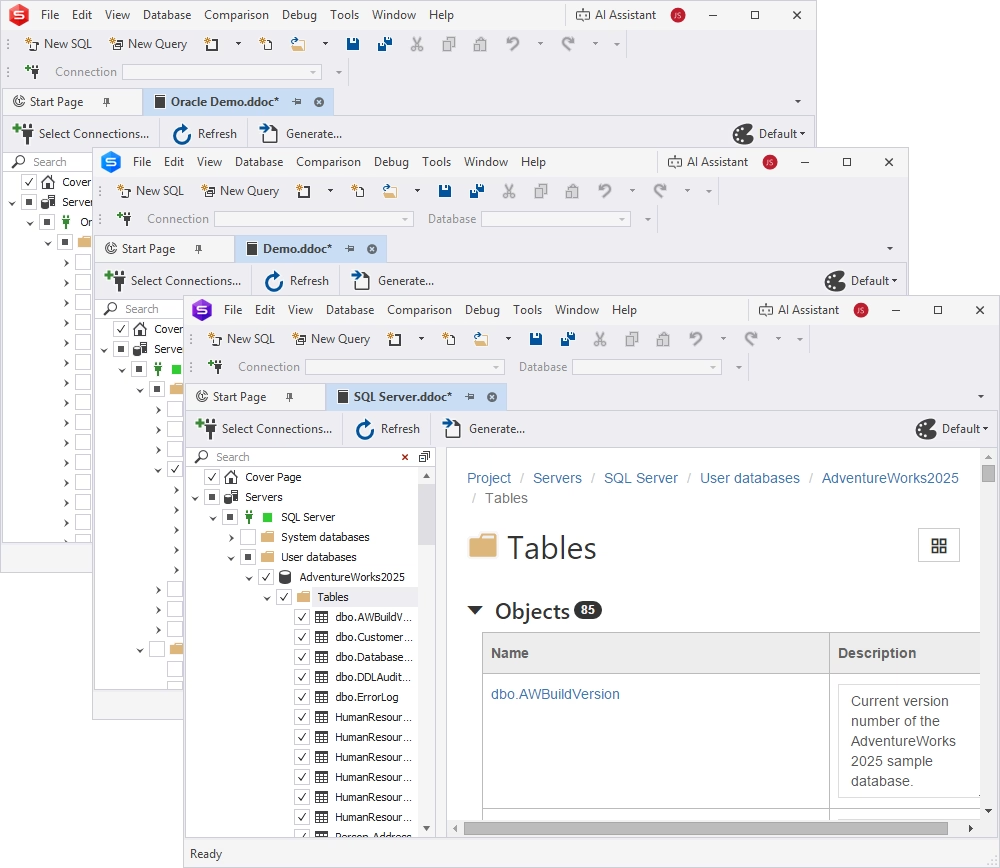
dbForge Edge is a multi-database solution that helps you perform the database development, design, management, administration, and testing tasks across SQL Server, MySQL/MariaDB, Oracle, PostgreSQL, and related databases and cloud platforms. Among the many features available in this solution, it is worth mentioning an intuitive and easy-to-use Documenter, the tool for automated generation of database documentation.
Documenter possesses a full set of features for visualization, customization, integration into CI/CD, and robust templates that one can tweak according to their needs and branding styles. With dbForge Edge, you get everything you need to master databases at once, never having to use separate tools for different tasks again.
Pros
- Integrated AI Assistant
- Generation of documentation via GUI or CLI
- Integration with CI/CD processes
- Task automation
- Rich customization features
- Tutorials and personalized support
Cons
- No native online/cloud version
- Limited real-time collaboration features
- Available in the Enterprise edition only
Key features
- Automated generation of detailed database documentation
- Export of documentation in HTML, PDF, and Markdown
- Inspection of inter-object dependencies
- Inclusion and editing of object descriptions
- Customization of layouts with WYSIWYG-based templates
- Full-text search for database objects
- CLI support
Supported DBMSs
SQL Server, MySQL, MariaDB, Oracle
Price
Free: Express edition (basic features)
Paid: Subscription (from $699.95/year), perpetual license (from $1499.90)
Free trial: 30 days
dbForge Edge
The ultimate multidatabase suite for database development, management, and administration, as well as data management, analysis, and reporting
dbdocs
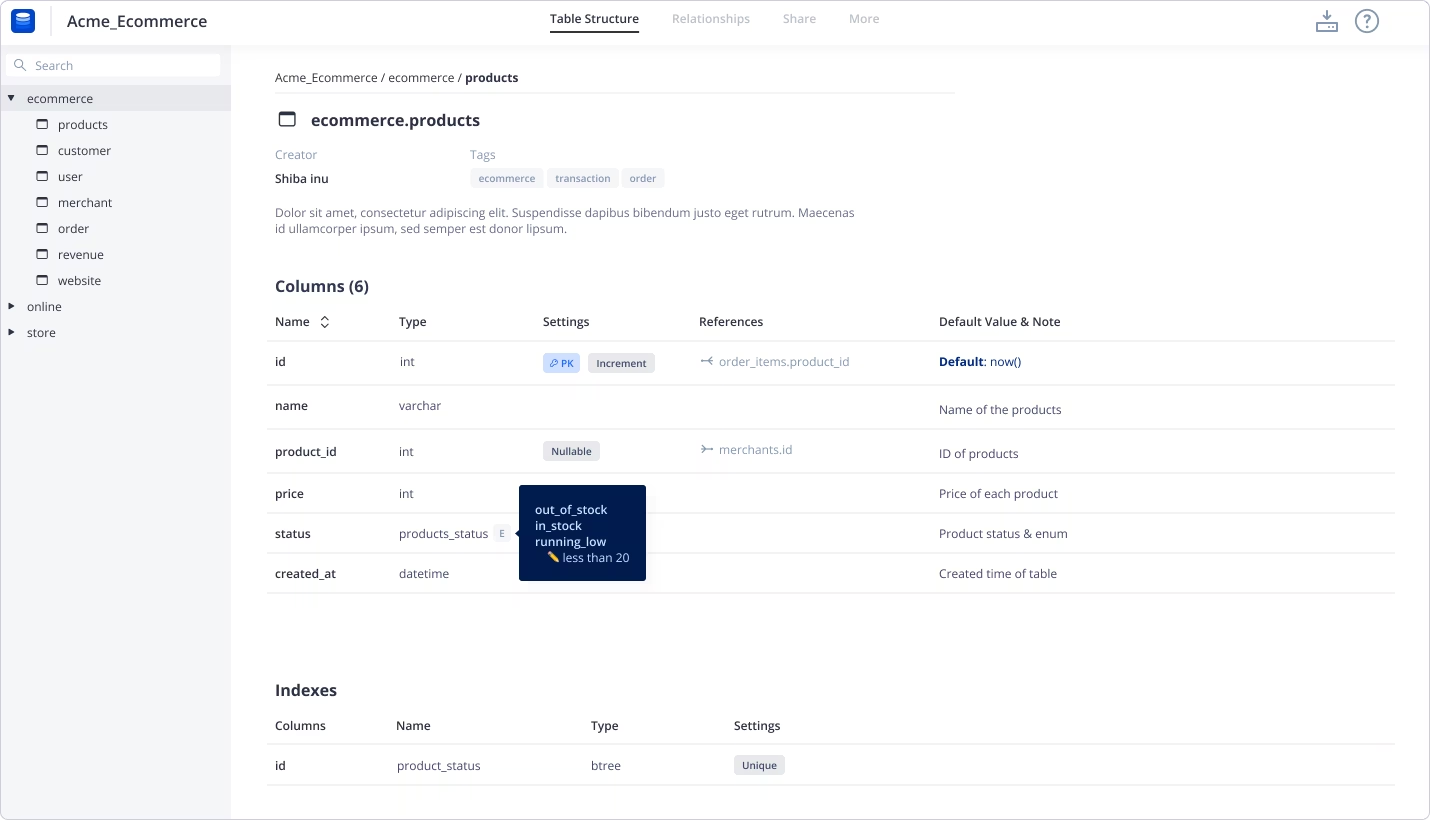
dbdocs is a simple tool designed to create web-based database documentation using DSL code. It supports SQL and MySQL database systems and generates cloud-based documentation where one can browse and check relationships between tables and fields.
Pros
- Simple and lightweight documentation
- Version control support (Git integration)
- Integration with CI/CD processes
- Web-based sharing and collaboration
- Clean, user-friendly interface
Cons
- Limited customization options
- Fewer visualization features
- Depends on schema definition
- Requires CLI knowledge to set up
Key features
- Auto-generation of documentation from schema definitions
- Schema visualization and interactive documentation
- Web-based sharing and collaboration
- Documentation generation via command line
- Task automation
- Customization of cover page
- Selection of objects for documentation
Supported DBMSs
MySQL, PostgreSQL, SQL Server
Price
Free: Basic features
Paid: Subscription (from $16 per month, paid annually)
Dataedo
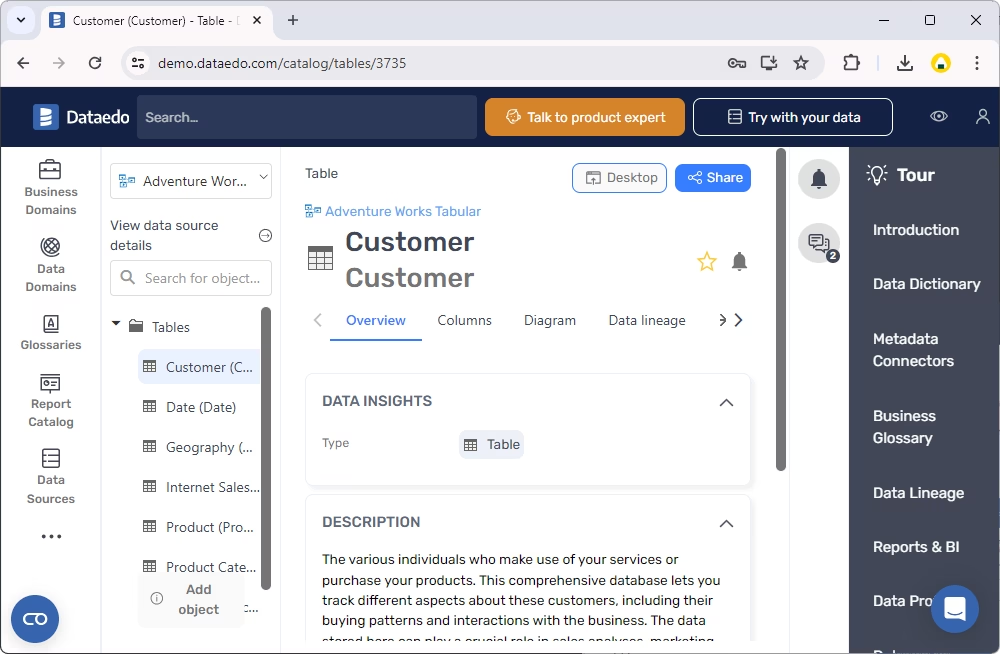
Dataedo is a data documentation and governance platform that provides features such as documenting existing databases, creating detailed data dictionaries, and visualizing data structures. It supports a wide range of relational databases and cloud platforms and enables teams to collaborate on database documentation.
The platform also offers a centralized metadata repository, automated data lineage tracking, and a business glossary to standardize terminology across the organization. The user-friendly interface allows both technical and non-technical users to explore and understand complex data ecosystems.
Pros
- Strong data documentation features
- Generation of data dictionaries
- Database schema visualization
- Collaboration through web portals
Cons
- Outdated UI and workflows
- Not ideal for complex modeling
- High price
Key features
- Automated generation of database documentation
- Data dictionary for documenting and annotating database structures
- Custom metadata fields for additional metadata attributes
- Collaboration and sharing of diagrams through interactive web portals
- Integration with Power BI, Tableau, and Microsoft Purview
- Web catalog, HTML, PDF, and Excel formats for documentation
Supported DBMSs
SQL Server, Oracle, MySQL, PostgreSQL, MariaDB
Price
Paid: from $18,000 per year
Free trial: 14 days
ApexSQL Doc
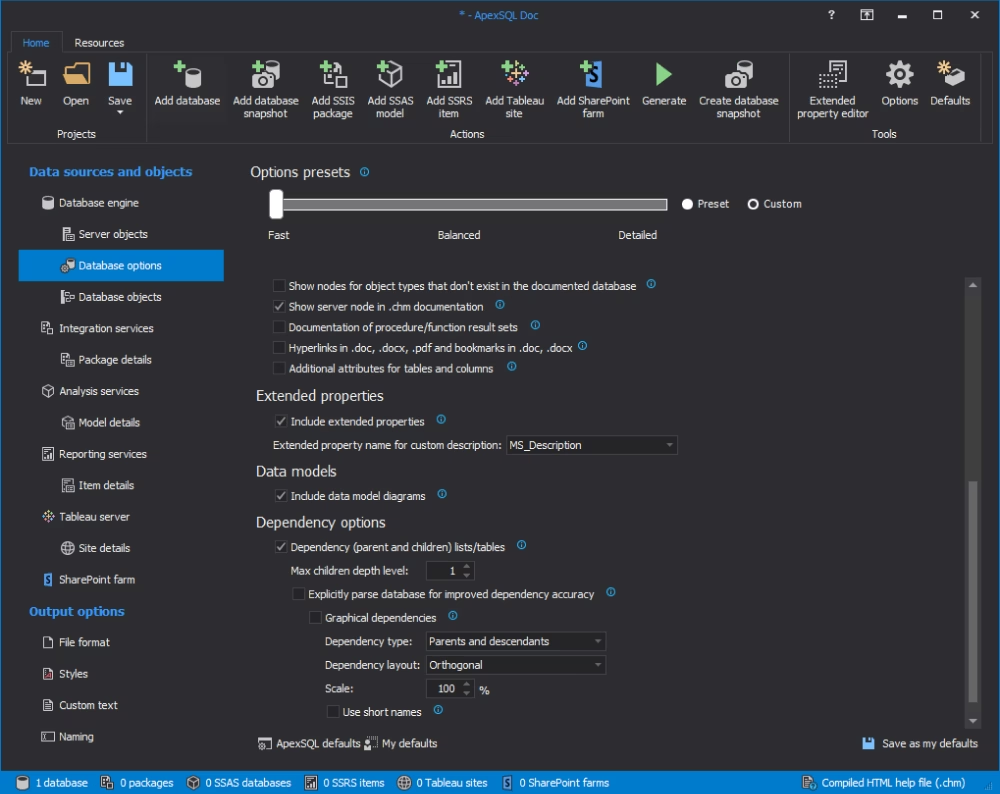
ApexSQL Doc is a documentation tool for SQL Server instances, databases, objects, as well as SSIS packages, SQL Server Analysis Services cubes, SQL Server Reporting Services reports, Tableau server sites, and SharePoint Server farms. It enables developers and architects to automate database management, working as an interface that is easy to master by non-technical users, and provides advanced functionality for complex tasks as well.
Pros
- Multiple export formats
- Advanced filtering and object selection
- Rich visualization capabilities
- Highly customizable output
- CLI support
Cons
- Limited to the SQL Server ecosystem
- A complicated procedure for getting a trial
- High price
- No releases since 2022
Key features
- Automated generation of database documentation
- Flexible selection of desired database objects to document
- Multi-format output (CHM, HTML, DOC, DOCX, Markdown, and PDF)
- Integration with SSIS, SSAS, SSRS, Tableau, and SharePoint
- Graphical visualization of dependencies
- Customizable templates, styles, and content
- Task automation and scheduling via CLI
- Schema change tracking via snapshots
- SSMS integration
Supported DBMSs
SQL Server ecosystem
Price
Paid: Subscription ($519/year per user)
Free trial: 30 days (provided on demand)
Redgate SQL Doc
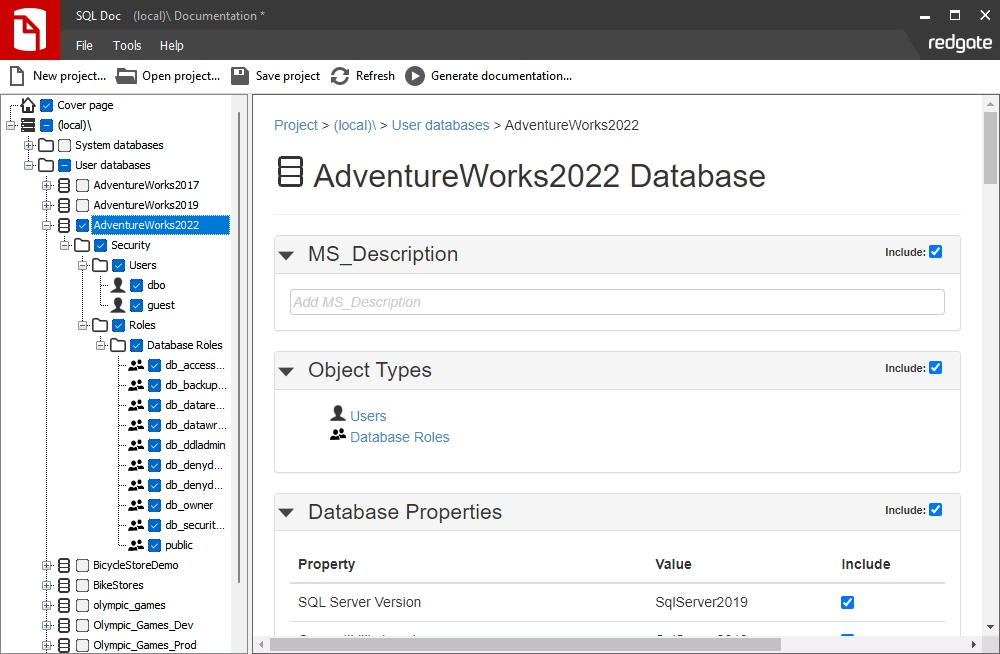
SQL Doc belongs to the SQL documentation tools that enable database developers to automate manual database documentation tasks. It automatically gets information on object definitions and dependencies, and users can describe them in more detail manually. The purpose of Redgate SQL Doc is to help teams share database information and distribute documentation in a convenient format.
Pros
- Speed and simplicity
- Automated documentation of schemas and dependencies
- Integration with SSMS
- Multiple export formats
- Task automation
Cons
- Limited to SQL Server
- Fewer customization options
- Commercial license required
Key features
- Automatic documentation generation from SQL Server
- Diverse output formats (HTML, PDF, Word, Markdown)
- Schema overview with object definitions and dependencies
- Extended properties support for annotations
- Custom branding (white-label documentation)
- Editable descriptions for tables, columns, indexes, etc.
Supported DBMSs
SQL Server databases, SSAS models, SSIS packages
Price
Paid: Subscription (from $303 per year per user)
Free trial: 14 days
SchemaSpy
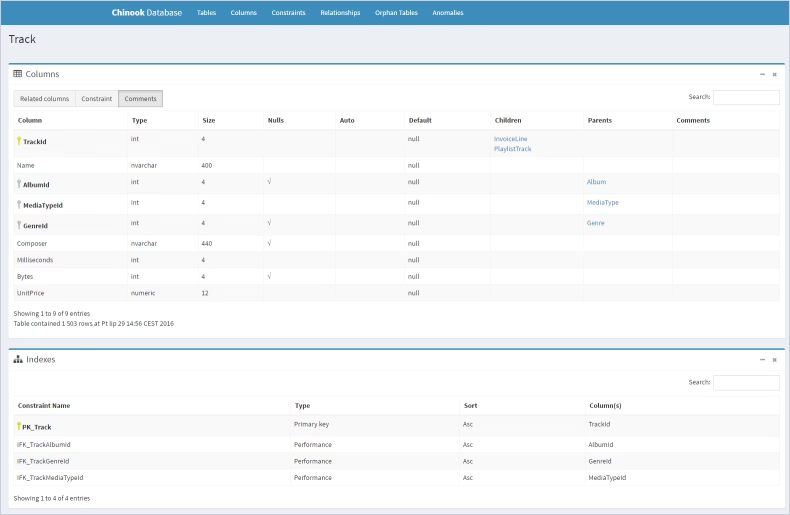
SchemaSpy is a free, open-source Java-based tool used to analyze and visualize the metadata of a database schema. It automatically generates a comprehensive set of interlinked HTML pages that document tables, columns, and relationships of the database.
Pros
- Strong visualization features
- Support for multiple databases
- Easy sharing via an interactive web portal
- Free solution
Cons
- Requires setup/configuration (Java, CLI)
- Limited built-in customization
Key features
- Automatic schema analysis via JDBC
- HTML-based documentation generation
- ER diagrams and relationship visualization
- Dependency analysis between tables
- Task automation via CLI
Supported DBMSs
PostgreSQL, MySQL, Oracle, SQL Server, SQLite, and other relational databases, using JDBC (Java Database Connectivity)
Price
Free software
Database Note Taker
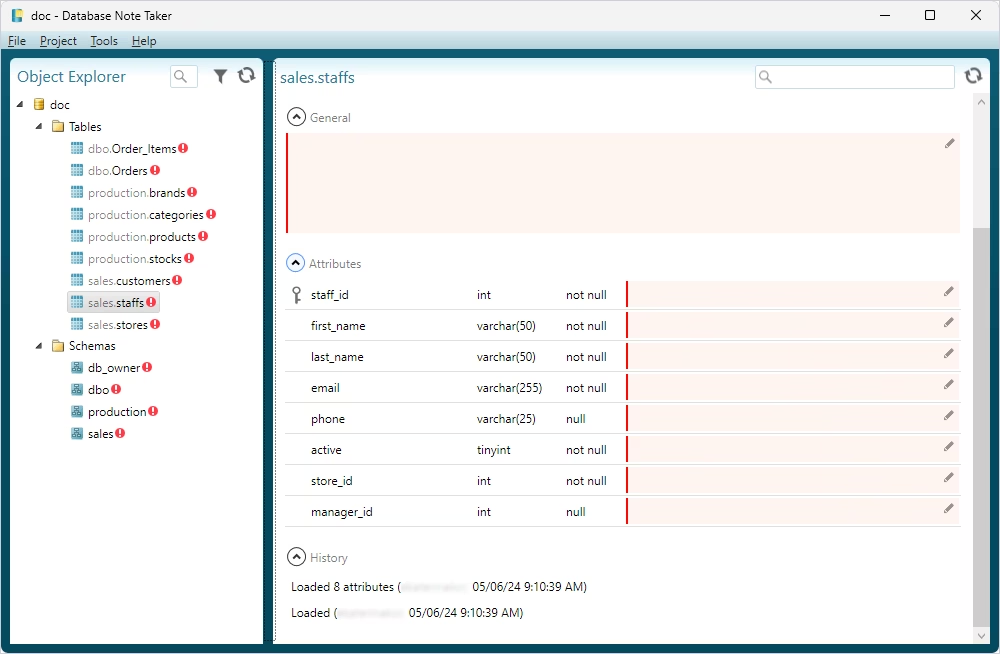
Database Note Taker is a free tool designed to help developers simplify documenting database structures, tables, columns, and stored procedures. It connects to databases via ODBC, refreshes schema structures, identifies missing documentation, and allows developers to add, edit, and publish documentation.
Pros
- Support for various DBMSs
- Version control integration
- Import of notes and comments
Cons
- Fewer automation/CI features
- Documentation requires manual updates
Key features
- Automatic extraction of database schema metadata
- Generation of HTML and XML documentation
- Included diagrams and object descriptions
- Capturing of tables, views, and procedures
Supported DBMSs
SQL Server, MySQL, and other relational databases
Price
Free software
dbdesc
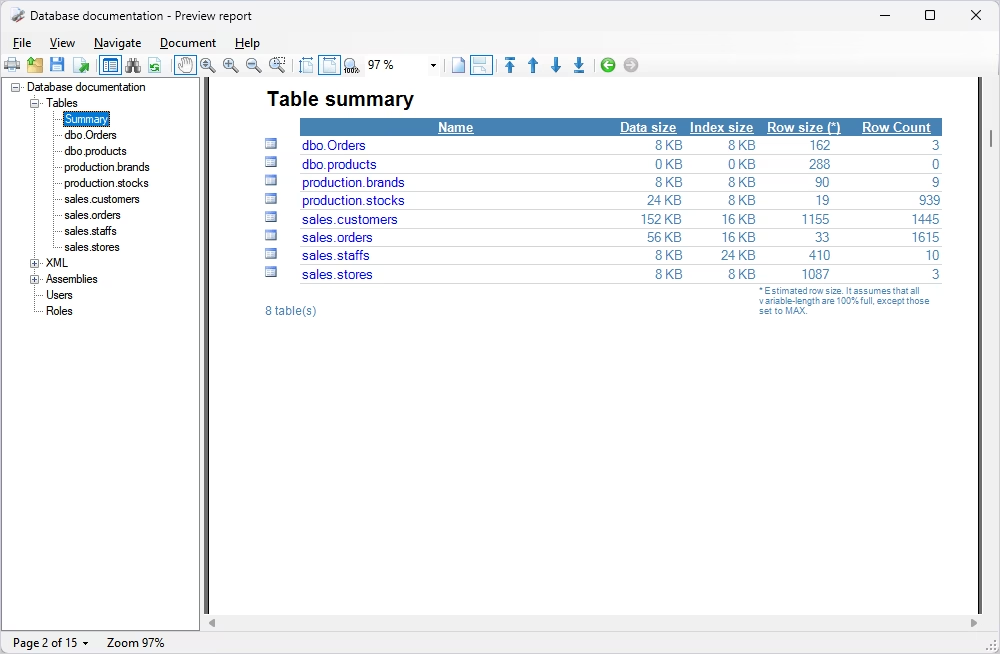
dbdesc is a database documentation tool that generates data from tables, keys, definitions, objects, and dependencies, and provides an easy way to share it in several commonly used formats, which can be adjusted to one's needs.
Pros
- Customization via XSLT templates
- Support for multiple databases
- Built-in extended properties editor for annotations
- CLI support and CI/CD integration
Cons
- Requires knowledge of XSLT for customization
- Older output formats (e.g., Word 2003 templates)
Key features
- Automatic generation of the database documentation
- Extensive schema extraction (tables, views, procedures, keys, etc.)
- Dependency matrix and object relationships
- Task automation
- Report viewer with search and indexing
Supported DBMSs
SQL Server, Oracle, MySQL, Microsoft Access, Firebird
Price
Free trial: No time restrictions, with random strings in the output files
Paid: $99 (perpetual license)
TechWriter for Databases
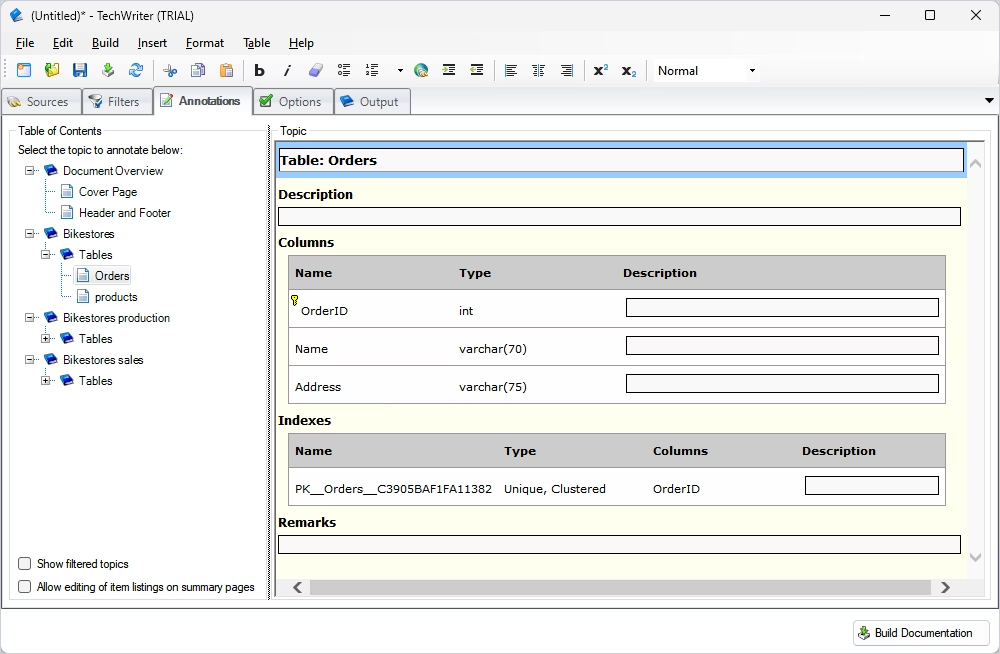
TechWriter for Databases from Quarksoft offers a set of basic features to generate database documentation using a neat interface with the WYSIWYG editor. Within this tool, one can use advanced filtering, showcase annotations, and document selected database objects.
Pros
- Multi-database support
- Support for databases, websites, and XML schemas
- Professional-looking documentation
- Enterprise-level reporting capabilities
Cons
- Outdated interface
- Complicated setup and configuration
Key features
- Automatically generated documentation
- Includes schema details, relationships, and object descriptions
- Multiple documentation formats (PDF, CHM, RTF, HTML, XPS, and XML)
- Customizable templates and formatting
- Advanced filtering by objects and search patterns
- Annotation editor
Supported DBMSs
SQL Server, MySQL, Oracle, PostgreSQL, DB2, Microsoft Access
Price
Paid: Subscription ($49.99 per month), perpetual license ($499)
Free trial: Refund guarantee
Database documentation tools comparison chart
| Tool |
Supported DBMS |
Documentation format |
Task automation |
Customization options |
Pricing |
Free trial |
 dbForge Edge
|
SQL Server, MariaDB, MySQL, Oracle |
HTML, PDF, Markdown |
Via CLI |
Rich features, WYSIWYG-based templates |
From $699.95 per year |
30 days |
 dbdocs
|
MySQL, PostgreSQL, SQL Server |
Cloud-based |
Via CLI |
Cover page customization |
From $16 per month (annual payment) |
Free version |
 Dataedo
|
SQL Server, Oracle, MySQL, PostgreSQL, MariaDB |
Web catalog, HTML, PDF, Excel |
Available |
Limited |
From $18.000 per year |
14 days |
 ApexSQL Doc
|
SQL Server databases, SSAS models, SSIS packages |
CHM, HTML, DOC, Markdown, PDF |
Via CLI |
Customizable templates, styles |
From $519 per year |
30 days (on demand) |
 Redgate SQL Doc
|
SQL Server |
HTML, PDF, DOC, Markdown |
Available |
Custom branding (white-label documentation) |
From $303 per year per user |
14 days |
 SchemaSpy
|
SQL, can be adjusted for PostgreSQL |
HTML |
Via CLI |
Limited |
Free |
N/A |
 Database Note Taker
|
SQL Server, MySQL |
HTML, XML |
Limited |
Limited |
Free |
N/A |
 dbdesc
|
SQL Server, Oracle, MySQL, Microsoft Access, Firebird |
HTML, RTF, DOC, PDF |
Via CLI |
Via XSLT templates |
$99 per user |
Uses random strings in the output |
 TechWriter for Databases
|
MySQL, Oracle, MS Access, SAS, SQL Server, PostgreSQL, DB2 |
PDF, CHM, RTF, HTML, XPS, XML |
Available |
Customizable templates and formatting |
From $49.99 per month |
Full refund guarantee |
Which database documentation tool to choose?
Creating clear database documentation cannot be underestimated, as it helps establish and improve collaboration within a team and assists in keeping track of any important changes. However, with so many database documentation tools arising, the choice cannot be based only on the functionality provided.
There are some obvious criteria like the support for specific databases or services: teams that focus on SQL Server and related services may need SSIS documentation tools, while other teams might find documenting the MySQL and PostgreSQL databases more important. Besides, we encourage you to look into the following matters:
Scalability and budget
Currently, you might have a small team that doesn't require extra users within a plan. Maybe your needs can even be satisfied with a free database documentation tool. However, at some point, you might have to migrate to using another tool that has more options, and the documentation consistency will be interrupted. That's why it's essential to plan ahead for the functionality that might be required to complement your project's growth. Even though getting a database documentation tool free of charge can seem like a good deal at the start, it often isn't in the long run.
Regular updates
Some of the solutions aren't frequently updated. At some point, they might lack essential features. For instance, not all database documentation tools support the latest versions of DBMSs. Also, the lack of updates might pose a threat to security. We recommend you pay attention to the tools that are updated regularly.
Support
Even the most experienced developers sometimes have to contact a support team to get assistance in a critical moment. The tools that provide advanced technical support have an extended community of users, and a complete knowledge base is always the best choice when you aim for stability.
Solution maturity
The solutions that have a story of continuous support and years of experience are often the most stable and the fastest to fix any issues. If there's a choice between a startup solution and a tried-and-true tool, it's better to choose the second option, especially if your budget allows it.
Wrapping up
Having an idea of which database documentation tools are available, you can safely try some of them out and check if they are going to work for you and your team. No matter which option you choose, you are now fully aware of all the features that are worth paying attention to.
You can try dbForge Edge in practice and evaluate its database documenting capabilities and all other features for all database tasks across major database systems. A fully-functional 30-day trial is available on the official website, so just download it, install it, and test dbForge Edge capabilities under your actual workload!
FAQ
What are the best tools for database documentation?
The choice of the tool always depends on your environment and priorities. For instance, such factors as supported DBMS, automation, collaboration needs, and budget can impact the choice significantly. That said, several tools are widely used and cover different needs: dbForge Documenter is a strong tool available in dbForge Edge, offering multiple export formats and strong automation capabilities. It is one of the most powerful database schema documentation tools available on the market. Other notable solutions include Redgate SQL Doc, dbdocs, Dataedo, and other tools.
What is the difference between database documentation tools and database modeling tools?
Documentation tools focus on describing existing databases. They extract schema details, relationships, and metadata, then present them in readable formats (HTML, PDF, etc.). Their goal is clarity, sharing, and maintenance. Modeling tools help design databases, allowing users to define tables, relationships, and constraints before implementation or during redesign. In short, documentation tools explain existing databases, while modeling tools help design future databases.
What should database schema documentation include?
Good schema documentation should include core objects (tables, views, columns, indexes, keys), programmable objects (stored procedures, functions, triggers), relationships (foreign keys and logical connections), dependencies (how objects rely on each other), object descriptions (human-readable explanations), metadata (data types, constraints, defaults, ownership), and schema hierarchy. The goal is to make the database understandable without reverse-engineering it.
How do I choose between cloud-based and desktop documentation tools?
Cloud-based tools deliver easy collaboration and sharing with access from multiple locations. They are typically lightweight and easy to configure. Desktop tools offer full control over sensitive data, offline access, and deeper integration with local environments. Teams handling sensitive data often prefer desktop tools, while distributed teams may favor cloud-based solutions.
Is dbForge Edge a good choice for database documentation?
Yes. dbForge Edge includes dedicated Documenters for major database systems such as SQL Server, MySQL/MariaDB, Oracle, and PostgreSQL. It offers extensive customization, supports multiple export formats, and provides schema visualization. It is a strong option for teams looking for an all-in-one solution supporting the entire database lifecycle.
Can dbForge Edge automate database documentation?
Yes. dbForge Edge supports automation from the command line, allowing you to configure and schedule documentation tasks. Documentation can be generated automatically at regular intervals, ensuring it stays accurate and up to date without manual effort.
Can dbForge Edge help with schema documentation?
Absolutely. dbForge Edge provides tools for generating detailed and highly customizable schema documentation across multiple database systems. It can document complex structures and export results in various formats, while automation ensures consistency and up-to-date documentation.


