Database Version Control Guide: Benefits, Tools, and Best Practices
Database version control is one of the most effective ways to achieve controlled, reliable deployments without costly, unpredictable failures. A solid approach to database version control ensures that all database changes are versioned, auditable, and simple to roll back, whether in MySQL, PostgreSQL, SQL Server, or on cloud platforms such as AWS and Azure. However, when database changes are not properly versioned and tracked, even a small update can break tables, corrupt data, or create inconsistencies across environments.
Despite the importance of having a solid database version control strategy, many teams treat it as an afterthought rather than a critical part of development. That's where issues like failed deployments, lost changes, and poor collaboration begin.
In this guide, you'll learn what database version control is, why it matters, how to choose the right version control for databases, and how to implement it safely in real-world workflows. You'll also explore database schema version control, compare database version control tools, and learn best practices to manage database changes with precision, consistency, and confidence.
TL;DR
Database version control helps teams manage schema changes reliably, reducing deployment risks and improving collaboration.
This guide explains how to implement version control for databases, avoid common pitfalls like schema drift and failed rollbacks, and choose the right tools and workflows to keep database changes aligned with application releases.
What is database version control?
Database version control is the process of tracking, maintaining, and applying changes to a database in a controlled, repeatable manner. It ensures that any changes, whether to schema, SQL scripts, or reference data, are documented, versioned, and deployable across environments.
In practice, a database version control system functions similarly to source control for code, but it goes further. Database version control manages the processes of creating, reviewing, testing, and deploying database changes. This process includes managing schema updates, performing migrations, and ensuring that all environments (development, staging, and production) are in sync.
Let's further explore how database version control differs from source control.
How database version control differs from source control for code
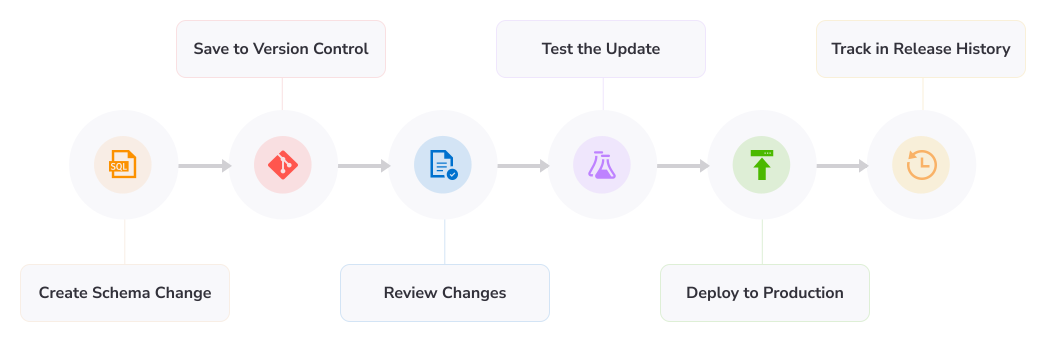
Database version control differs significantly from application code version control because databases are stateful. While application code might be rebuilt from files at any moment, databases contain real, changing data that cannot be simply regenerated without consequences.
Here's where the differences come in.
- State vs. stateless systems: Application code is static, but databases continually change as data is added, modified, or deleted.
- Schema and data dependency: Database changes influence both structure (tables and objects) and the data within them.
- Migration considerations: Changes must be applied in the correct order, using structured migration scripts.
- Rollback challenges: Undoing a database update may include restoring data rather than merely reverting code.
- Environment consistency: To prevent conflicts, all environments must reflect the same schema version.
In simple terms, source control tracks code, while database version control manages changes in a live system, where errors are costly, and control is critical.
Why database version control matters
Unmanaged database updates are one of the primary causes of failed releases. Without a structured, version-controlled procedure, your development teams may frequently experience botched deployments, unclear ownership of changes, difficult rollbacks, and inconsistent environments across development, testing, and production.
Moreover, manual database changes (through ad hoc scripts or one-time updates) turn the database into a release bottleneck. Even if you manage your application code well, a single untracked schema change or out-of-order migration could lead to a complete system failure. This scenario is where the database version control thrives. It ensures that database changes are applied in a predictable, traceable, and repeatable manner.
Without database version control, you are likely to face the following issues:
- Broken deployments: Missing or poorly applied schema modifications result in runtime failures.
- Schema drift: Development, staging, and production environments become out of sync.
- No clear ownership: Teams cannot track who made changes and why.
- Difficult rollbacks: Reverting changes is dangerous, especially when live data is involved.
- Release delays: Manual processes slow delivery and increase error rates.
Using a solid database version control strategy helps your teams gain complete insight into changes, reduce deployment risk, and ensure that every database update contributes to a stable, dependable release process.
What should be version-controlled in a database?
A reliable strategy for version control in databases should include the following:
- Schema definitions: The tables, columns, indexes, constraints, and relationships that make up your database structure
- Migration scripts: Ordered SQL scripts that apply incremental changes across versions
- Database objects: Stored procedures, functions, triggers, and views that control logic within the database
- Seed or reference data: Static or semi-static data necessary for the application to work properly
- Metadata for the release: Version information, deployment history, and which change happened where
Without this, database version control becomes fragmented, making it difficult to trace what happened, why it changed, and how to securely move forward or backward. However, by versioning these components, your team can fully reconstruct the state of a database at any point. This ensures consistency across environments and eliminates guesswork during deployments.
Schema versioning vs data versioning
Schema and data versioning address different problems, and it is important to understand their distinction.
Database schema version control focuses on tracking structural changes like tables, columns, indexes, and database objects, while data versioning involves tracking changes to the actual data stored within those structures over time.
The table below explains the distinction better.
| Schema versioning |
Data versioning |
| Tracks structural changes like tables, columns, indexes, and database objects |
Tracks changes to the actual data stored within the database over time |
| Ensures schema consistency and supports application functionality |
Provides historical visibility into data changes for auditing or analysis |
| Relatively straightforward and widely adopted |
More complex and often requires specialized database versioning tools |
| Used by most teams as part of standard database version control workflows |
Used in specific cases like compliance, auditing, or advanced data tracking |
| Relies on migration scripts and schema change tracking |
May involve row-level tracking, audit logs, or time-based queries |
| Typically implemented first in SQL database version control strategies |
Added later when there is a clear business or regulatory need |
Is backup the same as database version control?
No, backups and database version control serve entirely different purposes.
On the one hand, backups are snapshots of your database at a certain point. They are critical for disaster recovery, allowing you to retrieve data following failures, corruption, or outages. However, backups do not reveal how or why changes occurred.
On the other hand, database version control is concerned with long-term change management. It provides:
- Traceability: Who made a modification, when, and why?
- Differences in visibility: What changed between versions?
- Controlled deployment: Applying changes in a structured, repeatable manner.
- Rollback strategies: Reverting specific changes without restoring the entire database.
Note
Relying solely on backups allows you to restore data, but you cannot manage or understand the progress of your database. A proper database version control system complements backups by providing structure, visibility, and control over every database change.
State-based vs migration-based database version control
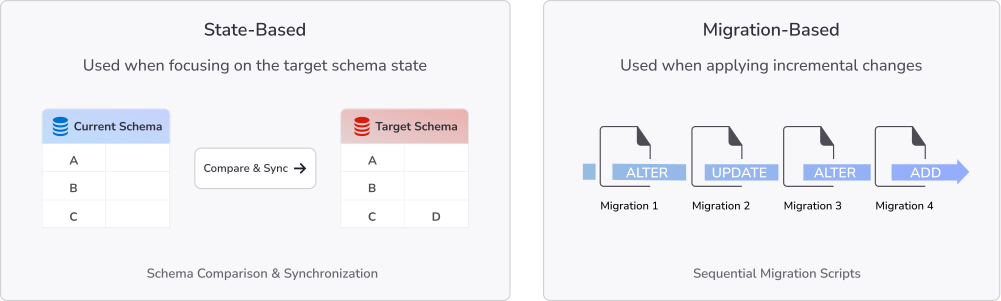
State-based and migration-based are the most common approaches to database version management. Understanding the distinction between the two is crucial when choosing a database version control solution, as it directly affects how your database updates are defined, tracked, and deployed across environments.
State-based version control
State-based version control defines what the database should look like at a given point in time. Instead of tracking individual changes, you maintain a complete model or snapshot of the desired schema.
A database version control tool then compares this target state with the current database state and automatically generates the SQL scripts needed to reconcile the differences.
This approach works well in scenarios where:
- Schema visibility is important: Teams can easily see the full structure of the database at any version.
- Schema comparison is needed: Differences between environments can be quickly identified and resolved.
- Environments are controlled: Changes are typically applied in stable, predictable workflows.
State-based database schema version control simplifies understanding the current design, but it may lack detailed insight into how the database evolved.
Migration-based version control
Migration-based version control records the exact sequence of changes made to a database across time. Each modification, such as establishing a table, changing a column, or adding an index, is documented in an incremental migration script.
These migrations are carried out in order, resulting in a clear and auditable history of database modifications.
This strategy is popular in modern DevOps and CI/CD pipelines since it provides the following:
- Repeatability: The same sequence of migrations can be used consistently across environments.
- Auditability: Each change is tracked with a clear history of what was done and when.
- Environment promotion: Changes go consistently from development to staging and production.
Migration-based version control for databases is directly related to how application code is distributed, making it ideal for agile teams and continuous delivery workflows.
Hybrid approach: When teams use both
Many teams use a hybrid approach to database versioning, which combines the strengths of both methods. This approach allows teams to maintain a clear record of changes while also ensuring that all environments follow the intended schema.
In the model:
- Migration-based procedures are used for managing and deploying changes during releases.
- State-based comparisons are utilized for drift detection, validation, and environment synchronization.
For example, a team could use migration scripts to deploy new features and schema comparison tools to detect unexpected differences in production. This combination provides both control and visibility, which are essential components of effective database version management best practices.
Key benefits of database version control
The core benefits of implementing a database version control system include:
Safer releases and easier rollback
Database version control makes releases significantly safer by introducing a controlled and traceable change history. Every modification is planned, reviewed, and applied in a defined order, reducing the chances of unexpected failures during deployment.
When issues do occur, rollback becomes far more manageable. Instead of relying on full database restores, you can revert specific migrations or changes, identify exactly what caused the issue, and restore schema and data to a known good state.
This level of control significantly reduces downtime and minimizes the impact of failed releases. But without database version control, rollback often becomes a high-risk, time-consuming process.
Improved collaboration across developers and DBAs
Version control for databases breaks down silos between developers and database administrators. Instead of working independently, both groups contribute to a shared system where all database changes are visible, reviewed, and documented.
This leads to:
- Better communication: Changes are discussed and validated before deployment.
- Shared ownership: No more untracked changes with unclear responsibility.
- Standardized workflows: Teams follow consistent processes for managing database updates.
By treating the database as part of the overall development lifecycle, database versioning tools enable smoother collaboration and reduce friction between teams.
More reliable testing and CI/CD automation
Database version control plays a critical role in enabling reliable testing and automation. When database schemas and migrations are versioned, they can be automatically applied in testing environments, ensuring consistency across every stage of development.
This process supports:
- Automated validation: Database changes can be tested before reaching production.
- Consistent environments: Development, staging, and production stay aligned.
- CI/CD integration: Database updates are deployed alongside application code.
As a result, teams can confidently promote changes through the pipeline, knowing that both the application and database are in sync. This is essential for modern DevOps workflows, where speed and reliability must go hand in hand.
Main challenges of version control for databases
Despite the important role of database version control in managing databases, it is not without some challenges. Some of the major challenges are:
Database drift and out-of-process changes
Database drift occurs when the actual database no longer matches the version-controlled definition, usually due to manual or untracked changes.
The three major causes of database drift and out-of-process changes are:
- Direct fixes in production
- Scripts executed outside the deployment pipeline
- Changes not committed to migrations
Drift leads to inconsistent environments, failed deployments, and loss of trust in your version control system.
Why rollback is harder in databases than in app code
Rollback is harder because databases store live, interconnected data.
Key challenges:
- Data integrity risks: Schema reversals can break or corrupt data.
- Dependencies: Tables and objects rely on each other.
- Irreversible changes: Some operations (e.g., deletions) can't be undone.
Unlike code, rollbacks often require custom scripts or recovery strategies, not just reverting a commit.
Branching, merging, and conflict resolution
Database changes are harder to merge than code because they involve structure and order, not just text:
- Conflicts affect schemas, not just files.
- Migration order impacts success.
- Changes may behave differently across environments.
As a result, merging often requires manual resolution and careful validation.
Legacy databases and undocumented changes
Legacy systems often lack version history, making adoption difficult.
Typical issues include the following:
- No migration tracking
- Years of manual changes
- Inconsistent environments
The solution is to create a baseline snapshot of the current schema, then manage all future changes through structured version control.
How do you avoid these challenges? The next section answers this important question.
Database version control best practices
Before we explore the best practices you need to get the most out of your database version control strategy, it is important to keep in mind that database version control works best when it is treated as a disciplined engineering process rather than an occasional task.
Now, let's explore the best practices.
Keep every schema change traceable
Every database change should be fully traceable from creation to deployment. This means no schema update, migration, or script should exist without a clear context.
To achieve this:
- Link changes to issues, tickets, or feature requests.
- Document the purpose of each migration clearly.
- Maintain a complete deployment history across environments.
- Require peer review before merging changes.
Traceability ensures that the development teams always understand what changed, why it changed, and when it was deployed. This is a core principle of any reliable database version control system.
Prefer small, incremental migrations
Small, incremental migrations are easier to manage, safer to deploy, and simpler to debug compared to large, monolithic database changes.
They improve review quality, testing accuracy, and rollback safety. However, large migrations often introduce multiple changes at once, making it difficult to identify the root cause of failures. In contrast, incremental database versioning supports controlled evolution and reduces deployment uncertainty.
Test database changes before production
Testing is a critical step in database change version control. No migration should reach production without being validated in a controlled environment.
Effective testing practices include:
- Validation in staging environments: Ensure schemas and scripts behave as expected.
- Deployment rehearsal: Simulate production deployments to identify issues early.
- Compatibility testing: Verify that the application and database versions work together.
- Rollback planning: Confirm that recovery steps are safe and executable.
Thorough testing reduces the chances of broken releases and ensures that database version control tools support safe deployment pipelines.
Baseline existing databases before adopting version control
For legacy systems, baseline creation is essential before introducing database version control. Without it, teams cannot reliably track changes or establish a starting point.
Creating a baseline involves capturing the current database schema as the initial version, documenting existing objects, tables, and relationships, and establishing a reference state for future migrations.
This step transforms an undocumented database into a controlled, version-controlled database, allowing teams to gradually introduce structured migrations without disrupting existing systems.
Align database versioning with CI/CD
Database version control becomes significantly more powerful when integrated into CI/CD pipelines. Instead of treating database changes as separate from application deployment, both are released together in a coordinated workflow.
This alignment lets you enjoy:
- Automated deployments: Database migrations run alongside application releases.
- Consistent environments: Every stage uses the same versioned schema.
- Faster delivery cycles: Reduced manual intervention in release processes.
- Early issue detection: Problems are caught before reaching production.
By embedding database version control into CI/CD, teams ensure that database evolution keeps pace with application development, creating a stable and predictable release pipeline.
Database version control tools and what to look for
Now that you fully understand what database version control is, its importance, and the best practices to apply for more efficient results, the next question is how do you choose the right database version control tool for your needs?
Choosing the right database version control tools is critical because not all solutions handle database complexity in the same way. When evaluating options, focus on practical capabilities rather than just popularity or familiarity.
Features to look for in database version control software
Effective database version control software should support both technical requirements and team workflows. The most important features include:
- Version control integration: Seamless compatibility with Git or other source control systems for tracking changes.
- Migration support: Ability to create, manage, and execute structured database migrations.
- Schema comparison tools: Clear visibility into differences between database versions or environments.
- Rollback support: Safe mechanisms to revert changes when deployments fail or issues arise.
- Validation and testing: Tools to verify migrations before applying them to production.
- CI/CD compatibility: Integration with automated pipelines for continuous delivery workflows.
- Visibility and audit trail: Full history of changes, including who made updates and when.
These capabilities ensure that database version control is reliable, predictable, and suitable for modern DevOps practices.
Open-source vs commercial database version control tools
When selecting database versioning tools, decide between open-source and commercial solutions. Each has distinct strengths depending on organizational needs.
Open-source tools:
- Offer high flexibility and customization
- Benefit from strong community support and continuous contributions
- Allow teams to build tailored workflows and integrations
Commercial tools:
- Provide enterprise-grade governance and security features
- Offer user-friendly interfaces and streamlined workflows
- Include dedicated support, documentation, and automation capabilities
In practice, open-source solutions are often preferred for flexibility and cost efficiency, while commercial database version control software is chosen for enterprise environments where governance, scalability, and support are top priorities.
How dbForge Edge can help with database version control
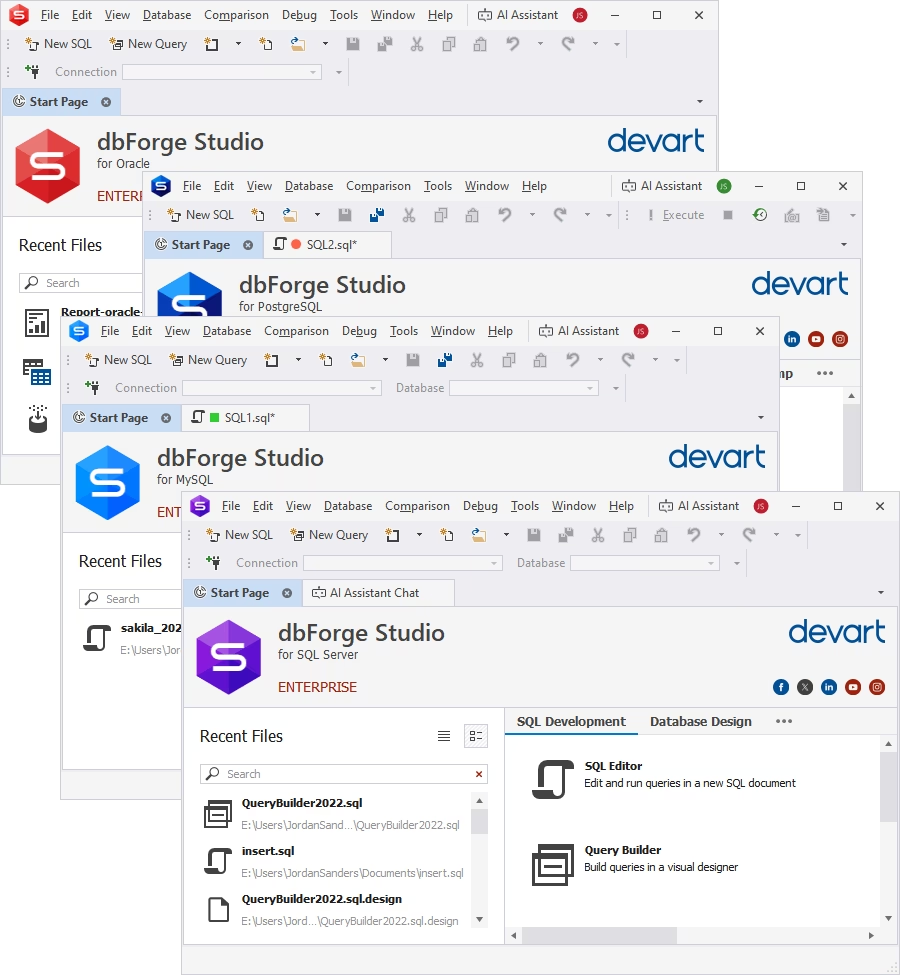
One of the most powerful tools that offers both schema database management and full database management is dbForge Edge. dbForge Edge is a powerful all-in-one universal database solution that supports database version control by combining SQL development, schema management, and automation tools into a unified workflow. It helps your development and DBA teams design, track, compare, and synchronize database changes across environments, making it easier to maintain consistent and reliable version-controlled databases.
Instead of managing schema updates manually, you can use dbForge Edge to streamline database changes through structured workflows that support multiple database systems and environments.
Here are some of the features that make it stand out:
- SQL development and query building: Create and refine SQL scripts used in migrations and schema updates.
- Schema comparison and synchronization: Detect differences between database versions and apply controlled updates across environments.
- Change management support: Organize and review database changes before deployment.
- Automation features: Reduce manual effort by automating repetitive database tasks and deployments.
- Version-control-friendly workflows: Align database development processes with external version control systems like Git.
These features make dbForge Edge particularly useful for teams working with database schema version control across complex environments, where consistency and visibility are essential.
In addition, the built-in AI Assistant helps improve the quality and reliability of database changes. It can:
- Explain SQL scripts used in migrations.
- Assist in troubleshooting errors during development or deployment.
- Help optimize queries for better performance before applying changes.
By combining development, comparison, automation, and AI-assisted optimization, dbForge Edge provides a practical environment for implementing database version control best practices in real-world workflows. Also, you can use subversion (SVN) version control supported by dbForge Edge.
To see how dbForge Edge excels in thorough database development, schema comparison, and version-control-friendly workflows, download the free trial and test it in your environment.
Conclusion
Database version control is essential for building reliable, predictable software releases. Without it, teams face broken deployments, schema drift, weak rollback options, and inconsistent environments that directly impact production stability.
Unlike application code, databases require a different approach because they are stateful systems where every change affects live data and downstream dependencies. This makes structured version control for databases not just useful, but necessary for modern development workflows.
To implement it effectively, teams must understand the difference between state-based and migration-based database versioning approaches and choose the model that best fits their release process and CI/CD pipeline.
Equally important, database version control best practices such as small incremental migrations, traceable changes, proper testing, and CI/CD integration matter just as much as the tools themselves. The right combination of process and tooling improves visibility, ensures consistency across environments, strengthens rollback readiness, and enables better collaboration between developers and database teams.
If you're looking to streamline database development and manage schema changes more effectively, try dbForge Edge. This powerful tool provides a multi-database workspace with schema comparison, source control support, and powerful SQL tooling designed to support modern database version control workflows.
FAQ
Why is version control for databases important for modern development teams?
Version control for databases is important because it prevents broken deployments, schema drift, and inconsistent environments. It ensures every database change is tracked, tested, and safely applied across all stages of development.
What is the difference between database schema version control and full data versioning?
Database schema version control tracks structural changes like tables, columns, and objects, while full data versioning tracks changes to the actual data stored in the database. Most teams focus on schema versioning first.
What are the main risks of managing database changes without database version control?
Without database version control, teams risk deployment failures, missing schema updates, poor rollback options, unclear change ownership, and mismatches between application and database versions.
Which database version control tools are best for handling schema changes and deployments?
The best tools support migration management, schema comparison, rollback capabilities, CI/CD integration, and audit trails. The right choice depends on workflow fit, automation needs, and team size.
How can teams reduce schema drift and rollback risks with database version control?
Teams can reduce schema drift by enforcing controlled migrations, avoiding manual changes, maintaining a single source of truth for schema definitions, and using automated validation in CI/CD pipelines.
How can dbForge Edge help with database version control across multiple database systems?
dbForge Edge helps by providing schema comparison, synchronization, SQL development tools, and version-control-friendly workflows across multiple supported database systems, improving consistency and deployment control.
Does dbForge Edge provide version control for both database schema and data changes?
dbForge Edge primarily supports schema-focused version control workflows, including comparison, synchronization, and change management. It also supports working with SQL scripts that can include data-related changes where needed.
Can teams try dbForge Edge before buying to see whether it fits their database version control best practices?
Yes, dbForge Edge offers a free trial so teams can evaluate its schema comparison, SQL development, and version-control-friendly workflows before making a purchase decision.
