Compare and Sync MySQL Database Schemas

dbForge Schema Compare for MySQL is a smart, handy tool that locates differences in database schemas and scripts folders, presents them in detailed comparison reports, and synchronizes them from a source to a target environment with just a few clicks.

  • Compare MySQL and MariaDB databases quickly and efficiently
  • Get an exhaustive overview of schema differences
  • Generate SQL scripts to update one database with the contents of another
  • Apply updates from development databases to staging or production
  • Automate recurring sync tasks from the command line
  • Deploy to Percona, Oracle MySQL Cloud, Amazon RDS, and Alibaba Cloud
Here's everything you need to work with MySQL databases most effectively

Comparison of schema objects

dbForge Schema Compare for MySQL supports a wide range of database objects, including those specific to both MySQL and MariaDB. You can compare and synchronize the following:

  • Tables
  • Views
  • Procedures
  • Functions
  • Triggers
  • Events
  • Packages (MariaDB)
  • Sequences (MariaDB)
Download for free

Export & analysis of results

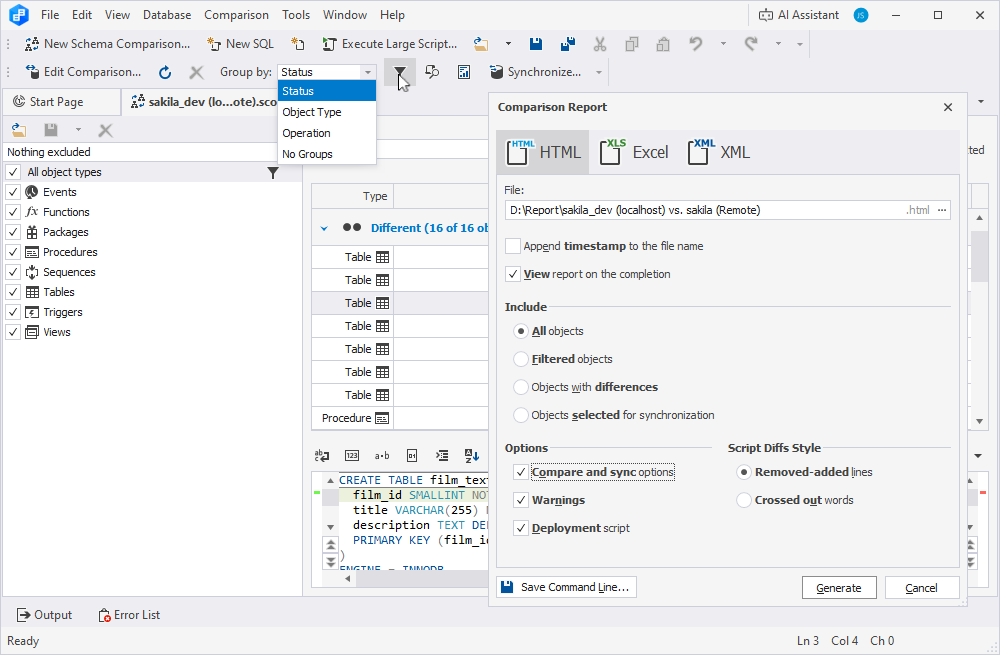
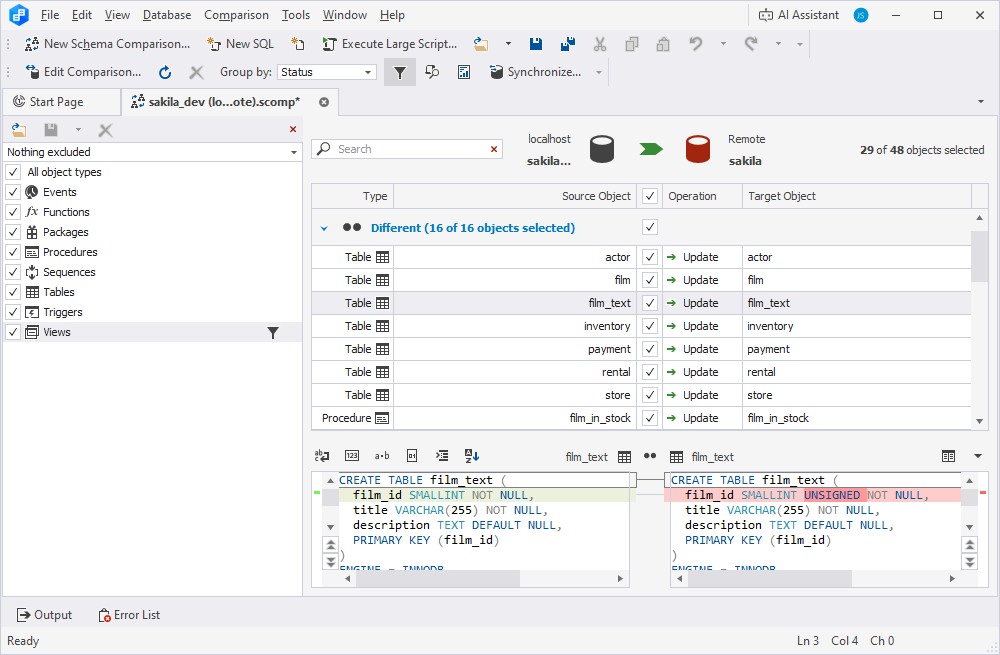
After completing a new comparison, dbForge Schema Compare presents the results in a clear, easy-to-read grid, with various options for analysis and export.

  • Show DDL differences per object
  • Group objects by type or status
  • Filter objects by name
  • Sort objects with flexible options
  • Highlight differences with color coding by type
  • Exclude specific objects from comparison
  • Save and load comparison settings
  • Export results to HTML, XML, or XLS
Download for free

Synchronization

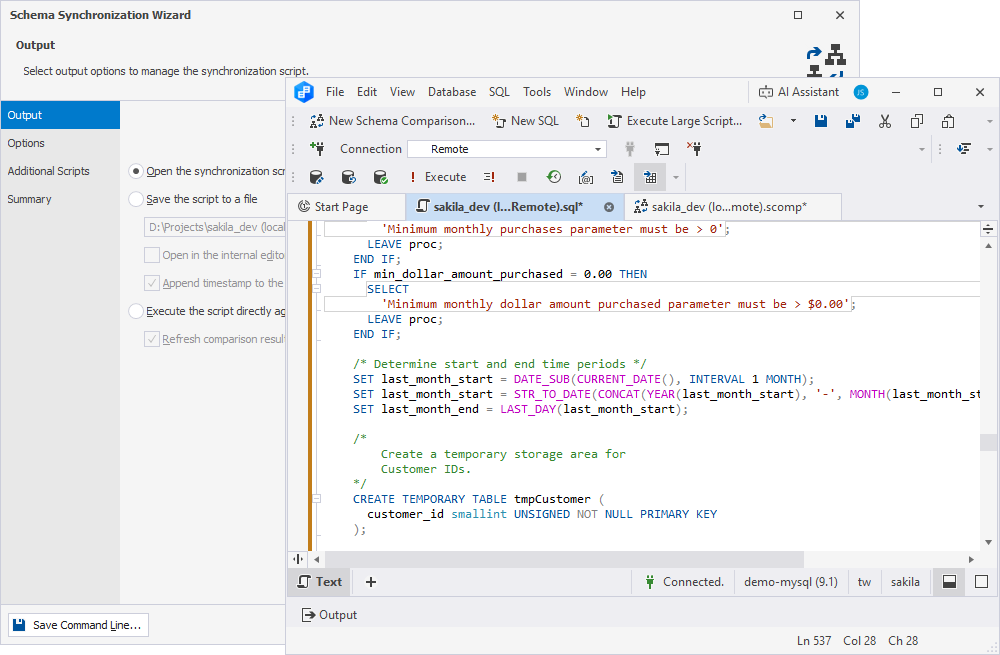
A variety of synchronization options will help you deploy schema changes to the required target database with complete control over the process.

  • Generate scripts to update database schemas
  • Preview synchronization scripts
  • Customize the process with additional scripts
  • Receive warnings about potential issues
  • Synchronize structures asynchronously
Download for free

Backup & recovery

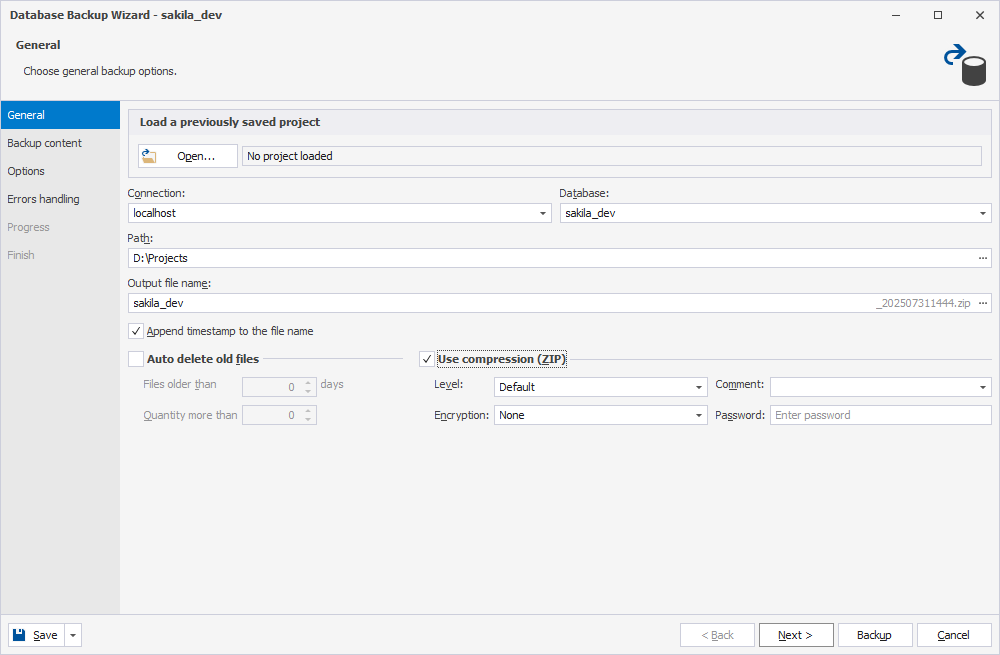
dbForge Schema Compare for MySQL lets you compare live databases and backup files. It also includes tools for performing backup and recovery.

  • Use backup and restore wizards
  • Back up schemas only or schemas with data
  • Handle large databases over 2 GB
  • Save backup task settings for reuse
  • Compress backup files into the ZIP format
  • Automate and schedule tasks from the command line
  • Receive notifications and warnings about issues
Download for free

Automation

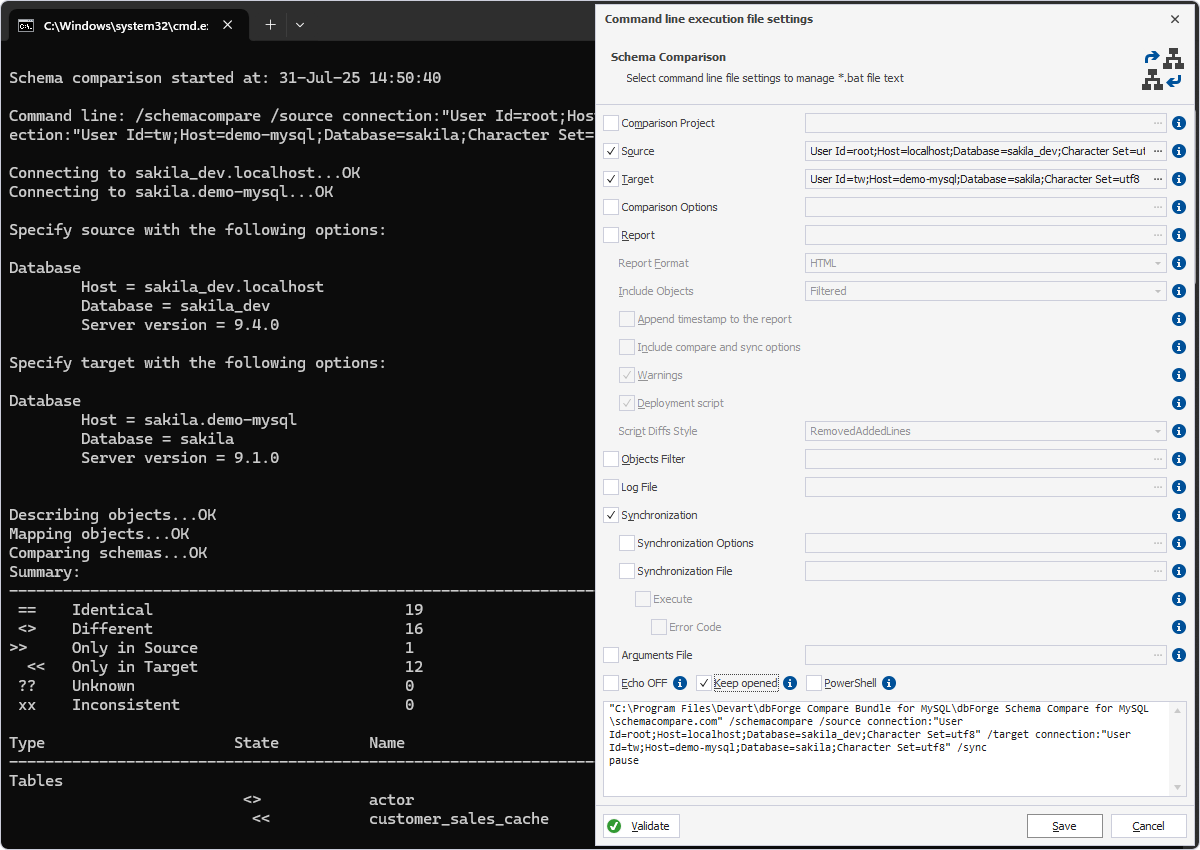
You can automate routine schema comparisons and synchronizations and run them on a schedule, saving time and minimizing manual effort.

  • Save settings for recurring operations into executable .bat files
  • Run schema comparisons with a single click
  • Launch synchronization jobs from the command line
  • Schedule tasks using Windows Task Scheduler
  • Create and run PowerShell scripts for advanced automation
Download for free

Compatibility

dbForge Schema Compare is noted for its broad compatibility, supporting MySQL, MariaDB, and a number of related cloud databases and services.

  • All active MySQL versions
  • All active MariaDB versions
  • All MySQL and MariaDB instances on Windows, Linux, FreeBSD, and Fedora OS
  • Amazon RDS, Amazon Aurora, Google Cloud, Oracle MySQL Cloud, and Alibaba Cloud

  • Secure Sockets Layer (SSL), Secure Shell (SSH), HTTP Tunneling, PAM Percona
Download for free

Schema Compare included in dbForge Compare Bundle

dbForge Schema Compare

Starts from

$89.95
per year
Get the tool

Key features:

  • Schema comparison & sync
  • Comparison reports
  • Sync script preview
  • Backup and recovery wizard
  • Command-line automation
Save 41% with the bundle

dbForge Compare Bundle

Starts from

$99.95
per year
Try the complete bundle

Key features:

  • Schema comparison & sync
  • Data comparison & sync
  • Automapping options
  • Comparison reports
  • Sync script preview
  • Smart diff management
  • Backup and recovery wizard
  • Command-line automation

Leading companies choose dbForge Schema Compare

Harris Kroger Wells Fargo Alcoa Hewlett Packard Enterprise

Success stories from our customers

[dbForge] Schema Compare's two best features are the ability to customize and share comparison files and run comparisons via command line, so they can be integrated into your pipeline. We use it to make our schema changes part of our source code and deploy alongside code changes.

Anthony A.

Senior Software Engineer

"I am happy with the dbForge comparison tool. Visual Studio Schema Comparison does not allow you to filter by object. Redgate has an awkward user interface. Adept SQL Diff is no longer supported (used to be my favorite comparison tool). The winner is dbForge :-)"

Robert O.

Senior Database Developer

Top Business Software — Most Loved
SoftwareSuggest — Easy Usability 2025
Crozdesk — Quality Choice 2025
Crozdesk — Trusted Vendor 2025
Crozdesk — Happiest Users 2025

Ready to get started?

Get started with dbForge Schema Compare at no cost

Get a 30-day trial

Download dbForge Schema Compare for a free 30-day trial and see how easy it is to find and sync changes in schemas.

Buy multiple licenses with a substantial discount

Multiple licenses discount

We provide flexible purchasing options and bulk discounts for multiple licenses to meet the budget of each and every customer.

Need a hand?

Need a hand?

If you need any help or have questions about our tools or purchasing options, just get in touch with our team. The response won't keep you waiting.

FAQ

What's the difference between schema comparison and data comparison?

Schema comparison focuses on analyzing the structure of the database, including objects like tables, views, functions, and triggers. Its goal is to identify structural differences. On the other hand, data comparison examines the content of database tables, detecting discrepancies such as missing or mismatched records. Both types of comparison can be performed using specialized dbForge tools.

How do I view schema differences between two databases?

You can use a specialized MySQL database comparison tool by dbForge to analyze the schemas of two databases and conveniently present the differences between them in a grid. This tool also offers features like filtering, sorting by type or status, and the option to export comparison results in HTML, CSV, or XLS files for detailed analysis.

Can I compare MySQL and MariaDB schemas together?

Yes, you can. dbForge Schema Compare for MySQL supports both MySQL and MariaDB databases, allowing you to compare schemas, identify discrepancies, analyze them in depth, and deploy changes.

How do I export MySQL schema comparison results?

To export the comparison results, go to the Comparison section in dbForge Schema Compare for MySQL. Select Generate Comparison Report from the menu, choose your desired format, and adjust any additional preferences for the exported report.

How does dbForge visualize schema differences?

After completing a comparison, dbForge Schema Compare for MySQL displays the results in a visual grid, highlighting the differences. Additional sorting and filtering options will help you analyze the differences and focus on specific objects.

What operating systems does dbForge Schema Compare support?

dbForge Schema Compare for MySQL can run on Windows, macOS, and Linux; however, the latter two require specialized compatibility solutions like Wine or CrossOver.

Does dbForge support version control integration?

Version control integration is available in dbForge Studio for MySQL, a comprehensive IDE for MySQL, MariaDB, and a variety of related cloud databases and services. This tool includes all necessary features for database development, management, analysis, and administration. However, the standalone dbForge Schema Compare for MySQL does not support version control integration.

Can I run schema comparison from the command line in dbForge?

Yes, dbForge Schema Compare for MySQL allows you to compare MySQL databases and synchronize them from the command line. You can also save task settings as executable .bat files to automate the process.

What are the licensing options for dbForge Schema Compare?

Our MySQL schema comparison tool is available as a standalone product or as an integrated part of dbForge Studio for MySQL. There are two licensing options: a perpetual license, which provides unlimited access to the software, and a subscription-based license, which grants access only for the duration of the subscription period. Once the subscription expires, the software becomes inaccessible until the user renews it.