MySQL REPLACE function: Syntax, examples, and safe updates
If you're working with MySQL databases and need to modify text stored in table columns, the REPLACE function makes the task simple. Whether you need to fix a typo, replace a word, or update multiple records at once, this function can save you a lot of time and effort.
In this article, we'll explore the MySQL REPLACE function, including its syntax, characteristics, and common use cases. We'll also look at how to combine REPLACE with other MySQL functions and how to troubleshoot common issues. Let's get started.
What is the MySQL REPLACE function?
MySQL REPLACE is a tool for string manipulation that replaces all occurrences of a specified substring with another substring.
This function is useful in many scenarios where you need to modify data that matches a specific pattern, such as correcting dates, fixing transposed letters or numbers, updating obsolete values, etc. REPLACE searches a string for every occurrence of the specified substring and replaces it with the new value you provide.
MySQL REPLACE quick syntax
The basic MySQL REPLACE syntax is as follows.
The function accepts the following parameters:
- original_text: The original string you want to modify, such as a word or sentence
- text_to_find: The substring you want to find and replace
- new_text: The substring that will replace text_to_find
Here is a simple example. You have a products table where some product names contain 'OldModel', and you want to replace it with 'NewModel'. You can use REPLACE as follows.
UPDATE products
SET product_name = REPLACE(product_name, 'OldModel', 'NewModel');
This statement searches the product_name column for every occurrence of 'OldModel' and replaces it with 'NewModel'.
MySQL REPLACE vs REPLACE INTO
REPLACE and REPLACE INTO have similar names, which can cause confusion. However, they serve completely different purposes in MySQL.
REPLACE is a string function. It searches a string for all occurrences of a specified substring and replaces them with another substring. By itself, REPLACE does not modify the data stored in a table. To save the changes, you need to use it within a data modification statement such as UPDATE.
REPLACE INTO is a data modification statement. It inserts a new row or replaces an existing one in a table, and it is especially helpful if the new row conflicts with an existing row based on a PRIMARY KEY or UNIQUE index. MySQL deletes the existing row and inserts the new one. If there is no conflict, it simply inserts the new row.
The following table summarizes the key differences between REPLACE and REPLACE INTO.
| Criteria | REPLACE function | REPLACE INTO statement |
|---|---|---|
| SQL category | String function | Data modification statement |
| Basic syntax | REPLACE(original_text, text_to_find, new_text) | REPLACE INTO table_name (columns) VALUES (values); |
| Purpose | Replaces one substring with another inside a string (operates on strings) | Inserts a new row or replaces an existing row in case of a duplicate key (operates on table rows) |
| What it changes | Returns a modified string and does not change table data (unless used inside an UPDATE statement) | Changes table data directly by inserting a new row or replacing an existing one |
| Common use case | Fixes typos, replaces characters, updates URL fragments, removes unwanted symbols, or changes text inside a column | Inserts a row when it does not exist or replaces a row that conflicts with a primary key or unique index |
| Example with SELECT | SELECT REPLACE('MySQL tutorial', 'tutorial', 'guide'); | Not applicable: REPLACE INTO does not work with standalone strings |
| Example with table data | UPDATE products SET name = REPLACE(name, 'Old', 'New'); | REPLACE INTO products (id, name) VALUES (1, 'New product'); |
| Duplicate key behavior | Does not check primary keys or unique indexes | Deletes the row with the primary key or unique key conflict and inserts the new row |
| Risk level | Lower when used in SELECT; higher when used in UPDATE without a WHERE clause | Higher, because it can remove and reinsert rows physically, affecting the table data and structure |
| Best practice | Preview changes with SELECT before running UPDATE, and use a WHERE clause | Use when you understand clearly the table keys and replacement behavior; opt for INSERT ... ON DUPLICATE KEY UPDATE for more control |
Use cases for the MySQL REPLACE function
The REPLACE function can save a lot of time and effort in many scenarios. Let's explore some of the most common use cases where it can be particularly helpful.
Throughout this article, we'll demonstrate these use cases with dbForge Studio for MySQL, an AI-powered IDE for MySQL and MariaDB databases, as well as related cloud platforms. dbForge Studio for MySQL offers a full set of features to cover the entire database lifecycle, from SQL code writing to database administration and version control, with rich visualization and automation capabilities and dedicated AI assistance on SQL development.
Cleansing data and correcting typos
Data may contain incorrect characters, typos, or formatting inconsistencies that need to be corrected. REPLACE provides a quick way to fix such issues.
Here is an example: an email domain has been misspelled as @sakilacastomer.org. Instead of finding and correcting each occurrence manually, you can use the REPLACE command.
SELECT
  customer_id,
  email AS original_email,
  REPLACE(email, '@sakilacastomer.org', '@sakilacustomer.org') AS corrected_email
FROM customer
WHERE email LIKE '%@sakilacastomer.org';
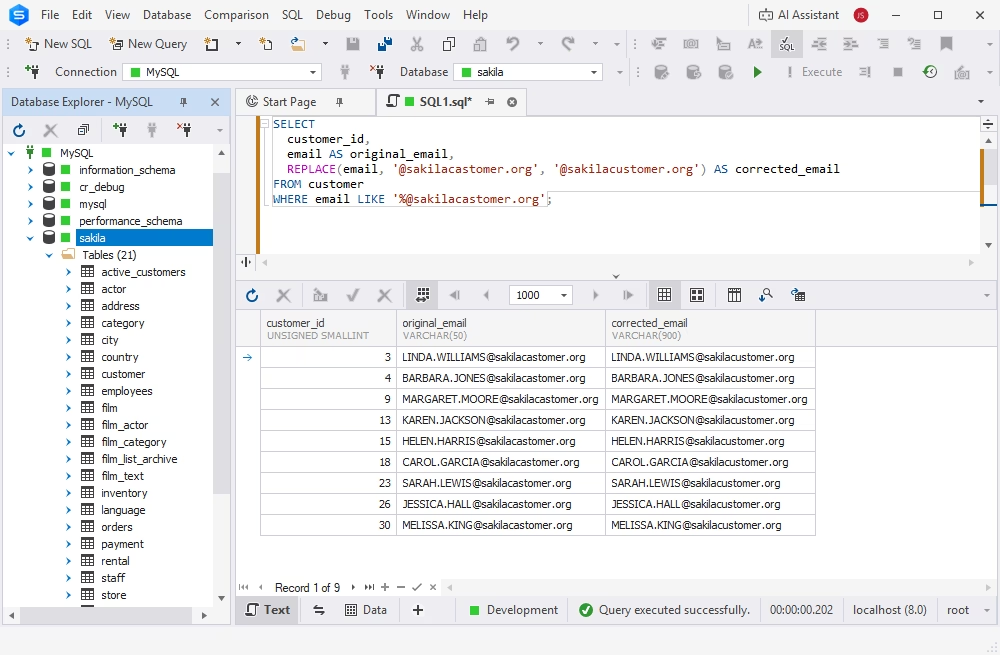
Note that this statement does not modify the stored data. It only returns the transformed value in the REPLACE MySQL query results. After that, you can apply the UPDATE statement.
UPDATE customer
SET email = REPLACE(email, '@sakilacastomer.org', '@sakilacustomer.org')
WHERE email LIKE '%@sakilacastomer.org';
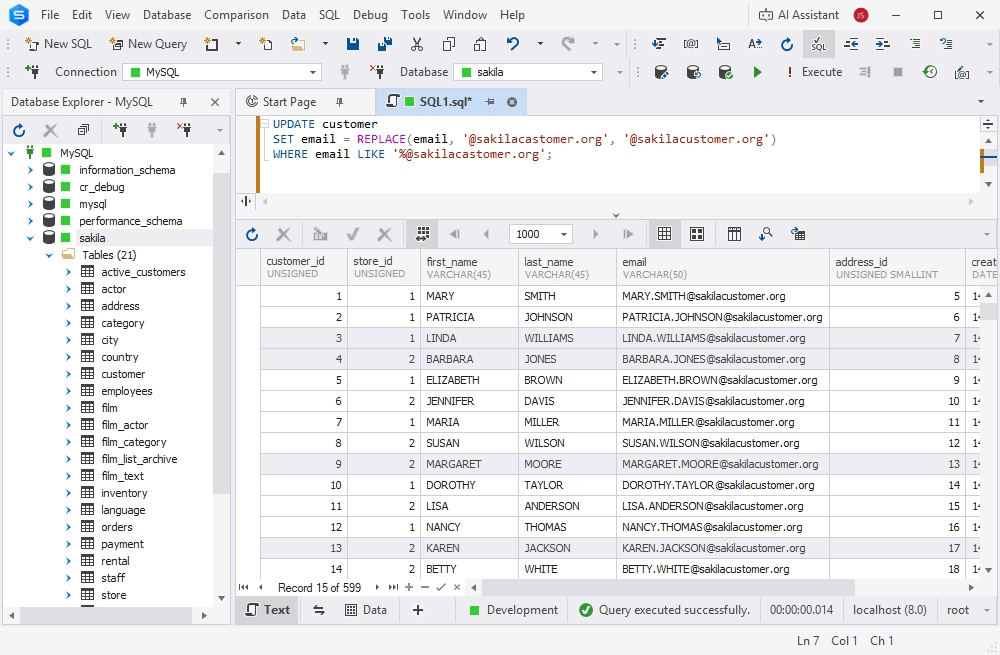
It is a good practice to run a SELECT statement first to verify that you are targeting the correct data and that the resulting values are as expected.
Removing unwanted characters
Extra symbols, spaces, and other unwanted characters can make data inconsistent. You can use REPLACE to remove them quickly. For example, to remove asterisks (*) from a string, replace them with an empty string.
SELECT
  customer_id,
  last_name AS original_last_name,
  REPLACE(last_name, '*', '') AS corrected_last_name
FROM active_customers
WHERE last_name LIKE '%*%';
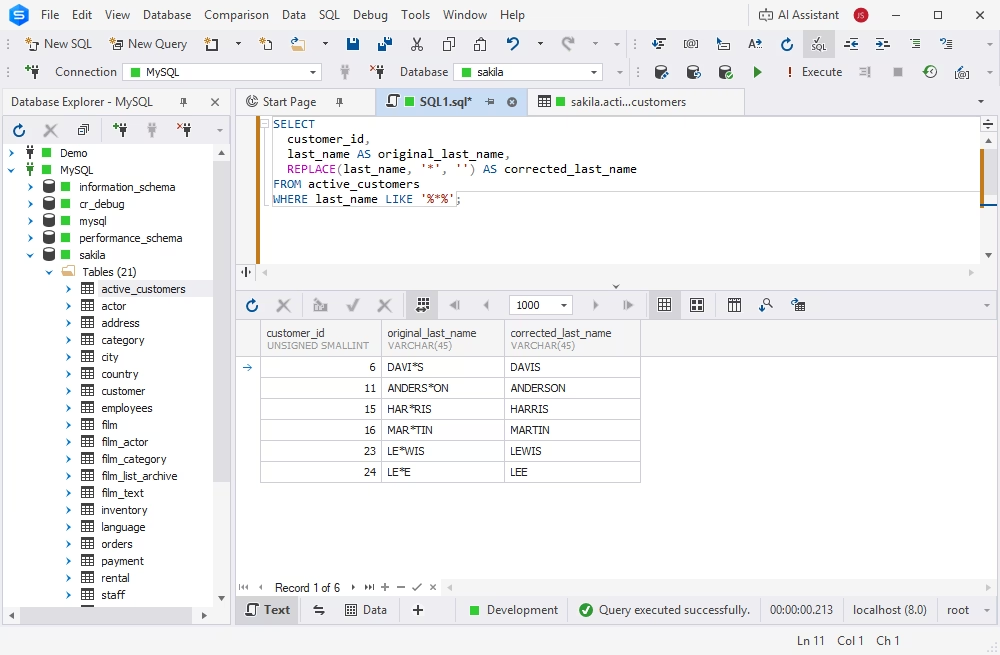
Hiding sensitive data
REPLACE can also help modify data used for testing or reporting when sensitive information needs to be hidden. For example, the following statement replaces each 'a' in the user's last name with an asterisk.
UPDATE active_customers
SET last_name = REPLACE(last_name, 'A', '*');
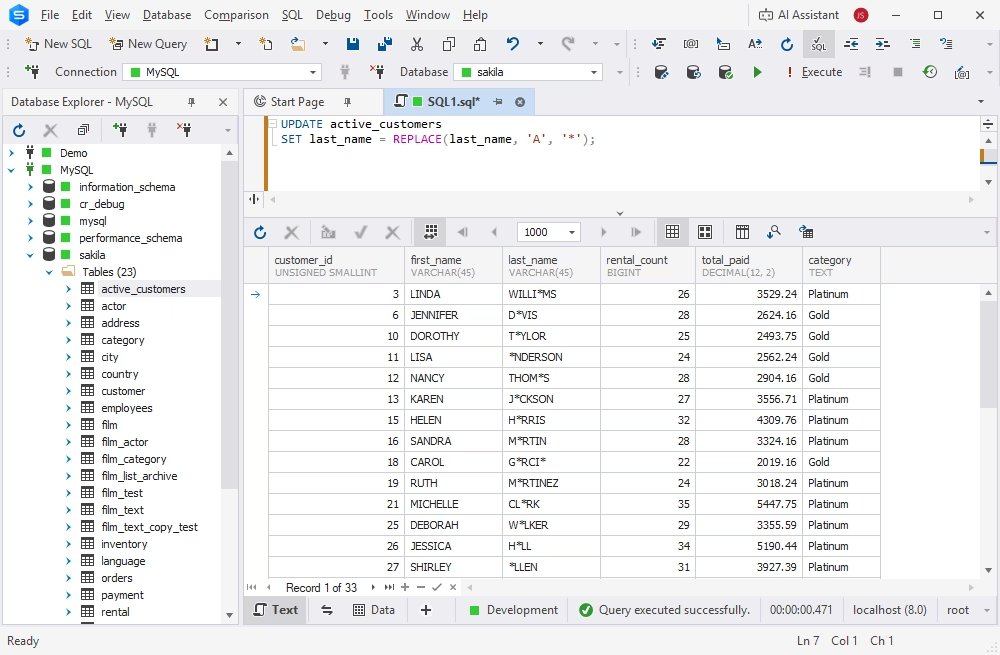
Replacing text in specific columns
Another common use case is replacing specific text in a particular column. For example, you can replace the abbreviation St. with Street in the address column.
UPDATE employees
SET address = REPLACE(address, 'St.', 'Street')
WHERE address LIKE '%St.%';
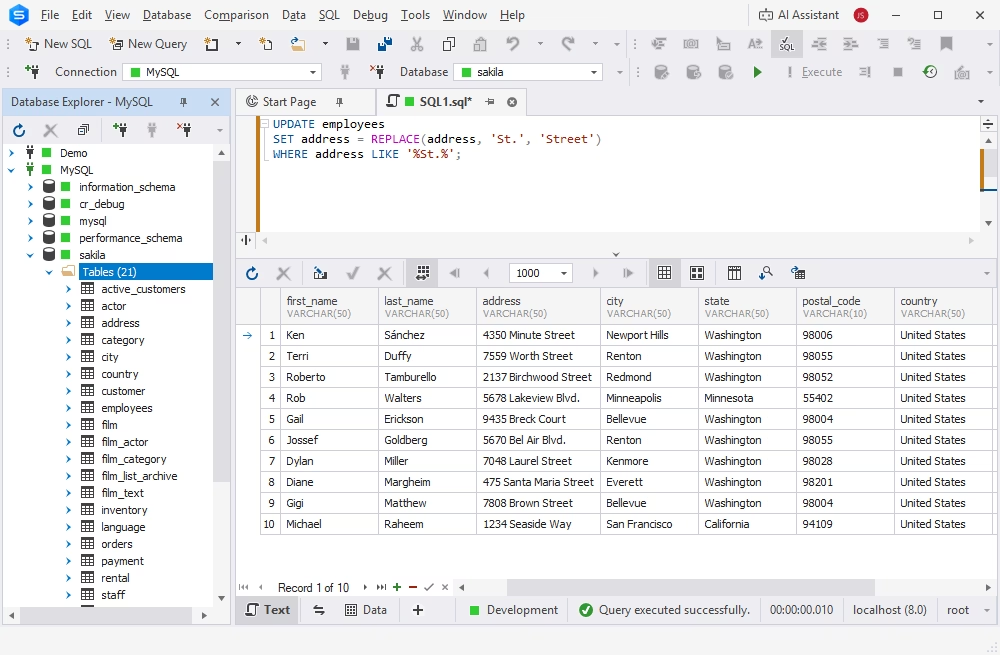
Using MySQL REPLACE in a column replaces every occurrence of the abbreviation St. within the values in the address column.
Using REPLACE in a MySQL view
A view is a stored query that presents data in a specific format without modifying the underlying table. Using REPLACE in a view allows you to transform or format text visually and leave the original data unchanged.
Let us take one more example for Sakila: the film table has a special_features column, which stores comma-separated values (e.g., Trailers, Deleted Scenes, and Behind the Scenes). Let us convert the data in this column into a more readable, bulleted format. We create a view that will show the original values alongside the formatted values. This way, we can see how it would look in the table and leave everything underlying untouched.
CREATE VIEW vw_film_special_features_formatted
AS
SELECT
  film_id,
  title,
  special_features AS original_special_features,
  REPLACE(special_features, ',', ' • ') AS formatted_special_features
FROM film;
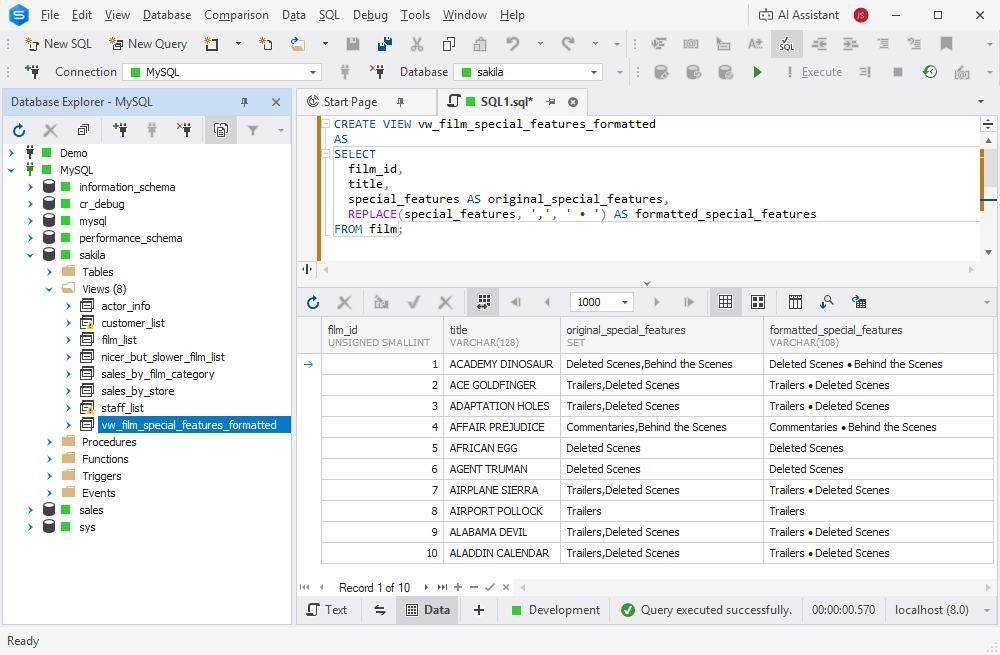
REPLACE is simple and convenient, making it an attractive option whenever you need to modify text quickly. However, it requires care and caution when using it to avoid unintended results. In the next section, we'll examine the risks and how to avoid them.
Special considerations when using MySQL REPLACE
There are several issues you should keep in mind to avoid incorrect results or unexpected behavior. In particular, you should understand how the REPLACE function handles case sensitivity, NULL values, and duplicate or repeated values.
Case sensitivity
The MySQL REPLACE function is case-sensitive. In one of our previous examples, we replaced a letter in the customers' last names with an asterisk. But how will it work if we don't specify the case?
Let us replace all occurrences of 'r' in customers' last names with asterisks.
SELECT
  customer_id,
  last_name AS original_last_name,
  REPLACE(last_name, 'r', '*') AS modified_last_name
FROM active_customers
WHERE last_name LIKE '%r%';
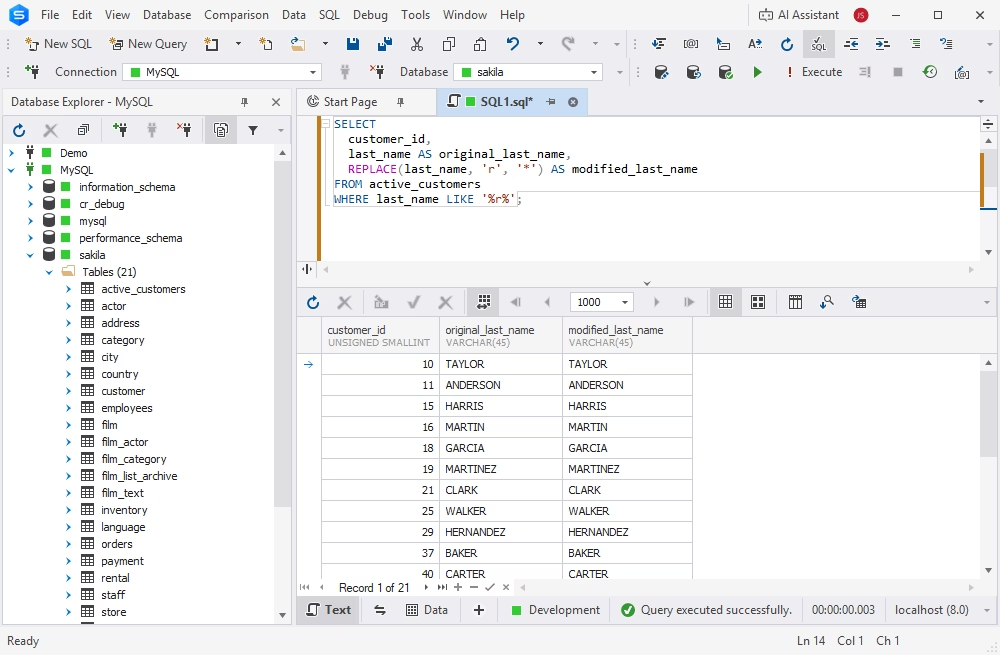
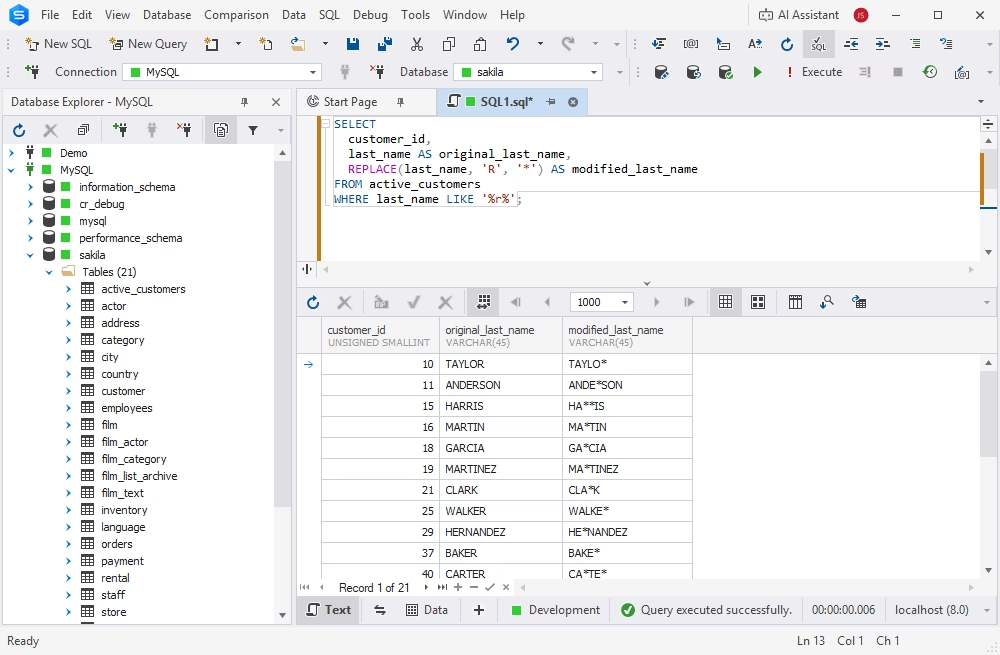
Since Sakila's last names are stored in all uppercase (e.g., ANDERSON), no matches will be found because there are no lowercase letters to replace. You need to specify 'R' as the value to be replaced explicitly.
SELECT
  customer_id,
  last_name AS original_last_name,
  REPLACE(last_name, 'R', '*') AS modified_last_name
FROM active_customers
WHERE last_name LIKE '%r%';
Replacement of NULL values
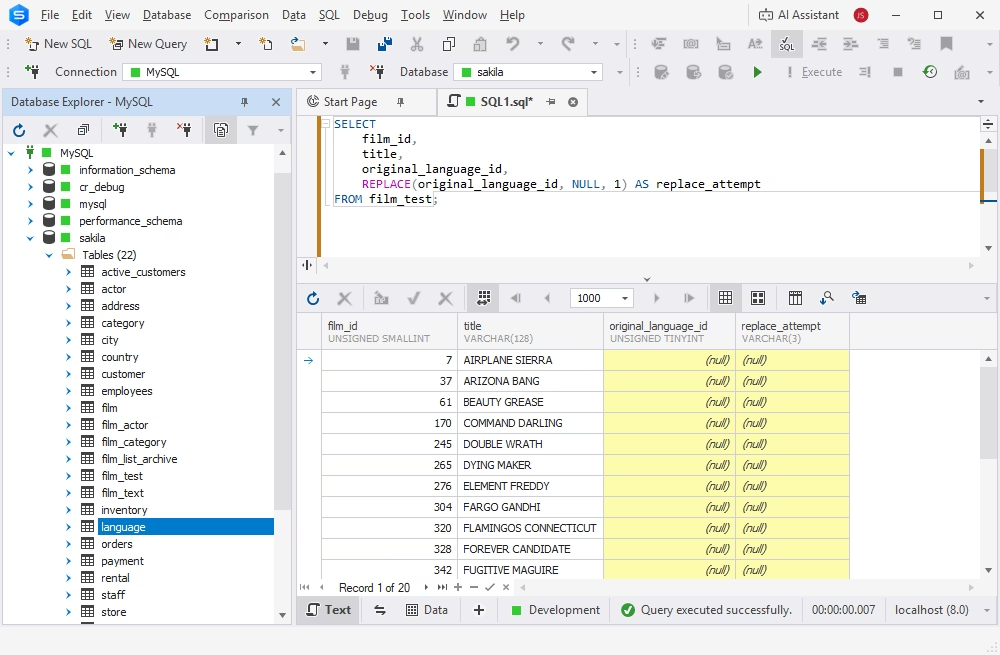
Another important consideration is how REPLACE handles NULL values. If any of its arguments—the source string, the substring to find, or the replacement string—is NULL, the function returns NULL.
SELECT
  film_id,
  title,
  original_language_id,
  REPLACE(original_language_id, NULL, 1) AS replace_attempt
FROM film_test;
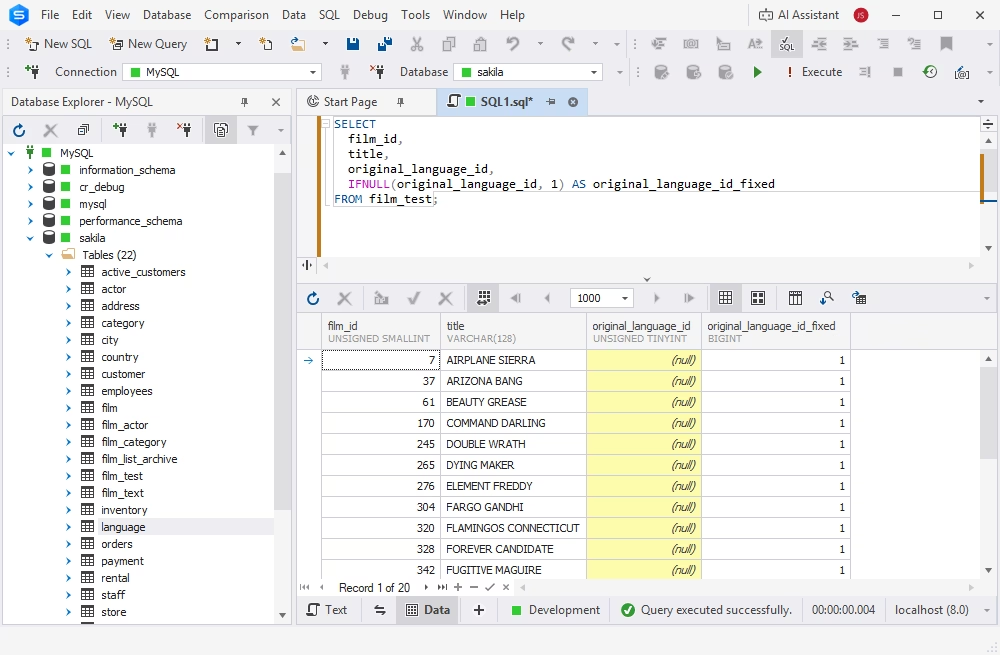
If your data contains NULL values, you can use IFNULL() to change them to empty strings before applying REPLACE.
SELECT
  film_id,
  title,
  original_language_id,
  IFNULL(original_language_id, 1) AS original_language_id_fixed
FROM film_test;
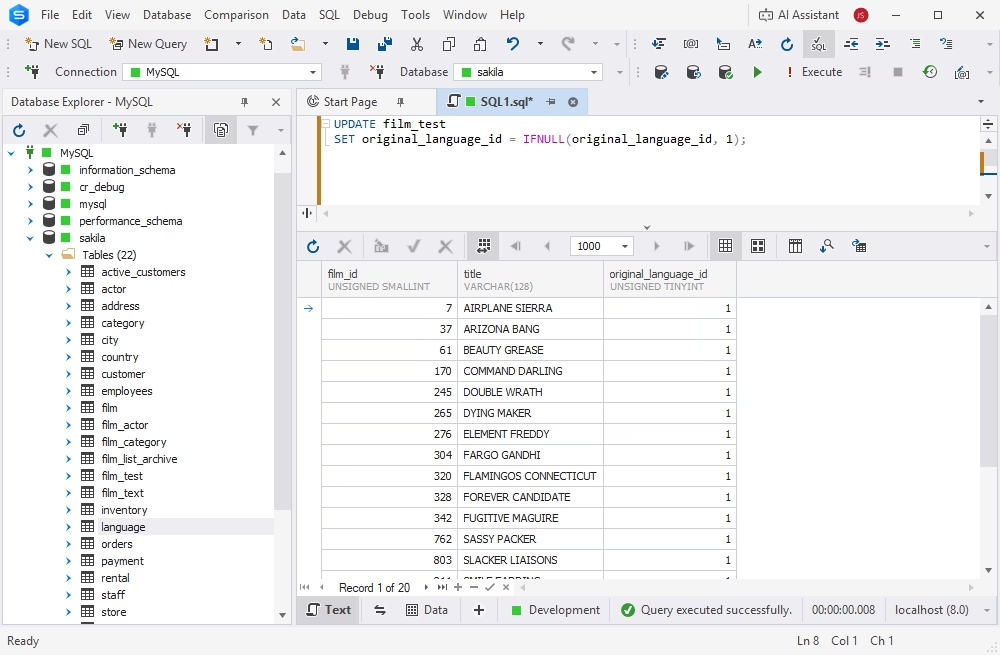
Now you can actually update the data and replace NULLs with the correct value.
UPDATE film_test
SET original_language_id = IFNULL(original_language_id, 1);
This way, you can replace a string in MySQL even if it contains NULLs. However, this approach converts NULL values to empty strings in the query result, which may not always be desired.
Handling of duplicate and repeated values
This function replaces all occurrences of the specified substring within a string, not just the first one. You should consider it when the same substring appears more than once.
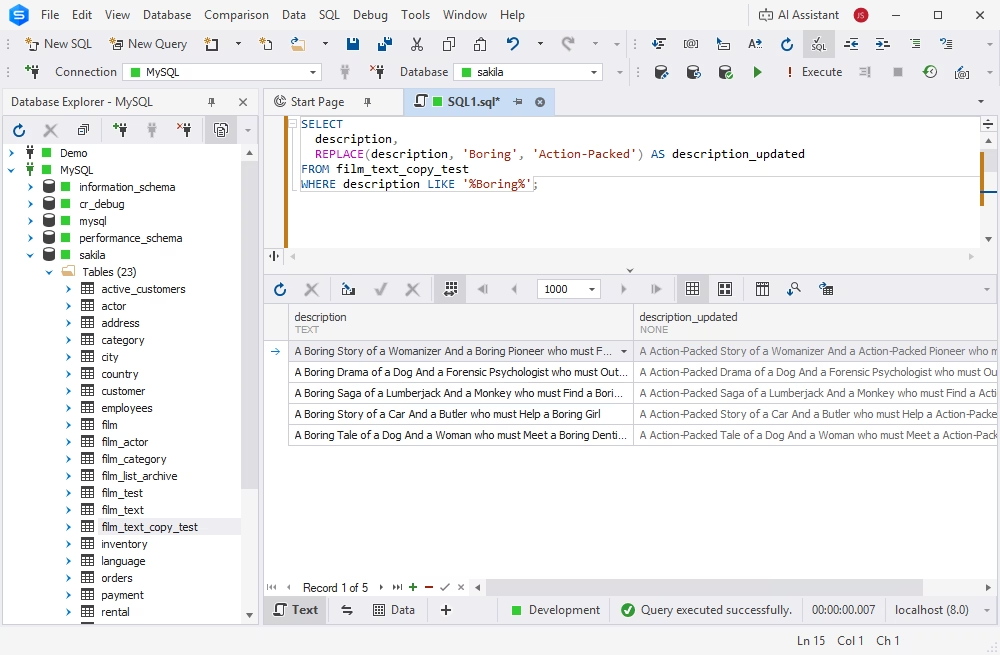
For example, we want to replace the word 'Boring' with 'Action-Packed' in the film descriptions. However, 'Boring' occurs multiple times in some descriptions, so REPLACE replaces every occurrence.
SELECT
  description,
  REPLACE(description, 'Boring', 'Action-Packed') AS description_updated
FROM film_text_copy_test
WHERE description LIKE '%Boring%';
How to use MySQL REPLACE with UPDATE safely
Using REPLACE with UPDATE modifies stored data, so it is important to use this combination carefully. If you define the conditions incorrectly, UPDATE can modify more data than intended. This operation may be difficult to reverse.
Two simple precautions make the task safer:
- Preview changes before running UPDATE
- Use a WHERE clause to limit the rows
Preview changes before running the UPDATE command
In the examples above, we ran the SELECT statement with the REPLACE expression before modifying data with UPDATE. It shows you which rows are affected and what the new values will look like. This practice is useful not only with REPLACE but also with all operations that actually modify stored data.
Add a WHERE clause to limit affected rows
Use a WHERE clause to restrict the update to rows that actually contain the target substring. Without an appropriate condition, the UPDATE statement may process more rows than necessary.
The basic pattern is as follows.
UPDATE table_name
SET column_name = REPLACE(column_name, 'old', 'new')
WHERE column_name LIKE '%old%';
Whenever possible, add more conditions to narrow the scope of the operation. Before making large or important changes, preview the results with a SELECT statement, test the operation in a non-production environment, and make a backup or establish a recovery option.
MySQL REPLACE vs other string functions
REPLACE is one of several MySQL functions for manipulating strings. Depending on the task, other functions may be more appropriate or can be combined with REPLACE for more precise manipulations. These include SUBSTRING(), CONCAT(), and REGEXP_REPLACE.
| Function | Description | Example |
|---|---|---|
| SUBSTRING() | Extracts a specified portion of a string. You can define the starting position and, optionally, the number of characters to return. | SUBSTRING('MySQL Database', 7, 8) becomes 'Database' |
| CONCAT() | Combines two or more strings into a single string. It is useful for constructing values from multiple text fields or expressions. | CONCAT('MySQL', ' ', 'Database') becomes 'MySQL Database' |
| REGEXP_REPLACE | Searches a string for text that matches a regular expression and replaces all matches with the specified replacement string. It is useful for more complex pattern-based replacements than REPLACE covers (e.g., swapping numbers, matching optional characters, or dealing with inconsistent formatting). | REGEXP_REPLACE('Order 12345', '[0-9]+', 'XXXXX') becomes 'Order XXXXX' |
Common MySQL REPLACE mistakes and fixes
MySQL REPLACE is a powerful function that should be used with care. Improper use can produce unexpected results, incorrect behavior, or even data loss.
Below are the most common issues you may encounter when working with MySQL REPLACE and recommendations for troubleshooting and resolving them.
| Mistake | Why it happens | How to fix it |
|---|---|---|
| REPLACE does not change anything | MySQL REPLACE is case-sensitive, so 'hello' and 'Hello' are treated as different strings. | Check the exact letter case in the source string. For simple cases, use LOWER() or UPPER(), but remember that this may change the case of the full output. |
| The result is NULL | One of the arguments passed to REPLACE is NULL. In this case, the output is also NULL. | Use IFNULL() or COALESCE() before applying REPLACE. Example: REPLACE(IFNULL(column_name, ''), 'old', 'new'). |
| The output differs from the expected result | The arguments are in the wrong order. REPLACE requires the source string first, the text to find second, and the replacement text third. | Use the correct syntax: REPLACE(str, from_str, to_str). Example: REPLACE('MySQL guide', 'guide', 'tutorial'). |
| Unintended parts of the string are changed | The substring is too broad or appears inside other words. For example, replacing 'is' may also change words like 'this' or 'history'. | Use a more specific substring. For pattern-based replacements, consider REGEXP_REPLACE (available in MySQL 8.0.4 and later). |
| Too many rows are updated | The UPDATE statement uses REPLACE without a WHERE clause, so MySQL applies it to every row in the table. | Preview the result with SELECT first, then run UPDATE with a clear WHERE condition. Example: WHERE column_name LIKE '%old%' |
| REPLACE does not insert or replace rows | REPLACE is a string function, not a table-row replacement command. It only changes text values when used in SELECT or UPDATE. | Use REPLACE INTO when you need to insert or replace full rows—and only when a primary key or unique key conflict takes place. |
| REPLACE INTO removes existing row data | REPLACE INTO may delete the existing row and insert a new one when a duplicate key is found. This can affect defaults, triggers, foreign keys, and auto-increment values. | Use REPLACE INTO carefully. If you only need to update selected columns, consider INSERT ... ON DUPLICATE KEY UPDATE instead. |
| The query behaves as expected in SELECT but not in UPDATE | A SELECT REPLACE query only previews the changed string. It does not modify the table until used inside an UPDATE statement. | After checking the result with SELECT, use: UPDATE table_name SET column_name = REPLACE(column_name, 'old', 'new') WHERE column_name LIKE '%old%'; |
Using MySQL REPLACE in dbForge Studio for MySQL
dbForge Studio for MySQL is one of the most user-friendly AI-powered IDEs for MySQL and MariaDB databases. It offers a comprehensive toolset for all database tasks, including AI-assisted SQL development, database management and version control, administration, and extensive automation.
When working with MySQL REPLACE(), dbForge Studio for MySQL provides a range of coding assistance features. Its SQL Editor offers intelligent code completion, syntax validation, debugging, code formatting, and a library of code snippets to help you accelerate SQL development, reduce errors, and make the overall process more efficient.
Throughout this article, we have used dbForge Studio for MySQL to demonstrate REPLACE() use cases, write and execute queries against a test database, and inspect the output in the results grid. However, the Studio offers additional features that can further simplify SQL development.
The integrated AI Assistant can generate SQL queries from natural-language prompts, as well as analyze, troubleshoot, and optimize existing queries.
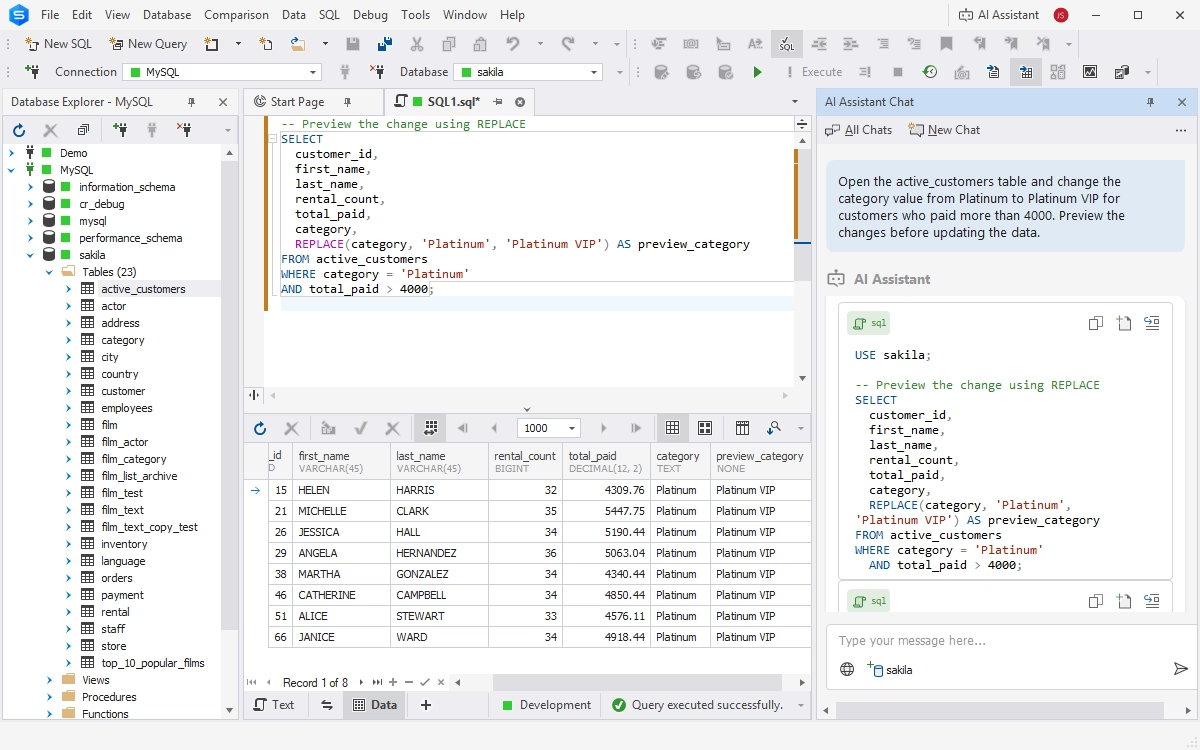
When working with MySQL REPLACE(), for example, you can describe what you want to accomplish: "Open the active_customers table and change the category value from Platinum to Platinum VIP for customers who paid more than 4000. Preview the changes before updating the data." The AI Assistant can then generate the appropriate query for you.
Download dbForge Studio for MySQL to write and test MySQL queries under your real workload.
Conclusion
MySQL REPLACE is a powerful and helpful function that lets you correct errors or replace outdated information in a string using just one command.
We have covered how REPLACE works, how to use it with other SQL commands like UPDATE and SELECT, and how to make sure that its usage is safe and correct. Now you can try it out properly with dbForge Studio for MySQL and see how it can make your data management more straightforward and efficient.
FAQ
No, the MySQL REPLACE() function cannot work with NULL values. If any of the parameters (original_text, text_to_find, or new_text) are NULL, the function returns NULL. To avoid this, use the IFNULL() function to convert NULL values to empty strings before applying REPLACE.
Yes, you can use REPLACE() in an UPDATE statement to modify repeated or duplicated substrings in column values. However, REPLACE() doesn't identify or eliminate duplicate rows. It only replaces matching substrings within text.
While REPLACE() is used for text substitution, it might help you replace duplicate records across multiple columns in the database (e.g., when a placeholder is used in the database, and you want to replace all instances with actual data). dbForge Studio for MySQL can assist you in identifying and managing duplicate records using visual tools, an intelligent syntax checker, and data comparison.
MySQL REPLACE() is case-sensitive, which may cause it to miss matches like "Hello" vs "hello". dbForge Studio for MySQL helps you handle this by letting you visually test queries and preview results.
dbForge Studio for MySQL supports intelligent code suggestions for all MySQL functions, including REPLACE(). However, since REPLACE() doesn't work with NULL values, you need to handle them explicitly using IFNULL().
Yes, dbForge Studio for MySQL provides a visual data editor that lets you view, filter, and update data directly in your tables. You can also apply REPLACE() and other functions in real time using the integrated SQL Editor.
A few common reasons why the REPLACE() function may not work as expected are case sensitivity due to the column's collation, NULL values, incorrect substring syntax, and confusion between the REPLACE() function and the REPLACE statement.
First, the integrated AI Assistant can generate a REPLACE query based on a prompt in plain language. You only need to describe what you want to accomplish with REPLACE, and the Assistant will generate the query so you can test it immediately against your database. In addition, SQL Editor provides a wide range of coding assistance features that help you write SQL code faster and more accurately, including smart code completion, syntax validation, debugging, formatting, and other tools.
Yes. Typically, you can use the MySQL REPLACE function to update text values across multiple rows. dbForge Studio can help you write the required query quickly with its integrated AI Assistant. You can then execute the query against your database and immediately view the results in the grid. The Studio also provides database backup functionality to help protect your data before making bulk changes.
Yes. The Studio allows you to use various SQL functions and techniques for cleaning table data, including window functions, TRIM(), COALESCE(), REPLACE(), and others. Data cleanup typically involves writing SQL queries to perform operations such as removing duplicates and extra whitespace, standardizing text, fixing typos, and converting data types. In dbForge Studio for MySQL, you can use the AI Assistant to generate these queries on demand. Simply describe what you need to do in plain language, and the Assistant will generate a query using suitable SQL constructs. You can then execute the query against your database, view the results immediately in the grid, and use the Studio's data analysis and reporting tools to explore the results visually.
Yes. Code completion in SQL Editor supports REPLACE and other string functions. It suggests relevant keywords and functions as you type, while syntax validation helps identify errors in your queries. You can also use the AI Assistant to generate and analyze SQL queries, helping you work with REPLACE and other string functions more quickly and efficiently.