
dbForge Studio for PostgreSQL
AI-powered IDE for database development, management, and data analysis across PostgreSQL and related cloud services
PostgreSQL constraints are rules that protect data integrity at the database level: they define what data can be inserted, updated, or deleted in a table, so invalid records never make it into your database. This article covers the standard PostgreSQL constraint types with practical examples and explains how dbForge Studio for PostgreSQL can help you create, manage, and visually validate constrained database schemas.
A constraint is a rule attached to a table or column that determines which values PostgreSQL can accept. Constraints are checked automatically on every INSERT, UPDATE, or DELETE operation, so a table can never contain a value that violates one of its own rules.
Constraints are essential for data integrity because data rarely enters a table through a single path. Applications, background scripts, scheduled imports, manual edits made directly in a SQL client, and integrations with third-party systems can all write to the same table. Validation logic built into an application only covers the traffic that goes through that application; however, a constraint defined in the database applies to each of these sources equally, which makes it a far more reliable way to protect data consistency and referential integrity than relying on application-level checks alone.
PostgreSQL supports six standard constraint types, each covering a different kind of data rule.
| Constraint | What it does | Example use case |
|---|---|---|
| NOT NULL | Requires a value | Required email or status |
| CHECK | Validates a condition | Price always greater than 0 |
| UNIQUE | Prevents duplicates | Unique email or SKU |
| PRIMARY KEY | Identifies each row | User ID or order ID |
| FOREIGN KEY | Links related tables | Orders linked to customers |
| EXCLUDE | Prevents conflicting rows | No overlapping bookings |
NOT NULL makes sure a column always contains a value, which is useful for fields such as an email address or an order status that should never be left empty.
CREATE TABLE employees (
    employee_id INTEGER,
    email VARCHAR(50) NOT NULL,
    last_name VARCHAR(50)
);
CHECK verifies that a value satisfies a condition before it is written to the table. A common example is making sure a price is always greater than zero.
CREATE TABLE products (
    product_id SERIAL PRIMARY KEY,
    product_name VARCHAR(100) NOT NULL,
    price NUMERIC(10,2) CHECK (price > 0)
);
UNIQUE stops duplicate values from being stored in a column or a group of columns, for example, to guarantee that no two customers share the same email address.
CREATE TABLE customers (
    customer_id INTEGER,
    email VARCHAR(50) UNIQUE
);
PRIMARY KEY combines NOT NULL and UNIQUE to give every row in a table a stable identifier, such as a customer ID or an order ID.
CREATE TABLE customers (
    customer_id INTEGER PRIMARY KEY,
    first_name  VARCHAR(50),
    last_name   VARCHAR(50),
    email       VARCHAR(100)
);
FOREIGN KEY links a column in one table to a column in another table, usually its primary key, so that a related record cannot reference a parent row that does not exist.
CREATE TABLE order_items (
    order_item_id SERIAL PRIMARY KEY,
    order_id INTEGER NOT NULL,
    customer_id INTEGER NOT NULL REFERENCES customers (customer_id)
);
EXCLUDE prevents two rows from having conflicting values according to a specified operator. It is most often used with range types to stop overlapping periods, for example, to guarantee that a room cannot have two bookings for the same time period.
CREATE TABLE room_bookings (
    room_id INTEGER NOT NULL,
    booking_period TSRANGE NOT NULL,
    EXCLUDE USING gist (room_id WITH =, booking_period WITH &&)
);A column-level constraint is defined alongside the column it primarily applies to. By convention, a column-level CHECK constraint references only that column; constraints involving multiple columns should be defined at the table level. Typical examples of a column-level constraint include NOT NULL, UNIQUE, and CHECK. The following SQL sample includes a CHECK constraint that only applies to the salary column, making sure that all salary values are positive.
CREATE TABLE employees (
    employee_id SERIAL PRIMARY KEY,
    salary NUMERIC(10,2) CHECK (salary > 0)
);
A table-level constraint is defined separately from the column list, usually at the end of the CREATE TABLE statement. It references several columns at once, for example, a composite primary key or a multi-column UNIQUE or CHECK constraint.
The SQL below demonstrates a PostgreSQL CHECK constraint that compares two columns. It is defined at the table level, since it does not belong to either column individually.
CREATE TABLE project_assignments (
    project_id INTEGER NOT NULL,
    start_date DATE NOT NULL,
    end_date DATE NOT NULL,
    CONSTRAINT valid_project_period CHECK (end_date > start_date)
);Constraints can be defined during the table creation with a CREATE TABLE statement or added later to an existing table with an ALTER TABLE statement. Let's look at some practical examples of defining constraints in PostgreSQL.
Creating constraints with CREATE TABLE
You can add constraints directly when creating a table.
CREATE TABLE customers (
    customer_id INTEGER PRIMARY KEY,
    email       VARCHAR(255) NOT NULL UNIQUE,
    age         INTEGER CHECK (age >= 18)
);
In this example, we create several constraints:
Adding constraints with ALTER TABLE
If a table already exists, you can add a constraint with ALTER TABLE. For example:
ALTER TABLE customers
ADD CONSTRAINT uq_customers_email
UNIQUE (email);
This constraint makes sure that email addresses in the customers table are unique.
Naming constraints clearly
PostgreSQL can automatically generate names for constraints, but explicitly naming them often makes database administration and troubleshooting easier. The following example uses constraints pk_products, uq_products_name, and chk_products_price, which clearly define the purpose of each constraint.
CREATE TABLE products (
    product_id INTEGER,
    product_name VARCHAR(100),
    price NUMERIC(10, 2),

    CONSTRAINT pk_products
        PRIMARY KEY (product_id),

    CONSTRAINT uq_products_name
        UNIQUE (product_name),

    CONSTRAINT chk_products_price
        CHECK (price >= 0)
);PostgreSQL constraints, indexes, and triggers play important roles in database design, but they serve different purposes. Choosing the right mechanism helps keep the database reliable while avoiding unnecessary complexity.
Simple business rules should usually be handled with constraints, since they are declarative, checked automatically, and easy to reason about. Indexes are designed to speed up lookups rather than to enforce rules, although a unique index can be used for conditional uniqueness. Triggers should be reserved for cases where declarative constraints are not enough, for example, when a rule depends on procedural logic or needs to touch other tables.
| Feature | Best for | Example |
|---|---|---|
| Constraints | Enforcing data rules | Required values, valid ranges, foreign keys |
| Indexes | Improving search performance | Faster lookups by email or ID |
| Unique indexes | Conditional uniqueness | Unique active records only |
| Triggers | Complex procedural logic | Custom validation or audit actions |
PostgreSQL provides several ways to inspect and manage constraints. You can use the information_schema views for a basic list of constraints, query the PostgreSQL-specific pg_constraint system catalog for more detailed information, and use ALTER TABLE to add, modify, or remove constraints. Let's try these approaches using dbForge Studio for PostgreSQL.
In PostgreSQL, to show constraints for a table, query information_schema.table_constraints. For example, the following query returns a list of constraints for the film table.
SELECT
    constraint_name,
    constraint_type
FROM information_schema.table_constraints
WHERE table_schema = 'public'
  AND table_name = 'film';
The response contains a list of all constraints applied to the table.
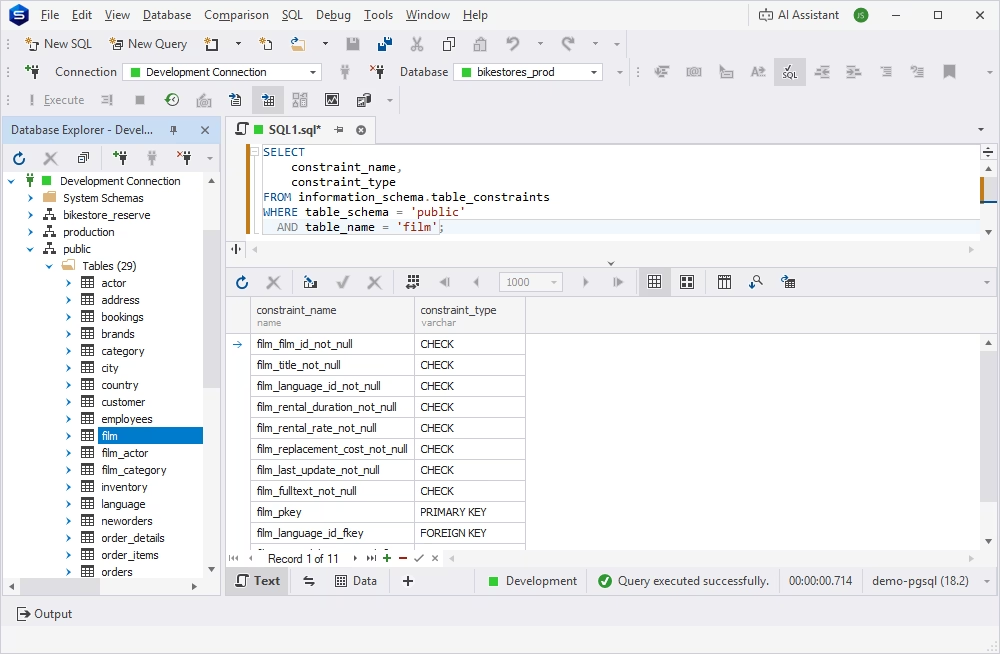
Alternatively, you can query the pg_constraint catalog to get a list of all constraints.
SELECT
    conname AS constraint_name,
    contype AS constraint_type
FROM pg_constraint
WHERE conrelid = 'public.film'::regclass;
This query returns a list of all constraints with their types, for example, p for PRIMARY KEY, f for FOREIGN KEY, u for UNIQUE, n for NOT NULL, and so on.
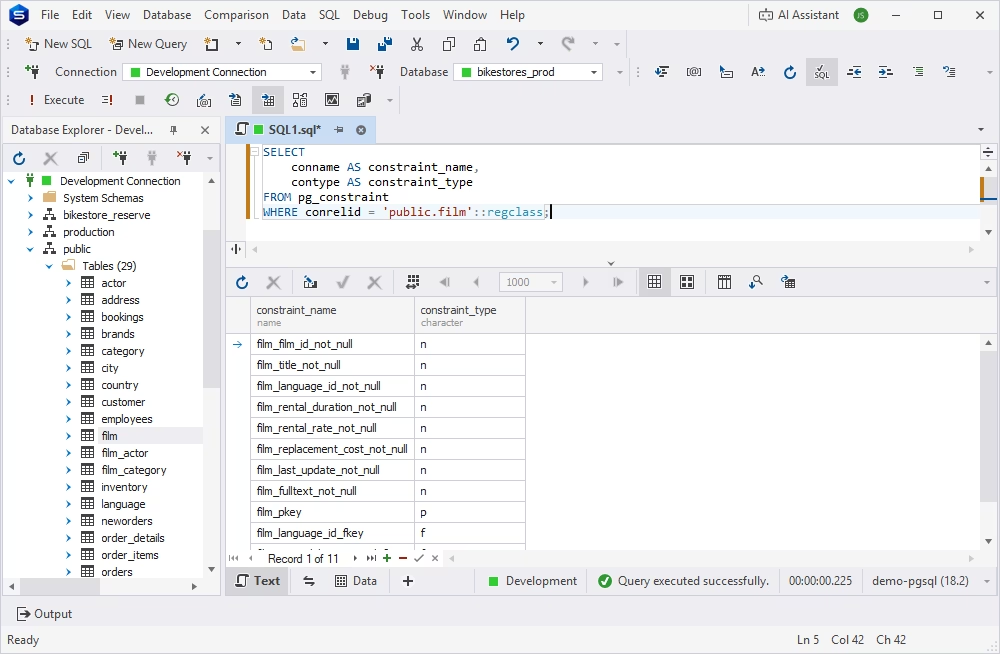
To see the full definition of a constraint, including its exact condition or referenced columns, query the pg_constraint catalog using the pg_get_constraintdef function.
SELECT
    conname AS constraint_name,
    pg_get_constraintdef(oid) AS definition
FROM pg_constraint
WHERE conrelid = 'public.film'::regclass;
The results contain the actual definitions of every constraint applied to the specified table.
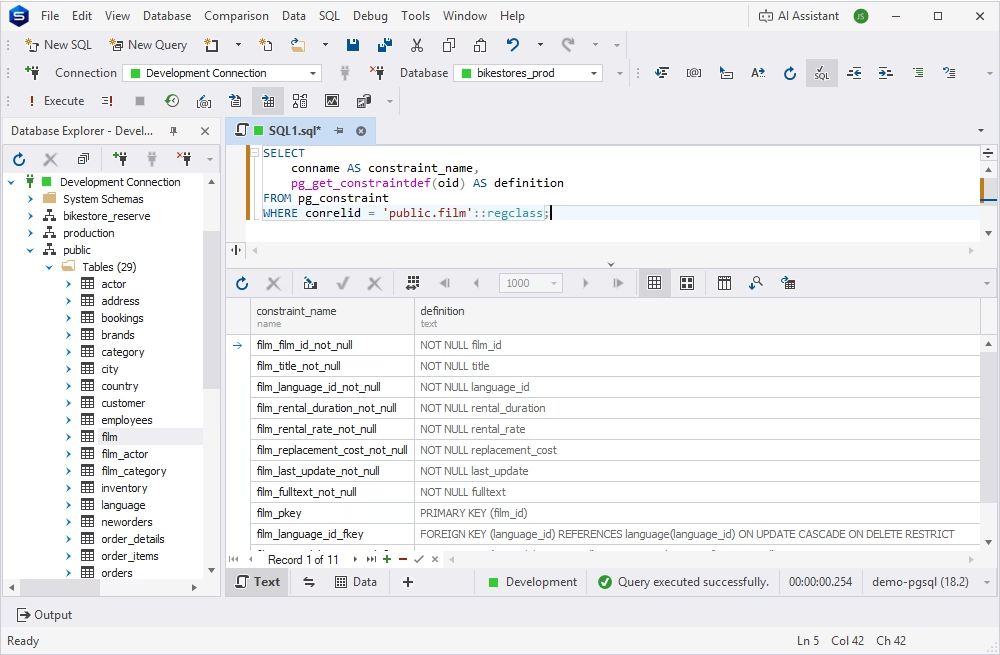
To drop, add, or recreate a constraint, for example, after changing a business rule, use an ALTER TABLE statement.
To remove a constraint, use PostgreSQL's DROP CONSTRAINT command.
ALTER TABLE rental
DROP CONSTRAINT rental_id_unique;
To add a new constraint, use the ADD CONSTRAINT command.
ALTER TABLE rental
ADD CONSTRAINT rental_id_unique UNIQUE (rental_id);
Sometimes, you may need to remove a constraint and recreate it. In this case, use the DROP CONSTRAINT command followed by the ADD CONSTRAINT command.
ALTER TABLE rental
DROP CONSTRAINT rental_id_unique;

ALTER TABLE rental
ADD CONSTRAINT rental_id_unique UNIQUE (rental_id);Before adding a new constraint to an existing table, check whether the current data already satisfies the rule. PostgreSQL validates existing rows when adding constraints, so invalid data can cause the ALTER TABLE operation to fail.
For example, before adding a UNIQUE constraint, check if the column contains duplicates; before adding a NOT NULL constraint, check for null values; and so on. The following query helps you see if there are null values in the rating column, to which you intend to add a NOT NULL constraint.
SELECT COUNT(*)
FROM film
WHERE rating IS NULL;
If the query returns 0, no rows violate the constraint, which means it is safe to enforce it.
PostgreSQL temporal constraints extend the standard constraint model to cover data integrity over time. They represent rules that apply not just to a value, but to the specific period during which that value is valid. Temporal constraints are useful for databases that store historical or time-bounded information, where it is important to ensure that records do not overlap incorrectly and that relationships between tables remain valid throughout the required period.
Typical use cases of temporal constraints include booking systems, where a particular booking condition is only valid from Monday to Friday, or e-commerce platforms, where a certain price only applies during a promotional period. Temporal constraints allow these time-based rules to be enforced at the database level rather than relying entirely on application logic.
Common use cases for PostgreSQL temporal constraints include the following.
| Use case | What the constraint protects |
|---|---|
| Booking systems | Prevents overlapping reservations |
| Subscriptions | Keeps one active plan per period |
| HR records | Avoids overlapping employee roles |
| Pricing history | Prevents conflicting prices |
| Contracts | Validates active contract periods |
| Audit records | Preserves data integrity over time |
The core problem that temporal constraints help resolve is that a plain UNIQUE or FOREIGN KEY constraint has no notion of time; it only checks whether a value matches, not whether the matching periods actually overlap. To address it, a database needs a dedicated mechanism that prevents, for example, two overlapping bookings for the same room or two active prices for the same product in the same period. Temporal constraints meet this need by making the database aware of the time dimension of a record.
PostgreSQL provides two clauses for defining temporal constraints: WITHOUT OVERLAPS, which can be used with PRIMARY KEY and UNIQUE constraints, and PERIOD, which can be used with FOREIGN KEY constraints.
PostgreSQL provides the WITHOUT OVERLAPS constraint for enforcing non-overlapping temporal periods. It can be used with a PRIMARY KEY or UNIQUE constraint to ensure that periods associated with the same entity do not overlap.
The example below shows how a WITHOUT OVERLAPS constraint is used in a table that stores room bookings. It ensures that the same room_id cannot have overlapping booking_period ranges, effectively preventing double bookings.
CREATE TABLE room_bookings (
    room_id       INTEGER,
    booking_period DATERANGE,
    guest_name    TEXT,

    CONSTRAINT uq_room_booking
        UNIQUE (room_id, booking_period WITHOUT OVERLAPS)
);While WITHOUT OVERLAPS helps prevent overlapping periods, the PERIOD constraint is designed to help enforce temporal relationships between tables. A conventional foreign key ensures that a referenced parent row exists. A temporal foreign key goes further: it ensures that the referenced parent records cover the required period of the child record. This is the core principle behind common scenarios such as:
For example, the following SQL creates a table that stores prices with a valid period, and another table that stores orders that must reference a price that was valid during the order period.
CREATE TABLE prices (
    product_id   INTEGER,
    valid_period DATERANGE NOT NULL,
    price        NUMERIC(10, 2) NOT NULL,

    CONSTRAINT pk_prices
        PRIMARY KEY (product_id, valid_period WITHOUT OVERLAPS)
);

CREATE TABLE orders (
    order_id     INTEGER PRIMARY KEY,
    product_id   INTEGER NOT NULL,
    order_period DATERANGE NOT NULL,

    CONSTRAINT fk_orders_price
        FOREIGN KEY (product_id, PERIOD order_period)
        REFERENCES prices (product_id, PERIOD valid_period)
);Before PostgreSQL introduced temporal constraints, developers often used range types together with exclusion constraints to enforce rules about time periods. This approach remains powerful, but PostgreSQL's temporal features provide a more declarative way to express common temporal data integrity rules.
| Option | Best for | Notes |
|---|---|---|
| Exclusion constraints | Flexible overlap rules | Powerful but more complex |
| Temporal constraints | Standard time-based integrity | Easier to read for common valid-period logic |
An exclusion constraint can prevent two rows from having conflicting values based on specified operators. Combined with PostgreSQL date types such as DATERANGE or TSTZRANGE, it can prevent overlapping periods. For example, the following SQL uses an EXCLUDE constraint to ensure that the same room cannot have overlapping bookings.
CREATE TABLE room_bookings (
    room_id        INTEGER,
    booking_period DATERANGE,

    CONSTRAINT excl_room_bookings
        EXCLUDE USING gist (
            room_id WITH =,
            booking_period WITH &&
        )
);PostgreSQL's temporal constraints provide more specialized syntax for common time-based integrity requirements. For instance, the same requirement that one room cannot have overlapping bookings can be expressed using a WITHOUT OVERLAPS constraint as follows:
CREATE TABLE room_bookings (
    room_id        INTEGER,
    booking_period DATERANGE,

    CONSTRAINT uq_room_bookings
        UNIQUE (room_id, booking_period WITHOUT OVERLAPS)
);
Here, the intent is more explicit: each room can have multiple booking periods, but those periods cannot overlap.
dbForge Studio, an advanced PostgreSQL GUI platform, supports you at every stage of designing, reviewing, and validating a schema with constraints to ensure maximum data integrity. The Studio's features include everything you need to design, develop, and maintain consistent databases.
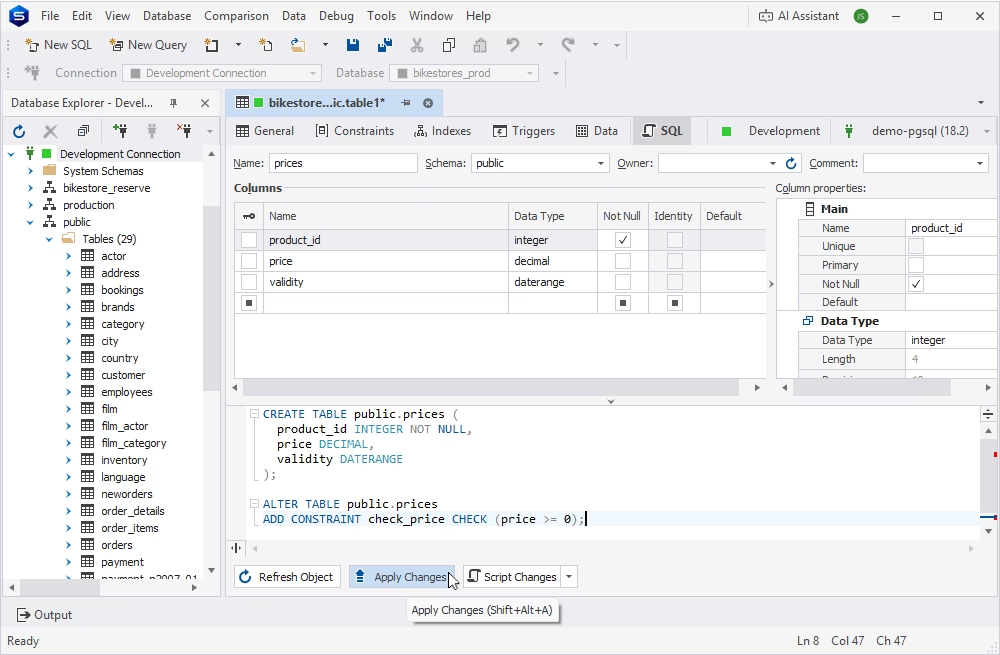
In dbForge Studio for PostgreSQL, you can create and modify tables in a visual interface without writing SQL. The Studio allows you to define data types and apply constraints to columns or entire tables. All types of constraints are supported, including foreign keys, which enable the management of relationships between tables.
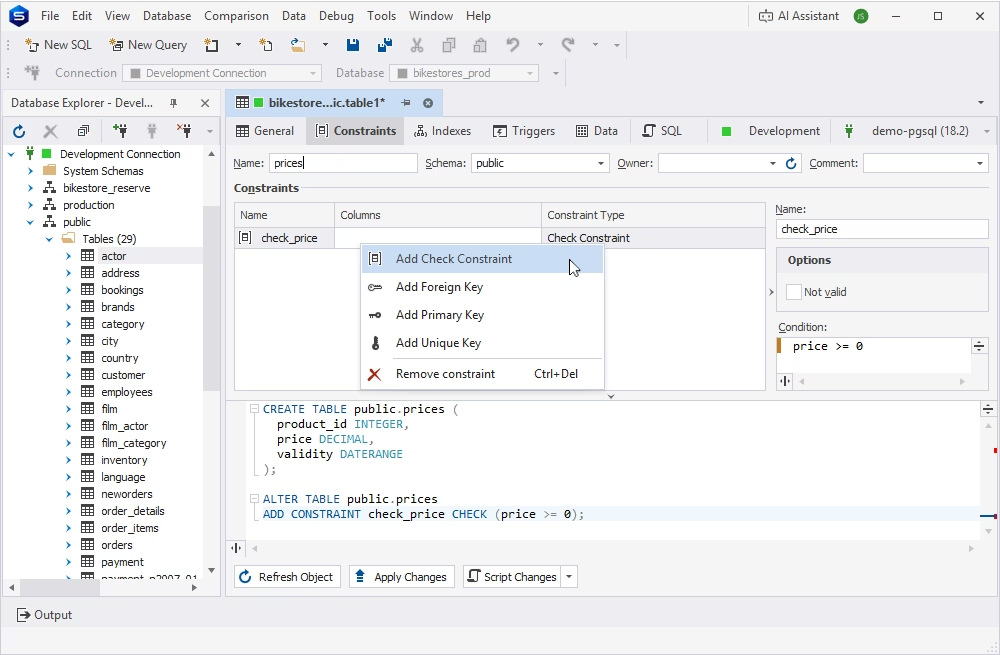
The Studio's SQL Editor helps you write and test the SQL behind CHECK, UNIQUE, EXCLUDE, and temporal constraints directly, with syntax highlighting and code completion to assist you even with the most complex syntax.
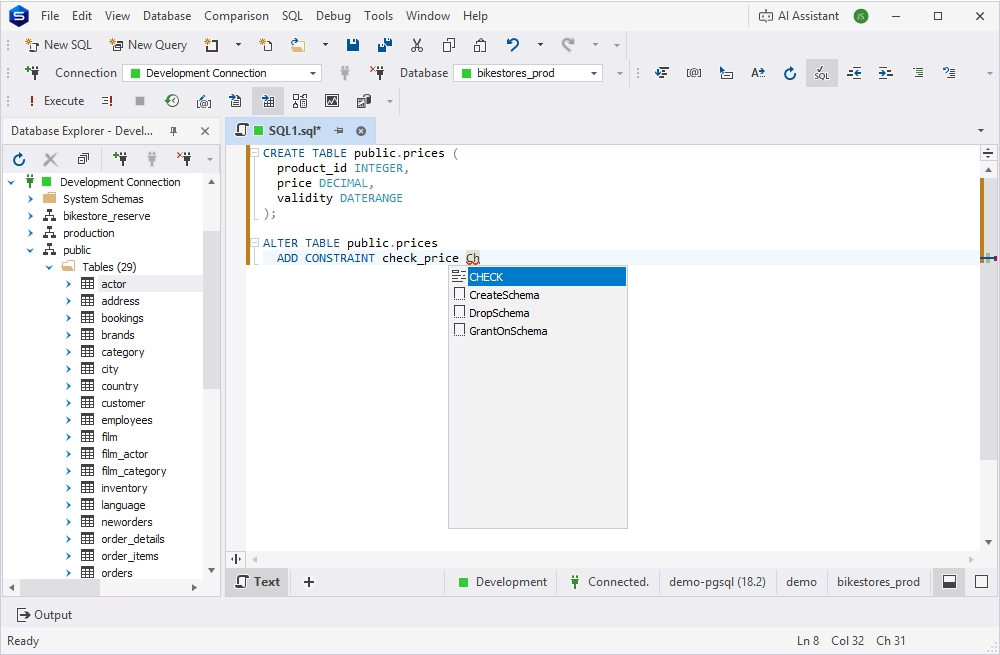
Before a schema change is applied to a shared database, you can review it in detail. This gives you a chance to catch a missing, overly permissive, or incorrectly scoped constraint before it reaches other environments.
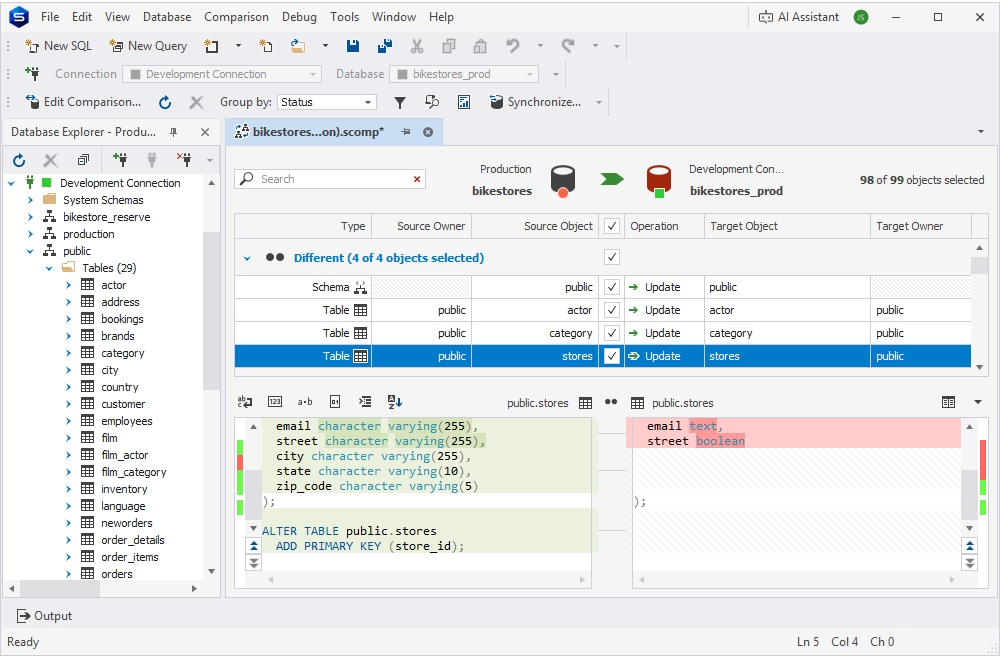
Schema comparison provided in dbForge Studio for PostgreSQL lets you compare databases in different environments side by side, helping you catch a missing or mismatched constraint before it causes a production issue.
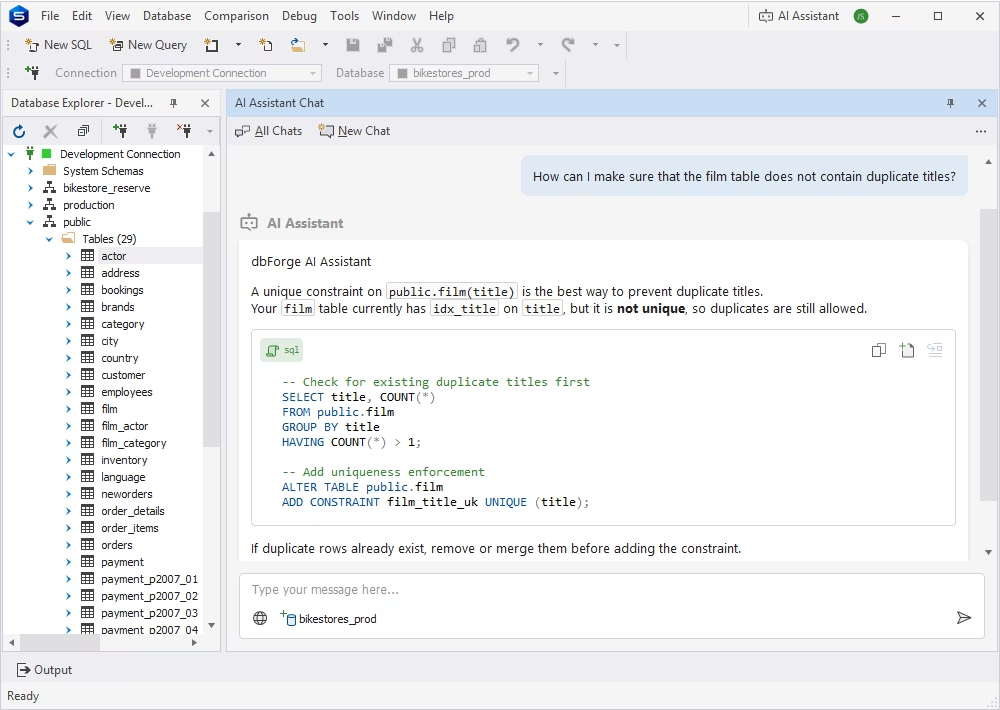
The integrated AI Assistant can explain complex SQL queries, translate plain text into valid SQL, and help you troubleshoot errors and inconsistencies.
Here is a concise checklist that you can use to make the most of PostgreSQL constraints—a useful feature that helps you maintain data integrity.
Give each important table a primary key to uniquely identify every row. This provides a reliable identifier for records and makes it easier to create relationships with other tables.
Use NOT NULL when a column must always contain a value. Enforcing this at the database level prevents incomplete records from being inserted by applications or users.
Use CHECK constraints to enforce straightforward rules directly in the database, such as ensuring that a price is not negative or that an age falls within an acceptable range.
Define foreign keys when records depend on related data in another table. They help prevent orphaned records and ensure that relationships between tables remain valid.
Use descriptive, consistent names. Clear names make constraint violations easier to understand and simplify database maintenance.
Test both data that should be accepted and data that should be rejected. This confirms that constraints enforce the intended rules and helps catch mistakes in the schema before deployment.
When adding a constraint to an existing table, first check whether current records already comply with the new rule. Cleaning up invalid data beforehand can prevent failed schema changes and unexpected deployment issues.
If records are valid only during specific periods, consider temporal features such as WITHOUT OVERLAPS and PERIOD. They can help prevent conflicting time ranges and maintain valid relationships across historical or time-based data.
Explain the purpose of constraints that represent significant business rules or complex relationships. Good documentation helps developers and DBAs understand why a rule exists and reduces the risk of accidentally weakening or removing important data protections.
PostgreSQL constraints are essential for reliable schema design and data quality: they enforce the rules a table must follow, no matter which application, script, or person is writing to it. Temporal constraints extend this same protection to historical and time-bounded data, giving teams a declarative way to maintain data integrity over time instead of relying on custom triggers.
If you are designing or reviewing a constrained schema, dbForge Studio for PostgreSQL can help you build, test, and review your tables and constraints visually, alongside the rest of your PostgreSQL development workflow.
Constraints are rules enforced by PostgreSQL that determine what data is allowed in a table. They protect data integrity by rejecting invalid inserts, updates, and deletes at the database level, regardless of which application or script is writing the data.
PostgreSQL supports NOT NULL, CHECK, UNIQUE, PRIMARY KEY, FOREIGN KEY, and EXCLUDE constraints. Starting with version 18, PostgreSQL also supports temporal constraints for enforcing valid-period data: PERIOD and WITHOUT OVERLAPS.
A PRIMARY KEY uniquely identifies each row in a table and does not allow NULL values; a table can have only one primary key. A PostgreSQL UNIQUE constraint also prevents duplicate values, but a column with a UNIQUE constraint can contain NULL values, and a table can have several UNIQUE constraints.
A FOREIGN KEY constraint links a column, or a set of columns, in one table to a column in another table, usually its primary key. PostgreSQL rejects any insert or update that would create a value in the referencing column without a matching value in the referenced table.
An exclusion (EXCLUDE) constraint prevents two rows from having conflicting values according to one or more specified operators. It is most commonly used with range types to stop overlapping periods, such as two bookings for the same room at the same time.
Temporal constraints are declarative constraints that enforce data integrity over time. They let PostgreSQL validate valid-period data, such as subscriptions, contracts, or pricing history, without relying on custom triggers or application logic.
WITHOUT OVERLAPS is a clause used with PRIMARY KEY and UNIQUE constraints on range or multirange columns. It stops PostgreSQL from accepting two rows for the same entity whose time periods overlap, for example, two active prices for the same product.
A time-based foreign key uses the PERIOD clause to make sure a child record references a parent record that is valid during the required period, not just a parent record that exists. This is useful for cases such as an order that must reference a price that was valid on the order date.
You can query the information_schema.table_constraints view for a general list, or query pg_constraint with the pg_get_constraintdef function to see the full definition of each constraint, including its exact condition or referenced columns.
Yes. dbForge Studio for PostgreSQL lets you design tables and relationships visually, write and test constraint SQL, review schema changes, compare development, staging, and production databases, and use AI assistance to explain SQL and troubleshoot constraint errors.