

dbForge Studio for PostgreSQL
AI-powered IDE for database development, management, and data analysis across PostgreSQL and related cloud services
PostgreSQL Query Builder is a convenient visual tool for creating SQL queries. Instead of writing SQL code manually, you can build SELECT statements, create JOINs, filter and sort tables simply by dragging and dropping, while the Query Builder for PostgreSQL takes care of the SQL syntax validation in the background.
A visual query builder helps developers and data experts accelerate their processes and improve the quality and productivity of their work. It turns complex query creation into a more intuitive and clearer process, making it accessible even for people with no technical background. Building queries via a graphic interface provides users with a structured view, displaying tables and their relationships in an easily understandable format.
Writing SQL manually is not only time-consuming but also error-prone, especially for complex queries. A query builder, where you can put together SQL queries by dragging and dropping components across the canvas, can save your time while reducing the probability of human errors. When you build queries in a visual tool, you can enjoy the following benefits:
When you build queries in a visual environment by putting together components to represent the business logic behind your query, the Postgres query builder automatically generates the corresponding SQL in the background. As a result, you get clean and consistent SQL queries that are easier to use and interpret and see how tables connect and interact:
Query visualization becomes a significant advantage when SQL needs to be reviewed and managed by multiple stakeholders—developers, DBAs, or data analysts. Not all of them may possess equal experience of parsing raw SQL, especially long and complex statements, and representing a query as a graphic diagram can make review and collaboration smoother:
The table below summarizes the most important capabilities of Query Builder, available in dbForge Studio, an all-encompassing PostgreSQL IDE that covers a variety of database development and management tasks.
| Feature | What it means | Why it matters | What to look for in a tool |
|---|---|---|---|
| Visual query diagram | A drag-and-drop workspace for adding tables, selecting columns, and building query logic visually | Diagrams help users understand query structure faster and reduce the need to write everything manually | Diagram-based query design, linked tables, visible relationships, drag-and-drop fields, and side-by-side visual/code workflow |
| JOIN builder and relationship handling | Tools for creating INNER JOIN, LEFT JOIN, RIGHT JOIN, and other JOINs between related tables | Multi-table queries are one of the main reasons teams use query builders for PostgreSQL; besides, strong JOIN support reduces errors and saves time | Easy JOIN configuration, automatic relationship detection, editable JOIN conditions, and support for multiple JOIN types |
| Filters, sorting, and grouping | Visual controls for WHERE, ORDER BY, GROUP BY, and HAVING clauses | These features are essential for turning raw table data into useful, targeted result sets | Condition builder, multiple filter rules, sort direction controls, grouping support, aggregate functions, and HAVING clause support |
| Support for subqueries and nested logic | Ability to create nested queries, derived tables, and more advanced query structures | This feature is important for reporting, complex filtering, reusable logic, and extracting data from layered conditions | Subquery support in SELECT, FROM, and WHERE, nested logic handling, and readable visual representation of complex structures |
| SQL preview and manual editing | Generation of SQL that users can inspect, edit, and reuse outside the visual builder | A good PostgreSQL query builder should support both visual design and direct SQL control | Live SQL preview, editable generated code, syntax highlighting, formatting, and the ability to switch between the visual and text modes |
| Query execution and result viewing | Ability to run the generated query immediately and inspect returned data in the same interface | This feature speeds up testing, validation, and iteration without forcing users to switch to another tool | One-click execution, results grid, pagination or row limits, quick refresh, export or copy options, and error visibility |
| Query profiling and optimization tools | Features for analyzing execution plans, runtime statistics, and query performance | Visual query building is useful, but production work also requires performance awareness | Query plan viewer, execution statistics, profiling tools, cost analysis, and performance recommendations or diagnostics support |
Query Builder can help database developers, DBAs, and data analysts accelerate their work and achieve higher clarity of SQL queries. By providing a graphical representation of complex queries, JOINs, filters, and data aggregations, Query Builder allows users to implement sophisticated business logic with minimal manual SQL coding.
Let's see how the use of Query Builder assists database users in different roles.
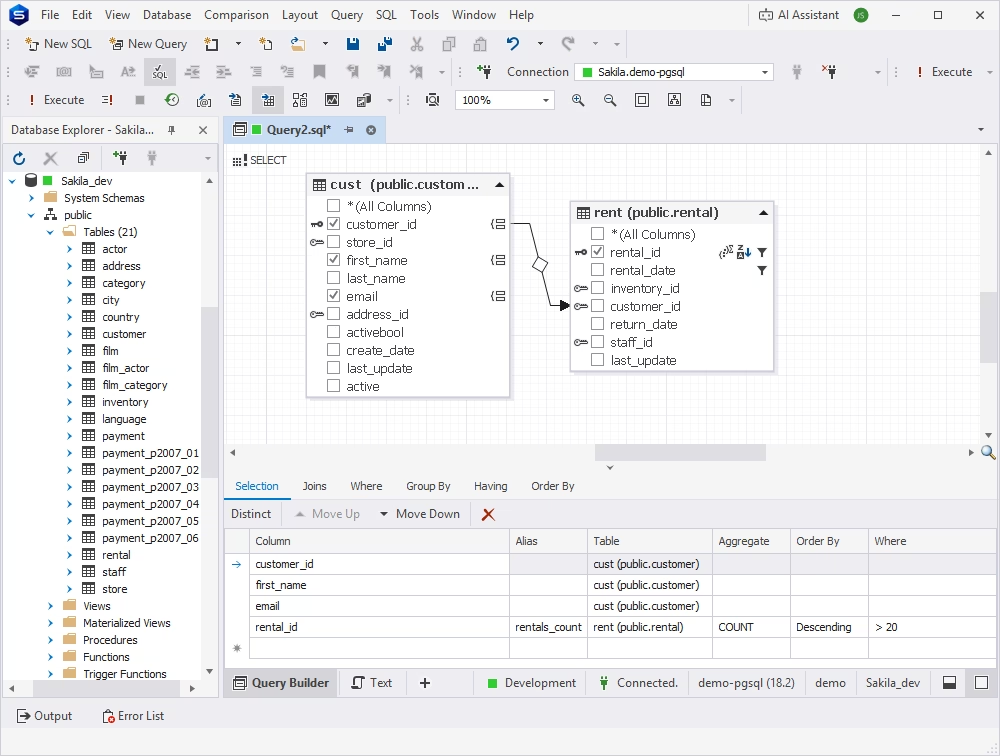
Using Query Builder, developers can join tables, apply different filters, and select filtered data as required by the application. The following query is intended to return a list of customers with their corresponding number of rentals starting from a certain date. This query scans two tables, applies filtering by date, groups the results for each customer, and only returns a list of customers who made more than 20 rentals within the specified period of time.
SELECT
    cust.customer_id,
    cust.first_name,
    cust.email,
    COUNT(rent.rental_id) AS rentals_count
FROM customer AS cust
JOIN rental AS rent
    ON cust.customer_id = rent.customer_id
WHERE rent.rental_date >= '2005-05-01'
GROUP BY cust.customer_id,
         cust.first_name,
         cust.email
HAVING COUNT(rent.rental_id) > 20
ORDER BY rentals_count DESC;
The same logic can be implemented by using Query Builder's graphical interface:
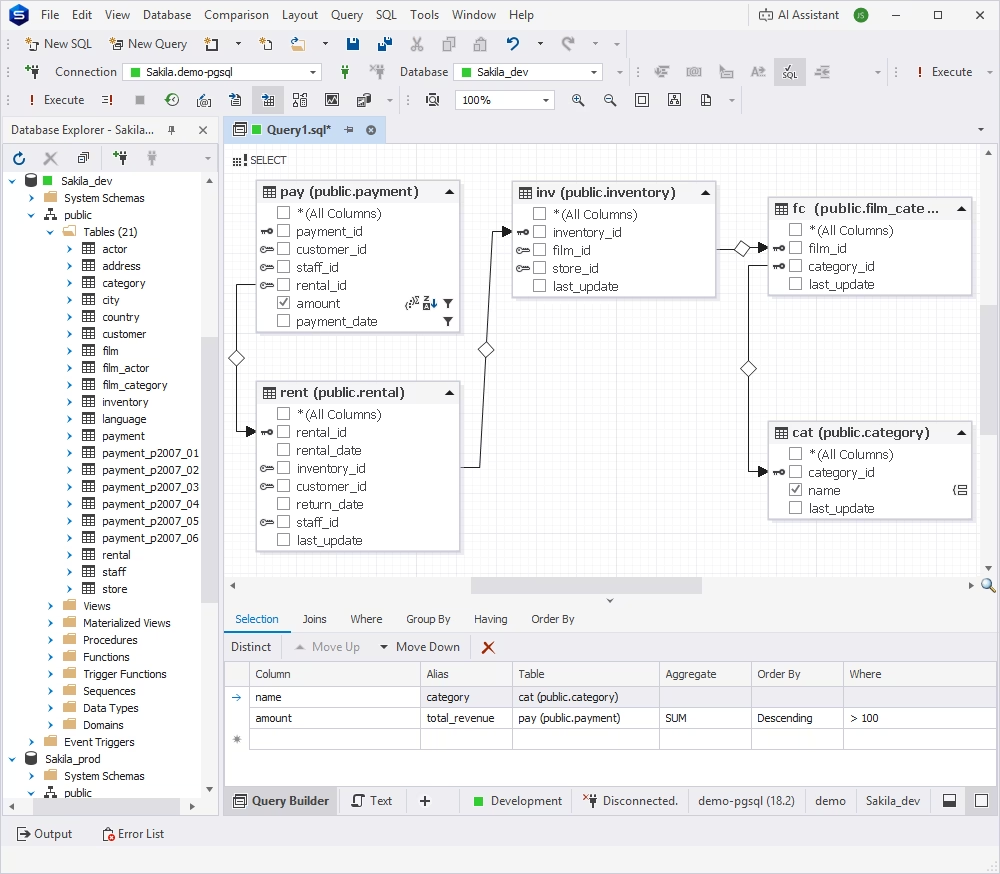
For data analysts, Query Builder represents a convenient method of extracting data for their reports without writing SQL queries manually. As an example, let's look at the following query that aggregates payment and rental data by film category, filters data by date, groups it by category, and calculates the total payment amount, only selecting the categories with the amount exceeding the specified figure:
SELECT
  cat.name AS category,
  SUM(pay.amount) AS total_revenue
FROM payment AS pay
  JOIN rental AS rent
    ON pay.rental_id = rent.rental_id
  JOIN inventory AS inv
    ON rent.inventory_id = inv.inventory_id
  JOIN film_category AS fc
    ON inv.film_id = fc.film_id
  JOIN category AS cat
    ON fc.category_id = cat.category_id
WHERE pay.payment_date >= '2005-05-01'
GROUP BY cat.name
HAVING SUM(pay.amount) > 100
ORDER BY total_revenue DESC;
With Query Builder, the same data can be retrieved by dragging and dropping objects on the canvas to build the query:
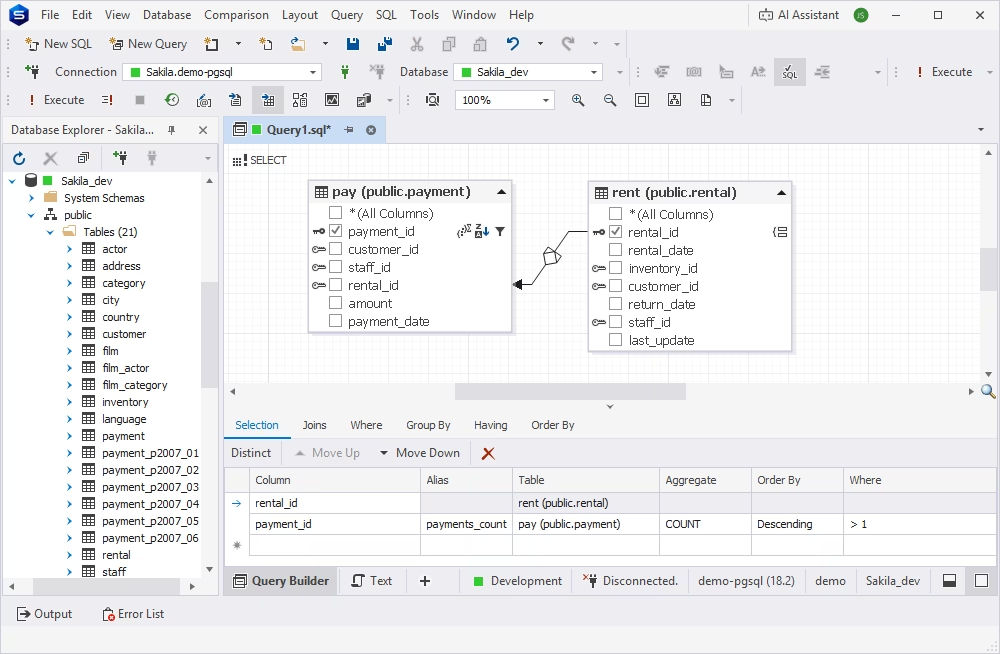
DBAs and database teams can use Postgres Query Builder in troubleshooting, testing, validation, and data review in PostgreSQL environments. The query below shows how Query Builder can create a statement that checks data validity and detects anomalies. It joins the rental and payment tables, groups rental data, and counts the related payments. Then, by selecting the records with more than one payment, the query indicates those that may have potential issues or business logic peculiarities:
SELECT
  rent.rental_id,
  COUNT(pay.payment_id) AS payments_count
FROM rental AS rent
  LEFT JOIN payment AS pay
    ON rent.rental_id = pay.rental_id
GROUP BY rent.rental_id
HAVING COUNT(pay.payment_id) > 1
ORDER BY payments_count DESC;
Query Builder makes the implementation of this logic easier by enabling a visual creation of the same query:
A query builder is more than a tool for visual query creation. To be truly effective, it must be an integral part of a broader environment that supports end-to-end SQL development and database management—design, coding, testing, troubleshooting, deployment, and data use. From this point of view, dbForge Studio for PostgreSQL ticks all the boxes—it is a complete IDE for developing, administering, and maintaining PostgreSQL databases with a full-featured query builder on board.
The Studio's Query Builder allows you to:
With the underlying SQL generated and updated in real time, your development iterations are much faster. You can focus on implementing the business logic rather than repeatedly editing and testing your queries.
A visual query builder, such as the one featured in dbForge Studio for PostgreSQL, mitigates the common risks of manual SQL coding: syntax errors and incorrect logic. With the Query Builder, you can:
As a result, you get clean, structured queries with fewer errors and, therefore, spend less time debugging your code.
Query Builder is part of a comprehensive database management environment. By helping you create queries faster and better, it accelerates and improves the entire database development workflow. In addition to assisting you in designing your SQL queries, the tool enables you to:
Being a part of a unified PostgreSQL management IDE, Query Builder supports you across the entire query development lifecycle, simplifying SQL tasks and reducing the number of errors.
Building SQL queries does not necessarily have to be complex, slow, or error-prone. Even if your line of work does not involve a deep understanding of SQL, you can manage databases and data easily with a range of convenient, user-friendly features offered by dbForge Studio for PostgreSQL. Query Builder helps you design complex queries visually, work more efficiently with related tables and JOINs, and generate accurate SQL faster with far less manual effort.
Whether you are developing analytical reports, reviewing query logic, or managing large PostgreSQL environments, Query Builder can simplify your workflows and improve productivity by saving the time needed to create complex queries and helping you avoid errors. If you are looking for a solution that can accelerate your SQL development and analytical processes, download dbForge Studio for PostgreSQL that includes Query Builder as well as lots of other useful features.
A PostgreSQL query builder is a tool for creating SQL queries in a visual interface by dragging and dropping database objects. Such a tool allows you to build even complex queries without writing SQL manually.
Yes, a visual query builder can be useful even for experienced SQL developers, for it can improve their productivity by providing better visibility into the business logic implemented in their queries and reducing the number of errors that can occur during manual coding.
Yes, a query builder handles complex relationships between tables and objects. When you create a query in a visual interface, the tool generates the corresponding SQL in the background, validating the syntax at the same time.
Absolutely. In an advanced query building tool, such as Query Builder integrated in dbForge Studio for PostgreSQL, you have the option to view and edit the SQL code generated automatically during the visual query creation. Select the Text tab in the Query Builder window to see the SQL corresponding to the visual query design.
Yes. Query Builder helps you see and understand the structure of SQL queries: JOINs, table relationships, and filtering. When represented as a visual diagram, structural inefficiencies (incorrect JOINs, unnecessary tables, poor filtering logic) are easier to identify and correct, which ultimately improves query performance.