What Is Supabase? Features, Pricing, and Use Cases
"Supabase pricing", "What is Supabase", and "How Supabase auth works" are some of the most frequently searched questions from developers who are looking for modern backend solutions. Supabase is an open-source Firebase alternative that provides everything you need to build scalable applications, including PostgreSQL-based databases, authentication, real-time APIs, and storage, all on a single platform.
If you're wondering about its pricing, how its free tier limits work, or what makes its features stand out, you're in the right place. This guide provides a comprehensive Supabase overview. Understanding how it works will help you decide whether it's the right backend for your project.
Let's get started.
What is Supabase?
Supabase is a backend-as-a-service (BaaS) development platform that provides all you need to build and scale applications without managing infrastructure. At its foundation, it offers fully managed PostgreSQL, but it goes much beyond that by integrating critical backend utilities into a single unified platform.
Additionally, each Supabase project comes with a powerful Postgres database and built-in services like authentication (Supabase Auth), auto-generated APIs, real-time subscriptions, and file storage. You can instantly turn your database into a secure, scalable Supabase backend without writing complex server-side code from scratch.
Supabase is often described as an open-source alternative to Firebase. However, while Firebase relies on proprietary systems, Supabase is built on open standards—especially PostgreSQL—giving you more transparency, flexibility, and control over your data.
How Supabase works
Supabase works by placing PostgreSQL at the center of your backend and layering essential services like APIs, authentication, storage, and serverless functions around it. Instead of hiding the database behind abstractions, Supabase reveals its full potential, giving you direct access while still automating the heavy lifting.
At a high level, the Supabase architecture looks like this:
- Supabase Database (PostgreSQL) forms the heart of every project
- Supabase API is generated automatically from your database schema
- Authentication (Auth) is closely integrated with the database
- Realtime engine streams live updates from database changes
- Storage manages files and media assets
- Edge Functions handle custom server-side logic
So, if you've been wondering whether Supabase uses PostgreSQL, the answer is yes, and it gives you full control over it.
Postgres at the core
Every Supabase project comes with a comprehensive PostgreSQL database at its foundation. This isn't a limited or abstracted version; it's a real Postgres instance with support for extensions, SQL queries, indexing, and advanced features.
Because Supabase is built directly on Postgres:
- You can use standard SQL for querying and data manipulation
- Your data remains portable (no vendor lock-in)
- You get features like triggers, functions, and Row Level Security (RLS)
This makes the Supabase database service ideal for developers who want both flexibility and reliability in production-grade applications.
Instant APIs from your schema
As soon as you create tables, Supabase exposes them through RESTful APIs. It automatically generates APIs directly from your database schema, eliminating the need to manually build backend endpoints.
Here's what that means in practice:
- Each table becomes an API endpoint instantly
- You can perform CRUD operations without writing backend code
- APIs are secured using built-in authentication and permissions
In addition to REST, Supabase also supports GraphQL through extensions and integrations, giving you more flexibility in how you query your data.
How Auth connects to your database
Supabase Auth is deeply integrated with your PostgreSQL database, making authentication both secure and flexible. User data is stored in a dedicated auth schema, separate from your main application tables.
What makes this powerful:
- Auth integrates smoothly with Row Level Security (RLS) to control access
- You can define fine-grained permissions directly in SQL
- You can easily link user identities to your application data
This tight integration allows you to build secure applications where access control is enforced at the database level, not just in your app logic.
How Realtime works
Supabase Realtime enables live updates by streaming changes directly from your database to connected clients. Instead of polling for updates, your app can subscribe to changes and react instantly.
Key capabilities include:
- Subscriptions: Listen for inserts, updates, and deletes in real time
- Presence: Track which users are online or active
- Broadcasts: Send messages between clients
- Live updates: Build chat apps, dashboards, and collaborative tools
This makes Supabase an excellent choice for dynamic, real-time applications without needing complex infrastructure.
Where Edge Functions fit
Supabase Edge Functions allow you to run server-side logic close to your users, enabling faster and more scalable applications. These functions are serverless and can be triggered by events or external requests.
Common use cases include:
- Handling webhooks from third-party services
- Running custom backend logic securely
- Integrating with external APIs
- Processing background jobs
By integrating Edge Functions with the rest of the Supabase backend, you can expand your application's capabilities beyond basic CRUD operations and build fully customized workflows.
Core Supabase features
From the explanation so far, it is safe to say that instead of juggling multiple tools, Supabase provides a unified platform that simplifies development while keeping you in full control of your data.
Below is a clear and scannable breakdown of the core Supabase features:
| Feature | What it is | Key capabilities | Typical use cases |
|---|---|---|---|
| Supabase Database | A fully managed PostgreSQL database at the core of Supabase | SQL queries, relational data modeling, extensions (PostGIS, pgvector), table editor, schema management | App data storage, analytics dashboards, SaaS backends, structured data apps |
| Supabase Auth | Built-in authentication and user management system | Email/password login, magic links, OTP, social providers (Google, GitHub), SSO, user roles | User registration, login systems, access control, multi-tenant apps |
| Supabase Storage | Scalable file storage system with access control | Buckets, large file uploads, CDN delivery, access policies, public/private files | Media storage, document management, avatars, file-based apps |
| Supabase Realtime | Engine for live data synchronization using subscriptions | Database change listeners, presence tracking, broadcast events, WebSocket support | Chat apps, live dashboards, notifications, collaborative tools |
| Supabase Edge Functions | Serverless TypeScript functions running globally | Event-driven logic, API endpoints, background jobs, integrations, low-latency execution | Webhooks, backend logic, third-party integrations, automation |
| Supabase APIs | Auto-generated REST and GraphQL APIs from your database | Instant REST API, GraphQL support, client SDKs (JS, Python, etc.), management API | Frontend/backend communication, mobile apps, API-driven apps |
| Supabase CLI & tools | Developer tooling for local development and deployment | Local Supabase instance, migrations, schema versioning, project management | Dev workflows, CI/CD pipelines, environment setup |
| Supabase logs & monitoring | Built-in logging and observability tools | Query logs, API logs, error tracking, performance monitoring | Debugging, performance tuning, production monitoring |
| Supabase Vector & AI features | Support for vector embeddings and AI workloads | The pgvector extension, similarity search, AI integrations, embeddings storage | AI apps, semantic search, recommendation systems |
Together, these Supabase features make it a powerful, all-in-one backend tool that is ideal for building everything from simple apps to complex, data-driven platforms.
Does Supabase use PostgreSQL?
Yes. Supabase uses PostgreSQL as its core database, and this approach is one of its biggest advantages. Unlike many backend platforms that rely on NoSQL systems, the Supabase Postgres database is a fully featured, relational database that gives you structure, flexibility, and long-term scalability.
Supabase gives you all the benefits of a robust relational database, including:
- Structured data modeling with tables, relationships, and schemas
- SQL queries for precise and powerful data access
- JOINs to combine data across multiple tables
- Transactions to ensure data consistency and reliability
- Extensions like PostGIS (geospatial) and pgvector (AI/embeddings)
These features make Supabase an excellent choice for applications that require structured, relational data.
Why PostgreSQL matters in Supabase
Using PostgreSQL allows Supabase to support complex data relationships that are difficult to manage in NoSQL systems. For example:
- SaaS applications with users, subscriptions, and permissions
- Analytics dashboards that require aggregations and reporting
- Internal tools and admin panels with relational workflows
- Apps with connected data, like e-commerce platforms or CRMs
Because everything is relational, you can model real-world relationships more naturally and query them efficiently using SQL.
The tradeoff: Postgres vs NoSQL
While Supabase Postgres is powerful, it's important to understand the tradeoffs. Relational databases like PostgreSQL are ideal for structured data and complex queries, but they may require more upfront schema design compared to NoSQL alternatives.
- PostgreSQL (Supabase) works best for structured data, relationships, and consistency
- NoSQL (e.g., Firebase) is better for flexible, unstructured, and rapidly changing data
Supabase doesn't try to replace every use case. Rather, it focuses on developers who want the reliability of SQL, the flexibility of open-source tools, and the ability to scale without being locked into proprietary systems.
Therefore, if your application depends on relationships, data integrity, and powerful querying, Supabase's PostgreSQL foundation is a major strength.
What is Supabase used for?
Supabase is used to build modern applications faster by providing a full backend for databases, authentication, real-time features, file storage, and APIs. Whether you're launching a startup, building internal tools, or creating AI-powered apps, Supabase helps you skip backend complexity and focus on product development.
Here are the most common Supabase use cases and what they look like in practice:
| Use case | What it means | Key capabilities | Example applications |
|---|---|---|---|
| Web and mobile app backends | Supabase acts as a full backend for applications without needing custom server infrastructure | PostgreSQL database, auto-generated APIs, client SDKs, Edge Functions | SaaS platforms, MVP startups, admin dashboards, mobile apps, CRUD-based tools |
| Authentication and user management | Built-in system to handle user identity, access control, and secure data access | Email/password login, magic links, OTP, social auth, SSO, Row Level Security (RLS) | User accounts, membership platforms, multi-tenant SaaS, protected dashboards |
| Realtime applications | Apps that require instant updates and live data synchronization between users | Realtime, WebSockets, presence tracking, event broadcasting | Chat apps, live notifications, multiplayer apps, collaborative tools, live analytics dashboards |
| File-heavy products | Applications that need to store, manage, and deliver files efficiently | Storage buckets, file upload APIs, access policies, CDN delivery | Media platforms, document management systems, profile image storage, content-driven apps |
| AI and vector-based projects | Apps that rely on embeddings, similarity search, or AI-driven features | Support for pgvector, vector search, database extensions, integration with AI tools | Semantic search engines, recommendation systems, AI assistants, RAG applications |
| API-driven applications | Projects where the frontend communicates directly with the backend via APIs | Auto-generated REST APIs, GraphQL support, client libraries, secure endpoints | SPA apps, mobile frontends, microservices, integrations with third-party services |
| Internal tools and dashboards | Tools built for teams to manage data, workflows, and reporting | SQL editor, dashboard UI, role-based access, fast backend setup | Admin panels, reporting systems, CRM-like tools, analytics dashboards |
These Supabase use cases demonstrate its versatility as a backend platform. From simple CRUD apps to complex real-time and AI-driven systems, Supabase provides the building blocks to launch faster while maintaining full control over your PostgreSQL database.
Supabase pricing explained
Supabase pricing starts with a free tier and scales through Pro, Team, and Enterprise plans based on your usage. As your app grows, costs depend on factors like database compute, storage, bandwidth (egress), monthly active users (MAU), Edge Functions, and Realtime usage.
At a high level, Supabase applies a usage-based pricing model, where you pay for what you consume beyond the included limits. Paid plans also come with $10 in compute credits, which helps offset initial usage before additional charges apply.
Let's break down each plan so you can understand what you're getting.
Free tier
The Supabase free tier is ideal for learning, prototyping, and small projects. It gives you access to most core features, but with usage limits that may not support production-scale apps.
Key highlights:
- Free access to the Supabase database, Auth, Storage, and APIs
- Limited compute resources and performance
- Limits on database size, file storage, and bandwidth
- Limited monthly active users (MAU) and real-time usage
This plan is perfect for:
- Testing ideas and MVPs
- Personal projects
- Learning how Supabase works
However, once your app starts growing or handling real users, you'll likely need to upgrade due to free tier limits.
Pro plan
The Pro plan starts at $25/month and is designed for production applications. It removes many of the restrictions of the free tier and introduces scalable performance.
What you get:
- $10 monthly compute credits included
- Higher database performance and scaling options
- Increased limits for storage, bandwidth, and MAU
- Better support for Edge Functions and real-time workloads
This plan is best for:
- Startups launching real products
- SaaS applications
- Apps with growing user bases
Costs increase based on usage, especially if your app exceeds the included resources.
Team plan
The Team plan builds on Pro by adding collaboration, security, and team management features. It's designed for organizations working on shared projects.
Key additions:
- Role-based access for team members
- Project-level permissions and collaboration tools
- Enhanced security and audit capabilities
- Centralized billing and management
Typical use cases:
- Growing startups with multiple developers
- Product teams managing shared environments
- Organizations needing better access control
Pricing is higher than Pro and scales based on team size and usage.
Enterprise plan
The Enterprise plan is tailored for large-scale applications that need advanced performance, security, and support. It offers custom pricing based on your specific requirements.
What it includes:
- Dedicated infrastructure and custom scaling
- Advanced security, compliance, and SLAs
- Priority support and account management
- Custom limits for compute, storage, and API usage
Best suited for:
- Large companies and high-traffic apps
- Mission-critical systems
- Enterprises with strict compliance needs
In summary, Supabase pricing starts free but scales with your application. While the free tier is excellent for getting started, production apps need a paid plan. Understanding the limits of each plan helps you avoid surprises as your app grows.
Supabase vs other backend platforms
If you're choosing between Supabase and its alternatives, the key question is whether you want a relational, SQL-based backend or a NoSQL/event-driven approach. Supabase stands out with its PostgreSQL foundation and open-source positioning, while competitors like Firebase focus on proprietary NoSQL systems.
Here's a simple comparison to help you decide:
| Platform | Core database model | Main built-in modules | Best fit | Main advantage |
|---|---|---|---|---|
| Supabase | PostgreSQL (relational) | Database, Auth, Storage, Realtime, Edge Functions, auto-generated APIs | SaaS apps, dashboards, CRUD products, apps with relational data | Strong SQL/Postgres foundation, open-source positioning, built-in backend stack in one platform |
| Firebase | Firestore / NoSQL document database | Auth, Firestore, Realtime Database, Storage, Cloud Functions | Mobile apps, event-driven apps, Google Cloud-centric products | Mature ecosystem, strong mobile tooling, deep integration with Google services |
| Appwrite | Document / table-style backend services | Auth, Databases, Storage, Functions, Messaging, Realtime, APIs | Teams that want a broad backend platform with strong self-hosting options | Full backend stack with Auth, Databases, Storage, Functions, Messaging, plus REST and GraphQL support |
| PocketBase | SQLite (embedded) | Realtime, Auth, File Storage, Admin Dashboard, REST API | Small apps, prototypes, internal tools, lightweight self-hosted projects | Extremely lightweight: open-source backend in one file with realtime, auth, storage, and admin UI |
How to choose the right platform
Each backend platform shines in different scenarios:
- Choose Supabase if you need a structured, SQL-based backend with strong relational data support
- Choose Firebase if you're building mobile-first or event-driven apps within the Google ecosystem
- Choose Appwrite if you want flexibility with self-hosting and a broader backend toolkit
- Choose PocketBase if you need something lightweight and easy to deploy for small-scale projects
Put simply, Supabase is ideal for developers who prefer SQL, want to avoid vendor lock-in, and need a complete backend with minimal setup. However, the best choice ultimately depends on your application's architecture, scale, and long-term requirements.
How dbForge Studio for PostgreSQL can help teams working with Supabase
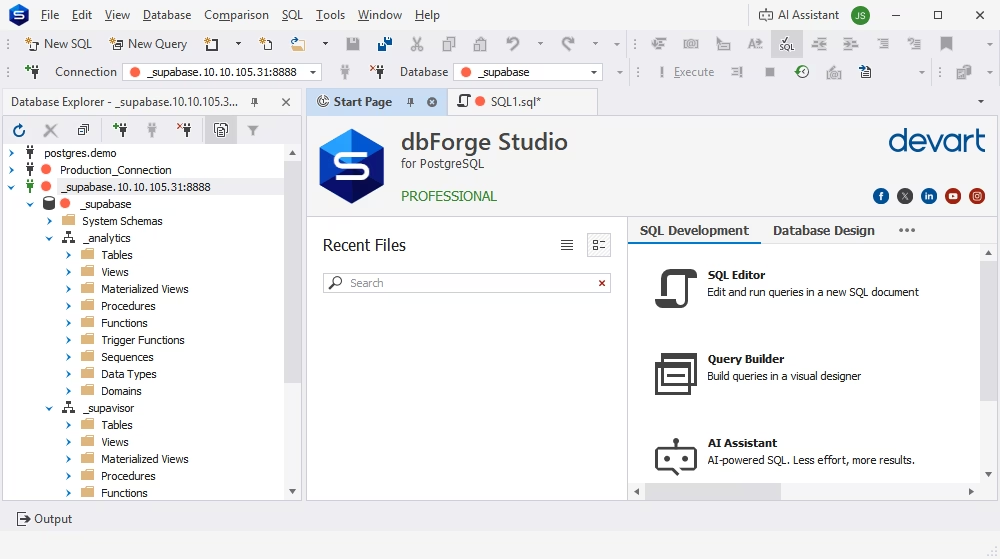
While Supabase offers a convenient browser-based interface and managed backend, it doesn't replace the need for advanced tooling, especially for complex or production-grade projects. This is where dbForge Studio for PostgreSQL comes in.
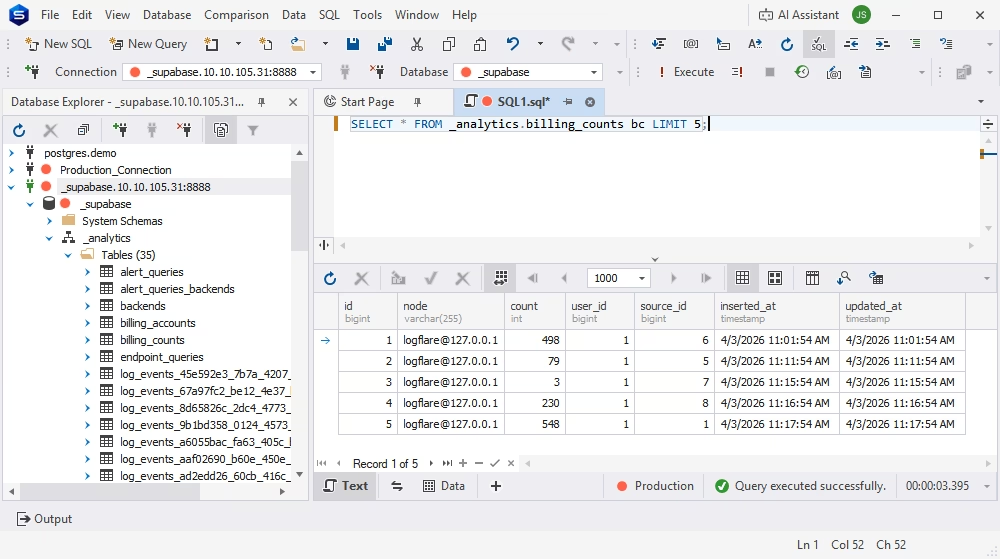
dbForge Studio enhances how teams work with Supabase by providing a powerful, dedicated PostgreSQL IDE for deeper database development, management, and optimization. Since every Supabase project is built on PostgreSQL, managing it with dbForge Studio unlocks more control and efficiency in your workflow. Moreover, the Studio makes the question "how to connect to Supabase?" easy to answer, since it lets you connect to Supabase just like you would to a native PostgreSQL database.
Here's where dbForge Studio for PostgreSQL adds real value:
- Writing and optimizing complex SQL queries: dbForge Studio for PostgreSQL stands out as one of the top IDEs, providing advanced features beyond basic queries. These include SQL editing, formatting, and performance tuning tools, which are especially useful when working with large datasets or complex JOINs in your Supabase database.
- Browsing and managing database schemas: With dbForge Studio for PostgreSQL, you can easily navigate tables, views, functions, and relationships in a structured interface. This improves visibility compared to browser-only tools and helps teams understand database architecture faster.
- Comparing and synchronizing database structures and data: dbForge Studio helps you identify differences between environments (e.g., staging vs production) and sync them efficiently. This is critical for maintaining consistency in growing Supabase projects.
- Improving performance: No more spending hours debugging queries. With dbForge Studio for PostgreSQL, you can analyze execution plans, detect bottlenecks, and optimize slow queries. This level of insight is essential for scaling applications and maintaining performance.
- Managing indexes, constraints, and relationships: dbForge Studio for PostgreSQL also makes designing and modifying database structures more effective, ensuring data integrity and better query performance.
Why it matters for Supabase teams
Supabase simplifies backend development, but as your application grows, so does the complexity of your database. Relying solely on a web interface can limit your ability to debug, optimize, and scale efficiently.
By integrating dbForge Studio for PostgreSQL into your workflow, you gain:
- More control over your Supabase Postgres database
- Better visibility into schemas, queries, and performance
- Higher productivity for developers and database administrators
While Supabase handles the infrastructure, dbForge Studio for PostgreSQL helps you fully leverage the power of PostgreSQL, especially in advanced, data-intensive, or production environments.
Conclusion
Supabase is a powerful PostgreSQL backend platform that combines database, authentication, APIs, real-time features, storage, and edge functions into a single, integrated package. It stands out as an open-source Firebase alternative that uses a relational PostgreSQL foundation rather than a NoSQL-first strategy. This makes it great for SaaS apps, dashboards, internal tools, and any application that relies on organized data and SQL.
Supabase pricing comprises a free tier, with premium plans rising based on usage. However, as your software grows, it is important to monitor compute, storage, and bandwidth to prevent unexpected charges.
Finally, Supabase is suitable for a wide range of modern use cases, including basic MVPs and large, real-time, AI-powered apps. If you value open standards, want to avoid vendor lock-in, and prefer to work with PostgreSQL, Supabase is a viable option.
If you're ready to dig deeper, discover how to use Supabase in real-world projects, and compare Supabase to Firebase, you will need the best IDE you can get, and we can suggest dbForge Studio for PostgreSQL as a worthwhile candidate. Download it for a free 30-day trial and see it in action today!
FAQ
Supabase is an open-source backend platform that helps you build applications without managing backend infrastructure. In simple terms, it gives you a ready-to-use PostgreSQL database along with authentication, APIs, storage, and real-time features so you can focus on building your app instead of setting up servers.
Supabase is used to build modern web and mobile applications quickly using a complete backend system. It's commonly used for SaaS platforms, dashboards, internal tools, real-time apps like chat systems, file-heavy applications, and AI-powered tools that require structured data and APIs.
Yes, Supabase is built entirely around PostgreSQL. Every project comes with a fully managed Postgres database, which allows developers to use SQL queries, relational data models, JOINs, transactions, and powerful extensions like PostGIS and pgvector.
The Supabase free tier includes access to core features but comes with usage limits on resources. These limits typically apply to database size, storage, bandwidth (egress), monthly active users, Edge Functions usage, and real-time connections. It's ideal for learning, prototyping, and small projects, but production apps usually require upgrading to a paid plan.