SQL databases are at the core of many businesses, and the value of data is undeniable. However, even with all protective measures in place, database corruption and data loss can still occur. That's why having a reliable way to recover data is critical for any organization.
To meet this need, a variety of SQL database recovery tools are available on the market. This article will explore the most popular and effective SQL recovery tools, highlight their strengths and weaknesses, and help you select the best solution for your needs.
What are SQL recovery tools?
SQL recovery tools are specialized applications designed to repair, restore, and recover corrupted, deleted, or inaccessible SQL database files, as well as lost data.
Database corruption can occur for various reasons, including hardware failures, malware or virus attacks, accidental record deletions, and other similar causes. In such cases, recovery tools play a crucial role in retrieving essential business data, restoring the structure and contents of damaged databases, and helping organizations comply with data retention and recovery requirements (especially in regulated industries).
Why businesses need SQL recovery tools
When SQL databases fail, the impact goes beyond technical errors. Businesses depend on database uptime for daily operations, so data loss quickly disrupts multiple departments.
Downtime caused by failed deployments, accidental deletion, database corruption, or synchronization errors can quickly interrupt revenue-generating activities. Teams may lose access to customer records, orders may stop processing, dashboards may become unreliable, and employees may be forced into manual workarounds while systems are restored. Even short interruptions can create cascading delays across support, finance, logistics, and compliance operations.
This is why SQL recovery tools for business must serve not only to recover damaged databases but also to reduce business disruption, accelerate response times, and support continuity during incidents.
SQL recovery software helps IT teams isolate and restore only the affected data instead of rolling back entire databases unnecessarily. It reduces downtime and prevents the loss of newer transactions or business activity that occurred after backups were created.
Tools also allow administrators to identify the source and scope of corruption quickly, helping teams take appropriate measures. Equally important is validation before restoration. Businesses need recovery tools that can preview recoverable objects, verify database integrity, and confirm data consistency before pushing changes.
In practice, the value of SQL recovery software is measured in reduced operational delays, lower recovery time objectives (RTOs), fewer interruptions to critical services, and faster restoration of normal business activity.
Log-based recovery vs file repair tools: What is the difference?
Not all SQL recovery tools address identical issues. While businesses may expect one tool to cover every failure, most tools are built for distinct recovery tasks, targeting either transaction logs or damaged files.
SQL recovery tools fall into two main categories: those that analyze SQL Server transaction logs to recover lost data and those designed to repair damaged database files. Each category serves a different recovery purpose.
Log-based recovery tools
Log-based recovery tools help ensure database transactional consistency after crashes, power failures, or errors. These tools identify and recover deleted, modified, or overwritten data by reading transaction history stored in log files. As transaction logs record every change, the system applies "redo" (replays committed transactions) and "undo" (reverts uncommitted transactions) operations upon restart.
These tools are necessary when the database itself remains operational, but critical data has been altered or removed. Instead of performing a full rollback, administrators can isolate the affected transactions, review changes, and recover the required data selectively. This approach minimizes downtime.
File repair tools
File repair tools are used to repair damaged, unreadable, or corrupted files (.ldf, .mdf, and .ndf database files) that cannot be opened or accessed after accidental deletion, failed updates, unwanted changes, or deployment mistakes. Such tools scan corrupted files, reconstruct accessible objects, and recover tables, indexes, stored procedures, triggers, and other critical components wherever possible.
Unlike transaction log analyzers, corruption recovery tools are typically used when the database cannot be mounted properly or when standard SQL Server repair methods fail. In these scenarios, the goal is often to save as much accessible data as possible to avoid complete data loss.
Selecting the right tool depends on the issue. Transaction log recovery may not fix database corruption, and file repair utilities may lack granular recovery. Understanding these distinctions enables targeted recovery strategies.
SQL recovery tools for business and enterprise use
As we move into tool selection, remember that organizations evaluate SQL recovery tools based on their own operational priorities. While data recovery is always the goal, the decision factors differ between small teams, mid-sized businesses, and enterprise environments.
Smaller IT teams
Smaller IT teams and growing businesses often operate with limited database administration resources, seeking speed, simplicity, and risk reduction. Recovery tools must provide clear workflows, fast deployment, and simple recovery processes during high-pressure incidents. Reducing downtime is usually the primary concern.
Mid-sized businesses
Mid-sized companies look for a balance between usability and broader recovery coverage. As infrastructure becomes more complex, SQL recovery tools for business should provide selective object recovery, transaction-level restoration, and faster incident triage without requiring specialized expertise.
Enterprise organizations
SQL recovery tools for enterprise environments must function reliably across complex infrastructures with high-availability environments, virtualized systems, hybrid architectures, and mission-critical production databases. At this level, buyers typically prioritize recovery precision, predictable restore workflows, and the ability to minimize disruption across systems.
Large organizations demand auditability with detailed recovery logs, change tracking, validation reporting, and documented recovery procedures to support internal governance, compliance requirements, and post-incident analysis. SQL Server recovery tools must provide support for multiple SQL Server editions, legacy systems, large databases, and complex scenarios.
Across all organization sizes, the common objective remains the same: restoring database operations quickly while minimizing disruption and business impact. The difference lies in the scale and the complexity of the recovery process.
Key features to look for in a SQL recovery tool
Before reviewing specific tools, it's important to define the criteria: what we expect from data recovery tools and which capabilities they must deliver.
Support for deleted and truncated data recovery (row-level recovery)
Accidental use of the DELETE or TRUNCATE commands is one of the most common causes of data loss. A reliable SQL recovery tool should be able to recover data lost in such scenarios. Such tools typically scan transaction logs or apply data carving techniques to retrieve removed rows even when no backup is available. This functionality allows you to recover specific records without restoring the entire database.
Support for deleted and dropped object recovery (object-level recovery)
The status of database objects directly impacts overall performance. SQL recovery tools should support the restoration of dropped objects, including tables, stored procedures, views, triggers, and indexes. This functionality allows developers and DBAs to restore critical components lost due to accidental deletion, migration issues, failed deployments, or other disruptions, with minimum downtime and ensured continuity.
Backup-based and log-based recovery
Backups and logs are essential for maintaining database integrity and security. They remain the primary method of recovery in most scenarios. However, in many cases, restoring the entire database is unnecessary, as you only need a specific portion of the data.
Advanced recovery tools can extract data directly from transaction log files (.ldf) or from differential and full backups, eliminating the need for a full recovery. It enables point-in-time recovery and selective data restoration, which is particularly valuable when working with large databases.
Corrupted database repair
Database corruption can lead to significant data loss and structural damage. That's why a key feature of any reliable SQL recovery tool is the ability to repair corrupted primary (.mdf) and secondary (.ndf) database files. These tools reconstruct damaged internal structures and recover accessible data from corrupted pages. Therefore, they help restore access to critical information after system crashes, disk failures, or software errors.
Preview and export options
Data recovery is a sensitive process. If done incorrectly, it can cause further damage. SQL recovery tools should include a preview feature for recoverable data. This helps prevent unintended changes before completing the process.
In many cases, users also need the ability to export recovered data to SQL scripts, Excel files, or directly into a live database. Modern recovery tools offer this option, so you can manage, validate, and restore data conveniently.
Why trust our review of SQL recovery tools
Choosing the right recovery software requires more than simply comparing feature lists. The tools in this review were selected based on their relevance to real-world SQL Server recovery scenarios faced by DBAs, IT administrators, and business environments of different sizes.
We used the following key criteria:
- Recovery scope: Support for transaction-level recovery, object-level recovery, full database repair, or corruption recovery.
- Recovery types: Support for .mdf/.ndf files, transaction logs, backup files, or deleted records.
- SQL Server compatibility: Support for different SQL Server versions and editions.
- Usability and workflow: Simplicity and efficiency of the problem identification, recovery steps, and results validation.
- Preview and export: The possibility to inspect data before restoration and export selected objects.
- Pricing and licensing: Overall cost structure, scalability, licensing flexibility, and suitability for teams of different sizes.
- Scenarios: Specific use cases for the tools.
The goal of this article is to help readers understand where each recovery tool fits, what problems it solves, and how it may support faster recovery and lower risks. This review is written specifically for database administrators, IT teams, system engineers, and businesses that compare SQL recovery options for operational use.
Best SQL recovery tools in 2026
In this section, we provide in-depth reviews of the most popular SQL recovery tools. We examine their functionality, highlighting key features that matter most to database administrators, as well as their specific advantages and limitations. Additionally, we review pricing options, as cost is always an important consideration.
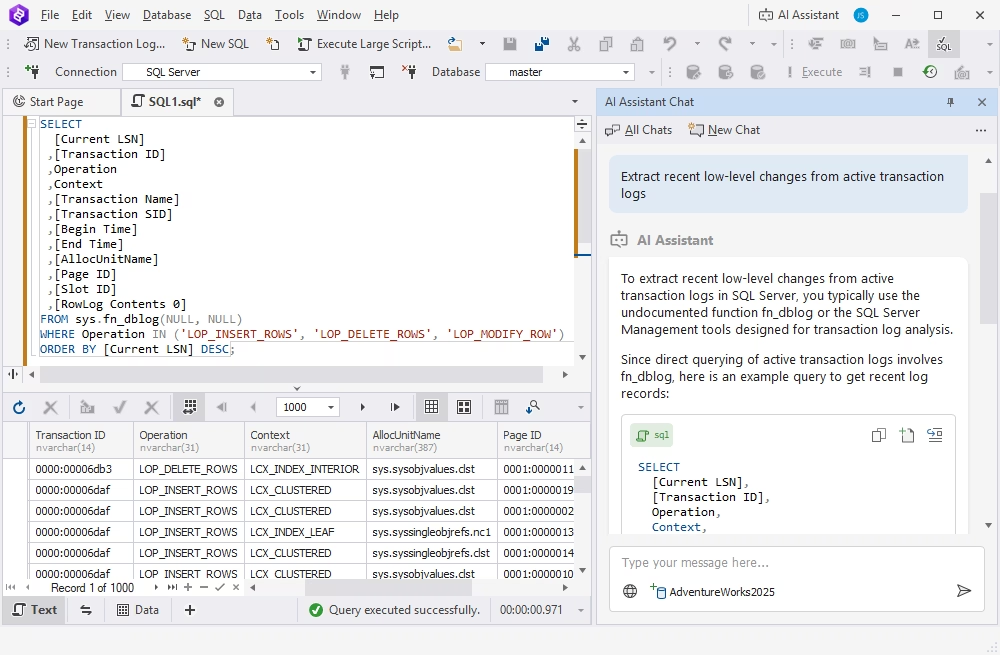
dbForge Transaction Log for SQL Server is a professional tool designed to read and analyze SQL Server transaction logs (.ldf files). It enables detailed investigation of data changes, precise rollbacks, and recovery of deleted records without requiring a full database recovery. Ideal for auditing, point-in-time recovery, and resolving specific transaction issues.
Pros
- Integrated AI Assistant
- Granular row-level recovery capabilities
- Full historical record of data changes
- Flexible recovery with exportable SQL scripts
- Personalized professional support
- Versatile pricing options
Cons
- Primarily focused on transaction log analysis
- Not suitable for repairing severely corrupted .mdf or .ndf files
Key features
- Replay and rollback of specific transactions
- Row-level data recovery without impacting entire tables or databases
- Point-in-time restoration of individual tables
- Comprehensive auditing: track what changed, who made the change, and when
- Recovery of deleted records directly from transaction logs
- Support for multiple file types: .mdf, .ldf, and .ndf
- Export of recovery scripts as SQL files for future use
Ideal for
- Auditing and analyzing data modifications
- Recovering individual transactions without a full database recovery
- Performing precise, point-in-time data recovery
Pricing
- Free edition: Limited functionality
- Paid: Subscription-based license (from $39.95 per month)
dbForge Transaction Log for SQL Server
A powerful tool for viewing, analyzing, and editing SQL transaction logs that provides detailed information about all changes in databases.
2. ApexSQL Recover
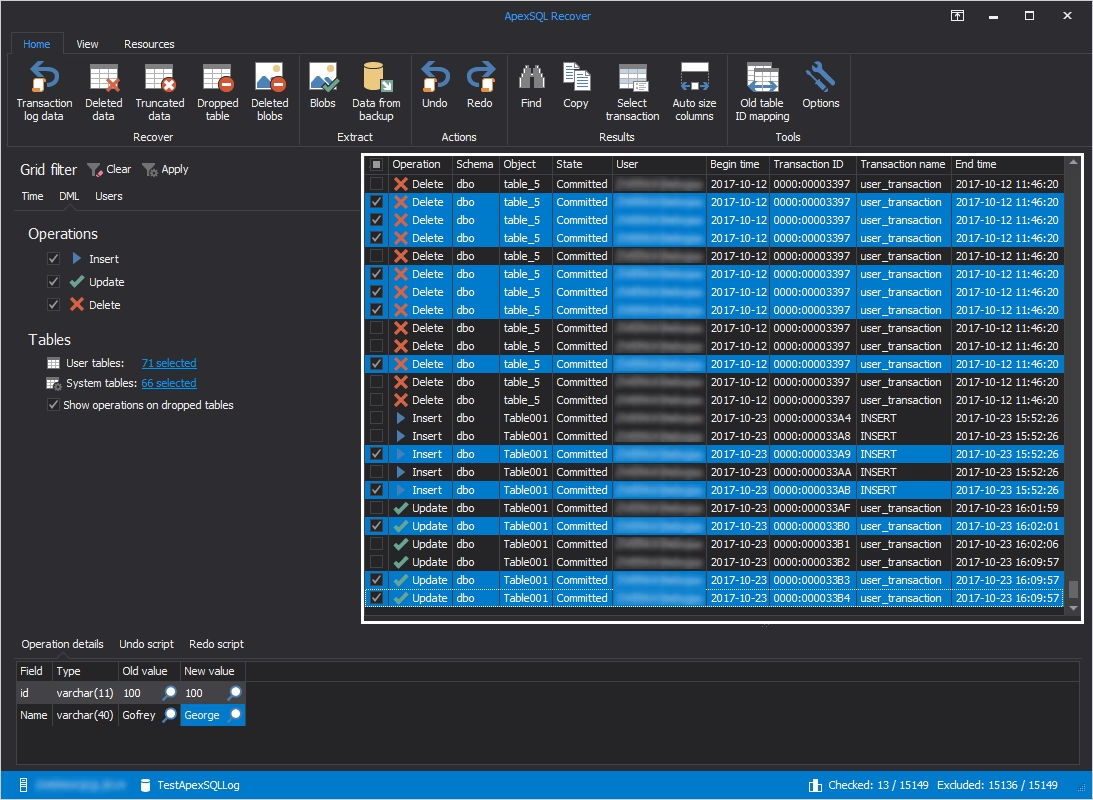
ApexSQL Recover is a powerful database recovery tool designed to restore lost, deleted, or corrupted data from Microsoft SQL Server databases. It supports a broad range of recovery operations, including the restoration of deleted records, truncated data, and dropped database objects. With its advanced recovery features, ApexSQL Recover is a valuable asset for database administrators focused on maintaining data integrity and minimizing downtime. The tool is compatible with various SQL Server versions, providing flexibility across different recovery scenarios.
Pros
- Extensive range of recovery options
- Support for multiple SQL Server versions
- Preview functionality for recoverable data
- Intuitive, user-friendly interface
Cons
- Relatively high cost
- Available only as part of Toad for SQL Server
- No repair for severely corrupted files
- Complex setup for novice users
Key features
- Row-level data recovery
- Point-in-time and rollback recovery at multiple levels
- Restoration of dropped tables, views, and deleted rows
- Seamless integration with SQL Server Management Studio (SSMS)
- Transaction log analysis to identify changes during backup
- Recovery of BLOB (Binary Large Object) data
Ideal for
- Enterprises with complex or large-scale recovery requirements
- Auditing and recovery following accidental object deletion or schema changes
- Users who prefer guided recovery workflows directly within SSMS
Pricing
- Free trial: On demand
- Paid: On a direct request
3. Kernel for SQL Database Recovery
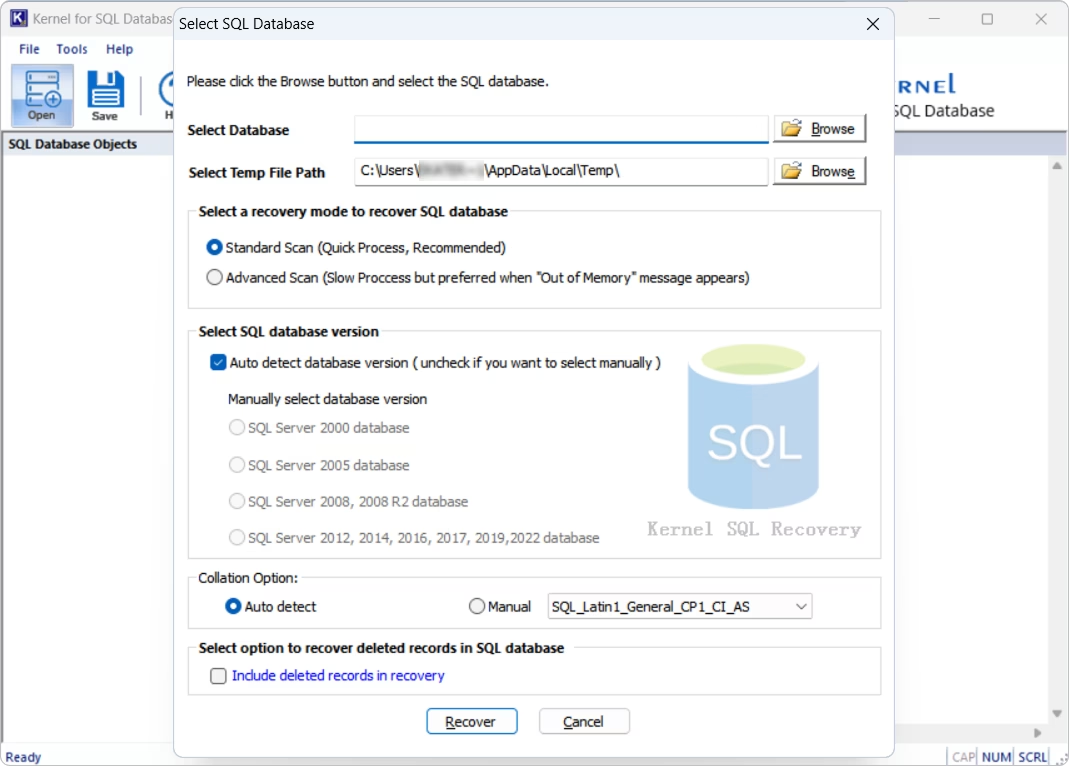
Kernel for SQL Database Recovery is a professional tool designed to repair and recover SQL Server databases. Its robust recovery algorithms and broad compatibility across SQL Server versions make it a preferred choice among SQL Server specialists. Kernel recovers a wide range of database objects, including tables, indexes, triggers, stored procedures, and BLOB data from .mdf and .ndf files. It also offers advanced preview and selective export features for precise and controlled recovery.
Pros
- Standard and Advanced scanning modes
- Support for Unicode and ASCII data types, including NVARCHAR
- Selective recovery of specific database objects
- Easy handling of large and complex database files
Cons
- The interface can be complex for beginners or non-technical users
- Higher cost to access the full feature set
- Limited customization options
Key features
- Comprehensive recovery of database objects, including keys and BLOB columns
- Recovery of deleted and truncated data
- Repair and recovery of corrupted .mdf and .ndf files
- Detailed, structured preview before recovery
- Point-in-time data recovery
- Export to live SQL Server databases, SQL scripts, and CSV
Ideal for
- Database administrators and IT professionals managing SQL Server corruption
- Businesses requiring granular recovery from both .mdf and .ndf files
- Organizations working with large or multilingual SQL Server databases
Pricing
- Free trial
- Paid: Subscription-based (from $299 per year)
4. DataNumen SQL Recovery
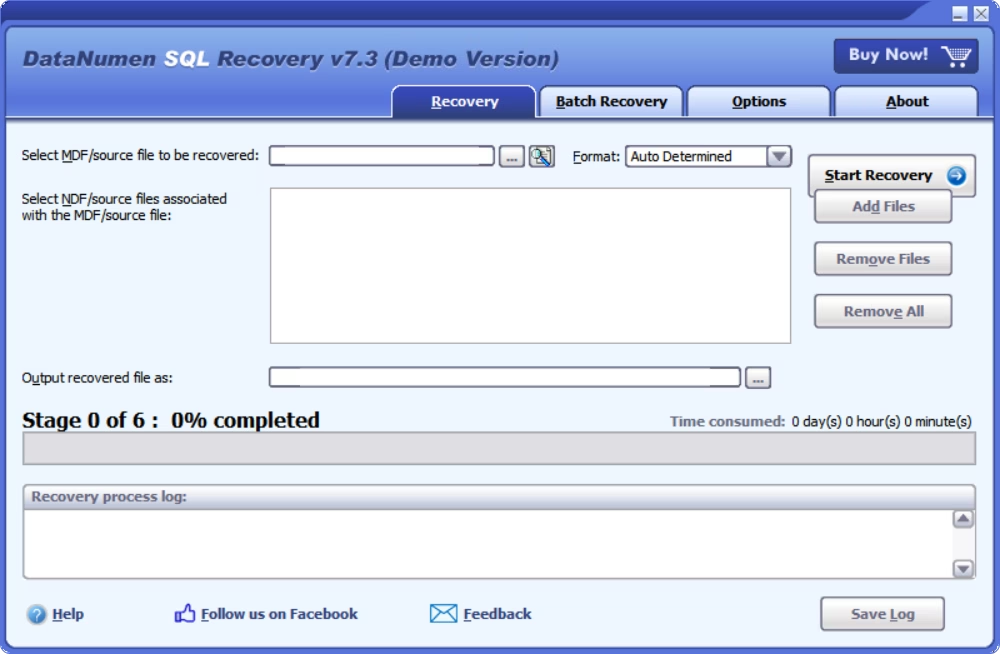
DataNumen SQL Recovery is a leading .mdf repair tool designed specifically to recover corrupted or damaged SQL Server databases. It repairs both .mdf and .ndf database files and restores a wide range of SQL objects, including tables, indexes, triggers, stored procedures, and encrypted components. With a high recovery rate and support for large files (up to 16TB), this tool is a reliable choice for organizations seeking data restoration without technical complexity.
Pros
- Advanced algorithms for restoring data from severely damaged files
- Integration with the Windows shell for easy access
- Support for very large database files
- Ability to recover encrypted database objects
- Compatibility with SQL Server versions 2005 through 2022 and legacy Windows systems
Cons
- No native interface for browsing or restoring data (requires SSMS)
- No support for remote or network recovery
- Relatively high price
- Limited customization options
Key features
- Repair of .mdf and .ndf files
- Recovery of a wide variety of database objects
- Restoration of accidentally deleted data
- Batch recovery for multiple corrupted files
- Simple, intuitive interface for quick learning
Ideal for
- IT teams and database administrators who need fast, accurate repair of .mdf and .ndf files
- Organizations managing large or encrypted SQL Server databases
- Environments running legacy infrastructure or older Windows OS versions
- Scenarios requiring quick batch recovery with minimal setup
Pricing
- Free trial
- Paid: Perpetual license (from $499.95)
5. Stellar Repair for MS SQL
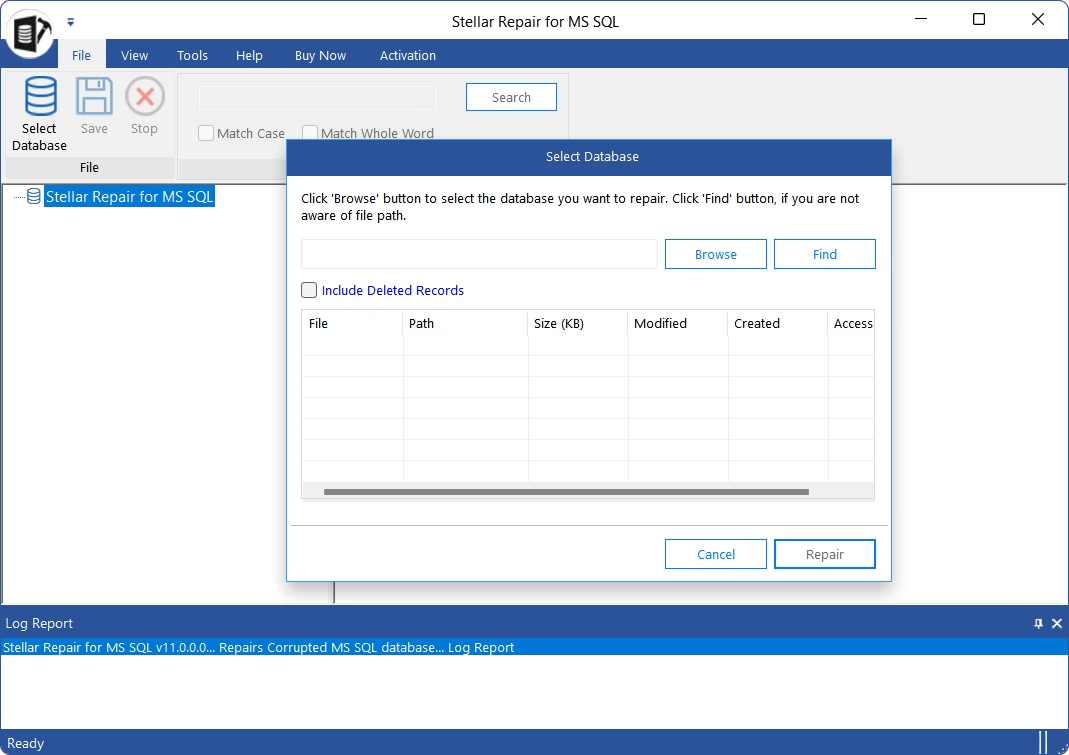
Stellar Repair for MS SQL is a popular on-premises tool designed to repair and restore corrupted Microsoft SQL Server databases, including .mdf and .ndf files. Renowned for its reliability, user-friendly interface, and selective recovery capabilities, it enables database administrators to recover critical data with minimal downtime. The tool supports all major SQL Server versions and is available for both Windows Server and Linux environments.
Pros
- Cross-platform support for Windows and Linux
- Tree-structured navigation for easier browsing
- Detection of potentially corrupted database objects
- Flexible export options (new database, XML, TXT)
- Support for SQL Server versions 2008 through 2022
- User-friendly interface for efficient workflows
- Event monitoring for crashes, disk space issues, etc.
Cons
- Higher price point
- Resource intensity during large or complex recoveries
- Slower performance on severely corrupted or very large databases
- Basic data visualization tools
Key features
- Recovery of data from damaged or inaccessible .mdf and .ndf files
- Selective recovery of specific database objects without full database restoration
- Data previewer with structured, easy-to-read format
- Backup recovery from .BAK files
- Comprehensive recovery of various database objects
Ideal for
- SQL Server administrators who need to repair files after crashes, hardware failures, or accidental deletions
- Organizations operating both Windows and Linux servers
- Businesses requiring data preview and validation before final restoration
Pricing
- Free trial
- Paid: Subscription-based (from $299 per year)
How to choose the right tool
We've reviewed several tools designed to help users recover and restore SQL Server data. We've examined their functionality, benefits, and potential challenges, so you can rely on this information when selecting the most suitable tool for your needs. Now, let's explore a few additional factors to guide your decision.
Recovery needs (deleted vs. corrupted data)
If you need to recover deleted records or objects (e.g., tables, rows, or views), the best options are dbForge Transaction Log and ApexSQL Recover. These tools specialize in log-based recovery, offering features such as row-level rollback, point-in-time recovery, and object-level restoration. They allow you to recover data without performing a full database recovery by utilizing transaction logs.
If your goal is to repair corrupted databases (e.g., damaged .mdf or .ndf files), consider tools like Kernel for SQL Database Recovery, DataNumen SQL Recovery, or Stellar Repair for MS SQL. These solutions are equipped to repair both schema and data, even in severely corrupted databases.
Technical expertise (beginner vs. advanced user)
For beginners or non-technical users, DataNumen SQL Recovery is a strong choice due to its intuitive interface and minimal setup requirements. Another user-friendly option is dbForge Transaction Log, which offers an intuitive UI, easy navigation, rich learning resources (including video tutorials), and personalized technical support.
For advanced users or database administrators (DBAs), ApexSQL Recover and Kernel for SQL Database Recovery are more suitable. These tools offer more advanced functionality for complex recovery scenarios, including selective object-level restoration and detailed recovery options.
Environment (live DB vs. backup files)
If you're working in a live SQL Server environment (such as real-time or transactional systems), choose dbForge Transaction Log or ApexSQL Recover. These tools provide in-place recovery using transaction logs and integrate with live SQL Server sessions. They help recover data without taking the database offline.
For recovery from backups or severely damaged files, consider Stellar Repair for MS SQL (supports recovery from .BAK files and inaccessible databases), Kernel for SQL Database Recovery, or DataNumen SQL Recovery. These tools excel in offline recovery, backup-based repair, and post-crash restoration.
Your specific recovery goals, environment type, and user experience level will help you define the best tool choice and ensure more efficient, accurate, and stress-free database recovery.
Conclusion
Recovering lost or damaged data and database objects is a critical task, given the vital role databases play in every business. That's why database administration always includes regular backups and well-defined backup and restore routines. Another key component is having reliable SQL recovery tools in place. When used in conjunction with backup and restore procedures, these tools help ensure the safety and integrity of your databases.
This article reviews some of the most popular modern SQL recovery tools to help you find the best solution for your needs. Many of these tools offer free trials, allowing you to test their features before committing to a purchase. For example, dbForge Transaction Log stands out with its rich functionality, extensive learning resources, responsive support, and flexible pricing. Download the fully functional free trial and see how it can enhance your workflow!
FAQ
Can I recover truncated tables in SQL Server?
Yes, you can, but it usually requires specialized SQL recovery tools or access to transaction log backups. When you truncate a table, SQL Server removes all data without logging individual row deletions, which makes recovery difficult through standard methods. However, professional recovery tools can analyze transaction logs or extract data from .mdf and .ndf files if the physical data hasn't been overwritten.
Is it possible to restore deleted data without a backup?
Yes, but it depends on several factors, such as whether the transaction logs or .mdf and .ndf files are still intact. Some third-party SQL recovery tools can scan .mdf files directly and recover deleted records, provided the space hasn't been reused. Without a backup, the chances of full recovery drop, so using recovery tools as soon as possible after deletion improves your success rate.
What's the difference between log recovery and file repair?
Log recovery uses the SQL Server transaction log (.ldf) to reconstruct or roll back specific transactions. This helps recover recently deleted or changed data. File repair focuses on fixing corrupt .mdf or .ndf files, allowing you to access or reattach the database. In short, log recovery deals with transactional issues, while file repair addresses file-level corruption.
What is the best SQL recovery tool?
Several powerful SQL recovery tools are available, including dbForge Transaction Log, DataNumen SQL Recovery, Stellar Repair for MS SQL, ApexSQL Recover, and Kernel for SQL Database Recovery. These tools support various recovery tasks like log analysis, selective data retrieval, repairing .mdf and .ndf files, recovering deleted records, and restoring both primary and secondary databases.
How to recover a SQL database?
Start by restoring the latest backup using T-SQL commands or your preferred IDE. If no backup exists or the database is corrupted, use SQL recovery tools to open damaged .mdf or .ndf files and extract the contents. You can then export the recovered data to a new SQL Server database. Your recovery approach will depend on whether you're dealing with deletion, corruption, or system failure.
How do I recover a corrupted SQL database?
First, run DBCC CHECKDB with the REPAIR_ALLOW_DATA_LOSS option (only if you have no backup), although this may result in some data loss. A safer option is to use third-party recovery tools that scan and repair corrupted .mdf and .ndf files. These tools let you export the repaired database to a new instance. Always back up the database before attempting any repair.
How to recover deleted data from SQL?
Recovery depends on whether the transaction logs or .mdf and .ndf files still hold the deleted data. If transaction logs are available, use SQL recovery tools to roll back transactions and restore deleted rows. If not, file-level tools can scan .mdf files directly and recover deleted records (provided the space hasn't been overwritten). The sooner you act, the better your chances of recovery will be.

 ApexSQL Recover
 Kernel for SQL DB Recovery
 DataNumen SQL Recovery
 Stellar Repair


