Choosing the best SQL Server tools goes beyond features; it's a decision that directly impacts how efficiently you design, develop, and monitor your databases. The right toolset helps you design databases more effectively while enhancing performance and reliability. However, with so many options available, it is easy to end up with fragmented processes and overlapping functionality.
This guide explores the best SQL Server tools for development, administration, and monitoring, so you can find the most efficient option for your specific workflow.
Let's get right into it.
How to choose the right SQL Server tools for your workflow
The best tools for SQL Server are not universal. They differ based on whether you prioritize development, administration, or performance monitoring. As such, in most cases, development teams use a combination of SQL Server tools, each optimized for a specific purpose. Here is a breakdown of the different workflows and tools that fit.
-
Development and coding: SQL Server developer tools with features like code completion, debugging, schema comparison, and version control integration.
-
Database management and administration: SQL Server management tools that help handle backups, security, user roles, and server configuration. These are essential for maintaining stability and control across environments.
-
Monitoring and performance tracking: SQL Server performance monitoring tools designed to detect slow queries, track resource usage, and prevent downtime through real-time alerts.
-
Performance tuning and diagnostics: SQL Server performance tuning tools and SQL Server diagnostic tools that help identify bottlenecks, analyze execution plans, and optimize queries for better efficiency.
-
Data integration and automation: SQL Server tools that specialize in ETL, data migration, and workflow automation. This is critical for teams handling large or complex data pipelines.
Beyond workflow requirements, your role and environment also influence your choice. For instance:
- Developers need speed and productivity features
- DBAs require control, monitoring, and automation
- Data teams prioritize scalability and performance insights
Therefore, when choosing the right SQL Server tool for your work, the most effective approach is to use a flexible set of SQL Server tools—or a unified ecosystem—that supports the entire database lifecycle, from development to monitoring and optimization.
Why use SQL Server tools for development, administration, and performance management?
Although the default SQL Server environment comes with built-in features for database development, they are often not enough to handle modern database workloads. SQL Server tools provide advanced capabilities needed for faster development, more profound analysis, and streamlined administration. Beyond these features, here are more reasons why you need SQL Server tools:
- Faster query writing and optimization: Advanced SQL Server tools make it easier to write efficient SQL with intelligent code completion, formatting, and query profiling.
- Schema and data comparison: SQL Server management tools allow you to compare schemas and data across databases, simplifying migrations, version control, and synchronization.
- Simplified administration: SQL Server tools also provide automated backups and security management, thereby reducing repetitive tasks and improving consistency across environments.
- Real-time monitoring and alerting: The monitoring features in SQL Server tools help track performance metrics, detect anomalies, and prevent downtime before it impacts users.
- Troubleshooting and diagnostics: With built-in analytics and execution plan insights, you can quickly identify slow queries, deadlocks, and bottlenecks.
- Deployment and change management: SQL Server tools' capabilities, such as versioning, scripting, and automated deployment workflows also help you manage database changes with greater control.
In practice, SQL Server management tools and other specialized solutions enable teams to do more than just the basics. They are a key part of any professional SQL Server workflow.
List of the best SQL Server tools for development, management, monitoring, and administration
So far, we have explored how to choose the right SQL Server tools and why they are important in database development, administration, and management. In this section, we'll examine the best SQL Server tools that support the full database lifecycle, including development, management, and monitoring capabilities.
Let's dive in.
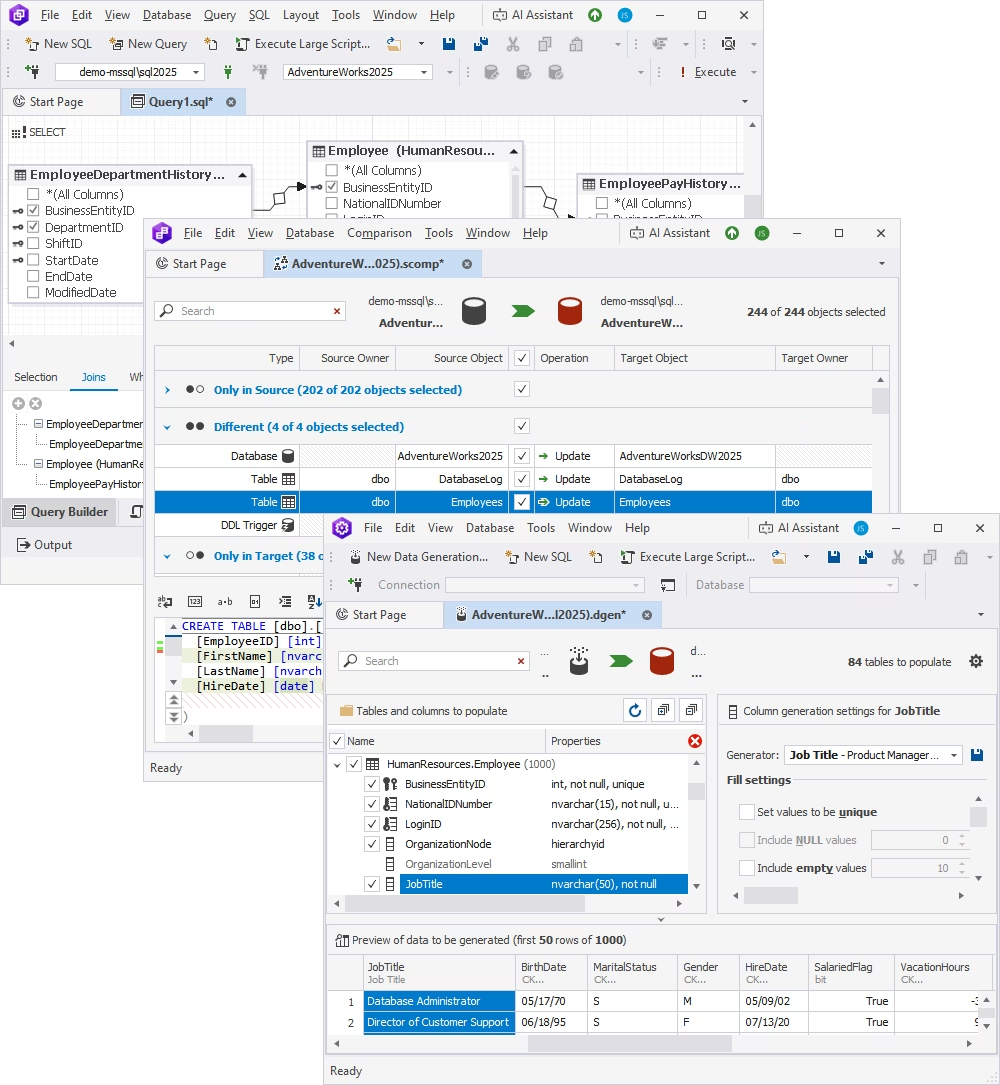
Description
dbForge SQL Tools are a comprehensive suite of SQL Server tools designed for database development, management, and productivity. They go beyond a basic editor by integrating SQL coding, schema comparison, query building, formatting, and documentation into a single interface.
For teams working with complex databases, dbForge SQL Tools provide everything needed to optimize workflows, including query writing and refactoring, schema comparison, and change deployment. These features make it especially useful for database engineers and DBAs who want to use advanced SQL query capabilities in SQL Server without having to switch between applications.
Key features
- Intelligent SQL code completion and formatting
- Schema and data comparison
- Query profiling and optimization
- Database documentation generation
- Deployment and change management tools
Pros
- All-in-one toolkit for development and administration
- Built-in schema and data comparison tools
- Seamless integration with SSMS and Visual Studio
- Consistent UI across tools for easier adoption
- Advanced SQL coding, formatting, and refactoring features
- Integrated AI Assistant for query generation and optimization
- Source control integration for versioning and team collaboration
Cons
- Some tools may be used less frequently depending on use case
- Advanced features may have a learning curve for beginners
Price
Free Express editions are available. Advanced features are included in paid versions, with pricing varying by tool and bundle.
Compatibility
Microsoft SQL Server (on-premises and cloud), SQL Server Management Studio, and Visual Studio.
User reviews
Users highlight its productivity gains, especially for SQL development and schema comparison. Many appreciate the familiar interface and the ability to handle multiple database tasks within one ecosystem.
Best for
Database developers, engineers, and DBAs who need a unified SQL Server toolkit for development, comparison, and deployment workflows.
2. SQL Server Management Studio (SSMS)
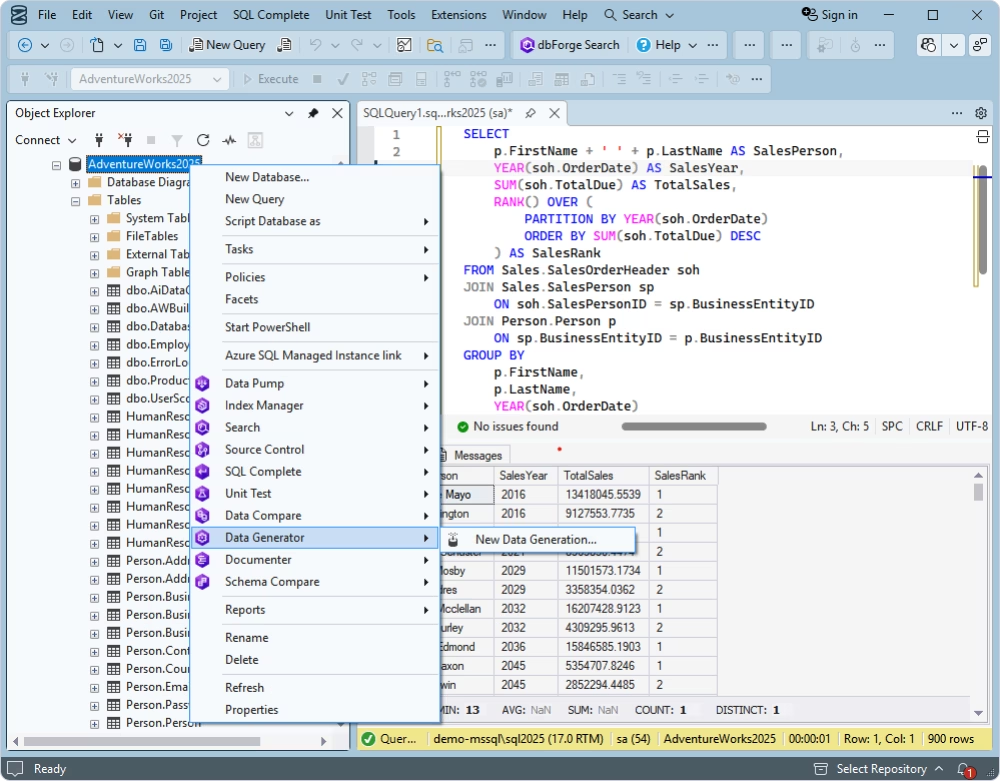
Description
SQL Server Management Studio (SSMS) is the default environment provided by Microsoft for SQL Server administration, querying, and object management. It is one of the most widely used SQL Server management tools and serves as the foundation for most database workflows.
While SSMS is reliable and familiar, it often requires additional tools or add-ins to extend its capabilities for advanced development, automation, or comparison tasks.
Key features
- Query editor and execution
- Database object management
- Backup and restore
- Security and user management
Pros
- Free and officially supported by Microsoft
- Familiar interface for most SQL Server users
- Strong core functionality for querying and administration
Cons
- Limited built-in productivity features
- Lacks advanced comparison and automation tools
- Can become slow with large databases
Price
Free
Compatibility
Microsoft SQL Server (all major versions), Windows environment.
User reviews
Users value SSMS for its reliability and accessibility but often note the need for additional SQL Server tools to improve productivity and performance tuning.
Best for
Developers and DBAs who need a reliable, default environment for SQL Server administration and querying.
3. Redgate SQL Toolbelt / SQL Monitor
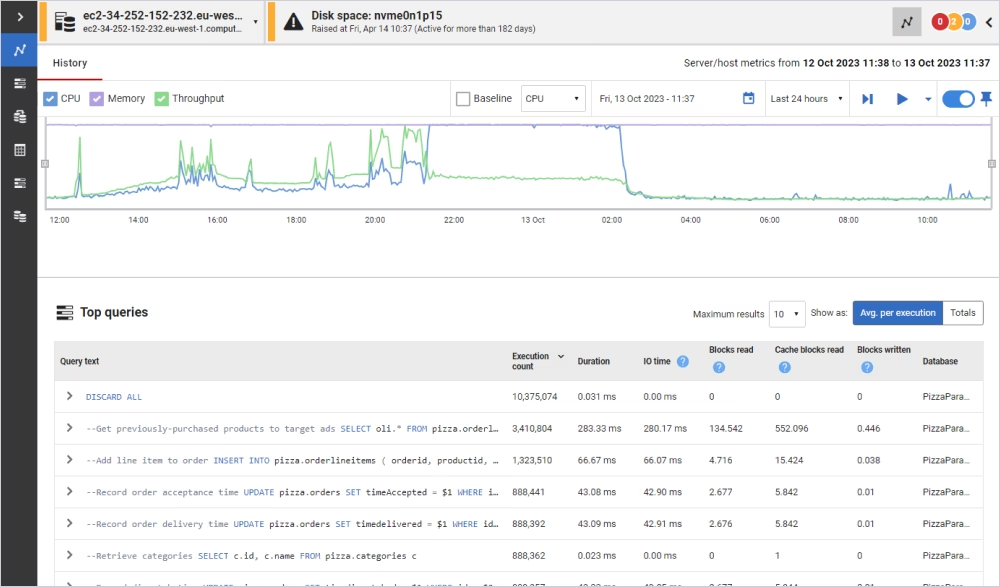
Description
Redgate provides a range of SQL Server tools, such as SQL Toolbelt and SQL Monitor, for monitoring, deployment, comparison, and database change management. It is extensively used by teams that require robust monitoring tools for SQL Server performance as well as development capabilities.
SQL Monitor prioritizes real-time performance tracking, alerts, and diagnostics, making it an excellent choice for production environments.
Key features
- Real-time performance monitoring
- Deployment automation
- Schema comparison
- Backup and recovery tools
Pros
- Powerful monitoring and alerting capabilities
- Strong reputation in enterprise environments
- Comprehensive toolset for DevOps and database lifecycle
Cons
- Higher cost compared to competitors
- Tools are often sold separately or in bundles
Price
Premium pricing (subscription-based).
Compatibility
Microsoft SQL Server, cloud and on-premises environments.
User reviews
Users praise its monitoring accuracy and depth, but often mention pricing as a key consideration.
Best for
Enterprise teams that need advanced monitoring, alerting, and DevOps-focused database lifecycle tools.
4. ApexSQL Tools
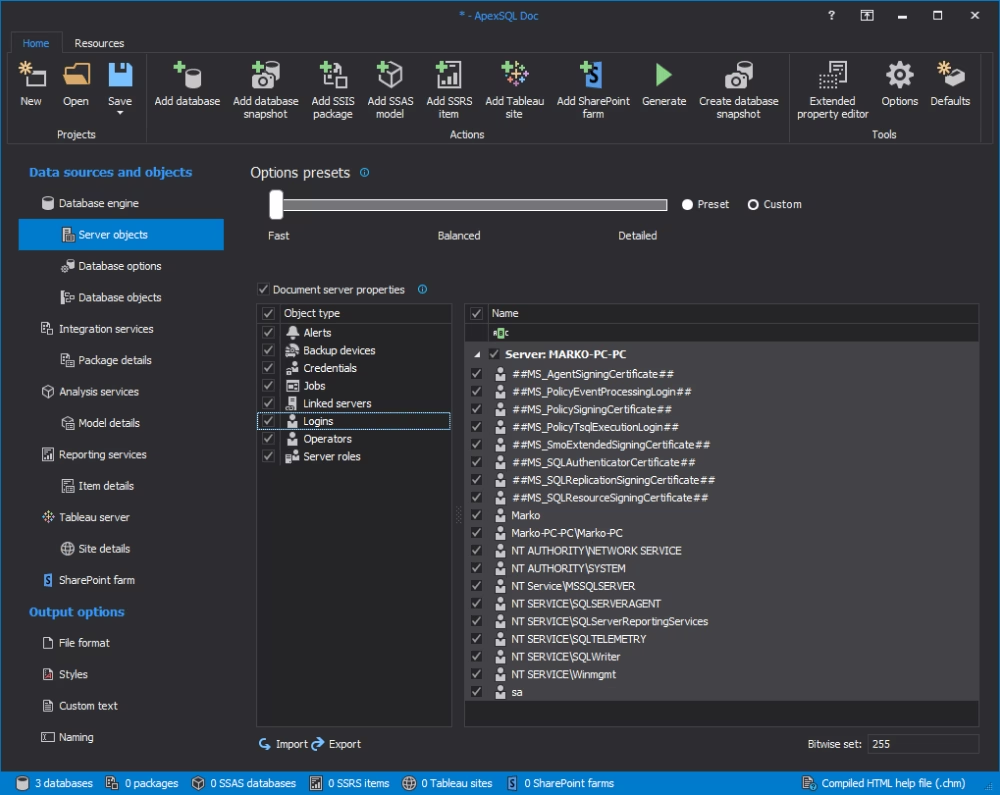
Description
ApexSQL Tools is a set of SQL Server-specific utilities designed for auditing, documentation, comparison, and DevOps workflows. It offers modular tools that can be used individually, making it ideal for teams that want flexible, task-specific solutions.
ApexSQL Tools is especially suitable for organizations that require detailed audits, compliance tracking, and development assistance.
Key features
- Auditing and compliance tracking
- Schema and data comparison
- Documentation generation
- Deployment automation
Pros
- Modular toolset for specific use cases
- Strong auditing and compliance features
- Good integration with DevOps workflows
Cons
- Fragmented experience across multiple tools
- The interface may feel less unified compared to competitors
Price
Individual tool pricing or bundled options.
Compatibility
Microsoft SQL Server and Windows-based environments.
User reviews
Users appreciate the depth of auditing features but sometimes note the lack of a fully unified interface.
Best for
Teams that require auditing, compliance tracking, and modular DevOps database tools.
5. SolarWinds SQL Sentry
Description
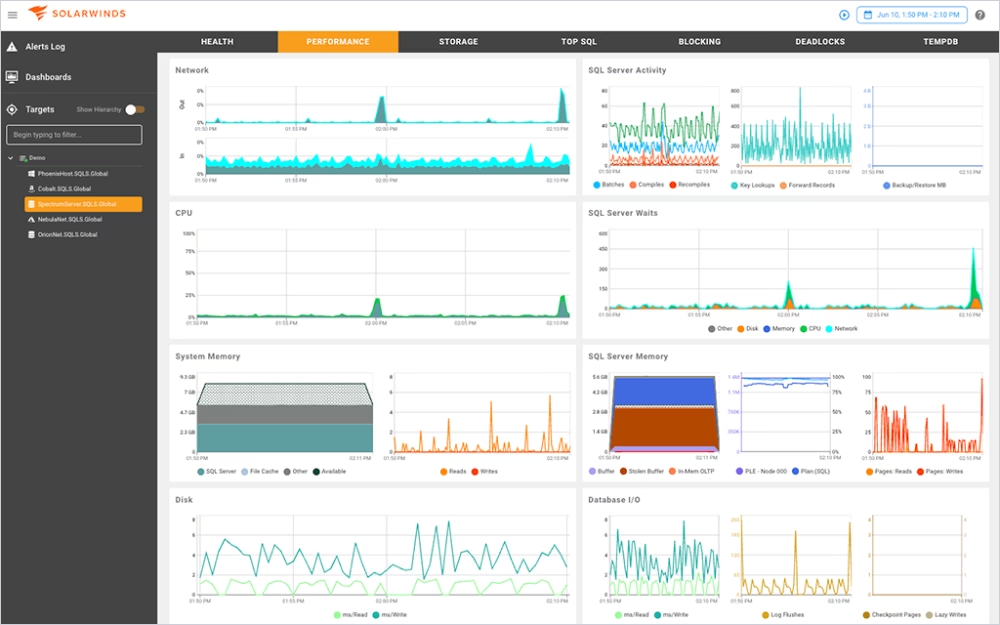
SolarWinds SQL Sentry is a specialized platform for SQL Server monitoring and performance diagnostics. It is designed for use in production environments where uptime, performance, and real-time analytics are crucial.
As one of the top SQL Server monitoring tools, SolarWinds SQL Sentry provides detailed information on server speed, query execution, and system health.
Key features
- Real-time performance monitoring
- Query performance analysis
- Alerting and notifications
- Historical performance tracking
Pros
- Advanced performance monitoring and diagnostics
- Real-time alerts and historical data tracking
- Strong visualization of performance metrics
Cons
- Can be complex to configure
- Focused mainly on monitoring (limited development features)
Price
Premium pricing (enterprise-focused).
Compatibility
Microsoft SQL Server, on-premises and cloud environments.
User reviews
Users value its deep diagnostic capabilities but note that it is best suited for experienced DBAs managing production systems.
Best for
DBAs managing production environments who need deep performance monitoring and diagnostics.
6. Quest Toad for SQL Server
Description
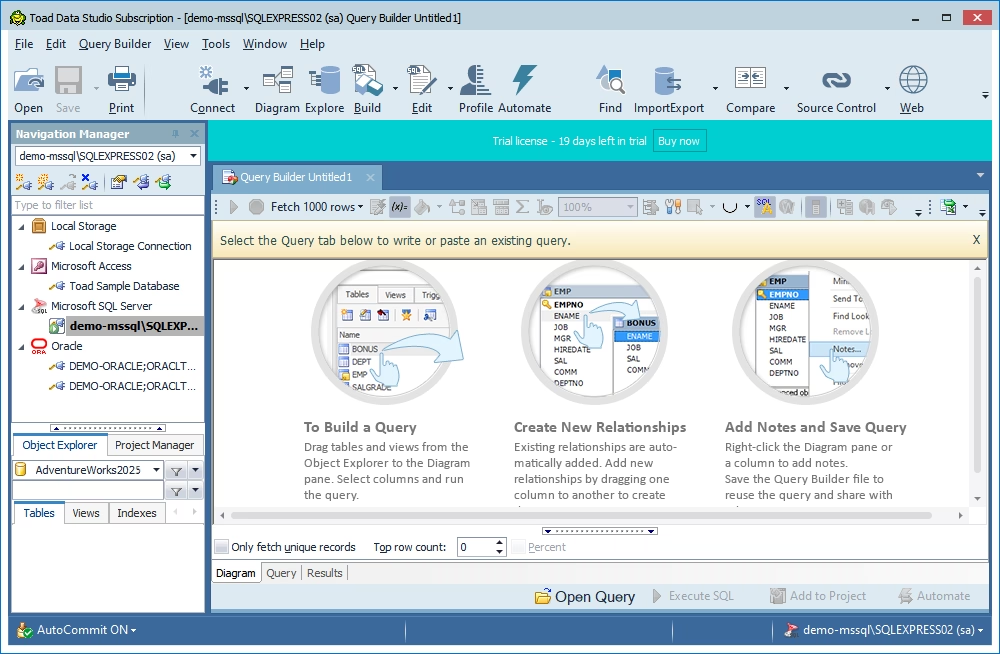
Toad for SQL Server is a mature SQL Server development and administration tool that includes query building, automation, and database management features. It is frequently used as a substitute for native Microsoft SQL Server utilities and is intended for developers and DBAs who need powerful SQL query tools for SQL Server.
Key features
- SQL query building and optimization
- Automation and scripting
- Database management tools
- Reporting capabilities
Pros
- Strong query and automation features
- Mature and reliable toolset
- Good support for database management tasks
Cons
- Interface can feel outdated
- Learning curve for new users
Price
Paid (varies by edition).
Compatibility
Microsoft SQL Server and Windows.
User reviews
Users appreciate its depth and reliability but sometimes highlight usability and UI concerns.
Best for
Developers and DBAs who need a powerful alternative to native SQL Server tools with strong automation.
7. Navicat for SQL Server
Description
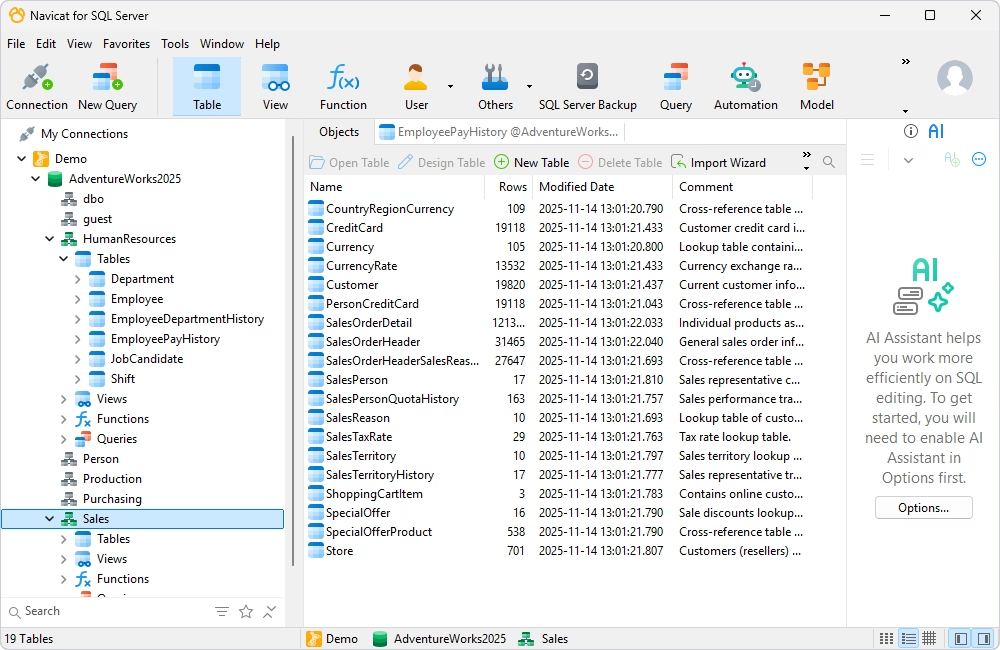
Navicat for SQL Server is a GUI tool for database management, data handling, and administration. It is particularly appealing to users who prefer visual workflows and require tools that can handle multiple database systems.
As one of the more user-friendly SQL Server database tools, Navicat for SQL Server simplifies tasks like data editing, query building, and database design.
Key features
- Visual query builder
- Data modeling and design
- Data transfer and synchronization
- Backup and restore tools
Pros
- Intuitive and user-friendly interface
- Multi-database support
- Strong visual tools for database design and management
Cons
- Limited advanced performance tuning features
- Can be expensive for smaller teams
Price
Paid (subscription or perpetual license).
Compatibility
Microsoft SQL Server, cross-platform (Windows, macOS, and Linux).
User reviews
Users like its ease of use and clean interface but may find it less powerful for deep performance tuning compared to specialized tools.
Best for
Users who prefer a visual, user-friendly interface for database management across multiple platforms.
SQL Server tools comparison table for developers, DBAs, and architects
Choosing between multiple SQL Server tools can be challenging, especially when each solution focuses on different aspects of development, administration, or monitoring. Instead of going through each tool individually, the table below helps you quickly evaluate important details.
| Tool |
Best For |
Core Focus |
Monitoring |
Query/SQL Development |
Schema/Data Compare |
Auditing |
Backup |
OS Support |
Free Trial |
|

dbForge SQL Tools
|
Developers, DBAs |
Development + admin toolkit |
Limited / depends on tool |
Yes |
Yes |
Partial / depends on tool |
Partial |
Windows, macOS, Linux |
Yes |
|

SSMS
|
DBAs, admins |
Native management |
Basic |
Yes |
No |
Limited |
Limited |
Windows |
Free |
|
Redgate SQL Toolbelt / SQL Monitor
|
DBAs, enterprise teams |
Monitoring + lifecycle tooling |
Yes |
Partial |
Yes |
Partial |
Partial |
Windows / Web |
Yes |
|

ApexSQL Tools
|
DBAs, compliance teams |
Audit + admin + DevOps |
Partial |
Partial |
Yes |
Yes |
Partial |
Windows |
Yes |
|

SQL Sentry
|
DBAs |
Monitoring + diagnostics |
Yes |
No |
No |
No |
No |
Windows / Web |
Yes |
|

Toad for SQL Server
|
Developers, DBAs |
Development + admin |
Limited |
Yes |
Partial |
Limited |
No |
Windows |
Yes |
|

Navicat for SQL Server
|
General users, admins |
GUI management |
Limited |
Yes |
Partial |
No |
No |
Windows, macOS, Linux |
Yes |
From the table above, it is safe to say that no single tool excels at everything. Some concentrate heavily on monitoring, while others prioritize development or administration. The question now is, how do you know which tool to go for? This is covered in the next section.
How to choose SQL Server tools based on development, monitoring, administration, and security needs
Choosing the right SQL Server tools is based on how well they match your actual use cases, not just feature lists. As such, it is important to consider important details such as your role, environment, and the complexity of your database workloads. The table below highlights the critical criteria to consider.
| Criteria |
Description |
| Role |
Are you a developer, DBA, architect, or data engineer? |
| Environment size |
Do you need the SQL Server tools for small projects or large, production-scale systems? |
| Deployment model |
Is your setup on-premises, cloud-based, or hybrid? |
| Monitoring needs |
Do you need the tools for real-time alerts or basic performance metrics? |
| Query productivity |
What are your query needs? Do they include advanced SQL editing, IntelliSense, and optimization? |
| Schema/data comparison |
Should the SQL Server tool include capabilities such as syncing environments and version control? |
| Auditing and compliance |
Do you need to track changes continuously, user activity, and meet compliance standards? |
| Budget |
What is your budget? |
Mapping these criteria to your workflow helps you select SQL Server management tools and development solutions that actually solve your daily challenges.
Choose SQL Server development tools for query editing, refactoring, and schema work
If you spend your days writing queries, altering schemas, or managing database scripts, the quality of the editor becomes crucial. You want to focus on SQL Server development tools that primarily improve how fast and accurately you write and manage SQL code.
Look for tools that offer:
- Intelligent code completion to reduce syntax errors and accelerate query writing
- Advanced formatting and refactoring for clean and maintainable SQL code
- Schema and data comparison for tracking and synchronizing changes across environments
- Version control integration for collaborative development workflows
These capabilities are critical for teams working on frequent database updates, CI/CD pipelines, or complex schema modifications. Strong SQL query tools for SQL Server can significantly save development time and increase code quality.
Choose SQL Server monitoring tools for production visibility and diagnostics
SQL Server monitoring solutions are essential for working in live, production environments where performance and uptime are critical. These tools help you detect issues on time and maintain your system's stability.
Prioritize solutions that provide:
- Real-time dashboards for server health and performance analytics
- Automated alerts to detect issues before they escalate
- Wait statistics and query analysis to detect bottlenecks
- Historical performance data for trend analysis and capacity planning
These capabilities are important for high-traffic applications, corporate systems, and other environments where downtime has a direct impact on business operations. The best SQL Server monitoring solutions provide both immediate and long-term performance insights.
Choose SQL Server management tools for administration and daily DBA work
SQL Server management tools are essential for efficiently addressing day-to-day administrative tasks. DBAs use these tools to ensure system reliability, enforce security, and manage database activities.
Key features to look for:
- Job scheduling and automation to reduce manual workload
- User and security management to regulate access and permissions
- Database object management for tables, views, and procedures
- Backup and restore capabilities to ensure data security
These technologies assist teams in managing multiple servers or environments by standardizing operations and lowering the risk of human errors. Reliable SQL Server management tools are the foundation for consistent and effective database administration.
Choose SQL Server audit and backup tools for governance and recovery
Audit and backup technologies are essential when your organization needs strong governance, compliance, and disaster recovery capabilities. These tools ensure that every change is tracked and that all data can be restored when necessary.
Focus on tools that offer:
- Detailed auditing and change tracking to ensure compliance and accountability
- User activity monitoring to detect unauthorized access or risky behavior
- Flexible backup strategies (full, incremental, and differential)
- Fast and dependable recovery options to minimize downtime
These features are particularly crucial in regulated industries or large organizations where data integrity and traceability are required. Investing in the right SQL Server auditing and backup solutions ensures long-term reliability, security, and peace of mind.
Which SQL Server tool is best for your team?
No doubt, there is no single SQL Server tool that can properly address all scenarios. The ideal choice is determined by your team's workload, environment, and priorities.
However, dbForge SQL Tools stands out as a comprehensive toolbox for SQL Server development and administration due to its integrated approach to coding, schema management, query optimization, and deployment workflows. It enables developers and DBAs to handle multiple jobs within the same ecosystem, reducing the need to switch between different tools.
Meanwhile, specialized solutions such as SQL Sentry or Redgate SQL Monitor are better suited for teams that primarily monitor performance, whereas ApexSQL Tools excels at auditing and compliance operations. Smaller teams or those that rely on native Microsoft tools may find SSMS enough for basic administration and query work.
Finally, choosing the correct tool—or combination of tools—should be based on your team's workflow, monitoring needs, compliance requirements, and budget.
Conclusion
Choosing the best SQL Server tools entails matching capabilities to real-world requirements. Developers, DBAs, and architects benefit the most from solutions that enable SQL development, monitoring, administration, and governance without disrupting workflow.
dbForge SQL Tools offer a comprehensive solution for teams seeking both development and administrative capabilities in a single ecosystem, while other solutions serve specialized functions such as monitoring, auditing, or performance diagnostics. By assessing your team's priorities and environment, you can choose solutions that enhance productivity, preserve database health, and ease day-to-day SQL Server operations.
For a complete overview of the powerful tools included in the suite, explore SQL Server Tools, which highlights how dbForge improves SQL Server development and administration workflows.
FAQ
What are SQL Server tools?
SQL Server tools are software applications that assist developers, DBAs, and data teams with SQL Server database management, development, monitoring, and optimization. They offer solutions for query writing, schema and data comparison, administration, performance monitoring, auditing, backup, and deployment. Teams can use these tools to streamline workflows, minimize errors, and improve database performance.
What is the difference between SQL Server tools and SQL Server Data Tools?
SQL Server tools refer to software that assists with SQL Server tasks such as management, monitoring, and performance, while SQL Server Data Tools (SSDT) is Microsoft's development environment for database projects, schema design, and business intelligence solutions.
SSDT focuses primarily on database development and deployment, whereas SQL Server tools may include administration, monitoring, and auditing.
Which SQL Server tools are best for DBAs?
DBAs benefit from tools that make database management, monitoring, and backups easier.
Popular options include:
- dbForge SQL Tools - for administration and development in one suite
- SSMS - for native Microsoft SQL Server management
- Redgate SQL Toolbelt / SQL Monitor - for monitoring, deployment, and change management
- SQL Sentry - for advanced performance monitoring and diagnostics
Which SQL Server tools are best for database developers?
Database developers require tools to improve query writing, schema management, and source control. Top options include:
- dbForge SQL Tools - intelligent code completion, refactoring, and schema comparison
- Toad for SQL Server - query creation, automation, and database management
- SSMS with add-ins - familiar environment with increased productivity through plugins
What are SQL Server performance tuning tools used for?
SQL Server performance tuning tools are used to evaluate, optimize, and troubleshoot queries and server performance. They assist in identifying slow-running queries, detecting bottlenecks, reviewing execution plans, and monitoring resource usage.
dbForge SQL Tools, Redgate SQL Monitor, and SQL Sentry offer dashboards, alerts, and historical metrics to help improve database efficiency and availability.


