Migrating databases between different engines (such as from MySQL to PostgreSQL) has become a routine task. However, despite its frequency, it remains complex. A full migration involves more than simply copying data: it requires transferring schema objects, indexes, constraints, stored procedures, triggers, and other critical elements that define business logic. Since MySQL and PostgreSQL have distinct architectures and features, careful planning is essential at every stage—preparation, execution, and validation. Given this complexity, specialized tools are necessary.
This article provides a step-by-step guide to migrating MySQL databases to PostgreSQL. It covers each stage of the process, with examples using both dedicated GUI tools and the pgloader command-line utility.
Why migrate from MySQL to PostgreSQL
MySQL and PostgreSQL are two of the most widely used free database management systems. MySQL is often the first choice due to its speed, ease of use, and simple setup. However, as applications grow in complexity, MySQL can reach its limits and may no longer meet evolving technical or operational demands.
At this stage, teams often consider transitioning to a more advanced system. PostgreSQL, also free and open source, offers a richer feature set and greater flexibility for demanding projects.
Common business and technical reasons to move to PostgreSQL
Organizations typically move to PostgreSQL when their current database begins to limit growth, flexibility, or maintainability. The most common triggers include:
Application scaling and reliability
With time, MySQL may not cope with concurrency, data integrity, or uptime as expected. PostgreSQL provides strong ACID compliance, robust indexing, and proven performance at scale, especially for high-traffic applications.
Complex reporting and analytics
PostgreSQL offers an advanced query planner and rich SQL features that handle complexity more efficiently. It becomes a natural choice when reporting and analytics requirements can no longer be satisfied by MySQL.
Stronger relational modeling
Migration to PostgreSQL is a common option when teams need stricter data consistency and more sophisticated relationships (foreign keys, constraints, transactions). PostgreSQL provides features that are critical for financial systems, inventory management, and any environment where correctness is essential.
Advanced SQL and extensibility
PostgreSQL supports advanced SQL features (window functions, CTEs, JSON, recursive queries) and extensions (such as PostGIS or full-text search). This enables teams to solve complex problems directly within the database.
Modernizing the data stack
Older systems (or lightweight databases used early in development) may lack support for modern tooling, cloud-native deployments, or integration with data pipelines. PostgreSQL integrates well into modern ecosystems, including containers, managed cloud services, and analytics workflows.
In short, migration to PostgreSQL is typically driven by the need for scalability, richer data handling, more expressive querying, and a future-proof platform aligned with modern practices.
When a MySQL-to-PostgreSQL migration makes sense
Switching from MySQL to PostgreSQL can be a logical step when your needs begin to outgrow MySQL's capabilities—especially in areas such as complex SQL queries, advanced features, and integration with modern data stacks.
However, in many cases, such a move may be premature. If MySQL already meets your requirements for performance, reliability, and functionality, migration can introduce unnecessary cost and risk without delivering tangible benefits.
Before starting a migration, ask a key question: are you truly hitting the limits of your MySQL environment, or simply anticipating future needs? If your system is stable and continues to meet requirements, the more pragmatic choice may be to remain with your current setup.
What needs to be converted during MySQL-to-PostgreSQL migration
Database migration involves far more than copying rows of data from one system to another. It also includes transferring the entire structure and logic of the database, such as schemas, table definitions, data types, constraints, indexes, views, triggers, routines, default values, and identity or auto-increment mechanisms.
Each of these components presents its own challenges, so it is important to understand and plan for them before beginning the migration process.
Schema objects and table structures
Even basic structures do not always map cleanly. While tables and columns may transfer directly, keys, indexes, defaults, and constraints can behave differently or require different syntax. For example, index types, constraint naming conventions, or default value expressions may need adjustment. For this reason, it is important to review schemas in depth rather than assume that automated tools will handle everything correctly.
Data types and field compatibility
MySQL and PostgreSQL support similar concepts but implement them differently. Common issues include:
Differences in DATETIME vs. TIMESTAMP handling
Variations in text and binary storage types
Differences in JSON support (JSON vs. JSONB)
It is critical to select the correct target types, as this directly affects data integrity, performance, and query behavior.
Views, triggers, and stored logic
Database-side logic often requires rework. Views may rely on MySQL-specific syntax, while triggers and stored procedures may need to be rewritten due to differences in procedural languages.
Auto-increment, identity, and sequence behavior
In MySQL, AUTO_INCREMENT is defined directly within table definitions, whereas PostgreSQL relies on sequences—typically implemented through SERIAL or IDENTITY columns.
This difference affects how primary keys are generated and how inserts behave under concurrent workloads. If not handled carefully during migration, it can lead to issues such as duplicate key errors or misaligned sequences.
Key differences between MySQL and PostgreSQL
Migration area
MySQL
PostgreSQL
What to check
Auto-increment
Uses AUTO_INCREMENT
Uses identity columns or sequences
Validate insert behavior and key generation
Boolean values
Often TINYINT(1)
Native BOOLEAN
Check app logic and default values
Data types
Some MySQL-specific types
Different type system and stricter casting
Map types carefully before migration
SQL syntax
Uses MySQL syntax and functions
Uses PostgreSQL syntax and functions
Rewrite queries, functions, and expressions where needed
Upserts
ON DUPLICATE KEY UPDATE
ON CONFLICT
Update insert logic
Procedures and triggers
MySQL-specific syntax
PostgreSQL / PL/pgSQL syntax
Review stored logic manually or use an AI assistant
Constraints
Legacy schemas may use fewer checks
Stronger constraint enforcement
Check foreign keys, checks, and dirty data
Indexes
Different optimizer and index behavior
Supports different indexing options
Recheck indexing after migration
Charset and collation
MySQL-specific settings
Different collation and encoding behavior
Test sorting, comparisons, and imports
JSON and text handling
Different JSON functions and text behavior
JSON/JSONB and different operators
Validate JSON queries and text search
How to prepare for MySQL-to-PostgreSQL migration
Migration from MySQL to PostgreSQL begins with careful preparation and a thorough audit of the databases involved. This section outlines the pre-migration steps you need to take.
Proper preparation helps reduce errors, prevent data loss, and minimize the need for rework later.
Audit the source MySQL database
First, inspect the MySQL database intended for migration. Start by extracting a full schema dump using the SHOW CREATE TABLE command or mysqldump --no-data.
Review the essential components:
Column definitions, defaults, and NOT NULL constraints
Primary keys and unique constraints
Indexes (including composite and full-text)
Engine-specific features (e.g., InnoDB vs. MyISAM)
Important!
Look for any MySQL-specific features (such as engine options or implicit behaviors) that will not carry over. These must be explicitly redefined in PostgreSQL.
Pay special attention to the aspects described below.
Relationships and constraints
Map out foreign keys and dependencies between tables and verify them (MySQL setups may rely on implicit relationships). Also, identify missing constraints, as you need to enforce them in PostgreSQL.
Row volumes and data distribution
Analyze how much data needs to be moved, including table row counts, large BLOB or text fields, and heavily accessed tables. These factors will influence the migration strategy.
Routines, triggers, and procedural logic
Export and review stored procedures, functions, triggers, and scheduled events. Check for MySQL-specific syntax, as it will need to be rewritten for PostgreSQL.
Views
List all views and inspect their definitions for MySQL-specific or non-standard syntax. Also, check dependencies between views. Complex views may require refactoring rather than direct translation.
Unsupported or incompatible constructs
Identify features that do not translate directly, such as engine-specific options (e.g., MyISAM features), certain index types, or partitioning approaches. These elements must be redesigned in advance.
Decide what to migrate
Database migration is a broad term that can mean different things in practice. You may choose to migrate an entire database, selected schemas, specific tables, or only data. This decision affects scope, complexity, and how much of the original structure and logic is preserved.
Let's briefly examine these migration types.
Full database migration
This is the most comprehensive approach, including the entire database structure and all data while preserving full functionality and relationships. However, it is also the most complex and time-consuming option, with a higher risk of incompatibilities. It is commonly used in full system or platform migrations.
Selected schema migration
This approach involves migrating specific schemas (logical groupings of database objects), including selected tables, relationships, and related objects. It offers more control but requires careful analysis of dependencies between schemas. It is often used in large systems where only part of the database needs to be moved.
Specific table migration
This method focuses on individual tables rather than entire schemas or databases. It is less complex and allows for gradual migration. However, it carries the risk of breaking relationships if dependencies are overlooked.
Data-only migration
The simplest and most common approach involves transferring only raw data, without schemas or logic. It is typically used when the required database structure already exists in the target system. The downside is that the original database logic must be recreated manually.
In practice, migrations often combine several approaches. A common scenario is recreating the schema in PostgreSQL and then migrating selected data or tables.
Back up the MySQL database before conversion
Always back up both the schema and the data before making any changes to the source or target databases. This ensures that your environment is protected and allows you to roll back to a previous state if something goes wrong during migration.
With a reliable backup in place, you can restore the database, including its data, structure, and logic, at any time.
Prepare the target PostgreSQL environment
Set up your PostgreSQL environment in advance. Provision the target PostgreSQL server and ensure it meets all requirements (performance, storage, and security). Configure user roles and access controls ahead of time.
Depending on the chosen migration strategy, you may also need to create an empty database, define its schema, and implement the required business logic, as described earlier.
Best ways to convert MySQL to PostgreSQL
Migrating from MySQL to PostgreSQL can be done in several ways. The appropriate method depends on factors such as data size, schema complexity, downtime tolerance, required level of control, and team expertise.
Below are the most common approaches.
Logical dump and restore
The most straightforward method involves exporting the schema and data, converting them into PostgreSQL-compatible SQL, and importing them into PostgreSQL.
This approach works well for small to medium-sized databases with simple schemas and when downtime is acceptable. However, it requires careful handling of schema conversion, data types, and constraints, as well as offers limited automation for complex cases.
ETL (Extract, Transform, Load) tools
Dedicated migration tools or pipelines allow you to extract data from MySQL, transform schemas and data types, and load them into PostgreSQL automatically. This option is suitable for medium to large systems or when repeatable, testable migrations are required. Although it involves more initial configuration, it provides better control and validation.
Database migration tools
Specialized tools can analyze MySQL schemas and generate PostgreSQL equivalents, sometimes including data migration. These tools are suitable for moderately complex scenarios but almost always require manual adjustments, especially for more complex systems.
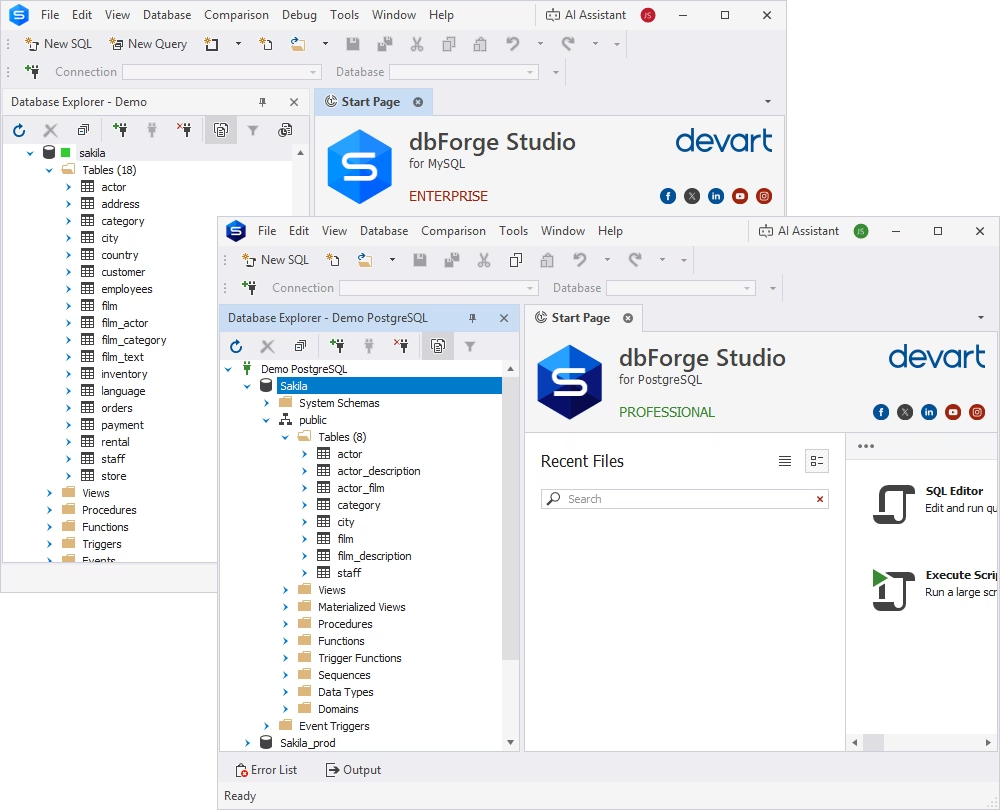
In this guide, we demonstrate MySQL-to-PostgreSQL migration using dbForge Edge—a universal database tool that supports both MySQL and PostgreSQL.
Migrate MySQL to PostgreSQL with dbForge Edge
dbForge Edge is a GUI-based, multi-database solution that supports SQL Server, MySQL/MariaDB, Oracle, PostgreSQL, Amazon Redshift, and popular cloud platforms. Its robust toolset enables you to manage the entire database lifecycle, from design and development to administration and automation.
The tools available in dbForge Edge cover a wide range of database management tasks, including data import, export, and direct migration between databases in different DBMSs via ODBC. Let's walk through the process step by step.
Step 1. Connect to the source and target databases
This tutorial focuses on migrating tables between MySQL and PostgreSQL databases. It assumes that you have already provisioned the PostgreSQL server, created the target database, and configured its business logic. The goal is to transfer tables and their data from MySQL to PostgreSQL.
To complete this task, you will need Devart ODBC Driver for PostgreSQL to enable data transfer. It is a high-performance connectivity solution that allows us to access live PostgreSQL data from anywhere. We will use it to enable the data transfer from the MySQL database to PostgreSQL, as it is much faster and does not require any specific configurations.
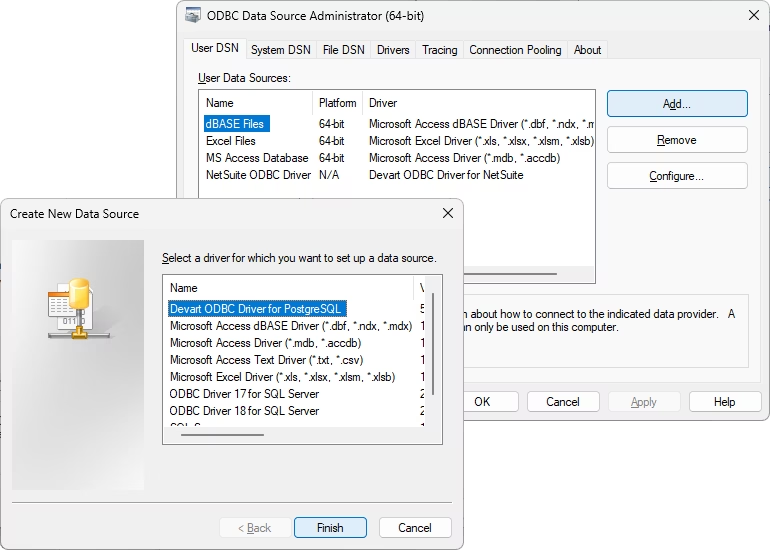
Download and install Devart ODBC Driver for PostgreSQL. Then configure it for use in the migration process: launch the ODBC Data Source Administrator that matches the bitness of your third-party application (32-bit or 64-bit), click Add, and select Devart ODBC Driver for PostgreSQL. Click Finish.
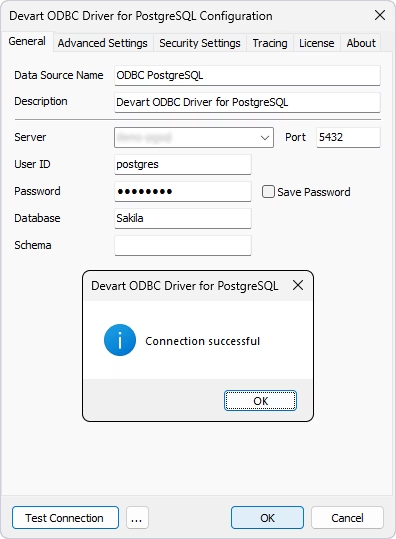
It opens the Devart ODBC Driver for PostgreSQL Configuration dialog. Give a name to your data source and provide the connection details for the server and the database where you will migrate your data from MySQL. We name our data source ODBC PostgreSQL, and will use this name in subsequent steps. Click Test Connection to verify that the connection details are valid and click OK to save the settings.
Next, connect to the MySQL source database using dbForge Studio for MySQL, a professional MySQL GUI tool available as part of dbForge Edge.
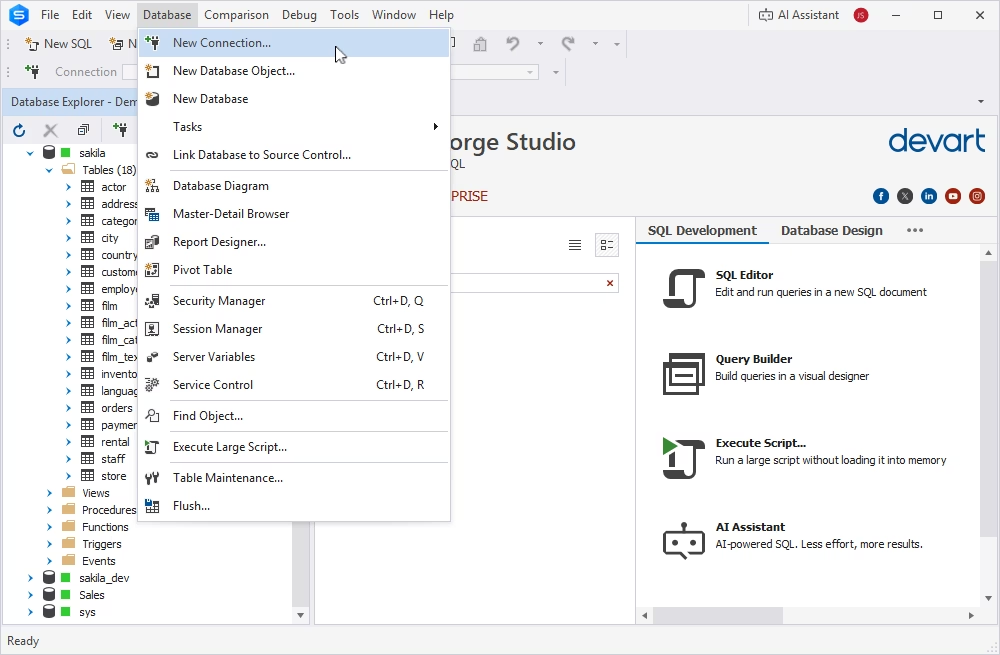
Launch the Studio and click Database > New Connection, or click the New Connection button on the toolbar. The Database Connection Properties window will appear.
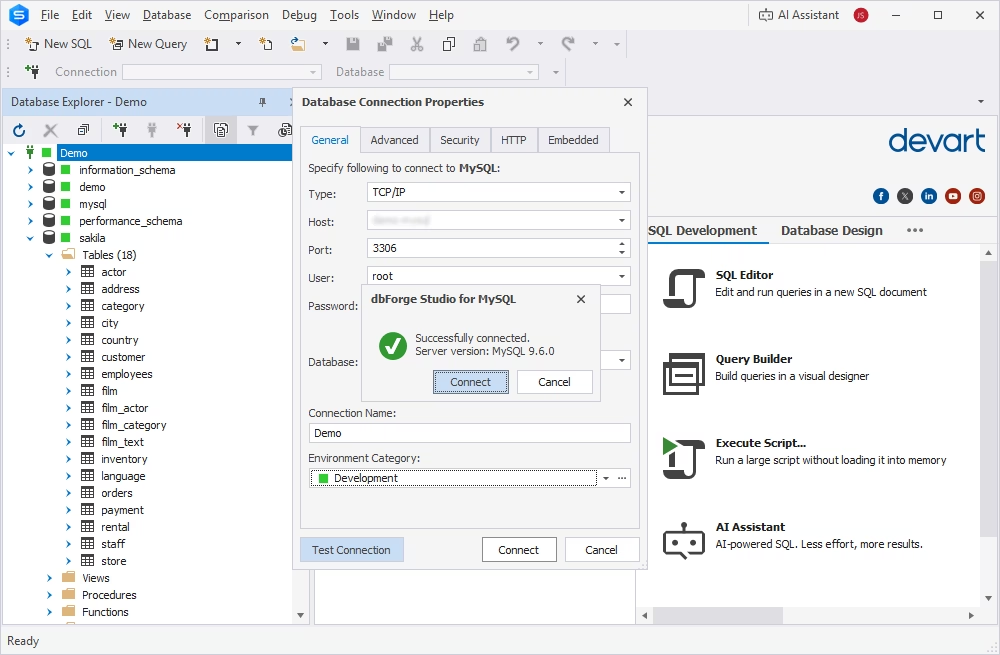
Enter the connection details: specify the connection type, enter the host, the port, the user, and the password. Optionally, you can also specify the default database to connect to. Connection Name is generated automatically from the hostname. However, you can set a distinctive name for your new connection.
In most cases, it is enough to successfully connect to the MySQL server and access the databases. Click Test Connection to verify the details, and dbForge Studio for MySQL will connect to the server.
Step 2. Configure the export format and destination
In our tutorial, we use the Sakila test database. It is a popular database used for demonstration purposes in both MySQL and PostgreSQL.
We already have the Sakila database on the PostgreSQL server, but it is not a full copy of the MySQL database. We will transfer the customer table from Sakila in MySQL to Sakila in PostgreSQL.
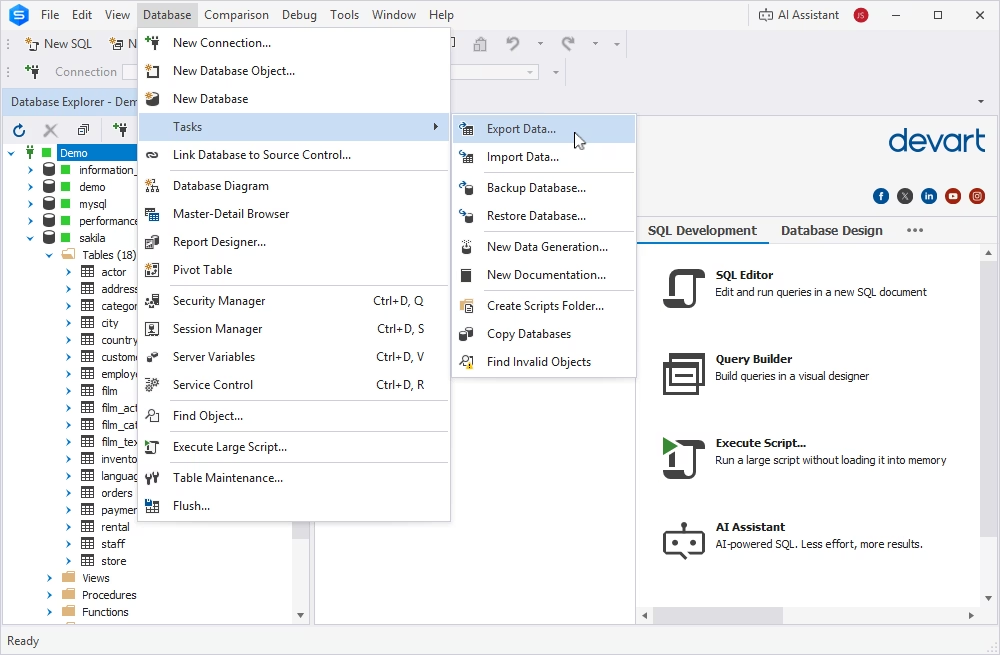
Navigate to the Database menu in dbForge Studio for MySQL and choose Tasks > Export Data.
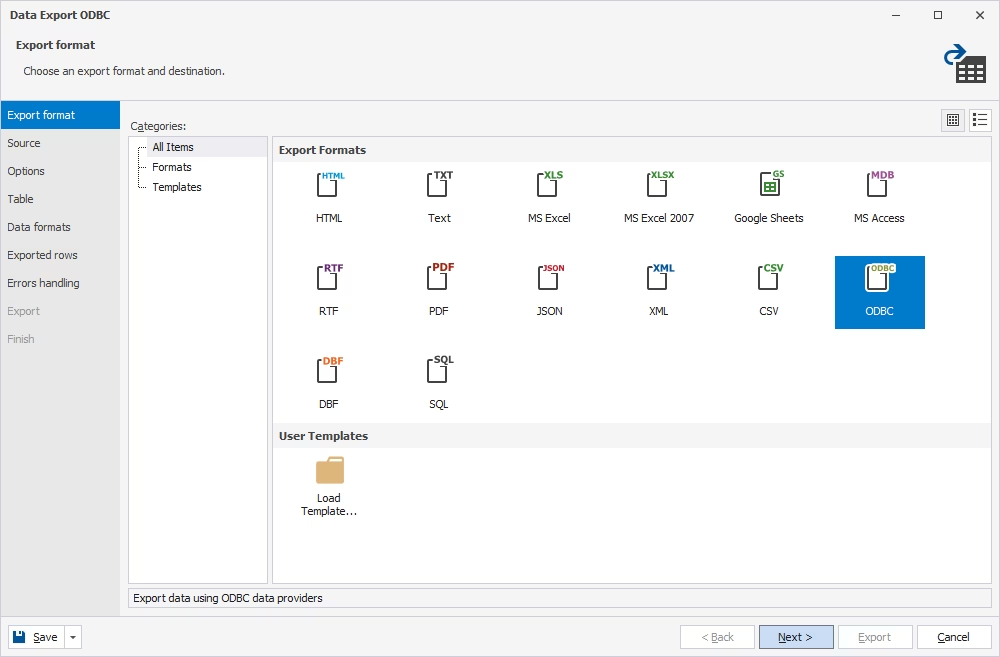
It opens the Data Export wizard that will help us configure the migration task in several clicks. The first step is to select the export format. In our case, we use ODBC. Click Next.
Step 3. Select tables, columns, and data scope
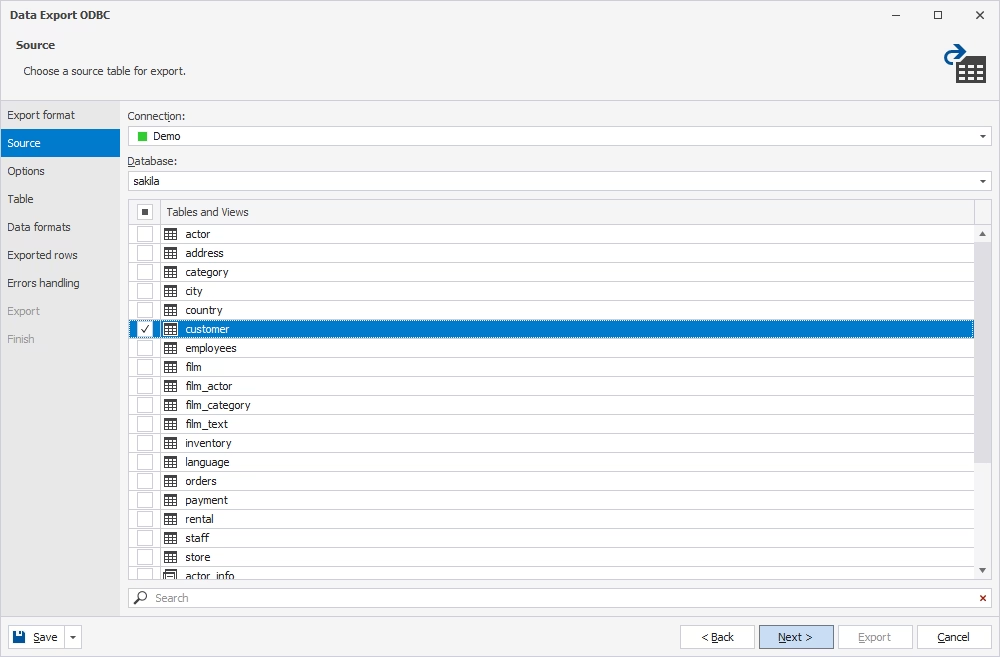
On the Source page, we can see the list of tables in the Sakila database. Let us migrate the customer table, which is present in MySQL but absent in PostgreSQL. Choose this table and click Next.
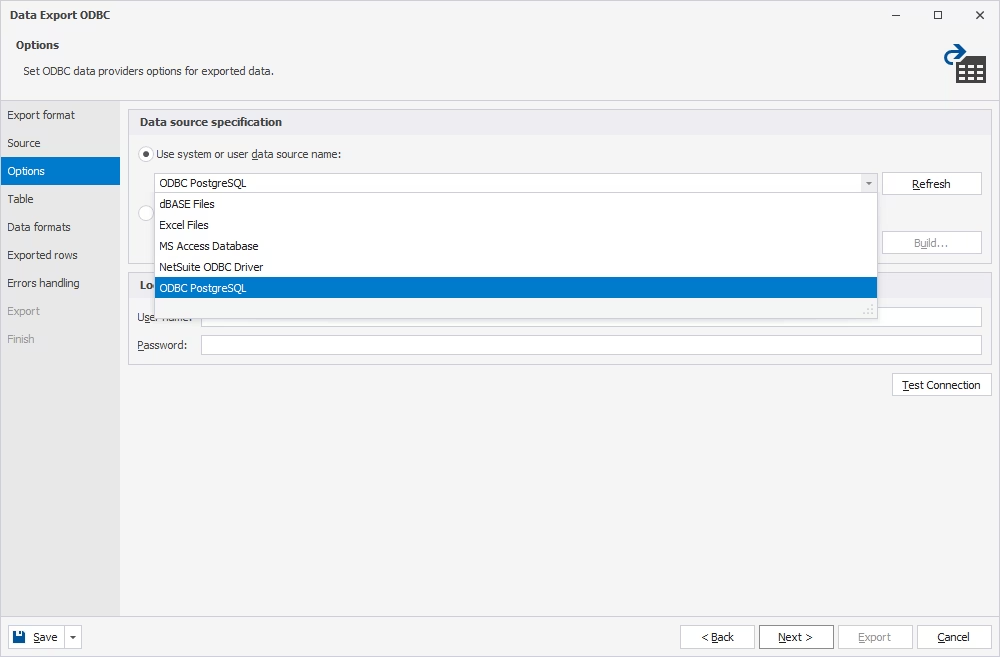
On the Options page, specify the data source. It should be the ODBC Driver we configured earlier and named ODBC PostgreSQL. Choose it from the list under the Use system or user data source name and click Next.
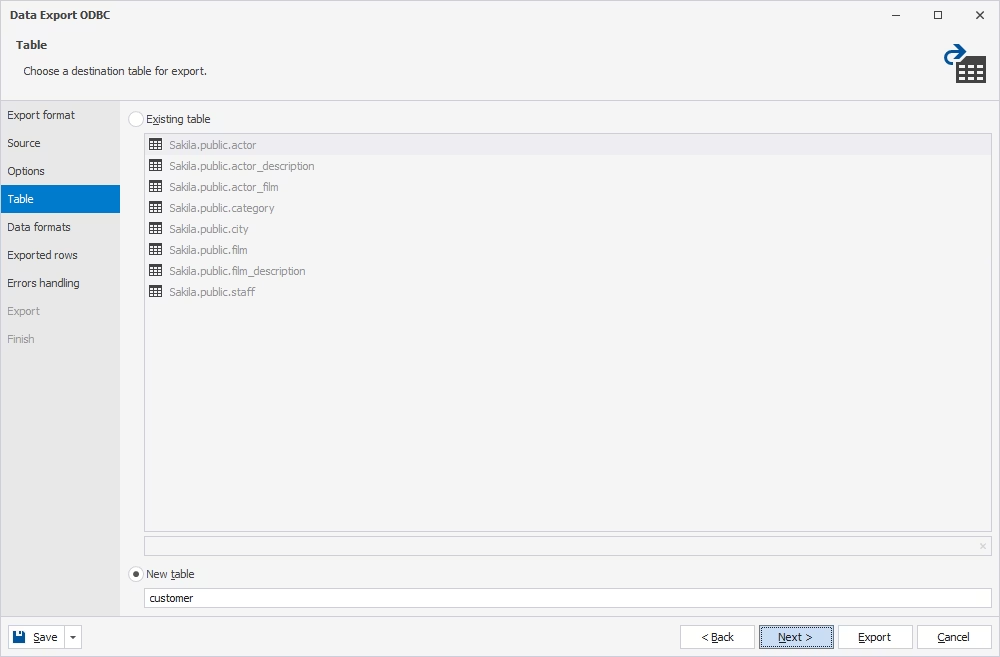
On the Table page, define whether you export data into an existing table or a new table. We choose the New table option and enter the name for that table.
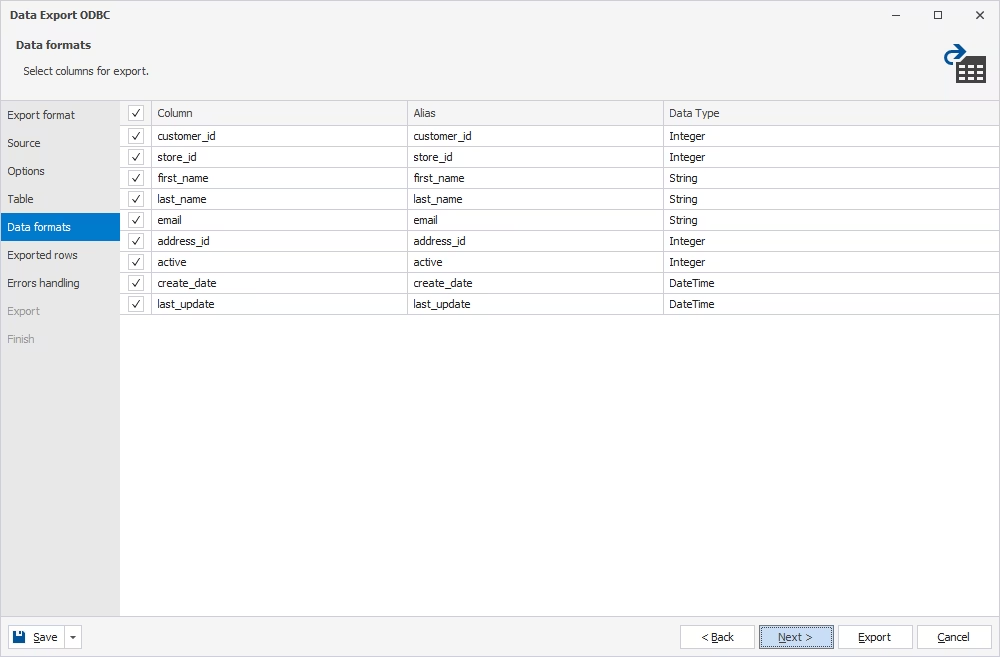
On the Data formats page, check the columns you want to migrate. Click Next.
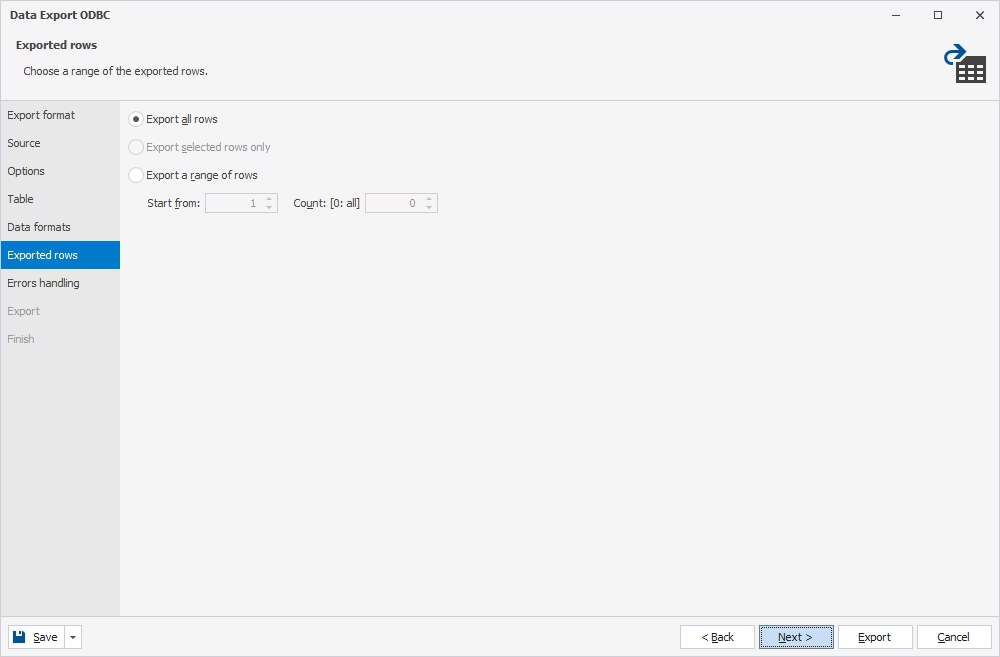
On the Exported rows page, define whether you want to export all rows or only a part of them. Click Next.
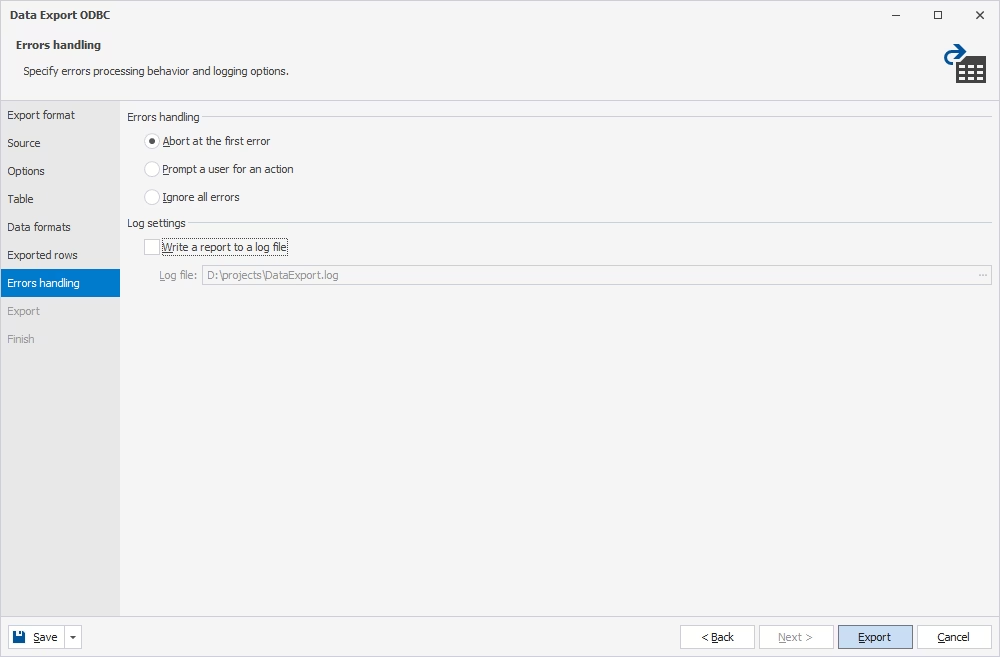
On the Errors handling page, set your preferences for the program behavior in case of errors. You can set the Studio to abort the process after the first detected error, ask the user for actions, or ignore errors and proceed. Optionally, you can set the application to write a report.
Step 4. View imported data in dbForge Studio for PostgreSQL
dbForge Studio has automatically created a new table named customer in the Sakila database with the same schema as in the original table in MySQL, and imported data into that new table.
To view the migrated data in PostgreSQL (and work with it further), we use dbForge Studio for PostgreSQL, which is also part of dbForge Edge. It is a robust IDE for PostgreSQL and Amazon Redshift databases as well as for related cloud platforms, including Supabase, that provides a comprehensive toolset for all standard tasks in these systems, including code writing, database comparison and synchronization, test data generation, data migration, database administration, and many other options.
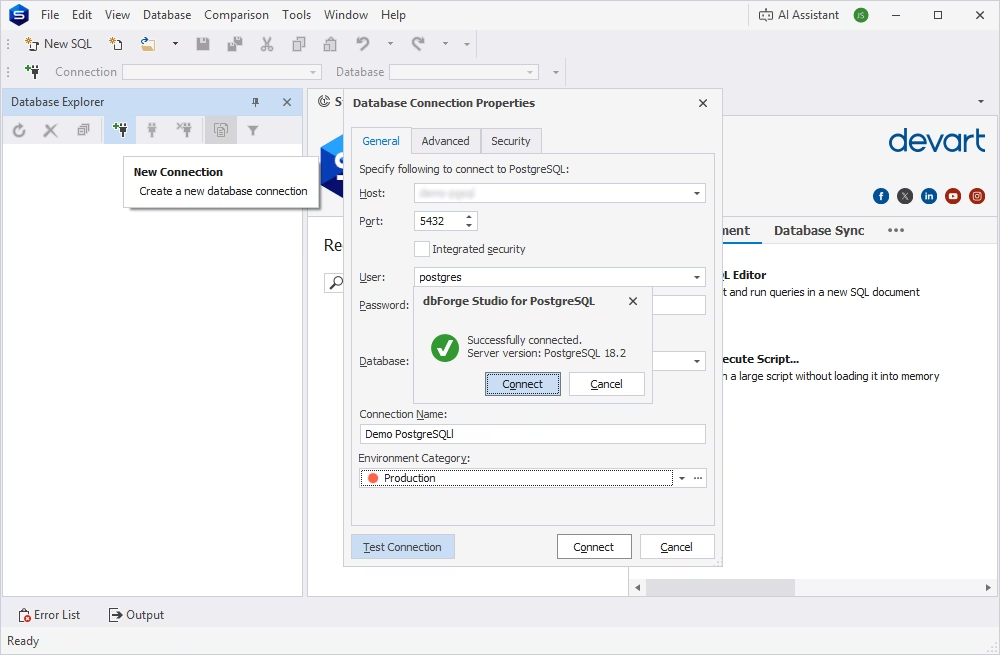
The process of connecting this PostgreSQL GUI is the same as for dbForge Studio for MySQL: launch dbForge Studio for PostgreSQL, navigate to Database > New Connection, and enter the connection details. Click Test Connection to check if everything is correct, and then click Connect.
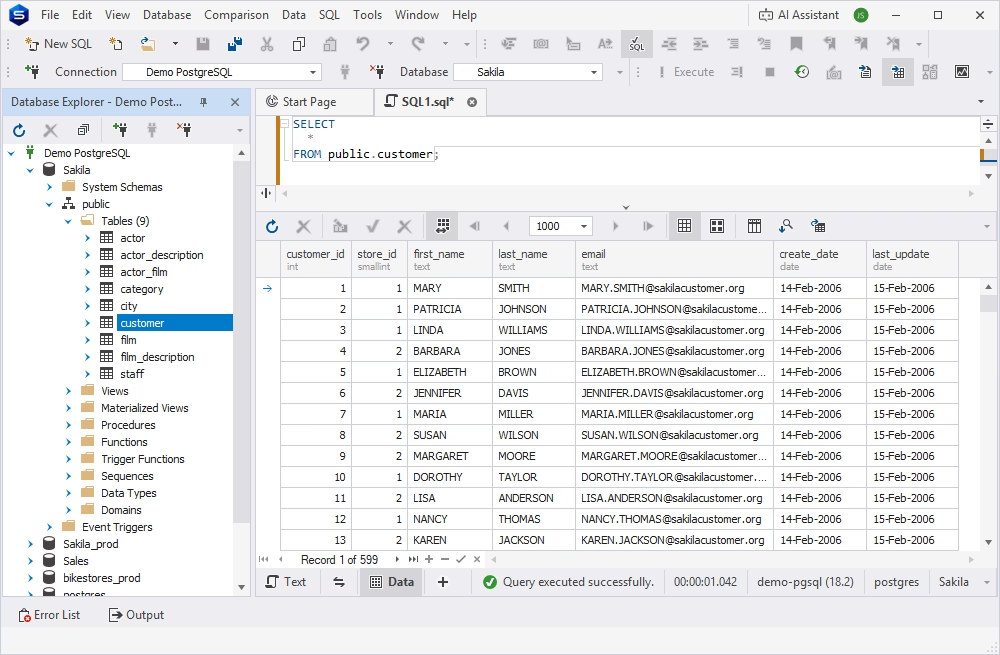
You can see the Sakila database with a new table added. The data is successfully transferred to this table.
Convert a MySQL dump to PostgreSQL
We have examined how to migrate table data from MySQL to PostgreSQL using the GUI-based tools: dbForge Studio for MySQL and dbForge Studio for PostgreSQL, both of which are included in dbForge Edge. This approach is fast and straightforward when you only need to transfer data, and it does not require any coding.
Another way to perform data migration between MySQL and PostgreSQL is by using a MySQL dump.
When dump-based migration makes sense
Dump-based migration is a practical approach in certain scenarios. It works best when simplicity and control are more important than automation or zero downtime.
Typical use cases include:
Migration of smaller or simpler databases
Offline migrations or those performed during maintenance windows
Established workflows that already rely on dump files
One-time or infrequent migrations
Dump files provide a simple, self-contained snapshot of the database. This makes them particularly useful for one-time migrations, as well as for situations where greater control over the process is required. You can edit SQL scripts to achieve precise results, and dump files can be versioned, reviewed, and modified before import. This is especially valuable for debugging and compliance purposes.
Common problems when converting MySQL dumps
Although convenient, dump-based migration between MySQL and PostgreSQL often encounters the following compatibility issues:
Syntax incompatibilities: MySQL-specific syntax is not valid in PostgreSQL and must be rewritten.
Unsupported or differing statements: Some MySQL features do not exist in PostgreSQL or behave differently.
Object creation order: PostgreSQL objects must be created in the correct sequence (e.g., tables before foreign keys, functions before triggers), or the import will fail.
Data type mismatches: MySQL types (e.g., TINYINT, DATETIME, ENUM) do not map directly to PostgreSQL equivalents and require manual conversion.
Encoding and collation issues: Mismatched character sets and collations can lead to errors.
Import failures and partial loads: Errors during import may stop execution midway, leaving the database in an inconsistent state.
In short, dump-based migration is not the best choice for large or complex systems. In such cases, it is better to use more automated, database-aware migration tools.
Using pgloader to migrate MySQL to PostgreSQL
pgloader is an open-source command-line tool designed to load data from various sources (CSV, DBF, SQLite, MySQL, Microsoft SQL Server) into PostgreSQL. For MySQL-to-PostgreSQL migration, pgloader is a popular option.
It automates much of the conversion process, including schema translation, data type mapping, and data transfer. It also helps ensure data integrity by logging errors and isolating rejected rows while allowing the bulk loading process to continue. However, compared to GUI-based tools, it requires more technical setup and configuration.
Let's walk through the process of transferring data from MySQL to PostgreSQL using pgloader, step by step.
Step 1. Install pgloader
A Linux environment is recommended (Ubuntu/Debian, CentOS), or Docker, as pgloader does not run natively on Windows.
Install pgloader using common package managers:
On Ubuntu/Debian:
sudo apt-get install pgloader
On macOS (using Homebrew):
brew install pgloader
Alternatively, you can compile it from source via the official GitHub repository.
Step 2. Prepare the source and target databases
Create the target PostgreSQL database in advance and review user permissions: pgloader generally requires read access to the MySQL source and write access to the PostgreSQL target to perform the migration smoothly.
Before using pgloader for database migration, make sure that the source MySQL database is accessible from the machine where pgloader is running.
Step 3. Write a pgloader load file or command
The load file is the central configuration that tells pgloader what to migrate and how to do it. It is kind of a declarative script that defines the entire migration workflow.
Therefore, you don't have to export, transform, and import data manually; instead, you describe everything in this file and let the utility execute it.
LOADDATABASEFROM mysql://root:password@localhost/sakila
INTO postgresql://postgres:password@localhost/sakila_pg
WITHincludenodrop, createtables, create indexes, resetsequences, data onlySET work_mem to'16MB', maintenance_work_mem to'512 MB'ALTERSCHEMA'sakila'RENAMETO'public';
Step 4. Run the migration
Once your load file is ready, execution is typically a single command:
pgloader my-migration.load
pgloader connects to MySQL and PostgreSQL. Then it does the following:
Inspects schema and prepares target objects (unless disabled)
Streams data in batches, often in parallel
Applies type casting and transformation rules from the load file
Builds indexes and constraints (either during or after loading)
For larger migrations, you can run this on a dedicated machine or container to avoid resource contention.
Post-migration validation checklist
A successful migration means that all data is present, relationships and constraints are valid, database logic behaves correctly, and the application functions as expected.
Therefore, once the migration is complete, you should thoroughly inspect the PostgreSQL database for completeness and accuracy. Run tests and compare it with the source MySQL database to ensure everything has been transferred correctly.
Check row counts and data completeness
Verify that no tables are missing
Compare row counts for each table
Spot-check records (especially edge cases such as NULL values, special characters, and large data fields)
Compare aggregates (e.g., sums and averages)
Validate date/time fields and boolean conversions
Any mismatches may indicate skipped rows, failed inserts, or data type and encoding issues.
Validate constraints, keys, and indexes
Verify the presence of primary keys and uniqueness constraints
Validate foreign key relationships
Check for orphaned records
Compare index definitions with the original schema
Identify missing or inefficient indexes
Performance issues often surface at this stage, even if the data itself is correct. Run sample queries and review execution plans to detect potential problems.
Test queries, reports, and application behavior
Ensure the next generated ID is higher than the current maximum
Confirm that inserts do not produce duplicate key errors
Verify that all views compile and return expected results
Ensure triggers execute correctly (e.g., insert/update side effects)
Validate that stored functions behave as expected
These objects are often rewritten during migration and therefore require careful testing.
Review performance after migration
A successful import does not automatically guarantee acceptable runtime performance. After migration, connect your application to PostgreSQL and run realistic workloads to evaluate:
Key workflows (reads, writes, updates)
Absence of query errors or syntax issues
Response times against expectations
Slow queries that need optimization
Potential bottlenecks
Post-migration validation is essential. It ensures that the migration is not only successful but also reliable, with each validation step playing a critical role.
Conclusion
Migrating from MySQL to PostgreSQL depends on thorough preparation, selecting the right migration method, accurate schema and data conversion, and comprehensive post-migration validation.
This article provided a practical guide to performing such a migration, with a focus on data transfer. dbForge Edge simplifies the process of moving MySQL data across databases, servers, and different DBMSs, reducing the need for manual scripting or multiple tools.
For teams working across multiple platforms, dbForge Edge offers a unified environment with full functionality. Whether you are performing a one-time migration from MySQL to PostgreSQL or managing ongoing tasks across different systems, it provides a consistent and scalable workflow.
You can try dbForge Edge in action with a fully functional free trial and evaluate its capabilities in your own environment.
FAQ
How do I migrate MySQL to PostgreSQL?
The process includes several key steps. First, review the schema, data types, constraints, and logic to ensure all MySQL-specific elements can be properly converted to PostgreSQL. Next, choose an appropriate migration method (dump and restore, ETL tools, or replication). Then prepare and transfer the schema and data using suitable tools or scripts. Finally, validate and test the PostgreSQL database to ensure correctness and stability.
Can I convert MySQL to PostgreSQL with the help of an AI assistant?
AI can assist with generating schema conversion scripts, suggesting data type mappings, identifying potential mismatches, and rewriting database logic. It can also help generate SQL code for PostgreSQL that mirrors your MySQL setup. However, AI cannot fully replace human involvement. Database migration requires careful oversight, especially for edge cases, performance tuning, and business-critical data.
What is the best tool to migrate MySQL to PostgreSQL?
The best tool choice depends on your specific requirements and constraints. Common options include pgloader, ETL tools, and custom SQL scripts. Typically, pgloader works well for simpler scenarios, ETL tools are better suited for complex migrations, and SQL scripts provide fine-grained control. In most cases, it is advisable to choose the simplest method that meets your needs.
What are the main differences between MySQL and PostgreSQL during migration?
Key differences include: Data types (e.g., TINYINT vs. BOOLEAN, differences in JSON handling), SQL syntax (PostgreSQL is stricter and more standard-compliant), auto-increment vs. sequence-based ID generation, indexing and constraint behavior, and stored procedures and triggers (often require rewriting). These differences are the primary source of migration challenges.
How can I ensure minimal downtime during migration from MySQL to PostgreSQL?
For near-zero downtime, consider using replication or change data capture (CDC) alongside an initial bulk load. Synchronize ongoing changes and switch over once both systems are aligned. For smaller systems, a dump-and-restore approach with a short maintenance window may be sufficient.
How can I convert MySQL to PostgreSQL without losing data integrity?
Maintaining data integrity depends on proper preparation and thorough validation. Ensure all data types and constraints are correctly mapped before migration. Migrate the schema first, then transfer the data once the schema has been verified. After migration, validate row counts, foreign keys, sequences, aggregates, and other critical elements. Run application-level tests to confirm correct behavior. While automation helps, manual verification remains essential.
Ready to get started?
Download dbForge Edge for a free trial today!
Get a free trial of dbForge Edge to evaluate all of its capabilities hidden under a sleek user interface.