How to migrate from SQL Server to PostgreSQL: Complete guide
Whenever you need to migrate a database to a different system, you face numerous challenges. Migration is not just copying the schema and data to a new location—it involves a lot of rework. Each database system has its own specifics, so migration requires more than simply copying the database. You need to adapt it to the new architecture and behavior, taking into account data types, indexes, stored procedures, functions, etc. On the other hand, database migrations are common, and one of the most popular destinations is PostgreSQL—powerful, flexible, transparent, reliable, and cost-efficient.
This article provides a step-by-step guide to migrating SQL Server databases to PostgreSQL, with an explanation for every stage: what you need to do, why, what you should consider, and how to verify the results.
SQL Server-to-PostgreSQL migration: What changes?
SQL Server and PostgreSQL are both popular relational databases, and they seem to have much in common in their architecture and features. However, they differ significantly. You need to evaluate lots of factors that affect the migration. Let us explore where these differences typically show up during database migration from SQL Server to PostgreSQL.
SQL dialect and function differences
SQL Server uses T-SQL; PostgreSQL uses its own SQL dialect, which is largely based on the SQL standard, but also adds specific extensions. This means you need to check and rewrite many queries. Some of the most common examples are:
- Row limiting: In SQL Server you can use SELECT TOP to limit the number of results, but TOP does not exist in PostgreSQL. Instead, you should use LIMIT, like
SELECT * FROM orders LIMIT 10.
- Null handling: T-SQL uses ISNULL(column, 'default'), but it becomes COALESCE(column, 'default') in PostgreSQL.
- String concatenation: SQL Server allows using
'Hello ' + name with + as a concatenation operator. PostgreSQL uses || ('Hello ' || name).
- Date formatting: T-SQL uses specific formatting codes with the CONVERT() function to convert strings to date formats. PostgreSQL uses different formatting patterns. Instead, it uses the TO_CHAR() function, so you need to learn and apply a different syntax.
- Current date/time: T-SQL uses GETDATE(), but PostgreSQL uses NOW() or CURRENT_TIMESTAMP. You need to rewrite functions like DATEADD() or DATEDIFF() using interval arithmetic (
NOW() + INTERVAL '1 day').
These differences seem small, but the amount of work can become huge if you need to handle hundreds of queries, views, and stored procedures.
Data type differences
Most SQL Server data types have PostgreSQL equivalents, but several types require additional measures:
- bit > boolean: This change means you need to adjust the true/false semantics in PostgreSQL.
- uniqueidentifier > uuid: The change affects the functions (NEWID() turns into gen_random_uuid()).
- datetime / datetime2 > timestamp or timestamptz: This is a common source of bugs: when you choose between timestamp (no time zone) and timestamptz (time zone-aware), it affects the behavior of dates across environments.
- money > numeric: PostgreSQL has a money type, but it is generally discouraged. Instead, you should choose numeric for financial data.
- varbinary > bytea: Binary data storage works differently; therefore, review the schema and code that reads/writes binary values.
- timestamp / rowversion issues: The timestamp type in SQL Server is not a date/time value—it is an auto-incrementing binary value used for row-versioning (concurrency control). PostgreSQL has no direct equivalent; you need to rework the entire logic using triggers, versioning columns, or concurrency mechanisms in PostgreSQL.
Stored procedures, triggers, and views
SQL Server databases have stored procedures, triggers, and functions written in T-SQL, and it is impossible to simply move their code to PostgreSQL. You have to review both the syntax and the logic for each procedure manually.
Views usually cause fewer complications, but you have to adjust the SQL code for the dialect differences. As for triggers, they should be rewritten in PL/pgSQL and tested against PostgreSQL's trigger execution timing and row-visibility rules.
Database migration is never a simple job. You have to explore and rewrite the full operational logic.
SQL Server-to-PostgreSQL migration checklist
Here we have compiled a short checklist for you to use when you prepare the migration.
| Step |
What to check |
Why it matters |
| Database inventory |
Tables, views, procedures, functions, triggers, SQL Server Agent jobs |
Shows migration scope |
| Dependencies |
Linked servers, apps, reports, ETL jobs |
Prevents broken integrations |
| Schema compatibility |
Data types, constraints, indexes |
Reduces conversion errors |
| SQL code |
T-SQL syntax, functions, procedures |
Avoids runtime failures |
| Data migration method |
Export/import, ODBC, ETL, replication |
Defines downtime and effort |
| Validation |
Row counts, checksums, constraints, queries |
Confirms migration quality |
| Performance |
Indexes, query plans, configuration |
Prevents post-migration slowdowns |
| Rollback plan |
Backups, restore plan, cutover window |
Reduces production risk |
Now, let us explore each step of the database migration from SQL Server to PostgreSQL in detail.
Step 1. Assess the SQL Server database
Before starting the migration, evaluate the entire database and define exactly what you need to migrate, including all hidden dependencies.
Focus on the following aspects:
- Database size and growth rate, which affect the duration of the migration process and the expected downtime.
- Number of database objects, such as tables, views, and their relationships, including foreign keys.
- Stored procedures and functions, counted and roughly categorized by complexity (simple CRUD wrappers or complex procedures with heavy business logic, cursors, or dynamic SQL).
- Triggers, since they often contain important business logic.
- SQL Server Agent jobs, which handle ETL and other scheduled tasks. In PostgreSQL, you will need a PostgreSQL-native equivalent (e.g., pg_cron or an external scheduler).
- Indexes and constraints, especially those that rely on SQL Server-specific features and won't map directly to PostgreSQL.
- Linked servers that are involved in cross-database or cross-instance operations. You need to redesign these dependencies in PostgreSQL, as it handles them differently (via postgres_fdw or dblink).
- Reporting dependencies, such as SSRS reports, Excel connections, or BI tools that query databases directly. You need to test these integrations against PostgreSQL separately.
- Application queries, so you know how much raw SQL you have. Ideally, you need to capture these queries through query logs or code review.
Tip
Create a spreadsheet or tracking document for the results of these checks to refer to it during the migration process when it becomes necessary.
Step 2. Convert the SQL Server schema to PostgreSQL
You have examined the database to migrate and taken all the necessary preparation steps like reviewing, redesigning, and rewriting the essential elements. The next step is to transfer the database schema.
As a rule, it is a standard, mechanical process. Still, the following issues require consideration:
- Tables and columns: Map each SQL Server data type to its PostgreSQL equivalent. Pay attention to computed columns and identity columns, since PostgreSQL uses sequences and GENERATED...AS IDENTITY rather than IDENTITY in SQL Server, and the syntax differs.
- Constraints: Primary keys, foreign keys, and unique constraints generally don't cause difficulties. However, check constraints sometimes rely on T-SQL functions that don't exist in PostgreSQL, so you need to rewrite them.
- Indexes: Standard B-tree indexes usually have straightforward equivalents, but filtered indexes (WHERE clause on the index) become PostgreSQL partial indexes with a slightly different syntax, and included columns (INCLUDE) map to PostgreSQL's covering indexes.
- Schemas and naming conventions: SQL Server is case-insensitive and commonly uses PascalCase or mixed-case object names. PostgreSQL folds unquoted identifiers to lowercase, which can break scripts or queries that rely on case. That's why you need to decide in advance whether you normalize everything to lowercase_snake_case or whether you need to quote identifiers to preserve original casing.
Have a look at the following table that explains how the data types should be mapped.
| SQL Server data type |
PostgreSQL data type |
Notes |
| bit |
boolean |
1/0 logic; 1 = TRUE, 0 = FALSE. |
| int |
integer |
Direct mapping. |
| bigint |
bigint |
Direct mapping. |
| tinyint |
smallint |
PostgreSQL has no 1-byte integer. SQL Server 'tinyint' is unsigned (0–255), while 'smallint' is signed (-32,768–32,767). Add a CHECK constraint to preserve the original range: CHECK (col BETWEEN 0 AND 255). |
| datetime |
timestamp |
Use timestamptz if time zone support is required. |
| datetime2 |
timestamp |
datetime2 provides higher precision and is the closest semantic match. Use timestamp(n) to specify the desired precision. |
| datetimeoffset |
timestamptz |
SQL Server preserves the original time zone offset, while PostgreSQL converts the value to UTC and discards the offset. Store the original offset in a separate column if you need to preserve it. |
| decimal |
numeric |
Direct mapping. |
| float |
double precision |
Uses 8 bytes and provides approximately 15 decimal digits of precision. |
| money |
numeric(19,4) |
Recommended for safer handling of monetary values. |
| nvarchar |
varchar(n) |
n specifies the maximum number of characters, not bytes. |
| nvarchar(max) |
text |
Review maximum length and character encoding during migration. |
| uniqueidentifier |
uuid |
PostgreSQL provides native UUID support. |
| varbinary(max) |
bytea |
Binary data handling differs between SQL Server and PostgreSQL. |
| xml |
xml |
PostgreSQL supports the XML data type, but XML querying works differently. PostgreSQL does not support XML indexes, schema collections, or T-SQL XML methods. Rewrite XML queries using PostgreSQL-specific functions such as xpath() and xmltable(). |
| geography |
geography |
Supported through the PostGIS extension. |
| hierarchyid |
No direct equivalent |
Via the LTREE extension and a label-based system. |
| vector |
vector |
The 'pgvector' extension supports direct vector data mapping, but similarity queries and indexing differ. Rewrite vector queries and index definitions to match PostgreSQL's syntax and capabilities. |
Step 3. Migrate data from SQL Server to PostgreSQL
Once the schema exists in PostgreSQL, you need to move the data. There are several approaches, and the right one depends on database size, acceptable downtime, and available tools.
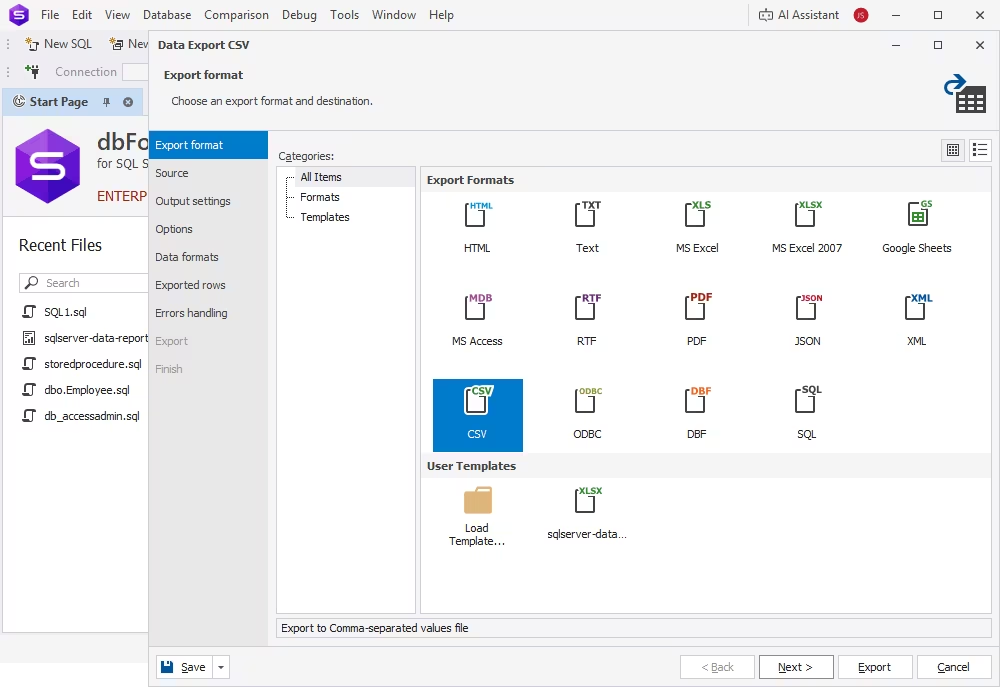
- Export and import: You can export data to a flat format (CSV) and load it into PostgreSQL via COPY or third-party data migration tools. This approach is simple and fast, popular for smaller databases or one-time migrations. If the schema is stable and the downtime is reasonable, data export and import will do the job.
- ODBC or ETL-based migration: Tools like pgloader, SSIS, or general-purpose ETL platforms can connect to SQL Server directly and transform data in flight, handling data type conversions, filtering, and other transformations as part of the load. This approach suits more complex migrations and requires additional setup time.
- Incremental or low-downtime migration: If your system can't go down for a substantial period, you may refer to the tools that support change data capture (CDC) or replication. In this case, an initial bulk load is performed and then followed by ongoing synchronization until the end. This approach minimizes downtime but adds complexity. Still, it is a common choice for large and actively used databases.
Many migrations combine several approaches: a bulk export/import of historical data via third-party tools, as illustrated below, paired with CDC-based synchronization.
Step 4. Convert T-SQL queries, procedures, and application logic
This step is the most complicated part of the migration, since handling the logic is challenging, and you can't fully automate it even with AI help.
Focus on the following:
- Stored procedures and functions: Review each T-SQL procedure and rewrite it in PL/pgSQL or split it into plain SQL functions with simple logic. Focus first on TRY...CATCH blocks (they need to turn into PostgreSQL's exception handling), cursors (replace them with set-based operations that perform better in PostgreSQL), and temp table usage (adapt them to PostgreSQL's temporary table or CTE patterns). Review and prioritize procedures by importance.
- Application code changes: If you use any raw SQL in application code, make sure to adjust it to a new dialect in advance (e.g., TOP to LIMIT, string concatenation, date functions, etc.).
Tip
Instead of a single big rewrite, convert and test procedures in priority order, starting with the most frequently used or business-critical procedures. Test the converted logic against the new schema to catch mismatches or differences early.
| SQL Server |
PostgreSQL |
Notes |
| SELECT TOP 10 * FROM users |
SELECT * FROM users LIMIT 10 |
Pagination syntax differs |
| ISNULL(col, 'N/A') |
COALESCE(col, 'N/A') |
PostgreSQL uses standard SQL function |
| GETDATE() |
NOW()/CURRENT_TIMESTAMP |
Choose based on use case |
| NEWID() |
gen_random_uuid() |
Requires UUID generation support |
| + for strings |
CONCAT() or || |
|
| IDENTITY |
GENERATED ... AS IDENTITY/sequence |
Review insert and return logic |
Step 5. Validate the migrated PostgreSQL database
Migration does not end with schema and data transfer. You need to make sure that the new database is complete and behaves as expected. So, the following checks are necessary:
- Schema validation: Compare table structures, constraints, indexes, and object counts between source and target. You need to detect if anything could be dropped or altered unintentionally.
- Data validation: Run row counts, checksums, or sampling comparisons between SQL Server and PostgreSQL to confirm data integrity. This check is crucial for those columns that required data type conversion.
- Functional and performance testing: Run the query and transaction workloads against PostgreSQL, checking both the results and performance. For instance, a fast query in SQL Server may not automatically be fast in PostgreSQL because the two systems handle indexing and query optimization differently. You may need to run additional query analysis and profiling.
Validation of the migration is a separate stage where you can catch problems before they affect your work.
Common SQL Server-to-PostgreSQL migration issues
The following issues can occur during the migration of the database between systems, so refer to the checklist below.
| Issue |
Likely cause |
How to fix |
| Type mismatch errors |
SQL Server and PostgreSQL data types differ |
Review mappings before import |
| Broken stored procedures |
T-SQL is not PL/pgSQL |
Rewrite and test procedure logic |
| Wrong boolean results |
SQL Server bit logic differs from PostgreSQL boolean |
Replace 1/0 comparisons with TRUE/FALSE logic |
| Case-sensitive object errors |
PostgreSQL handles quoted identifiers differently |
Standardize naming before migration |
| Slow queries after migration |
Indexes or query plans differ |
Review indexes and run PostgreSQL query analysis |
| Failed imports |
Encoding, delimiter, NULL, or date format issues |
Test import on staging first |
| Broken application queries |
SQL dialect differences |
Audit app SQL and ORM-generated queries |
| Constraint failures |
Data quality issues in source database |
Clean data before final migration |
How dbForge Edge helps with SQL Server-to-PostgreSQL migration
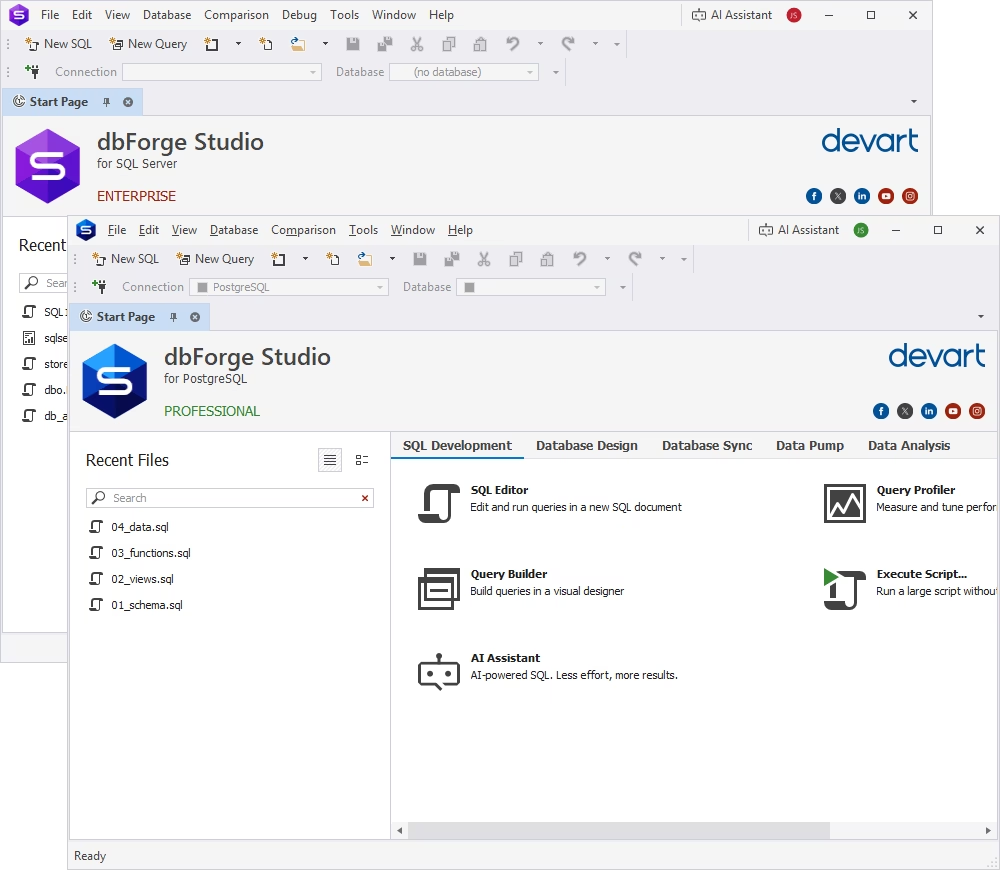
dbForge Edge is an AI-powered multidatabase solution that supports both SQL Server and PostgreSQL and allows you to perform all kinds of database tasks across these systems. Though it is not a universal converter, it can help with the migration steps outlined earlier. In particular, it helps inspect source data, prepare scripts, review the SQL code, manage PostgreSQL objects, compare results, and validate migrated data.
Work with SQL Server and PostgreSQL in one toolset
When migrating databases between systems, teams need access to both platforms for working with their databases. dbForge Edge is a universal database tool for all major DBMSs and related cloud services. It includes four dedicated IDEs, each tailored to a specific database system: SQL Server, MySQL, Oracle, or PostgreSQL.
Its comprehensive toolset covers SQL editing, database browsing, data review, data import and export, direct data migration between systems, and post-migration validation, among many other tasks. Instead of using separate tools for different databases and tasks, you can rely on a single solution to handle them all.
Review and adapt SQL with AI assistance
dbForge Edge includes an integrated AI Assistant that can help generate, explain, troubleshoot, and optimize SQL queries. You can use this feature to analyze database schemas and objects, especially when you need to detect any specific features that define the business logic.
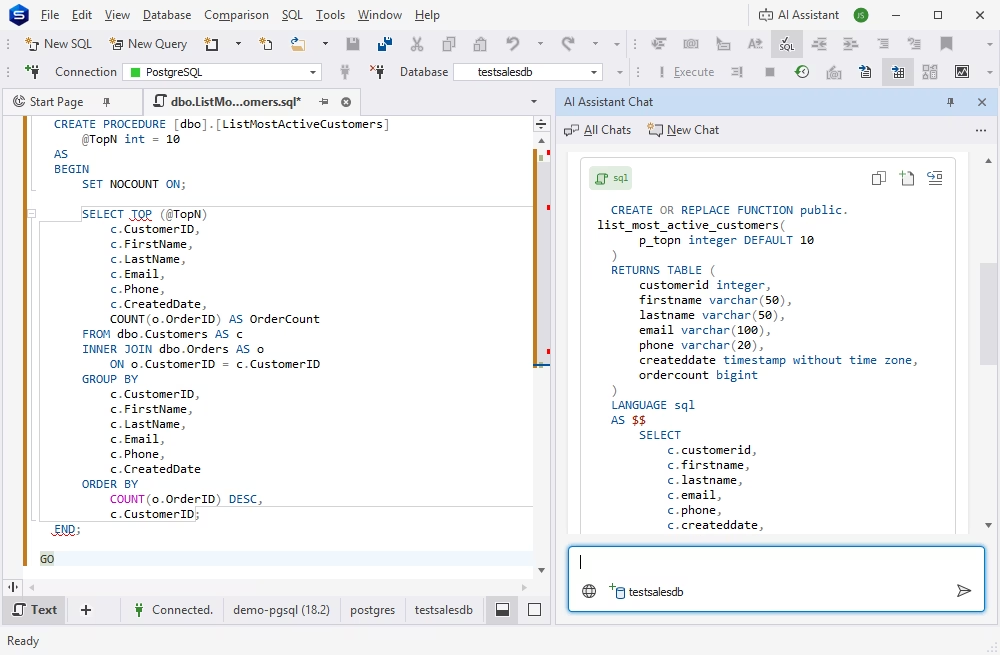
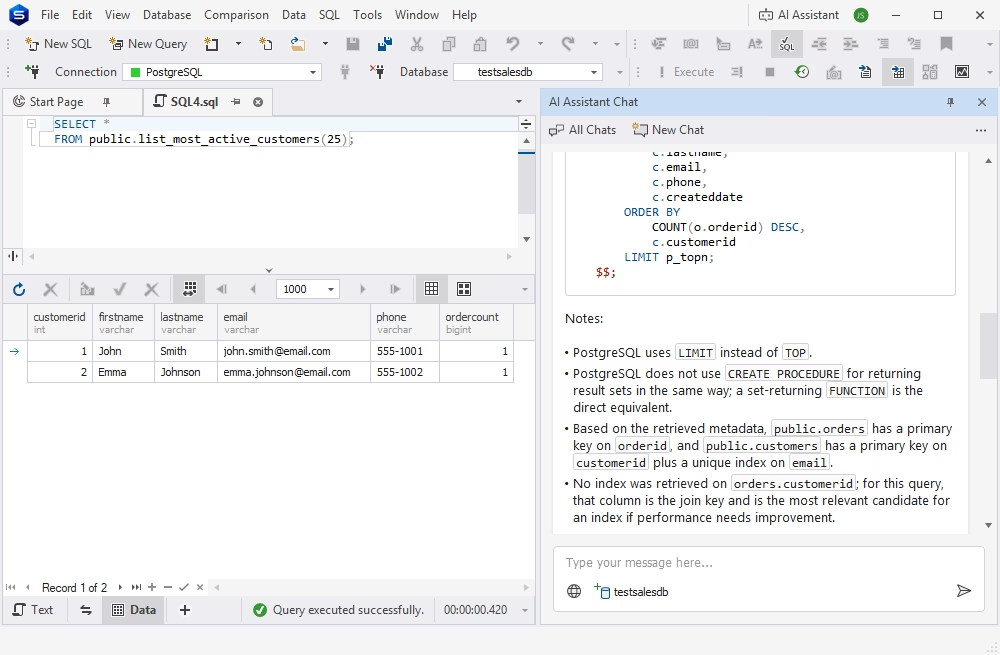
Also, it can help you translate T-SQL code into the target PostgreSQL dialect, as the AI Assistant is equally proficient in the specifics of each database management system.
Note
Though AI assistance is valuable, you should always review the AI-generated SQL scripts before execution.
Validate migration results with compare and sync tools
The schema and data comparisons mentioned earlier are necessary to validate the migration results. dbForge Edge provides dedicated Schema Compare and Data Compare for SQL Server and PostgreSQL, helping you detect all differences between the database structures and table data and deploy changes manually or automatically.
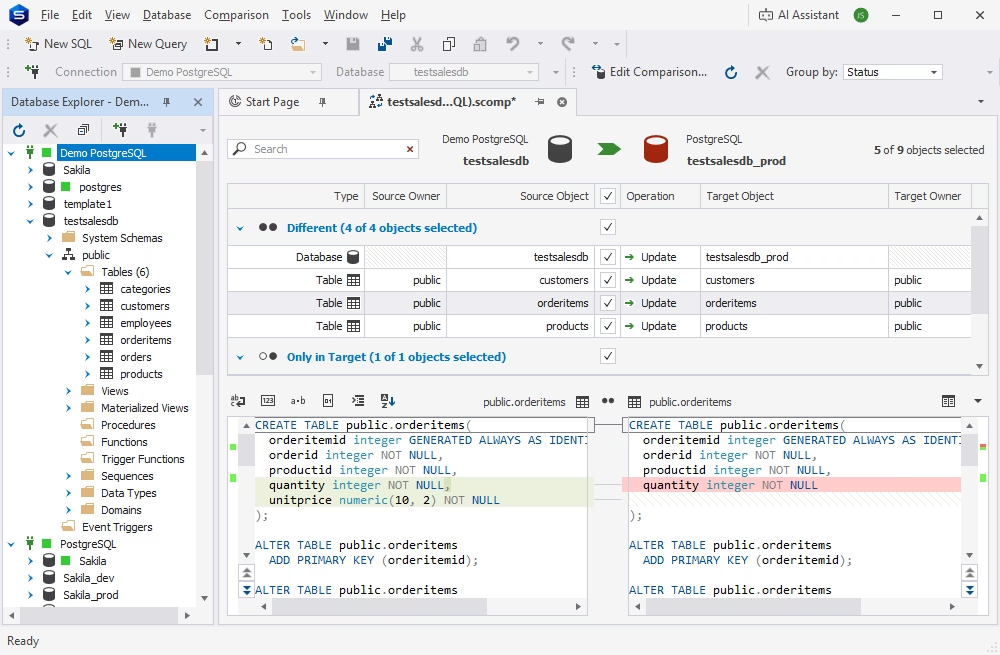
You can try dbForge Edge in your work with SQL Server and PostgreSQL databases: just download the fully functional free trial, install it, and see it in action.
dbForge Edge
A comprehensive solution that unifies development, management, and analysis across multiple databases within a single suite
SQL Server-to-PostgreSQL migration best practices
To ensure safe and successful migration, you need technical means and SQL knowledge, but a disciplined migration process is equally important. Let us consider some of the best practices for database migration.
Start with a full database inventory
Every migration should start with a complete inventory of your SQL Server database. It allows you to estimate the overall migration complexity and helps detect specific objects that require additional manual rewriting. You should not skip this database inventory stage as it may have severe consequences.
Test the migration in a staging environment first
Always test schema conversion, data transfer, and SQL rewrites against a staging PostgreSQL instance to catch type mismatches, failed imports, broken queries, missing indexes, and other issues. It is far cheaper to find and fix them in staging than in production.
Map data types before moving production data
Errors in data type mapping are often silent; you see their consequences after the migration as incorrect data and unreliable query performance. It is essential to examine the data type mapping in advance, especially bit columns, datetime values, money, and varbinary columns. Start the migration only after mapping the data types precisely.
Rewrite and review T-SQL manually where needed
T-SQL code is not well-suited to automated translation; if you migrate the SQL Server database to a different system, you should review and convert the code manually. The best approach is to treat the database examination as a comprehensive line-by-line process rather than a batch conversion task—it takes more time, but it helps you detect problems before sending the database to production.
Monitor PostgreSQL performance after migration
Even if the migration is technically successful, the new database in a new environment may behave differently than expected. Monitor the database actively after the migration: review execution plans, analyze slow queries, check indexes, and tune the PostgreSQL configuration parameters (the AI Assistant in dbForge Edge can help you with this significantly).
Conclusion
Migration of a SQL Server database to PostgreSQL is a complex process that includes schema conversion, data movement, SQL rewriting, results validation, and performance tuning.
Modern database tools can significantly reduce the amount of manual effort, though. Database migration will always require your supervision, but professional tools can help you make this job faster.
dbForge Edge offers the functionality to analyze databases, detect critical issues, assist in conversion, perform schema and data migration, and run post-migration checks. Try its powers with a fully functional 30-day free trial!
FAQ
How do I migrate from SQL Server to PostgreSQL?
Database migration from SQL Server to PostgreSQL follows five stages: assess the source database (tables, procedures, jobs, dependencies), convert the schema (data types, constraints, indexes), migrate the data (export/import, ETL, or CDC-based sync), convert T-SQL logic and application queries, and validate the result (schema, data integrity, and application behavior). To keep it safe, do it in a staging environment first.
What is the recommended approach for converting SQL Server stored procedures to PostgreSQL?
SQL Server objects are not converted easily, so you should review your stored procedures manually.
First, analyze the logic and the means to implement it, and then rewrite it in PL/pgSQL. Pay special attention to differences in SQL Server and PostgreSQL: T-SQL's TRY...CATCH should become the exception handling in PostgreSQL; cursors are often better replaced with set-based logic, and temp tables should be adapted to PostgreSQL's syntax.
Additionally, rank procedures by business criticality and convert and test the most important ones first.
What are the main differences between SQL Server and PostgreSQL?
These systems differ in SQL dialects, data types, built-in functions, procedural language for stored logic (T-SQL vs. PL/pgSQL), identity/auto-increment handling, indexing behavior and query planning, case sensitivity, and administration workflows. Therefore, migration of databases from SQL Server to PostgreSQL requires deep preparation, not just copying the database structure and data.
How do I convert SQL Server data types to PostgreSQL?
Most data types are similar in both systems, and you can map them directly. However, some of them need attention:
- bit becomes boolean
- uniqueidentifier becomes uuid
- datetime/datetime2 becomes timestamp or timestamptz (choose carefully based on time zone needs)
- money becomes numeric
- varbinary becomes bytea
- nvarchar(max) becomes text
Also, timestamp/rowversion in SQL Server is a special case (it is not a date type, but a row-versioning mechanism). In PostgreSQL, you need to reimplement it with triggers or versioning columns.
What is the best way to move data from SQL Server to PostgreSQL?
It depends on database size and downtime:
- Export/import suits smaller databases.
- ODBC or ETL tools (like pgloader) are good for migrations with data transformation.
- CDC-based incremental replication suits large, actively used production systems that require minimal downtime.
Many migrations combine a bulk load with CDC sync for final cutover.
How do I validate data after SQL Server-to-PostgreSQL migration?
Validation should cover three areas: schema (tables, constraints, and indexes), data (row counts, checksums, or sampling, especially for converted types), and functional/performance testing (running application queries).
Will my application code need changes after moving to PostgreSQL?
Usually, yes. For instance, SQL Server's TOP, ISNULL(), T-SQL date functions, and some other elements do not exist in PostgreSQL. You need to modify your code and convert its logic to PostgreSQL equivalents.
How can AI help rewrite SQL Server queries for PostgreSQL?
AI tools can speed up the mechanical parts of conversion. They can translate common syntax, draft initial PL/pgSQL versions of simple stored procedures, and identify likely mismatches. AI tools are useful at the initial stage, but their output still needs manual review, especially for procedures with complex business logic.
What are the most common SQL Server-to-PostgreSQL migration issues?
The most frequent problems include issues caused by case sensitivity, as PostgreSQL lowercases unquoted identifiers, incorrect data type mapping, errors during the conversion of stored procedures and other objects using the T-SQL-specific syntax, missing indexes, etc. These problems often occur because the migration teams underestimate the time and effort needed for preparation and don't check, analyze, and test everything appropriately.
Can dbForge Edge help with SQL Server-to-PostgreSQL migration?
dbForge Edge is a unified visual toolset that helps perform successful migration across all major database systems. It helps teams inspect source databases, prepare conversion scripts, manage PostgreSQL objects, compare results, and validate migration. The AI Assistant helps you generate SQL queries, analyze code, troubleshoot, and optimize queries, simplifying both the preparation and post-migration validation jobs for you.


