How to Compare MySQL Databases With dbForge Data Compare
Comparing databases is a critical task in daily database management. Database developers and administrators must identify discrepancies between databases, synchronize them across different environments, and carry out routine migrations and updates. These operations are essential and among the most demanding, requiring considerable effort and precision to prevent data loss or corruption.
While database management systems offer built-in tools for these tasks, many software vendors have also developed specialized solutions for database comparison, synchronization, and data migration due to the complexity of the process.
We will explore the various methods available for data comparison, discuss their advantages and disadvantages, and highlight the use of GUI-based tools in particular, with a focus on MySQL database comparison.
What is MySQL database comparison
Database comparison in MySQL (and other database management systems) is identifying differences between copies of a database located on different servers or environments, such as development, staging, and production. Typically, this comparison involves both schema structures and data content.
The main goal is to ensure the databases are identical, which is accomplished through synchronization. Once the comparison is complete, a dedicated DML (Data Manipulation Language) script is generated to update the target database with objects and/or data from the source database. This process is essential for effective database development and management.
In practice, we must compare two databases, review the differences, and optionally execute a synchronization routine. Depending on business requirements and operational workflows, comparison can be performed in real-time, on a schedule, or as needed.
Why compare MySQL databases?
Database comparison is fundamental in database management for several important reasons:
- Ensure data consistency across servers
- Validate changes made in staging or development environments
- Synchronize databases accurately across production, staging, and development
- Verify data integrity after a migration
- Confirm the accuracy and completeness of data in backups
There are multiple methods available that allow us to compare MySQL databases. In this article, we'll explore the main approaches.
Common challenges of MySQL database comparison
MySQL, as a relational database management system, stores data in interrelated tables and organizes it in a structured format. It is a convenient solution for handling large datasets and conducting analytical tasks. However, when it comes to the question of how to compare two MySQL databases, various difficulties and challenges often arise.
Avoiding data loss during synchronization
Many real-world scenarios involve deploying changes to target environments, which requires identifying and synchronizing differences to individual rows. This task can be complex, and incorrect updates may lead to serious issues.
Data volume and performance
Databases can contain vast amounts of data. Comparing large datasets slows down operations due to querying millions of rows. This can consume CPU, memory, and disk I/O resources heavily.
Handling schema vs. data differences
Comparing databases should cover both the database schema differences (like changes in table structures, data types, or constraints) and data stored in tables (added, modified, or deleted records), as both these aspects are essential in database development. Managing these two aspects requires different tools and approaches.
Automation and integration
Integrating database comparison logic into CI/CD pipelines and automated processes is essential, but not all tools offer sufficient automation capabilities.
Methods to compare MySQL databases
MySQL offers several methods for comparing databases efficiently, particularly when comparing table data. The available options include:
- Using custom SQL queries (manual comparison)
- Using MySQL built-in tools
- Using third-party software solutions
Let us examine these options, including their advantages and disadvantages.
Using custom SQL queries (manual comparison)
Users can write dedicated SQL queries to compare data between tables or databases, and the results will only deliver the records in this or that table. Such queries can be complex, including JOINs, EXCEPT, EXISTS, NOT EXISTS, or UNIONs.
The basic query used to compare two MySQL databases for differences is as follows:
SELECT * FROM db1.table1
WHERE NOT EXISTS (
SELECT 1 FROM db2.table2
WHERE db1.table1.id = db2.table2.id
);
The result set will display all records that exist in db1.table1 and do not exist in db2.table2.
Pros
- Fully customizable based on the database schema
- No need for external tools
- Allows real-time comparison of live data
Cons
- Time-consuming and error-prone for large datasets
- Requires good SQL knowledge
- Difficult to automate or schedule
Using MySQL built-in tools
This approach suggests using the mysqldump utility, which exports database table data into flat files in SQL or CSV formats. Then specialized comparison tools like mysqldbcompare work on that exported data to detect the discrepancies.
The command for the table comparison would be as follows:
The basic query used to compare two MySQL databases for differences is as follows:
mysqldbcompare --server1=user@localhost --server2=user@localhost db1:db2 --difftype=sql --include-table=table1In this query, --server1 and --server2 define the connection details for the two databases you compare, db1:db2 defines the databases you compare, and --difftype=sql ensures delivering spotted differences as SQL statements for database synchronization. The --include-table=table1 parameter restricts the comparison to a specific table (table1).
Pros
- Suitable for schema and data structure comparisons
- Allows automation of comparison tasks
- Can work offline if dumps are available
Cons
- Less efficient for large datasets
- Complicated row-by-row data comparison
- Snapshot-based (not real-time)
Using third-party software solutions
Many software developers provide tools designed specifically for database comparison. These tools are typically GUI-based, featuring user-friendly interfaces and robust functionality, and they allow users to compare two MySQL tables for differences covering both database schemas and data.
A notable example is the dbForge product line by Devart, which offers a comprehensive suite of tools for database management. These tools include an all-in-one IDE, dbForge Studio for MySQL, which offers a diverse set of database comparison and synchronization features. Additionally, you can get these features in two standalone applications: Data Compare and Schema Compare.
Pros
- No need for advanced SQL skills
- Time efficiency and flexibility
- Automation capacities
Cons
- Most feature-rich tools are commercial
- May require special training
- Available functionality can be limited
dbForge tools for database comparison support both data and schema comparison and allow the most precise task configuration in several clicks with the help of dedicated wizards. Let us see how to compare two databases in MySQL using dbForge Data Compare.
Five stages of MySQL data comparison
Data comparison is the process of identifying differences between two databases specified as Source and Target with the purpose of making their contents identical. The Source database contains the original data, while the Target database is the one we compare against the Source. The data from the Source will be inserted into the Target during synchronization.
5 stages of data comparison:
- Connect to MySQL servers that host the Source and Target databases.
- Select Source and Target databases to compare and configure additional comparison settings as needed.
- Map corresponding databases in the Source and Target. Once the comparison is complete, we can view all detected differences.
- Analyze comparison results for detected differences and decide which actions to apply during synchronization.
- Synchronize data in the Target database with the Source. The differences between the two databases can be viewed and analyzed in a detailed report.
dbForge Data Compare offers a user-friendly graphical interface at your service, lets you set up comparison requirements just a few clicks, displays the results in an easily readable way, and synchronizes data between the Source and Target.
How to compare two MySQL tables for differences
In this article, we focus on the standalone dbForge Data Compare.
After downloading and installing the tool, open it and click New Data Comparison.

Specify the databases you want to compare: the type (a live database or a script folder), connection (the server), and the particular databases. The original database is the Source, and the database you will migrate data to is the Target.

On the Options page, you may configure specific options for the comparison process.

On the Mapping page, select the objects to compare – you may accept the default settings to compare all data or select specific tables. You can view additional information for each table.

Click Compare to start the comparison process.

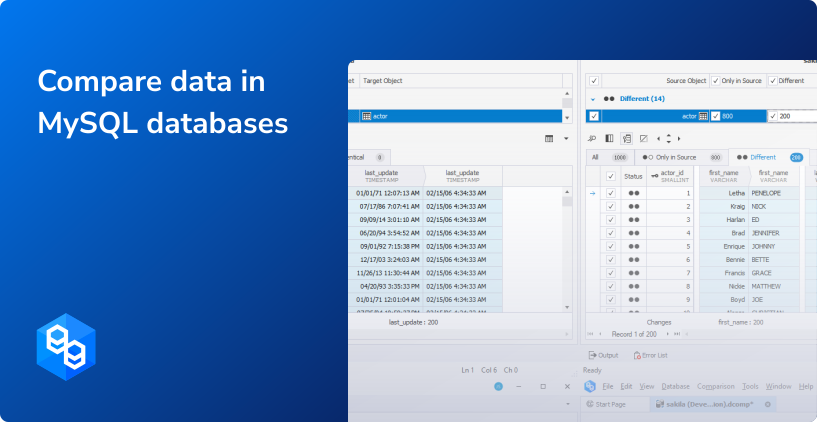
When the task is completed, you will see the comparison results in a new window.

How to analyze data differences in MySQL databases
The data comparison document provides you with a detailed overview of data differences found in two compared databases. You can apply various filters to analyze the results more precisely.

The comparison results can be exported as reports in different formats for further reference.

Finally, you can automate regular data comparison tasks via the command line. Click Save > Save Command Line, and get the task settings in a .bat file that you can use for further task scheduling and running the comparisons automatically.

To synchronize databases, click the green arrow at the top of the comparison window.

The Data Synchronization Wizard will open to let you configure the job precisely. Depending on your preferences, you can view the synchronization script after generation, save it locally, or execute it automatically against the database.

The data synchronization job can also be automated in the same way – click Save > Save Command Line.
With dbForge Data Compare, it only takes several clicks to configure the database comparison and synchronization jobs. All these regular, demanding, and tedious tasks can be run automatically, regularly on schedule.
Conclusion
Comparing databases is a task you'll encounter regularly in your workflows. While there are several ways to compare data across databases, using dedicated tools is by far the most efficient and convenient method. Even experienced professionals rely on specialized data comparison tools for their speed and ease of use.
One such tool is dbForge Data Compare, a powerful and user-friendly solution designed to handle large data volumes effortlessly. It supports connections to multiple servers, offers detailed reporting, processes large datasets smoothly, and includes robust automation features.
dbForge Data Compare is available as a standalone application or as part of dbForge Studio for MySQL. You can explore the full capabilities of the Studio with a 30-day free trial. Just download and install it to see how it can enhance your daily work with MySQL and MariaDB databases.
A few words from our users
Senior Software Engineer
Software Engineer
CEO
FAQ
Yes. You need access to those servers. Correctly specify the connections in the tool you use for comparing databases, and you will be able to compare the databases.
MySQL offers two tools for comparing databases, mysqldump and mysqldbcompare, which work together. First, you use mysqldump to export the data into flat files. Then, mysqldbcompare compares the data in those exported files. This approach can be complicated, while modern GUI-based third-party tools provide a better user experience.
Full database comparison includes both the database schemas with all their objects and data stored in tables. The task to compare MySQL tables for differences covers data stored in tables only, without referring to schema objects. These tasks are different, but tools like dbForge Studio for MySQL perform them.
Yes, dbForge tools allow regular database comparison tasks to be automated through the command line. You can save all the task configurations as a .bat file and use it to perform tasks automatically and schedule tasks to run regularly.
dbForge Data Compare supports live databases and script folders. You can quickly compare data in tables, even large data volumes, and obtain detailed results with highlighted data differences. After that, you can synchronize databases and deploy changes onto destination platforms. The tool generates data synchronization scripts that you can execute immediately or save for editing or reusing. All MySQL/MariaDB on-premise and cloud versions are supported. Data comparison and synchronization can easily be automated and run on schedule.
Yes, dbForge Data Compare supports automating tasks through the command line interface. You can schedule such tasks and run them regularly. The tool will compare the databases and report all differences. You can configure the tool to deliver detailed comparison reports by email or save them locally. The changes deployment can also be automated.
dbForge Data Compare for MySQL allows you to synchronize databases immediately after the comparison. You can manually sync all differences, a group of selected differences, or even a single record. The tool generates data synchronization scripts that you can execute immediately to get the databases in sync. You can automate regular data synchronization tasks using the Save Command Line option and schedule such tasks according to your requirements.