How to remove duplicate rows in MySQL
To delete duplicate rows in MySQL while keeping one record from each duplicate group, use a DELETE JOIN statement. It compares records based on the columns that define duplicates and removes additional copies while preserving the row with the lowest unique identifier.
For example, this statement removes duplicate rental records from a working copy of the MySQL Sakila sample database:
DELETE r1
FROM rental_dedup AS r1
JOIN rental_dedup AS r2
  ON r1.rental_date = r2.rental_date
 AND r1.inventory_id = r2.inventory_id
 AND r1.customer_id = r2.customer_id
 AND r1.cleanup_id > r2.cleanup_id;
MySQL also supports deduplication through temporary tables, GROUP BY aggregation, and the ROW_NUMBER() window function. This guide explains all four methods, shows how to find duplicate records, and compares data quality tools for managing duplicate data.
Duplicate records can distort reports, increase storage requirements, and prevent unique constraints from being created. Finding them by hand in a large table takes time, and one wrong DELETE condition can remove rows you need. dbForge Studio for MySQL helps you do this work faster and with less risk: generate deduplication queries with the AI Assistant, check the affected rows in the data grid, and back up the database before you run a DELETE.
MySQL duplicate removal cheat sheet
MySQL provides several approaches to finding, deleting, and preventing duplicate records. The following table summarizes the SQL commands and tools for common deduplication tasks.
| Task | Recommended approach |
|---|---|
| Find duplicate records | GROUP BY ... HAVING COUNT(*) > 1 |
| Delete duplicates and keep one copy | DELETE JOIN |
| Stage duplicate records before deletion | Temporary table |
| Preserve the minimum or maximum ID | GROUP BY with MIN() or MAX() |
| Keep the oldest or newest record | ROW_NUMBER() OVER (...) |
| Prevent future duplicates | UNIQUE constraint |
| Identify redundant indexes | Percona pt-duplicate-key-checker |
For straightforward cleanup, DELETE JOIN is often a practical starting point. Before you run any deletion statement, verify which columns define duplicates and which records should remain.
How to find duplicate rows in MySQL
To find duplicate rows in MySQL, use GROUP BY with HAVING COUNT(*) > 1. This query finds groups of records that contain repeated values in the columns that define a duplicate.
Preparing the Sakila sample database
The examples use the standard MySQL Sakila sample database, which contains tables for a fictional DVD rental business. The rental table stores individual rental transactions, including the rental date, inventory item, customer, return date, and staff member.
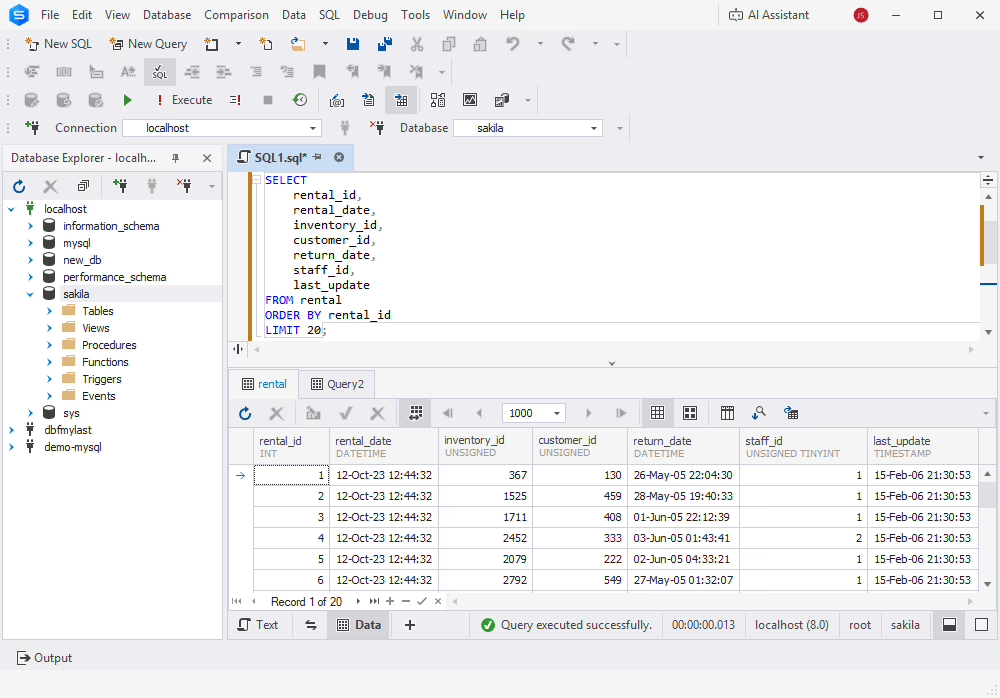
In this guide, a duplicate is a record with the same rental_date, inventory_id, and customer_id. These columns correspond to a unique key in the original Sakila table. Because that constraint prevents duplicate combinations, we create an isolated working copy for testing.
Important: Do not remove constraints or delete records from the original sakila.rental table.
First, select the Sakila database and create a working table with its rental data:
USE sakila;

CREATE TABLE rental_dedup
ENGINE=InnoDB
AS
SELECT *
FROM rental;
The new table contains the rental data but does not inherit the original table's primary key, unique key, foreign keys, or other indexes. This allows us to insert duplicate records without changing the original Sakila tables.
Add a separate identifier to the working table:
ALTER TABLE rental_dedup
ADD COLUMN cleanup_id BIGINT UNSIGNED
    NOT NULL AUTO_INCREMENT PRIMARY KEY FIRST;
The cleanup_id column uniquely identifies each row in the working copy, even when rental data is repeated.
Next, insert three duplicate records by copying existing rows from Sakila:
INSERT INTO rental_dedup (
    rental_id,
    rental_date,
    inventory_id,
    customer_id,
    return_date,
    staff_id,
    last_update
)
SELECT
    rental_id,
    rental_date,
    inventory_id,
    customer_id,
    return_date,
    staff_id,
    last_update
FROM rental
ORDER BY rental_id
LIMIT 3;
These records have the same rental values as existing rows but get new cleanup_id values. The working table now contains three additional duplicate records, and the original rental table remains unchanged.
Identifying duplicate groups
Run the following query to find duplicate groups:
SELECT
    rental_date,
    inventory_id,
    customer_id,
    COUNT(*) AS duplicate_count
FROM rental_dedup
GROUP BY
    rental_date,
    inventory_id,
    customer_id
HAVING COUNT(*) > 1;
In our test dataset, the query returns three duplicate groups, each containing two matching records.
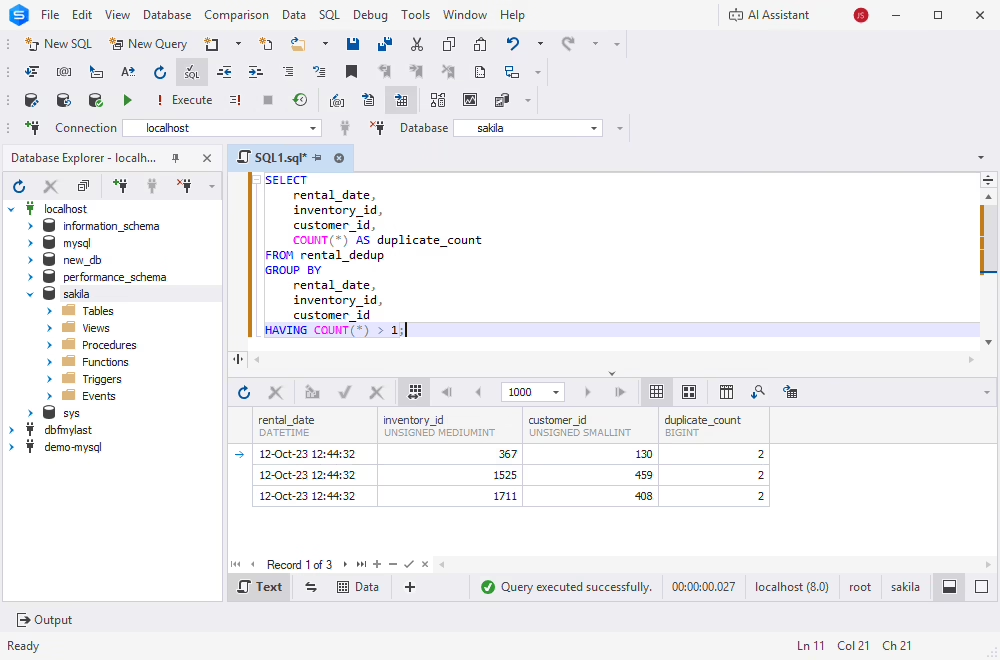
To display the individual records that should be removed, run:
SELECT r1.*
FROM rental_dedup AS r1
WHERE EXISTS (
    SELECT 1
    FROM rental_dedup AS r2
    WHERE r1.rental_date = r2.rental_date
      AND r1.inventory_id = r2.inventory_id
      AND r1.customer_id = r2.customer_id
      AND r1.cleanup_id > r2.cleanup_id
);
The query finds the additional copies and leaves out the row with the lowest cleanup_id in each group.
The examples match duplicates on columns that do not allow NULL. If your duplicate-key columns can contain NULL, use the MySQL null-safe equality operator <=> where appropriate.
Which method should you use to delete duplicate rows?
MySQL supports several methods for deleting duplicate records while preserving one row per group. The best choice depends on your table structure, MySQL version, available indexes, and rules for the records to keep.
| Method | How it works | Best for | MySQL version |
|---|---|---|---|
| DELETE JOIN | Self-join deletes matching duplicate rows | Quick cleanup on small-to-medium tables | All |
| Temporary table | Stage duplicate row IDs in a temporary table, then delete the matching rows | Reviewing duplicate records before deletion | All |
| GROUP BY aggregation | Keep the MIN or MAX ID per duplicate group | Simple deduplication by a few columns | All |
| ROW_NUMBER() | Assigns row numbers within duplicate groups and deletes rows where row_num > 1 | Precise control, modern MySQL | 8.0+ |
DELETE JOIN is generally the simplest option when duplicate conditions are clear. ROW_NUMBER() gives you more flexibility when you need to keep records according to timestamps, statuses, or other ordering rules.
The four methods are independent alternatives. Each method starts with the same three duplicate records. After testing a deletion method, restore the test data using the INSERT statement from the preparation section before trying the next method. Do not reinsert the records if the duplicates are still present.
Method 1: Delete duplicate rows using DELETE JOIN
Best for: Quick cleanup on small-to-medium tables when the matching columns and the record to keep are clearly defined.
DELETE r1
FROM rental_dedup AS r1
INNER JOIN rental_dedup AS r2
  ON r1.rental_date = r2.rental_date
 AND r1.inventory_id = r2.inventory_id
 AND r1.customer_id = r2.customer_id
 AND r1.cleanup_id > r2.cleanup_id;
The DELETE JOIN statement compares the working table with itself using two aliases: r1 and r2. The matching conditions find records with the same rental date, inventory item, and customer. The last condition, r1.cleanup_id > r2.cleanup_id, selects additional copies for deletion whenever a matching row with a lower identifier exists.
As a result, the row with the lowest cleanup_id remains in each duplicate group. For the prepared Sakila dataset, the query removes the three added records and keeps the original rental data.
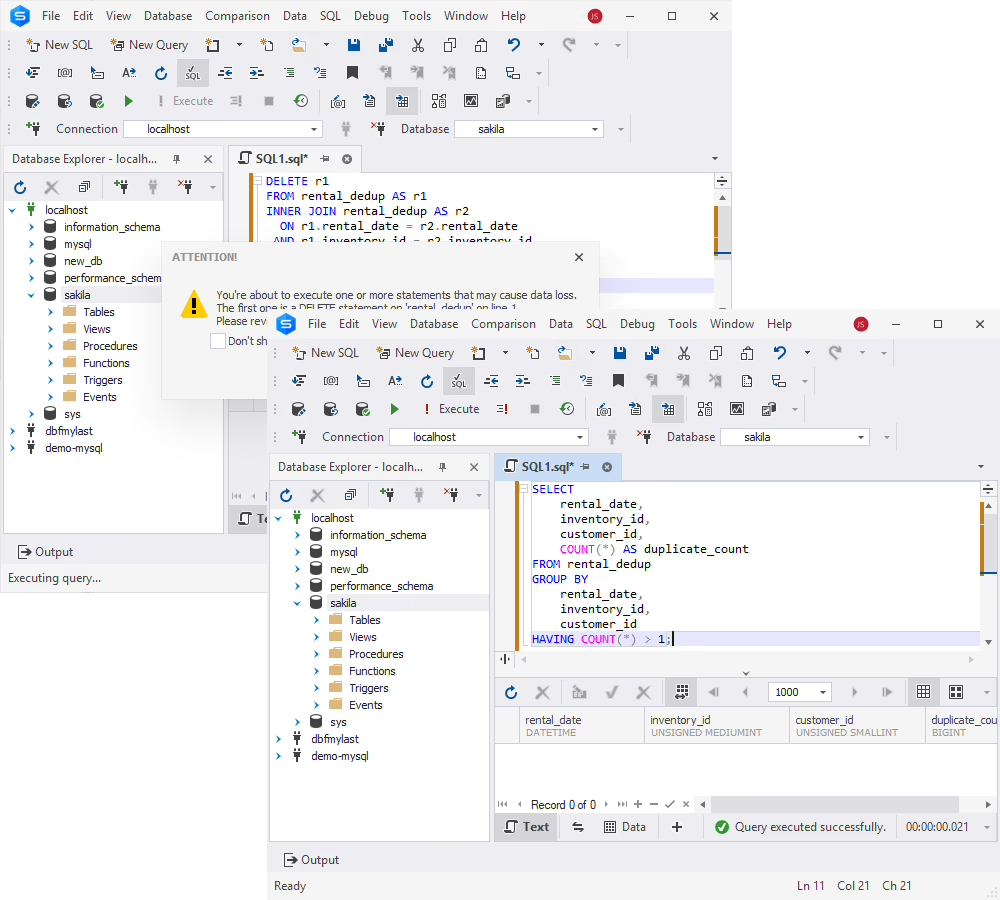
This method does not require rebuilding the entire table. However, its performance depends on table size, duplicate distribution, and indexing. For larger datasets, inspect the execution plan and consider an index on the duplicate-matching columns.
If you delete rows by mistake in a real database, you can restore a MySQL database from a backup.
Method 2: Remove duplicates using a temporary table
Best for: Staging and reviewing duplicate records before you delete them.
CREATE TEMPORARY TABLE duplicate_rental_ids (
    cleanup_id BIGINT UNSIGNED PRIMARY KEY
) ENGINE=InnoDB;

INSERT INTO duplicate_rental_ids (cleanup_id)
SELECT r1.cleanup_id
FROM rental_dedup AS r1
WHERE EXISTS (
    SELECT 1
    FROM rental_dedup AS r2
    WHERE r1.rental_date = r2.rental_date
      AND r1.inventory_id = r2.inventory_id
      AND r1.customer_id = r2.customer_id
      AND r1.cleanup_id > r2.cleanup_id
);
The query creates a temporary table that contains only the identifiers of redundant records. Temporary tables in MySQL are available only within the current session.
Review the selected rows:
SELECT
    r.cleanup_id,
    r.rental_id,
    r.rental_date,
    r.inventory_id,
    r.customer_id
FROM rental_dedup AS r
JOIN duplicate_rental_ids AS d
  ON r.cleanup_id = d.cleanup_id
ORDER BY r.cleanup_id;
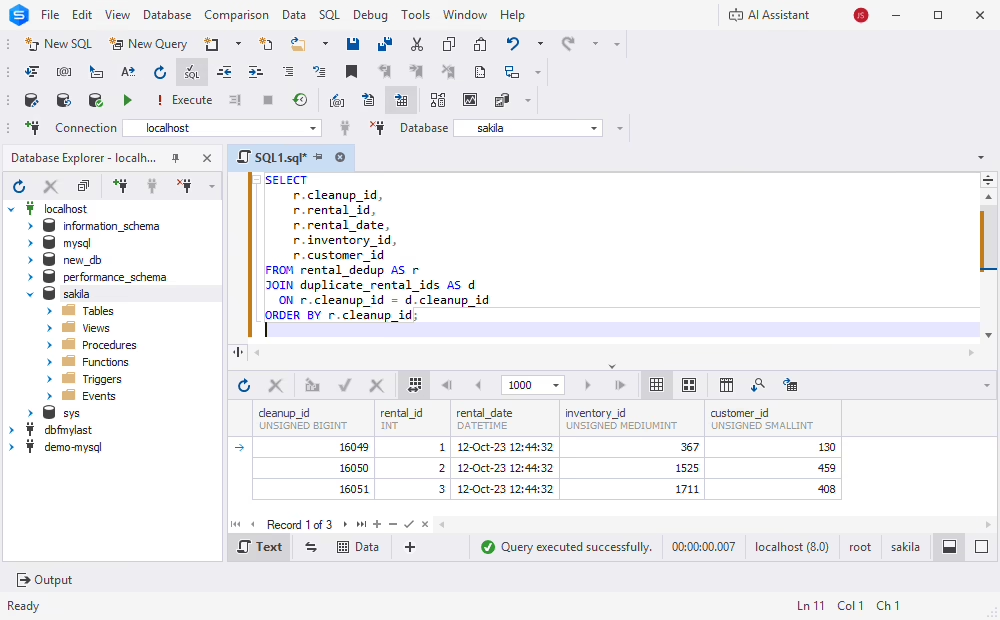
After you verify the results, remove the staged records:
START TRANSACTION;

DELETE r
FROM rental_dedup AS r
JOIN duplicate_rental_ids AS d
  ON r.cleanup_id = d.cleanup_id;

SELECT ROW_COUNT() AS deleted_rows;
Verify the remaining data, then run COMMIT if the results are correct or ROLLBACK if they are not. After you commit, remove the temporary table:
DROP TEMPORARY TABLE duplicate_rental_ids;This method separates duplicate detection from deletion. You can inspect the selected records and confirm that the intended rows will remain.
For InnoDB tables, you can roll back the deletion before you commit. Unlike approaches that use TRUNCATE TABLE to empty the original table, this method does not require an irreversible truncation operation.
However, temporary tables do not prevent concurrent changes to the source data. If other sessions modify the table between staging and deletion, you may need additional consistency controls.
Method 3: Delete duplicate rows using GROUP BY
Best for: Preserving the minimum or maximum unique identifier in each duplicate group.
DELETE r
FROM rental_dedup AS r
JOIN (
    SELECT
        rental_date,
        inventory_id,
        customer_id,
        MIN(cleanup_id) AS keep_id
    FROM rental_dedup
    GROUP BY
        rental_date,
        inventory_id,
        customer_id
) AS retained
  ON r.rental_date = retained.rental_date
 AND r.inventory_id = retained.inventory_id
 AND r.customer_id = retained.customer_id
WHERE r.cleanup_id <> retained.keep_id;
The GROUP BY clause finds matching groups, and MIN() determines which row to keep. The derived table groups records by rental date, inventory item, and customer. For each group, MIN(cleanup_id) finds the record to keep, and the outer DELETE removes records whose identifiers differ from it.
To inspect the surviving records in each duplicate group before deletion, run:
SELECT
    rental_date,
    inventory_id,
    customer_id,
    COUNT(*) AS duplicate_count,
    MIN(cleanup_id) AS keep_id
FROM rental_dedup
GROUP BY
    rental_date,
    inventory_id,
    customer_id
HAVING COUNT(*) > 1
ORDER BY keep_id;
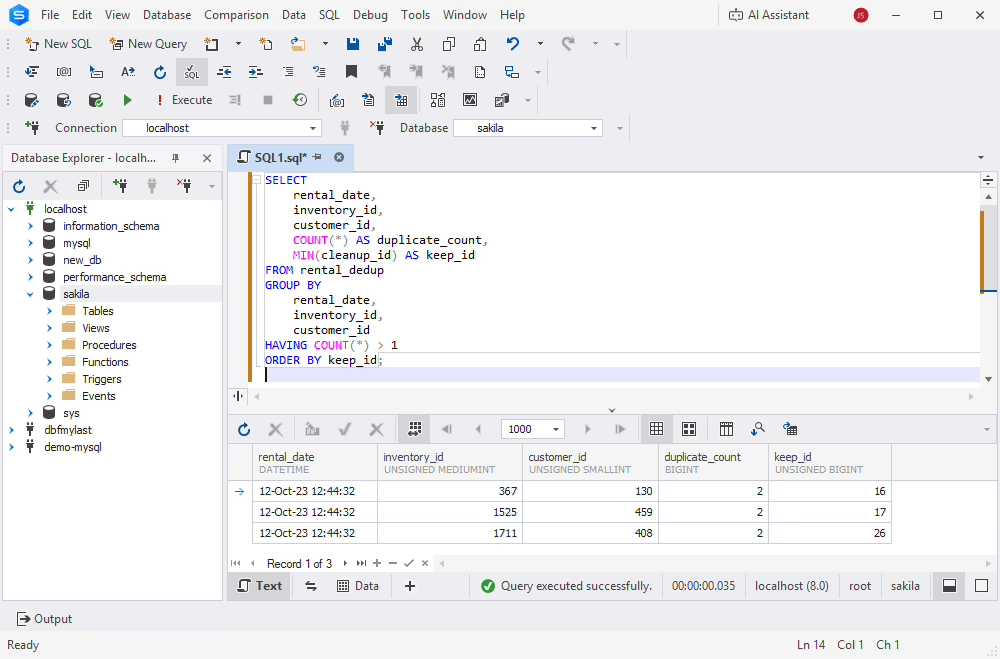
This approach is useful when you can express the rule for the record to keep with aggregate functions such as MIN() or MAX().
MySQL restricts certain operations that modify a table while reading from it at the same time. In this example, aggregation prevents MySQL from merging the grouped derived table into the outer query, so MySQL materializes the grouped result. Before you run the method on production data, test it on your target MySQL version and inspect the execution plan.
Do not group values with CONCAT(). Different combinations of column values may produce identical strings. Grouping by individual columns is clearer and safer.
Method 4: Delete duplicate rows using ROW_NUMBER()
Best for: Choosing which duplicate record to keep with explicit ordering rules. Requires MySQL 8.0 or later.
DELETE r
FROM rental_dedup AS r
JOIN (
    SELECT
        cleanup_id,
        ROW_NUMBER() OVER (
            PARTITION BY
                rental_date,
                inventory_id,
                customer_id
            ORDER BY cleanup_id
        ) AS row_num
    FROM rental_dedup
) AS ranked
  ON r.cleanup_id = ranked.cleanup_id
WHERE ranked.row_num > 1;
The ROW_NUMBER() window function assigns a sequence number to each record within a duplicate group. The PARTITION BY clause groups records with the same rental date, inventory item, and customer. Within each group, ORDER BY cleanup_id places the row with the lowest identifier first.
The DELETE statement removes all rows numbered greater than one and keeps the first record in each group.
To inspect the duplicate candidates, use a ROW_NUMBER() CTE:
WITH ranked AS (
    SELECT
        cleanup_id,
        rental_id,
        rental_date,
        inventory_id,
        customer_id,
        ROW_NUMBER() OVER (
            PARTITION BY
                rental_date,
                inventory_id,
                customer_id
            ORDER BY cleanup_id
        ) AS row_num
    FROM rental_dedup
)
SELECT *
FROM ranked
WHERE row_num > 1;
The query returns the records scheduled for removal without modifying the table.
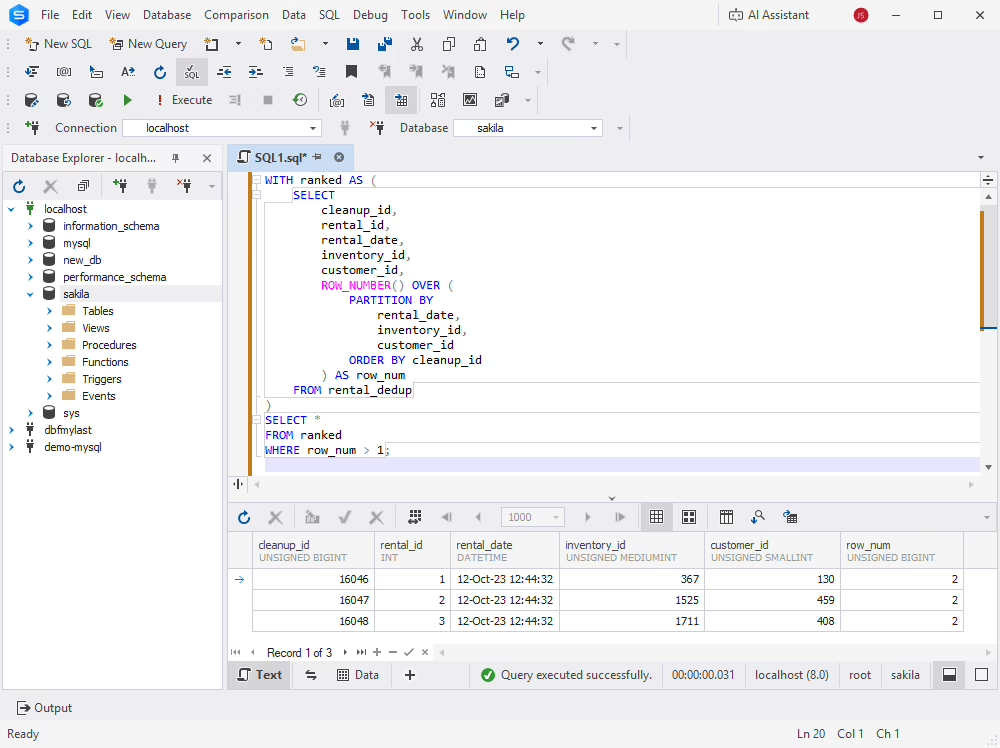
Unlike basic aggregation, ROW_NUMBER() supports more complex rules for the record to keep. For example, to keep the most recently updated record, order by:
ORDER BY last_update DESC, cleanup_id DESCThe unique identifier in the ordering ensures deterministic results when timestamps are equal.
MySQL version compatibility for duplicate removal
Most duplicate-removal approaches work in MySQL 5.7 and later. However, window functions and common table expressions require MySQL 8.0 or newer.
| Feature | MySQL 5.7 | MySQL 8.0 | MySQL 8.4 | MySQL 26.10 |
|---|---|---|---|---|
| DELETE JOIN | Yes | Yes | Yes | Yes |
| GROUP BY + HAVING | Yes | Yes | Yes | Yes |
| Temporary tables | Yes | Yes | Yes | Yes |
| ROW_NUMBER() | No | Yes | Yes | Yes |
| Common table expressions (CTE) | No | Yes | Yes | Yes |
| UNIQUE indexes | Yes | Yes | Yes | Yes |
MySQL 5.7 is an older, unsupported release. For maintained environments, use a supported MySQL version and verify the behavior of the SQL method you choose against that version.
How to remove duplicate records safely
Before you delete duplicate records in MySQL, find the affected rows, create a recoverable backup, and use transactions when the storage engine supports them.
For the Sakila working table, start by counting all rows, unique records, and the rows that should be removed:
SELECT
    COUNT(*) AS total_rows,
    COUNT(DISTINCT rental_date, inventory_id, customer_id)
        AS unique_records,
    COUNT(*) -
    COUNT(DISTINCT rental_date, inventory_id, customer_id)
        AS rows_to_delete
FROM rental_dedup;
With the prepared test data, rows_to_delete is 3.
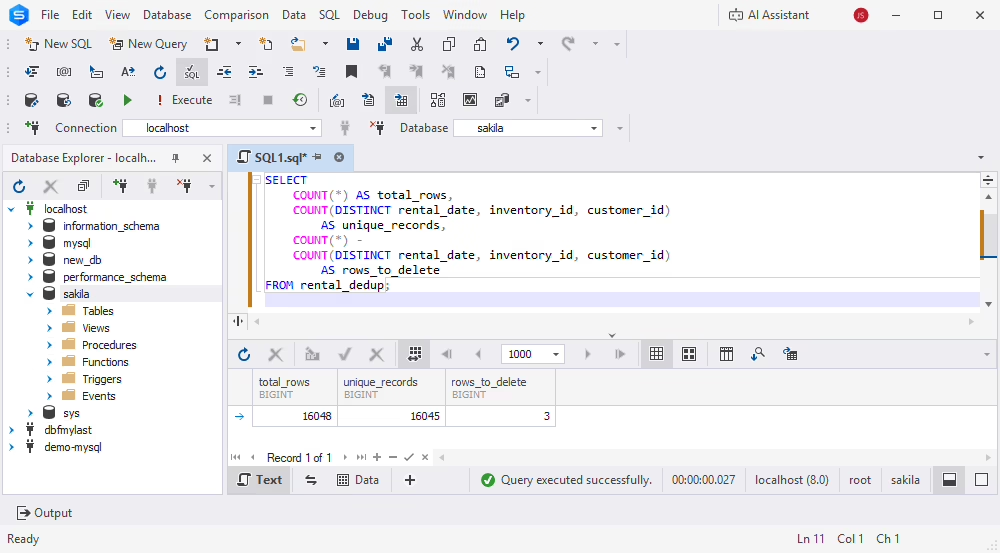
COUNT(DISTINCT) with several columns is a MySQL extension, and it ignores rows where any of the listed columns is NULL. In rental_dedup, these columns do not allow NULL, so the result is accurate.
Start a transaction and run the deletion:
START TRANSACTION;

DELETE r1
FROM rental_dedup AS r1
JOIN rental_dedup AS r2
  ON r1.rental_date = r2.rental_date
 AND r1.inventory_id = r2.inventory_id
 AND r1.customer_id = r2.customer_id
 AND r1.cleanup_id > r2.cleanup_id;

SELECT ROW_COUNT() AS deleted_rows;
Compare the number of affected rows with the expected result. Then verify that no duplicate groups remain:
SELECT
    rental_date,
    inventory_id,
    customer_id,
    COUNT(*) AS duplicate_count
FROM rental_dedup
GROUP BY
    rental_date,
    inventory_id,
    customer_id
HAVING COUNT(*) > 1;
An empty result means that no duplicate groups remain according to the specified criteria. Also confirm that the intended records were preserved: an empty duplicate-group result alone cannot prove that no valid records were removed.
Commit only after successful verification:
COMMIT;If the results are incorrect and the transaction has not been committed, run ROLLBACK instead.
For large tables, delete records in batches to reduce transaction size and locking.
Do not use TRUNCATE TABLE during transactional cleanup. In MySQL, TRUNCATE causes an implicit commit and cannot be rolled back with a normal transaction.
Common mistakes when removing duplicates in MySQL
Incorrect deduplication queries can remove valid records or leave duplicate data behind. Common problems include incomplete matching conditions, inconsistent rules for the records to keep, and unsafe transaction handling.
| Mistake | Why it matters | Recommended approach |
|---|---|---|
| Matching only one column | May delete valid records | Use all columns that define a duplicate |
| Ignoring NULL values | Standard equality may miss duplicates | Use null-safe comparisons where needed |
| Grouping concatenated values | Different combinations can produce identical strings | Group by individual columns |
| Using non-deterministic ordering | The surviving record may vary | Include a unique tie-breaker |
| Ignoring foreign keys | Deletion may fail or affect related records | Review dependent tables |
| Using TRUNCATE during cleanup | Cannot be rolled back normally | Prefer transactional DELETE |
| Skipping verification | Incorrect deletions may go unnoticed | Compare expected and actual results |
These considerations are particularly important when you remove duplicates from related transactional data. In the original Sakila database, the payment table references rental. Deleting rental records without considering this relationship can affect data integrity. For this reason, this guide performs all operations on an isolated working copy instead of the original Sakila tables.
Duplicate rows vs duplicate indexes in MySQL
Duplicate rows and duplicate indexes are different database problems. Duplicate rows contain repeated business data, while duplicate indexes are redundant index structures that may increase storage requirements and maintenance costs.
A non-unique index allows multiple rows to share the same indexed values. These records are not necessarily duplicates. For example, several rental records can legitimately reference the same customer_id, because a customer may rent multiple films.
To find repeated data values, use GROUP BY with HAVING COUNT(*) > 1. To detect duplicate or redundant indexes, use pt-duplicate-key-checker (Percona Toolkit).
Removing duplicate records improves data correctness. Removing redundant indexes can reduce unnecessary index maintenance. These are different tasks, so do not confuse them.
Tools for finding and removing duplicate data in MySQL
Data quality tools help you find duplicate records, inspect database content, compare datasets, and manage cleanup operations. Different utilities address different stages of deduplication and database maintenance.
| Tool | Type | What it does for duplicates | Best for |
|---|---|---|---|
| dbForge Studio for MySQL | GUI IDE | AI-assisted SQL generation, SQL editing, data inspection, data comparison, backup | All-in-one MySQL development and cleanup |
| Percona Toolkit (pt-duplicate-key-checker) | CLI toolkit (open source) | Finds duplicate and redundant indexes, including non-unique indexes | DBAs auditing indexes |
| OpenRefine | Data-wrangling tool (open source) | Clusters similar values and merges duplicates in messy data | Ad-hoc data cleanup |
| WinPure | Data-quality suite | Deduplication with exact and fuzzy record matching | Business data-quality projects |
dbForge Studio for MySQL
dbForge Studio for MySQL is an AI-powered IDE for MySQL and MariaDB database development, administration, and maintenance. Its SQL Editor lets you write and run the duplicate-detection and deletion queries from this guide. Code completion, SQL formatting, and the results grid help you inspect records and verify cleanup operations.
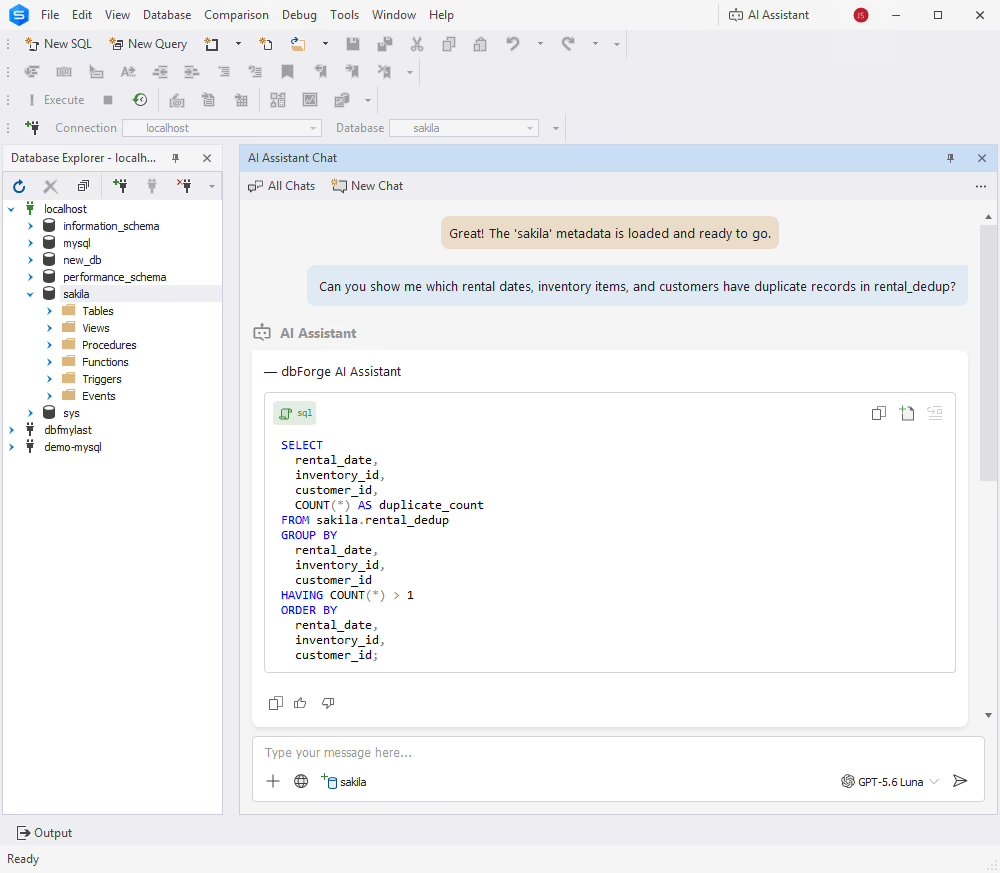
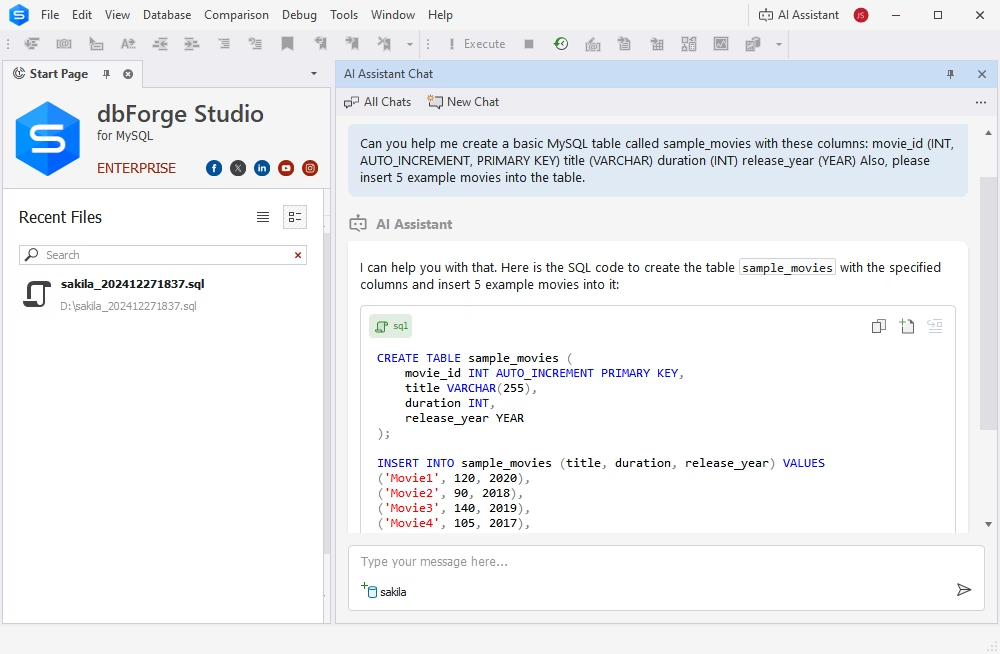
The AI Assistant generates SQL from natural-language requests. When you attach a database, it uses the database metadata as context. For example, with the sakila database attached, you can ask:
"Can you show me which rental dates, inventory items, and customers have duplicate records in rental_dedup?"
The AI Assistant generates a GROUP BY query with HAVING COUNT(*) > 1 that you can insert into SQL Editor and run.
Review generated SQL before you run any statement that modifies database content.
dbForge Studio also includes database backup and Data Compare, which compares records between database sources and synchronizes data. Data Compare does not remove duplicate records from a single table automatically. For this task, run the appropriate SQL deduplication statements in the editor.

dbForge Studio for MySQL
A powerful, all-in-one IDE for MySQL and MariaDB professionals that helps design, develop, manage, and optimize databases faster and with confidence.
Percona Toolkit
Percona Toolkit includes command-line utilities for MySQL administration. Its pt-duplicate-key-checker utility finds duplicate and redundant indexes, including redundant non-unique indexes:
pt-duplicate-key-checker --host=localhost --user=dbaAdditional connection options and authentication parameters may be required. This utility audits index structures and does not remove duplicate records from database tables. For details, see Duplicate rows vs duplicate indexes in MySQL.
OpenRefine
OpenRefine is an open-source application for exploring, transforming, and cleaning structured data. Its clustering tools find values that represent the same entity despite differences in spelling, capitalization, or formatting. OpenRefine is useful for customer lists, product catalogs, and imported datasets where duplicates are not exact matches.
WinPure
WinPure provides data quality and record-matching tools that find and consolidate duplicate information. Its exact and fuzzy matching can find potentially related business records even when their values differ. WinPure suits broader data quality projects rather than straightforward SQL deletion statements.
How visual database managers transform data handling
Deduplication in a console means writing every query by hand, reading results as plain text, and hoping the DELETE condition is right. A visual database manager turns this into a controlled workflow. dbForge Studio for MySQL works with on-premises servers and cloud services such as Amazon RDS, Amazon Aurora, Azure Database for MySQL, and Google Cloud Platform, and offers more than the default MySQL Workbench: AI-assisted SQL development, database design, data comparison, backup, version control, and automation.
For duplicate cleanup, the Studio covers each step:
- Generate queries with AI: Describe the task in plain language, and the AI Assistant generates the query. It can also explain, fix, and optimize existing queries.
- Write queries faster: SQL Editor offers code completion, context-sensitive suggestions, syntax validation, and code formatting.
- Find duplicates visually: The data grid displays query results in an easy-to-read format, so you can spot duplicate rows and refine the DELETE condition before you run it.
- Protect your data: Back up the database before you delete rows, and use Data Compare to check the differences after cleanup.
Download dbForge Studio for MySQL to find and remove duplicate rows in your own databases.
How to prevent duplicate rows in MySQL
The most reliable way to prevent duplicate records is to enforce uniqueness with database constraints. MySQL supports UNIQUE indexes that reject inserts or updates that violate a defined combination of values.
The original Sakila rental table already has a unique key on rental_date, inventory_id, and customer_id. The working copy does not inherit that constraint. After you remove its duplicate records, add the same uniqueness rule:
ALTER TABLE rental_dedup
ADD CONSTRAINT uq_rental_event
UNIQUE (
    rental_date,
    inventory_id,
    customer_id
);
MySQL then rejects new rows with identical values in these three columns.
This example shows why enforcing uniqueness at the database level is important. In other applications, the columns in a unique constraint must reflect actual business requirements.
Applications can also use INSERT ... ON DUPLICATE KEY UPDATE when an existing record should be updated instead of duplicated.
Database-level uniqueness constraints protect better against concurrent inserts than application-level validation alone. Always remove existing duplicates before you add a unique constraint. Otherwise, the index creation fails.
Conclusion
Even with strict validation, duplicate records find their way into MySQL tables through imports, retries, and data entry errors. Left alone, they distort reports, waste storage, and make every query that depends on unique data less reliable.
MySQL provides several methods for removing duplicate rows while preserving the records you need. DELETE JOIN offers a direct solution, temporary tables support staged cleanup, and GROUP BY and ROW_NUMBER() give you more control over which rows remain. The Sakila examples show how to find and remove duplicates without modifying the original sample database.
Whichever method you choose, define duplicate criteria carefully, inspect the affected records, verify the results, and enforce appropriate uniqueness constraints.
dbForge Studio for MySQL provides tools for preparing, executing, and verifying duplicate cleanup queries. The AI Assistant generates deduplication queries from plain-language prompts, SQL Editor helps you write and check the code, and backup and Data Compare protect your data before and after cleanup. Try it with a 30-day free trial that gives you full access to all features.
FAQ
Use a DELETE JOIN statement that matches rows on the columns defining duplicates and compares their unique identifiers. A condition such as t1.id > t2.id removes records with higher IDs while preserving the lowest ID in each group. Verify the matching conditions with a SELECT query before deletion.
There is no universally fastest method. DELETE JOIN can perform well with suitable indexes, while batch deletion may reduce transaction size and locking. Compare execution plans and test the available approaches on representative data. Performance depends on table size, duplicate distribution, indexes, and server workload.
dbForge Studio for MySQL provides SQL editing, AI-assisted query generation, and data inspection tools for duplicate cleanup. OpenRefine supports clustering and transformation of inconsistent datasets, while WinPure offers exact and fuzzy matching. Percona Toolkit helps detect redundant indexes rather than duplicate records in table data.
Use GROUP BY and HAVING COUNT(*) > 1 on the indexed columns to identify duplicate data. A non-unique index may legitimately contain repeated values, so define duplicates according to your business rules first. To find duplicate or redundant indexes themselves, use Percona Toolkit's pt-duplicate-key-checker.
Yes, but selecting which specific record to preserve is more difficult without a unique identifier. When possible, add a suitable row identifier or use a controlled working table for cleanup. Avoid relying on physical row order because MySQL does not guarantee it.
Use ROW_NUMBER() with PARTITION BY to define duplicate groups and ORDER BY last_update DESC, id DESC to place the most recent record first. Delete records where the row number exceeds one. This approach requires MySQL 8.0 or later and a reliable field for determining recency.
Create a UNIQUE constraint on the column or combination of columns that must contain unique values. MySQL then rejects inserts or updates that violate the constraint. Remove existing duplicates before adding the index, and ensure that the selected columns reflect your business rules. Applications can also use INSERT ... ON DUPLICATE KEY UPDATE to handle conflicting records.
Yes, when using a transactional storage engine such as InnoDB and the transaction has not been committed. Execute START TRANSACTION before deletion, verify the results, and run ROLLBACK if the deletion is incorrect. After committing, recovery generally requires a backup or another recovery mechanism.