How to Migrate from MySQL to MariaDB Using dbForge Studio for MySQL
Switching from MySQL to MariaDB doesn't have to be risky, complex, or time-consuming.
If you're reading this article, you probably already run MySQL in production and want to switch to MariaDB without breaking your schema, data, users, stored routines, or application connections. The challenge isn't deciding to migrate from MySQL to MariaDB; it's doing it safely, with zero surprises.
MariaDB stands out as the go-to open-source option for high performance and long-term flexibility, but a successful MySQL-to-MariaDB migration still requires careful planning and the right tooling. Despite the high level of compatibility between the two systems, minor differences in features, engines, or configurations can lead to issues.
This article provides a comprehensive guide to migrating from MySQL to MariaDB using dbForge Studio for MySQL. Whether you're planning a full migration, testing a parallel setup, or exploring MySQL to MariaDB replication strategies, you'll learn a structured, reliable workflow to migrate MySQL to MariaDB with minimal manual effort, low validation risks, and automated key steps.
Let's get right into it.
Why migrate from MySQL to MariaDB
Migrating from MySQL to MariaDB typically occurs to gain more control, cut costs, and access enhanced features. If you already rely on MySQL and want to switch to MariaDB, the goal is to do this without disrupting your applications and maintain long-term flexibility.
Beyond control and access, here are the most common reasons for a MySQL-to-MariaDB migration:
- Licensing and openness: MariaDB is fully open source, making it appealing to teams looking to avoid vendor lock-in or future licensing changes.
- Performance improvements: MariaDB often includes optimizer enhancements and additional storage engines that can deliver better query performance in certain workloads.
- Feature expansion: Migrating from MySQL to MariaDB introduces capabilities not always available in MySQL, giving you more options, especially when designing systems.
- Cost considerations: Migrating from MySQL to MariaDB helps organizations to reduce dependency on commercial database ecosystems while still maintaining enterprise-level functionality.
- Active development direction: Some teams prefer MariaDB's faster and more community-driven innovation cycle.
That's why any attempt to convert MySQL to MariaDB should follow a structured approach. This ensures proper validation, testing, and alignment with your existing applications before making the switch permanent.
When a MySQL-to-MariaDB migration makes sense
A MySQL-to-MariaDB conversion makes sense when your environment can handle controlled change, and you want to improve flexibility, cost efficiency, or compatibility with open-source tooling. The crucial question is not whether you can migrate from MySQL to MariaDB, but whether your current configuration allows you to do so securely without affecting production.
In practice, the decision hinges on the strength of your system's connection to MySQL-specific behavior and how prepared you are to validate the results. If your design is standard and well documented, switching from MySQL to MariaDB is easier and less disruptive. Below are examples of best cases for migration and cases where you should delay migration.
Good scenarios for migration
Common good scenarios for migrating from MySQL to MariaDB include:
- Small-to-medium production systems: Easier to test, validate, and roll back if needed
- Staging or development environments: Ideal for testing compatibility before full rollout
- Legacy MySQL deployments: Older systems that benefit from MariaDB's active development
- Cost-sensitive projects: Where reducing licensing or infrastructure costs is a priority
- Self-hosted environments: Full control over configuration simplifies the transition
- Teams already using MariaDB elsewhere: Existing familiarity reduces migration risk
In these scenarios, using a structured workflow and tools to convert MySQL to MariaDB can significantly reduce manual effort and errors.
Cases where you should delay migration
As established earlier, not all cases support migration from MySQL to MariaDB seamlessly. For example, the following cases may require you to pause and evaluate further before migrating from MySQL to MariaDB.
- Heavy version lock-in: Applications tightly coupled to a specific MySQL version
- Custom plugins or extensions: Features that may not exist or behave differently in MariaDB
- Complex replication setups: Risk of breaking synchronization or data consistency
- MySQL-specific application logic: Queries or behaviors that don't translate cleanly
- Strict zero-downtime requirements: Especially without a tested rollback strategy
In these situations, rushing a MySQL-to-MariaDB migration can introduce instability. A safer approach is to first audit dependencies, test thoroughly, and build a rollback plan before making the switch.
Pre-migration checklist before you convert MySQL to MariaDB
Now that we have seen the different scenarios where migrating from MySQL to MariaDB can be either seamless or a hassle, before you migrate from MySQL to MariaDB, you need to validate compatibility, audit your database objects, and secure a reliable backup to avoid costly surprises. This checklist ensures your MySQL-to-MariaDB migration starts on a solid foundation rather than relying on assumptions.
Use the checklist below to systematically prepare your environment.
| Checklist item | What to check | Why it matters for migration |
|---|---|---|
| Check MySQL and MariaDB version compatibility | Verify your current MySQL and the target MariaDB version. Review deprecated features, SQL syntax differences, and version-specific behavior. | Even closely related versions can differ in supported syntax and object behavior. Catching this early reduces failed imports and post-migration fixes. |
| Audit database objects before migration | Review tables, views, stored procedures, functions, triggers, events, indexes, foreign keys, partitions, character sets, collations, and custom configurations. | Not every object transfers cleanly. This audit highlights what may need adjustment before export or after import. |
| Review storage engines, collations, and SQL modes | Identify which storage engines are in use, what collations are assigned, and whether SQL mode settings differ between source and target. | These differences can affect sorting, comparisons, validation rules, and query behavior—sometimes breaking application logic after migration. |
| Back up the source MySQL database | Create a full backup of both schema and data. Ideally, perform a test restore to confirm the backup works correctly. | A backup is your safety net. It protects against incomplete imports, compatibility issues, and data loss during the cutover process. |
| Identify application dependencies | Review connection strings, ORM mappings, database drivers, reporting tools, ETL pipelines, scheduled scripts, and integrations tied to MySQL-specific settings. | Migration doesn't end at the database layer. Even if you successfully convert MySQL to MariaDB, applications can fail if they still depend on old configurations or MySQL-specific behavior. |
How to migrate from MySQL to MariaDB using dbForge Studio for MySQL
dbForge Studio for MySQL stands out as one of the most efficient IDEs for MySQL, MariaDB, and a rich variety of related cloud databases and services. The Studio supports schema + data comparison and synchronization, data export/import, database copying, and backup/recovery—each suited for different migration scenarios.
If your goal is a full MySQL-to-MariaDB migration with validation, Schema and Data Compare is the most reliable option. For selective transfers, export/import works well. If you want speed, Copy Database is ideal. And for script-driven environments, backup/restore remains a solid approach. Let's break down the ways dbForge Studio for MySQL stands out as the best MariaDB GUI client, with advanced features designed for a seamless migration.
Method 1. Migrate with Schema and Data Compare
Schema Compare and Data Compare in dbForge Studio offer the most structured way to migrate MySQL to MariaDB because it lets you detect and resolve differences before applying changes. Instead of blindly copying data, you validate the schema and content first before copying the data. This approach significantly reduces the risk of compatibility issues. Follow the steps below to perform this migration.
Step 1: Connect to source MySQL and target MariaDB
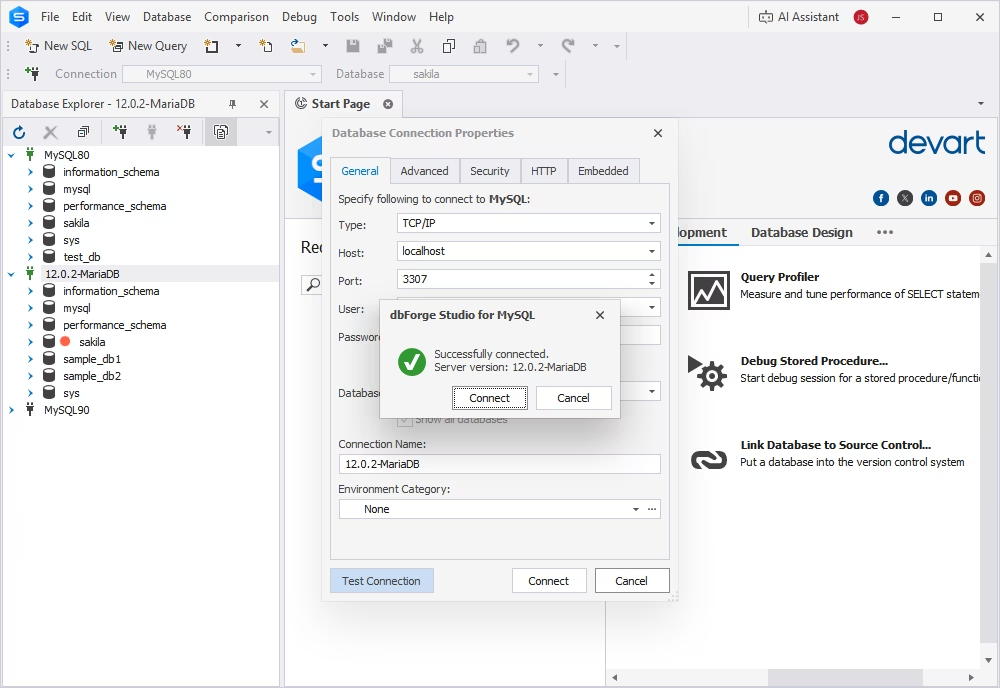
Set up connections to both your MySQL source and MariaDB target within dbForge Studio. This establishes the foundation for comparison and synchronization.
Step 2: Review schema objects before migration
Inspect tables, views, procedures, and other objects to understand what will be migrated and identify any potential incompatibilities early.
Step 3: Run Schema Compare to detect differences
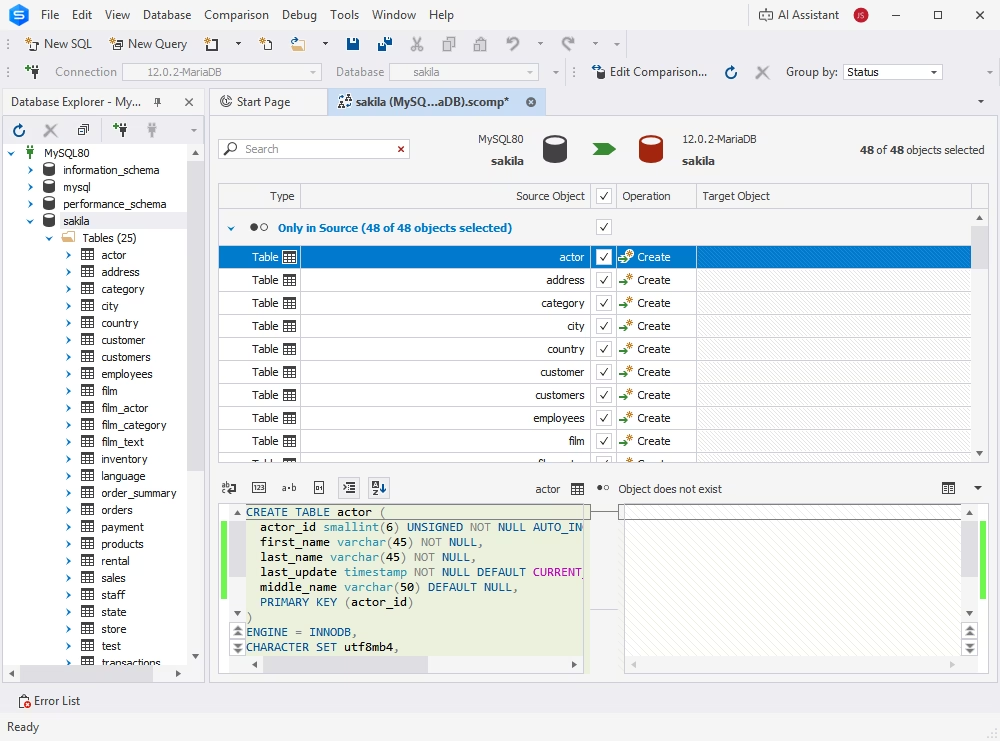
Use Schema Compare to analyze structural differences between MySQL and MariaDB. This highlights missing objects, mismatches, or unsupported definitions.
Step 4: Synchronize schemas
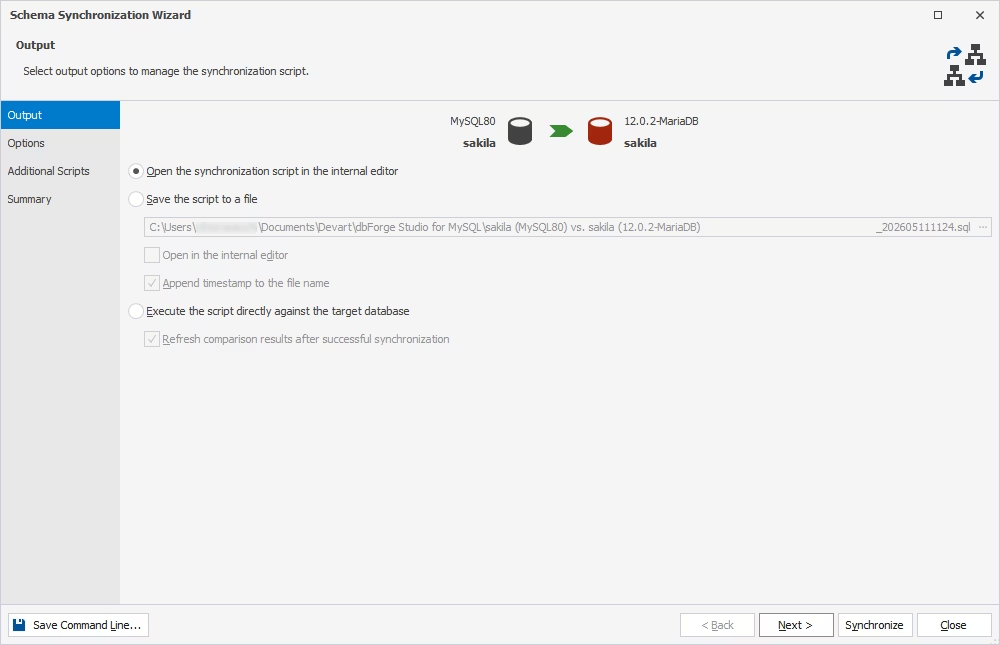
Apply the required changes to align the target MariaDB schema with the source MySQL structure.
Step 5: Run Data Compare to migrate data
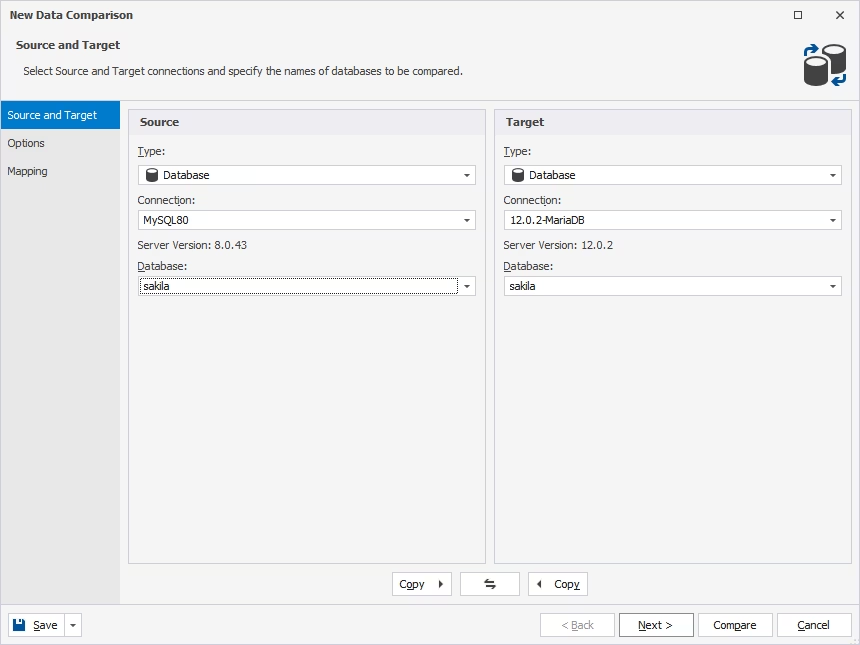
Once schemas match, use Data Compare to transfer data while ensuring consistency between both systems.
Step 6: Fix compatibility issues after the sync
Address any errors related to syntax, engines, or functions that may behave differently in MariaDB.
Step 7: Validate the migrated database
Run queries, test constraints, and verify data integrity to ensure everything works as expected.
Step 8: Update application connections
Point your applications to MariaDB and monitor performance and behavior during the transition.
This method is ideal when accuracy and validation are critical in a MySQL-to-MariaDB migration.
Method 2. Migrate with data export and import
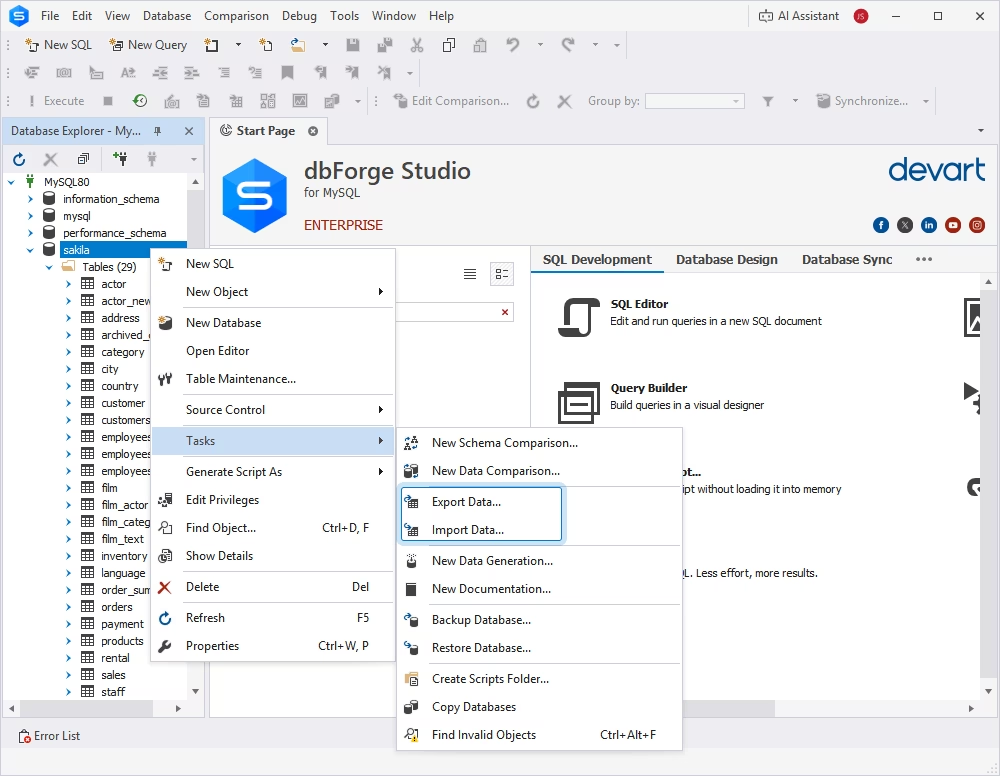
The export/import feature in dbForge Studio for MySQL stands out when you need to transfer specific tables or datasets rather than the entire database. With this feature, you can configure data formats, column mappings, and transformation rules, making it easier to adapt data during the migration. Additionally, built-in error logging helps you track failed rows or conversion issues.
This approach works well for partial migrations, testing scenarios, or when you want more granular control over what gets transferred.
Method 3. Migrate with Copy Databases
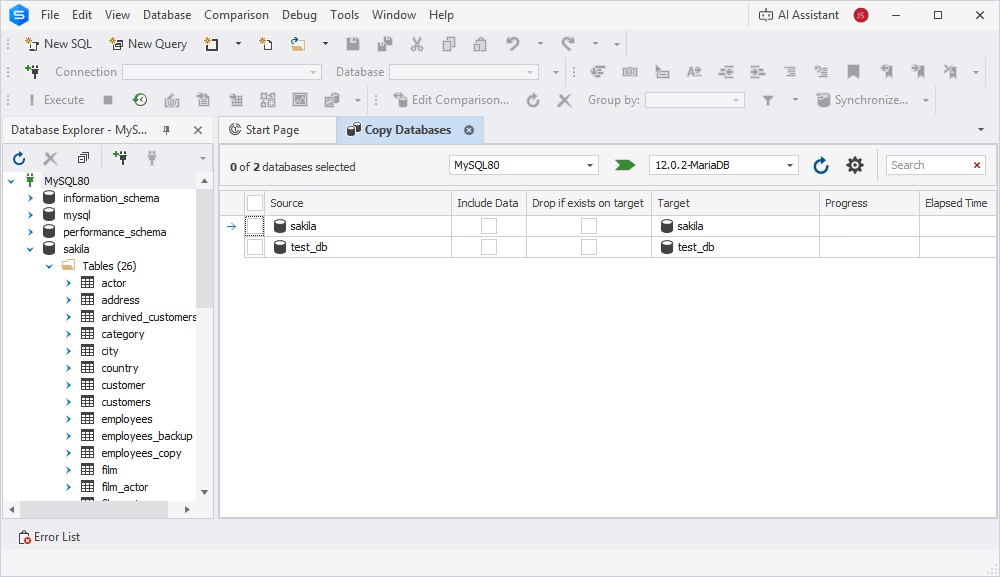
If speed is your priority, Copy Databases in dbForge Studio for MySQL is the fastest way to switch from MySQL to MariaDB. It allows you to move the entire database (schema and data) in a single workflow.
This method requires minimal configuration and is suitable for straightforward environments where compatibility issues are unlikely. However, it provides less visibility into differences, so it's best used when you're confident in schema alignment.
Method 4. Migrate via backup/restore or SQL scripts
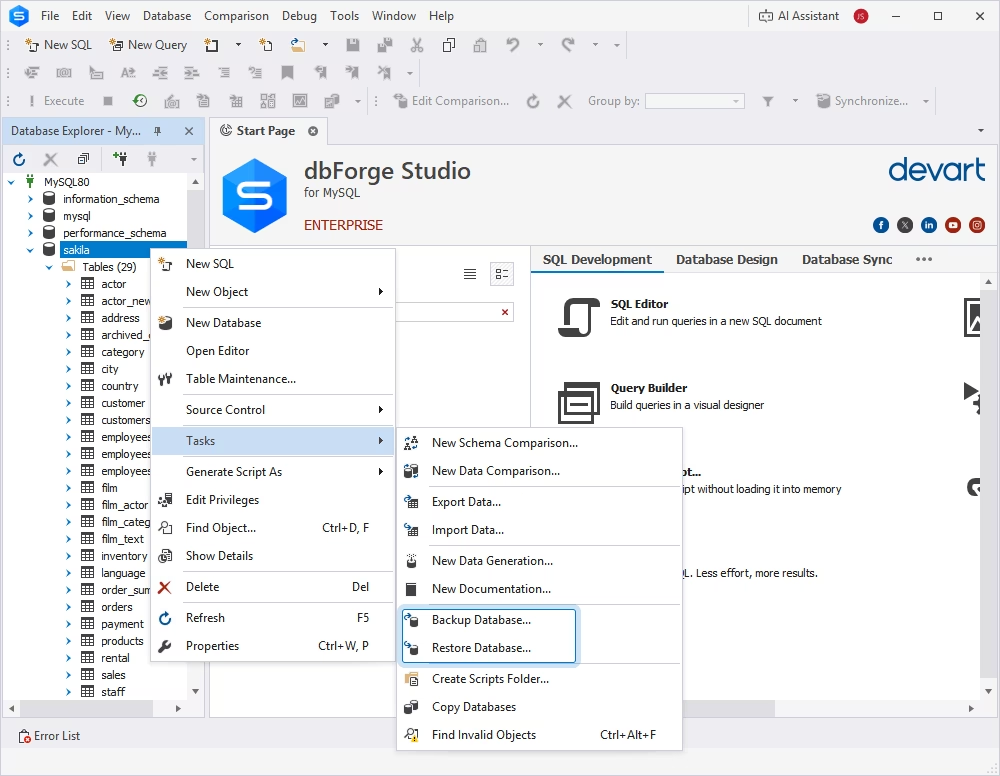
This is the traditional way to convert MySQL to MariaDB and is often preferred in environments that require full control over the migration process.
With this method, you generate SQL dump files or backups from MySQL and restore them into MariaDB. This method is highly flexible and works well with version-controlled deployments, automation pipelines, or manual validation workflows.
However, it requires more effort to handle compatibility issues, making it less beginner-friendly compared to dbForge Studio's visual tools.
Common MySQL-to-MariaDB migration issues and how to avoid them
Even with high compatibility, a MySQL-to-MariaDB migration can introduce subtle issues that affect performance, data integrity, or application behavior. The safest way to migrate from MySQL to MariaDB is to anticipate these problems early and validate each layer—schema, data, and connectivity.
The table below highlights the most common issues teams face when they switch from MySQL to MariaDB and how to handle them effectively:
| Migration issue | What usually causes it | How it shows up after migration | How to avoid or fix it |
|---|---|---|---|
| Syntax differences in routines, triggers, and views | Stored procedures, functions, triggers, or view definitions may include SQL syntax or logic that behaves differently across MySQL and MariaDB versions. | Imports fail, routines don't compile, triggers stop working, or views return errors after migration. | Review object definitions before migration, test procedural SQL in staging, and update incompatible syntax after import. Use dbForge Studio to inspect and adjust objects quickly. |
| Users and user privilege differences | Authentication methods, user accounts, and privilege models may not align perfectly between versions. | Login failures, broken application connections, or permission inconsistencies. | Audit users and privileges in advance, then recreate or adjust them in MariaDB instead of assuming direct compatibility. Retest all access points after migration. |
| Character set and collation mismatches | Differences in default encoding settings or improper handling during import. | Incorrect sorting, broken search results, unreadable characters, or inconsistent query outputs. | Verify character sets and collations at database, table, and column levels before migration. Validate multilingual data after import and standardize settings where possible. |
| Storage engine or feature incompatibilities | Use of engines or MySQL-specific features that behave differently or aren't fully supported in MariaDB. | Tables import with warnings, engine changes occur, or certain features stop working. | Review engine usage and dependencies ahead of time. Test performance-critical queries and adjust unsupported options manually if needed. |
| Data validation problems after migration | Incomplete data transfer, constraint mismatches, or differences in null handling and dependency order. | Row count mismatches, foreign key issues, broken reports, or inconsistent application behavior. | Validate row counts, test constraints, and run key application queries before cutover. Troubleshoot step-by-step—starting with schema, then data, then application logic. |
| Syntax and logic differences in routines (advanced cases) | Differences in control flow, variable handling, or built-in function behavior between MySQL and MariaDB. | Routines compile but return different results, or business logic behaves unexpectedly. | Go beyond syntax checks. Test logic with real data in staging, compare outputs before and after migration, and adjust where necessary. |
These issues don't mean you shouldn't migrate MySQL to MariaDB. They simply highlight why a structured approach is critical. With proper validation, testing, and the right tooling, you can convert MySQL to MariaDB without introducing instability into your environment.
Final thoughts on switching from MySQL to MariaDB
Migrating from MySQL to MariaDB is entirely achievable when you treat it as a structured database project. With proper planning, validation, and testing, you can switch from MySQL to MariaDB without disrupting applications or compromising data integrity.
The key takeaway is simple: success in a MySQL-to-MariaDB migration depends less on the tools themselves and more on how you use them. You need to review schema differences, validate data consistency, test application behavior, and prepare for edge cases like authentication, routines, or collation mismatches. Skipping these steps is where most migration issues begin.
That is where dbForge Studio for MySQL becomes especially valuable. It gives you a controlled environment to compare schemas, migrate data, generate scripts, troubleshoot errors, and validate results—all before you fully migrate to MariaDB. Instead of relying on manual checks, you can use built-in automation to reduce risk and save time.
If you're planning to migrate MySQL to MariaDB, download dbForge Studio for MySQL and start by setting up a test migration using the trial period. Validate everything in staging, refine your workflow, and only then move to production with confidence.
FAQ
MariaDB is highly compatible with MySQL, but not 100% identical. Most schemas, queries, and applications work without major changes, which is why many teams migrate from MySQL to MariaDB. However, differences can appear in areas like storage engines, authentication methods, SQL behavior, and advanced features. That's why testing and validation are essential before and after migration.
Yes, but it depends on your setup and planning. Zero-downtime MySQL-to-MariaDB migration is possible using strategies like replication, staged cutovers, or dual-write approaches. However, these require careful configuration and testing. For most teams, a short maintenance window combined with proper validation is the safer and more practical approach.
The easiest and most reliable way is to use a structured tool like dbForge Studio for MySQL. Features such as Schema and Data Compare allow you to detect differences, synchronize schema, and migrate data with validation. This approach reduces manual effort and helps avoid common migration errors.
Not necessarily. Because MySQL and MariaDB are largely compatible, you don't need a dedicated converter in most cases. Instead, tools like dbForge Studio provide all the functionality required to export, compare, synchronize, and validate databases—making the migration process more controlled and transparent.
