You can install the driver by using the Windows installer.
After you receive the license key, add it to your connection strings to connect to the data source.
Salesforce has become the backbone for many businesses, centralizing customer data and keeping workflows in perfect sync. But no tool works in isolation. To get the most out of Salesforce, you need to connect this platform with the rest of your tech stack.
That's where ADO.NET steps in. By treating Salesforce data like a traditional database, ADO.NET allows developers to access, query, and manage data with the tools they already know. For easier and smoother connections and performance, try dotConnect for Salesforce—a high-performance data provider that ensures connectivity with real-time queries, bulk data synchronization, and support for Salesforce's REST API.

Ensures effortless connection to Salesforce, enabling users to access data easily and intuitively.

Supports familiar SQL statements, requiring no special knowledge of a complex API or SOQL.

Uses well-known ADO.NET classes, enabling an easy start and creating a convenient working environment.

Fully supports EF Core, Dapper, NHibernate, LinqConnect, and other technologies for efficient data management.

Conforms to the latest ADO.NET standards and innovations for seamless integration with .NET applications.

Includes priority support, detailed documentation, and regular updates for continuous improvement.
You can start using dotConnect for Salesforce immediately with a 30-day free trial. Choose one of the following installation options:
You can install the driver by using the Windows installer.
After you receive the license key, add it to your connection strings to connect to the data source.
To connect your C# application to Salesforce, you need the Devart.Data.Salesforce library. The connection is established through the SalesforceConnection object. You need to provide a connection string specifying the authentication type and the license key that you obtained during the product activation:
string connectionString = "Authentication Type=AccessRefreshTokenInteractive;" +
"License Key=**********";Now that your connection is set up, you can pull data from Salesforce. Here’s an example SQL query to retrieve specific fields (Id, Name, Phone, and Website columns) from the Account table:
string query = "SELECT Id, Name, Phone, Website FROM Account";You can modify this query according to your needs and retrieve additional fields, filter results with a WHERE clause, or sort the data. The SalesforceDataReader ADO.NET class allows you to perform this task and use the results in your application.
To run a query against Salesforce, you need to create a SalesforceCommand object and tie it to your query and active Salesforce connection. Using ExecuteReader on the command enables the SalesforceDataReader to read the query results one row at a time.
See the basic example below:
using(SalesforceCommand command = new SalesforceCommand(query, salesforceConnection)) {
  using(SalesforceDataReader reader = command.ExecuteReader()) {
    // Read and process data
  }
}
After running the query, the SalesforceDataReader class lets you read the results one row at a time. This approach is ideal for large datasets because it is memory-efficient. For each row, you can extract the values of fields like Id, Name, Phone, and Website. If a field is missing data, you can set it to a default value, like N/A, as shown below:
while (reader.Read()) {
  string id = reader["Id"]?.ToString() ?? "N/A";
  string name = reader["Name"]?.ToString() ?? "N/A";
  string phone = reader["Phone"]?.ToString() ?? "N/A";
  string website = reader["Website"]?.ToString() ?? "N/A";

  Console.WriteLine($"Id: {id}");
  Console.WriteLine($"Name: {name}");
  Console.WriteLine($"Phone: {phone}");
  Console.WriteLine($"Website: {website}");
}
This loop processes each row of data and prints it in a readable format. It’s straightforward and ensures that if any field is missing, it won’t break your output.
Let us see how to connect using dotConnect for Salesforce, retrieve data from Salesforce using SQL-like queries, and display results in a C# console application. dotConnect uses Salesforce's API to access and manipulate Salesforce data in .NET applications.
static void Main(string[] args) {
  string connectionString = "Authentication Type=AccessRefreshTokenInteractive;" +
  "License Key=**********";

  try {
    using(SalesforceConnection salesforceConnection = new SalesforceConnection()) {
      salesforceConnection.ConnectionString = connectionString;
      salesforceConnection.Open();

      string query = "SELECT Id, Name, Phone, Website FROM Account";

      using(SalesforceCommand command = new SalesforceCommand(query, salesforceConnection)) {
        using(SalesforceDataReader reader = command.ExecuteReader()) {
          if (reader.HasRows) {
            while (reader.Read()) {
              string id = reader["Id"]?.ToString() ?? "N/A";
              string name = reader["Name"]?.ToString() ?? "N/A";
              string phone = reader["Phone"]?.ToString() ?? "N/A";
              string website = reader["Website"]?.ToString() ?? "N/A";

              // Process the data (e.g., store in a list or database)
            }
          }
        }
      }

      salesforceConnection.Close();
    }
  } catch (Exception) {
    // Handle exceptions (log or rethrow)
  }
}
In this query, the SalesforceConnection class opens a connection to Salesforce, the SalesforceCommand class prepares and executes the SQL query, and the SalesforceDataReader class iterates over the query results row by row, allowing you to process each row.
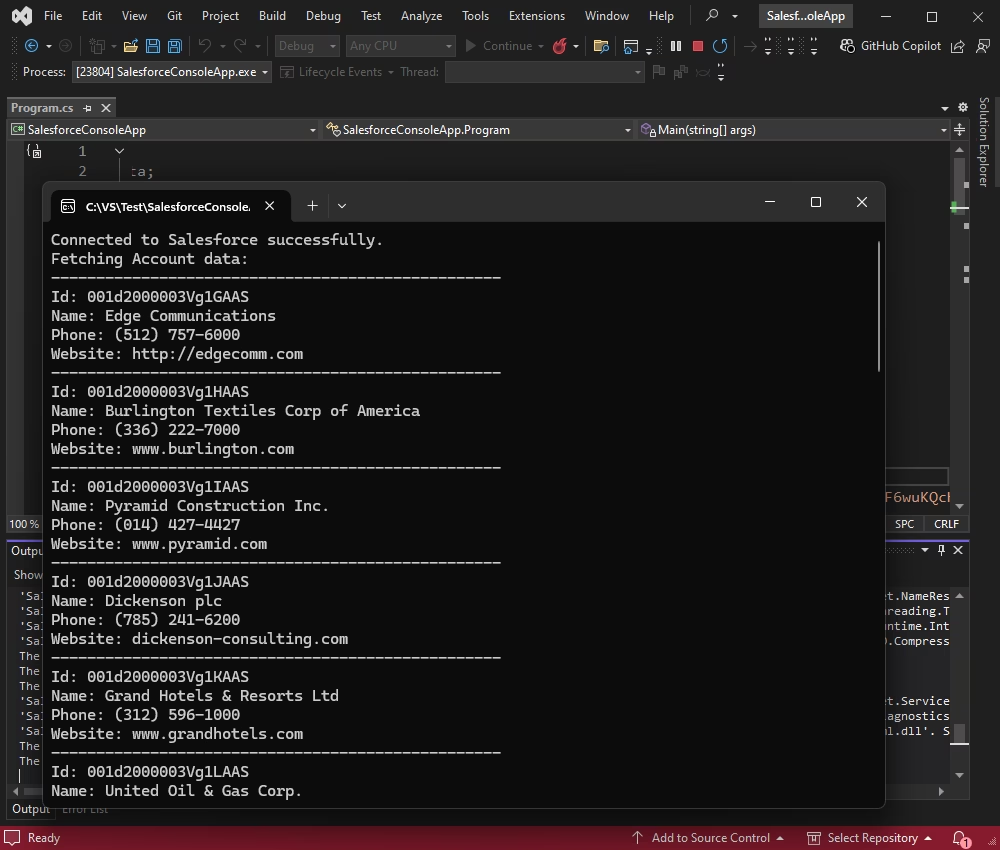
After successfully connecting to Salesforce, the application fetches and displays the data from the Account table in the console.
| Property | Meaning |
|---|---|
| Authentication Type | Authentication method for connecting to Salesforce, such as UserNamePassword, AccessRefreshToken, AccessRefreshTokenInteractive, SessionId, etc. |
| Host | The Salesforce.com or Database.com login URL, such as login.salesforce.com, login.database.com, test.salesforce.com, etc. |
| User ID or User | Salesforce login account. |
| Password | Password for the account. |
| Refresh Token | Salesforce OAuth 2.0 refresh token used for the OAuth Refresh Token authentication. |
| Security Token | Automatically generated key used to log in to Salesforce from untrusted networks. |
| License Key | Your license key. |
dotConnect for Salesforce is the optimal solution when you need to connect your C# application to Salesforce via ADO.NET. It simplifies what used to be a complex process and lets you integrate Salesforce data smoothly into your .NET applications. This way, you save time and can focus on what matters most—building better applications.
On top of that, advanced features like LINQ and Entity Framework give you the power to take full advantage of your data. To experience the full potential of dotConnect for Salesforce, download the free trial and see how it handles your specific workload!
License Key parameter.
Authentication Type=AccessRefreshTokenInteractive
When you call Open() on the SalesforceConnection, a browser window automatically opens for Salesforce login and consent. After successful authentication, dotConnect retrieves and manages the access and refresh tokens automatically, so no manual token handling is required.
Scaffold-DbContext with the Devart.Data.Salesforce.EFCore package and a dotConnect connection string (including the License Key) to generate the DbContext and entity classes.

I'm a technical content writer who loves turning complex topics — think SQL, connectors, and backend chaos–into content that actually makes sense (and maybe even makes you smile). I write for devs, data folks, and curious minds who want less fluff and more clarity. When I'm not wrangling words, you'll find me dancing salsa, or hopping between cities.

