PostgreSQL teams often need to compare data across databases to ensure that migrations are accurate, environments remain consistent,
and deployments do not introduce unexpected changes. Data comparison tools make it easier to validate migrated data, check staging against production,
find missing or mismatched records, and verify that lookup and reference tables contain the expected values. They can also help detect
data drift that develops over time as different environments receive independent updates.
In this comparison, we look at tools that help PostgreSQL teams identify data differences, validate changes, and
synchronize selected data, with a focus on their key strengths and weaknesses and practical use cases.
Choosing the right PostgreSQL data comparison and sync tool
Picking the right tool matters because "comparing databases" can mean very different things depending on the task at hand.
A developer validating a migration script, a DBA who has to keep environments in sync, and a team managing an always-on disaster recovery setup
may have different requirements for data comparison, which define the choice of tools.
PostgreSQL data comparison solutions generally fall into three categories:
- GUI comparison tools provide a visual way of comparing databases, reviewing differences, and executing synchronizations. GUI tools
are typically used in validating migrations, finding and reviewing database differences, or identifying missing or changed data.
- CLI-driven comparison tools focus on automation and integration, which makes them suitable for scripted data comparisons,
CI/CD pipelines, and repeatable deployment workflows. These tools are used to perform scheduled comparisons, generate comparison and synchronization
scripts, and integrate into DevOps processes.
- Replication platforms are designed for distributing and synchronizing data between databases rather than identifying
differences. Their typical use cases include database synchronization across different locations, real-time or near-real-time data distribution, and
disaster recovery.
Data comparison vs data sync vs replication: what do you actually need?
These three terms get used interchangeably, but they describe distinct operations with different tooling.
Data comparison means identifying row-level differences between two datasets,
typically tables, views, or query results, without changing anything.
Data sync goes a step further by applying selected changes to make the target data match the source.
Replication means continuously moving changes between systems as they happen, often as part
of high availability, disaster recovery, or data integration architectures.
PostgreSQL data comparison tools
Data comparison tools find differences between two PostgreSQL databases by comparing table data, views, or query results
and reporting which rows were inserted, deleted, or changed. They are best suited to migration validation, release checks between environments,
keeping reference or lookup data consistent, and spotting data drift after a deployment. They may have data synchronization
capabilities, but only apply changes when you explicitly choose to.
PostgreSQL data synchronization tools
Synchronization tools use the comparison results to help you apply selected changes from a source database to a target.
The important part of this category is control: a generated sync script should always be reviewed before it is executed, especially against a
production database.
PostgreSQL replication tools
Replication tools are designed for ongoing, automatic change movement rather than a one-off or
scheduled check. They support high availability, disaster recovery, and analytics pipelines that need a near-real-time
copy of production data. They are also commonly used in distributed or multi-region systems. For a simple "compare PostgreSQL databases"
task, a full replication platform is usually too infrastructure-heavy.
What kind of tool do you need?
The right approach depends on what you are trying to accomplish. If you need to inspect differences, validate a migration,
compare environments, or synchronize data, a dedicated comparison and synchronization tool such as dbForge Data Compare for PostgreSQL
can be a strong fit. It is designed as a full-featured data comparison and synchronization tool that enables
controlled, reviewable comparison and synchronization. While perfectly suited for release validation and data management,
dbForge Data Compare should not be considered a replacement for a dedicated high-availability,
change-data-capture, or continuous replication platform.
List of the best PostgreSQL data comparison and sync tools
The following list includes tools from all categories: dedicated data comparison and sync tools and replication solutions.
It presents both GUI- and CLI-based tools, covering a variety of use cases.
dbForge Data Compare for PostgreSQL
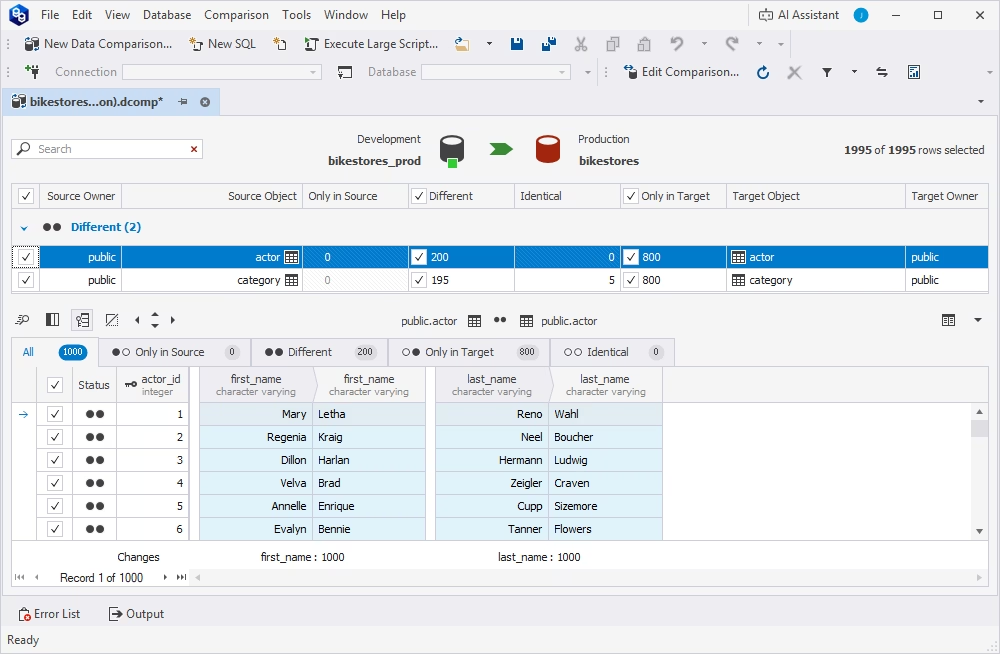
dbForge Data Compare for PostgreSQL is a GUI tool
for comparing and synchronizing PostgreSQL table data. It helps DBAs and developers detect row-level differences between two databases,
review every change before it is applied, generate sync scripts, produce comparison reports, and automate recurring comparison tasks from the command line.
For teams that need controlled PostgreSQL data comparison rather than an always-on replication pipeline,
dbForge Data Compare is a strong choice: it is purpose-built for exactly this job, with reviewable synchronization scripts
and reporting on top of the comparison itself.
Pros
- Fast, accurate detection of row-level differences between PostgreSQL databases
- Full or partial data synchronization with editable sync scripts
- Comparison report generation in CSV, Excel, and HTML formats
- Command-line scripts for automated, scheduled comparisons
- Broad support for cloud and managed PostgreSQL services
- Integrated AI Assistant for SQL generation, explanation, and troubleshooting
Cons
- No native support for macOS and Linux (CrossOver or Wine required)
- Paid tool
Features
- Full or partial comparison of tables, views, and query results
- Automatic and custom object/column mapping, including tables with different names or structures
- Customizable comparison options (ignore columns, round float values, apply a WHERE filter, and more)
- Auto-generation of synchronization scripts, with manual editing before execution
- Pre- and post-synchronization script support
- Command-line automation combined with Windows Task Scheduler
Compatibility
Supports all actively maintained PostgreSQL server versions (8.4 through 18), plus popular cloud and managed services:
Supabase, Amazon RDS, Amazon Aurora, Amazon Redshift, Heroku, and more.
Price
Paid: From $74.95 per year (or $149.95 for a perpetual license)
Free trial: 30 days
dbForge Data Compare for PostgreSQL
A powerful, fast, and easy-to-use data comparison and synchronization tool for PostgreSQL, on-premises and in the cloud
EMS Data Comparer for PostgreSQL
EMS Data Comparer for PostgreSQL
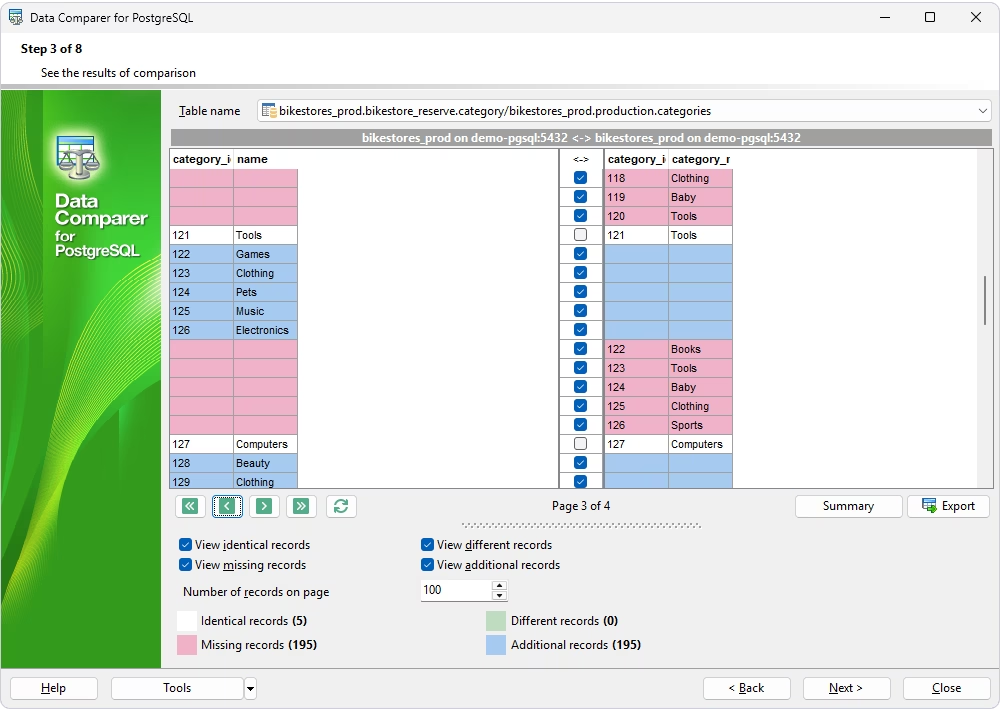
is a dedicated tool for comparing and synchronizing table data between two PostgreSQL databases. It helps users identify differences between tables,
review comparison results, and generate scripts to synchronize selected data. The tool provides a step-by-step graphical wizard for configuring comparisons
and synchronization, while also offering a command-line utility for automating workflows.
Pros
- Wizard-driven comparison and synchronization setup
- Separate command-line utility for scripted, repeatable runs
- Controlled full or partial synchronization
- Automation support
Cons
- Windows-only tool
- Lack of a built-in scheduler; recurring runs rely on Windows Task Scheduler
- Free trial is limited to 10 tables
- Limited database support
- Outdated UI design
Features
- Simultaneous comparison of multiple tables
- Full or partial synchronization with manual or automatic record selection
- Comparison filters
- Sync script generation with a built-in editor
- Command-line utility driven by saved comparison templates
- Support for all PostgreSQL data types
Compatibility
Supports PostgreSQL 7.3 through 16.
Price
Paid: Perpetual license from $60
Free trial: 14 days, limited to 10 tables
Navicat for PostgreSQL
Navicat for PostgreSQL
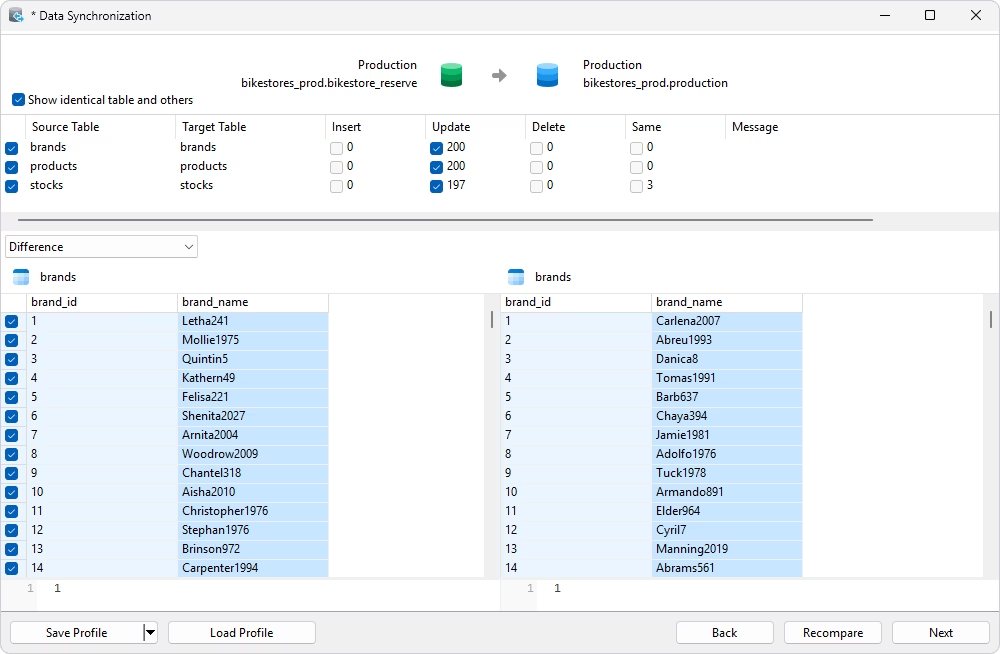
is a cross-platform PostgreSQL database management and development tool. It supports a broad range of tasks, including SQL development, data editing,
database object management, data profiling, data transfer, and database comparison and synchronization. Rather than being a dedicated data-compare-only
product, it is a comprehensive database client where comparison and sync are part of a wider administration toolset.
Pros
- Strong visual workflow for core database management tasks
- Cross-platform availability: Windows, macOS, and Linux
- Automation capabilities
- Support for major cloud-hosted databases
Cons
- Comparison and sync are bundled inside a general-purpose client rather than sold as a dedicated diff product
- Advanced features are edition-dependent
- Large database comparisons can be resource-intensive
Features
- Data comparison and synchronization
- Structure comparison and synchronization
- Data transfer between databases
- SQL editor
- Object designer
- Backup and recovery
- Scheduled automation of saved comparison and sync profiles
Compatibility
Supports PostgreSQL 7.3 and higher as well as major cloud-hosted databases, such as Amazon RDS, Amazon Redshift,
Microsoft Azure Database for PostgreSQL, Google Cloud SQL, Huawei Cloud RDS for PostgreSQL, and others.
Price
Paid: Standard Edition—perpetual license $299.00 or monthly subscription $14.99.
Enterprise Edition—perpetual license $449.00 or monthly subscription $22.99.
Free trial: 14 days
DataGrip
DataGrip is a cross-platform database IDE
designed for developers and database administrators who work with multiple database systems. It provides a unified environment
for SQL development, database object management, data editing, query analysis, data and schema comparison, and database navigation.
It is primarily an IDE for database development rather than a dedicated synchronization product: the data comparison feature
is a diff viewer for spotting differences, not a tool for generating a reusable data sync script.

Pros
- Excellent SQL development capabilities
- Broad database support
- Cross-platform availability
- Comprehensive developer-friendly workflow
Cons
- Extensive feature set may be overwhelming for simple database management tasks
- Data comparison and synchronization are not an end-to-end process and require manual control
- Resource consumption is higher compared to simpler, more lightweight tools
- Commercial use requires a paid subscription
Features
- Database Explorer for browsing databases and schemas
- Multiple database connections
- Data and schema comparison
- AI assistance
- Import and export capabilities
- Integrated version control
Compatibility
Supports multiple PostgreSQL versions as well as Amazon RDS, Amazon Aurora, and other PostgreSQL-compatible cloud databases
through standard drivers.
Price
Free: Non-commercial use
Paid: Individual license from $10.90 per month; Organization license from $25.90 per month
Free trial: 30 days
pgCompare
pgCompare, maintained by Crunchy Data,
is an open-source, developer-oriented command-line tool for validating data consistency across PostgreSQL and other database systems,
including Oracle, MySQL, MariaDB, DB2, and SQL Server. It is designed for post-migration and post-replication validation rather
than day-to-day GUI comparison work.
Pros
- Open-source tool under the Apache 2.0 license, backed by an established PostgreSQL vendor
- Multi-database support, which makes it a good fit for heterogeneous environments
- Synchronization capabilities
- Local or remote deployment, which is an advantage for working with distributed databases
Cons
- Requires Java and a Maven build toolchain rather than a simple installer
- Not suitable for GUI-driven workflows
- Only focuses on data comparison, lacking other database management features
Features
- CLI-driven table discovery, batch comparison, and detailed mismatch checks
- Central repository for tracking multiple comparison projects over time
- Auto-generated synchronization SQL for detected mismatches
Compatibility
Supports data comparisons between PostgreSQL and Oracle, MySQL, MariaDB, DB2, and SQL Server databases.
Price
Free: Open source (Apache License 2.0)
SymmetricDS
SymmetricDS is an open-source database replication and synchronization platform built for distributed and heterogeneous environments.
It uses trigger-based change data capture to move data between more than 20 supported database platforms, including PostgreSQL, MySQL, Oracle, and SQL
Server.
SymmetricDS supports one-way and bidirectional synchronization, near-real-time data streaming, bulk data movement, filtering,
subsetting, and transformation. Unlike traditional Postgres database comparison tools, SymmetricDS is primarily intended for ongoing data movement
and replication, including multi-primary architectures, cloud integration, distributed databases, and zero-downtime migration scenarios.
Pros
- Continuous replication capabilities
- Broad database support across more than 20 platforms
- Support for data transformation during replication
- Scalable architecture
- Open-source Community edition
Cons
- Requires specific infrastructure and complex configuration
- Advanced capabilities are available only in commercial editions
- Cannot be used as a substitute for a backup, disaster recovery, or high-availability architecture
Features
- Change Data Capture (CDC) for continuously capturing database changes
- One-way and bidirectional synchronization
- Cross-platform data synchronization
- Data transformation and mapping
- Conflict management
Compatibility
Supports more than 20 database platforms for heterogeneous replication, including PostgreSQL, MySQL, Oracle, and SQL
Server.
Price
Free: Community edition (GPL v3)
Paid: Standard, Pro, and Enterprise subscription tiers; pricing available on request
Free trial: 30 days for commercial tiers
PostgreSQL logical replication and pglogical
PostgreSQL logical replication and pglogical are replication technologies
designed to move selected data changes from a publisher/provider database to one or more subscriber/target databases. PostgreSQL's built-in logical replication is available as part
of modern PostgreSQL releases, while pglogical is an extension that provides additional logical replication capabilities. Both approaches are intended for ongoing data movement
and synchronization, rather than for interactively comparing two databases, reviewing row-level differences, or generating a sync script the way dedicated data comparison tools do.
Pros
- Native publish/subscribe replication built into the PostgreSQL core, no separate replication product required
- Selective replication via row filters and column lists (PostgreSQL 15 and later)
- Support for migrations through change replication from an existing database to a new environment
- Support for distributed architectures with data replication to multiple PostgreSQL databases
- Additional capabilities provided by pglogical: replication sets, subscriber-side filtering, and configurable conflict resolution
- Support for Amazon RDS, Amazon Aurora PostgreSQL, and Azure Database for PostgreSQL
Cons
- Not a data comparison tool
- Not designed for selective, manual synchronization
- Steep learning curve: requires database administration knowledge
- PostgreSQL-specific with no support for heterogeneous database synchronization
- Potential limitations for complex workloads
Features
- Support for replication of selected tables rather than replicating an entire database
- Initial table synchronization with subsequent changes applied continuously
- Data replication to multiple databases
- Support for PostgreSQL migrations, upgrades, and distributed PostgreSQL environments.
Compatibility
Native logical replication requires PostgreSQL 10 or later; pglogical supports PostgreSQL 9.4 and later. Both tools are compatible with Amazon RDS/Aurora and Azure Database for PostgreSQL.
Price
Free: Both tools are open source, with native logical replication as part of PostgreSQL core and pglogical under the PostgreSQL License
Bucardo
Bucardo is an open-source, asynchronous PostgreSQL database replication system designed primarily
for multi-source and multi-target replication. It supports PostgreSQL-to-PostgreSQL replication and can also replicate PostgreSQL data to certain other database systems through its supported
replication mechanisms. Bucardo uses a trigger-based approach to detect changes and can replicate selected tables rather than requiring an entire database to be copied. It is particularly known
for supporting multi-master replication, where multiple PostgreSQL databases can accept changes and synchronize them with one another.
Bucardo is a replication platform, not a data comparison tool. Its purpose is to continuously or periodically propagate data changes between databases, whereas data comparison
tools are designed to identify differences between existing datasets and let users review or selectively synchronize those differences.
Pros
- Open-source tool
- Multi-source and multi-target replication
- Asynchronous replication
- Conflict-handling capabilities
Cons
- Complex configuration requiring PL/Perl and several Perl module dependencies
- PostgreSQL-focused with no support for other databases
- Not suitable for simple data comparisons
Features
- Multi-master replication
- One-to-many and many-to-one replication
- Conflict detection and resolution
- Asynchronous replication between PostgreSQL databases
- Support for database migrations and upgrades
- Trigger-based change detection
Compatibility
Requires PostgreSQL 8.2 or later.
Price
Free: Open source (BSD license)
Comparison table of the best PostgreSQL data comparison and sync tools
The table below summarizes the details of the data comparison and synchronization tools we have reviewed.
| Tool |
Best for |
Data comparison/
Data sync |
Sync script |
Ongoing replication |
GUI |
CLI |
Cloud database support |
|
dbForge Data Compare for PostgreSQL
|
Controlled PostgreSQL data comparison and synchronization |
Yes/Yes |
Yes |
No |
Yes |
Yes |
Yes |
|
EMS Data Comparer for PostgreSQL
|
PostgreSQL table data comparison and sync |
Yes/Yes |
Yes |
No |
Yes |
Yes |
No |
|
Navicat for PostgreSQL
|
PostgreSQL GUI with data sync features |
Yes/Yes |
Yes |
No |
Yes |
Limited |
Yes |
|
DataGrip
|
SQL IDE with database comparison features |
Yes/Limited |
Limited |
No |
Yes |
Limited |
Yes |
|
pgCompare
|
Open-source or developer-focused PostgreSQL comparison |
Yes/Limited |
Yes |
No |
No |
Yes |
Yes |
|
SymmetricDS
|
Distributed database synchronization and replication |
No/Yes |
No |
Yes |
Admin UI |
Yes |
Yes |
|
PostgreSQL logical replication / pglogical
|
PostgreSQL-native logical replication |
No/Yes |
No |
Yes |
No |
SQL/
CLI |
Yes |
|
Bucardo
|
PostgreSQL asynchronous replication |
No/Yes |
No |
Yes |
No |
Yes |
Yes |
How to choose the best PostgreSQL data comparison or sync tool
Choosing the best PostgreSQL data comparison or synchronization tool depends on what you actually need to accomplish. A tool built for row-level comparison is the right
choice when you need to find differences between two databases, while a PostgreSQL database synchronization tool is better when you need to turn those differences into controlled changes. If your goal
is to continuously move data between systems, you are looking for a replication platform instead. When evaluating tools, focus on practical capabilities such as visual comparison, synchronization
script generation, automation, cloud connectivity, replication support, and integration with your existing development workflow.
Choose a data comparison tool for row-level database differences
When you need to identify differences between two PostgreSQL databases or datasets at the row level, choose a dedicated data comparison tool, for example, dbForge
Data Compare for PostgreSQL, Navicat for PostgreSQL, DataGrip, or pgCompare. These tools are particularly useful for the following purposes.
- Validating database migrations by confirming that data was transferred correctly.
- Checking staging against production after deployments or data updates.
- Detecting data drift between environments.
- Comparing reference and lookup tables that should remain consistent.
- Verifying test data across development or staging environments.
- Finding missing or modified records without manually writing comparison queries.
- Preparing selected data for synchronization after differences have been reviewed.
Choose a sync tool when you need controlled change deployment
If you need to apply differences, rather than simply identify them, look for a tool that can generate and review synchronization scripts, such as dbForge Data Compare for PostgreSQL,
EMS Data Comparer for PostgreSQL, or pgCompare. Data synchronization tools can be useful in the following cases.
- Keeping staging and production data aligned.
- Synchronizing reference and lookup data.
- Reviewing changes before production deployments.
- Automating repeated data synchronization flows.
- Verifying replication or data transfer results.
- Supporting auditable production changes.
Choose replication for ongoing data movement
When you need continuous data movement, high availability, disaster recovery, an analytics pipeline, or a distributed system, choose a replication tool: SymmetricDS, PostgreSQL logical
replication, or Bucardo. Replication tools are the best fit in the following scenarios.
- Enabling continuous data movement between PostgreSQL databases.
- Supporting high availability (HA) architectures.
- Maintaining disaster recovery and standby environments.
- Running distributed applications that need data in multiple locations.
- Supporting cloud or regional data distribution.
- Performing ongoing database migrations.
Check the PostgreSQL version and cloud compatibility
Before choosing a tool, verify that it works with the exact PostgreSQL versions and hosting environments you use. Also, it is important to check compatibility with your
managed PostgreSQL provider and any SSL/SSH connection requirements.
This matters especially for cloud services such as AWS, Azure, Google Cloud, Heroku, Supabase, Neon, and TimescaleDB, where some tools and extensions have restrictions
around superuser access or specific replication features.
Which PostgreSQL data compare and sync tool should you use?
If you are looking for the best tool to compare PostgreSQL databases, the choice largely depends on what you want to achieve.
For teams that need visual PostgreSQL data comparison, controlled synchronization, shareable reports, sync scripts, and automation,
dbForge Data Compare for PostgreSQL is the best overall fit. It combines an accessible GUI with command-line automation,
so the same tool works both for a one-off release check and for a recurring, scheduled comparison job.
If your actual requirement is always-on data movement rather than comparison, for high availability, disaster recovery, or distributed systems,
a replication platform such as native PostgreSQL logical replication, pglogical, SymmetricDS, or Bucardo is a better match.
FAQ
What is the best PostgreSQL data comparison tool?
dbForge Data Compare for PostgreSQL is a strong overall choice: it detects row-level data differences between two PostgreSQL databases,
lets you review and generate synchronization scripts, produces comparison reports, and supports command-line automation. Other options, such as
EMS Data Comparer for PostgreSQL or the open-source pgCompare, may fit better for teams with a smaller budget or a need for cross-database validation.
How do I compare two PostgreSQL databases?
If you need to compare data in two databases, choose an efficient Postgres data comparison tool, for example, dbForge Data Compare for PostgreSQL, Navicat, DataGrip, or
pgCompare. Connect to both databases, select the tables, views, or queries you want to compare, configure any comparison options such as ignored columns or row filters,
and run the comparison. The tool then reports which rows are missing, added, or different, without changing any data until you choose to synchronize.
What is the difference between PostgreSQL data comparison and schema comparison?
Data comparison identifies differences in the actual data stored in tables, such as missing, added, or changed records. Schema comparison identifies differences in
database structure, such as tables, columns, indexes, and constraints.
Can I synchronize data between two PostgreSQL databases?
Yes. Data sync tools such as dbForge Data Compare for PostgreSQL, EMS Data Comparer for PostgreSQL, and Navicat generate a script that inserts, updates,
or deletes rows in a target database so that it matches a source. The script can typically be reviewed and edited before it runs.
Is Postgres replication the same as data synchronization?
No. Replication continuously moves changes between systems as they happen, usually for high availability, disaster recovery, or distributed systems,
with no per-change review step. Data synchronization is typically a controlled, reviewed operation, run once or on a schedule, where a person or process decides which changes to apply.
What is a PostgreSQL data diff tool?
A PostgreSQL data diff tool compares the data of two PostgreSQL databases or tables and reports differences such as inserted, deleted, or changed rows. It typically
presents the results in a visual comparison grid so you can review each difference before deciding whether to synchronize it.
Can dbForge Data Compare for PostgreSQL generate sync scripts?
Yes. dbForge Data Compare for PostgreSQL automatically generates a synchronization script for the differences you select and lets you edit that script before running it,
save it to a file for later use, or execute it immediately to deploy the changes.
Which PostgreSQL sync tool is best for migrations?
For validating and syncing PostgreSQL database migrations with a reviewable script, dbForge Data Compare for PostgreSQL or EMS Data Comparer for PostgreSQL are practical choices.
If you are looking for an open-source tool, check out pgCompare.
Can I automate PostgreSQL data comparison?
Yes. dbForge Data Compare for PostgreSQL and EMS Data Comparer for PostgreSQL both include a command-line interface that can be combined with Windows Task Scheduler for recurring,
unattended comparisons. Open-source tools such as pgCompare are designed to run from the command line as part of a CI/CD pipeline.
Do I need a replication tool or a data comparison tool?
If you need continuous, automatic data movement for high availability, disaster recovery, or a distributed system, choose a replication tool such as native PostgreSQL
logical replication, pglogical, SymmetricDS, or Bucardo. If you need to check for and control specific data differences, for example, after a migration or a deployment,
a data comparison tool, such as dbForge Data Compare for PostgreSQL, DataGrip, or Navicat, is the better fit.
What is the difference between replication tools and data comparison tools?
Replication tools operate continuously: they monitor changes in the source database (via mechanisms such as CDC, binary logs, or WAL) and automatically apply
those changes to the target, keeping it up to date in real time or with minimal latency. No user intervention is required.
Data comparison tools are triggered on demand, either manually or on a schedule. They take a snapshot of two databases at the moment of execution,
identify differences in schema or data, and produce a report. Changes are not automatically applied to the target: synchronization based on comparison results is a separate
step that the user initiates deliberately.
In short: replication is continuous automated synchronization; data comparison is on-demand diagnostic analysis.