
dbForge Studio for PostgreSQL
AI-powered IDE for database development, management, and data analysis across PostgreSQL and related cloud services
Amazon Redshift is a popular fully managed cloud data warehouse service designed specifically for Online Analytical Processing (OLAP). At the moment, Amazon Redshift is one of the favored options for organizations when they need to establish large-scale data analytics and business intelligence.
This article focuses on migrating data from PostgreSQL databases to Amazon Redshift. It will cover the differences between these systems to help you understand what you need to be concerned about for such a migration, explain the existing methods of data migration, and illustrate the process using dbForge Studio for PostgreSQL. Let us start.
Migration from PostgreSQL to Amazon Redshift does not mean replacing a database with a more suitable database management system. Amazon Redshift is a database, but its structure is fundamentally different from transactional databases. It is based on PostgreSQL and allows querying and manipulating data with SQL, but it cannot replace PostgreSQL, MySQL, Oracle, or another database that powers standard applications.
Data migration from PostgreSQL to Amazon Redshift usually means transferring data from a local PostgreSQL server or a cloud-based platform like Amazon RDS for PostgreSQL, Amazon Aurora PostgreSQL, or another PostgreSQL-compatible database into Amazon Redshift to establish a dedicated analytics platform for warehousing and reporting. Meanwhile, PostgreSQL databases remain active and continue supporting transactional workloads.
Although Redshift is based on PostgreSQL, it works differently because it is designed for a different purpose—OLAP, BI, aggregations, large scans, and columnar data storage. It does not have many essential features of PostgreSQL, but it compensates for that with scalability and advanced analytics capabilities for massive data volumes.
The table below summarizes the most essential differences between PostgreSQL and Amazon Redshift.
| Feature | PostgreSQL | Amazon Redshift |
|---|---|---|
| Primary use case | OLTP, application databases, transactional systems | OLAP, analytics, BI, data warehousing |
| Workload type | Frequent reads/writes, inserts, updates, deletes | Large analytical queries, aggregations, reporting |
| Storage model | Row-based storage | Columnar storage |
| Scalability model | Vertical scaling and replicas, depending on setup | MPP architecture for parallel query execution |
| Data model | Normalized relational schemas | Analytics-focused schemas, often star/snowflake models |
| Common users | Developers, DBAs, backend teams | Data engineers, BI teams, analysts |
| Query focus | Fast access to individual rows and indexed records | Fast processing of large datasets and grouped results |
| Indexing and optimization | Traditional indexes, query planner, constraints | Sort keys, distribution keys, columnar compression |
| Inserts and updates | Strong for frequent row-level changes | Better for bulk loads and batch processing |
| Reporting usage | Good for lightweight reporting, but heavy queries can affect production performance | Designed for reporting, dashboards, and BI workloads |
| AWS ecosystem fit | Available through Amazon RDS and Aurora PostgreSQL | AWS data warehouse integrated with S3, Glue, DMS, QuickSight, and other AWS services |
| Pricing | Free | A paid service with flexible pricing options |
Moving data from PostgreSQL to Amazon Redshift usually takes place when you need analytical workloads that PostgreSQL can no longer support efficiently. Amazon Redshift is optimized for scanning and analysis of massive datasets, while PostgreSQL excels in transactions for business applications. Thus, modern workflows may dictate separating the transactional and analytical workflows.
The following issues are the most common factors causing teams to move data to Redshift.
Performance degradation is one of the most common reasons to migrate. For instance, complex JOIN operations, aggregations, and sophisticated data reports consume memory and disk resources, and as reporting activities grow, transactional performance suffers. By moving analytics and reporting workflows to Amazon Redshift, organizations can run the related resource-intensive operations without affecting business applications.
Every time you refresh the BI dashboards, they have to execute numerous complex queries. As datasets grow, PostgreSQL starts struggling. As a result, the task takes too long, especially when you need to retrieve fresh data from several dashboards simultaneously.
Amazon Redshift, on the other hand, is designed specifically for this type of workload. Its architecture makes it possible to analyze hundreds of millions of rows in a much more efficient manner than PostgreSQL would allow.
This factor is the key in both use cases described earlier. PostgreSQL can handle large databases efficiently, but in large organizations, eventually, tables become huge, reports take too long to complete, and analytical workloads outgrow the existing capabilities. Besides, when companies integrate professional BI tools like Tableau, Power BI, Looker, or Amazon QuickSight, the number of specific analytical queries increases tremendously.
Therefore, it becomes a logical decision to move those billions of rows to Amazon Redshift, which can handle them in a much more efficient way, and use the BI tools with Redshift.
As the importance of business analytics and reporting grows, so does the workload they place on databases. Let us consider the most common and demanding scenarios where you may face complications running regular analytical operations and therefore seek a more powerful alternative to run such tasks.
Many businesses generate daily recurring reports that summarize activity from the previous day or week, e.g., daily sales reports, order summaries, inventory reports, financial reports, operational KPIs, etc. Instead of calculating these reports directly on PostgreSQL, organizations often choose to transfer them to Amazon Redshift.
Operational databases focus on current business operations, while analysts usually need historical trends over months or years. For instance, examination of sales trends over multiple years, seasonal demand analysis, product performance over time, etc. are necessary to develop reliable financial forecasting. Amazon Redshift is optimized for querying large historical datasets.
Marketing and product teams need to analyze customer behavior, including their purchase patterns, user engagement, customer segmentation, etc. It requires processing large volumes of data about transactions and customer behavior, including complex JOINs to combine and relate the data portions. A warehouse is a better option than a PostgreSQL database.
Finance departments require consolidated reports with the information from several essential sources. As a rule, such reports include revenue breakdowns, profitability analysis, customer lifecycles, cost analysis, and other metrics. To achieve that, large aggregations are necessary, and Amazon Redshift processes such queries more efficiently.
The analysis of data from different systems is a necessity now. An organization usually uses such sources as CRM platforms, marketing platforms, web analytics tools, PostgreSQL applications, and, in addition, raw data stored in CSV files in cloud storage. By loading these datasets into Amazon Redshift, you can obtain a single platform for data analysis and reporting.
With time, organizations mature and need more options for data storage and processing. While PostgreSQL may remain the system to handle transactions, teams need a data warehouse to serve as a central repository for analytical data from all business aspects. Amazon Redshift is one of the most popular and convenient platforms for such scenarios.
Despite all its advantages, Amazon Redshift is not the universal solution that suits any scenario. It can be suitable and even optimal for large organizations that deal with huge datasets and require powerful tools that process loads of data, analyze it with complex queries, and create detailed and professional reports.
On the other hand, if you don't need to handle billions of rows daily, your datasets are moderate in size, and the query performance is acceptable for your purposes, there is no need to add a commercial Redshift solution. You can achieve all your goals with PostgreSQL.
To move data from PostgreSQL to Amazon Redshift, you can use several methods. The choice of the right one depends on the data volume to transfer, complexity, and specific requirements for data cleansing and transformation. Let us review the most common ways.
| Method | Best for | Pros | Cons |
|---|---|---|---|
| S3 + COPY | Large batch loads | Fast Redshift bulk loading, AWS-native approach | Requires export, S3 setup, IAM permissions, and load orchestration |
| AWS DMS | Full load and CDC replication | Managed AWS service, good for ongoing sync scenarios | Needs monitoring, correct configuration, and schema-change handling |
| AWS Glue | ETL and scheduled transformations | Good for data transformation before Redshift loading | Setup and cost can grow with job complexity |
| ETL/ELT tools | Low-maintenance sync | Ready-made connectors, automation, monitoring | Paid tools, vendor dependency, governance concerns |
One of the most common and simplest methods is to export data from PostgreSQL into files (e.g., CSV), upload those data files to Amazon S3, and then load them into Amazon Redshift using the COPY command.
This method is suitable for large datasets due to the use of the COPY command (it is optimized for bulk loading). There is no need for inserting rows one by one, as Amazon Redshift can read multiple files in parallel from Amazon S3.
As a rule, this method is applied for batch imports, complex daily imports (including historical data processing), and initial data migrations. It requires exporting data as a separate step, but overall, it is the preferred solution.
AWS DMS is a web service for migrating data between two data stores (endpoints). It is possible to migrate data using the same database engine or between different engines (e.g., from SQL Server to Oracle). However, to use it, you need to have at least one endpoint on AWS – it can't migrate data between on-premises databases.
AWS DMS is a suitable solution for transferring data from on-premises or cloud PostgreSQL databases to Amazon Redshift. It supports full load to copy the existing data and ongoing replication to also replicate the INSERT, UPDATE, and DELETE actions as soon as they take place. By using this method, you can synchronize Redshift with your PostgreSQL operational database.
Using AWS DMS is helpful for hybrid environments, especially when you deal with near-real-time analytical jobs.
AWS Glue is a serverless ETL service that helps you prepare, move, and integrate data from over 70 data sources, allowing you to create, run, and monitor ETL pipelines visually. Besides, it simplifies the process of integrating data across the architecture because AWS Glue integrates with Amazon S3 and AWS analytics services.
This method helps you prepare the data for transfer – clean inconsistencies, filter unnecessary records, aggregate and join datasets, standardize data formats, add comments or more information manually, etc. Usually, AWS Glue becomes the chosen option if organizations need more than just copying data to the new target location, like Amazon Redshift, but also require implementing complex business logic and specific data transformations.
Many organizations use commercial or free tools to move data from PostgreSQL to Amazon Redshift. These popular tools include Fivetran, Stitch, Hevo, Airbyte, RudderStack, etc.
These tools provide built-in data connectors, allow scheduling data migration tasks, and can even replicate PostgreSQL data into Redshift. The primary advantage of such tools is that they can reduce the amount of manual work, especially manual SQL coding, and replace it with GUI tools which simplify the job significantly.
Data migration from PostgreSQL to Amazon Redshift is not just copying tables from a database in PostgreSQL to Redshift. Since Redshift has significant structural differences, PostgreSQL schemas and data types cannot always be transferred directly to it. You need to prepare data appropriately before loading it into Redshift, and this process involves several steps.
PostgreSQL and Amazon Redshift have a similar foundation, but they are not fully compatible. Therefore, when planning the migration of data from PostgreSQL to Amazon Redshift, you need to review the database schema and data types used in your PostgreSQL databases. In particular, pay attention to the following aspects:
In addition to schema and data types, review all PostgreSQL-specific functions, operators, and SQL syntax used by the application. Make sure to identify all incompatible elements and rewrite them to use the equivalents supported by Redshift. This step is crucial to ensure the database logic will work correctly after the migration.
Problems and incorrect results in data analytics are often caused by the initial transfer of poor-quality data. You need to review the data you plan to migrate to Amazon Redshift before you start loading it. Check and fix the following aspects:
Amazon Redshift performs better if your models require fewer JOINs. If you need Redshift's reporting capabilities and plan to use them extensively, you may need to create other types of tables with data, such as those listed below.
Designing such tables specifically for analytics requires extra effort, but it helps Amazon Redshift process large datasets and perform complex analytical and reporting tasks more efficiently.
dbForge Studio for PostgreSQL is a multifeatured IDE with AI integration that is designed to perform all database tasks in PostgreSQL, Amazon Redshift, and related cloud platforms. The Studio allows you to connect to Redshift and manage databases and database objects visually, as well as run queries and do other essential tasks faster and more accurately than via manual coding.
It is important to note that dbForge Studio for PostgreSQL is not a universal Redshift-loading tool, and it can't replace AWS DMS, Glue, or specialized third-party ETL solutions. However, it can help you prepare the data for migration and do such tasks as inspect tables, edit data, export it for further use with dedicated tools, compare schemas and data, and create and rewrite the necessary tables and other database objects with the help of AI Assistant.
Let us see how to use dbForge Studio for PostgreSQL for migrating data from a PostgreSQL database to Amazon Redshift. In our case, we are going to export selected data to CSV from the PostgreSQL database.
Open dbForge Studio for PostgreSQL and navigate to Database > New Connection. In the Database Connection Properties window, enter the necessary details.
Click Test Connection to check if everything is correct, and then click Connect.
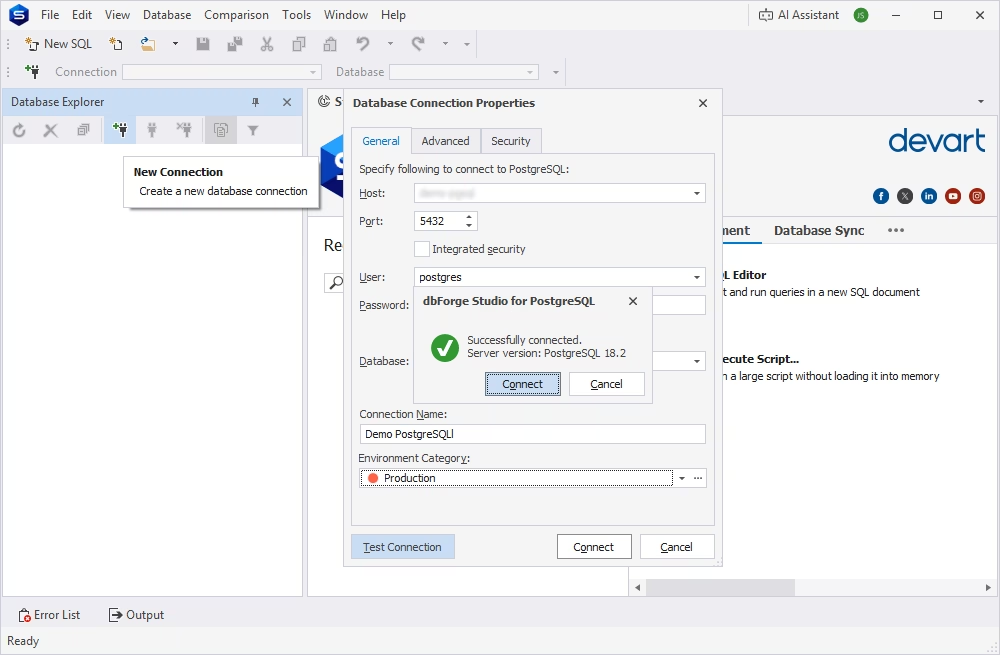
You will see the list of databases in the Database Explorer pane on the left.
For our test scenario, we use the sakila test database that is available for PostgreSQL. Navigate to the necessary schema, expand the sakila node, then the Tables node, and select the table to export data from. You can view the table data first to make sure that it matches your requirements. Also, you can analyze the data and edit it directly in the table.
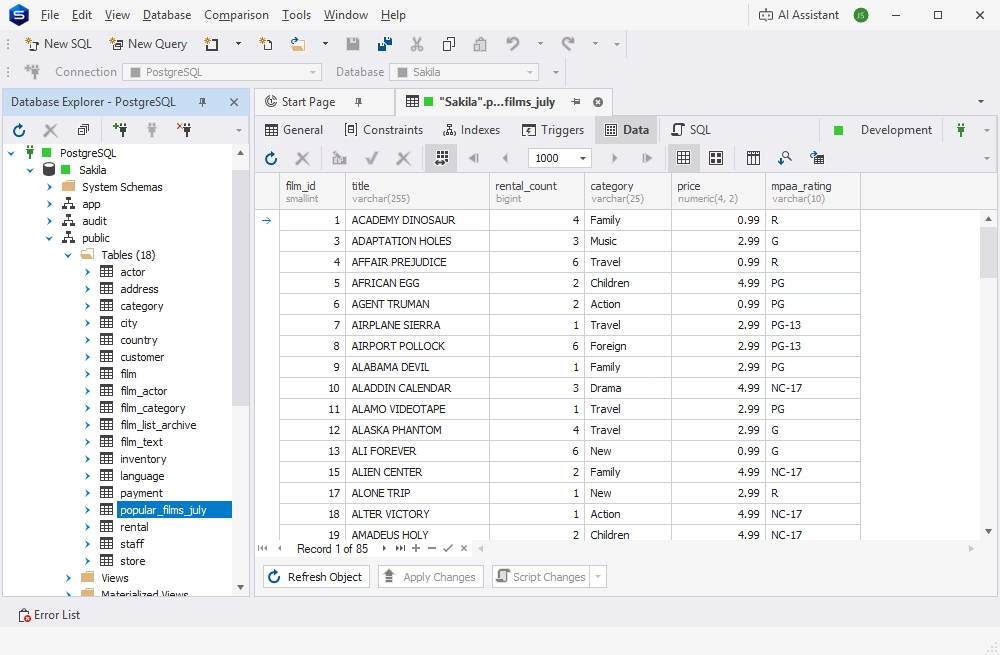
You can use dbForge Studio for PostgreSQL to export data in 14 different formats. As mentioned earlier, it is possible to upload data as CSV files to Amazon S3 and load it then into Amazon Redshift using the standard COPY command. dbForge Studio makes it easy to export data to CSV and automate the process for recurring data updates.
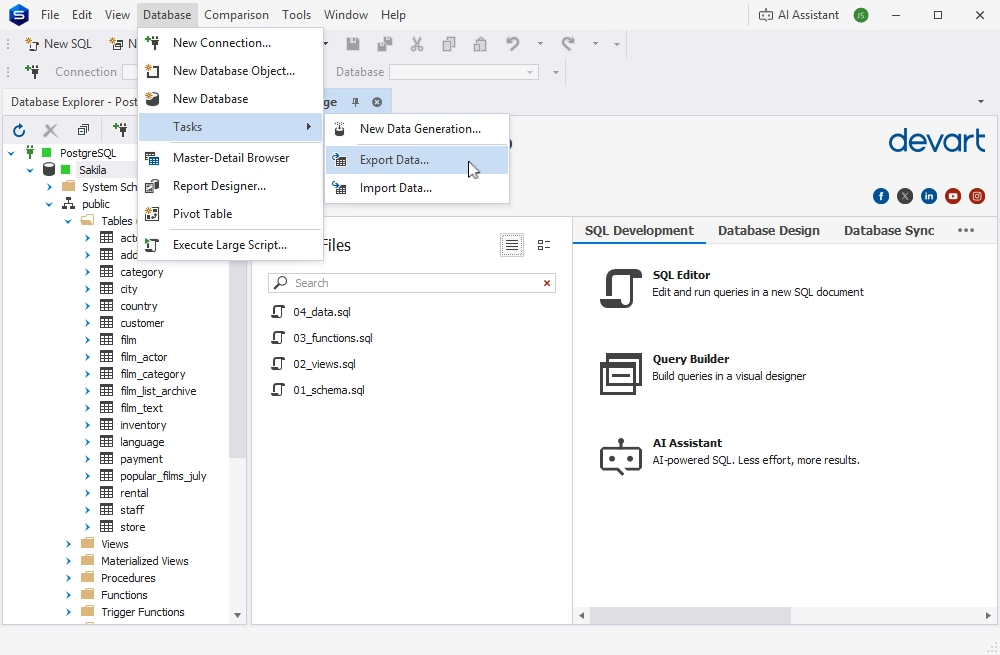
To export data, open the Database menu and select Tasks > Export Data.
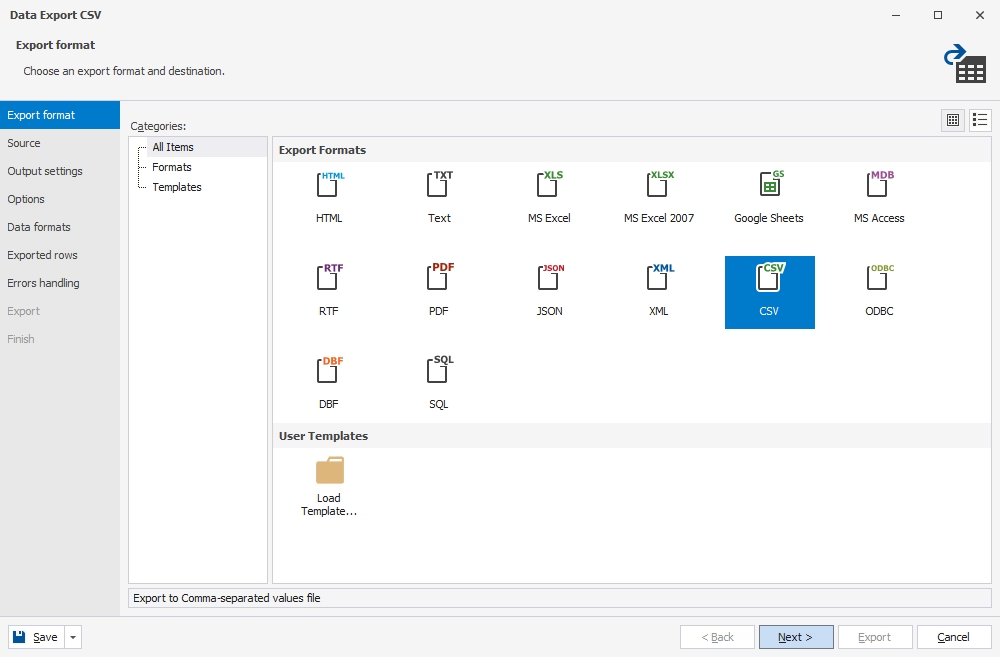
The Data Export wizard will open, displaying the list of available export formats. Select CSV and click Next.
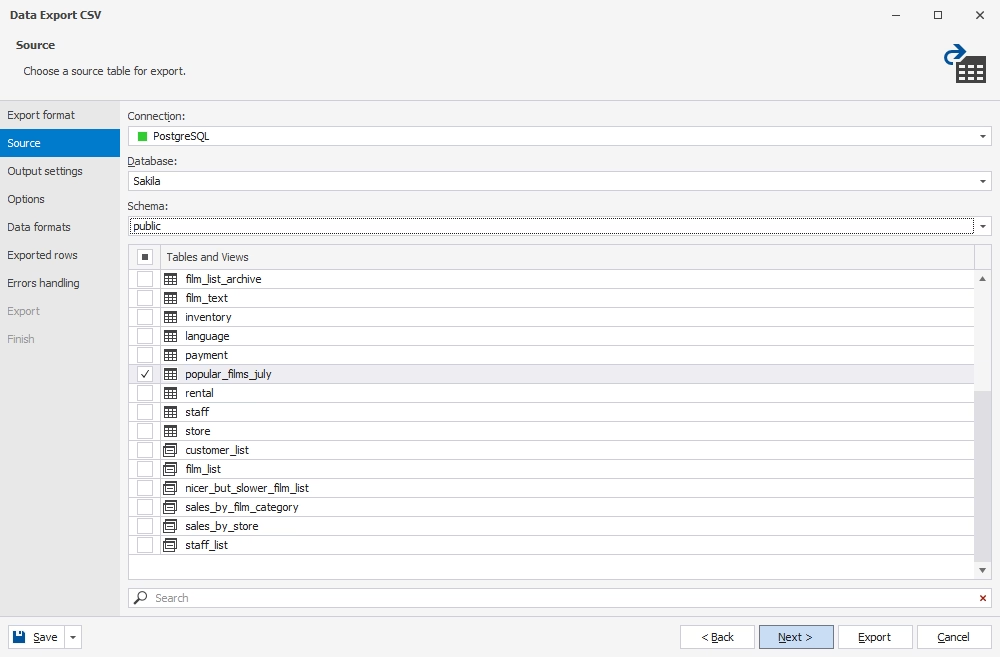
On the Source page, choose the connection, database, schema, and the table or view you want to export. You can export data from a single table or multiple tables in one operation.
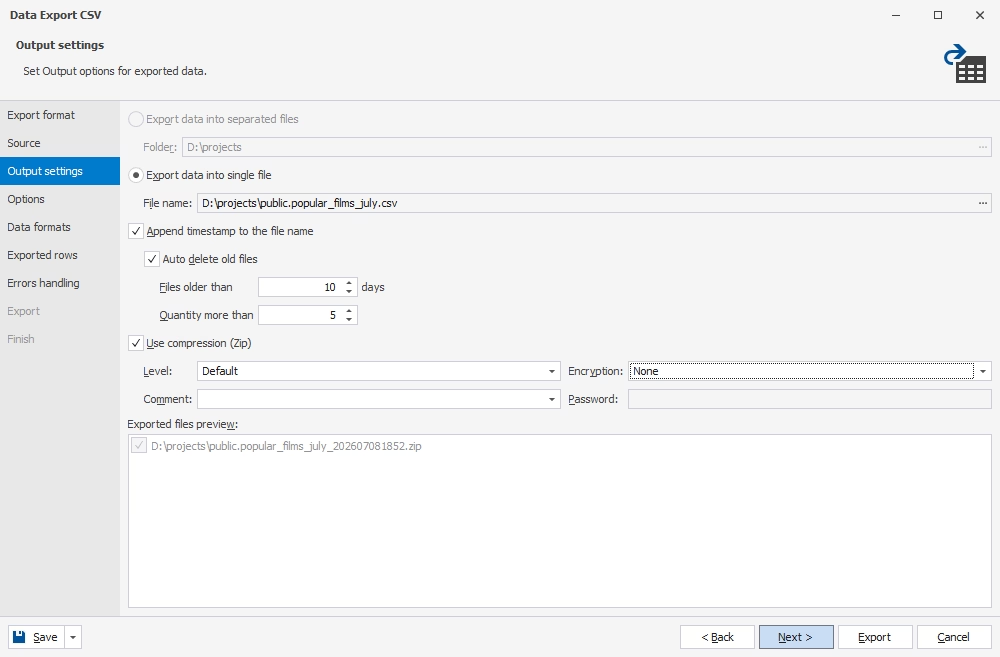
On the Output Settings page, configure the export options to suit your needs. You can export data to a single file or separate files, specify the destination folder, and enable file compression if required.
We have created the tutorial on exporting PostgreSQL data to CSV, so refer to it for detailed step-by-step instructions on configuring the export process. With the visual data export wizard, the entire process takes just a few clicks.
Once the export is complete, upload the CSV files to Amazon S3 and use the COPY command to load them into Redshift.
Alternatively, you can import data directly into Amazon Redshift tables using the Data Import functionality in dbForge Studio, which fully supports Amazon Redshift. Simply follow the wizard to map the source and destination objects and complete the import. However, this feature is not a replacement for dedicated ETL tools or high-volume data loading solutions.

A feature-rich and versatile IDE for database development and management, as well as data management, analysis, and reporting
The appropriate method depends primarily on how frequently the data must be updated. To ensure frequent updates and real-time data for analytics, you need to synchronize it between Amazon Redshift and PostgreSQL.
A full load copies the entire PostgreSQL dataset into Amazon Redshift in a single operation. It is the simplest and most commonly used method in the following cases:
However, the full load method usually means that you won't update data frequently. Therefore, if you need to query actual data in real time, full load is not the best option.
Incremental synchronization is the method where you transfer only the changes, such as newly added records or records modified since the previous load.
The best-fit scenarios for incremental synchronization are as follows.
Change Data Capture (CDC) is the method that captures database changes continuously and replicates them all, including inserts, updates, and deletes, with minimal delay. AWS DMS, which was mentioned earlier in this article, is a popular solution for using CDC when migrating data from PostgreSQL to Redshift.
Common use cases include:
CDC provides the freshest data, but it is also the most sophisticated approach that requires additional expertise and effort to implement and maintain it.
| Approach | Best for | Data freshness | Complexity |
|---|---|---|---|
| Full load | Initial migration, small datasets | Low to medium | Low |
| Incremental sync | Scheduled reporting | Medium | Medium |
| CDC | Near-real-time analytics | High | High |
Migrating a database or its data to a new platform is not a simple job. It requires planning, preparation, and careful attention at every stage of this process. This article explores the available migration methods, explains the preparation steps required for a successful migration, and highlights common challenges to help you transfer your data efficiently and get the most out of Amazon Redshift.
A tool that can simplify both the migration process and your day-to-day work with Amazon Redshift is dbForge Studio for PostgreSQL. It helps you prepare your PostgreSQL database for migration, validate the migrated data, and perform database management tasks in Amazon Redshift.
You can download a fully functional free trial of dbForge Studio for PostgreSQL to explore its features and see how it fits into your migration and database management workflows.
It depends on your requirements. If you plan large one-time or scheduled batch migrations, refer to the simplest option: export data to Amazon S3 and load it into Redshift using the COPY command. It is also the fastest method. For continuous synchronization or near-real-time replication, use the AWS Database Migration Service (AWS DMS). Finally, if the migration requires thorough data preparation, cleansing, and conversion, AWS Glue or third-party ETL/ELT tools may be more suitable.
Mostly no. PostgreSQL and Amazon Redshift are meant for different purposes. PostgreSQL is an OLTP database that can power transactional applications, while Amazon Redshift is a data warehouse optimized for analytics, reporting, and business intelligence. Many scenarios suggest using both these systems: PostgreSQL as the operational database, and Redshift as the analytical data warehouse.
PostgreSQL is a general-purpose relational database that supports frequent inserts, updates, and deletes. Amazon Redshift is a cloud-based data warehouse designed for analytical queries against large datasets, with columnar storage and massively parallel processing (MPP). As a result, Redshift can deliver high performance for BI and data reporting, while PostgreSQL remains a strong platform for transactional operations.
Yes. AWS Database Migration Service (AWS DMS) is the specialized solution that can migrate data from PostgreSQL, Amazon RDS for PostgreSQL, and other compatible sources to Amazon Redshift. It supports both full loads and ongoing replication using Change Data Capture (CDC), which makes it a good choice for keeping Redshift synchronized with operational PostgreSQL databases.
A common approach is to export PostgreSQL data to CSV or Parquet files, then upload them to Amazon S3 and load them into Redshift using the standard COPY command. Alternatively, you can use native tools like AWS DMS, AWS Glue, or third-party ETL/ELT solutions.
Yes, using Amazon S3 together with the Redshift COPY command is often the best method for bulk data loading. It is faster and more scalable, and it is suitable for initial migrations, importing historical data, or scheduling batch loads.
Yes, it is possible via Change Data Capture (CDC). AWS DMS is the native tool that allows you to replicate inserts, updates, and deletes continuously from PostgreSQL to Amazon Redshift with minimal latency.
Redshift does not support the following PostgreSQL data types:
You need to check for such data types before moving data to Amazon Redshift and convert them to the supported types or redesign the affected schema objects and application logic.
The best way is to compare the source and target data. Check the row count, compare aggregate values, run key business reports to verify the results, validate the keys, and test the most essential queries. You can use dedicated tools like Data Compare in dbForge Studio for PostgreSQL to identify and fix discrepancies before using the migrated data in practice.
dbForge Studio for PostgreSQL can help you prepare data for migration – select the necessary data portions, analyze the datasets, edit the data if necessary, and export to CSV files. Also, it helps you perform the post-migration checks – you can compare the source and target data as well as write and run the necessary analytical queries or perform reporting tasks. Overall, dbForge Studio enables you to connect to Amazon Redshift and work with its data just as you would with regular PostgreSQL databases. However, it is not a replacement for native tools like AWS DMS or AWS Glue or specialized third-party ETL solutions.