How to compare database schemas in SQL Server
One of the essential tasks that database developers, DBAs, and DevOps specialists face regularly is comparing database schemas. Database structures are constantly evolving, and when teams work with multiple environments—typically development, testing, staging, and production—keeping them synchronized is crucial. Schema comparison identifies differences between environments and helps validate deployments, generate migration scripts, and keep source-controlled database projects aligned with live databases.
In this article, we'll explore how to compare database schemas in SQL Server. We'll see what to consider before starting the comparison and how to use dbForge Schema Compare for this workflow.
What is SQL Server schema comparison?
In SQL Server (and all other database systems), schema comparison is the process of analyzing two database structures, usually with a specialized tool, to identify differences between them.
The comparison covers database objects such as tables, columns, indexes, views, stored procedures, functions, triggers, constraints, schemas, and security objects. It can reveal differences such as missing or modified columns, indexes, stored procedures, and other objects, allowing database specialists to keep databases across different environments identical.
Note that SQL Server schema comparison focuses on database structures, not data. If you need to compare table data between databases, you must perform a separate data comparison operation using a dedicated tool.
What database objects are compared?
To compare database schemas in SQL Server, you need to examine the database objects that define its structure and behavior. The goal is to identify all added, removed, or modified objects, including:
- Tables and columns
- Primary and foreign keys
- Constraints
- Indexes
- Views
- Stored procedures and functions
- Triggers
- Security objects (e.g., users, roles, permissions, and related security settings)
For example, a database in the development environment may contain a new column, a different index definition, or a modified stored procedure that is not present in staging or production. Schema comparison detects and reports these differences, allowing developers and DBAs to review them and synchronize databases across environments.
Schema comparison vs data comparison
Schema comparison and data comparison are two common database management tasks, but they focus on different aspects.
- Schema comparison examines the database structure, including objects, definitions, relationships, properties, and permissions.
- Data comparison compares records stored in tables and identifies differences in their values.
Therefore, when a task is described simply as database comparison, it is important to clarify whether it refers to the schema, the data, or both. Schema comparison checks whether two databases have the same structure, while data comparison analyzes whether they contain the same records and values.
Source and target database: Why direction matters
Database comparison involves two databases: a source and a target. The source is the database whose structure and changes you want to preserve or deploy, while the target is the database that you need to update.
Let us consider a simple scenario: a development database contains approved changes that you need to deploy to staging. In this case, the development database is the source, and the staging database is the target. A dedicated schema comparison tool identifies the differences between these two databases and generates a synchronization script. When you execute this script, it applies the changes to the target. This way, the staging database gets in sync with the development database.
However, if you accidentally reverse the source and target, the generated synchronization script will apply changes in the wrong direction. Instead of deploying changes from development to staging, it may revert the approved changes in the development database to make it match the staging database.
Therefore, always verify the source and target databases and the deployment direction before generating and executing a synchronization script.
When do you need to compare database schemas in SQL Server?
In your daily jobs, you may often need to compare database schemas in SQL Server and verify that databases in two environments have the expected structures. Change deployments, unexpected changes caused by errors and failures, database migrations, and CI/CD workflows all involve database schema comparison as an integral step. Let us explore some of the most common scenarios.
Before deploying changes from development to production
Before every release, you should compare the development and production databases. It is necessary to define which changes will be introduced—new objects added, obsolete objects removed, and existing objects modified. Schema comparison helps validate these changes before deployment and speeds up the review process, especially when you apply a modern schema comparison tool with robust reporting capabilities.
As a result, you can review the expected differences and identify unexpected changes that might still occur even after all checks. Schema comparison tools also help you prepare and verify migration scripts and define rollback procedures in case of failures before any changes get to production.
After database drift between environments
As a rule, you move changes sequentially from development to testing, staging, and, finally, production. However, this order can change over time. For example, a developer applies a hotfix directly to staging, skipping the usual development and testing steps. Another developer may also make a manual change in an environment that is not included in the deployment script. While such changes are often small, they can accumulate over time and lead to significant, unexpected differences between databases.
In these situations, regular schema comparisons across environments help track and detect the discrepancies. Teams can identify which database contains the intended version to synchronize the others accordingly. This approach helps prevent small inconsistencies from turning into larger problems later.
During migration or database modernization
Moving or modernizing SQL Server databases is common, especially when you need to migrate databases and applications to the cloud, such as Azure SQL. In these scenarios, schema comparison is essential, as it lets you verify that the target database contains all the required objects with the correct definitions. It also helps you identify and resolve schema mismatches before the migration is complete.
When working with source control and CI/CD
Database teams often store database projects, scripts, and .dacpac files in source control, where they represent the expected database structure, while a live SQL Server database reflects the current state of an environment. Comparing them helps identify differences and potential issues before deployment.
This validation is especially important when database deployments are automated. Schema comparison can verify that the changes defined in source control match the target database before they reach production. It can also be integrated into CI/CD pipelines to automate schema validation and help prevent unexpected changes from being deployed.
Main ways to compare database schemas in SQL Server
Schema comparison in SQL Server is an important task where accuracy is crucial. Database developers and DevOps specialists typically use specialized tools to identify differences, generate reports, and, in many cases, automate synchronization.
Microsoft provides schema comparison capabilities in its solutions, while several popular third-party applications offer additional features for more advanced comparison and deployment workflows.
Below are some of the most popular tools for comparing SQL Server database schemas.
| Method | Best for | Source/target options | Script generation | Notes |
|---|---|---|---|---|
| dbForge Schema Compare | Enterprise-level projects and DevOps integration | Databases, scripts folders, backups, snapshots, source control revisions | Yes | Supports both SSMS-based and independent workflows |
| Visual Studio Schema Compare | SQL database projects / SSDT users | Databases, projects, .dacpac | Yes | Good for project-based workflows |
| VS Code MSSQL Extension | Cross-platform SQL development | Databases, SQL projects, .dacpac | Yes | Microsoft's current path after discontinuing Azure Data Studio |
| Redgate SQL Compare | Versatile schema deployment | Databases, scripts folders, backups, snapshots | Yes | Well-known commercial option |
| SQL scripts / system catalog queries | Quick checks | Live databases | Manual | Useful for limited checks, not full sync |
| Open-source schema comparison tools | Budget-conscious teams | Depends on the tool | Optional | May vary; you need to verify comparison accuracy and support for SQL Server |
How dbForge Schema Compare helps compare SQL Server schemas
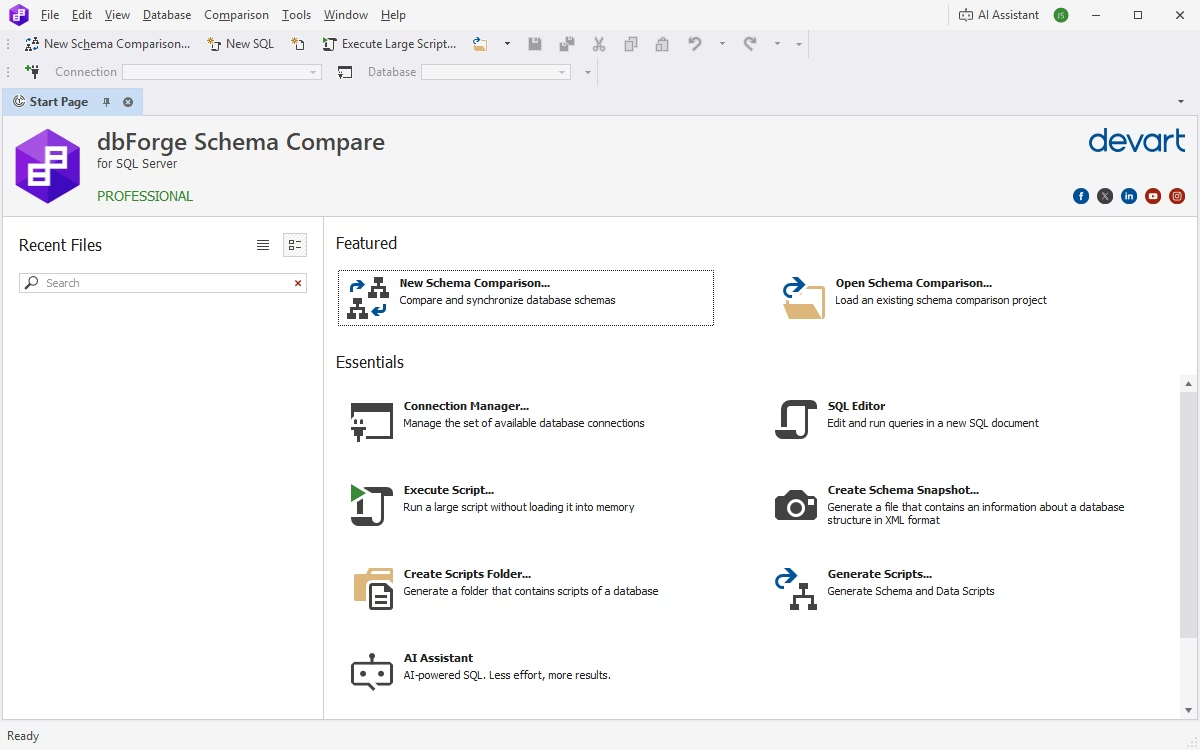
dbForge Schema Compare for SQL Server is a robust AI-powered SQL schema comparison tool that is available as both a standalone application and an SSMS add-in.
This tool supports SQL Server both on-premises and in the cloud, including Azure SQL and other relevant cloud platforms. The intuitive visual interface makes it easy for users of all skill levels to master this tool, configure comparisons, review differences, and synchronize database schemas efficiently.
Why dbForge Schema Compare is a strong choice for SQL Server teams
Teams working on enterprise-grade SQL Server projects, whether on-premises or in the cloud, need schema comparison tools that support a wide range of development and deployment scenarios and provide the following capabilities:
- Support for multiple source and target types, including live databases, native backups, snapshots, scripts folders, and source control revisions.
- Support for on-premises and cloud databases, allowing teams to compare databases across development, testing, staging, and production environments regardless of where they are hosted.
- Clear presentation of detected differences, with filtering and sorting options for easier analysis.
- Generation of synchronization scripts allowing teams to deploy all changes or only selected changes.
- Task automation and scripting, which helps integrate schema comparison into DevOps workflows and CI/CD processes.
With this combination of comparison, synchronization, and automation capabilities, dbForge Schema Compare is a popular and reliable option for teams that need to manage SQL Server schema changes regularly across multiple environments.
Compare and review schema differences directly from SSMS
One of the advantages of dbForge Schema Compare for SQL Server is its integration with SQL Server Management Studio (SSMS). It allows you to start a schema comparison directly from the Object Explorer. Simply select a database and specify whether it should be used as the source or target.
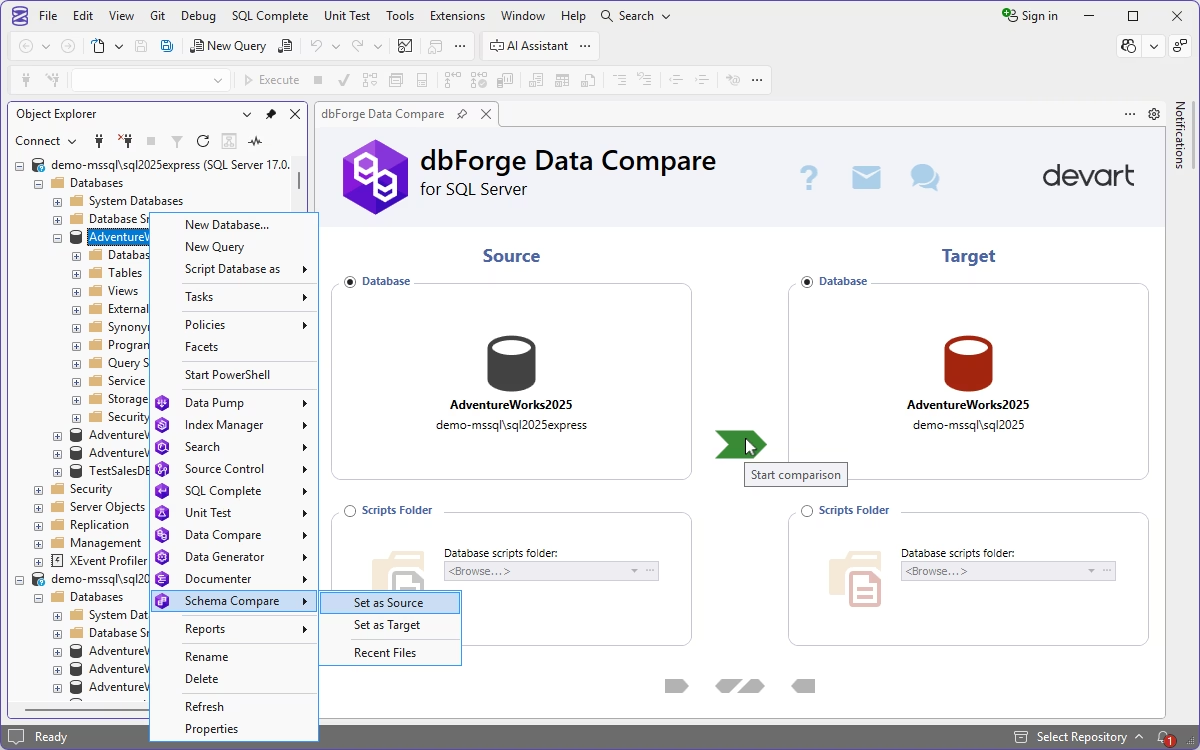
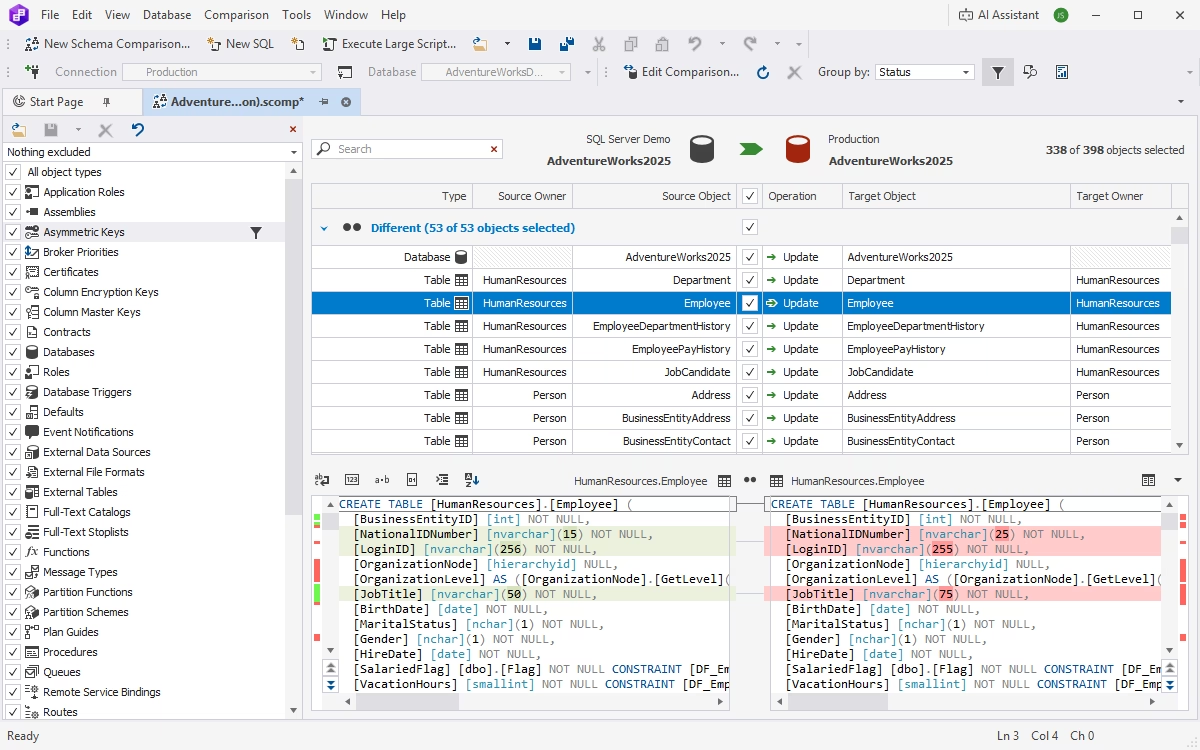
After this initial step in SSMS, dbForge Schema Compare opens and performs the comparison. It displays all the detected differences, generates a synchronization script for selected objects, and allows you to deploy your changes directly.
Generate synchronization scripts for safer database deployment
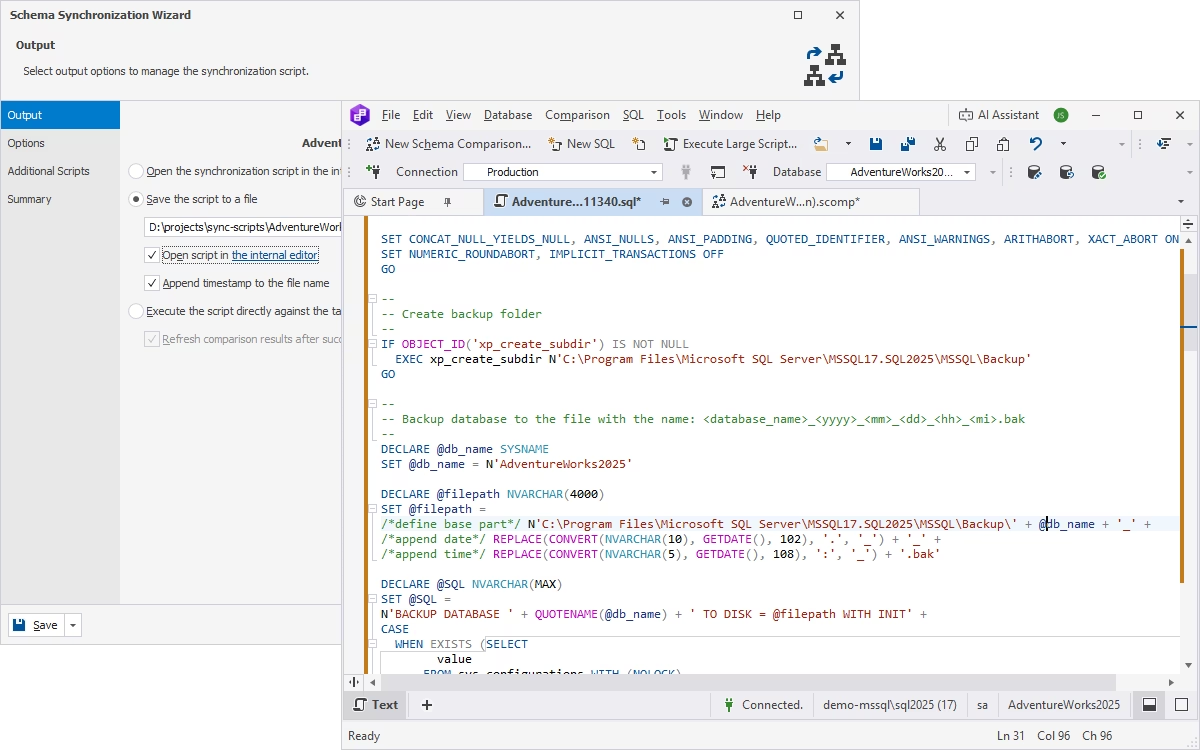
Modern database workflows can be complex, and schema comparison often involves various additional steps. DBAs and developers need to analyze comparison results, select which changes to deploy—from all the detected changes to a specific group or individual objects—and generate synchronization scripts that fit their standard deployment process. In some cases, they may also need to execute additional scripts as part of deployment. dbForge Schema Compare for SQL Server delivers these capabilities in a single solution.
How to choose a SQL Server schema comparison tool
If your team performs database schema comparison tasks regularly, a dedicated tool can simplify, optimize, and, ideally, automate the process. When choosing the right one for your team, consider several criteria that affect both your workflow and the functionality you need.
Check supported sources and development environments
The first consideration is the tool's ability to support different comparison sources and development environments, both on-premises and in the cloud.
Depending on your workflow, you may need to compare live databases, scripts folders, database projects, .dacpac files, source control revisions, native backups, or snapshots. It may also be important to ensure that your schema comparison tool can connect to and work with cloud databases.
Teams working with SSDT and database projects may benefit from Visual Studio integration, while cross-platform developers may prefer VS Code or a standalone solution.
If you work with SSMS, you can use its built-in schema comparison feature; however, it is rather limited. Another option is a professional database schema comparison tool that integrates with SSMS, such as dbForge Schema Compare for SQL Server.
Review filtering, mapping, and comparison control
When you compare SQL Server database schemas, you need control over objects included in the analysis and synchronization. If you work with complex databases, the tool should provide flexible options for filtering, configuring ignore rules, mapping schemas and tables, and excluding specific differences from synchronization.
These settings are especially important for multiple environments that have different configurations or requirements. In such cases, deploying all the detected changes to the target database may be inappropriate or even risky. Instead, you need to identify which objects or settings to exclude as well as how to map the objects or modify them before deployment. Filtering and mapping features help you maintain this level of control.
Therefore, your database schema comparison tool should do more than simply identify and synchronize differences. It should also help you prevent unwanted changes from being included in deployment scripts.
Evaluate deployment safety and automation options
Schema comparison is the first step. After reviewing the comparison results, you need to apply the required changes to the target database. The tool should generate clear, readable deployment scripts that you can review, validate, and test in non-production environments before applying them to production.
If your team uses automated workflows, look for command-line support and comparisons of source control revisions. These features make it possible to incorporate regular schema comparisons and database deployments into automated pipelines.
In general, if your workflow involves only basic schema checks, the free schema comparison features available in SSMS, Visual Studio, or VS Code may provide sufficient functionality. However, more complex scenarios often require flexible filtering, mapping, deployment, and automation capabilities. In such cases, more advanced SQL Server schema comparison tools can provide greater control, precision, flexibility, and automation than free alternatives. Commercial solutions also generally provide comprehensive documentation and professional vendor support.
FAQ
The simplest way to compare SQL Server database schemas is to use a dedicated schema comparison tool. Since schema comparison requires a source and a target, first specify the two databases and run the comparison.
Tools such as dbForge Schema Compare for SQL Server automatically detect differences between the source and the target, conveniently presenting them for review and analysis. You can then select the changes you want to deploy, customize the synchronization process, and auto-generate a synchronization script. Finally, execute the script against the target database to apply the selected changes.
Yes. The latest version of SSMS includes a database schema comparison tool that is currently documented as a preview feature. It can compare connected databases, SQL database projects, and .dacpac files, and it can generate or apply an update script.
However, this feature is currently rather limited and offers a less polished visual experience than established third-party SQL Server schema comparison tools.
dbForge Schema Compare for SQL Server is a powerful and convenient solution for comparing and synchronizing database schemas. It supports a broad range of sources, including databases, native backups, snapshots, source control revisions, and scripts folders. It thoroughly analyzes source and target schemas and provides object filtering, reporting, synchronization script generation, SSMS integration, and automation capabilities. All in all, this DB comparison tool for SQL Server is suitable for both interactive schema comparison and deployment workflows.
Microsoft's native tools—SQL Server Management Studio (SSMS), Visual Studio, and VS Code—provide schema comparison functionality at no additional cost. However, their capabilities may not be sufficient for complex comparison and deployment workflows. In such cases, you may need an advanced commercial solution such as dbForge Schema Compare for SQL Server, which offers a fully functional 30-day free trial.
Yes. Visual Studio with SQL Server Data Tools (SSDT) supports schema comparison for databases and SQL database projects. It can display detected differences and generate deployment scripts.
Yes. The MSSQL extension for Visual Studio Code includes schema comparison functionality and supports databases, .dacpac files, and SQL projects. It also allows users to filter differences, exclude selected changes, and generate or apply synchronization scripts.
No. Azure Data Studio was retired on February 28, 2026, and no longer receives updates, security fixes, or support. Microsoft recommends migrating to Visual Studio Code with the MSSQL extension, which provides schema comparison and other SQL development features.
dbForge Schema Compare can generate scripts automatically and reduce the risk of errors. First, compare the source and target schemas and review the detected differences. Then, select the changes you want to apply and let Schema Compare auto-generate a synchronization script. Always review the generated script and test it in a non-production environment before executing it against production.
Schema Compare checks the database structure, including tables, columns, indexes, stored procedures, views, constraints, and other objects. Data Compare checks the records stored in database tables. If your workflows involve comparing both database schemas and table data, consider dbForge Compare Bundle for SQL Server, which includes the dedicated Schema Compare and Data Compare tools.
Yes, but you must build the comparison logic yourself. You can query SQL Server catalog views such as sys.objects, sys.tables, sys.columns, and sys.indexes, along with related views, to retrieve metadata and compare it between databases. This approach is flexible but requires you to develop and maintain the comparison logic. For most workflows, dedicated schema comparison tools are more convenient and efficient.
Ideally, you should compare all database objects relevant to your deployment. These typically include tables, columns, primary and foreign keys, indexes, constraints, views, stored procedures, functions, and triggers. Depending on your deployment workflow, you may also need to include schemas, users, roles, permissions, synonyms, sequences, and other database objects.
The latest version of SSMS provides a schema comparison feature. Open it, select the source and target databases, and run the comparison. SSMS displays the results in a grid, where you can select individual differences to view their details. You can then generate a synchronization script and apply the changes to the target database.
A SQL schema diff is a list of structural differences between two database definitions. For example, it can show that a column or index exists only in the source or target database, or that the definitions of a stored procedure or view differ between the databases.
dbForge Schema Compare for SQL Server allows comparing source control revisions with ease.
First, verify that you have selected the correct source and target databases. Then, review and filter the detected differences before deciding which changes to apply. If you use a dedicated schema comparison tool, generate the synchronization script and review it before execution. Test the script in a non-production environment to verify that it works as expected. Only afterwards should the changes be applied to staging or production.
Yes. dbForge Schema Compare can use native SQL Server .bak files as schema comparison sources and compare them with databases, snapshots, scripts folders, and other supported sources. It can also generate a synchronization script from a backup. However, certain backup types are not supported for this purpose, including encrypted, compressed, TDE-enabled, Azure SQL Database, partial, filegroup, and transaction log backups.