.NET Connector for Salesforce With ORM Support

dotConnect for Salesforce is a versatile enterprise-grade connector that enables access to Salesforce data in .NET applications of any complexity. It delivers advanced ORM support, compatibility with multiple .NET platforms, and easy integration with a number of IDEs, including Microsoft Visual Studio.

The connector undergoes regular security and performance testing to ensure reliability and consistent quality. It also includes premium support, frequent updates, and detailed documentation to help you get started quickly.

  • Access to data without client libraries
  • Advanced ORM support: EF Core, Dapper, NHibernate, and more
  • Full compliance with ADO.NET standards
  • Support for all versions of Salesforce Web API
  • Support for SOQL and other Salesforce-specific features
  • Powerful local SQL engine with support for SQL-92
  • Integration with Visual Studio
Easy integration with Salesforce

Easy integration with Salesforce

You do not need to know the specifics of accessing Salesforce data. Connection is made effortless.

No Salesforce API and SOQL learning

No need to learn the API

There is no need to study and use a complex API or SOQL. Just use familiar SQL statements.

User-friendly ADO.NET classes

User-friendly ADO.NET classes

dotConnect for Salesforce uses well-known ADO.NET classes and thus provides you with an easy start.

using Devart.Data.Salesforce;

class Program
{
  static void Main()
  {
    using SalesforceConnection conn = new(
      "Authentication Type=AccessRefreshTokenInteractive;" +
      "License Key=your_license_key");
    conn.Open();
  }
}


using Devart.Data.Salesforce;

class Program
{
  static void Main()
  {
    using SalesforceConnection conn = new(
      "Authentication Type=AccessRefreshTokenInteractive;" +
      "Host=login.salesforce.com;" +
      "User [email protected];" +
      "Client Id=your_client_id;" +
      "Client Secret=your_client_secret;" +
      "License Key=your_license_key");
    conn.Open();
  }
}

Easy connection to Salesforce

dotConnect for Salesforce allows you to connect to Salesforce through Interactive OAuth, ensuring a reliable and secure connection. It also supports connections via user credentials, giving you the flexibility to work the way that suits your environment best.

  • Quick connection without auxiliary libraries
  • Full support for SOQL queries and web service calls
  • Robust security features with advanced encryption and authentication
  • Flexible connectivity options for diverse operational environments
  • Cost-effective deployment

Advanced ORM support

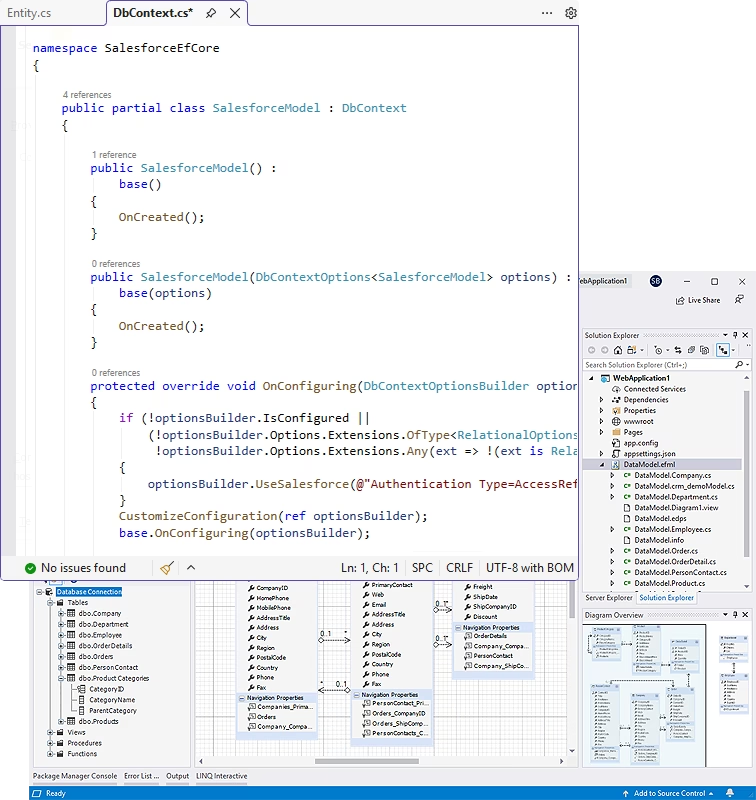
dotConnect for Salesforce offers enhanced ORM support when bundled with Entity Developer – a visual designer for ORM models:

Entity Framework Core

1.x, 2.x, 3.x, 5.0, 6.0, 7.0, 8.0, and 9.0

NHibernate

1.x-5.x

Entity Framework

v4-v6

Dapper

1.x, 2.x

Using Entity Developer for various ORM technologies enables automatic creation of entity classes and the DbContext class, speeding up development and keeping the data model in sync with the database.

Compatibility and integration

Platforms
  • .NET 5.0, 6.0, 7.0, 8.0, 9.0, 10.0
  • .NET Framework 4.5-4.8
  • .NET Core 2.x, 3.0
  • ASP.NET Core Blazor
  • .NET MAUI
Salesforce Web API

All versions

Visual Studio Extension
  • Data source connection
  • Database object explorer
  • Data retrieval and display
Compatibility with NuGet

Works in any NuGet-compatible IDE like VS Code, JetBrains Rider, etc.

Single connector for all your SQL queries

dotConnect for Salesforce simplifies your data management by helping you run SQL queries directly within the Salesforce environment. This powerful tool allows you to handle accounts, contacts, leads, and other data with ease, using familiar SQL statements instead of the complex Salesforce API.

  • Data management via SQL queries: Retrieve, inspect, and manage your Salesforce data by writing and executing SQL queries.
  • Full CRUD support: Run CREATE, READ, UPDATE, and DELETE operations with standard SQL statements.
  • Advanced SQL capabilities: Utilize complex JOINs, WHERE conditions, and other SQL-specific features.
  • Broad object access: Work with a wide range of Salesforce objects like accounts, contacts, leads, and opportunities.

How dotConnect for Salesforce works

Simple queries are directly translated into Salesforce API calls and executed on the Salesforce side.

Complex queries are split into parts, with portions executed on Salesforce, while the local SQL engine processes the results.

The processed data is returned to the application.

Try the 30-day trial of the full product. No limits. No card required. Start free trial