Visual ORM designer with code generation for EF Core, Entity Framework, NHibernate & LINQ to SQL
Entity Developer now supports Entity Framework Core 11 and .NET 11, including complex property mapping, SQL Server temporal tables, and new database server versions. The update also introduces configurable target server versions, model-only foreign key relationships, and improved validation. Existing models retain their current code generation behavior unless you choose to change it.
EF Core 11 and .NET 11 support
The update extends EF Core 11 and .NET 11 support across model settings, Database First workflows, and Visual Studio integration, with improved package management and compatibility with existing projects.
EF Core 11 and .NET 11 in model settings
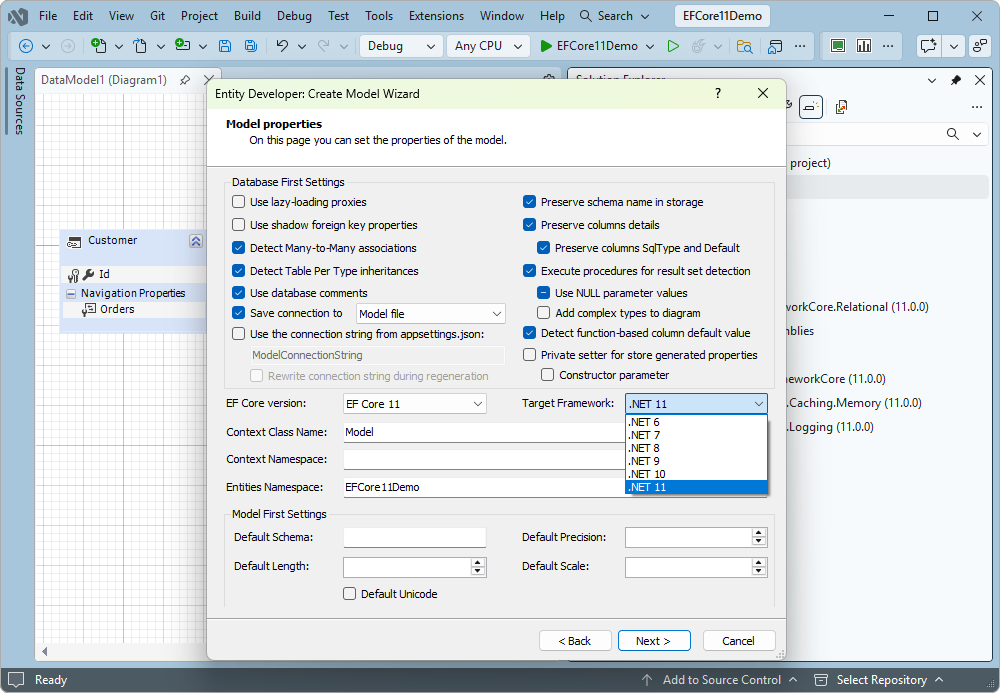
EF Core models now offer Entity Framework Core 11 and the .NET 11 target framework, both in the model settings and in the Database First wizard. New EF Core models use EF Core 11 and .NET 11 by default.
EF Core 11 is available for the following providers:
- Devart dotConnect providers for Oracle, MySQL, PostgreSQL, SQLite, MongoDB, Salesforce, and others.
- Microsoft.Data.SqlClient for SQL Server.
- Microsoft.Data.Sqlite for SQLite.
- Npgsql for PostgreSQL.
If a provider does not support the EF Core version selected in the model, the model properties dialog automatically falls back to the latest version that the provider supports.
.NET 11 is also available for Entity Framework 6, LinqConnect, and NHibernate models.
Visual Studio: The Add New Item wizard
When you add an Entity Developer model to a Visual Studio project, the wizard now does the following:
- Correctly recognizes
net11.0 projects.
- Installs the Devart EF Core 11 packages and the Microsoft and Npgsql packages for EF Core 11.
- Keeps your EF Core 10 projects on EF Core 10: third-party packages for EF Core 10 are installed with explicit versions, so an EF Core 11 package never gets into the project by accident.
- For SQL Server models with
hierarchyid columns (EF Core 8 and later), installs the official Microsoft.EntityFrameworkCore.SqlServer.HierarchyId package of the same version as Microsoft.EntityFrameworkCore.SqlServer.
- For Microsoft Entra ID authentication (
Authentication=ActiveDirectory...), adds Microsoft.Data.SqlClient.Extensions.Azure, which SqlClient 7 moved into a separate package.
A typical SQL Server project created by the wizard gets the following references:
<PackageReference Include="Microsoft.EntityFrameworkCore.SqlServer"
                  Version="11.0.0" />
<PackageReference Include="Microsoft.EntityFrameworkCore.SqlServer.HierarchyId"
                  Version="11.0.0" />
<PackageReference Include="Microsoft.Data.SqlClient.Extensions.Azure"
                  Version="..." />
How to upgrade an Entity Developer model to EF Core 11
To upgrade an existing model to EF Core 11:
- Update Entity Developer to the latest version.
- Open your existing EF Core model.
- In the model settings, select Entity Framework Core 11 and set the target framework to .NET 11.
- Verify that your database provider supports EF Core 11 and update the required NuGet packages.
- Review the Complex Type Mapping settings if you want to use the ComplexProperty API.
- Validate the model and regenerate the code.
- Build and test your application to verify compatibility.
Existing models retain their Owned mapping by default, so upgrading does not automatically change complex type mappings.
EF Core 10 vs. EF Core 11: Feature support in Entity Developer
Entity Developer supports both EF Core 10 and EF Core 11, with differences in complex type mapping, inheritance support, and SQL Server temporal table configuration. The table below compares how Entity Developer handles these features when generating code for each EF Core version.
| Feature |
EF Core 10 |
EF Core 11 |
| ComplexProperty mapping |
Supported with limitations |
Expanded support |
| Indexes on complex type properties |
Uses Owned mapping when unique keys are present |
Supports indexes with ComplexProperty mapping |
| Complex types in TPT/TPC hierarchies |
Uses Owned mapping |
Supports ComplexProperty mapping |
| SQL Server temporal period properties |
Generated as shadow properties |
Generated as CLR properties |
| Default target framework for new models |
.NET 10 |
.NET 11 |
These differences apply to Entity Developer models targeting the respective EF Core versions. Existing models retain their current complex type mapping behavior unless you explicitly change the mapping settings.
Your model knows your server
Entity Developer uses the target server version of the model for data types, database scripts, and now also for the generated EF Core code.
New server versions and an explicit Target Server
The target server lists now include SQL Server 2025, Oracle 26ai, PostgreSQL 18, and MySQL 9.7. Newer servers are recognized correctly: when a server version is not in the list yet, Entity Developer uses the closest earlier version it supports, so data types and scripts remain correct.
EF Core models also get a new settings page, Model Settings > Synchronization > Target Server. The first item, Auto (from connection: …), follows the database connection of the model. You can also select a version explicitly, and Entity Developer keeps it even when you change the connection. For SQL Server, Auto takes the compatibility level of the database rather than the server version.
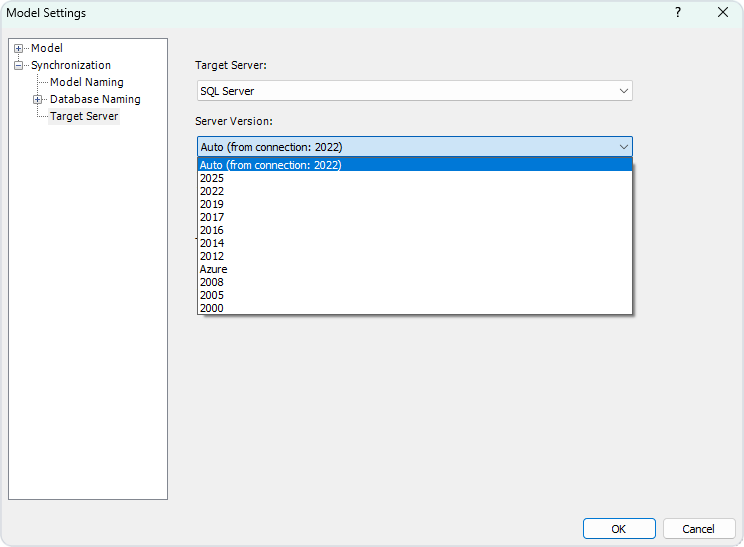
A typical use case: you develop against SQL Server 2025, but production runs SQL Server 2019. Select 2019 once in the model, and Entity Developer generates data types, database scripts, and EF Core code for the server you actually deploy to.
SQL Server: UseCompatibilityLevel
The target server matters for the generated code too. EF Core 11 assumes SQL Server 2022 (compatibility level 160) by default and translates, for example, Math.Max into the GREATEST function:
var prices = context.Products
.Select(p => Math.Max(p.Price, p.Discount))
.ToList();
Entity Developer now generates UseCompatibilityLevel from the target server of the model, for EF Core 8 and later and SQL Server 2012 to 2025. With Target Server set to SQL Server 2019, the generated context contains the following code:
optionsBuilder.UseSqlServer(
    @"Data Source=...;Initial Catalog=ed_tv;...",
    options => { options.UseCompatibilityLevel(150); });
The same query then runs as SELECT [p].[Price], [p].[Discount], with Math.Max evaluated on the client.
| SQL Server |
2012 |
2014 |
2016 |
2017 |
2019 |
2022 |
2025 |
| Compatibility level |
110 |
120 |
130 |
140 |
150 |
160 |
170 |
A level lower than the EF Core default is always generated. A higher level is generated only when you select the version explicitly, because a version taken from your development connection may be newer than your production server.
Complex types mapped with ComplexProperty
Why it matters
Complex types in Entity Developer are value objects, such as an Address, a Money amount, or a GeoPoint. They have no identity of their own and are stored in the columns of the owning table. Until now, Entity Developer generated them as EF Core owned entity types (OwnsOne), which EF Core treats as entities with a hidden key and tracks separately.
EF Core 8 introduced the ComplexProperty API designed specifically for value objects, and EF Core 11 made it ready for most real-world models with indexes on complex type properties, complex types in TPT and TPC hierarchies, and more. Entity Developer now generates complex types as complex properties wherever your EF Core version supports it.
|
Owned type (OwnsOne) |
Complex property (ComplexProperty) |
| Identity |
Hidden key, tracked as an entity |
No identity, a value |
| Sharing an instance |
Not allowed |
Allowed, values are copied |
| Comparison |
By key |
By value |
| Database schema |
Columns of the owner's table |
The same columns |
Example model
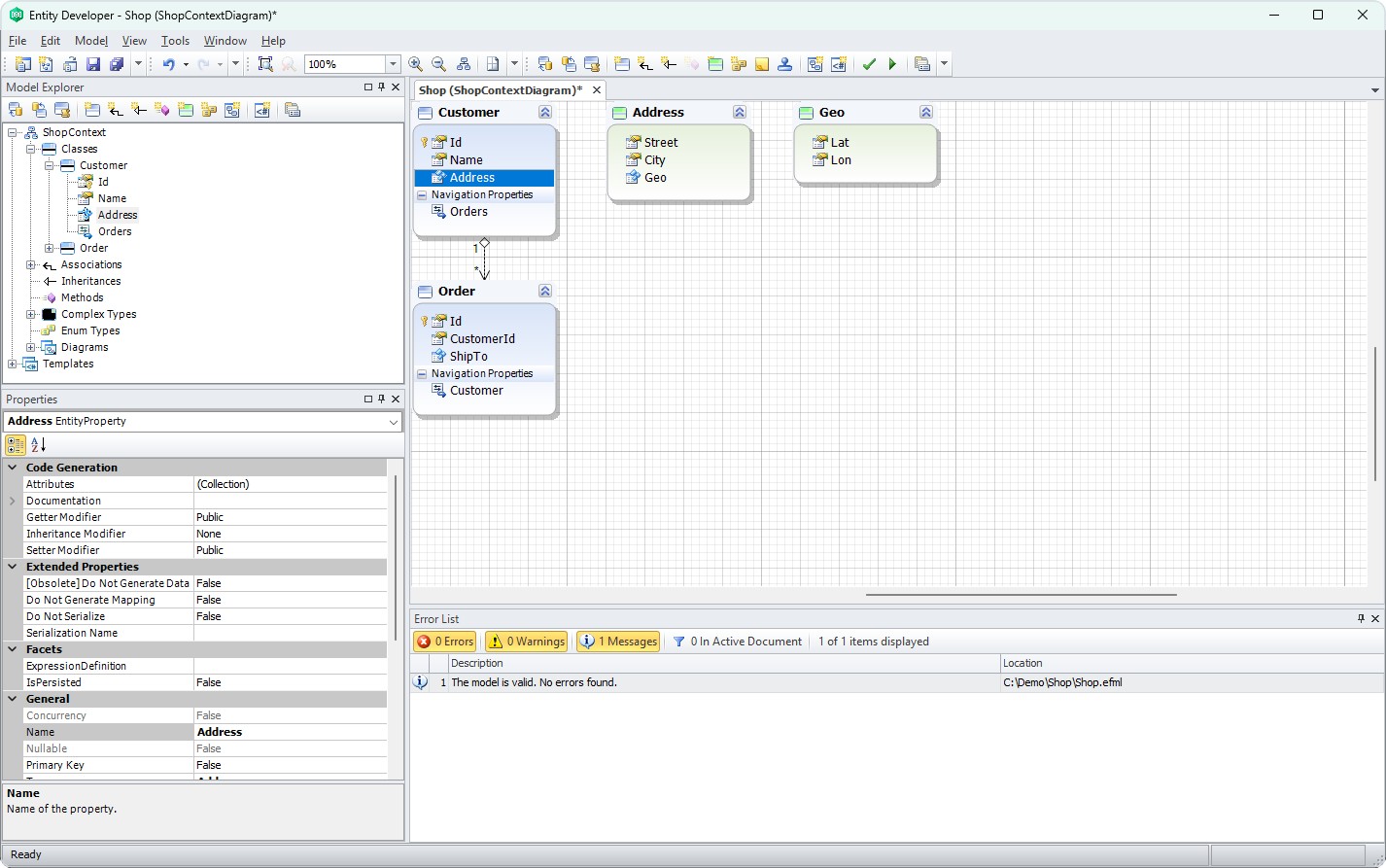
The examples in this section use a simple SQL Server model: Customer.Address and Order.ShipTo are of the complex type Address { Street, City, Geo }, where Geo { Lat, Lon } is a nested complex type. City and the Lat, Lon pair have unique keys.
Complex Type Mapping, Mapping, and Effective Mapping
The model has a new setting, Complex Type Mapping (in the Defaults category), with three values: Default, Owned, and Complex. Each complex type has its own Mapping property with the same values, where Default means "as set in the model".
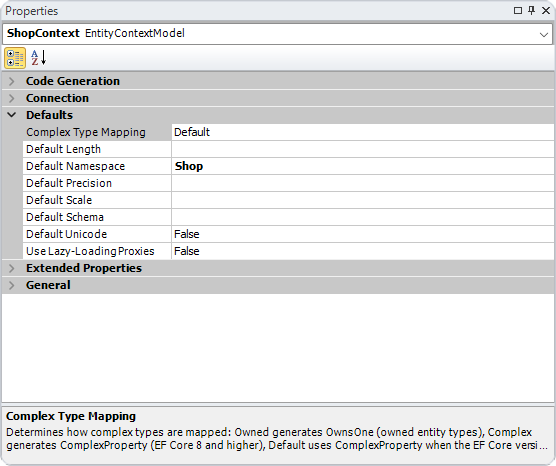
With Default, Entity Developer selects the best mapping for your EF Core version:
| EF Core |
Default resolves to |
| 2–7 |
Owned (OwnsOne) |
| 8–10 |
Complex (ComplexProperty), unless the type has a unique key or is used in a TPT or TPC hierarchy; then Owned |
| 11 |
Complex |
| Any |
Owned for a complex type without properties or one used by a shadow property |
Complex types nested in each other always get the same mapping, because EF Core cannot put a complex property into an owned type or vice versa.
The new read-only Effective Mapping property of a complex type shows which mapping Entity Developer selected and why:
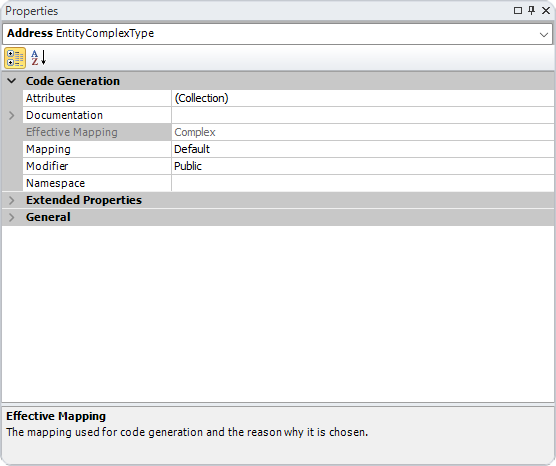
EF Core 11: Address is mapped as a complex property
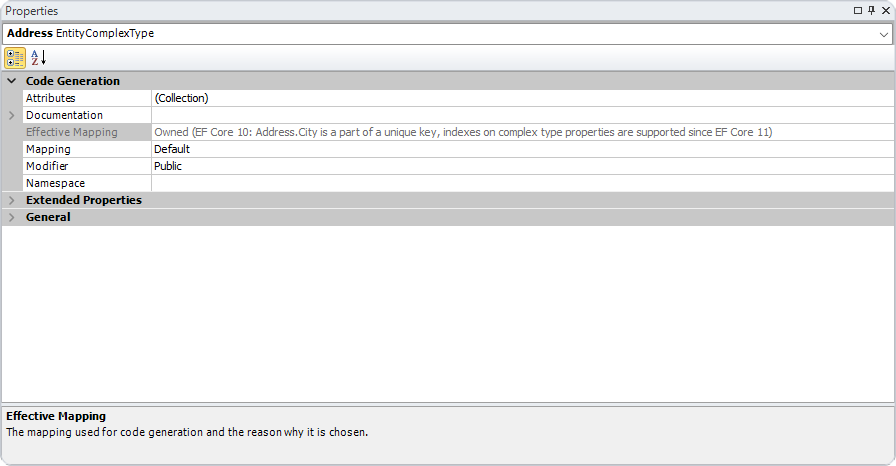
The same model on EF Core 10: "Owned (EF Core 10: Address.City is a part of a unique key, indexes on complex type properties are supported since EF Core 11)"
This also simplifies upgrades: a model on EF Core 10 resolves Address to Owned and explains why; when you switch the model to EF Core 11, the same type becomes a complex property without any other changes.
Your existing models are safe. Models created before this release are loaded with Complex Type Mapping set to Owned, so they keep generating exactly the same code until you decide to switch. New models use Default.
Owned vs. complex property mapping
With the Owned mapping, Entity Developer generates owned types, as before:
modelBuilder.Entity<Customer>()
    .OwnsOne(t => t.Address)
        .Property(x => x.City)
        .HasColumnName(@"Address_City")
        .IsRequired()
        .HasMaxLength(100);

modelBuilder.Entity<Customer>()
    .OwnsOne(t => t.Address)
        .OwnsOne(t => t.Geo)
            .Property(x => x.Lat)
            .HasColumnName(@"Address_Lat")
            .IsRequired();

modelBuilder.Entity<Customer>()
    .OwnsOne(t => t.Address)
        .HasIndex(@"City")
        .IsUnique(true);

modelBuilder.Entity<Customer>()
    .OwnsOne(t => t.Address)
        .OwnsOne(t => t.Geo)
            .HasIndex(@"Lat", @"Lon")
            .IsUnique(true);
With EF Core 11 and the Default mapping, the same model produces complex properties:
modelBuilder.Entity<Customer>()
    .ComplexProperty(t => t.Address)
    .IsRequired();

modelBuilder.Entity<Customer>()
    .ComplexProperty(t => t.Address)
        .Property(x => x.City)
        .HasColumnName(@"Address_City")
        .IsRequired()
        .HasMaxLength(100);

modelBuilder.Entity<Customer>()
    .ComplexProperty(t => t.Address)
        .ComplexProperty(t => t.Geo)
        .IsRequired();

modelBuilder.Entity<Customer>()
    .ComplexProperty(t => t.Address)
        .ComplexProperty(t => t.Geo)
            .Property(x => x.Lat)
            .HasColumnName(@"Address_Lat")
            .IsRequired();

modelBuilder.Entity<Customer>()
    .HasIndex(e => e.Address.City)
    .IsUnique(true);

modelBuilder.Entity<Customer>()
    .HasIndex(e => new { e.Address.Geo.Lat, e.Address.Geo.Lon })
    .IsUnique(true);
Note the following:
- Nested complex types become nested
ComplexProperty calls.
- Unique keys on complex type properties become indexes on the entity, such as
HasIndex(e => e.Address.City), which is new in EF Core 11.
- The database schema is the same for both mappings. Update To Database and Update From Database produce identical scripts for Owned and Complex models, so switching the mapping does not affect your database.
- Visual Basic code is generated the same way, and the Complex mapping works with the template options you already use: self-contained entity configuration, property change notifiers, nullable reference types, lazy loading proxies, Data Annotations validation, and Data Contract serialization.
When a complex type is used in several places, as Address is used by both Customer and Order here, Entity Developer leaves index naming to EF Core (for example, IX_Customers_Address_Lat_Address_Lon). This avoids duplicate index names in databases where index names must be unique per schema, such as PostgreSQL.
Inheritance: TPH, TPT, and TPC
On EF Core 11, complex properties work in all three inheritance strategies. Here is the code that Entity Developer generates for a TPC hierarchy with dotConnect for Oracle, where the base class Party has an Address and the derived class Company has a Billing address:
optionsBuilder.UseOracle(@"User Id=shop;Server=...;Direct=True");
modelBuilder.Entity<Party>().ToTable(@"Parties", @"SHOP");
modelBuilder.Entity<Party>().UseTpcMappingStrategy();
modelBuilder.Entity<Party>()
.ComplexProperty(t => t.Address)
.IsRequired();
modelBuilder.Entity<Party>()
.ComplexProperty(t => t.Address)
.ComplexProperty(t => t.Geo)
.IsRequired();
modelBuilder.Entity<Company>().ToTable(@"Companies", @"SHOP");
modelBuilder.Entity<Company>()
.ComplexProperty(t => t.Billing)
.IsRequired();
modelBuilder.Entity<Company>()
.ComplexProperty(t => t.Billing)
.ComplexProperty(t => t.Geo)
.IsRequired();
On EF Core 8–10, a complex type used in a TPT or TPC hierarchy resolves to Owned, and Effective Mapping explains why: "Owned (EF Core 10: Company uses TPT inheritance, complex types in TPT and TPC hierarchies are supported since EF Core 11)".
The validator catches what EF Core would reject
EF Core does not support some combinations, and Entity Developer reports them in the Error List instead of letting them fail at runtime:
- A complex type explicitly mapped as Complex when your EF Core version or model does not support it.
- Complex types nested in each other with different mappings.
- An owned complex type in a class that has derived classes in a TPC hierarchy, which EF Core rejects when the context is created.
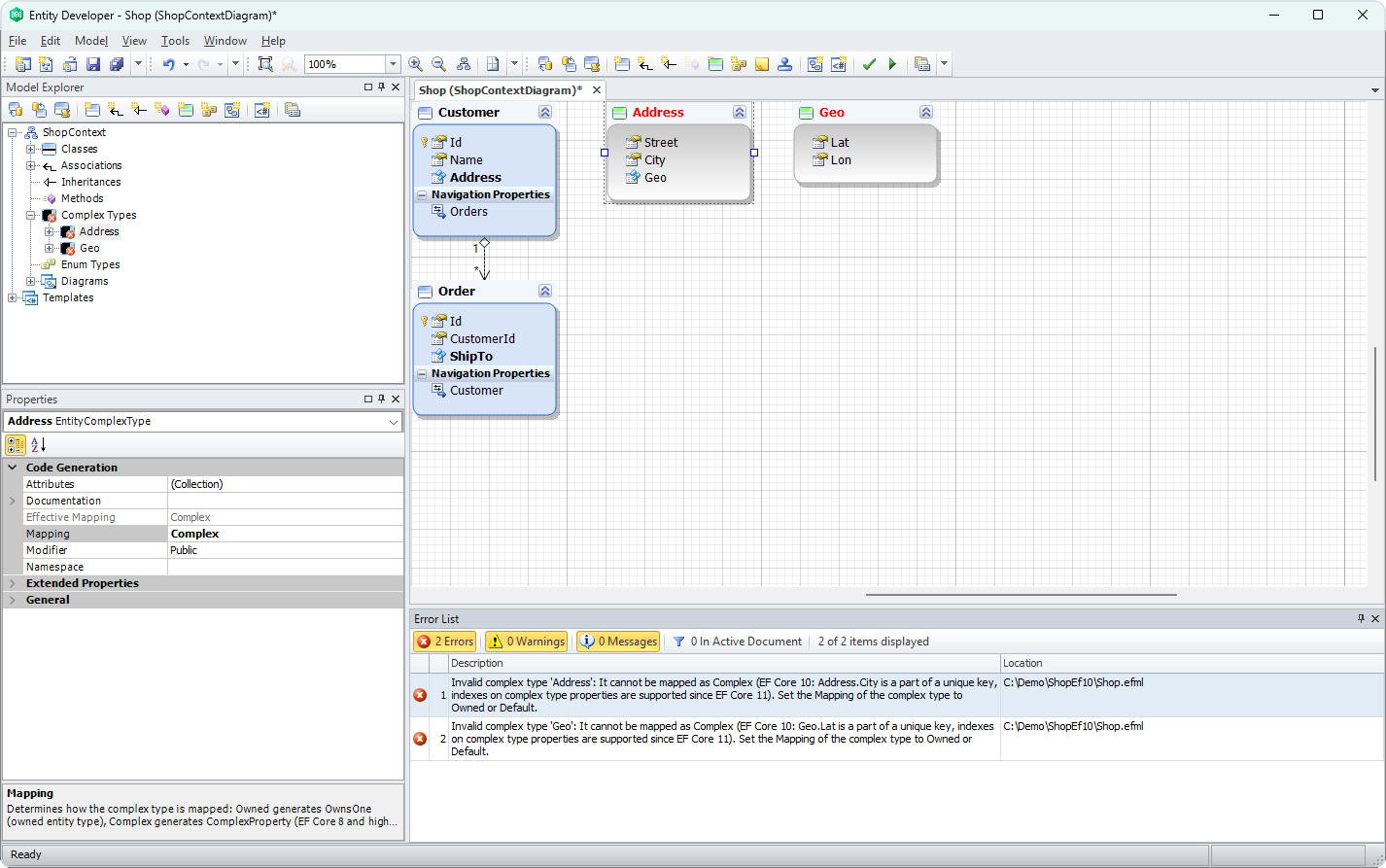
An EF Core 10 model with Mapping = Complex: the validator explains what to change
For the TPC case, the message describes the fix: "Invalid complex type 'Address': It is mapped as Owned, but the class 'Party' that uses it has derived classes in a TPC hierarchy. EF Core does not support owned types in such classes. Set the Mapping of the complex type to Complex."
Provider compatibility and Database First support
Complex properties also work with dotConnect providers, as the Oracle example above shows. Database First with the default settings creates EF Core 11 models for .NET 11; complex types are still defined in the model, as before.
SQL Server temporal tables
Entity Developer now supports SQL Server system-versioned temporal tables in both directions, from the database to the code and from the model to the database.
Database First and Update From Database. System-versioned tables are recognized automatically: the class gets Temporal set to True, Temporal Period Start, Temporal Period End, and Temporal History Table (as Schema.Table when the history table is in another schema). History tables are not added to the model, and hidden period columns are read as well.
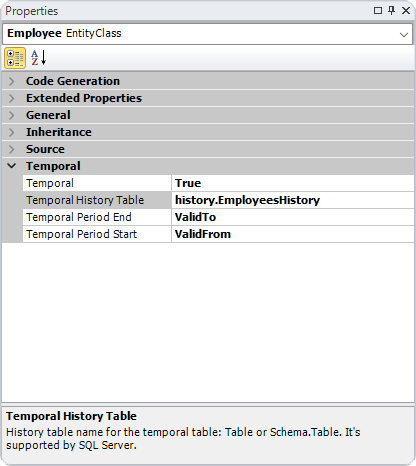
Model First and Update To Database. Entity Developer creates temporal tables with period columns and system versioning:
CREATE TABLE dbo.Employees (
   Id INT NOT NULL IDENTITY,
   ...
   ValidFrom DATETIME2 GENERATED ALWAYS AS ROW START NOT NULL,
   ValidTo DATETIME2 GENERATED ALWAYS AS ROW END NOT NULL,
   CONSTRAINT PK_Employees PRIMARY KEY (Id),
   PERIOD FOR SYSTEM_TIME (ValidFrom, ValidTo)
)
WITH (SYSTEM_VERSIONING = ON (HISTORY_TABLE = history.EmployeesHistory))
Turning Temporal on for an existing table adds the period columns with default values for existing rows. Turning it off removes the period and the history table. Selecting another history table moves the history.
EF Core 11 code. Period columns are now ordinary properties of your class (on EF Core 10 and earlier, they remain shadow properties, as EF Core requires), and the generated mapping uses them directly:
modelBuilder.Entity<Employee>().ToTable(@"Employees", @"dbo", x => {
    x.IsTemporal(temporal => {
        temporal.HasPeriodStart(e => e.ValidFrom);
        temporal.HasPeriodEnd(e => e.ValidTo);
        temporal.UseHistoryTable(@"EmployeesHistory", @"history");
    });
});
Temporal queries work with the generated code:
var lastYear = context.Employees
    .TemporalAsOf(DateTime.UtcNow.AddYears(-1))
    .ToList();
Validation. The validator checks temporal settings against the EF Core version and the target server. For example, on EF Core 11, period properties must be non-nullable DateTime columns of the datetime2 type without a default value.
Use temporal tables to audit price or salary changes without triggers, or create a model from an existing temporal database in a single step.
Optional foreign key constraints
Associations in EF Core models have a new property, Create Foreign Key Constraint. It is True by default, including in existing models.
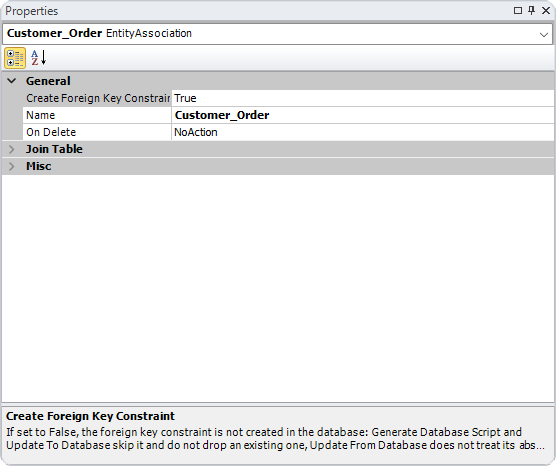
When the property is False, the relationship stays in the model and in the code, but no foreign key constraint is created in the database:
- Generate Database Script does not create the constraint.
- Update To Database neither creates nor drops it.
- Update From Database does not treat the constraint, present or absent, as a difference.
- For a many-to-many association, the setting applies to both foreign keys of the join table.
With EF Core 11, the generated code also tells migrations to skip the constraint. Here is the output for a Product–Category association in an Oracle model:
modelBuilder.Entity<Product>()
    .HasOne(x => x.Category)
    .WithMany(op => op.Products)
    .HasForeignKey(@"CategoryId")
    .IsRequired(true)
    .ExcludeForeignKeyFromMigrations();
This is useful for legacy databases without foreign keys, data warehouses and sharded databases, bulk data loads, and relationships between tables in different databases.
Additional fixes and improvements
This release also improves support for the following scenarios:
- Saving models with named unique keys on complex type properties.
- The Implement Cloneable and Data Contracts template options with complex types.
- Database First for PostgreSQL many-to-many join tables with mixed-case names.
- Detection of SQL Server 2025 servers.
- Validation in Console Entity Developer: the
Validate-Model command now reports validation errors.
Get started
With this release, Entity Developer:
- Supports EF Core 11 and .NET 11.
- Maps complex types as value objects with ComplexProperty and explains every mapping decision.
- Keeps your existing models and generated code unchanged until you decide to switch.
- Designs SQL Server temporal tables and foreign keys that exist only in the model.
- Uses your target server version to configure EF Core.
To get started, download the latest Entity Developer installer. For EF Core 11 models with Devart data providers, update to the latest dotConnect packages. Existing customers with an active subscription can upgrade at no additional cost.
FAQ
Does Entity Developer support EF Core 11 and .NET 11?
Yes. Entity Developer supports Entity Framework Core 11 and .NET 11 for new and existing models. Both versions are available in the model settings and Database First wizard.
Can I upgrade an existing EF Core 10 model to EF Core 11?
Yes. You can change the EF Core version in the model settings and regenerate the code. Existing complex type mappings remain unchanged unless you explicitly update their configuration.
What is the difference between OwnsOne and ComplexProperty in EF Core 11?
OwnsOne maps a value object as an owned entity type, while ComplexProperty maps it as a complex type without a separate entity identity. EF Core 11 expands support for complex properties, including indexes and TPT/TPC inheritance.
Does Entity Developer support SQL Server temporal tables?
Yes. Entity Developer supports creating SQL Server system-versioned temporal tables through Model First and importing existing temporal tables through Database First.
Can Entity Developer generate EF Core 11 code for SQL Server 2019?
Yes. You can specify SQL Server 2019 as the target server. Entity Developer generates the corresponding UseCompatibilityLevel configuration to account for SQL Server compatibility requirements.
Does upgrading Entity Developer change my existing models?
Existing models retain their previous complex type mapping behavior. Models created before this release use Owned mapping by default, while new models use Default mapping.