ODBC Driver for xBase

Devart ODBC Driver for xBase provides fast, direct access to DBF-based data from 200+ reporting, analytics, BI, and ETL tools. With the Driver, you can easily manage dBase, FoxPro, Visual FoxPro, Clipper, Codebase, and HiPer-Six data on Windows, macOS, and Linux.

The Driver connects directly to your DBF files without external libraries or database client software, supports standard ANSI SQL-92 and full CRUD operations, and makes it easy to bring legacy xBase data into modern data workflows.

  • Verified compatibility with multiple BI and ETL tools
  • Simple installation on multiple computers
  • Easy access to your data from anywhere
  • Direct DBF file access
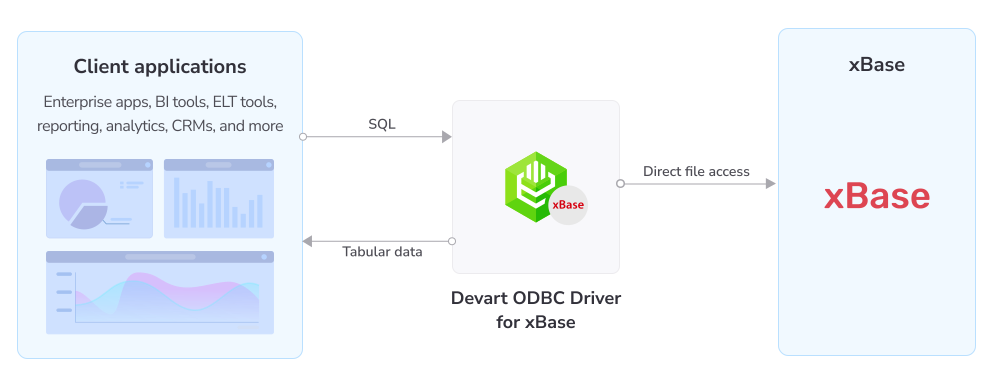
How ODBC Driver for xBase works

Support for all popular DBF formats

The Driver automatically detects each table's xBase format from its DBF header, allowing you to access data without specifying the format in advance.

It supports all widely used xBase/DBF formats, while the DBFFormat connection parameter lets you explicitly force a specific format whenever needed.

  • dBase III through dBase 10
  • FoxPro 2
  • Visual FoxPro
  • Clipper
  • Codebase
  • HiPer-Six

Features

Direct access to xBase files

Direct file access

With the Driver, you can directly connect to a folder of DBF files with no external libraries, FoxPro or dBase installation, and no database client required.

Recovery of damaged files

Corrupted data recovery

The Driver allows you to recover readable data from damaged DBF files and broken indexes, skipping corrupt rows, metadata, or tables and returning intact data.

Full support of ODBC functions, data types, and standards

Full SQL-92 operations

Connected through the Driver, you can run SELECT, INSERT, UPDATE, and DELETE with JOINs across tables and call native dBase functions directly in SQL.

Bidirectional mapping between xBase and ODBC data formats

Advanced data conversion

The Driver enables advanced bidirectional mapping between xBase/DBF field types and ODBC data types with full Unicode (UTF-8) support.

Fast access to objects and metadata

Objects and metadata access

Using the ODBC Driver for xBase, you can retrieve comprehensive database metadata, including tables, columns, indexes, primary keys, and more, through standard ODBC functions.

Full conformance with the ODBC standards

ODBC conformance

The Driver ensures full compliance with the ODBC 3.81 API and data types, enabling any popular ODBC-aware application to access and manage your DBF data.

Support for bulk operations

Bulk operations & performance

You can modify large amounts of data quickly with bulk inserts, updates, and deletes, while connection pooling and prepared statements help improve performance.

Standalone installer enabling cost-effective deployments

Cost-effective deployment

A single standalone installer with no external libraries or database client required keeps deployment costs low across large organizations thanks to silent installation and OEM licensing.

How does Devart ODBC Driver stack up against the legacy Microsoft Visual FoxPro/dBase ODBC Driver?

Features
Devart ODBC Driver
Legacy Microsoft driver
Platforms
Windows, macOS, Linux
Windows only
64-bit applications
Supported (32- and 64-bit)
32-bit only
Maintenance status
Actively maintained
Deprecated and no longer supported (Microsoft's replacement is an OLE DB provider)
Supported formats
dBase III–10, FoxPro 2, Visual FoxPro, Clipper, Codebase, HiPer-Six
Limited; not compatible with features added after Visual FoxPro 6.0
Corrupted-data & index recovery
Supported
Not supported
Standards
ODBC 3.81, ANSI SQL-92, Unicode (UTF-8) support
Older ODBC/SQL support

Pricing

ODBC Driver for xBase

Starts from

$139.95
per year
Try the Driver

Key features:

  • Direct access to DBF files with no external libraries required
  • Support for all popular DBF formats (dBase, FoxPro, Visual FoxPro, Clipper, and more)
  • Recovery of corrupted data and broken indexes
  • Full support for the ODBC 3.81 API and ANSI SQL-92 with CRUD
  • Cross-platform connectivity: Windows, macOS, and Linux (32- & 64-bit)

ODBC Drivers Universal Bundle

Starts from

$499.95
per year
Try the Universal Bundle

Key features:

  • Support for all 92 ODBC Drivers
  • Easy access to live data from anywhere
  • Full support for standard ODBC API functions and data types
  • No need for database client libraries
  • Support for ODBC-compliant reporting, analytics, BI, and ETL tools
  • Secure connections via SSL, SSH, and HTTPS tunneling

Verified compatibility with 200+ tools

Devart ODBC Drivers are verified to be compatible with leading analytics and reporting tools, various IDEs and programming languages. Get fast and secure access to your data in any application using our ODBC Drivers!

Roles

IT & data teams

Wire DBF files into ETL/ELT pipelines through standardized ODBC connectivity on Windows, macOS, or Linux. Recover data from damaged files, control locking and code pages, and keep legacy datasets accessible.

Colleagues in a conversation

Developers

Maintain legacy xBase applications or migrate DBF data using a consistent ODBC interface and standard SQL from C++, Delphi, Python, and PHP with no FoxPro/dBase runtime or proprietary libraries required.

Developer writing code

ODBC Universal Bundle

Get high-performance ODBC Drivers for 92 databases and cloud services in a single Universal Bundle with a 95% discount

Ready to get started?

Get a 30-day free trial now

Get a free trial now

You can download our ODBC Driver for a free 30-day trial. It is a great way to see the Driver in action with no hurry.

Enjoy bulk discounts

Enjoy bulk discounts

We offer flexible options to meet your budget in the optimal way. You can get bulk discounts for multiple purchases.

Need a hand?

Need a hand?

If you need any help or have questions about our connectivity solutions or purchasing options, feel free to get in touch.

FAQ

What is the xBase ODBC Driver?

The ODBC Driver for xBase is a standards-compliant ODBC connector that reads and writes xBase/DBF files—dBase, FoxPro, Visual FoxPro, Clipper, Codebase, and HiPer-Six—as SQL tables, so that any ODBC-aware application can query and edit legacy DBF data on Windows, macOS, and Linux without installing FoxPro or dBase.

How do I connect to xBase using ODBC?

Download and install the Driver, then create a DSN with the Database parameter pointing to the folder that contains your DBF files. Optionally set the DBFFormat parameter or leave it on Auto to detect each table's format. Then point any ODBC-compliant tool—Power BI, Excel, Tableau, or others—at that DSN. For step-by-step setup instructions, see the Get started guide.

Do I need FoxPro or dBase installed?

No. The Driver accesses DBF files directly and requires no external libraries, runtime, or database client.

Which DBF formats are supported?

All popular xBase/DBF formats are supported: dBase III through dBase 10, FoxPro 2, Visual FoxPro, Clipper, Codebase, and HiPer-Six. The Driver detects each table's format automatically or lets you force one.

Can it recover data from corrupted DBF files?

Yes. Using the IgnoreDataErrors, IgnoreIndexErrors, IgnoreMetadataErrors, and IgnoreBrokenTables settings, the Driver skips corrupt rows, metadata, indexes, or broken tables and still returns the intact data, which is useful for recovering readable records from damaged legacy files.

Which operating systems are supported?

The Driver supports Windows, macOS (including Apple silicon), and Linux, in both 32-bit and 64-bit versions.

Why choose Devart over the legacy Microsoft xBase/FoxPro driver?

Devart's Driver is cross-platform and works with 64-bit applications, supports Visual FoxPro and other DBF formats, is actively maintained, and can recover data from corrupted files, while the legacy Microsoft Visual FoxPro ODBC driver offers limited support in these areas.

Where can I download the xBase ODBC driver?

You can download the xBase ODBC driver for Windows, macOS, and Linux (32-bit and 64-bit) from the Download page on the Devart website, where you can get a free 30-day trial version that can be activated with a license key after purchase.