SQL database design basics: Table design and examples
To design a SQL database, start with identifying your entities and defining tables and keys. Follow with mapping table relationships, then normalize and add constraints and indexes. This guide walks through each step with examples.
These practical guidelines can help database developers and DBAs create and manage increasingly complex database structures without relying entirely on manual SQL scripting. Advanced GUI-based tools, such as dbForge Studio for SQL Server, provide interactive AI-powered visual database design features intended to facilitate the process and reduce errors.
How to design a database in SQL Server: Step by step
Designing a relational database is best approached as a sequence of practical steps.
| Step | What to do |
|---|---|
| 1. Gather requirements | List the data the app must store and the questions it must answer |
| 2. Identify entities | Turn the main nouns (e.g. Employee, Job, Application) into tables |
| 3. Define columns & data types | Add the attributes for each table and pick the right data types |
| 4. Set primary keys | Give every table a primary key to uniquely identify each row |
| 5. Map relationships | Connect tables with foreign keys (one-to-one, one-to-many, many-to-many) |
| 6. Normalize | Remove redundancy by organizing data into related tables (up to 3NF) |
| 7. Add constraints & indexes | Enforce integrity (NOT NULL, UNIQUE, CHECK) and index key lookup columns |
Designing a database schema
Let's design a basic database following the checklist above. For this example, we'll build a database schema for a recruitment system that allows recruiters to analyze the candidates' experience, job history, and skills.
To design this schema, we will use dbForge Studio for SQL Server, a fully featured database management IDE that supports the entire database lifecycle: design, development, administration, and maintenance. The Studio provides visual database diagrams and object editors that allow you to create and edit databases without writing code. At the same time, if you prefer designing a database with SQL statements, the Studio provides a context-aware code editor with auto-completion, keyword suggestion, formatting, and refactoring.
Gather requirements
Start by determining what the database must support and what information it needs to store. For our recruitment database, the following information is essential.
- Companies where the applicant used to work
- Positions that the applicant used to hold at these companies
- Projects that the applicant took part in
- Skills that the applicant possesses
- Duration of the applicant's employment at each of the companies and in each position
Identify entities
The requirements allow us to outline the list of entities represented in the database. Each entity becomes a table that stores relevant data.
- Employee: Personal data of each employee
- Company: Information about the companies the employee worked for
- Position: Information about the positions the employee occupied during their career
- Project: Details of the projects the employee took part in
- Skill: A catalog of skills
- ProjectSkill: Skills associated with a particular project
- JobHistory: Employee's complete resume with data on all their previous companies and projects
Define columns and data types
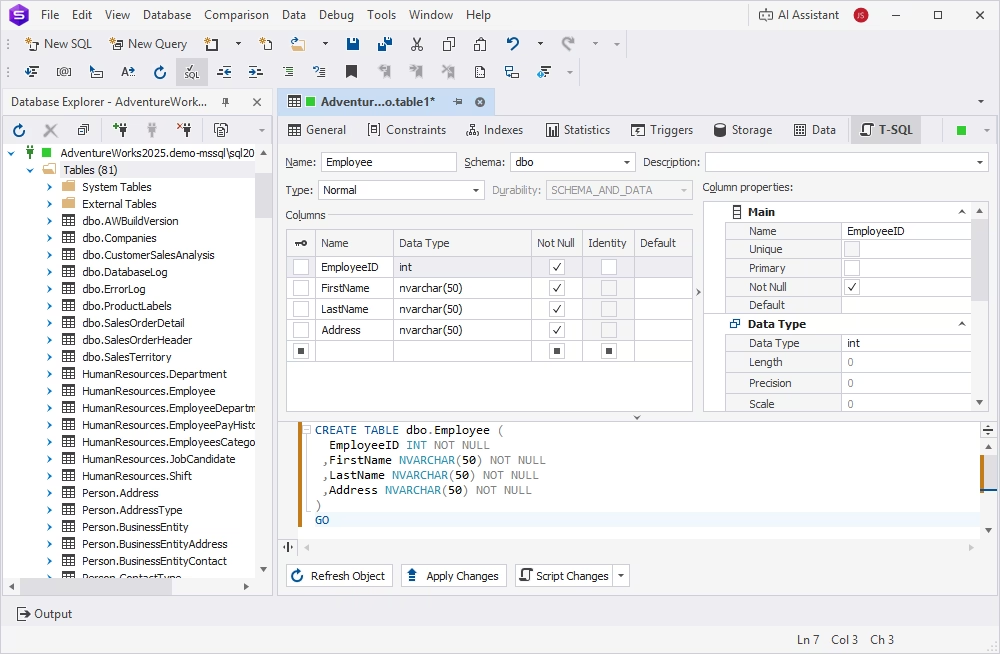
For each entity we have defined, we need to list the attributes that are going to become columns in the corresponding tables. At the same time, let's think of the data types that match the column values.
For example, for each employee in the Employee table, we need to store the following details:
- ID: A unique identifier of the employee stored as an integer value.
- First name: The employee's first name, for which the nvarchar data type is appropriate.
- Last name: The employee's last name, also stored as an nvarchar value.
- Address: The employee's address, which is also stored as an nvarchar value.
Similarly, we need to define columns for other tables and create them in the database. Let's use the table editor in dbForge Studio to create the tables required for the recruitment service.
Set primary keys
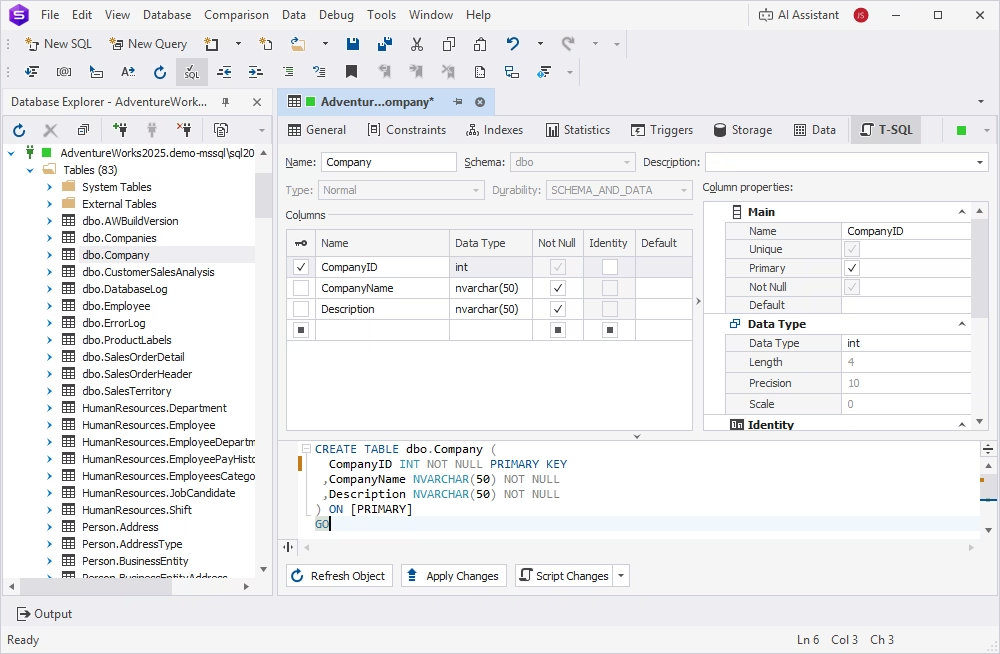
Primary keys serve as unique identifiers for each row in a table. They help you define relationships in a database. A primary key may be a single column or a combination of columns that meet the following requirements:
- They contain unique values or unique combinations of values when a primary key consists of multiple columns.
- Their values are NOT NULL.
- There is only one primary key per table.
The usual practice is to assign IDs as primary keys, as they meet all the requirements. In our examples, all tables have ID columns, so let's make them primary keys.
Map relationships
Relationships define how data in different tables is associated. There are three main types of relationships:
- One-to-one relationship: Each row in one table is related to at most one row in another table. A typical example of a one-to-one relationship is a database storing passport data. Each person can have only one passport, and each passport belongs to only one person.
- One-to-many relationship: Each row in the first table is related to any number (zero or more) of rows in the second table, while each row in the second table is associated with at most one row in the first table. For example, a company can maintain multiple projects, but each individual project is only associated with this company.
- Many-to-many relationship: Multiple rows in one table are related to multiple rows in another table. This type of relationship exists, for example, between a table listing employees and another table listing companies. An employee can have worked in several companies, and a company can have more than one employee.
In a relational database, relationships are typically implemented using primary keys and foreign keys. A foreign key is a column or combination of columns that references a primary key, a unique constraint, or an eligible unique index in the same or another table.
Our recruitment service database has some of the following relationships:
- Company and Employee: Many-to-many relationship, since an employee could work for different companies, and companies have many employees.
- Position and Employee: Many-to-many relationship, because an employee can hold multiple positions, and the same position can be held by multiple employees.
- Position and Company: Many-to-many relationship, because a company can have multiple positions, and the same position type can exist at multiple companies.
Other entities are related in a similar way. Using the Studio's database diagrams, we can define all the required relationships in a GUI-based workflow by dragging and dropping database objects across the canvas. The resulting database schema looks as follows.
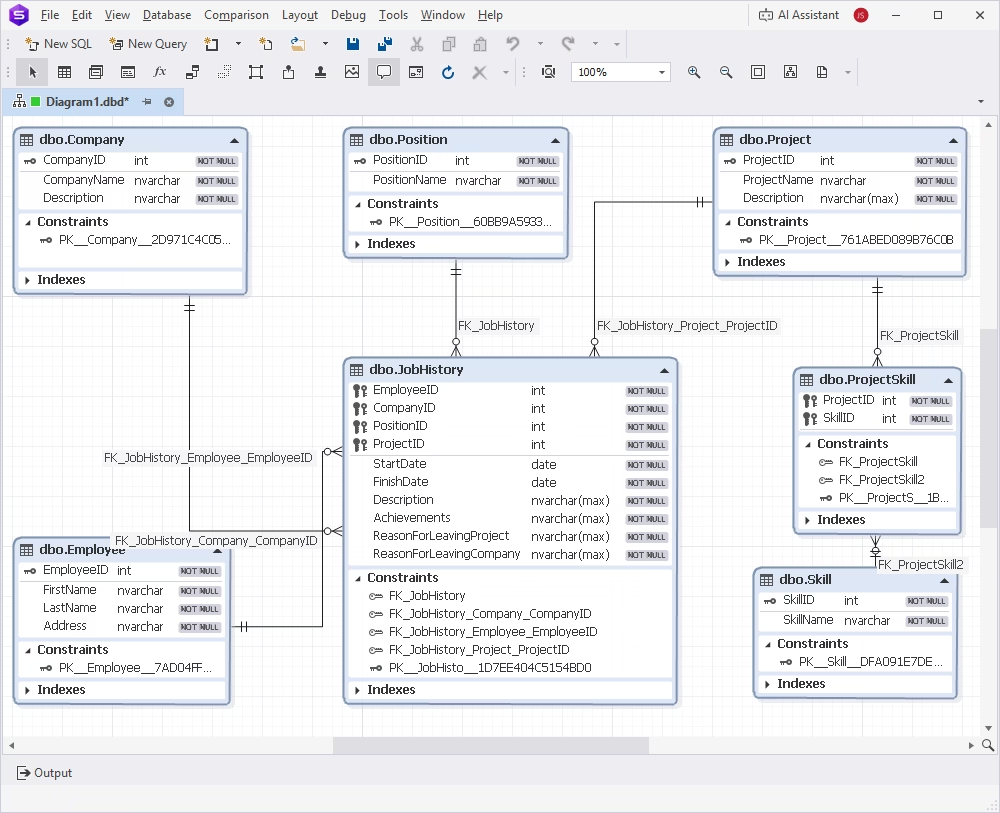
Here, the JobHistory table represents the entity of each employee's job history; that is, the resume that implements a many-to-many relationship between the employee, company, position, and project.
The Project and Skill tables relate as many-to-many; thus, they are linked with the help of the ProjectSkill entity.
The same design can be implemented with the following code.
CREATE TABLE Company (
    CompanyID INT PRIMARY KEY,
    CompanyName NVARCHAR(50) NOT NULL,
    Description NVARCHAR(50) NOT NULL
);

CREATE TABLE Position (
    PositionID INT PRIMARY KEY,
    PositionName NVARCHAR(50) NOT NULL
);

CREATE TABLE Project (
    ProjectID INT PRIMARY KEY,
    ProjectName NVARCHAR(50) NOT NULL,
    Description NVARCHAR(MAX) NOT NULL
);

CREATE TABLE Skill (
    SkillID INT PRIMARY KEY,
    SkillName NVARCHAR(50) NOT NULL
);

CREATE TABLE Employee (
    EmployeeID INT PRIMARY KEY,
    FirstName NVARCHAR(50) NOT NULL,
    LastName NVARCHAR(50) NOT NULL,
    Address NVARCHAR(50) NOT NULL
);

CREATE TABLE JobHistory (
    EmployeeID INT NOT NULL,
    CompanyID INT NOT NULL,
    PositionID INT NOT NULL,
    ProjectID INT NOT NULL,
    StartDate DATE NOT NULL,
    FinishDate DATE NOT NULL,
    Description NVARCHAR(MAX) NOT NULL,
    Achievements NVARCHAR(MAX) NOT NULL,
    ReasonForLeavingProject NVARCHAR(MAX) NOT NULL,
    ReasonForLeavingCompany NVARCHAR(MAX) NOT NULL,
    PRIMARY KEY (EmployeeID, CompanyID, PositionID, ProjectID),
    FOREIGN KEY (EmployeeID) REFERENCES Employee(EmployeeID),
    FOREIGN KEY (CompanyID) REFERENCES Company(CompanyID),
    FOREIGN KEY (PositionID) REFERENCES Position(PositionID),
    FOREIGN KEY (ProjectID) REFERENCES Project(ProjectID)
);

CREATE TABLE ProjectSkill (
    ProjectID INT NOT NULL,
    SkillID INT NOT NULL,
    PRIMARY KEY (ProjectID, SkillID),
    FOREIGN KEY (ProjectID) REFERENCES Project(ProjectID),
    FOREIGN KEY (SkillID) REFERENCES Skill(SkillID)
);
Normalize the database
Database normalization is the process of organizing data into related tables to reduce unnecessary duplication, prevent data inconsistencies, and make a database easier to maintain. It involves identifying which facts belong together, separating them into appropriate tables, and connecting those tables using primary and foreign keys.
Normalization follows a progression of database design rules called normal forms. The main normal forms are as follows.
| Normal form | Main rule | Problem it helps prevent |
|---|---|---|
| 1NF—First Normal Form | Each column contains a single value per row; there are no repeating groups. | Lists of values stored in one cell and inconsistent row structures |
| 2NF—Second Normal Form | The table is in 1NF, and every non-key attribute depends on the whole of every candidate key, not just part of a composite key. | Partial dependencies |
| 3NF—Third Normal Form | The table is in 2NF, and non-key attributes do not depend transitively on candidate keys. | Transitive dependencies and duplicated facts |
| BCNF—Boyce–Codd Normal Form | Every determinant of a nontrivial functional dependency is a superkey. | Certain dependency anomalies that 3NF can permit |
| 4NF—Fourth Normal Form | The table is in BCNF and has no nontrivial multi-valued dependencies unless their determinant is a superkey. | Independent multi-valued facts stored together |
| 5NF—Fifth Normal Form | Nontrivial join dependencies are implied by candidate keys. | Redundancy that can arise when a table must be decomposed into several tables and joined back |
For most relational database designs, 1NF, 2NF, and 3NF represent a sufficient level of normalization. Other normal forms address more specialized situations.
If we evaluate our database design against the normalization requirements up to 3NF, we will find that the JobHistory table needs revision. It combines information about two different entities: employment at a company and assignment to a project. When stored in a single table, this data may be redundant and cause update and delete anomalies.
The optimal implementation is splitting this table into two tables.
CREATE TABLE EmploymentHistory (
    EmploymentID INT PRIMARY KEY,
    EmployeeID INT NOT NULL,
    CompanyID INT NOT NULL,
    PositionID INT NOT NULL,
    StartDate DATE NOT NULL,
    FinishDate DATE,
    ReasonForLeavingCompany NVARCHAR(MAX),

    FOREIGN KEY (EmployeeID)
        REFERENCES Employee(EmployeeID),
    FOREIGN KEY (CompanyID)
        REFERENCES Company(CompanyID),
    FOREIGN KEY (PositionID)
        REFERENCES Position(PositionID)
    );

CREATE TABLE EmployeeProjectAssignment (
    AssignmentID INT PRIMARY KEY,
    EmploymentID INT NOT NULL,
    ProjectID INT NOT NULL,
    StartDate DATE NOT NULL,
    FinishDate DATE,
    Description NVARCHAR(MAX),
    Achievements NVARCHAR(MAX),
    ReasonForLeavingProject NVARCHAR(MAX),

    FOREIGN KEY (EmploymentID)
        REFERENCES EmploymentHistory(EmploymentID),
    FOREIGN KEY (ProjectID)
        REFERENCES Project(ProjectID)
    );
Add constraints and indexes
Constraints are rules applied to data columns and tables to restrict the types of data that can be inserted, updated, or deleted. There are the following six core constraints.
| Constraint | Purpose |
|---|---|
| NOT NULL | Prevents a column from storing NULL values |
| UNIQUE | Prevents duplicate entries |
| PRIMARY KEY | Identifies each row |
| FOREIGN KEY | Links related tables |
| CHECK | Validates a condition |
| DEFAULT | Applies a default value when no value is provided |
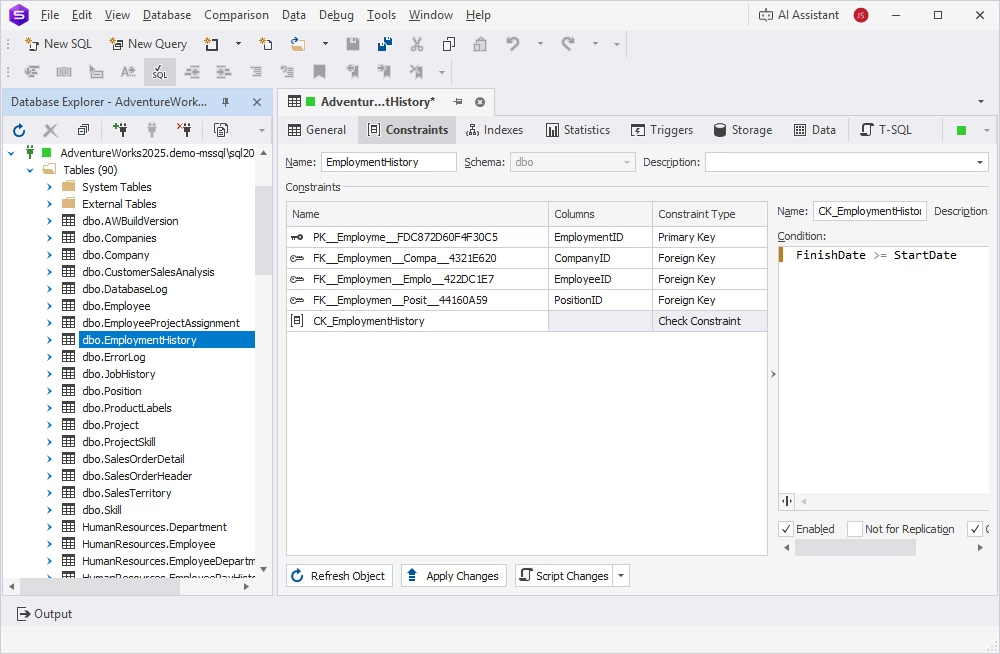
Our schema already contains PRIMARY KEY and FOREIGN KEY constraints that we used to link tables. Also, we defined all IDs and some other columns as NOT NULL, requiring that their values must always be provided. Let's add some CHECK constraints to make sure data remains consistent.
For example, we can add a rule verifying that the FinishDate is always equal to or later than the StartDate. We can achieve this by adding CHECK constraints to the EmploymentHistory and EmployeeProjectAssignment tables.
You can also add constraints by executing the following ALTER TABLE statements.
ALTER TABLE EmploymentHistory
ADD CONSTRAINT CK_EmploymentHistory_FinishDate_StartDate
CHECK (FinishDate >= StartDate);

ALTER TABLE EmployeeProjectAssignment
ADD CONSTRAINT CK_EmployeeProjectAssignment_FinishDate_StartDate
CHECK (FinishDate >= StartDate);
Indexes help improve the database performance by speeding up data retrieval and narrowing searches. Indexes enable the database engine to quickly locate data without scanning the entire table.
SQL Server automatically creates indexes for primary keys. Let's also add indexes to some foreign keys to accelerate data search.
| Table | Index | Purpose |
|---|---|---|
| EmploymentHistory | (EmployeeID, StartDate) | Retrieve an employee's employment history chronologically |
| EmploymentHistory | (CompanyID) | Find employees and employment records for a company |
| EmploymentHistory | (PositionID) | Find employment records for a position |
| EmployeeProjectAssignment | (EmploymentID, StartDate) | Retrieve projects assigned during an employment period |
| EmployeeProjectAssignment | (ProjectID) | Find all employee assignments for a project |
| ProjectSkill | (SkillID) | Find all projects that use a particular skill |
dbForge Studio for SQL Server provides a GUI-based workflow for adding indexes to tables. Open the table editor and set up the required indexes.
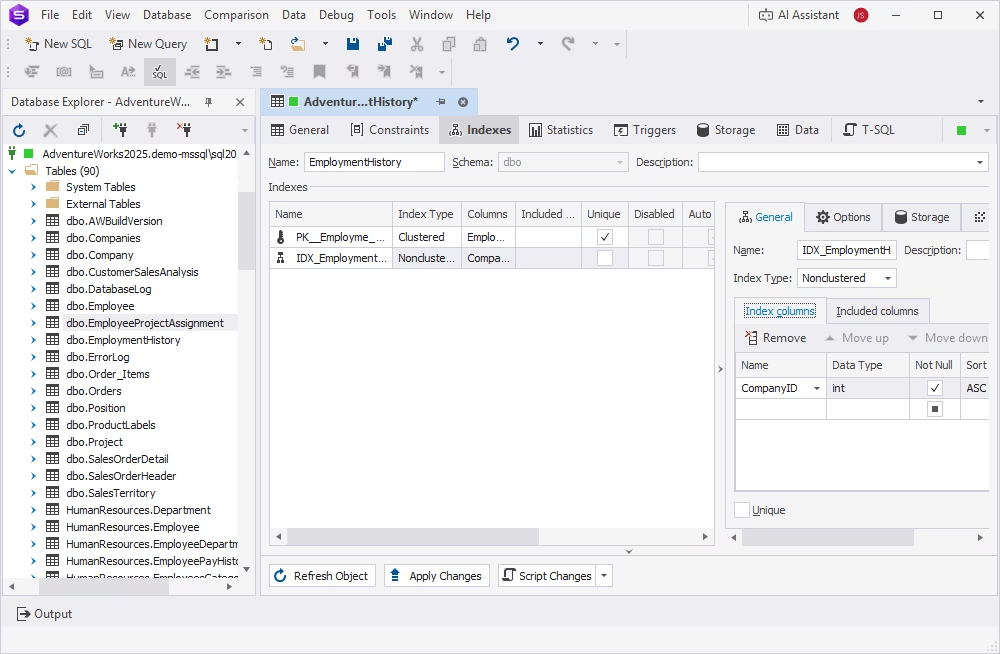
Alternatively, you can set up all the indexes with the following SQL.
-- Employment history: employee timeline
CREATE INDEX IDX_EmploymentHistory_EmployeeID_StartDate
ON dbo.EmploymentHistory (EmployeeID, StartDate);

-- Find employment records by company
CREATE INDEX IDX_EmploymentHistory_CompanyID
ON dbo.EmploymentHistory (CompanyID);

-- Find employment records by position
CREATE INDEX IDX_EmploymentHistory_PositionID
ON dbo.EmploymentHistory (PositionID);

-- Find project assignments within an employment period
CREATE INDEX IDX_EmployeeProjectAssignment_EmploymentID_StartDate
ON dbo.EmployeeProjectAssignment (EmploymentID, StartDate);

-- Find all assignments for a project
CREATE INDEX IDX_EmployeeProjectAssignment_ProjectID
ON dbo.EmployeeProjectAssignment (ProjectID);

-- Find projects associated with a skill
CREATE INDEX IDX_ProjectSkill_SkillID
ON dbo.ProjectSkill (SkillID);
Conclusion
Effective database design goes beyond translating real-world objects and relationships into a database schema. It requires anticipating changing business requirements, maintaining data integrity, managing dependencies, and ensuring that the database can evolve without introducing inconsistencies or disrupting applications. Database developers, DBAs, and data architects must balance current needs with future scalability while keeping schemas understandable, maintainable, and aligned across environments.
Advanced tools, such as dbForge Studio for SQL Server, help simplify these challenges with visual database design, schema comparison and synchronization, dependency analysis, and the integrated AI Assistant that supports you in generating, troubleshooting, and understanding SQL code.
You can start designing database schemas now by downloading dbForge Studio for SQL Server for free with immediate access to all its features, including database diagrams and object editors.
FAQ
To design a database in SQL Server, follow the steps below.
- Gather requirements
- Identify entities
- Define columns and data types
- Set primary keys
- Map relationships
- Normalize the database
- Add constraints and indexes
To design a database, define the requirements and identify entities and relationships between them. Then, proceed to create the corresponding tables and columns, set primary and foreign keys, and map relationships. Normalize the database to reduce data duplication and prevent inconsistencies. Finally, add constraints and indexes to ensure data integrity and improve performance.
Database normalization is the process of organizing data to reduce redundancy, prevent anomalies, and improve maintainability.
A primary key is one or several columns in a table that uniquely identify each row. A foreign key is a column or a set of columns in one table that links it with another table by referencing the primary key in that table.