PostgreSQL GUI tools for macOS are transforming database management into a smarter experience. Thanks to these solutions, the days of struggling to debug errors from the command line are over. Today, PostgreSQL GUI tools offer intuitive, visual interfaces that streamline workflow, eliminate repetitive coding, and help you move faster with fewer errors.
PostgreSQL stands out as one of the world's most favored database management systems. When paired with GUI tools, it becomes even more versatile, enhancing productivity and fast-tracking database performance.
Whether you are a beginner database developer, analyst, or administrator looking to choose the best PostgreSQL client for Mac, this article will guide you toward the most flexible and feature-rich GUI tools for PostgreSQL on macOS.
Best PostgreSQL tool for each task on macOS
| Task |
Best tools |
Why |
| Best overall |
dbForge Studio for PostgreSQL, DBeaver, DataGrip |
dbForge Studio offers an integrated environment for SQL development, database management, debugging, and performance analysis.
DBeaver is a versatile multi-database alternative, while DataGrip excels at SQL development. |
| Best free |
pgAdmin, DBeaver Community, OmniDB |
pgAdmin is a free, open-source PostgreSQL administration tool. DBeaver Community supports PostgreSQL and many other database systems. OmniDB is another open-source option for web-based database management. |
| Best lightweight pgAdmin replacement |
TablePlus, Postico, Beekeeper Studio |
TablePlus provides a fast, streamlined interface for multiple database systems. Postico offers a native macOS experience focused on PostgreSQL, while Beekeeper Studio provides a modern, approachable interface for everyday querying and data editing. |
| Best for exporting large PostgreSQL databases |
pg_dump (CLI), DBeaver, DataGrip, TablePlus |
pg_dump CLI handles high-throughput, scripted dumps without memory overhead of a graphical interface, while DBeaver, DataGrip, and TablePlus provide optimized streaming data extraction
to CSV and SQL for multi-gigabyte datasets without UI freezes. |
| Best for cross-platform performance tuning |
dbForge Studio for PostgreSQL, DataGrip, DBeaver |
dbForge Studio provides query profiling and debugging capabilities for investigating inefficient queries. DataGrip offers query execution plans and SQL analysis,
while DBeaver provides SQL execution-plan inspection and database monitoring features that vary by edition. |
| Best for schema migration automation (CI/CD) |
Flyway, Liquibase, Atlas, Bytebase |
Flyway and Liquibase manage versioned database changes through migration scripts. Atlas supports declarative schema management and migration workflows. Bytebase adds collaborative change management, review, and deployment controls for teams. These tools complement rather than replace a GUI client. |
| Best for reporting and dashboards |
Metabase, Superset, Redash, Grafana |
Metabase is well suited to accessible, interactive business dashboards and self-service analytics. Superset provides a flexible BI and data exploration platform. Redash focuses on SQL-based queries and visualizations, while Grafana is particularly useful for operational monitoring and time-series dashboards. |
Most popular PostgreSQL GUI clients on macOS
There are a lot of PostgreSQL GUI clients for Mac available on the market. These tools simplify manual SQL coding and data management and help you achieve
your goals faster by providing intuitive visual interfaces and numerous features for various database tasks.
Let us consider some of the most efficient and popular solutions designed for PostgreSQL experts on macOS.
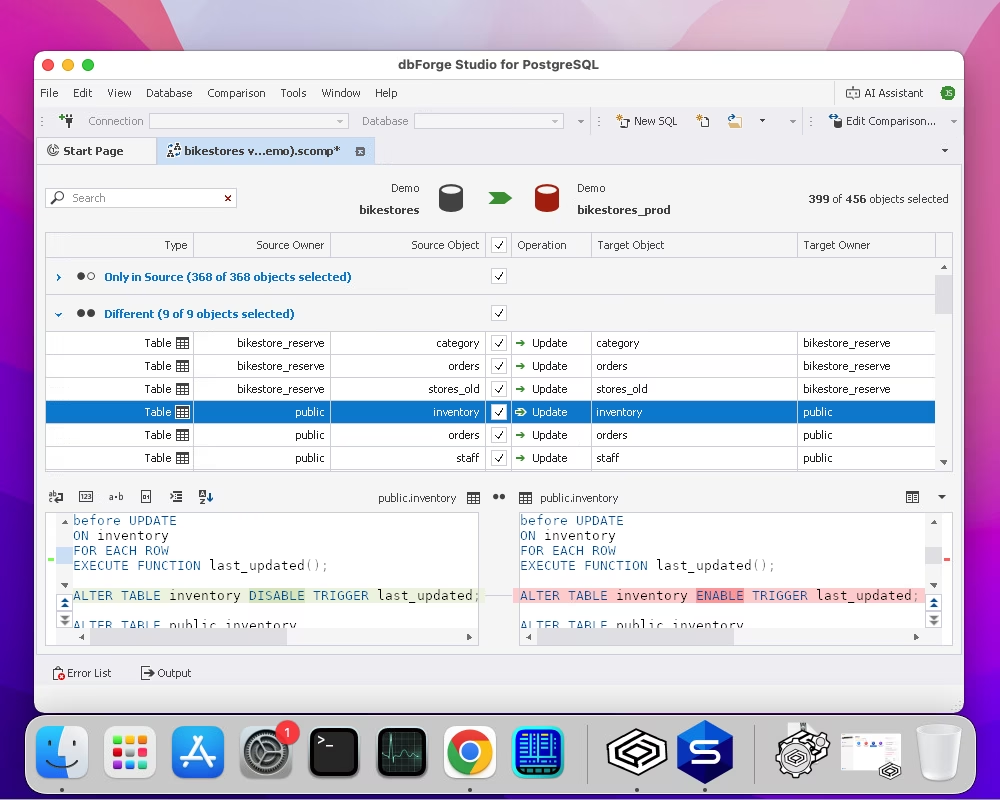
dbForge Studio for PostgreSQL is a commercial PostgreSQL client for macOS with a free Express edition.
The Studio is best for full-cycle design, development, and administration of PostgreSQL databases. It provides all the required capabilities to perform the majority of database-related
tasks with one software solution.
The Studio focuses on jobs related to database development, management, and administration on PostgreSQL, Supabase, Amazon Redshift, and several other databases and cloud services.
With exceptional flexibility, advanced features, and robust customization and automation options, dbForge Studio for PostgreSQL is favored by users of all skill levels.
Pros
- An integrated AI Assistant with query creation, analysis, and troubleshooting
- Multi-featured SQL coding assistance module
- Schema and data comparison and synchronization
- Visual database designer
- 200+ generators of realistic test data
- Visual Query Builder
- PostgreSQL Debugger
- Visual object editors
- Automation of recurring tasks through CLI
- Professional support and comprehensive documentation
Cons
- No native macOS version (though it runs smoothly on macOS via CrossOver)
- English-only interface
Pricing options
- Free: Express edition with basic functionality
- Paid: Subscription starts from $89.95 per year; perpetual license starts from $179.95
- Free trial: 30 days
dbForge Studio for PostgreSQL
A feature-rich and versatile IDE for database development, management, and administration, as well as data management, analysis, and reporting
pgAdmin
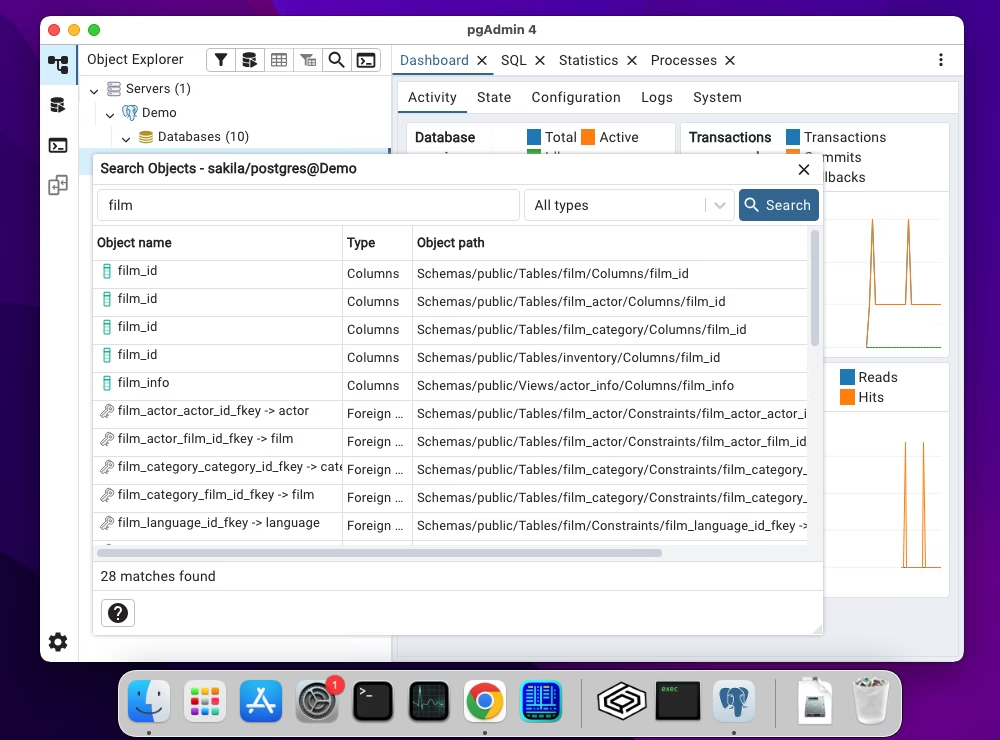
pgAdmin is a free PostgreSQL client for macOS best for administering PostgreSQL databases. It is the only GUI client that is officially recognized as native for Postgres.
Its functionality enables operation on PostgreSQL cloud servers, providing you with universal access, regardless of the operating system or geographical location.
Also, pgAdmin is widely recognized for its stability, user-friendly design, and an array of visual features that are very useful when you're handling a range of database tasks on macOS and other systems.
Pros
- SQL editor with shortcuts for enhanced operation
- Built-in code debugging functionality
- Server monitoring features
- Visual interface for easy task configuration and execution
- Large community of professionals and detailed documentation
Cons
- Lacks some advanced features like data comparison
- Performance may degrade with large databases
- Requires additional setup in professional workflows
- Limited support and no dedicated customer service
Pricing options
- Free: Open-source solution
Download pgAdmin
DBeaver
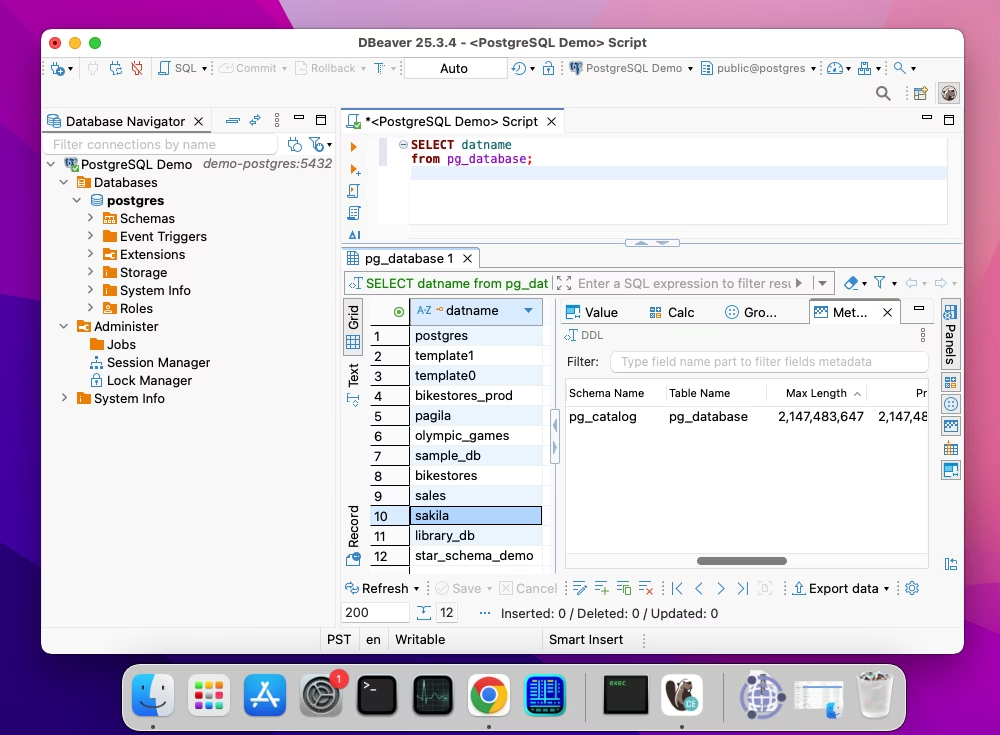
DBeaver is a commercial PostgreSQL client for macOS with a free Community edition. It is best for cross-platform performance tuning and overall database management.
DBeaver is often defined as a universal database tool with support for over 80 database systems, including PostgreSQL, and cross-platform coverage, including Mac.
It comes with a customizable UI and numerous features to successfully perform all major database tasks.
Pros
- Visual database design using ER diagrams
- Data migration with a graphical wizard
- Tree-like database explorer for easy object management
- SQL query design, analysis, editing, and execution
- Advanced security features
- Full-text data search and various data views
Cons
- Interface can be overwhelming for new users
- Might run slower when working with large databases
- Advanced features are only available in the paid edition
- Limited official support; relies heavily on community input
Pricing options
- Free: Community edition
- Paid: Subscription starts from $12 per month; $113 per year.
- Free trial: 14 days
Download DBeaver
Navicat for PostgreSQL
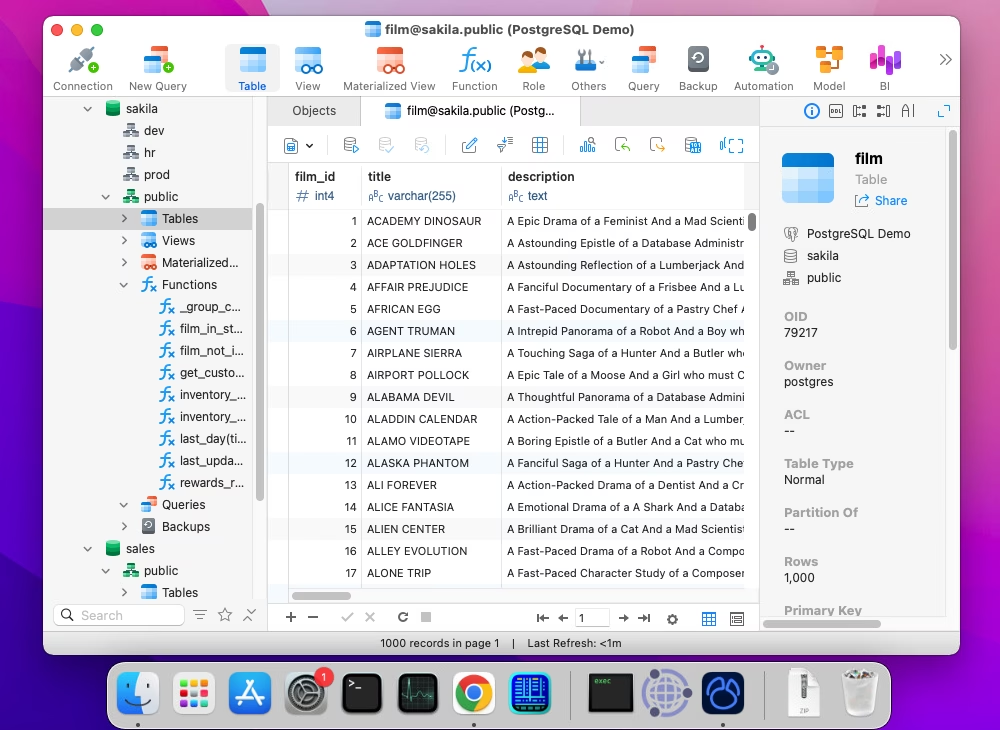
Navicat for PostgreSQL is a commercial PostgreSQL client for macOS best for database administration and development. It is a powerful tool designed for database specialists working
with Postgres and other major database management systems. The software offers a robust SQL editor with numerous features, allowing you to create effective queries of any complexity and
execute them directly from within the software.
In addition, Navicat provides various tools for performing fundamental database tasks. Its accurate and user-friendly GUI, as well as advanced data visualization tools, made it a favorite among both beginners and experts. It also offers reliable and effortless management of databases on Windows, macOS, and Linux.
Pros
- Wide range of data formats for import and export
- Integration with cloud platforms
- Robust data modeling and data visualization tools
- SSH tunneling and SSL protocols
- Visual database object management on diagrams
- Scheduling and automation of tasks
Cons
- High price point compared to similar tools
- Some users report occasional UI lag or bugs on macOS
- Limited customization options for automation or CLI tasks
Pricing options
- Paid: Starts from $13.99 per month / $139.99 per year (non-commercial use)
- Perpetual license: Starts from $279
- Free trial: 14 days
Download Navicat for PostgreSQL
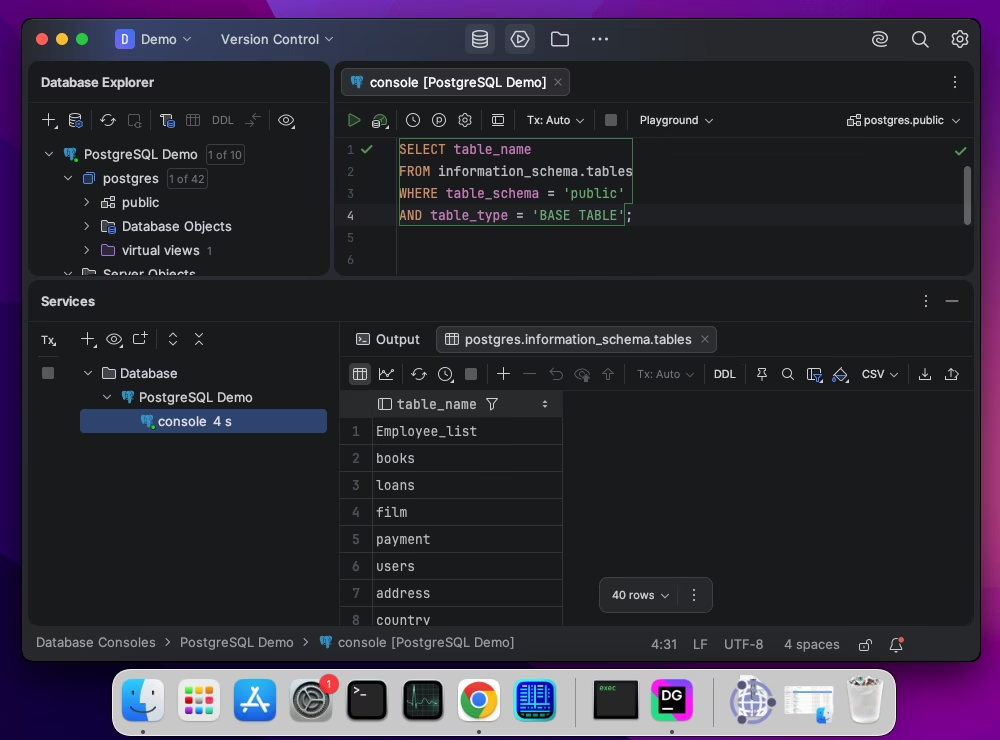
DataGrip
DataGrip is a commercial PostgreSQL client for macOS best for database development. Its user-friendly and customizable interface, coupled with powerful functionality, makes it an ideal solution for database experts. With DataGrip, you can easily create and execute queries, track query history, and effectively analyze query performance.
Furthermore, DataGrip lets you extend its default functionality through dedicated plugins, providing you with all the necessary tools within a single software solution.
Pros
- Advanced code refactoring
- Visual database schema management
- DDL and DML automation
- Collection of various themes for UI customization
- Powerful data editor
- Built-in data visualization with graphical charts
Cons
- Heavy on system resources
- Steep learning curve for beginners
- Not ideal for DBAs needing admin-focused tools
- Requires a JetBrains subscription for commercial use
Pricing options
- Free: Non-commercial edition
- Paid: Starts from $10.90 per month per individual user
- Free trial: 30 days
Download DataGrip
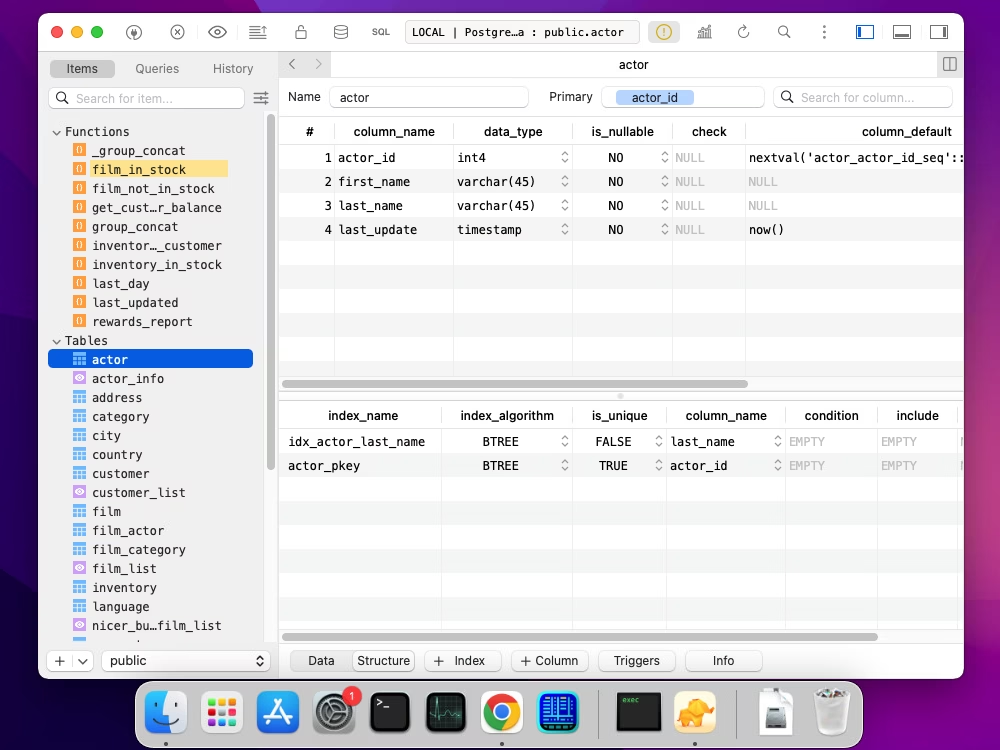
TablePlus
TablePlus is a commercial PostgreSQL client for macOS best for lightweight database development and management. It is one of the top favorites among database developers
who work with major database management systems like PostgreSQL. It is particularly renowned for its efficient querying and data editing capabilities. The user
interface is neat and simple, yet customizable, empowering you to tackle your work challenges effortlessly without requiring any coding knowledge.
Additionally, TablePlus prioritizes security, providing high-level options like end-to-end encryption for database connections and built-in SSH tunneling.
Pros
- Possibility to enhance the default functionality with JavaScript-based plugins
- Configurable shortcuts for a better user experience
- Advanced SQL editor with a variety of output options
- High speed and performance
- Active community on GitHub
Cons
- Limited support for advanced database tasks like test data generation
- Multiple tabs, windows, filters, and boards are only available in the paid version
- Limited command-line capabilities for database task automation
Pricing options
- Paid: Starts from $99.00 per user, one-time purchase
- Free trial: Limited functionality
Download TablePlus
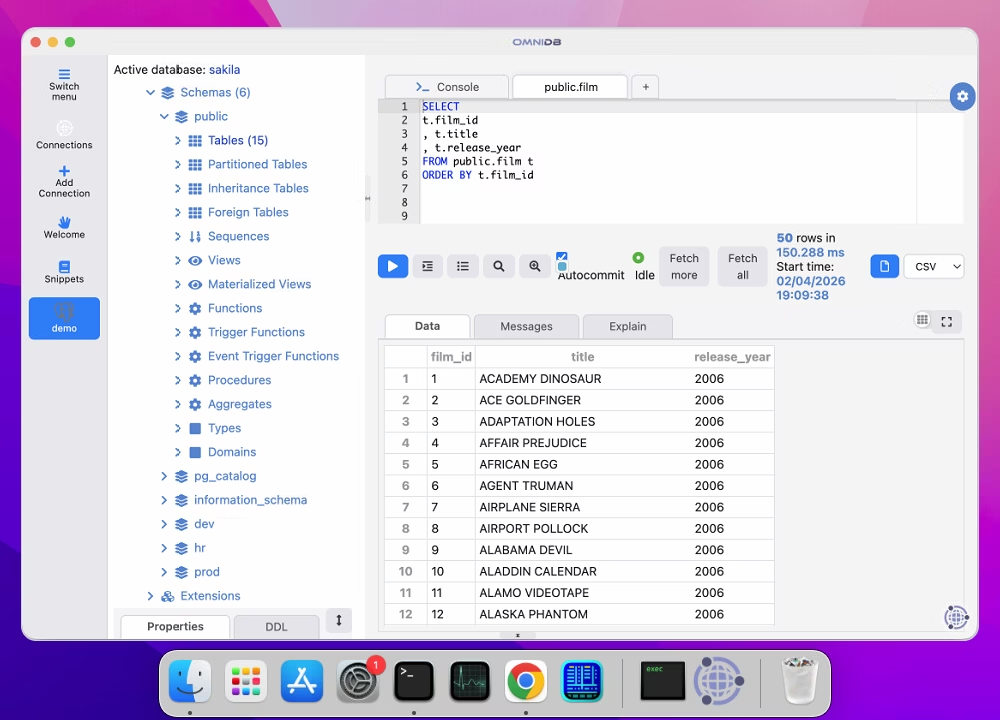
OmniDB
OmniDB is a free PostgreSQL client for macOS best for web-based database management. It is designed explicitly for efficient database management on PostgreSQL and can be used on macOS easily. This free and open-source product offers a wide range of useful functionalities, including a smart SQL code editor with syntax highlighting, code debugging, and completion, as well as intuitive data editing tools, interactive charts, and optional plugins that enhance the default capabilities.
The tool boasts an intuitive interface, allowing you to access all the necessary features quickly from a single page. Whether you're a database expert or a beginner, OmniDB simplifies your database management tasks and provides a smooth and productive experience.
Pros
- Multi-user mode for collaboration purposes
- Personal data encryption in multi-user work
- Access from any location and OS via a web browser
- SQL editor configuration
- Easy connection management
- Customizable data reports
- Various color schemes for better visual appeal
Cons
- Lacks some features like schema diffing or data generation
- UI may feel basic for experienced users
- Limited plugin or integration ecosystem
- Community support only; no official customer service
Pricing options
- Free: Open-source solution
Download OmniDB
Comparison of PostgreSQL GUI tools for macOS
The table below is a detailed comparison of the PostgreSQL GUI tools explored so far.
| Tools |
Key features |
Usability |
Pros |
Cons |
Pricing |

dbForge Studio for PostgreSQL
|
SQL editor, query profiler, schema/data comparison, data generator,
CLI |
Pro-level |
All-in-one toolset, automation, professional support |
No native macOS app, learning curve for beginners |
Free Express edition; paid editions: from $89.95 per year |

pgAdmin
|
SQL editor, debugging, server monitoring, visual config tools |
General use |
Open source, widely used, full Postgres support |
UI can be sluggish; browser-based experience not ideal for all users |
Free |

DBeaver
|
ER diagrams, query editor, data migration, visual explorer |
Developer-friendly |
Multi-DB support, customizable UI, plugin
ecosystem |
Interface may feel overwhelming; performance varies with large databases |
Free / From $12/month |

Navicat for PostgreSQL
|
SQL editor, data modeling, cloud integration, SSH tunneling |
Professional-grade |
Great UX, automation, rich feature set |
High price point; occasional feature gating in lower tiers |
Subscription: From $13.99/month; perpetual license: $279 |

DataGrip
|
SQL editor, refactoring, visual schema, plugin support |
Expert-level |
Strong PostgreSQL & multi-DB support, JetBrains quality |
Heavier app, uses more resources; subscription model |
From $10.90/month |

TablePlus
|
Advanced SQL editor, SSH tunneling, high performance |
Fast & clean |
Fast, minimal, customizable UI |
Only two tabs, windows, and filters and one board in free trial; fewer enterprise tools |
From $99 one-time |

OmniDB
|
Web-based editor, data visualization, multi-user mode |
Lightweight |
Open source, customizable, collaborative tools |
Less actively maintained; limited in visual and enterprise features |
Free |
How to choose the right PostgreSQL GUI for macOS
There is no one-size-fits-all solution for choosing the best Postgres client for macOS.
However, some criteria can help you make an informed choice. Below are some of these criteria.
UI design
When choosing a PostgreSQL GUI Mac client, go for the one with clean, intuitive layouts and minimal
clicking for critical features like schema viewers, query editors, and result grids. If the tool's layout is
cluttered or dated, no matter how powerful it is, this can slow down your workflow.
A good example of PostgreSQL GUI tools with an intuitive UI is dbForge Studio. It offers a
modern interface with customizable layouts compared to open-source options like pgAdmin, which may feel more
utilitarian and less polished.
Core features: query editor, data viewer, and beyond
At the center of any great Postgres GUI Mac tool are core features like an excellent query editor that lets
you highlight syntax, autocomplete queries, and analyze query execution plans, and a responsive data viewer to
filter, sort, and edit data in place. After validating that the tool you want to choose has these core
features, you can also check for additional ones like schema comparison, ER diagrams, test data generation,
and automation via CLI.
One of the best Postgres GUI Mac tools that offer these features and more is dbForge Studio.
This multi-featured IDE stands out with its built-in data generators and schema synchronization
capabilities.
macOS native app vs. web-based interface
Another important thing to consider when choosing a PostgreSQL GUI for macOS is how to run it. Running a
PostgreSQL GUI client natively on macOS ensures better integration, performance, and local access to the application.
Some tools, like TablePlus and DBeaver, are native macOS applications, providing seamless
system-level support. Additionally, dbForge Studio, though originally for Windows, is accessible on Mac via
CrossOver, offering a native-like experience without sacrificing functionality. However, other tools like
pgAdmin and OmniDB are web-based or require browser interfaces, which can introduce lag, layout
inconsistencies, and security considerations.
Pricing and licensing
Before choosing the best PostgreSQL GUI Mac tool for your needs, consider its pricing and
licensing. Open-source options like pgAdmin and OmniDB are free, but they often lack the advanced features
and dedicated support you get with commercial tools. If you're looking for advanced functionality, robust
performance, and ongoing support, a tool like dbForge Studio for PostgreSQL offers strong value, even on
macOS. On the other hand, if you're working on smaller-scale projects and value simplicity or open-source
freedom, tools like DBeaver or pgAdmin may work for you.
Advice for PostgreSQL developers
After you have chosen the ideal PostgreSQL GUI tool for your workflow and installed it, here
are a few things to keep in mind when using it.
Learn keyboard shortcuts
Keyboard shortcuts speed up access to specific areas and enable faster task execution compared
to mouse-based methods. For example, dbForge Studio for PostgreSQL offers both predefined shortcuts and
facilitates the configuration of personal shortcuts for various commands.
Customize your workspace
The ability to tailor the workspace to meet your needs can greatly enhance your overall
productivity. The best PostgreSQL client for Mac often offers a range of color themes and enables the
customization of menus and bars for your convenience. Make sure to explore the personalization options that
your chosen solution offers.
Get more productive with code completion and formatting
SQL coding constitutes a significant portion of a database developer's workload, especially
complex queries. In dbForge Studio for PostgreSQL, the SQL formatter and code editor offer auto-completion for faster coding,
syntax validation, formatting, and a collection of editable code snippets, as well as the option to create
custom snippets.
Use database modeling tools
ER diagrams are widely used tools for schema design and for visually constructing databases
using graphical blocks and relationships. An integrated database designer can support both reverse and
forward engineering, enabling you to convert visual constructs into SQL scripts and actual databases into
editable graphical models. Therefore, you can modify the diagram before applying it to the database.
Implement automated backup and recovery
Data safety and consistency are of paramount importance for every database. Hence, providing
the technical capabilities for creating backups and restoring data is a critical requirement. A number of
PostgreSQL clients for Mac, like Navicat for PostgreSQL or DBeaver, enable both scheduled and on-demand backup/restore
operations, all within the same IDE.
Monitor performance
Performance monitoring is a highly demanded feature of any database IDE. Typically, it includes modules for
detecting and resolving query performance bottlenecks, monitoring dashboards
for databases, users, and servers, and user management modules. The performance monitoring features will
also let you create, edit, and delete user accounts and their privileges. If your role involves such jobs, you'll need such a solution in your software toolkit.
Why dbForge Studio for PostgreSQL is a top choice
dbForge Studio for PostgreSQL stands out as a top-tier solution combining powerful capabilities with a
user-friendly interface that makes it one of the most comprehensive PostgreSQL GUI Mac tools available
today. Using the Studio, developers and DBAs can accelerate SQL coding, database design, debugging, performance analysis, and routine administration. Its AI Assistant enhances productivity by helping
users generate, explain, and troubleshoot SQL code, while support for cloud-hosted PostgreSQL databases enables teams to work with databases across different environments.
Here are a few things that make dbForge Studio for PostgreSQL a go-to option.
All-in-one PostgreSQL toolkit
With dbForge Studio for PostgreSQL, there's no need to juggle multiple tools. From query
writing and data editing to schema comparison and performance tuning, everything you need is integrated into
a single, cohesive environment. dbForge Studio for PostgreSQL simplifies your workflow, boosts productivity,
and eliminates the friction of switching between platforms.
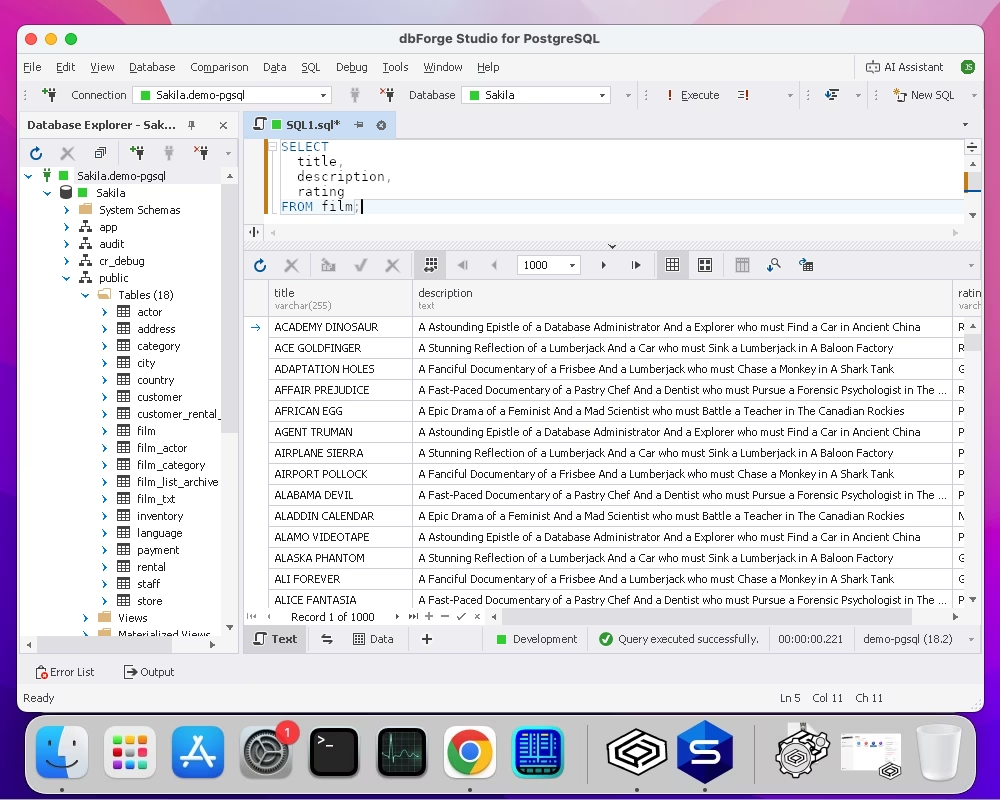
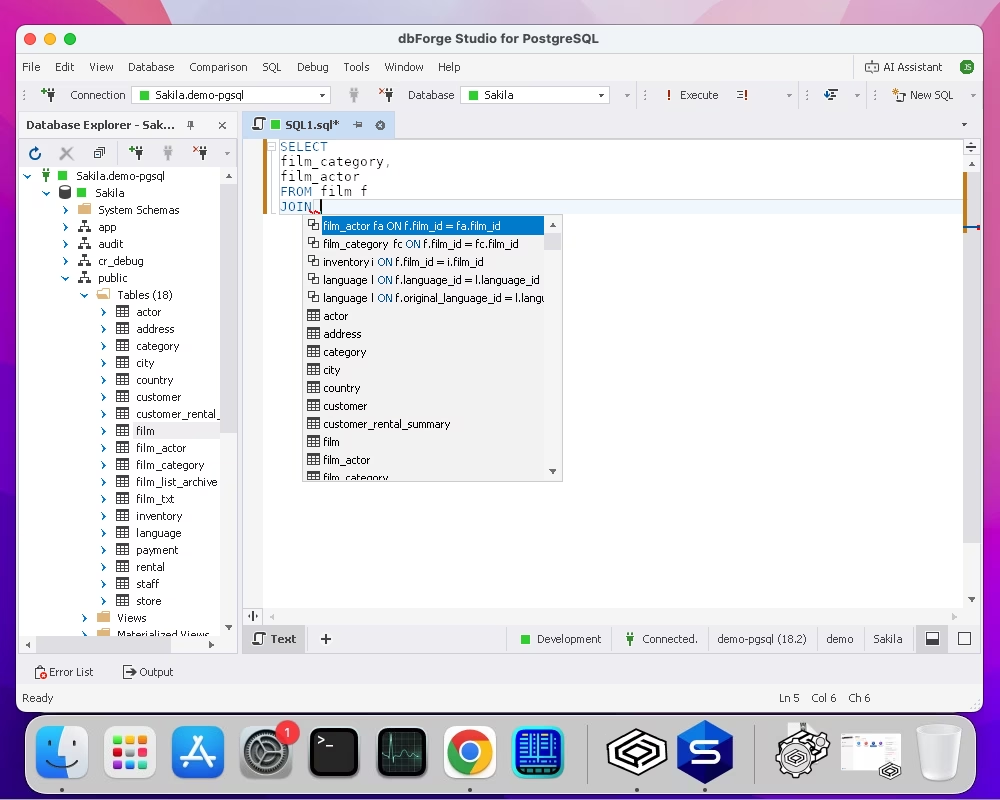
Smart SQL coding assistance
The intelligent SQL editor in dbForge Studio for PostgreSQL makes writing queries faster and
more reliable, as it includes a wide range of features like auto-completion, syntax checking, and code
formatting to help reduce errors and speed up development. Whether you're writing complex joins or exploring
stored procedures, dbForge Studio for PostgreSQL makes it smoother.
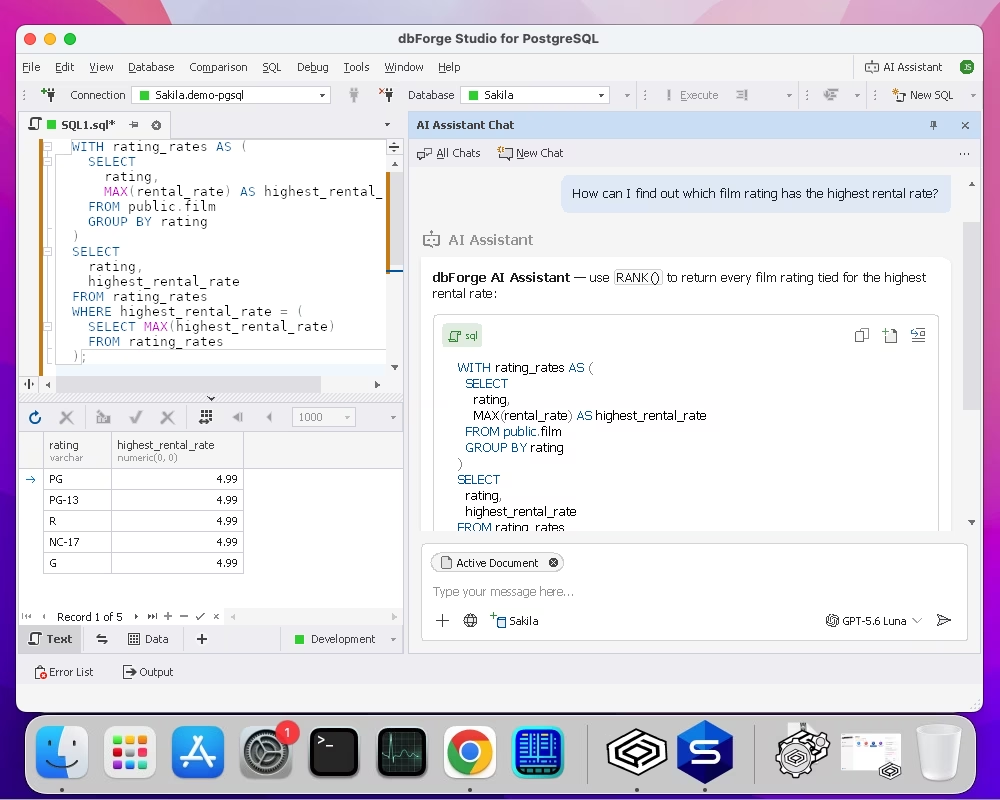
AI-powered coding
The integrated AI Assistant can generate queries relevant to your databases. It gives
recommendations on improving manually written code, identifies potential issues, and explains parts of code.
Moreover, it is integrated with our documentation center and can guide you through any feature of the
dbForge tool you are using.
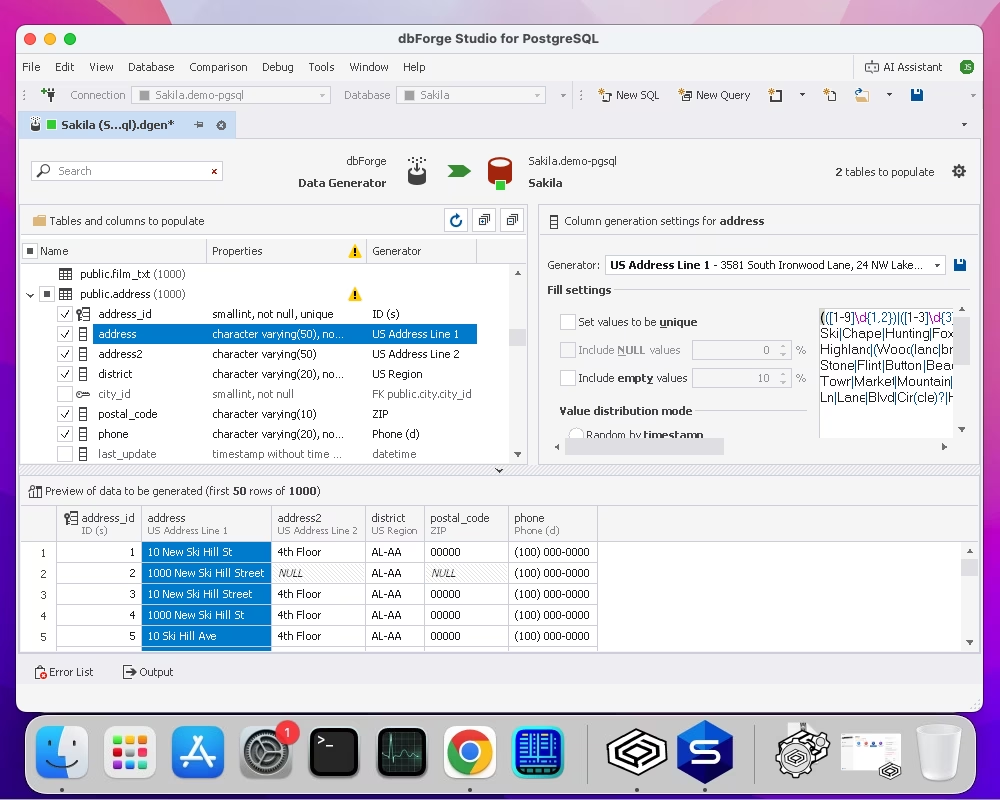
Data generation and testing tools
Populate your tables with realistic test data in seconds using over 200 built-in data
generators in dbForge Studio for PostgreSQL. This feature is a game-changer for QA teams and developers who
need to simulate real-world scenarios.
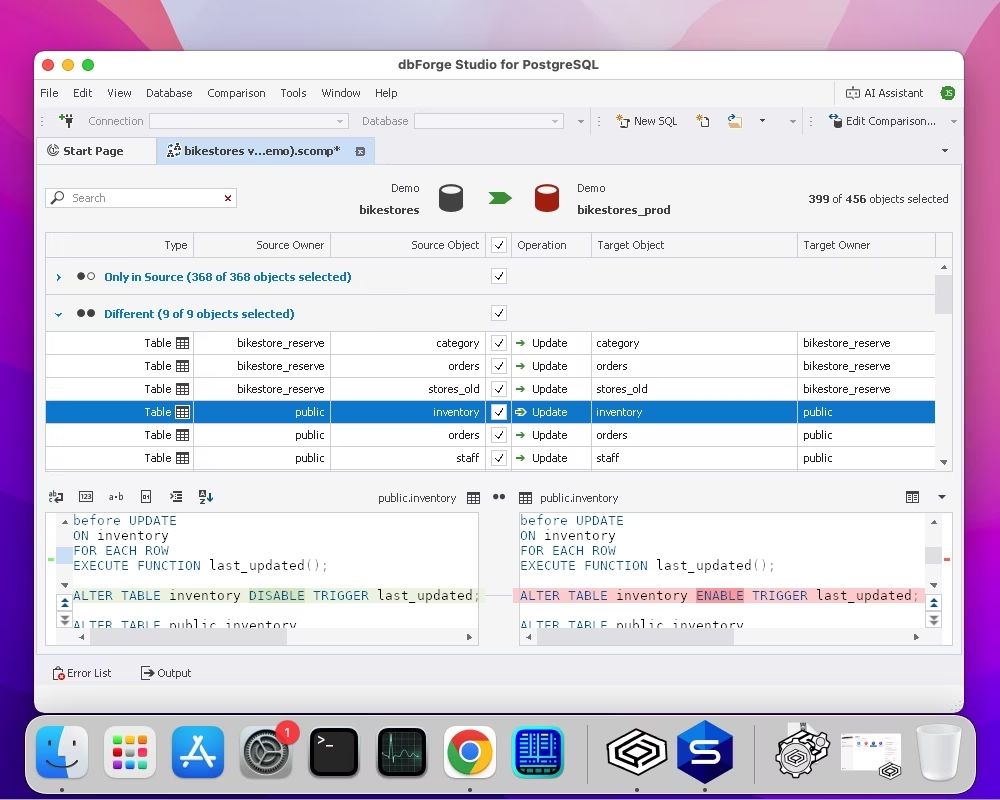
Schema and data comparison
The schema and data comparison features let you compare and synchronize database structures
and contents, ensuring consistency across environments. They are ideal for managing deployments, migrations,
or version control in multi-stage development pipelines.
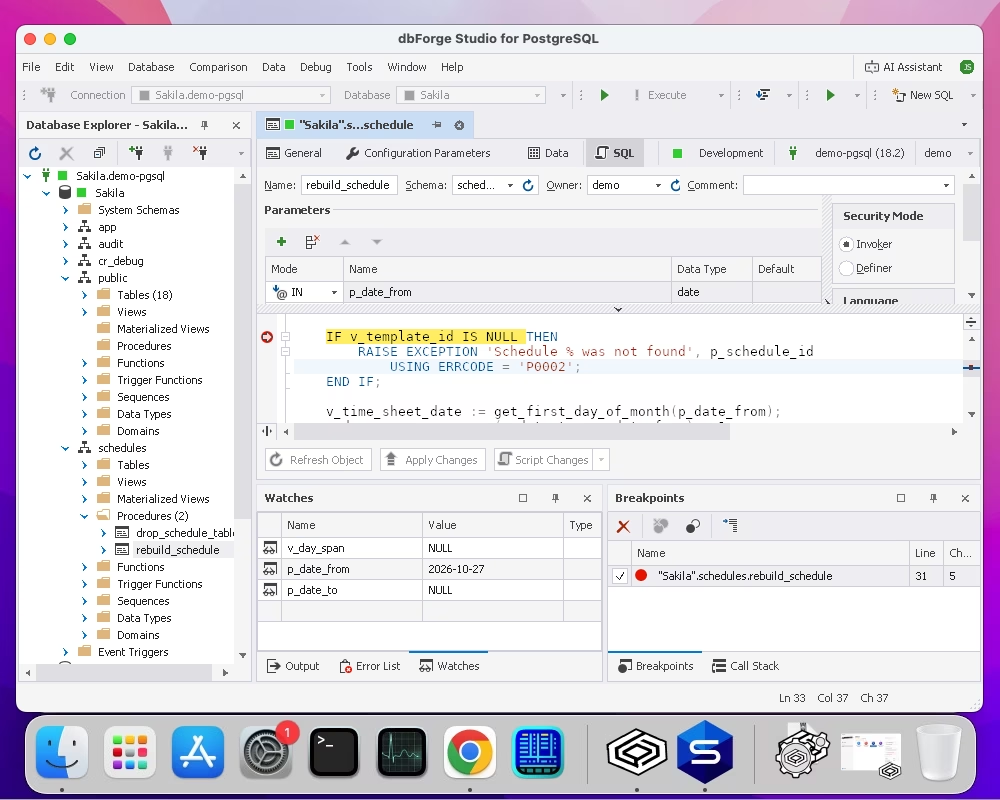
PostgreSQL Debugger
PostgreSQL Debugger integrated into dbForge Studio allows you to perform deep analysis of your code and find errors that affect SQL performance.
You can pause the execution of stored procedures, functions, and triggers to monitor their behavior and pinpoint issues.
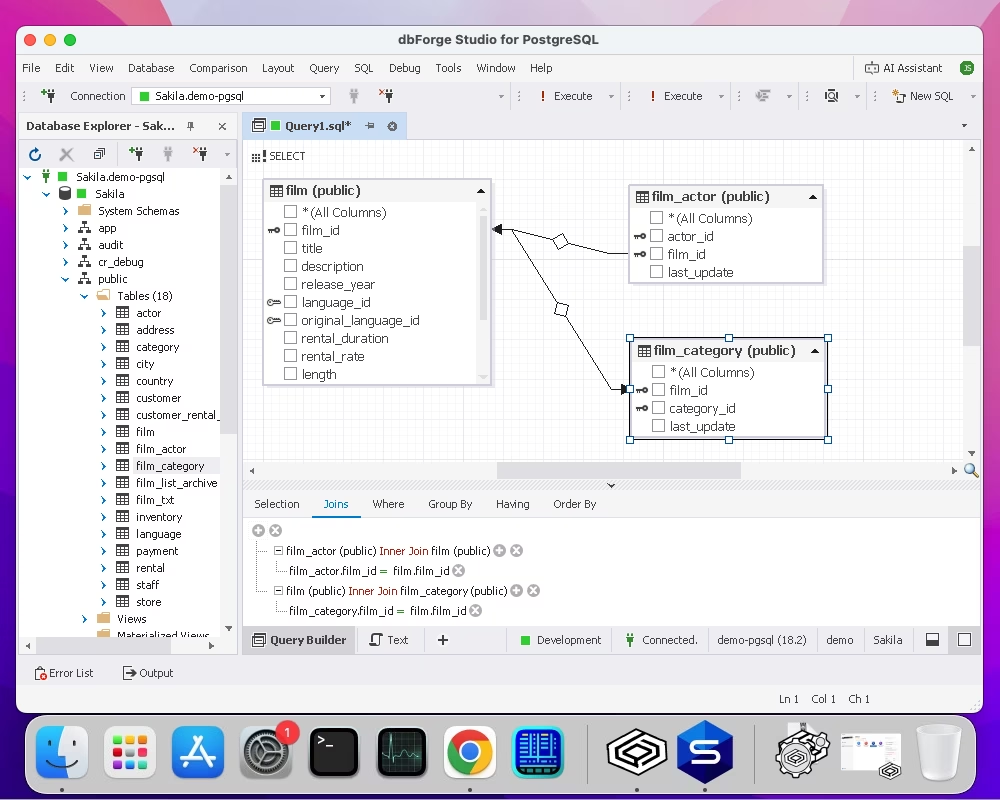
Visual Query Builder
With dbForge Studio for PostgreSQL, you do not need to write SQL to create valid queries. Visual diagrams enable you to build queries of any
complexity, apply filters, create JOINs between tables, and review the results immediately.
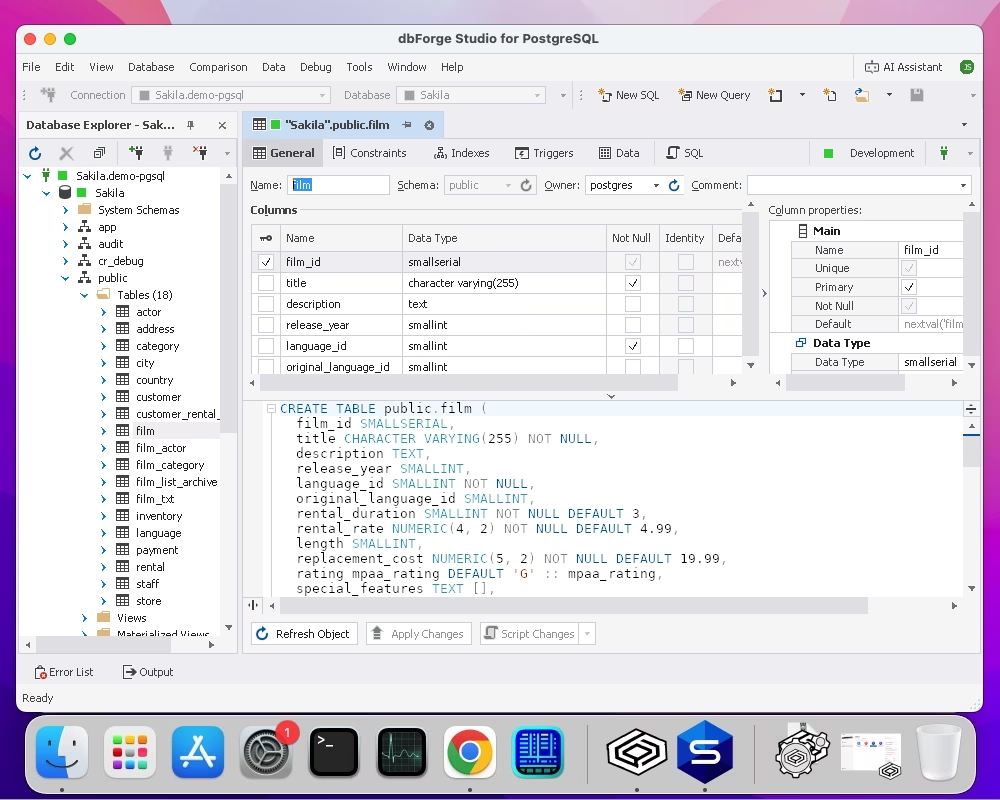
Visual object editors
The Studio provides an intuitive graphical interface for building databases, schemas, and tables. You do
not need deep knowledge of SQL to design and create database objects; however, the Studio generates the corresponding code in the background for further reference.
Cross-platform accessibility
Although dbForge Studio for PostgreSQL is a native Windows application, it's fully operational on macOS and
Linux via CodeWeavers' CrossOver solution. This ensures that, as a Mac user, you can enjoy all the power of
dbForge without sacrificing performance or usability. Beyond this, the Studio offers professional technical
support and a library of detailed documentation and tutorials to ensure that help is always within your
reach whenever you need it.
This powerful solution delivers the perfect balance of depth, speed, and usability. Whether you're
designing, debugging, deploying, or maintaining your databases, dbForge Studio for PostgreSQL has your back.
dbForge Studio for PostgreSQL
A feature-rich and versatile IDE for database development, management, and administration, as well as data management, analysis, and reporting
Conclusion
PostgreSQL clients for Mac significantly enhance the database experience, cutting down on repetitive tasks and
boosting productivity and output quality, especially when paired with proper SQL knowledge.
This article evaluated the most reliable and functional GUI tools designed for PostgreSQL database
specialists using macOS. This is a follow-up to a previous article where we focused on the top
Postgres GUI clients for Windows.
dbForge Studio for PostgreSQL has a fully functional 30-day free trial that will give you the opportunity to
thoroughly assess its features and capabilities and decide if it's exactly what you need.
FAQ
What is the best PostgreSQL GUI for Mac users?
There is no single best PostgreSQL GUI for Mac users. Each tool is designed for specific
functionalities. Tools
like Postico and TablePlus are easy to use and quick when you're working on a small job. For large or
more
professional database management, dbForge Studio for PostgreSQL is your best bet.
Is there a native Postgres client for macOS?
Absolutely. Native Postgres clients for macOS include TablePlus and pgAdmin. However, dbForge Studio
runs on macOS via CrossOver, creating a native-like compatibility.
Are there any free Postgres GUI tools for Mac?
Yes. pgAdmin, OmniDB, and the Express edition of dbForge Studio for PostgreSQL are free options. pgAdmin
is
open-source, while dbForge Express offers a subset of pro-level features at no cost.
How do I install the GUI tools for macOS?
Here's a quick guide on how to install some of the most popular PostgreSQL GUI clients for macOS.
Option 1: App Store Installation (SQLPro for Postgres)
- Open your App Store
- Search for “SQLPro for Postgres”
- Click Install and wait for it to finish
- Open the app, connect your PostgreSQL server, and start managing your databases
Note: SQLPro for Postgres is ideal for a minimal workflow without advanced features.
Option 2: Manual Download (Postico)
- Download the Postico app
- Move it to your Applications folder
- Open and connect it to your database using your credentials
Note: Postico is perfect if you want a clean UI and ease of use for common data
management tasks.
Option 3: Installing dbForge Studio for PostgreSQL
- Download and install CrossOver for Mac
- Download dbForge Studio for PostgreSQL
- Use CrossOver to install and run dbForge Studio on your Mac
Note: dbForge Studio for PostgreSQL is an advanced and all-in-one GUI client for Mac,
offering
unmatched functionality on macOS via CrossOver.
For more detailed instructions, see: How to Install dbForge Studio for PostgreSQL on macOS.
Can I use pgAdmin on Mac without Docker?
Of course. pgAdmin has a macOS installer that you can use through a browser interface. Docker is not a
required deployment method.
What GUI tools support PostgreSQL on Apple Silicon Macs?
Most modern PostgreSQL GUI Mac tools support Apple Silicon either natively or via Rosetta 2. TablePlus
and DBeaver run well, while dbForge Studio for PostgreSQL operates smoothly via CrossOver, which is
compatible with M1/M2 chips.
Does dbForge Studio for PostgreSQL work natively on Mac?
No, it doesn't. dbForge Studio is a Windows application, but it offers a native-like compatibility on
macOS using
CrossOver—a commercial solution that allows Windows apps to run on macOS without a virtual machine or
dual boot
setup.
How easy is it to install dbForge Studio on macOS?
Very easy and straightforward. Read this detailed
step-by-step guide to help you install both PostgreSQL and dbForge Studio on macOS.
What are the main advantages of dbForge Studio for PostgreSQL on Mac?
When you use dbForge Studio for PostgreSQL on Mac, you have access to its advanced features like a powerful
SQL editor,
schema comparison, data generation, query profiler, automation via CLI, extensive compatibility with
services like
Amazon Redshift, Supabase, Heroku, IBM Cloud, Alibaba Cloud, Amazon RDS, Amazon Aurora, and professional
technical support.
Is there a trial version of dbForge Studio for PostgreSQL for Mac?
Yes. A 30-day free trial is available. It's a great way to see if it works for your workflow on macOS.
What is the best lightweight PostgreSQL client for Mac to replace pgAdmin?
TablePlus, Postico, and Beekeeper Studio are the optimal choices if you are looking for a lightweight tool to replace pgAdmin. TablePlus and Postico are paid tools that offer native macOS experiences, while
Beekeeper Studio has a free Community edition.
What are the best tools for exporting large PostgreSQL databases?
If you need to export large PostgreSQL databases, consider pg_dump (a dedicated command-line utility for exporting PostgreSQL databases), DBeaver, DataGrip, or TablePlus.
These tools handle large exports efficiently.
What tools automate PostgreSQL schema changes and migrations in CI/CD pipelines?
Tools like Flyway, Liquibase, Atlas, and Bytebase enable version control and automated schema changes and database migrations. If you are setting up CI/CD for database management, these tools may be
what you are looking for.
What are the top cross-platform PostgreSQL management tools?
For cross-platform PostgreSQL management, check out DBeaver, DataGrip, or pgAdmin. These tools support PostgreSQL database operations on Windows, macOS, and Linux.


