A SQL editor is a tool that helps users write, format, and execute SQL queries, as well as interact directly with databases to retrieve, modify, and manage data.
SQL editors can be desktop applications or browser-based, varying significantly in their functionality. Some are lightweight editors designed primarily for writing and running queries, while others are full-featured database IDEs for DBAs and engineering teams (in the latter case, the SQL editor is often just one component of a broader IDE). In any case, SQL editors are indispensable for anyone who works with databases, providing not only a convenient workspace but also a range of coding assistance features.
So, what is the best SQL editor available? There is no universal answer, as the right choice always depends on many factors. To help you decide, we've prepared this comparison of the most popular SQL editors on the market. It includes detailed reviews of desktop and web-based solutions, both free and paid, and evaluates their functionality, including database compatibility, coding assistance, collaboration capabilities, AI-powered functionality, and pricing.
Quick comparison table of the best SQL editors
Before proceeding to the detailed reviews to decide which tool could be the best SQL editor, take a look at the comparison table below. It provides a quick side-by-side overview of the key features of the SQL tools selected for this article, from comprehensive IDEs such as dbForge Studio for SQL Server to lightweight tools like the free SQL editor DB Fiddle, and highlights the most essential options.
| Tool |
Free plan |
Compatibility |
AI features |
Code completion |
Data editing |
Best for |
 dbForge Studio for SQL Server
|
Free Express edition; free trial |
SQL Server, Azure SQL |
Integrated AI Assistant |
Yes |
Yes |
SQL Server development and DBA work |
|
|
Free |
SQL Server, Azure SQL |
GitHub Copilot |
Yes |
Limited |
Free Microsoft SQL Server administration |
|
|
Free |
SQL Server, Azure SQL, SQL DB in Fabric |
GitHub Copilot |
Yes |
Partial |
Lightweight SQL Server development |
|
|
Free Community edition; free trial |
Diverse SQL databases |
Available |
Yes |
Yes |
Multi-database work |
|
|
Free non-commercial; free trial |
Relational and NoSQL DBs |
JetBrains AI |
Yes |
Yes |
Advanced SQL coding across databases |
|
|
Free edition; free trial |
Diverse SQL databases |
Available |
Yes |
Yes |
Cross-platform SQL client |
|
|
Free (basic features)/paid |
Warehouses and databases |
SQL Assistant (third-party AI services) |
Yes |
Limited |
Collaborative SQL editing |
|
|
Free |
SQL Server, MySQL, Oracle, PostgreSQL, SQLite, etc. |
AI chat powered by ChatGPT |
Basic |
Limited |
Free online SQL practice |
|
|
Free |
MySQL, MariaDB, PostgreSQL, SQLite |
Not available |
Basic |
Limited |
Learning SQL and testing SQL queries |
List of the best SQL editor tools
In this section, you'll find reviews of some of the most popular SQL editors. While some are lightweight tools focused solely on writing and editing SQL code, others are full-featured database IDEs that support a wide range of database development and administration tasks, particularly for SQL Server. We evaluated each tool using the same criteria and compared the most essential features side by side.
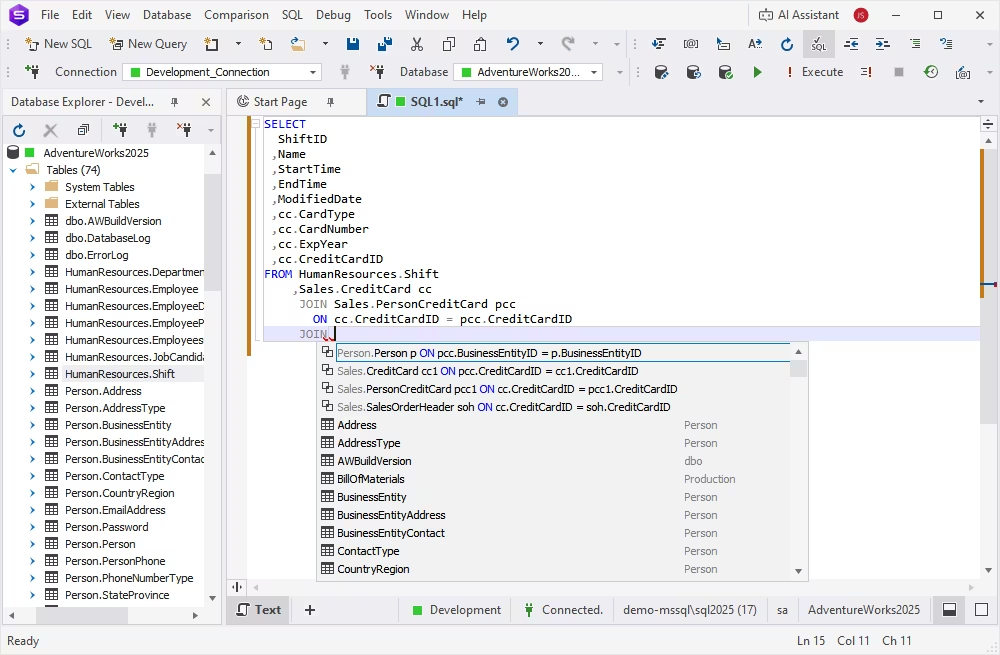
dbForge Studio for SQL Server is an AI-powered IDE for SQL Server, Azure SQL, and multiple related databases. It supports the entire database lifecycle, from database design and development to administration and automation, and one of its core features is a robust built-in SQL editor.
Designed for both database professionals and beginners, the editor improves every stage of SQL development and helps users work more efficiently. It includes IntelliSense-style code completion, syntax validation, SQL debugging, code formatting, reusable code snippets, and many other features that can accelerate SQL development at least twice. Another integrated tool called Data Editor also enables users to view, analyze, and edit table data visually without writing additional queries.
The AI Assistant can generate SQL queries from natural-language prompts, analyze existing queries, identify errors, and suggest optimizations to improve their performance and readability.
Pros
- AI Assistant for SQL development
- T-SQL Debugger
- T-SQL code analysis
- Data analysis and visualization
- Documentation and video tutorials
- Personalized support from the vendor
Cons
- Advanced options are available in paid editions
Key features
- Smart code autocompletion and syntax validation
- Code formatting
- Code snippets library
- Query history
- Direct query execution against the database
- Data Editor with rich data visualization and analysis options
- Visual Query Builder
- Integrated Source Control
Compatibility
Windows; runs on macOS and Linux via CrossOver or Wine
Pricing
- Free: Express edition (limited functionality)
- Paid: Subscription-based (from $249.95 per year) or perpetual license (from $499.95)
- Free trial: 30 days
dbForge Studio for SQL Server
A powerful, all-in-one IDE that helps SQL Server professionals design, develop, manage, and optimize databases faster and with confidence
SQL Server Management Studio (SSMS)
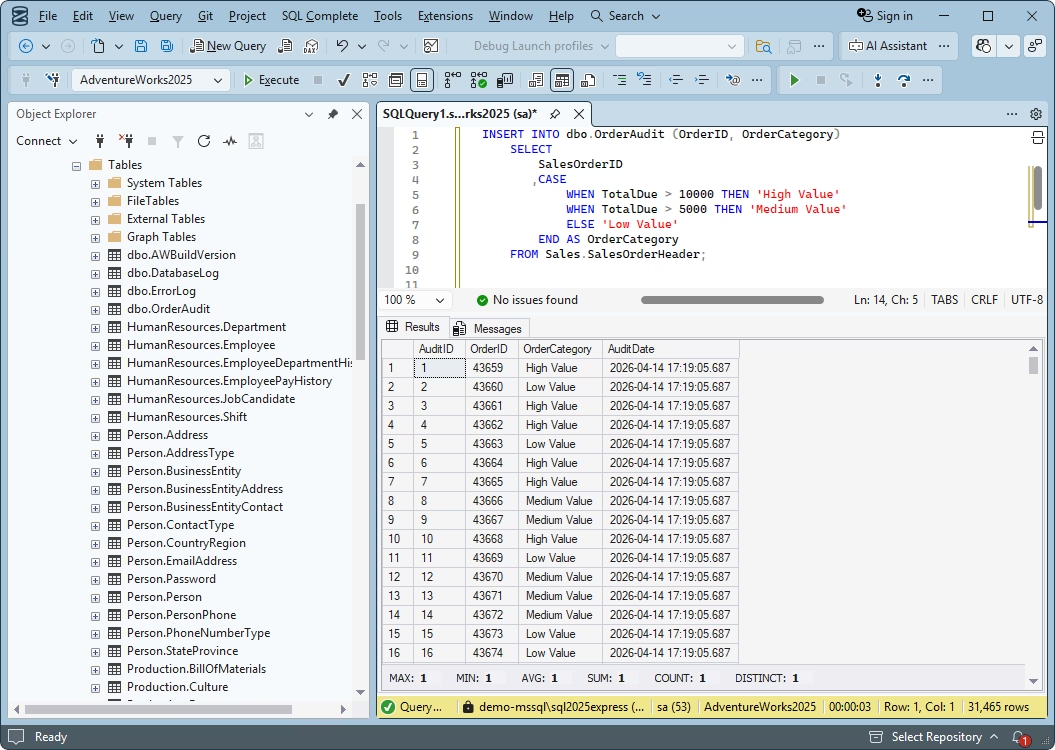
SQL Server Management Studio (SSMS) is Microsoft's official IDE for SQL Server development and administration. It remains one of the most widely used tools among SQL Server professionals, even with more powerful alternatives available. Teams that work primarily with SQL Server usually prefer using Microsoft's native toolset, including SSMS.
The SQL editor available in this IDE features Microsoft's IntelliSense technology for code completion, syntax assistance, and error detection. In recent versions, integration with GitHub Copilot has added AI-powered capabilities for SQL development, helping users generate, explain, and improve SQL code. Another advantage of SSMS is its extensibility: the SQL editor's functionality can be expanded with both Microsoft-provided and third-party add-ins.
Pros
- IntelliSense-based code completion
- Integrated GitHub Copilot for SQL coding
- Full integration with the Microsoft ecosystem
- Extensibility via plugins
- Support and regular updates from Microsoft
Cons
- Limited data editing functionality
- Support for Microsoft SQL environments only
Key features
- Built-in T-SQL Editor
- Code snippets
- Query execution against the database
- Visual execution plan
- Integration with Git
Compatibility
Windows
Pricing
Free
VS Code + MSSQL extension
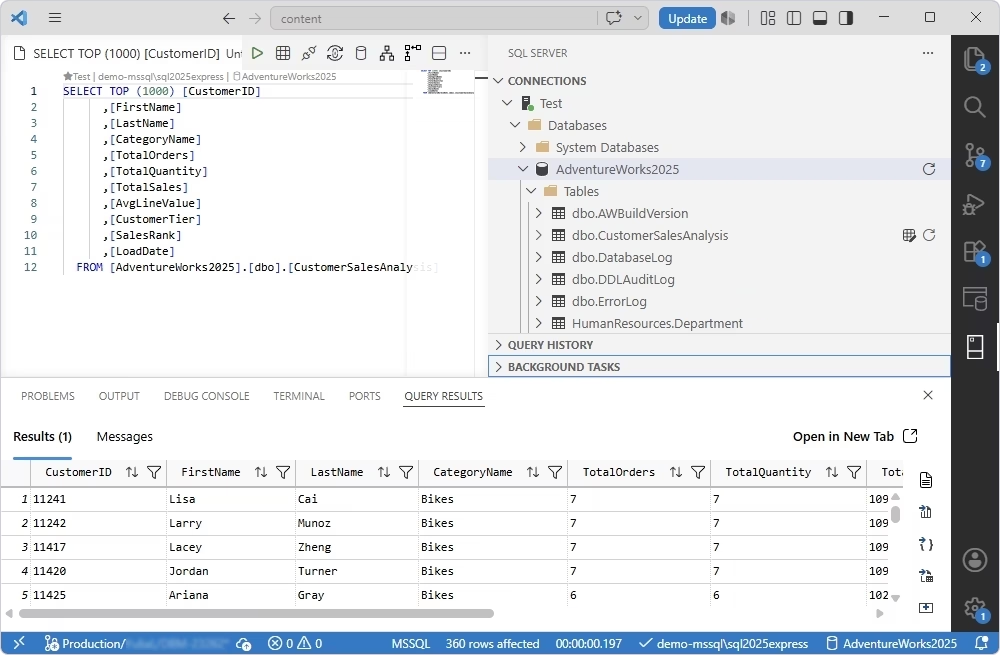
Visual Studio Code (VS Code) is a popular free and lightweight source code editor developed by Microsoft. With the Microsoft MSSQL extension installed, it becomes a powerful environment for developing and managing SQL Server databases. It also serves as a modern replacement for the recently retired Azure Data Studio and, for many development tasks, can be used as an alternative to SQL Server Management Studio (SSMS).
The MSSQL extension enables you to write and execute T-SQL queries, explore database schemas, and manage SQL Server instances directly from the VS Code workspace. Therefore, developers can perform most standard SQL development tasks without relying on a heavier IDE such as SSMS.
Pros
- IntelliSense-based T-SQL editing
- High extensibility via VS Code add-ins
- Integrated GitHub Copilot AI
- Git integration
- Lightweight and fast
Cons
- Limited SQL refactoring
- Limited data editing
- Complex configuration for advanced functionality via add-ins
- Not suitable for advanced database workflows
Key features
- T-SQL editing with syntax highlighting and language support
- IntelliSense for code completion, object names, parameters, keywords, and syntax suggestions
- Real-time syntax validation and error highlighting
- Query execution for single statements, selected code, or entire scripts
- Execution plans for query analysis and optimization
- AI-powered query generation, management, and code completion
Compatibility
Windows, macOS, Linux
Pricing
Free
DBeaver
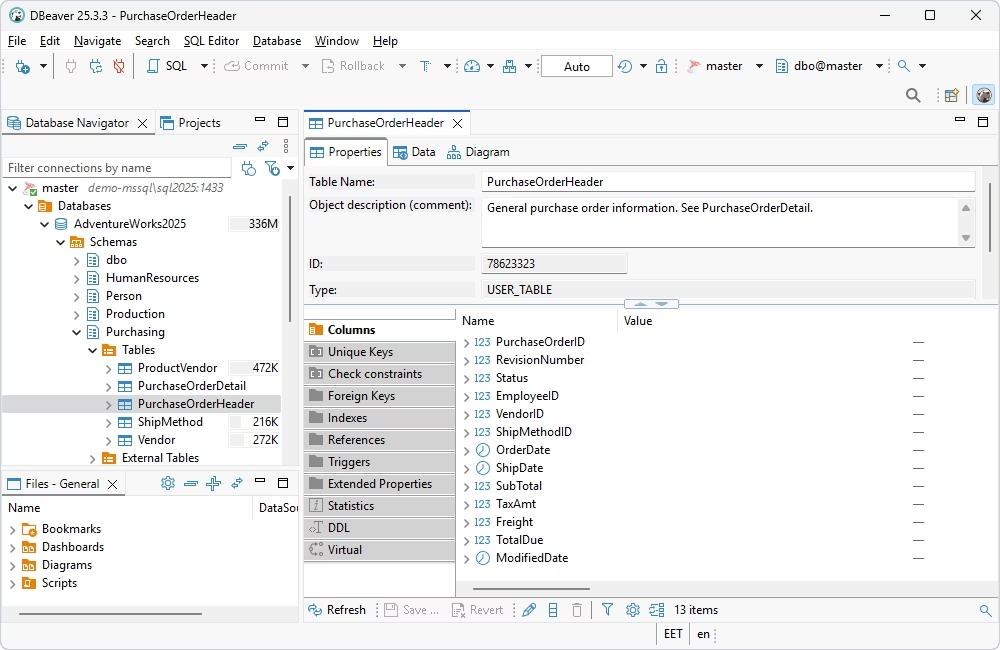
DBeaver is a cross-platform, multi-database SQL client that supports more than 100 database management systems. It offers rich functionality for database development and administration, including a robust SQL editor available in both the free Community edition and the commercial editions.
The SQL editor provides a set of coding productivity features, such as syntax highlighting, code completion, SQL formatting, query execution, and query history. It also allows users to run queries directly and work with multiple SQL scripts simultaneously. The integrated data editor enables viewing, editing, filtering, sorting, grouping, and analyzing data in a visual mode. The AI helper can assist with SQL query generation, optimization, and troubleshooting.
Overall, DBeaver is one of the most popular choices for individual developers and teams looking for a flexible, cross-platform database management tool, with the SQL editor serving as one of its key capabilities.
Pros
- Decent coding assistance options
- AI-powered SQL query generation
- Data visualization and editing
- Visual Query Builder
- Git repository integration
Cons
- Advanced functionality is restricted to paid editions
- Lack of code analysis and debugging
- Paid support options
Key features
- SQL editor with smart code completion
- SQL code formatting
- Code snippets library
- SQL refactoring
- History of executed SQL statements
- Visual SQL EXPLAIN plan
- Data editing
Compatibility
Windows, macOS, Linux
Pricing
- Free: Community edition
- Paid: Subscription-based (from $11 per month)
- Free trial: 14 days
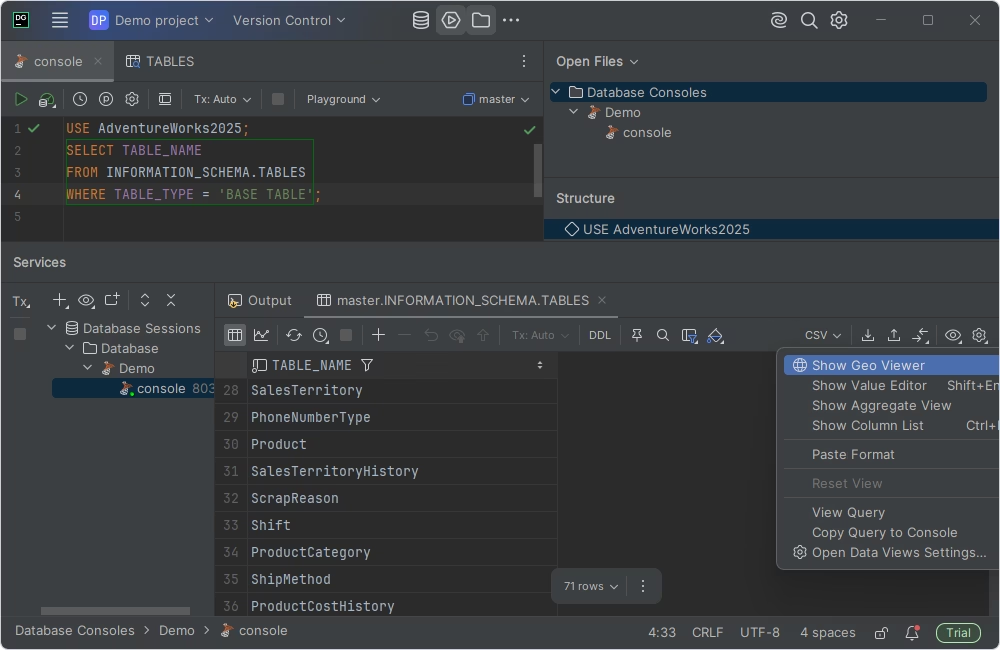
DataGrip
DataGrip is a cross-platform IDE designed for developers who prioritize code-centric workflows, productivity, and support for multiple database platforms. It integrates with other JetBrains products, making DataGrip a popular choice among developers who already use them.
A powerful SQL editor is one of the central DataGrip features. It offers intelligent code completion, on-the-fly code analysis, syntax highlighting, refactoring, and other advanced coding assistance features. Although DataGrip does not provide the same database administration capabilities as some dedicated database IDEs, it is often chosen by specialists who value an exceptional SQL editing experience and multi-database support, particularly on macOS and Linux.
Pros
- AI Assistant for advanced SQL coding
- DDL and DML automation
- Plugin ecosystem and JetBrains integrations
- Git integration
Cons
- Lack of code debugging
- Complex UI that requires time to master
Key features
- Smart SQL editor with autocompletion and code refactoring
- Smart query console with local history
- Query profiling
- Advanced data viewer and editor
- Multiple connectors for various data sources
Compatibility
Windows, macOS, Linux
Pricing
- Free: Non-commercial use
- Paid: Subscription-based (from $10.90 per month)
- Free trial: 30 days
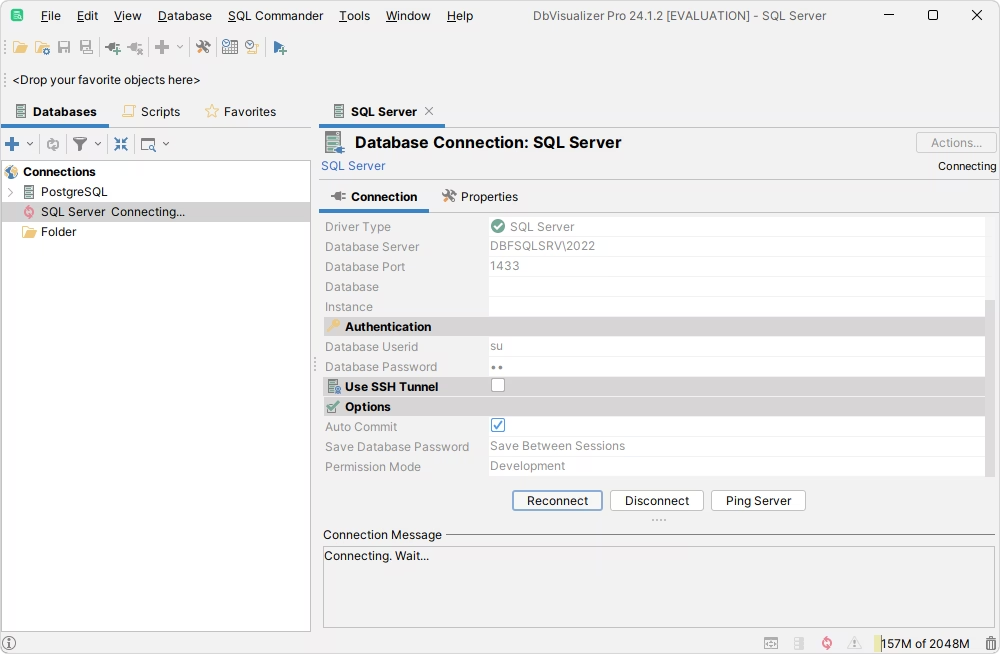
DbVisualizer
DbVisualizer is a universal, cross-platform database client with a built-in SQL Editor. It is a popular choice for developers and database administrators who need a consistent environment for working across multiple databases. The tool provides everything required for everyday database development, querying, and design tasks.
DbVisualizer focuses primarily on SQL development, data exploration, and secure database connectivity rather than advanced administration. Its SQL editor includes a comprehensive set of productivity features, such as syntax highlighting, intelligent code completion, SQL formatting, code refactoring, query profiling, and script execution.
Pros
- AI support for query generation and analysis
- SQL formatting tools
- UI customization with various themes and options
Cons
- Lack of code debugging and analysis
- Limited documentation and learning resources
Key features
- SQL editor with intelligent autocompletion and syntax checking
- SQL code formatting
- Code snippets
- SQL refactoring
- Visual query builder
- Data visualization, search, and inline editing
- Query performance analysis (EXPLAIN plans)
Compatibility
Windows, macOS, Linux
Pricing
- Free: Basic functionality
- Paid: Subscription-based (depends on the license type, from $199/year per user)
- Free trial: 21 days
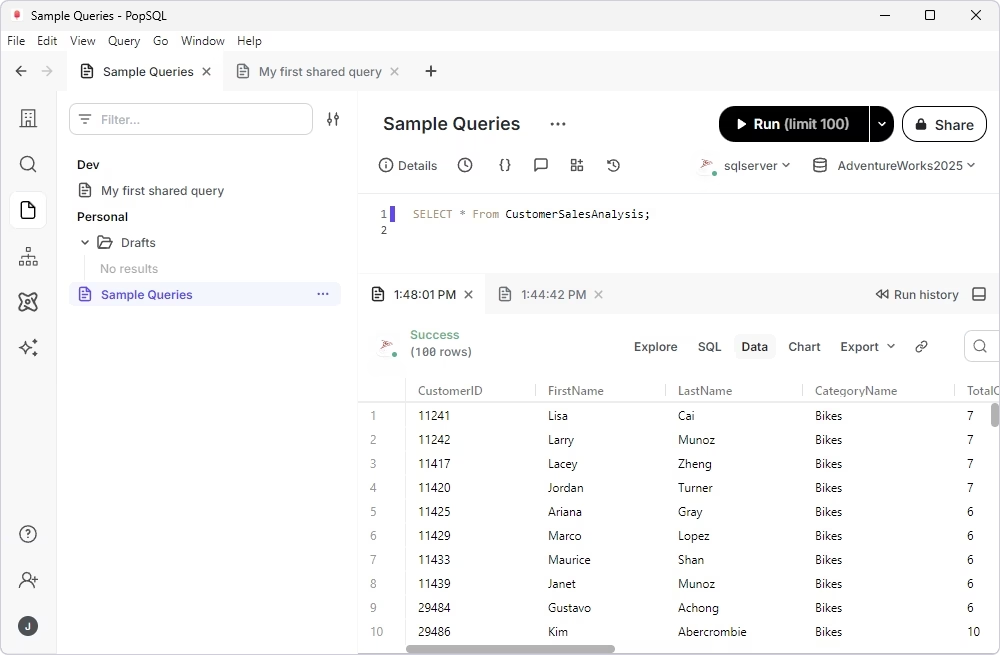
PopSQL
PopSQL is a SQL editor and database management tool that allows users to write, execute, share, and visualize SQL queries, as well as collaborate on query results. It is popular among teams that work with multiple databases and rely on shared SQL workflows. One of its goals is to simplify data analysis by combining SQL editing, dashboards, and reporting in a single platform.
PopSQL supports a wide range of SQL databases and cloud data warehouses. While it is not a full-featured database IDE like some of the tools discussed earlier, it offers a capable SQL editor with features such as syntax highlighting, autocompletion, query history, versioning, and real-time collaboration. These capabilities make it a common choice for data analysts, software developers, and business intelligence teams that need a collaborative environment for writing, testing, and sharing SQL queries.
Pros
- AI-powered SQL Assistant
- User-friendly interface with minimal setup
- Collaboration and query-sharing capabilities
- Multi-database support
- Built-in dashboards
- Shared repository of SQL queries
Cons
- Advanced features are available in paid editions only
- Lack of functionality for database development
- The product shuts down on September 1, 2026
Key features
- SQL editor with syntax highlighting, code autocompletion, and SQL formatting
- Collaboration (sharing queries, leaving comments, and maintaining a centralized query library)
- Support for query variables and reusable parametrized SQL queries
- Version history
- Charts and dashboards for query results visualization
- Scheduling query execution
- Integrations with Slack, Google Sheets, and GitHub
Compatibility
Windows, macOS, Linux
Pricing
- Free: Basic functionality
- Paid: Subscription-based (from $19/month)
SQL Fiddle
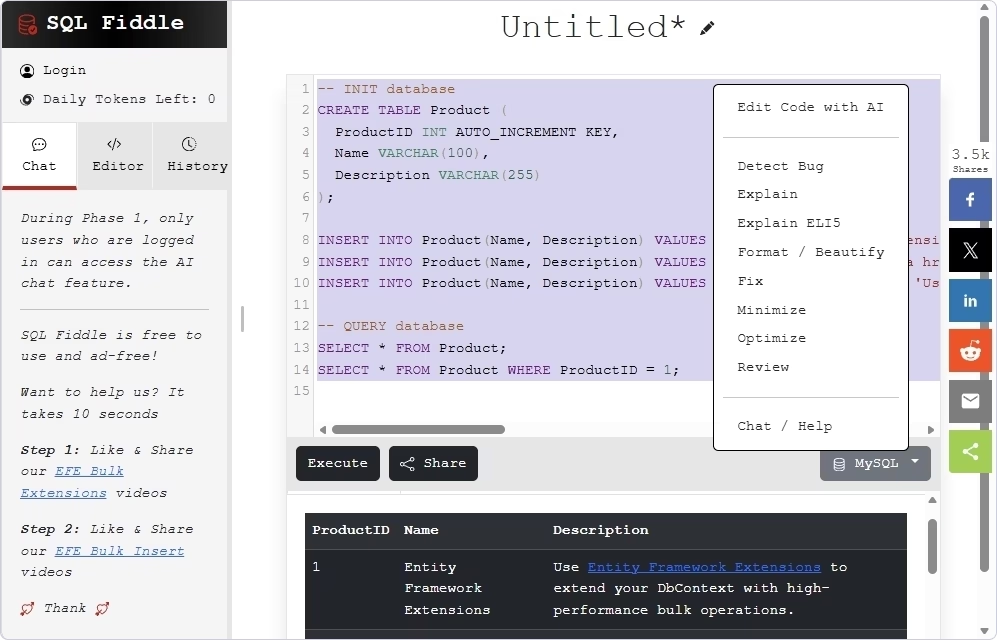
SQL Fiddle is a free online SQL editor that lets users write, execute, and share SQL queries directly in a web browser without installing any software. It is primarily intended for learning SQL, testing queries, creating reproducible examples, and demonstrating database behavior in an isolated environment.
SQL Fiddle supports all major database management systems and includes AI assistance (powered by ChatGPT) for SQL query generation and coding support.
Pros
- No need for installation or separate configuration
- Support for multiple SQL dialects
- Strong collaboration capabilities
- Real-time code execution
- AI-powered query generation
Cons
- Not intended for production database development
- Limited SQL editing functionality compared to desktop IDEs
Key features
- Multi-database compatibility (all major systems)
- Schema builder
- Sample data generation
- Direct query execution
- Sharing SQL queries via links
- Simple and convenient UI
Compatibility
Web-based, available via a browser on any OS
Pricing
Free
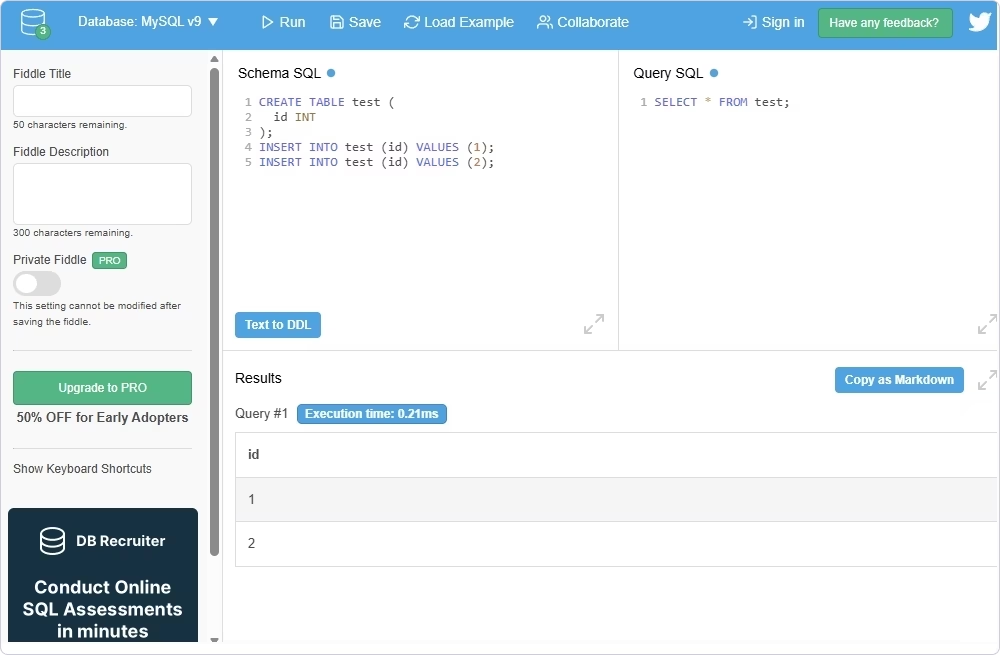
DB Fiddle
DB Fiddle is a suite of web-based SQL notebooks that lets users write and execute SQL queries for MySQL, MariaDB, PostgreSQL, and SQLite directly in the browser, in real time. It requires no installation or server configuration. Users can also share SQL sessions through unique URLs for collaboration and troubleshooting.
DB Fiddle is widely used by SQL beginners who learn database concepts, software developers for testing and validating SQL queries, and database administrators for troubleshooting SQL-related issues. It is lightweight, browser-based, and well-suited for quick experiments, demonstrations, and knowledge sharing.
Pros
- No need for installation and configuration
- Accessible through a web browser
- Separate scripts for database setup and query execution
- Simple sharing of SQL examples via links
- Modern UI
Cons
- Not suitable for complex database development
- Insufficient SQL editing capabilities
- Possible unstable performance
Key features
- Online SQL editor available via a web browser
- Multi-database support
- Creation of database objects and test data
- Instant query execution
- Generation of permanent links for sharing SQL scripts
Compatibility
Web-based, available via a browser on any OS
Pricing
Free
Online SQL editors vs desktop SQL editors
Modern SQL editors are available as either desktop applications or web-based tools, and this article has covered some of the most popular options in both categories. As you have seen, these two types of SQL editors are designed for different use cases.
Online SQL editors are typically lightweight tools focused on writing and executing SQL queries. Their main benefits include instant access through a web browser without installing software or configuring a local database environment, as well as convenient collaboration and sharing features.
Desktop SQL editors, by contrast, provide a much more comprehensive feature set, especially when they are part of a full-featured database IDE. They offer more powerful features, such as intelligent code completion, debugging, source control integration, and query performance analysis.
The table below summarizes the key differences between online and desktop SQL editors.
| Feature |
Online SQL editors |
Desktop SQL editors |
| Installation |
No installation required; accessed through a web browser |
Installed locally on a computer |
| Setup |
Ready to use instantly |
Requires database connection setup |
| Features |
Basic SQL writing, editing, and query execution |
Comprehensive development and database management features, including code completion, debugging, formatting, and syntax checking |
| Performance |
Depends on internet connection |
Generally faster and capable of handling large databases |
| Database access |
Usually temporary or cloud-hosted databases |
Direct connections to local, remote, and cloud databases |
| Collaboration |
Easy to share queries via links |
Relies on source control or shared projects |
An online SQL editor is suitable in the following scenarios:
- Learning SQL without installing software
- Quick query testing or demonstration
- Sharing SQL code examples
- Working on devices where it is impossible to install a desktop editor
A desktop SQL editor (typically provided by full-featured IDEs) is better in the scenarios listed below:
- Professional database development
- Writing and debugging complex SQL scripts
- Analyzing and optimizing query performance
- Administering complex database environment
- Maintaining large database environments
Free SQL editors vs paid SQL editors
Price is often one of the deciding factors, and many users look for a free SQL editor to reduce costs.
In many cases, free SQL editors provide functionality for learning SQL, writing and testing queries, and performing basic database administration. Paid tools deliver advanced features such as intelligent code completion tailored to a specific SQL dialect, customizable formatting rules, data editing, query history, professional support, and collaboration features.
This article covers both free and paid SQL editors. As you may have noticed, several commercial desktop tools also offer free editions. For example, if you need a free SQL editor for SQL Server, you can choose from SQL Server Management Studio (SSMS), the free Express edition of dbForge Studio for SQL Server, or DataGrip's non-commercial version.
How to choose the best SQL editor
After comparing some of the most popular and user-friendly desktop and online SQL database editors, the next question is: how do you choose the best one? The answer depends on your specific workflows, requirements, and level of experience. Let us evaluate a few factors to identify the best SQL editor that matches your professional needs.
Start with your database engine
The first thing to consider is the database management system (DBMS) you use. Although many SQL editors support multiple database systems, some of them are specifically optimized for a particular engine.
If you primarily work with SQL Server, look for an editor that fully supports T-SQL and delivers administrative capabilities (e.g., dbForge Studio for SQL Server or SSMS). If you manage diverse database platforms regularly, choose a multi-database editor (e.g., DataGrip, DBeaver, or DbVisualizer).
Decide between online and desktop use
Your workflow always influences the choice between a browser-based and a desktop SQL editor.
Online SQL editors are ideal for learning SQL, sharing examples, or testing queries. Since they run in a web browser, they require no installation and can be accessed from almost any device with an internet connection.
Desktop SQL editors, on the other hand, are better suited for professional development and database administration. If you regularly work with production databases, a desktop solution is usually the better choice.
Check SQL editing features
While basic syntax highlighting is now standard, not all tools deliver advanced editing capabilities. If your work involves managing production databases, especially in enterprise environments, you will definitely need the following features in your SQL query editor:
- Intelligent code completion
- Automatic code formatting with customizable rules
- Code snippets and templates
- Query history
- Database object search and navigation
- Query execution plans for performance analysis
- AI-powered coding assistance (query generation, optimization, and explanation)
The more time you spend writing SQL, the more valuable these productivity features become.
Review security and production requirements
If you plan to use a SQL editor with production databases, security should be one of your top priorities.
Choose a tool that supports secure database connections, encrypted communication, and reliable credential management. When a SQL editor is available as a part of a more feature-rich IDE with advanced database administration features, you can also expect support for database authentication methods and role-based permissions.
You should also look for features that reduce the risk of accidental errors. Useful options include confirmation prompts before executing destructive statements, transaction management, query execution plans, and activity logging. These capabilities are typically found in full-featured database IDEs rather than lightweight web-based SQL editors.
Compare pricing and team fit
Finally, consider your budget and whether you'll be working independently or as part of a team.
If you primarily work with SQL Server, you can choose SSMS or Visual Studio Code, both of which offer native SQL Server support and robust functionality.
However, if you need advanced productivity features, comprehensive database management tools, professional support, or enterprise-grade capabilities, a third-party SQL IDE may provide greater long-term value.
Which SQL editor should you choose?
The best SQL editor is the one that matches your specific environment, responsibilities, and workflow, and the feature set is not the only deciding factor.
SQL Server developers and DBAs working in enterprise environments often choose dbForge Studio for SQL Server for its robust toolset and advanced SQL editing capabilities. SSMS remains a popular free option for native Windows-based SQL Server administration.
Professionals who work with multiple database platforms across different operating systems often prefer DBeaver or DataGrip, as both provide multi-database support and advanced SQL development features.
For beginners learning SQL, a free SQL editor like SQL Fiddle may offer a convenient way to write and execute queries without installing software or configuring a database environment.
If you would like to evaluate dbForge Studio for SQL Server, download the fully functional free trial and explore all of its advanced features for 30 days under the real workload.
FAQ
What is the best SQL editor?
The best SQL editor is the one that best fits your workflow, database platform, and professional requirements. If you primarily work with SQL Server and manage enterprise environments, a dedicated IDE such as dbForge Studio for SQL Server is an excellent choice with its comprehensive SQL editor and overall database development and management capabilities. If you develop SQL for multiple database systems, a cross-platform IDE like DataGrip may be a better fit. For learning SQL, testing queries, or quickly sharing code, free online SQL editors such as SQL Fiddle or DB Fiddle will be a simple solution.
Which free SQL editor should I use?
The answer depends on how you plan to use it. If you only need to write and test SQL queries occasionally, a free online SQL editor is usually sufficient. If you need more advanced SQL editing and database management features, consider the free editions of desktop SQL IDEs discussed in this article. If you work primarily with SQL Server, SSMS and Visual Studio Code are both excellent free options with native Microsoft support.
Which online SQL editor is the best?
Most online SQL editors offer similar core functionality, including writing and executing SQL queries directly in a web browser without installing software or configuring a local database environment. SQL Fiddle and DB Fiddle both support multiple database systems and allow users to share queries. SQL Fiddle also integrates an AI chat powered by ChatGPT for query generation and testing.
Which SQL editor works best on Mac?
Several popular SQL IDEs, including Visual Studio Code, DBeaver, DataGrip, and DbVisualizer, offer native support for macOS. Although dbForge Studio for SQL Server is designed for Windows, it can also run on macOS using compatibility solutions such as CrossOver or Wine. Web-based SQL editors are platform-independent and work in any modern browser, making them a convenient choice regardless of your operating system. When choosing a SQL editor for macOS, it is often more important to consider factors such as database compatibility, SQL editing capabilities, and database management features than the operating system itself.
Which SQL editor is best for SQL Server?
If you are looking for the most feature-rich tool, dbForge Studio for SQL Server offers one of the most comprehensive sets of SQL development and database management tools available. SSMS, Microsoft's official and free IDE for SQL Server, remains the standard choice for administration and development. In addition, many modern SQL IDEs provide strong SQL Server support along with SQL editing features.