
dbForge Studio for PostgreSQL
AI-powered IDE for database development, management, and data analysis across PostgreSQL and related cloud services
Teams migrate from Heroku Postgres for many reasons: infrastructure changes, rising costs, performance requirements, cloud consolidation, compliance needs, or a broader move to AWS, Azure, GCP, Supabase, Neon, or self-hosted PostgreSQL. Whatever the destination, moving a production database is more than a matter of running a dump and restoring it elsewhere.
The real risk is in everything around the migration: preserving data integrity, minimizing downtime, validating the target database, and switching the application over safely. A migration that completes technically but leaves behind missing records, inconsistent sequences, broken extensions, or an improperly configured application can be more damaging than the downtime it was meant to avoid.
There is no single reason to move away from Heroku Postgres. For some, database migration is part of a larger decision to move the entire application stack to another provider. For others, it's the necessity to maintain the database on a different managed PostgreSQL service or in a self-managed environment, while the application remains on Heroku. Some of the most common reasons for migration include the following:
Migration is often justified when the database no longer fits the direction of the application or the team's operational requirements. This move is particularly reasonable when the application itself is already leaving Heroku. In that situation, migrating the database as part of the broader infrastructure transition can eliminate unnecessary dependencies and put the application and database in the same environment.
It can also make sense when a managed PostgreSQL provider offers a better geographic or network location relative to the application servers. Keeping the database close to the workloads that access it can reduce network latency and simplify connectivity.
Finally, migration may be warranted when Heroku Postgres no longer fits the team's operational or budget requirements. That might mean the available database configuration does not provide the desired performance, observability, or control, or that the total cost has become difficult to justify.
That does not mean every team should leave Heroku Postgres. A migration has its own engineering cost and introduces production risk, so the expected operational or business benefit should be significant enough to justify the change.
Sometimes the safest migration strategy is not to migrate yet. Staying on Heroku may be the better choice when the database is stable, the application has no broader infrastructure migration planned, or the team does not currently have enough time and expertise to perform and validate a production database migration.
It is also reasonable to delay the move when the target provider has not been selected. Choosing a destination based solely on price can create a new set of operational problems later, particularly around backups, monitoring, networking, connection limits, and recovery procedures.
Before committing to a migration, teams should audit the existing Heroku Postgres setup, document its dependencies and operational requirements, and test the proposed migration path against a representative copy of the production database. If the benefits are not yet clear, or the migration cannot be rehearsed safely, there is little reason to rush the cutover.
There are three common approaches to migrating a Heroku Postgres database: dump and restoration, provider-specific import tools, or replication-based migration. The right choice depends less on the migration method itself and more on the characteristics of the database and the cutover requirements.
Key factors include database size, write activity, acceptable downtime, PostgreSQL and extension compatibility, and the capabilities and restrictions of the target platform. A small database with a simple application may be migrated safely with a straightforward dump and restoration. A large, write-heavy production database with a short downtime window may require continuous replication or a migration service instead.
For small and medium-sized databases, a logical dump followed by a restoration is usually the simplest and most common approach. PostgreSQL's native pg_dump and pg_restore tools are quick, portable, and give the team direct control over the export and import process. A typical flow is as follows.
pg_dump -Fc "$HEROKU_DATABASE_URL" > heroku.dump
pg_restore -d "$TARGET_DATABASE_URL" --jobs=4 heroku.dump
The exact options should be adapted to the target provider, PostgreSQL versions, roles, extensions, and security model. The important point is that the dump represents a point-in-time copy. If the application continues writing to Heroku while the dump is being transferred and restored, those later changes will not automatically appear in the target.
Heroku's PGBackups feature is intended for moderately loaded databases up to 20 GB. Heroku warns that backups can time out for heavily loaded databases, databases larger than 20 GB, databases with many schemas, or databases containing large objects. For databases outside those conditions, Heroku recommends using a different logical-backup approach, including running pg_dump directly.
Size alone should not determine the migration strategy. A 15 GB database receiving thousands of writes per second can be harder to migrate safely than a mostly idle 50 GB database. Likewise, extension compatibility can make an otherwise simple dump more complicated: the target must provide compatible extensions and versions, or the dump may require adjustment before it can be restored cleanly.
Some PostgreSQL providers offer their own migration commands or migration interfaces that automate part of the dump-and-restore process. These can be useful when moving directly from Heroku because they may handle connection setup, provisioning, compatibility checks, and the initial import for you.
For example, Fly.io documents a dedicated Heroku import flow. Its import command performs pre-checks and transfers the database into a Fly Postgres instance. However, Fly explicitly warns that data created by the Heroku application during the migration will not be transferred. To ensure the target contains all data, the application should be taken offline or placed in the read-only mode during the migration.
This limitation illustrates an important distinction: a provider import tool can make the initial transfer easier, but it does not necessarily solve the live synchronization problem. Before choosing one, check whether the tool supports ongoing replication, how it handles writes during the import, what PostgreSQL versions it supports, and how it treats Heroku-specific extensions or database objects.
Larger production databases can require a different approach when taking the application offline for the duration of a dump and restoration is unacceptable. In these cases, teams may use logical replication, third-party replication tools, or a provider-assisted migration service to keep the target synchronized while the source remains live.
The general pattern is to perform an initial copy of the database and then continuously replicate changes made on Heroku. Once the target has caught up with the source, the application is placed into maintenance or the read-only mode, the final changes are synchronized, and the application is pointed at the new database. This can reduce the final cutover from hours to minutes or less, depending on the system and migration method.
In practice, the decision can be summarized simply: use dump and restoration when the database is small enough and the downtime window is acceptable; use a provider import tool when it fits the target platform and its write-handling limitations are acceptable; and consider replication when database size, write volume, or downtime requirements make a one-shot transfer impractical. Whatever method you choose, rehearse it against a representative copy of production before the final cutover.
| Migration method | How it works | Downtime | Best for | Advantages | Limitations |
|---|---|---|---|---|---|
| Dump and restoration | Create a PostgreSQL dump with pg_dump and restore it on the target with pg_restore. | Usually requires downtime or a write freeze for the final migration. | Small to medium databases and straightforward migrations. | Simple, widely supported, and easy to script. Gives you direct control over the migration process. | Large databases can take a long time to dump and restore, and writes made after the dump are not automatically transferred. |
| Provider import tools | Use migration or import functionality provided by the destination database provider to transfer the Heroku PostgreSQL database. | Varies by provider and migration workflow. | Teams moving to a managed PostgreSQL service with a supported import workflow. | Can simplify setup and data transfer while reducing the amount of migration infrastructure you need to manage manually. | Features, supported source configurations, PostgreSQL versions, extensions, and migration options vary between providers. |
| Replication | Keep the target database synchronized with the source while the application continues running, then switch application traffic during cutover. | Can reduce downtime to a short cutover window. | Large production databases and applications that require minimal downtime. | Reduces the amount of data that must be transferred during the final cutover and can keep the target synchronized until migration. | More complex to configure and operate. Replication compatibility, extensions, permissions, and provider restrictions must be verified. |
| Manual GUI-assisted validation | Use a PostgreSQL database tool to inspect the source and target, compare database objects, run validation queries, and review critical data after migration. | Depends on the underlying migration method. | Validation, troubleshooting, and migrations where visual inspection of database objects is useful. | Makes it easier to compare tables and objects, inspect data, identify differences, and investigate migration problems. | Not a replacement for a complete migration strategy and can be time-consuming for large databases or highly automated environments. |
The most important part of a Heroku Postgres migration is not the command that copies the database. It is the preparation around that command. A thorough checklist helps prevent the three problems that matter most in a production migration: data loss, unexpected downtime, and a target database that cannot be restored or used correctly.
Work through these checks before scheduling the final cutover.
Before choosing a migration method, establish exactly what exists in the Heroku Postgres database. At least record the following:
The PostgreSQL version deserves particular attention. Heroku's migration preparation guidance recommends gathering version information before starting the migration and, where a PostgreSQL upgrade is also required, separating the version upgrade from the migration itself. Keeping those changes independent makes failures easier to diagnose and gives you a clearer rollback path.
Do not rely solely on the database size reported by the platform. Large tables, indexes, schemas, objects, and active write traffic can all affect how long a migration takes and which migration method is appropriate.
Create and configure the target database before the migration window begins. Wherever practical, use the same PostgreSQL major version as the source initially. A separate version upgrade can be performed after the migration has been validated.
Verify that the target has the following:
Most importantly, do not restore directly into production without staging validation. First restore a representative copy into a staging or isolated target environment and verify that the schema, extensions, data, indexes, sequences, application queries, and background jobs behave as expected.
A successful restoration command only proves that PostgreSQL accepted the dump. It does not prove that the application will work correctly against the new database.
A dump-and-restore migration creates a hard boundary: the dump contains the data that existed when the dump was created, but it does not automatically include writes made afterward. Heroku's migration guidance therefore recommends making the application read-only or taking it offline during the relevant migration window so that new writes cannot be lost.
Before the cutover, decide exactly when writes will stop and how that state will be enforced. For a Heroku-hosted application, maintenance mode can be used to prevent normal application traffic while the database migration is completed.
The migration runbook should explicitly define the following:
Do not treat the rollback plan as an emergency-only document. Test it during the staging rehearsal. If the migration fails halfway through, the team should know exactly which database is authoritative, which application state is safe to restore, and who is responsible for making the decision to roll back.
The final cutover should be a controlled sequence rather than a single command: stop writes > complete the final transfer > validate the target > switch the application > run smoke tests > monitor closely > retain the source until the migration is confirmed successful.

A successful Heroku Postgres migration is a sequence of controlled steps, not just a pg_dump command. The exact commands depend on the migration method and target provider, but the overall process is the same: collect the source connection details, create a reliable backup or dump, restore it to the target, validate the result, switch the application, and monitor the new environment.
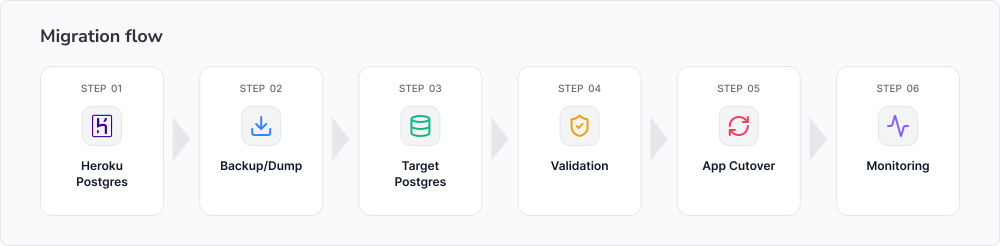
Start by retrieving the connection information for the Heroku Postgres database. You will typically need the host, port, database name, username, password, and SSL mode.
You can use the Heroku CLI to retrieve connection details for external SQL clients. Use the following command.
heroku pg:credentials:url DATABASEThe returned connection information includes sslmode=require, which is important when connecting to Heroku Postgres from an external client or migration tool. Do not disable SSL simply because a migration command fails to connect; first verify that the target tool supports the required SSL settings.
Keep the source credentials out of shell history, source code, documentation, and CI logs where possible. Prefer environment variables or a secrets manager when passing database URLs to migration tools.
There are two common ways to create the source copy: use Heroku PGBackups for a standard backup, or run pg_dump yourself when you need more control over the export.
For a standard Heroku backup, the workflow can be as simple as the following.
heroku pg:backups:capture --app my-app
heroku pg:backups:download --app my-app
This is convenient when the backup characteristics fit your database and migration requirements. Heroku also documents using pg_dump directly for manual database exports, which gives you greater control over the format and dump options.
For example, a custom dump can be created with the following command.
pg_dump -Fc "$HEROKU_DATABASE_URL" -f heroku.dumpThe custom format is particularly useful when restoring with pg_restore, because it supports options such as parallel restoration and selective object restoration.
Whichever method you use, treat the dump as a critical migration artifact. Record when it was created, verify that the file exists and is readable, and, where practical, perform a test restoration before the production cutover.
If you created a custom-format dump with pg_dump -Fc, restore it with pg_restore as follows.
pg_restore \
  --dbname="$TARGET_DATABASE_URL" \
  --jobs=4 \
  heroku.dump
For a plain SQL dump, use psql instead.
psql "$TARGET_DATABASE_URL" < heroku.sqlBe deliberate about options. --clean tells pg_restore to drop database objects before recreating them. That can be useful when refreshing an existing environment, but it is potentially destructive and should not be added casually to a production restoration.
Options such as --no-owner and --no-acl can also be useful when the roles and ownership model on the target differs from Heroku. --no-owner prevents the restoration from attempting to assign objects to source roles that do not exist on the target, while --no-acl skips restoring access control lists. Whether either option is appropriate depends on how users, roles, and permissions have been prepared on the destination.
Avoid restoring blindly into a non-empty database. Existing objects can conflict with objects from the dump, and a partially populated target can produce confusing errors or leave the database in an uncertain state. For a production migration, restoring into a clean, appropriately configured target is generally easier to reason about.
A successful restoration is only the beginning of validation. Before switching production traffic, compare the source and target and verify that the application behaves correctly against the new database.
Make sure you check the following:
If you prefer a graphical workflow, dbForge Studio for PostgreSQL can be useful during this stage. It provides a visual way to inspect database objects, execute validation queries, and compare database structures rather than relying exclusively on CLI output.
Application-level validation is particularly important. A database can contain the expected rows while the application still fails because of a missing extension, incorrect permissions, incompatible configuration, or a sequence that was not restored to the expected state.
Once the target database has passed validation, prepare the application for the cutover. Update the relevant environment variables, secrets, connection strings, SSL configuration, connection pooling settings, and deployment configuration. If the application uses separate credentials for migrations, background workers, reporting, or administrative tasks, update those as well.
Avoid hardcoding the old Heroku credentials. Heroku connection information can change or rotate, so applications should consume database credentials through configuration or a secrets management mechanism rather than embedding a historical connection string in source code.
For the final cutover, stop writes according to the migration plan, perform any required final synchronization or restoration, switch the application's database configuration to the target, and restart or redeploy the relevant services. Then immediately run a small set of application smoke tests before declaring the migration complete.
Keep the old database available during the agreed rollback period. Do not immediately eliminate the source just because the new database accepts connections.
Migration can be technically correct and still change application performance. Moving from Heroku Postgres to another PostgreSQL provider can change hardware characteristics, PostgreSQL configuration, network latency, available extensions, index behavior, connection limits, and connection pooling behavior.
After the cutover, monitor database CPU, memory, storage, active connections, connection wait time, errors, and application latency. Pay particular attention to queries that were fast on Heroku but become slow on the new platform.
Review slow query logs and compare execution plans for important workloads. A query that used one index or plan on Heroku may choose a different plan on the target because statistics, PostgreSQL versions, hardware, configuration, or indexes differ.
If performance changes materially, investigate before assuming the migration itself is the problem. Running EXPLAIN (ANALYZE, BUFFERS) against representative queries, refreshing statistics, checking indexes, and reviewing connection pool settings can often reveal the difference.
Your migration is complete only when the data is correct, the application is operating normally, and the target database is performing acceptably.
Migration does not have to be managed from the command line. The above-mentioned dbForge Studio for PostgreSQL can provide a GUI-powered workspace for inspecting the source and target databases, running SQL validation checks, comparing schemas and data, importing and exporting data, and investigating query performance after the cutover.
Let's see what the Studio has to offer.
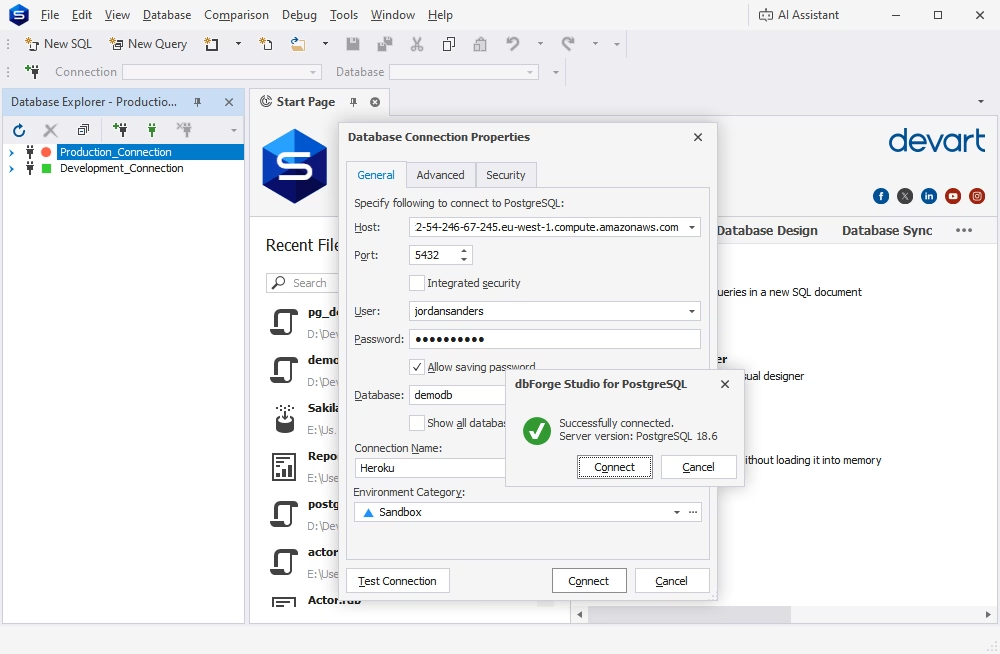
The first step is to establish connections to both environments. Just as you open the Studio, it prompts you to enter the credentials and connect. You can have as many connections as you like.
You can open the New Schema Comparison wizard in one of the following ways:
Once the wizard opens, on the Source and Target page, select the source and target server connections and databases for schema comparison.
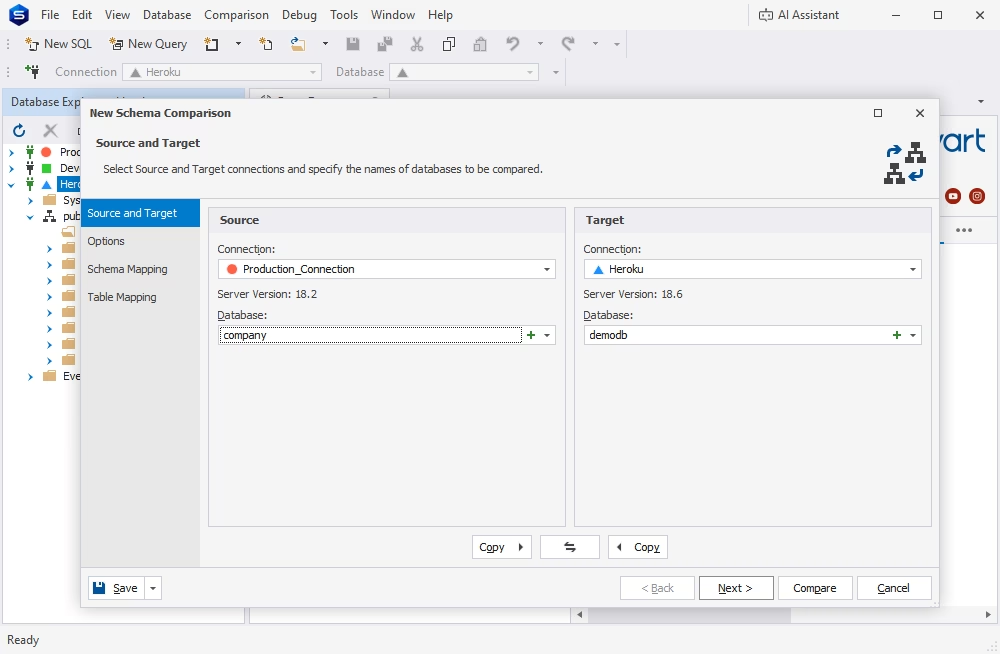
Configure the comparison options further if necessary. Then click Compare to run the process and get the results.
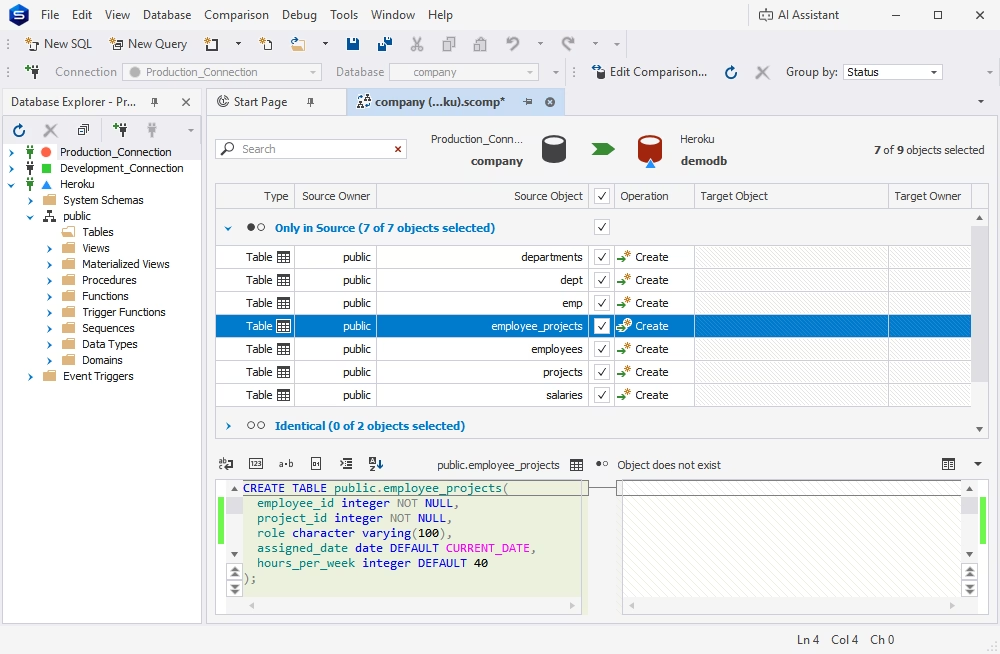
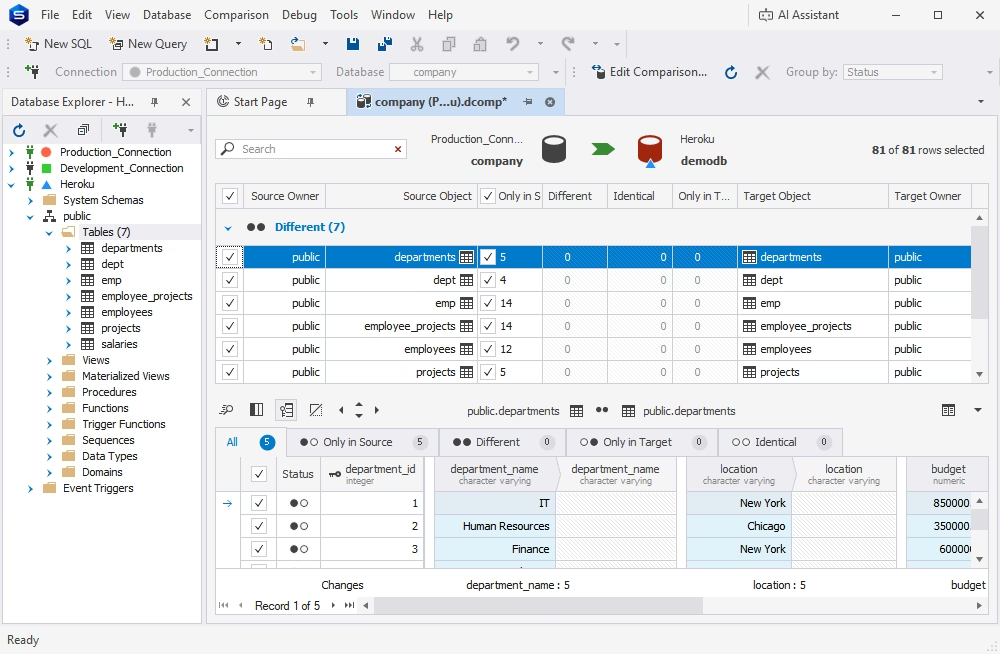
You can compare your actual table data in a similar way by opening the New Data Comparison wizard. The workflow is basically the same here. In the end, you get a data comparison document with all differences highlighted.
The Studio's SQL Editor will help you run validation queries of any kind to make sure your tables have migrated successfully.
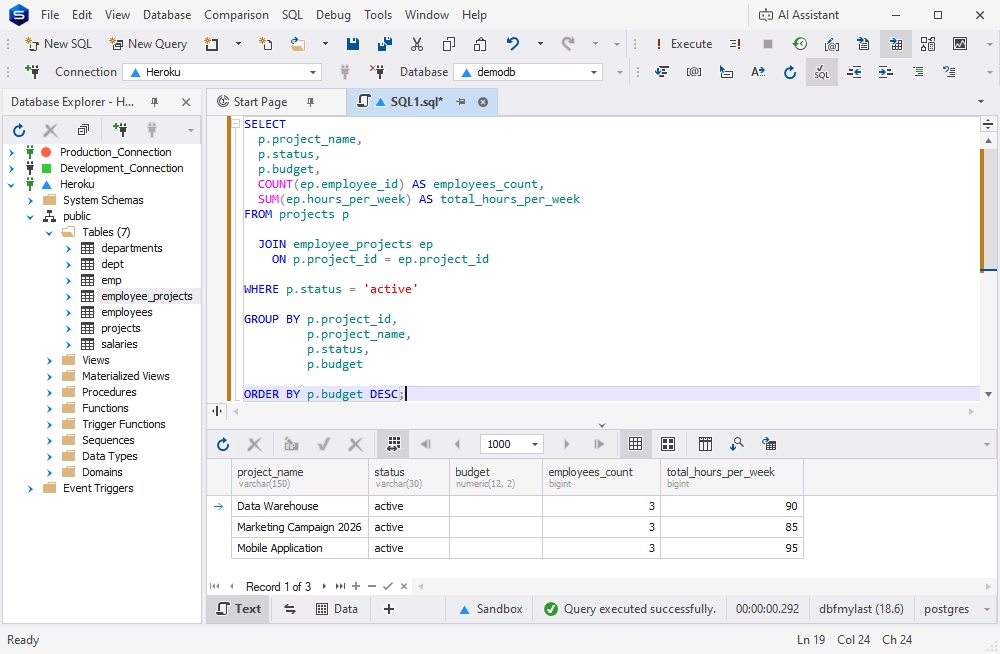
For larger migrations, maintain a small set of validation queries covering row counts, null or uniqueness constraints, recent records, application-specific invariants, and other critical data. Saving these checks makes them reusable during staging rehearsals and the final production cutover.
Database performance can change after moving from Heroku Postgres because the target may use different hardware, PostgreSQL settings, indexes, extensions, connection pooling, or network paths. A query that was fast before migration may therefore behave differently after the switch.
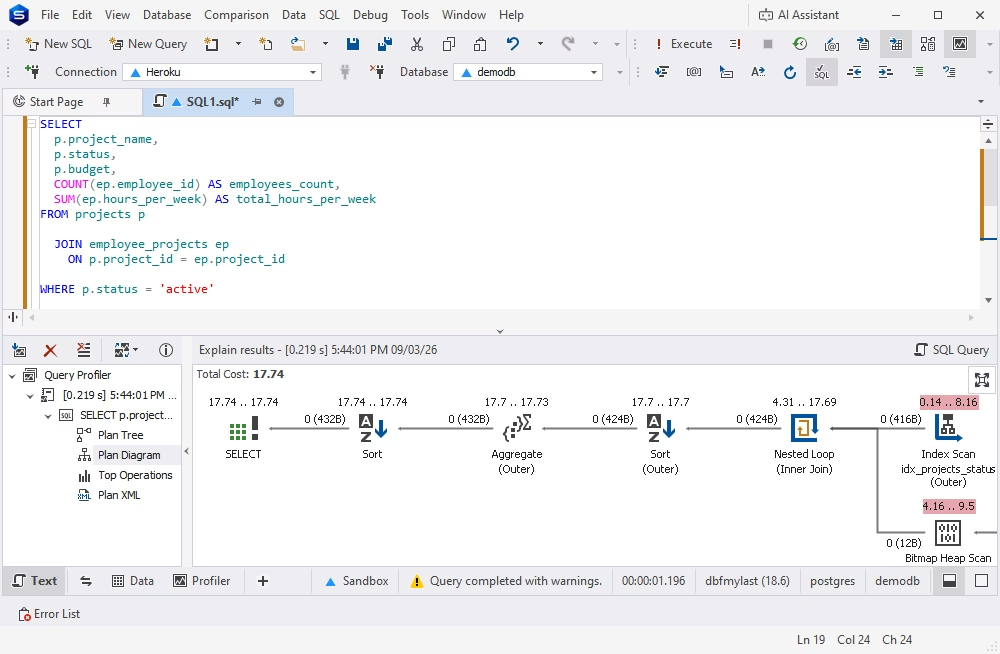
dbForge Studio includes a Query Profiler that can help you investigate these changes. After the cutover, use it to examine important or newly slow queries, compare execution plans, and identify where additional investigation is needed. For example, a changed plan may point to stale statistics, a missing index, different configuration, or altered data distribution.
To activate Query Profiler, open a query in SQL Editor and click the Query Profiling Mode button on the SQL toolbar. Run your query and get a document with all the required information, including the plan tree of query execution, a diagram with the cost of all operations as a percentage of the total batch cost, a list of top operations taking place on the server, and your execution plan in the XML format.

A feature-rich and versatile IDE for database development and management, as well as data management, analysis, and reporting
Even when the dump and restoration commands complete successfully, a Heroku Postgres migration can fail; this can be caused by incompatible extensions, missing permissions, writes that occur during the transfer, insufficient disk space, or queries that behave differently on the target. Planning for these problems in advance makes the migration easier to troubleshoot and reduces the chance of discovering them during the production cutover.
Check the major version on both sides before starting the migration. Keeping the same major version during the initial move is often the simplest approach; if a PostgreSQL upgrade is also required, separating the upgrade from the infrastructure migration makes troubleshooting and rollback easier.
Extensions require the same level of attention. An extension available on Heroku Postgres may not be available, enabled, or configured in exactly the same way on the target provider. A restoration can therefore fail when it encounters an unsupported extension, or the database can restore successfully but the application can later fail when it calls functionality that is missing.
Before your migration, check the extensions on the source and confirm that the target supports compatible versions. Do not assume that two providers offering "managed PostgreSQL" expose the same extension set or configuration options.
Database ownership and permissions are another common source of restoration failures. A Heroku-managed PostgreSQL database can contain provider-controlled roles and ownership arrangements that do not exist on the destination. The target provider may also use a different administrative or application user model.
As a result, a restoration may produce errors about missing roles, object ownership, grants, or ACLs. Depending on the target environment, options such as --no-owner and --no-acl can prevent the restoration from attempting to recreate source ownership and access control lists that are inappropriate for the destination.
After you restore your database, explicitly verify that the application's database user can perform every required operation and that administrative access is restricted appropriately. Pay particular attention to tables, sequences, schemas, functions, and other objects that may have different ownership on the target.
A basic dump-and-restore migration represents the database at a particular point in time. If the application continues writing to Heroku after the dump is created, those new records and updates are not automatically copied into the restored database.
This is one of the most important risks in a one-shot migration. For example, if the dump starts at 01:00 and the application continues accepting orders until 03:00, the target database can be missing two hours of production changes.
Prevent this by putting the application into maintenance or read-only mode before the final dump, or by using a replication-based migration that keeps the target synchronized while the source remains active. The cutover procedure should explicitly state when writes stop.
Large databases introduce additional failure modes. A dump can take longer than expected, the restoration can exceed the planned maintenance window, the target can run out of disk space, a network connection can be interrupted while transferring the dump, or large index builds can significantly extend recovery time.
Do not discover these limits during the production migration. Perform a complete test restoration in an isolated environment using a representative production dump. Measure the time required for the following:
Use those measurements to establish a realistic migration window and make sure the target has enough storage for both the restored database and the temporary space required during the operation.
A restoration that exits successfully does not prove that the migration is correct. PostgreSQL can successfully restore a database while the migration process still contains data or configuration problems that only become visible when the application uses particular tables or workflows.
Validate row counts for critical tables and inspect important business records. Also check constraints, indexes, foreign keys, sequences, materialized views, extensions, and permissions. Then test application workflows rather than relying solely on database-level checks.
dbForge Studio for PostgreSQL can be useful here because it provides a visual way to inspect tables and database objects, compare source and target databases, and run validation queries. This is especially helpful when the migration has been rehearsed several times, and you need to identify what changed between attempts.
A database can be completely correct and still perform differently after leaving Heroku. The target provider may use different hardware, PostgreSQL configuration, storage, indexes, statistics, connection pooling, or network infrastructure. Even a small change in network latency between the application and database can affect workloads that make many database round trips.
After the migration, run ANALYZE where appropriate, so the optimizer has current statistics. Then monitor slow queries and compare execution plans for workloads that became slower after the move. Look for changes in index usage, row estimates, JOINs, sequential scans, connection waits, and other plan characteristics before making configuration or schema changes.
The visual Query Profiler in dbForge Studio for PostgreSQL helps investigate post-migration query behavior by showing execution plans and performance information.
| Error | Cause | Prevention | Fix |
|---|---|---|---|
| PostgreSQL version mismatch | The source and target use incompatible major PostgreSQL versions, which can cause restoration or compatibility issues. | Check the major version on both sides before migration. Keep the same major version for the initial move when possible. | Align the PostgreSQL versions, or perform the PostgreSQL upgrade separately from the infrastructure migration. |
| Unsupported or incompatible extension | An extension available on Heroku Postgres may be unavailable, disabled, or configured differently on the target provider. | List the extensions on the source and verify that the target supports compatible versions and configurations. | Install or enable a compatible extension on the target, or remove/replace functionality that the target does not support. |
| Missing role or ownership error | The dump contains source-provider roles or ownership arrangements that do not exist on the destination. | Review database roles and ownership before migration and account for differences in the target provider's user model. | Use options such as --no-owner and --no-acl when appropriate, then assign the correct ownership and permissions on the target. |
| Permission or ACL errors | Grants and access control lists from the source may not be valid for the target environment. | Review required permissions and confirm the target's administrative and application-user model before restoring. | Restore without source ACLs when appropriate and explicitly grant application users access to required schemas, tables, sequences, functions, and other objects. |
| Missing production data after migration | The application continued writing to Heroku after the dump was created, so new records and updates were not included in the dump. | Put the application into maintenance or read-only mode before the final dump, or use replication to keep the target synchronized. | Stop writes, create a final dump, restore it, and perform the cutover. If writes already occurred, repeat the migration or use an appropriate synchronization strategy. |
| Dump or restoration exceeds the migration window | Large databases can take longer than expected to dump, transfer, restore, or rebuild indexes and constraints. | Perform a complete test restoration using a representative production dump and measure each migration stage. | Extend the maintenance window, optimize the migration process, use parallel restoration where appropriate, or consider a replication-based migration. |
| Target runs out of disk space | The target does not have enough storage for the restored database and temporary space required during recovery. | Estimate the required storage and test the restoration in an isolated environment before production migration. | Increase target storage and repeat the restoration after confirming sufficient free space. |
| Interrupted dump or transfer | A long-running dump or transfer can be interrupted by network failures or other connectivity problems. | Test the complete transfer process and use a reliable method for moving large dump files. | Restart the failed transfer or dump and verify the integrity of the dump before restoring it. |
| Data or database objects missing after restoration | A successful restoration does not guarantee that all critical data, indexes, constraints, sequences, views, extensions, or permissions behave as expected. | Plan explicit post-restoration validation instead of relying only on the pg_restore exit status. | Compare critical row counts and business records, then verify constraints, indexes, foreign keys, sequences, materialized views, extensions, and permissions. |
| Application workflow fails after migration | Database-level restoration may succeed while application-specific queries or workflows encounter missing functionality or configuration differences. | Run application smoke tests and test critical workflows against the restored database before cutover. | Identify the failing database object, permission, extension, or query and correct the target configuration before completing the cutover. |
| Queries become slower after migration | The target may have different hardware, PostgreSQL settings, storage, indexes, statistics, connection pooling, or network latency. | Run ANALYZE where appropriate and establish baseline performance before and after migration. | Compare slow queries and execution plans, then investigate index usage, row estimates, JOINs, sequential scans, connection waits, and other plan changes. |
Migrating from Heroku Postgres does not mean moving to one particular replacement. The best destination depends on your existing infrastructure, budget, compliance requirements, expected workload, scaling model, and internal DevOps expertise.
Some move to a managed PostgreSQL service in the cloud they already use. Others choose a developer-focused database platform that provides a simpler application-to-database workflow. If you have strong infrastructure capabilities, you may choose a VPS or self-hosted PostgreSQL to gain more control over configuration and costs.
The important thing is to evaluate the operational model, not just the database engine. All of these destinations can run PostgreSQL, but they differ substantially in networking, backups, high availability, monitoring, upgrades, extensions, scaling, and the amount of infrastructure to be operated.
AWS RDS and Aurora PostgreSQL are a good choice if you are already running application infrastructure on AWS. RDS provides managed PostgreSQL instances with integrated AWS networking, monitoring, backups, and other infrastructure services. Aurora PostgreSQL is an alternative for teams evaluating AWS's distributed database architecture and its scaling and availability characteristics. The trade-off is that AWS exposes considerably more infrastructure configuration than a platform like Heroku, which can mean more operational decisions.
Azure Database for PostgreSQL is a good choice if your applications, identity systems, networking, or compliance infrastructure already live in Azure. It can simplify integration with the rest of an Azure-based environment while retaining a managed PostgreSQL operating model.
Google Cloud SQL for PostgreSQL, similarly, works best if you are already using Google Cloud and looking for a managed PostgreSQL service integrated with your existing cloud infrastructure, networking, monitoring, and access controls.
The main overall advantage of this category is infrastructure consolidation. If compute, networking, observability, IAM, and security controls are already managed in one cloud, moving PostgreSQL there can reduce cross-platform dependencies.
The downside is that managed cloud databases can expose more configuration and operational complexity than Heroku. Teams should evaluate not only the database price but also networking, backups, monitoring, HA, storage, connection management, and the engineering time required to operate the service.
Another option is a PostgreSQL platform designed around application developers rather than broader cloud infrastructure.
Supabase provides managed PostgreSQL alongside application-oriented services and tools, making it suitable for those who want the database to remain closely integrated with their application workflow.
Neon is a PostgreSQL platform built around a serverless architecture, with features such as branching that can be useful for development and testing workflows.
Fly.io can be a nice choice if you deploy applications on Fly.io and want your database infrastructure close to those workloads. Its documentation also provides a specific workflow for importing a Heroku database.
Render offers managed PostgreSQL alongside application hosting, making it a relatively straightforward option if you are looking to keep application and database infrastructure within the same developer-oriented platform.
Northflank provides application and infrastructure tools for those who want more control than a purely opinionated platform while retaining a developer-oriented deployment workflow.
These and similar platforms can reduce the amount of infrastructure work required to get an application and PostgreSQL database running together. They may be especially attractive when the goal of leaving Heroku is to find a platform with a better combination of pricing, deployment workflow, and scalability.
The migration requirements still need to be evaluated individually. Check PostgreSQL versions, extensions, connection limits, backup and recovery capabilities, HA options, networking, and any provider-specific limitations before making the final choice.
Self-hosting PostgreSQL on a VPS or dedicated infrastructure provides the greatest degree of control. You can choose the PostgreSQL version, operating system configuration, extensions, storage, connection management, monitoring stack, backup system, and other infrastructure components.
That control comes with responsibility, however.
With self-hosted PostgreSQL, your team is responsible for backups, monitoring, security, patching, PostgreSQL upgrades, disk management, recovery procedures, and high availability. A database that appears cheaper on a VPS can become significantly more expensive when engineering time and operational tools are included.
High availability deserves particular attention. Running PostgreSQL on one VPS may be inexpensive, but it is not equivalent to having a managed HA database. Teams that require failover need to design and test replication, failure detection, promotion, backups, recovery, and potentially multi-zone infrastructure.
Self-hosting therefore makes the most sense when you genuinely need additional control and have the operational expertise to manage PostgreSQL reliably. If reducing infrastructure responsibility is the primary goal, another managed PostgreSQL service may be a better destination.
Ultimately, the best Heroku Postgres replacement is the one that matches your operational model as well as your database requirements. A migration should reduce an existing constraint, and not simply replace one platform dependency with another.
Making PostgreSQL migration reliable is less about finding a clever command and more about reducing uncertainty. The following practices will help you catch problems before production, keep the cutover controlled, and retain a clear recovery path if something goes wrong.
Never make the first migration attempt against production. Restore a real Heroku Postgres backup into a staging or temporary target database and run the entire migration process before scheduling the final cutover.
Use the rehearsal to identify restore errors, missing extensions, role and permission problems, incompatible PostgreSQL versions, and application-level issues. It will also give you a realistic measurement of how long the backup, transfer, restoration, validation, and application restart actually take.
Ideally, use a representative production backup rather than a small synthetic database. The migration window should be based on measured recovery times, not an estimate made from database size alone.
Treat the final migration window as a change freeze. New application migrations, table modifications, index changes, extension changes, and other database changes can create differences between the source database, the dump, the target database, and the application code.
A schema freeze gives you a stable source and target to compare. If a database change is genuinely required, make it before the final backup and repeat the staging rehearsal if it materially changes the migration.
The same principle applies to application deployments. Avoid shipping database-dependent application changes while the final migration is in progress unless the deployment has been explicitly designed to work with both database environments.
A dump-and-restore migration captures the database at a particular point in time. If users or background workers continue writing to Heroku Postgres after the backup is created, those changes may be missing from the target database.
For a standard logical migration, put the application into maintenance or read-only mode before the final dump and stop background jobs that can modify the database. This establishes a clear point at which the source becomes frozen.
If the application cannot tolerate that downtime window, consider a replication-based migration instead. Continuous replication can keep the target synchronized while the source remains available, allowing the final cutover to happen after the target has caught up.
Before changing the application's database connection, define exactly how you will return to the original Heroku Postgres environment if the target fails.
Keep the source database available and unchanged for an agreed rollback period. Document who can authorize a rollback, what conditions trigger one, how the application's connection settings will be restored, and how writes will be handled if the target has already accepted production traffic.
Do not immediately delete the original database after a successful connection test. A migration is not fully validated just because the application starts; retain the source until your team has confirmed that the new database works correctly under real application traffic.
A successful restoration does not automatically mean a successful migration. Validate both the database and the application before declaring the move complete.
Check row counts for important tables, recent and representative business records, sequences, foreign keys, indexes, materialized views, extensions, constraints, and permissions. Then run representative application workflows. For example, create a record, update it, query it, and exercise any critical background jobs.
dbForge Studio for PostgreSQL can provide a convenient visual layer for this work. You can inspect tables and objects, run saved validation queries, and compare source and target databases where appropriate. This can be particularly useful when validating repeated staging migrations and investigating differences between the two environments.
Do not assume that identical data will produce identical performance. The target provider may use different hardware, PostgreSQL configuration, storage, statistics, connection pooling, or network paths, all of which can change query behavior.
After the cutover, monitor slow queries, database connections, application latency, and resource utilization. Review execution plans for queries whose performance changed significantly after the move. As mentioned, the Studio's integrated Query Profiler will be a great helper here.
If a query becomes slower, investigate the plan before changing the query or adding an index. Differences in statistics, index availability, configuration, connection pooling, or network latency may explain the behavior.
Migrating from Heroku Postgres is manageable when it is treated as a controlled database operation rather than a single export/import command. The migration method should match the database size, write activity, downtime requirements, PostgreSQL version, extension compatibility, and capabilities of the target platform.
The safest approach is to rehearse the migration, prepare and validate the target environment, control writes during the final transfer, verify the recovered data, and keep a rollback path until the new database has been proven in production. Post-migration monitoring is equally important because query performance and operational behavior can change when the underlying infrastructure changes.
And, of course, you most likely want a powerful PostgreSQL GUI tool to inspect, compare, validate, and profile PostgreSQL databases before and after your Heroku Postgres migration.
Download dbForge Studio for a free trial and explore everything it has to offer.
The safest approach is to rehearse the migration in staging, validate the target database, freeze writes during the final dump or use replication for low-downtime migrations, and keep a tested rollback plan. The right method depends on database size, write volume, downtime tolerance, and target compatibility.
Yes. pg_dump and pg_restore are a common choice for small and medium-sized databases. Create a logical dump from Heroku Postgres, restore it into a compatible target PostgreSQL environment, then validate the data and application before switching production traffic.
There is no fixed number. A dump/restore migration generally requires enough downtime to prevent writes after the final dump and complete the restoration and validation. A staging rehearsal can provide a realistic estimate. For very large or write-heavy databases, replication-based approaches can reduce the final cutover window.
Create and configure an RDS PostgreSQL instance, verify the PostgreSQL version and extension compatibility, export the Heroku database with pg_dump or another suitable method, and restore it to RDS. Validate roles, data, sequences, indexes, extensions, and application behavior before changing the application connection settings.
Compare row counts and critical business records, then check constraints, foreign keys, indexes, sequences, materialized views, extensions, and permissions. Run representative application workflows and compare important queries. A proper data comparison tool for PostgreSQL can make source-versus-target checks easier to repeat.
Audit the PostgreSQL version, database size, schemas, tables, extensions, indexes, sequences, roles, privileges, materialized views, and large objects. Also confirm target disk capacity, extension availability, SSL requirements, backups, monitoring, connection limits, and the planned downtime and rollback procedures.
Yes. dbForge Studio for PostgreSQL is the ultimate GUI for connecting to the source and target, inspecting database objects, importing and exporting data, comparing schemas and data, running validation queries, and analyzing query performance after migration.
Yes. Comparing the source and target can help identify schema differences and, where appropriate, data differences after a recovery. This is especially useful during staging rehearsals and final validation. dbForge Studio provides schema and data comparison capabilities for this purpose. It is also a powerful and flexible PostgreSQL client for database sync.
Monitor application latency, slow queries, CPU, memory, storage, connection pool behavior, errors, and overall database availability. Run ANALYZE where appropriate and review execution plans for queries whose performance changes. Continue monitoring closely until the new environment has demonstrated stable production behavior.