
dbForge Studio for PostgreSQL
AI-powered IDE for database development, management, and data analysis across PostgreSQL and related cloud services
Understanding PostgreSQL data types is essential for anyone working with PostgreSQL databases: developers, DBAs, and data analysts. A strictly defined system of the supported data types ensures data integrity across different database instances and application compatibility. In this article, we explore PostgreSQL data types with examples that demonstrate their use and analyze the best practices for choosing the appropriate PostgreSQL data types in database management.
PostgreSQL data types define the values that can be stored in database tables. They determine the format, accepted value range, and storage requirements for the data. In a PostgreSQL table, each column is assigned a certain data type, which defines all values that can be stored in the column.
PostgreSQL provides a number of native data types, for example, BOOLEAN, CHARACTER, NUMERIC, DATE/TIME, and others. In addition, users can create new data types as needed using the CREATE TYPE statement. Most PostgreSQL tools support the native set of data types and the creation of user-defined ones.
Choosing the correct data types for PostgreSQL tables helps you:
For example, you can store dates as either DATE or TEXT; however, using the correct data type—DATE—enables filtering, sorting, and calculations.
Let's look closer at each data type to understand its specifics and use cases.
Numeric types are used to store numerical data, such as numbers, quantities, prices, percentages, and other similar values. PostgreSQL supports the following numeric data types:
| Type | Description | Storage size | Range | Best use case | Example |
|---|---|---|---|---|---|
| INTEGER | Any whole number | 4 bytes | -2,147,483,648 to 2,147,483,647 | Standard whole-number values, quantities, counters, common IDs | 1024 |
| SMALLINT | 2-byte INTEGER | 2 bytes | -32,768 to 32,767 | Small whole numbers, ratings, status codes, small counters | 25 |
| BIGINT | 8-byte INTEGER | 8 bytes | -9,223,372,036,854,775,808 to 9,223,372,036,854,775,807 | Large IDs, high-volume counters, analytics data, transaction numbers | 9000000000 |
| NUMERIC | Number representing an exact numeric value | Variable | User-defined precision and scale | Exact decimal values, financial data, prices, balances | 1299.99 |
| DECIMAL | Number representing an exact numeric value | Variable | User-defined precision and scale | Exact decimal values, accounting, taxes, currency calculations | 45.75 |
| REAL | Single-precision floating-point number | 4 bytes | Approximate, about 6 decimal digits of precision | Scientific values, measurements, approximate calculations; should not be used for financial calculations | 3.14 |
| DOUBLE PRECISION | Double-precision floating-point number | 8 bytes | Approximate, about 15 decimal digits of precision | Large analytical calculations, scientific data, approximate values; should not be used for financial calculations | 3.141592654 |
| SERIAL | Auto-incrementing 4-byte integer | 4 bytes | 1 to 2,147,483,647 | Auto-incrementing IDs for small and medium-sized tables | 1 |
| BIGSERIAL | Auto-incrementing 8-byte integer | 8 bytes | 1 to 9,223,372,036,854,775,807 | Auto-incrementing IDs for large or fast-growing tables | 10000000001 |
| SMALLSERIAL | Auto-incrementing 2-byte integer | 2 bytes | 1 to 32,767 | Auto-incrementing IDs for small tables, when saving storage space is critical | 1628 |
The SQL example below uses three numeric data types.
This example demonstrates how PostgreSQL numeric data types can be used in real-life situations to store different data and enable calculations in SQL.
CREATE TABLE products (
    product_id SERIAL PRIMARY KEY,
    product_name VARCHAR(100),
    quantity INTEGER,
    unit_price NUMERIC(10,2),
    discount REAL
);

INSERT INTO products (product_name, quantity, unit_price, discount)
VALUES ('Wireless Mouse', 50, 29.99, 0.10);

SELECT
    product_name,
    quantity,
    unit_price,
    quantity * unit_price AS total_value
FROM products
WHERE unit_price > 20.00;
Character data types are used to store text: names, addresses, descriptions, email addresses, and other strings of characters. They may consist of letters, numbers, symbols, and whitespace.
| Type | Description | Best use case | Example |
|---|---|---|---|
| CHAR(n) | Fixed-length string; shorter values are padded with spaces | Fixed-length codes, abbreviations, country codes, status codes | 'US' |
| VARCHAR(n) | Variable-length string with a defined maximum length | Fields that require a strict length limit, such as usernames, emails, or product codes | '[email protected]' |
| TEXT | Variable-length string without a specified maximum length | General text fields, descriptions, comments, article content, logs | 'PostgreSQL data types guide' |
The following example uses all three character data types.
CREATE TABLE employees (
    employee_id INTEGER,
    first_name VARCHAR(50),
    last_name VARCHAR(50),
    country_code CHAR(2),
    notes TEXT
);
Date and time data types store dates, times, timestamps, and intervals. They are commonly used to track events, schedule activities, and calculate durations. Dates are stored in the standard PostgreSQL date format.
| Type | Description | Best use case | Example |
|---|---|---|---|
| DATE | Calendar date without time | Birth dates, invoice dates, deadlines, subscription start dates | '2026-06-04' |
| TIME | Time of day without a date | Opening hours, schedules, recurring daily events | '14:30:00' |
| TIMETZ | Time of day with time zone awareness | International business hours | '14:30:00+02' |
| TIMESTAMP | Date and time without a time zone | Local events, internal system records, date-time values tied to one time zone | '2026-06-04 14:30:00' |
| TIMESTAMPTZ | Date and time representing an absolute point in time | Application events, logs, created/updated timestamps, global systems | '2026-06-04 14:30:00+03' |
| INTERVAL | Time span or duration | Trial periods, subscription length, delays, elapsed time | '30 days' |
The following SQL creates an appointments table using different PostgreSQL date and time types to define time-related values.
CREATE TABLE appointments (
    appointment_id SERIAL PRIMARY KEY,
    patient_name VARCHAR(100),
    appointment_date DATE,
    appointment_time TIME,
    created_at TIMESTAMPTZ,
    duration INTERVAL
);In PostgreSQL, boolean data types store logical values, UUID data types store unique identifiers, and binary data types store binary data.
| Type | Description | Best use case | Example |
|---|---|---|---|
| BOOLEAN | Logical values: true, false, null | Active/inactive status, feature flags, yes/no settings, published/unpublished states | TRUE |
| UUID | Universally unique identifiers | Public IDs, distributed systems, API records, non-sequential primary keys | '550e8400-e29b-41d4-a716-446655440000' |
| BYTEA | Binary data | Encrypted values, binary payloads, small files, hashes, images stored directly in the database | '\xDEADBEEF' |
For a real-life example of how these data types are used, let's look at the following SQL. It creates a table that stores documents as files and uses all three data types.
CREATE TABLE documents (
    document_id UUID PRIMARY KEY DEFAULT gen_random_uuid(),
    file_name VARCHAR(100),
    file_data BYTEA,
    is_encrypted BOOLEAN
);In PostgreSQL, JSON and JSONB data types are used to store JSON data. The difference between them is that JSON stores data as plain text, while JSONB stores JSON in a binary format, which may facilitate processing.
Another JSON-related data type is jsonpath, which stores JSON path expressions—instructions that describe how to navigate and search through JSON data.
| Type | Description | Best use case | Example |
|---|---|---|---|
| JSON | JSON data as plain text | Preservation of the original JSON format, whitespace, and key order | '{"role":"admin","active":true}' |
| JSONB | JSON data in a binary, decomposed format | Searching, indexing, filtering, and querying JSON values | '{"theme":"dark","notifications":true}' |
| jsonpath | JSON path expressions | Finding and filtering information inside a JSON document | $.customer.name |
In real life, the usage of JSON and JSONB data types is very similar. For example, the following SQL can use either JSON or JSONB.
CREATE TABLE products (
    product_id SERIAL PRIMARY KEY,
    details JSONB
);

INSERT INTO products (details)
VALUES (
    '{
        "name": "Wireless Mouse",
        "price": 29.99,
        "brand": "Elmer578",
        "in_stock": true
    }'
);
However, internally, the data is stored differently. JSON stores data exactly as it is entered, while JSONB does not preserve whitespace, duplicate keys, or the key order. As a result, JSONB is the preferred data type for storing JSON data, as it supports efficient filtering when combined with appropriate indexes, such as GIN indexes, which can help locate matching rows without scanning the entire table.
ARRAY and ENUM data types are special data types natively supported by PostgreSQL. ARRAY data types allow storing multiple values of the same type in a single column; ENUM data types restrict a column to a predefined set of values.
| Type | Description | Best use case | Example |
|---|---|---|---|
| ARRAY | Multiple values of the same data type in one column | Simple lists such as tags, labels, selected options, or scores | tags text[] |
| ENUM | One value from a predefined list | Fixed statuses, roles, priorities, or workflow stages | ('new', 'paid', 'shipped', 'cancelled') |
The following example demonstrates the use of the ARRAY and ENUM data types. It creates a table that stores tasks with their names, statuses, and tags. The task statuses belong to a predefined list represented as an ENUM data type, while the tags are stored as an ARRAY of text values associated with each task.
CREATE TYPE task_status AS ENUM (
    'Not Started',
    'In Progress',
    'Completed'
);

CREATE TABLE tasks (
    task_id SERIAL PRIMARY KEY,
    task_name VARCHAR(100),
    status task_status,
    tags TEXT[]
);

INSERT INTO tasks (task_name, status, tags)
VALUES (
    'Update product documentation',
    'In Progress',
    ARRAY['Documentation', 'PostgreSQL', 'Release']
);

SELECT
    task_name,
    status,
    tags
FROM tasks
WHERE status = 'In Progress'
  AND 'PostgreSQL' = ANY(tags);
Network data types are used to store network-related information, such as IP addresses, MAC addresses, and network ranges.
| Type | Description | Best use case | Example |
|---|---|---|---|
| INET | IPv4 or IPv6 host address | IP tracking, access logs, user sessions, IP-based filtering | '192.168.1.10' |
| CIDR | IPv4 or IPv6 network range | Subnets, routing rules, firewall ranges, network blocks | '192.168.1.0/24' |
| MACADDR | 6-byte MAC address | Device tracking, network inventory, hardware identification | '08:00:2b:01:02:03' |
| MACADDR8 | 8-byte MAC address in EUI-64 format | IoT device identification, IPv6 networking | '08:00:2b:01:02:03:04:05' |
The following SQL is an example of how network data types can be used to store network device information.
CREATE TABLE network_devices (
    device_id SERIAL PRIMARY KEY,
    hostname VARCHAR(100),
    ip_address INET,
    subnet CIDR,
    mac_address MACADDR
);

INSERT INTO network_devices (
    hostname,
    ip_address,
    subnet,
    mac_address
)
VALUES (
    'router-01',
    '192.168.1.10',
    '192.168.1.0/24',
    '08:00:2b:01:02:03'
);

SELECT
    hostname,
    ip_address,
    subnet,
    mac_address
FROM network_devices
WHERE ip_address << subnet;
Full-text search data types store searchable text. While the common LIKE operator searches strings character by character, full-text search recognizes complete words. Besides, it removes words like "the" or "and" and can match different forms of the same word.
| Type | Description | Best use case | Example |
|---|---|---|---|
| TSVECTOR | Processed text optimized for full-text search | Searchable documents, article content, product descriptions | 'postgresql':1 'types':2 |
| TSQUERY | Full-text search query | Matching search terms against a TSVECTOR column | 'postgresql & types' |
The following example uses the TSVECTOR data type to create a full-text search system. The article title and body are stored as PostgreSQL TEXT values and automatically normalized using the to_tsvector() function in a generated column. A GIN index is created on the TSVECTOR column to improve full-text search performance. This example requires PostgreSQL 12 or later because it uses generated columns. The to_tsquery() function creates a search query using PostgreSQL's query syntax. For raw user input, use plainto_tsquery() or websearch_to_tsquery() instead, as they handle plain text input without requiring operators.
CREATE TABLE articles (
    article_id SERIAL PRIMARY KEY,
    title TEXT,
    body TEXT,
    search_vector TSVECTOR GENERATED ALWAYS AS (
        to_tsvector(
            'english',
            coalesce(title, '') || ' ' || coalesce(body, '')
        )
    ) STORED
);

CREATE INDEX idx_articles_search_vector
ON articles
USING GIN (search_vector);

INSERT INTO articles (title, body)
VALUES (
    'Introduction to PostgreSQL',
    'Learn about PostgreSQL data types and indexing.'
);

SELECT title
FROM articles
WHERE search_vector @@ to_tsquery('english', 'PostgreSQL & indexing');
Bit strings are strings of 0's and 1's used to store and manipulate data at the individual-bit level, rather than storing values as integers or text. PostgreSQL supports two bit string data types: BIT(n) and BIT VARYING(n).
| Type | Description | Best use case | Example |
|---|---|---|---|
| BIT(n) | Fixed-length bit string | Fixed collections of boolean flags | BIT(8): 10110010 |
| BIT VARYING(n) | Variable-length bit string | Variable collections of boolean flags | BIT VARYING(8): 101 |
As an example of BIT(n) use, let's analyze the following query that defines application user permissions. The application has five permissions that can be enabled or disabled for a particular user with corresponding boolean values:
This collection can be stored as follows.
CREATE TABLE users (
    user_id INTEGER,
    permissions BIT(5)
);
A user may have, for example, the following set of permissions: 10011, where each bit represents whether a particular permission is enabled.
For an example of how BIT VARYING(n) can be used, let's look at the following SQL that creates a table storing messages with their payload.
CREATE TABLE messages (
    id BIGSERIAL PRIMARY KEY,
    payload BIT VARYING(1024)
);
This table can store messages with payload values of 101101, 101101001011, or 10110100101111001010, which will all be valid as long as their length does not exceed 1024 bits.
In PostgreSQL, the XML data type is used to store well-formed XML documents or XML content.
| Type | Description | Best use case | Example |
|---|---|---|---|
| XML | Well-formed XML content | Storing XML received from external systems | <item> <product_id>25</product_id> <quantity>2</quantity> </item> |
While in many cases, XML values can be stored as TEXT or JSONB data, XML is useful for applications integrated with systems that communicate data in XML format, such as external ordering or inventory systems. For example, the following SQL creates a product catalog using the XML data type.
CREATE TABLE products (
    product_id INTEGER PRIMARY KEY,
    product_data XML
);
This table can then accept data in the XML format.
INSERT INTO products (product_id, product_data)
VALUES (
    1,
    '<product>
        <name>Laptop</name>
        <category>Electronics</category>
        <price>1200</price>
    </product>'
);In addition to the standard data types, PostgreSQL offers several advanced data types for modeling complex data structures and enforcing business rules.
| Type | Description | Best use case | Example |
|---|---|---|---|
| GEOMETRIC | Two-dimensional geometric objects, such as points, lines, boxes, paths, polygons, and circles | Spatial calculations, technical drawings, simple geometry-based data | POINT, LINE, BOX, CIRCLE |
| RANGE | A range of values with lower and upper bounds | Date ranges, price intervals, booking periods, availability windows | DATERANGE, INT4RANGE, TSRANGE |
| MULTIRANGE | Multiple non-overlapping ranges in one value | Complex schedules, multiple availability periods, grouped numeric or date intervals | DATEMULTIRANGE, INT4MULTIRANGE |
| COMPOSITE | A custom structure that combines multiple fields into one type | Reusable structured values, function return types, complex records | CREATE TYPE address AS (city text, zip_code text); |
| DOMAIN | A custom type based on an existing type with additional constraints | Reusable validation rules, positive numbers, email-like values, restricted codes | CREATE DOMAIN positive_price AS numeric CHECK (VALUE > 0); |
| USER-DEFINED | Custom data types created by users, including ENUM, COMPOSITE, RANGE, and DOMAIN types | Extending PostgreSQL for application-specific data models | CREATE TYPE order_status AS ENUM ('new', 'paid', 'shipped'); |
The following SQL example models an order management system using some of the advanced data types.
-- Create a domain type
CREATE DOMAIN positive_price
AS NUMERIC(10,2)
CHECK (VALUE > 0);

-- Create a composite type
CREATE TYPE address AS (
    street TEXT,
    city TEXT,
    postal_code TEXT
);

-- Create an enum type
CREATE TYPE order_status AS ENUM (
    'Pending',
    'Processing',
    'Shipped',
    'Delivered'
);

CREATE TABLE orders (
    order_id SERIAL PRIMARY KEY,

    -- User-defined ENUM
    status order_status,

    -- DOMAIN
    total_price positive_price,

    -- COMPOSITE
    shipping_address address,

    -- GEOMETRIC
    warehouse_location POINT,

    -- RANGE
    delivery_window TSRANGE,

    -- MULTIRANGE
    maintenance_windows TSMULTIRANGE
);

INSERT INTO orders (
    status,
    total_price,
    shipping_address,
    warehouse_location,
    delivery_window,
    maintenance_windows
)
VALUES (
    'Processing',
    149.99,
    ROW(
        '123 Main Street',
        'New York',
        '10001'
    ),
    POINT(15, 25),
    tsrange(
        '2026-04-20 09:00',
        '2026-04-20 17:00'
    ),
    tsmultirange(
        tsrange('2026-04-18 08:00', '2026-04-18 10:00'),
        tsrange('2026-04-19 14:00', '2026-04-19 16:00')
    )
);

SELECT
    order_id,
    status,
    total_price,
    (shipping_address).city AS city,
    warehouse_location,
    delivery_window
FROM orders
WHERE delivery_window @> TIMESTAMP '2026-04-20 10:30';OID is a PostgreSQL-specific, unsigned 4-byte integer type used internally to identify database objects. It is a numeric identifier assigned to objects inside PostgreSQL, such as tables, types, functions, and other system objects.
| Type | Description | Best use case | Example |
|---|---|---|---|
| OID | Unsigned 4-byte integer | Use in PostgreSQL's system catalogs and database administration | 23081 |
As a real-world example of OID use, let's look at the following SQL. It retrieves the OID of the film table from the pg_class system catalog.
SELECT
    oid,
    relname
FROM pg_class
WHERE relname = 'film';
The result contains the OID for the requested table.
   oid | relname
-------+-----------
 33499 | film
You can use the OID to retrieve other internal details of the table.
SELECT *
FROM pg_class
WHERE oid = 33499;In PostgreSQL, pg_lsn is a specialized data type used to represent a Log Sequence Number (LSN). An LSN identifies a specific position in PostgreSQL's Write-Ahead Log (WAL), where changes are written before they make it to the actual database.
| Type | Description | Best use case | Example |
|---|---|---|---|
| pg_lsn | Position within the WAL | Database replication monitoring | 16/B374D848 |
The pg_lsn data type is useful in cases when you need to compare LSN values, for example, in monitoring database replications. The following SQL allows you to calculate the number of WAL bytes between the primary and standby PostgreSQL instances during replication to know how far behind the standby is.
SELECT
    '16/B374D848'::pg_lsn -
'16/B3700000'::pg_lsn;| Use case | Recommended data type | Why |
|---|---|---|
| Primary key | BIGSERIAL, identity column, or UUID | BIGSERIAL and identity columns work well for sequential IDs; UUID is useful for distributed systems and public-facing identifiers |
| Money values | NUMERIC(precision, scale) | NUMERIC stores exact decimal values and avoids rounding issues common with floating-point types |
| Short text | TEXT or VARCHAR | TEXT works for most strings; VARCHAR is useful when a strict maximum length is required |
| Long content | TEXT | TEXT stores variable-length text without requiring a predefined limit |
| Created/updated timestamps | TIMESTAMPTZ | TIMESTAMPTZ handles time zone conversion and is suitable for logs, events, and application timestamps |
| True/false values | BOOLEAN | BOOLEAN stores logical values (TRUE and FALSE) and can also represent an unknown or missing value using NULL |
| JSON attributes | JSONB | JSONB supports indexing, filtering, and faster querying of JSON values |
| IP addresses | INET | INET stores IPv4 and IPv6 addresses in a native PostgreSQL network type |
| Searchable documents | TSVECTOR | TSVECTOR stores processed text optimized for PostgreSQL full-text search |
| Status values | ENUM or lookup table | ENUM works for fixed status lists; lookup tables are better when values may change or need metadata |
Choosing the right data types is an essential step in building efficient, high-performance databases. However, database design begins with choosing the right tools. dbForge Studio for PostgreSQL, with its convenient user interface, a variety of features that simplify database design and development, intelligent SQL editing, and PostgreSQL formatter, represents a comprehensive PostgreSQL IDE, where you can create, modify, and manage Postgres data types, design schemas, and develop SQL code with ease.
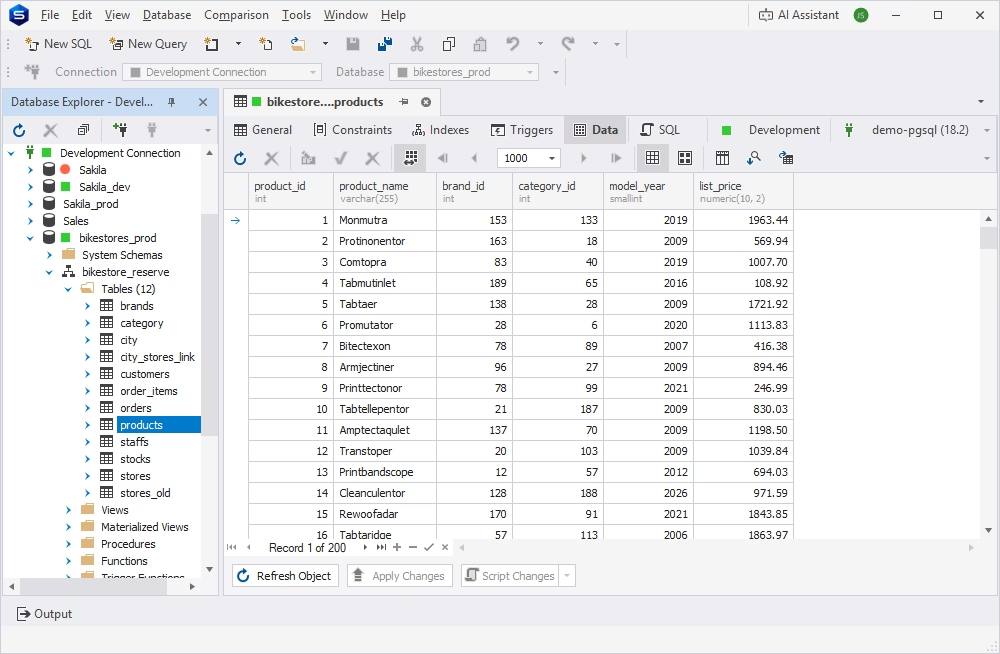
In dbForge Studio, you can explore the table structure in a visual Data Editor with all data types clearly visible. When you open a table in the Editor, it is shown as a grid, where each column is assigned a specific data type.
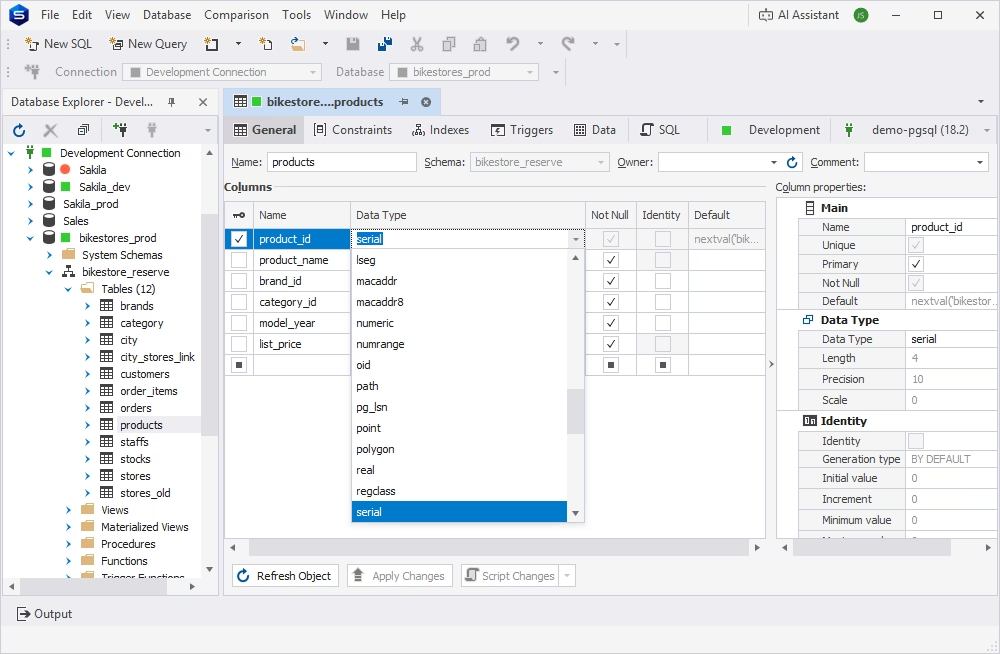
When needed, you can modify data types in the Table Editor, selecting from an extensive list of supported ones or creating user-defined data types. dbForge Studio enables table editing directly in the grid without writing SQL.
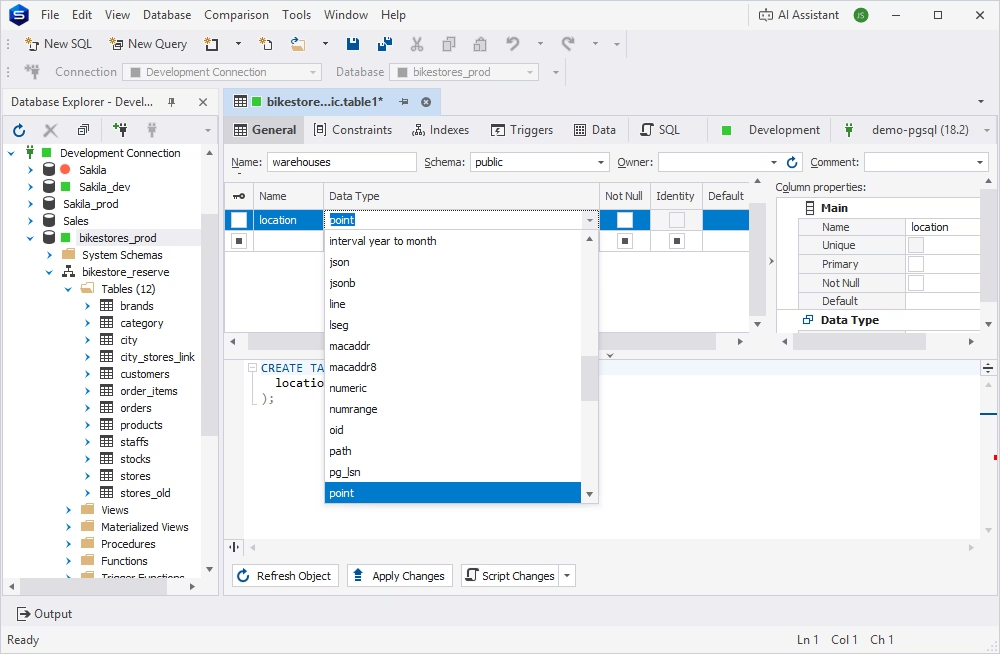
Similarly, you can choose the appropriate data types for table columns when creating new tables. Just choose the required type from the drop-down list, and it will be assigned to the new column.
While dbForge Studio for PostgreSQL allows you to design and modify tables without writing code, it automatically generates the corresponding SQL as you work. Whenever you add, modify, or remove a column, change its data type, or alter other table properties, the Studio updates the SQL in real time.
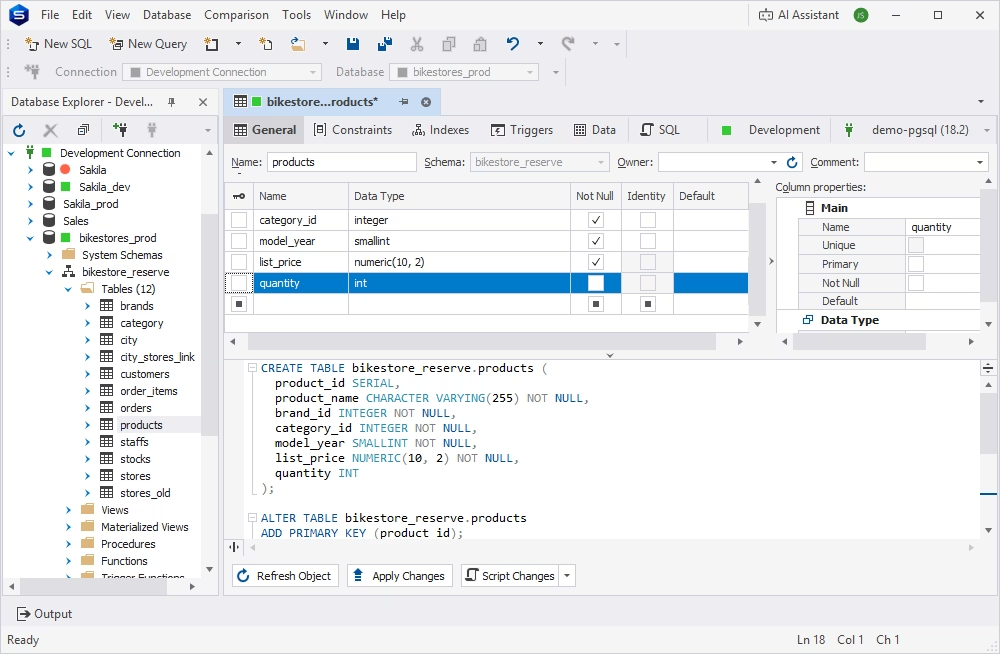
When you are done editing, you can always review your changes before committing them. If everything is correct, click Apply Changes to save your updates. Otherwise, continue editing or discard your changes at any time.
PostgreSQL natively supports a rich and versatile set of data types that enables developers to model virtually any kind of data, from simple numbers and text to JSON documents, arrays, network addresses, and user-defined types. Choosing the appropriate data type is critical for database design, as it helps ensure data accuracy and integrity, improve query reliability, and optimize storage and performance. Among the most commonly used PostgreSQL data types are INTEGER, BIGINT, NUMERIC, TEXT, BOOLEAN, TIMESTAMPTZ, JSONB, and UUID, each designed to address specific storage and application requirements.
When selecting a data type, consider not only the values you need to store today but also your application's requirements, such as business logic, expected value ranges, precision requirements, indexing strategy, and anticipated data growth. By choosing the right data types from the beginning, you can build a database that is more efficient, scalable, and easier to maintain. Moreover, if you are using dbForge Studio for PostgreSQL, it can further simplify this process by providing intelligent SQL editing, visual database design, and comprehensive support for PostgreSQL's built-in and user-defined data types.
PostgreSQL data types define the format, accepted range, and storage requirements for values that can be stored in the columns of a PostgreSQL table.
The most common PostgreSQL data types are INTEGER, BIGINT, NUMERIC, TEXT, BOOLEAN, TIMESTAMPTZ, JSONB, and UUID.
In PostgreSQL, VARCHAR and TEXT are both used to store character strings. The main difference is that VARCHAR can enforce a maximum length, while TEXT has no predefined length limit.
Both TIMESTAMP and TIMESTAMPTZ are used in PostgreSQL to store date and time values. TIMESTAMP stores a date and time exactly as provided, without any time zone information. TIMESTAMPTZ is time-zone-aware: PostgreSQL converts input values to UTC, discards the original time zone, and displays the timestamp using the current session's TimeZone setting. If you need to preserve the original time zone, store it in a separate column.
PostgreSQL supports both JSON and JSONB to store data in the JSON format. JSON stores data as plain text, while JSONB stores it in a binary format, which facilitates filtering and indexing.
The most efficient PostgreSQL data type for financial calculations is NUMERIC, as it stores exact decimal values and does not round them as floating-point types do.
For primary keys, the best options are BIGSERIAL and UUID. BIGSERIAL works for sequential IDs, while UUID is a good choice for distributed systems and public-facing identifiers. At the same time, identity columns with values automatically generated by PostgreSQL can also serve as primary keys. Identity columns use common Postgres numeric types, such as INTEGER or BIGINT.
Yes. PostgreSQL supports user-defined data types that are required for application-specific data models.
User-defined data types in PostgreSQL include ENUM, COMPOSITE, RANGE, and DOMAIN types. ENUM, COMPOSITE, and RANGE types are created using CREATE TYPE,
while DOMAIN types are created using CREATE DOMAIN. For example, you can create an ENUM type with: CREATE TYPE order_status AS ENUM ('pending', 'processing', 'shipped');