

dbForge Studio for PostgreSQL
AI-powered IDE for database development, management, and data analysis across PostgreSQL and related cloud services
Vibe coding is a software development approach in which developers build apps, games, or websites by describing what they want in plain language to an AI assistant and letting AI generate much of the code instead of writing every line manually.
Vibe coding is particularly useful for creating mockups, conducting experiments, and building early working prototypes. These tasks could previously take days or even weeks, but with the help of AI, they can be done within hours. As a result, we have a growing number of AI-powered coding tools and AI-assisted development workflows, which often use PostgreSQL as the foundation for applications.
This article explores the role of PostgreSQL in vibe coding and the benefits it can offer. It also examines the broader vibe coding approach, including common technology stacks, potential pitfalls, and best practices for building AI-assisted applications.
The term vibe coding stands for the specific workflow where AI assistants generate and modify application code based on prompts. It is already a common approach for UI components, business logic, APIs, queries, and so on.
However, this task can’t be completed without a reliable backend: to actually work, vibe-coded applications need to connect to a real database. PostgreSQL can provide the required foundation, enabling AI-generated apps to work with data and use a well-established database system.
In brief, vibe coding with PostgreSQL suggests using AI for schema generation, backend code, SQL queries, etc., while PostgreSQL provides the capabilities to store and manage the application data.
A UI prototype can demonstrate how an application looks and behaves; it does not require a complex backend. Currently, the UI prototype creation is a common job for AI assistants. However, to understand how the application really works, even at the earliest stages, it needs to connect to a database that stores real data and users.
Let us take a simple example: we ask the AI assistant to generate a query that fetches the list of the latest rentals (we use a popular PostgreSQL test database dvdrental to illustrate our examples). The assistant returns the following query.
SELECT
  r.rental_id,
  r.rental_date,
  c.first_name,
  c.last_name,
  f.title,
  r.return_date
FROM rental AS r
JOIN customer AS c
  ON c.customer_id = r.customer_id
JOIN inventory AS i
  ON i.inventory_id = r.inventory_id
JOIN film AS f
  ON f.film_id = i.film_id
ORDER BY r.rental_date DESC
LIMIT 20;
Therefore, AI can quickly generate a SQL query, a backend endpoint, a table shown in the UI, or data models. However, you need a database to store the data. A mock database may not be sufficient. This is where PostgreSQL can help.
PostgreSQL is well-suited for applications that require structured data, complex queries, relationships between entities, and data integrity rules. Its features provide the foundation that allows the application to grow with new requirements, complexity, and increased data volumes without the replacement of a temporary database.
PostgreSQL is a common choice for projects that work with relational or structured data, such as:
On the other hand, it does not mean that PostgreSQL should be the default choice for every project.
This system is exceptionally helpful when the vibe-coded app needs to store related items, perform aggregate operations, sort and filter data, support multiple users, build reports, and ensure scalability and maintainability.
However, if your goal is to create a simple local prototype only, you might not need the advanced functionality of PostgreSQL. In that case, you can start with a more lightweight solution, such as SQLite, PGlite, or sandbox databases for testing your ideas. When the application starts handling persistent data and multiple users in complex environments, PostgreSQL will be a more appropriate option.
Have a look at the table below: it compares the most popular databases used as the foundation for vibe-coded applications, highlighting their advantages, limitations, and best-fit scenarios.
| Database | Best for vibe coding | Main advantages | Limitations | When to use |
|---|---|---|---|---|
 PostgreSQL |
Production-ready apps with relational data | Full SQL support, strong relational model, transactions, indexes, constraints, mature tools, portability | Requires more setup and database knowledge than lightweight options | Use when the app needs real users, structured data, reporting, filtering, scalability, and long-term maintainability |
 SQLite |
Simple local prototypes and small apps | Easy to start, no server setup, good for quick testing and local development | Limited for concurrent production workloads and complex backend scaling | Use for early experiments, demos, small internal tools, or apps without heavy multi-user database needs |
 PGlite |
Browser/sandbox-based PostgreSQL-style development | Works well in local or sandbox environments, useful for AI app builders, gives a Postgres-like development flow | Not a full replacement for hosted PostgreSQL in production | Use when vibe coding inside browser-based or sandboxed environments before moving to hosted Postgres |
 Supabase |
Hosted Postgres with backend features | Built on PostgreSQL, includes authentication, APIs, storage, dashboard, and quick app setup | Adds platform-specific workflows and may require learning Supabase services | Use when you want PostgreSQL plus ready-made backend features for faster app development |
 Neon |
Serverless hosted PostgreSQL | PostgreSQL-compatible, cloud-native, good for branching, serverless workflows, and modern app development | Focused mainly on database hosting, so other backend services need separate tools | Use when you need hosted Postgres with scalable cloud infrastructure and developer-friendly database branching |
 Convex |
App builder workflows with managed backend logic | Simplifies backend development, real-time features, and database logic for some AI-generated apps | Different model from SQL/PostgreSQL; less control over relational SQL workflows and portability | Use when you prefer an integrated backend platform over direct SQL and PostgreSQL database management |
If you start your application from scratch and rely on AI app builders, working without a large team, the most common stack to use is TypeScript + Prisma + PostgreSQL.
TypeScript is a free and open-source programming language developed by Microsoft that builds on top of JavaScript, adding static typing. TypeScript is applicable for both backend and frontend, so you have less context to manage and fewer errors. An AI builder can also follow this unified codebase more easily and accurately. Besides, TypeScript has already become a huge ecosystem with many frameworks and libraries to cover almost all business needs.
Prisma is a client that keeps the database schema aligned with your application entities and gives AI tools a structured schema layer. You can define your model once, generate versioned migrations, and use TypeScript to get consistent data access. In practice, it means fewer runtime errors and a single source of truth for the data structure.
PostgreSQL is the database system that serves almost every purpose. It is powerful, scalable, reliable, and free to use, and it works as a starting point for the majority of applications.
Now, let us explore the benefits of Prisma. Several features are very useful when building applications with AI.
With these features, Prisma helps you make the AI-generated backend code more predictable thanks to working within a defined schema and type system.
Also, take a look at some useful commands listed below.
Get the existing database model.
Create the Prisma Client.
Create the migration file (with no immediate execution).
Check the migration status.
Take a look at the following example.
const customer = await prisma.customer.findUnique({
  where: {
    customerId: 1,
  },
  include: {
    rentals: {
      orderBy: {
        rentalDate: "desc",
      },
      take: 10,
    },
  },
});
This example proves that Prisma helps the AI assistant work with existing models, column types, and relations, as well as supports the migration history.
However, the SQL migration file generated by Prisma still requires an in-depth review before implementation. Type safety can detect many application-level mistakes, but it does not guarantee that every schema design, query, or migration is correct.
Assume that we want to use the dvdrental demo database to create a personal log of our rentals, expenses, and ratings for each rental; in other words, a small personal client based on dvdrental. Instead of coding forms and queries manually, we can use AI: describe the desired tracking behavior to the AI builder and let it create the schema, UI, and reports.
The full prompt is provided below.
Now, let us take a closer look at the prompt to see how it is constructed.
First, we start a new project with the following.
"Build a personal movie rental tracker backed by a Postgres dvdrental database. I want to log my own rentals: which film (pulled from the dvdrental film table), the date I rented it, how much I paid, my personal comment, and my own 1–5 rating."
Second, we add spend tracking.
"Add a spending summary view that totals what I've paid, grouped by month, quarter, and year, with a simple chart for each time range."
Next, we add search and filters.
"Let me search my rental history by film title, actor, or category, and filter by rating, date range, and amount paid."
Then we add convenient lookups.
"When I add a new rental, let me search the dvdrental film catalog by title or actor to auto-fill the film details instead of typing them in."
Finally, we add a dashboard.
"Create a home dashboard showing this month's spend, my average rating, my most-rented category, and a table of recent rentals."
The chosen AI app builder will generate the schema. Review it thoroughly and publish the tracker.
The primary factor in using AI coding tools is their speed. AI can generate database schemas, SQL queries, and application logic quickly, saving a lot of time. But the generated code is not always reliable, efficient, or safe. Even the smallest design or business logic mistakes can affect the results and even production environments, especially when the application evolves and needs to process more data and support more complex tasks.
Therefore, developers need to focus on two essential aspects: the creation of accurate prompts and the validation of AI-generated output. Let us consider some of the most common issues that developers face with vibe coding.
Indeed, AI can quickly generate tables and database schemas based on a prompt, but you should not treat the output as production-ready at once. Generated schemas may contain issues, such as inconsistent or unclear naming, inappropriate data types, missing keys, or duplicated fields.
For instance, the AI builder generated the following table for our personal rental tracker.
CREATE TABLE ai_rentals (
  id TEXT,
  film_title TEXT,
  rental_date TEXT,
  return_date TEXT,
  payment_amount TEXT
);
In this schema object, all data is stored as text, including the ID, dates, and payment amounts. Also, the primary key and other constraints are missing. This code allows empty fields and data duplication. If applied to the production database, it may lead to significant malfunction of the entire application.
That’s why you should always review schema changes carefully before applying them to a live environment. Check the following critical elements:
Also check other essential conditions. You may use an AI assistant to analyze the code and find possible troubles, but again, you should not rely on AI completely. You will still need to double-check the results.
AI assistants can generate SQL that looks correct, but it may have undesired consequences in a real database, especially when it uses the commands that physically modify data or database objects (e.g., DELETE, UPDATE, DROP TABLE, ALTER TABLE, and migration scripts).
One of the most common problems is using DELETE or UPDATE statements with an incorrect or missing WHERE clause in the AI-generated SQL queries.
Assume that the AI helper generated the following command for the expired rentals.
UPDATE rental
SET return_date = CURRENT_TIMESTAMP;
However, the WHERE clause is missing, and this command will update all rental fields. To avoid this, you need to review all rows that this command is going to change. Use the following command.
SELECT
  r.rental_id,
  r.rental_date,
  r.return_date,
  c.customer_id,
  c.first_name,
  c.last_name,
  f.title
FROM rental AS r
  JOIN customer AS c
    ON c.customer_id = r.customer_id
  JOIN inventory AS i
    ON i.inventory_id = r.inventory_id
  JOIN film AS f
    ON f.film_id = i.film_id
WHERE r.return_date IS NULL
AND r.rental_date < CURRENT_TIMESTAMP - INTERVAL '7 days'
ORDER BY r.rental_date;
After the check, modify the command by adding the WHERE clause to make it accurate.
UPDATE rental
SET return_date = CURRENT_TIMESTAMP,
    last_update = CURRENT_TIMESTAMP
WHERE return_date IS NULL
  AND rental_date < CURRENT_TIMESTAMP - INTERVAL '7 days';
Now you can be sure that the command updates only rentals that have not yet been returned (return_date IS NULL) and whose expected rental date was more than 7 days ago.
There can be other commands which, if accepted by default, without reviewing, can cause significant data loss. For instance, AI can generate the following commands for migration:
These changes can affect the data or structure of the database. The code must be reviewed before execution to verify what every query or migration can change. Also, you always need to make a backup and ensure recovery from any destructive operations if it happens by chance.
PostgreSQL usually works well as a backend for vibe-coded applications, but AI-generated code should not have direct and uncontrolled database access.
You need to combine the speed of AI-assisted development with database safety practices, such as separate environments, code reviews, backups, migration checks, and code testing with realistic data.
One common way to test a database change is to execute it within a transaction, as shown below.
BEGIN;

UPDATE rental
SET return_date = CURRENT_TIMESTAMP,
    last_update = CURRENT_TIMESTAMP
WHERE return_date IS NULL
  AND rental_date < CURRENT_TIMESTAMP - INTERVAL '7 days';

SELECT
  rental_id,
  rental_date,
  return_date,
  customer_id
FROM rental
WHERE return_date :: DATE = CURRENT_DATE
ORDER BY rental_id;

ROLLBACK;
Here, BEGIN starts the transaction, UPDATE modifies the rows that match the specified condition, and SELECT lets you review the results. ROLLBACK then reverts the changes, leaving the database in its original state.
After testing the query in a safe environment and verifying the results, you can replace ROLLBACK with COMMIT to apply the changes permanently.
Keep in mind that using a transaction does not replace backups or a thorough review of migration code. However, it provides a convenient way to test changes and revert them before they are committed.
Treat AI-generated code as a starting point rather than production-ready code. Always review and test AI-generated SQL and application code thoroughly before deploying it to production.
Now, let's look at some basic recommendations for vibe coding with PostgreSQL-based applications.
AI-generated code and SQL should not work directly with production data. A query or migration generated by AI may contain incorrect elements, and its execution may modify the wrong records or schema objects.
Use separate environments for development, testing, and production (this recommendation is valid for all development workflows, not just vibe coding).
The separation of environments allows you to test AI-generated code without risking the actual schema and data. It also ensures that the production environment receives only reviewed and approved changes.
AI tools must not have unrestricted access to production databases or any sensitive information. Also, you should never hard-code the database credentials into the application or paste them into AI prompts. Use accounts with limited permissions and grant only the access required for a specific task.
For instance, you can create a read-only role for the AI tool or an analytical application to use without changing data.
CREATE ROLE dvd_ai_reviewer
LOGIN
PASSWORD '<set-with-a-secret-manager>';

GRANT CONNECT
ON DATABASE dvdrental
TO dvd_ai_reviewer;

GRANT USAGE
ON SCHEMA public
TO dvd_ai_reviewer;

GRANT SELECT
ON ALL TABLES IN SCHEMA public
TO dvd_ai_reviewer;

GRANT USAGE, SELECT
ON ALL SEQUENCES IN SCHEMA public
TO dvd_ai_reviewer;
If you need to provide read-only access to future tables for dvd_ai_reviewer, add the following command.
ALTER DEFAULT PRIVILEGES IN SCHEMA public
GRANT SELECT ON TABLES TO dvd_ai_reviewer;These measures help you ensure that AI tools will not receive more access than necessary.
Any database migrations should be reviewed carefully, no matter if they are coded manually or generated by an AI tool. However, when you deal with the AI-generated code, you need to be extra cautious.
In the example shown below, our AI coding assistant generates the following migration to add a column that stores a customer's loyalty program status.
ALTER TABLE customer
ADD COLUMN loyalty_status VARCHAR(20) NOT NULL;
This command creates a required column but does not assign a loyalty status to existing customers. Because the column is defined as NOT NULL, the migration may fail if existing rows cannot be populated with valid values. Even if the migration succeeds in a particular setup, applying schema changes without reviewing their impact can affect the database and the performance of the application that relies on it.
The migration should be reviewed and adjusted before it is executed.
A safer approach is to first add the column without the NOT NULL constraint, populate it with the appropriate values, verify the results, and only then make the column mandatory.
BEGIN;

ALTER TABLE customer
ADD COLUMN loyalty_status VARCHAR(20);

UPDATE customer
SET loyalty_status = CASE
WHEN customer_id IN (SELECT
    p.customer_id
  FROM payment AS p
  GROUP BY p.customer_id
  HAVING SUM(p.amount) >= 100)
THEN 'gold'
ELSE 'standard'
END
WHERE loyalty_status IS NULL;

SELECT
  loyalty_status,
  COUNT(*) AS customer_count
FROM customer
GROUP BY loyalty_status
ORDER BY loyalty_status;

SELECT
  COUNT(*) AS customers_without_status
FROM customer
WHERE loyalty_status IS NULL;

ALTER TABLE customer
ALTER COLUMN loyalty_status
SET DEFAULT 'standard';

ALTER TABLE customer
ALTER COLUMN loyalty_status
SET NOT NULL;

ALTER TABLE customer
ADD CONSTRAINT chk_customer_loyalty_status
CHECK (loyalty_status IN ('standard', 'gold'));

COMMIT;
The following query verifies the column definition.
SELECT
  column_name,
  data_type,
  is_nullable,
  column_default
FROM information_schema.columns
WHERE table_schema = 'public'
AND table_name = 'customer'
AND column_name = 'loyalty_status';
To verify the check constraint, run the following.
SELECT
  constraint_name,
  check_clause
FROM information_schema.check_constraints
WHERE constraint_name = 'chk_customer_loyalty_status';
If necessary, you can roll back the schema change by removing the constraint and the column.
BEGIN;

ALTER TABLE customer
DROP CONSTRAINT IF EXISTS chk_customer_loyalty_status;

ALTER TABLE customer
DROP COLUMN IF EXISTS loyalty_status;

COMMIT;Always check the following aspects before running a migration:
You should also test the migration with realistic data and workloads in both development and staging environments. This helps identify potential problems before they affect production.
Finally, always have recent backups and a tested recovery plan in place. They provide an additional layer of protection if the migration causes unexpected issues.
Modern AI tools include “no-coding, prompt-only” options, suggesting that the user does not need SQL knowledge. The prompt written in plain language should be enough for the SQL vibe coding performed by the tool. However, this practice can be risky. Without SQL knowledge, you might not understand all the nuances of database operations.
To use PostgreSQL database in a vibe-coded application efficiently, you need to be well-versed in SQL when working on the following aspects:
Prisma and TypeScript are really useful in vibe coding, but PostgreSQL is still an SQL database that requires understanding of what happens under the ORM layer. Here, direct SQL is a more appropriate tool.
AI coding tools are continuously becoming faster, more accurate, and capable of handling increasingly complex tasks. However, they still require human supervision. If you leave the data model entirely to AI, errors and malfunctions are likely to occur. Some issues may not become apparent when the database contains only a small amount of data, but they can become more serious as the data grows.
To prevent such problems, you need to approach the project as a developer: work alongside your AI assistant, review its output, test the results, and fix any issues. A wide range of tools is available to help you manage every aspect of your application, including the PostgreSQL database behind it.
Visual PostgreSQL IDEs, such as dbForge Studio for PostgreSQL, can help you validate AI-generated code and verify whether the SQL queries, schema, and data operations produce expected results.
The following capabilities are in high demand for AI-generated code checking:
These options are particularly helpful for vibe coding because AI tools may produce SQL code that works well with a small test dataset but does not scale appropriately or does not fully reflect the intended database design.
Visual database tools help you examine the actual state of PostgreSQL objects rather than rely solely on the explanations provided by AI. Only after such checks can you accept AI-generated code.
dbForge Studio for PostgreSQL is a high-performance IDE for PostgreSQL databases and related cloud platforms. It provides visual representations of database schemas and actual data, making operations easier and more efficient. It also offers a broad range of tools for reviewing and validating the database layer of vibe-coded applications. Developers can inspect results, test AI-generated SQL, and address potential issues before they affect the application.
The Studio includes the necessary features discussed in the previous section. In particular, SQL Editor lets you review, modify, and execute SQL queries and migrations against the appropriate database in development, staging, or production environments.
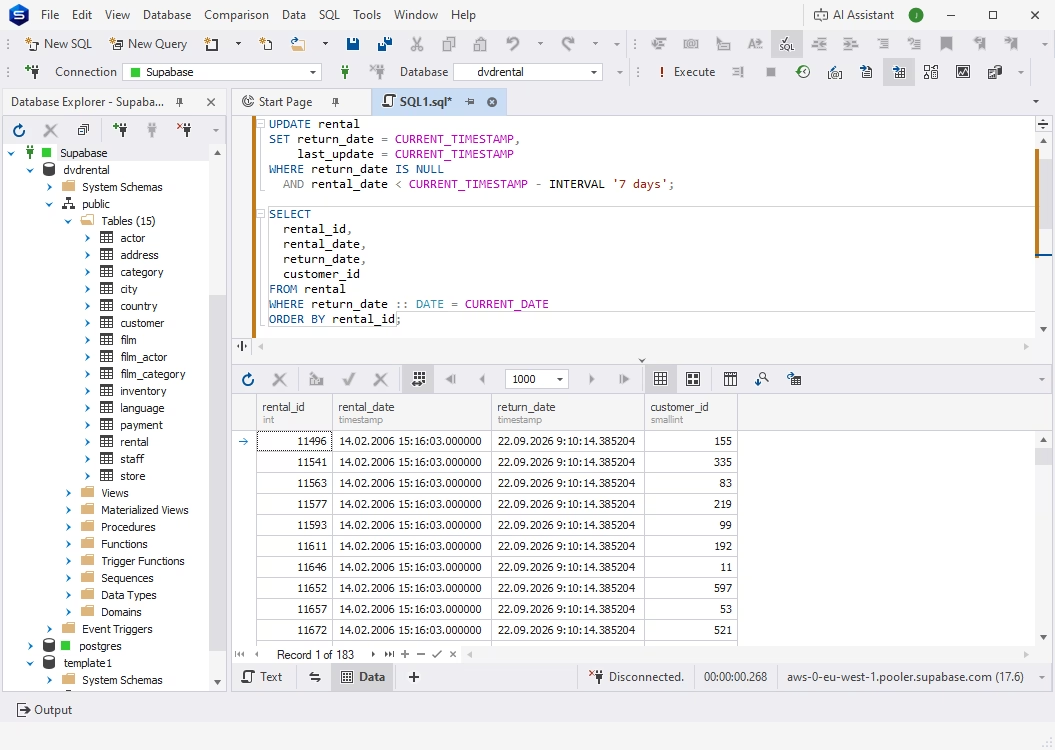
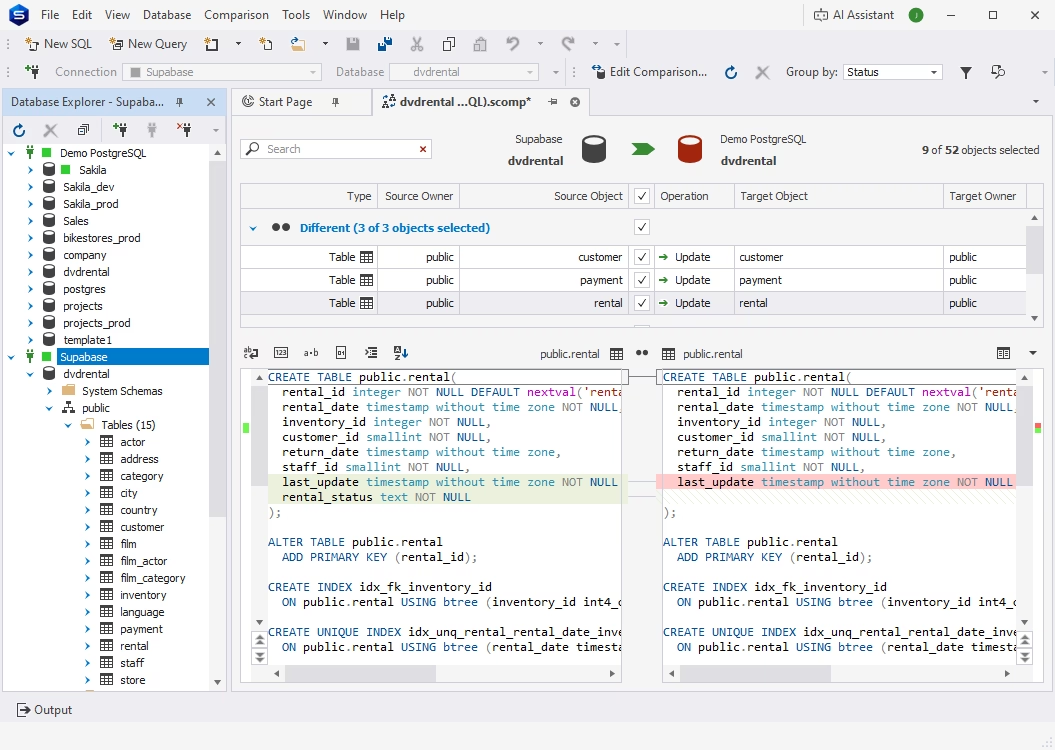
Schema comparison makes it easier to identify structural issues, while data comparison helps verify that generated transformations and synchronization operations produce the expected results.
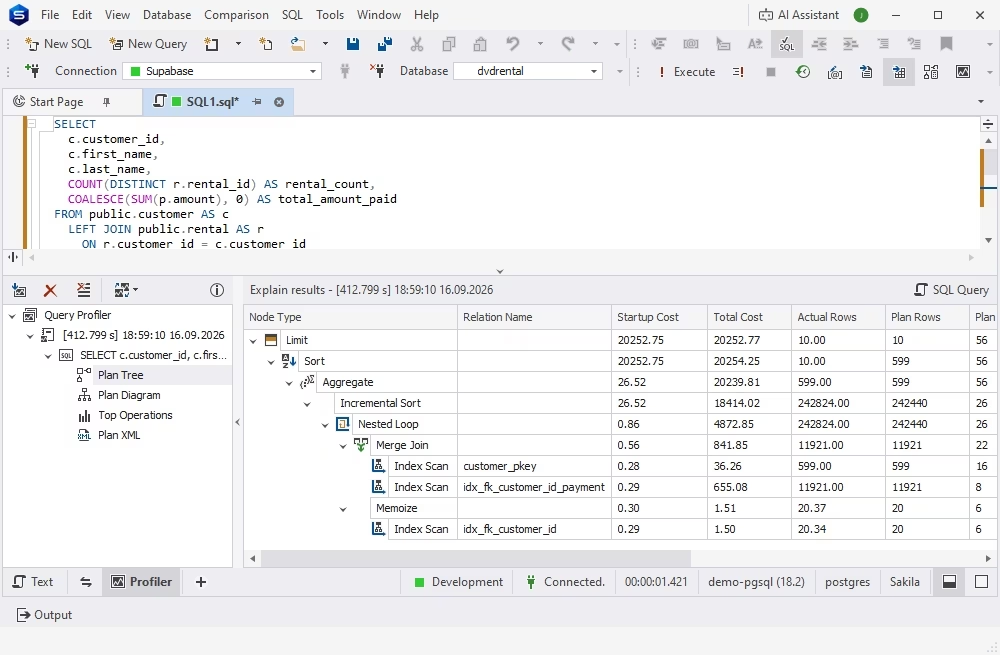
dbForge Studio for PostgreSQL also provides performance analysis tools that can be particularly useful for validating vibe-coded applications. These tools help identify inefficient queries and the underlying causes of performance issues. For example, Query Profiler lets you analyze query execution, identify bottlenecks, and optimize queries.
The IDE also offers tools for importing and exporting data and generating high-quality test data. These capabilities simplify the process of creating and managing test datasets and moving data between environments.
Finally, dbForge Studio for PostgreSQL includes an integrated AI Assistant for generating, analyzing, troubleshooting, and optimizing SQL queries. While it is not specifically designed for vibe coding, it can help you review AI-generated code against the databases you work with and create SQL queries for specific tasks performed by your vibe-coded application.
All in all, the Studio's visual database management, SQL development, comparison, and performance analysis features make AI-assisted development workflows more reliable and efficient. You can benefit from the speed of vibe coding while maintaining control over the PostgreSQL database layer.
PostgreSQL is an excellent choice for vibe coding when an application needs a real relational database rather than a simple prototype or mock data. It offers a strong relational model, excellent scalability, and a broad range of features that help AI-generated applications work with data.
Popular frameworks and tools, such as Prisma and Neon, simplify the connection of these applications to PostgreSQL. In addition, modern PostgreSQL IDEs allow developers not only to manage databases but also to validate and modify AI-generated schemas, database objects, data, and queries. This makes PostgreSQL a suitable choice for a wide range of applications, including vibe-coded ones.
Still, vibe coding is not a silver bullet, and AI-generated code is not automatically reliable or safe. AI can produce incorrect or poorly designed database objects, inefficient queries, and unsafe migrations. To get the most out of vibe coding, you need to review and control the AI-generated output and treat AI as a powerful tool that still requires human supervision. The developer remains in charge.
Vibe coding with PostgreSQL is an AI-assisted development workflow. Developers use prompts written in plain language and AI coding tools to generate or modify application code while PostgreSQL serves as the backend database. AI can help create schemas, SQL queries, migrations, APIs, and application logic, while PostgreSQL provides relational storage, transactions, constraints, and other SQL capabilities.
Yes, PostgreSQL is a good fit for many vibe-coded applications, especially those that require structured data, relationships, transactions, and SQL queries. The most common PostgreSQL usage examples include SaaS applications, dashboards, CRMs, marketplaces, booking systems, and internal tools. However, PostgreSQL is not the default choice for every project. Simple prototypes may be easier to build with SQLite, PGlite, or a sandbox database.
Yes. AI tools can generate PostgreSQL table definitions, relationships, indexes, constraints, SQL queries, and migration scripts. However, the generated output should be reviewed before applying because it may contain errors and poor data modeling decisions. In this case, you need to edit the migration scripts to fix the issues first.
Check what database objects and data the migration will affect before running it. Review the migration script for potential data loss, destructive operations, long-running locks, and compatibility with the current application code. Also, make sure to test the migration in development and staging environments, with realistic data. Always verify that backups and recovery options are available. If any issue occurs, you need to be able to roll the migration back or ensure recovery in another way.
The main risks include accidental data modification or deletion and unsafe schema changes, including broken relationships, poorly designed tables, and missing indexes. There are also risks of exposing sensitive credentials or production data and performance issues caused by poorly designed queries. To avoid such problems, don’t give AI-generated code direct and unrestricted access to production.
Review all generated SQL before execution, particularly DELETE, UPDATE, DROP, TRUNCATE, and ALTER statements. Test queries and migrations in development and staging environments first, use restricted database permissions and read-only access where possible, maintain reliable backups, and avoid giving AI tools direct access to production databases. For data-changing queries, verify filters and affected rows before committing changes.
Prisma is a common addition to the TypeScript/PostgreSQL stack. Its schema models, typed database access, defined relations, migrations, and generated client code provide a structure that can make AI-generated backend code more predictable. However, Prisma does not replace the knowledge of database design or SQL. You still should review generated schemas and migrations and edit them manually if needed.
Yes. Supabase and Neon provide hosted PostgreSQL options that can simplify database setup for AI-assisted projects. They can be useful when developers want to create a PostgreSQL database and connect to it without managing their own database infrastructure. As with any hosted database, development, staging, and production environments should remain separated, and credentials and permissions should be carefully managed.
You can use several types of tools to help validate AI-generated database changes. One of the most efficient options is a PostgreSQL IDE, such as dbForge Studio for PostgreSQL, which allows you to inspect schemas, detect differences between database versions before deployment, run and review SQL queries, analyze their results, and optimize their performance.
Also, migration tools and frameworks can track and apply database changes in a controlled way, and automated tests in staging environments can verify that the application code works correctly before reaching production. By using such tools, you can benefit from AI code generation and maintain full control over your PostgreSQL databases, queries, and data.