SQL Server Convert String to Date: CAST, CONVERT, and TRY_CONVERT Examples
Handling dates is a common task in software development, but it often involves complications: dates are often stored as text strings, especially in CSV or JSON files. Therefore, it becomes necessary to convert such strings into date/datetime objects to use them correctly. There are several practical methods for performing this task.
This article will guide you through different scenarios of converting string values to date formats in SQL Server. To illustrate the use cases, we will refer to dbForge Studio for SQL Server, a powerful IDE for all kinds of database tasks SQL Server on-premises and in the cloud. Let us start.
How to convert a string to a date in SQL Server
SQL Server offers several functions that convert text values into DATE, DATETIME, or DATETIME2 formats. These functions are CAST, CONVERT, and TRY_CONVERT. But before we proceed to explore these functions, let us clarify why we need to convert strings to dates at all.
First and foremost, a string of characters brings no semantic meaning to a database or application. It is impossible to perform arithmetic calculations with strings. Therefore, if some dates stored in the database are strings, they affect the calculations and the overall performance.
You need to convert such strings to dates for sorting, filtering, calculation, and storage, and do it accurately. In SQL Server, the CAST, CONVERT, and TRY_CONVERT functions perform this task. Below you can see how they work.
CAST is used for ANSI-standard conversion.
CONVERT performs the SQL Server-specific conversion with format/style support.
TRY_CONVERT works similarly to CONVERT, but it returns NULL on invalid input instead of an error.
CAST vs CONVERT vs TRY_CONVERT
All three functions convert a value from a string to a date. However, they differ in syntax, flexibility, and error handling. The table below summarizes the key differences between these functions.
| Feature | CAST | CONVERT | TRY_CONVERT |
|---|---|---|---|
| SQL standard | ANSI | T-SQL only | T-SQL only |
| Style codes | Not supported | Supported | Supported |
| On failure | Throws an error | Throws an error | Returns NULL |
| Safety for dirty data | Not recommended | Not recommended | Recommended |
| Best for | Portable SQL or simple conversions | Date/number formatting with style codes | User input or untrusted data |
Convert a string to a date using CAST
CAST is the function that works across most SQL databases. It is the simplest conversion option, but it does not support style/formatting codes.
CAST string as DATE
The basic syntax is as follows.
You can use this function to convert strings to different date types.
In all these examples, CAST explicitly tells SQL Server that the value should be treated as a date and converted to the specified date types. Then these values can be used in date calculations, comparisons, and other scenarios.
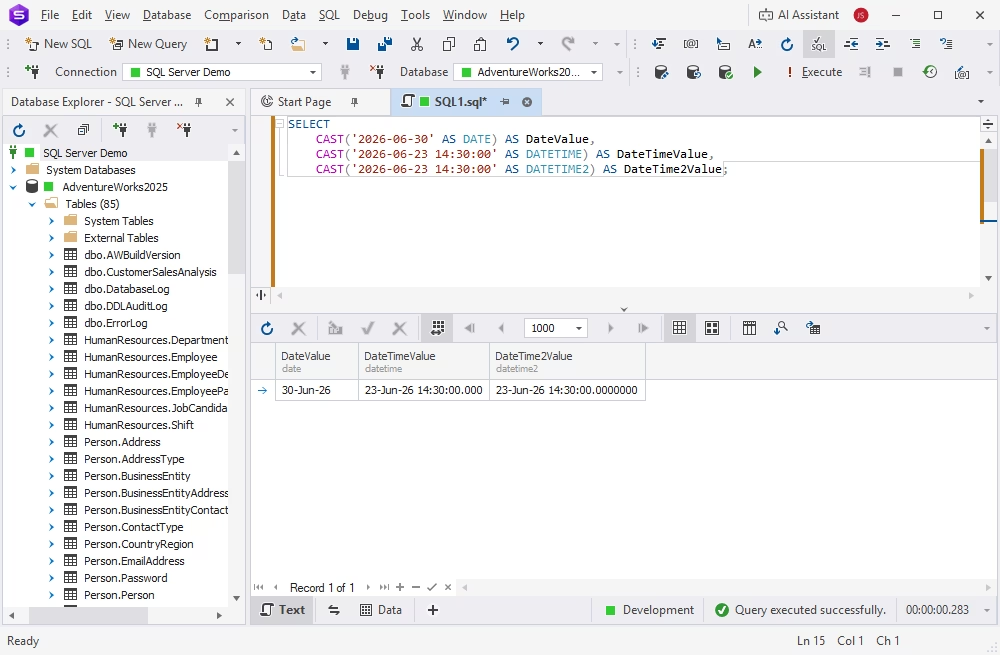
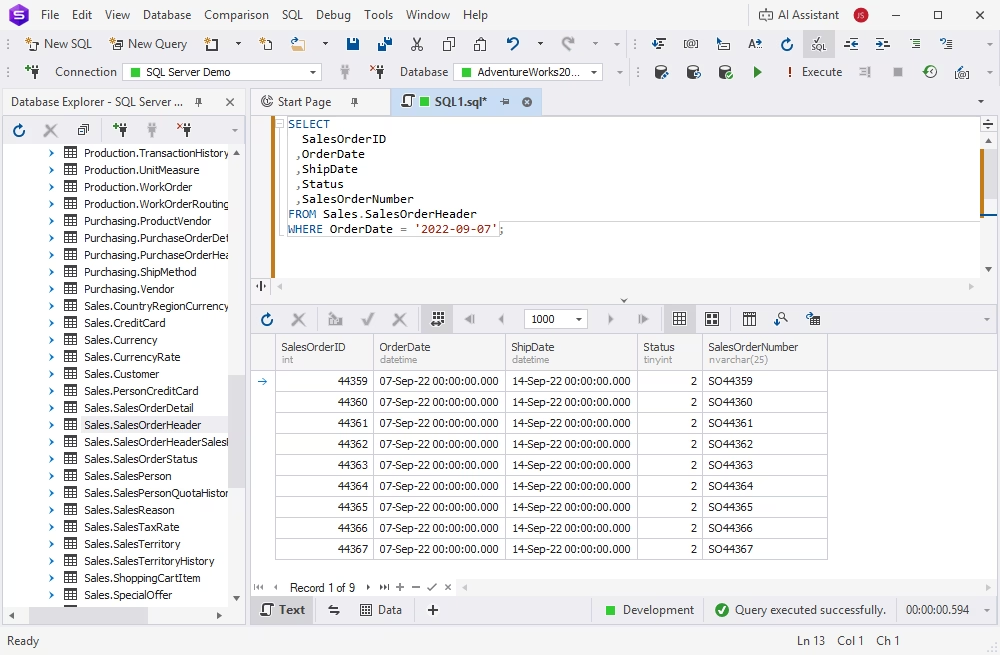
CAST works best when the string is in a standard format such as YYYY-MM-DD or YYYY-MM-DD HH:MM:SS. For ISO date literals, SQL Server can even perform the string-to-date conversion automatically.
SELECT
  SalesOrderID
 ,OrderDate
 ,ShipDate
 ,Status
 ,SalesOrderNumber
FROM Sales.SalesOrderHeader
WHERE OrderDate = '2022-09-07';
When CAST may fail
CAST fails if date values are invalid. In this case, SQL Server produces an error and stops the query.
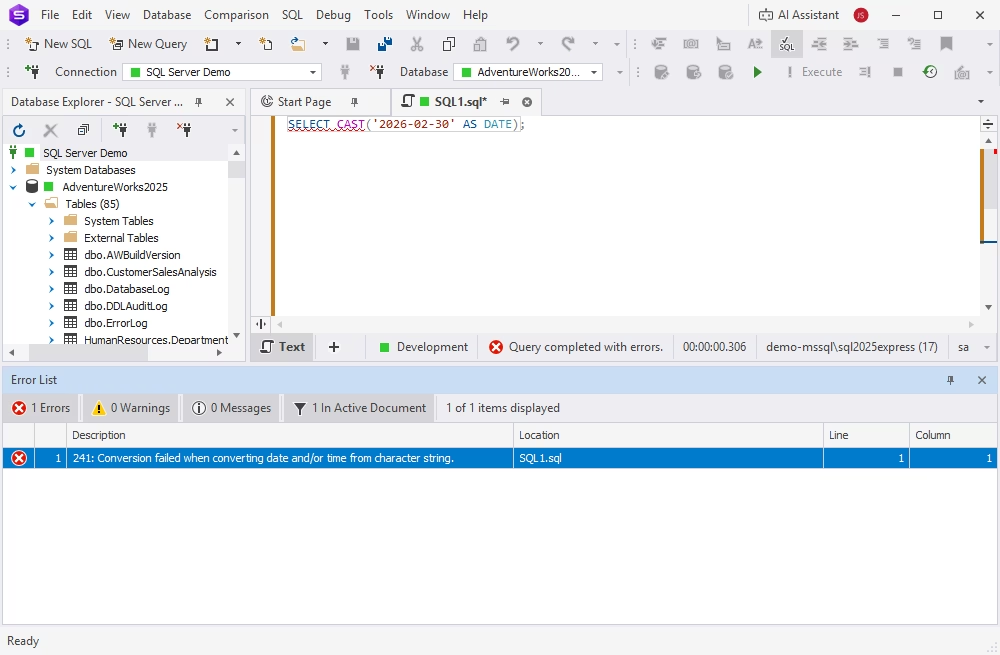
It also may fail because of ambiguous date formats; the result depends on the DATEFORMAT and language settings applied during the session.
It is better to avoid using CAST when input data may contain invalid dates or locale-dependent formats. ISO formats (YYYYMMDD or YYYY-MM-DD) are preferable.
Convert a string to a date using CONVERT
CONVERT is a SQL Server function that converts a string to a date or datetime value. Unlike CAST, it accepts style codes that instruct SQL Server how to interpret the string.
CONVERT syntax
The basic syntax is as follows.
Parameters:
- data_type — the target type, such as DATE
- expression — the value to convert
- style — an optional numeric code that defines the input string format
Convert DD/MM/YYYY to date
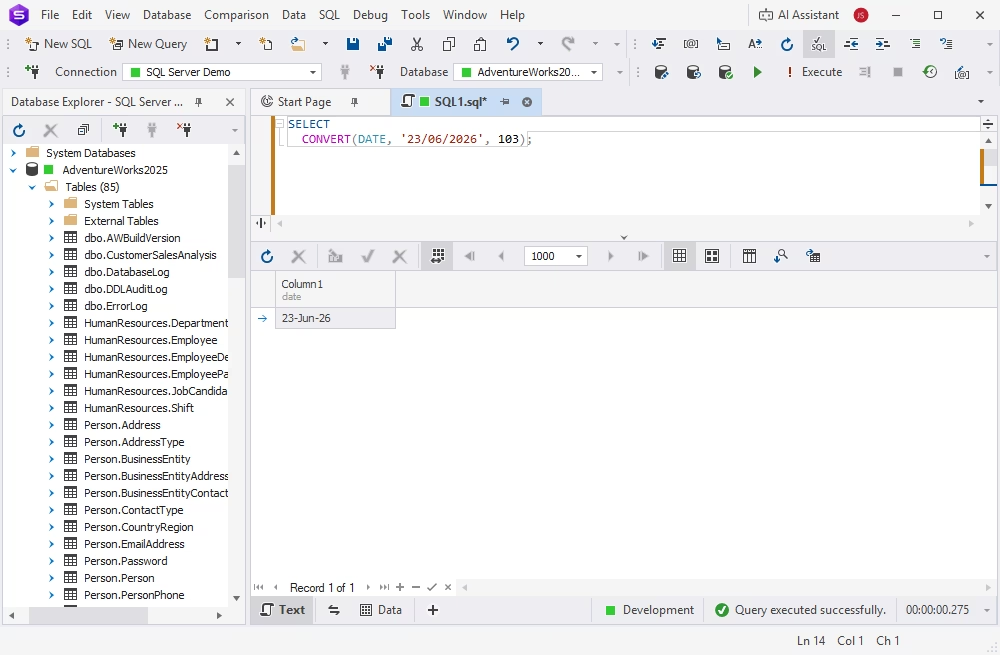
DD/MM/YYYY is the British/French date format. Use the style code 103 for correct interpretation. Otherwise, SQL Server may misinterpret the date or produce an error.
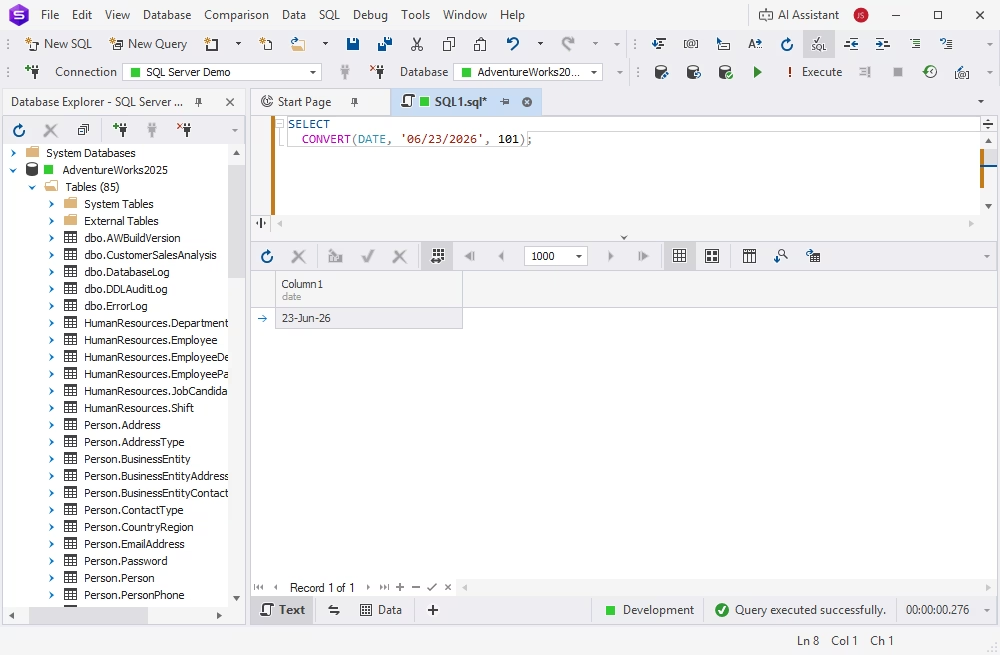
Convert MM/DD/YYYY to date
MM/DD/YYYY is the US date format. The 101 style code should be applied to tell SQL Server to treat the first number as the month.
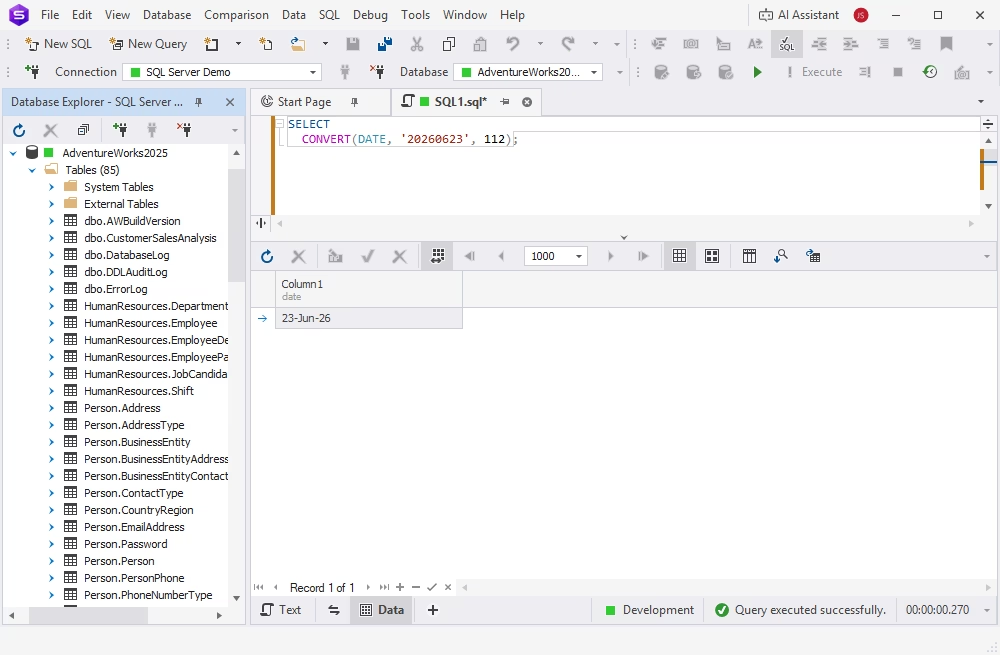
Convert YYYYMMDD to date
YYYYMMDD is the ISO format defined by the style code 112. This format is unambiguous; thus, it is recommended generally for SQL Server date strings.
CONVERT may fail due to invalid input values or a mismatch between the style code and the actual format. In such cases, SQL Server raises an error and stops processing the query.
Common SQL Server date style codes
The table below lists the most common style codes used in SQL Server for conversion strings to date formats.
| Style code | Definition | Format | Example |
|---|---|---|---|
| 101 | US | MM/DD/YYYY | 12/31/2026 |
| 103 | British/French | DD/MM/YYYY | 31/12/2026 |
| 104 | German | DD.MM.YYYY | 31.12.2026 |
| 112 | ISO | YYYYMMDD | 20261231 |
| 120 | ODBC canonical | YYYY-MM-DD HH:MI:SS | 2026-12-31 10:30:00 |
| 126 | ISO 8601 | ISO 8601 | 2026-12-31T10:30:00.000 |
Handle invalid date strings with TRY_CONVERT
TRY_CONVERT works like CONVERT, but it has one significant difference: it returns NULL instead of raising an error when a conversion fails. This specificity makes it suitable for operations with imported data or data input by users: it does not break the process even if invalid values are detected.
The basic syntax is as follows.
The ability of TRY_CONVERT to continue processing all rows even when some values are invalid is helpful in data validation, cleansing, and bad data detection scenarios. Let us see how it works in practice.
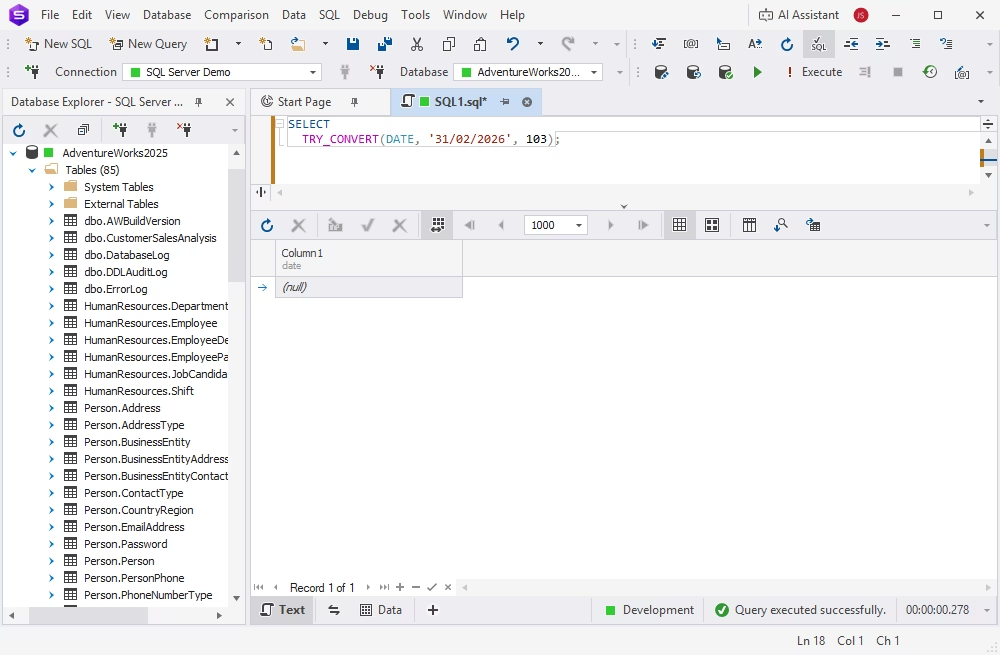
Return NULL instead of an error
Data stored in CSV or XLS files or entered directly by the user often contains invalid values. When SQL Server has to process such data with CAST or CONVERT, invalid values cause the system to raise an error and stop the query. In contrast, TRY_CONVERT returns NULL for such values, and the query continues processing rows. Thus, you can generate reports and validate data even if some records are malformed.
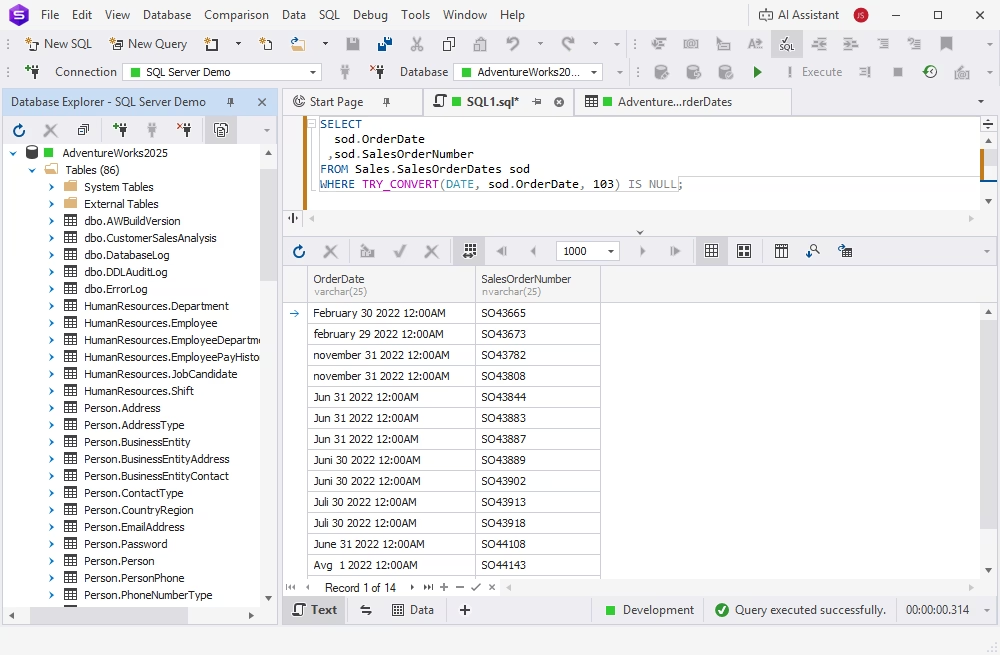
Find rows with invalid dates
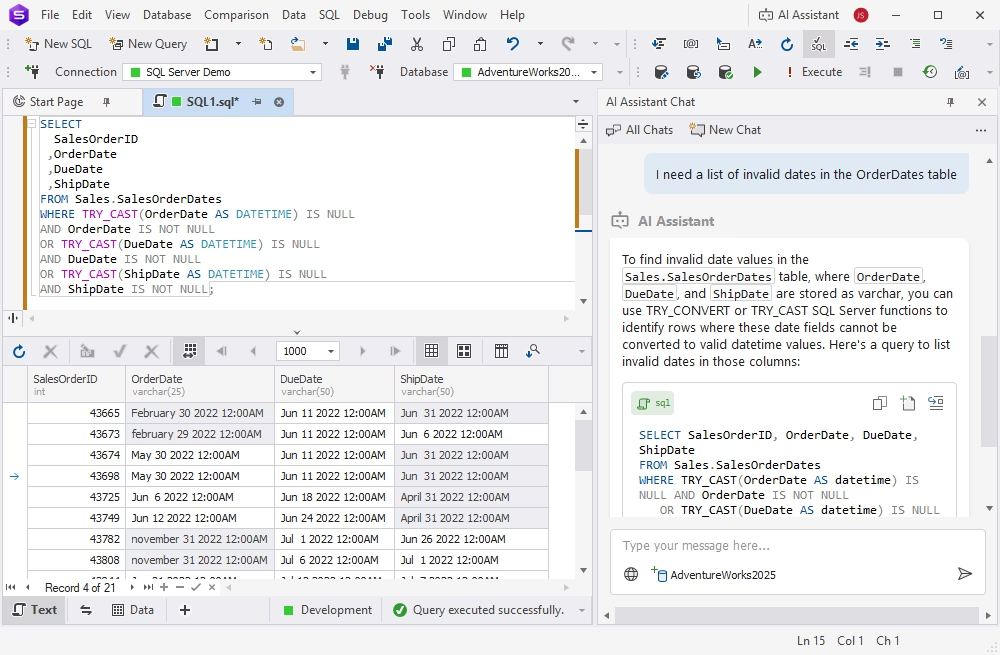
TRY_CONVERT helps you identify records with invalid date strings before loading data into production. In practice, it means selecting rows where TRY_CONVERT returns NULL. This method is widely used for importing, validating, and cleaning data.
How dbForge Studio for SQL Server helps with date conversion queries
dbForge Studio for SQL Server is an AI-powered integrated development environment that supports the full database development lifecycle, from T-SQL coding to version control.
When converting strings to date types, dbForge Studio provides a practical environment for writing, testing, and troubleshooting conversion queries. You can run CAST, CONVERT, and TRY_CONVERT examples directly in the Studio's SQL Editor, review results, and identify invalid date values before applying changes to production data.
The integrated dbForge AI Assistant can explain conversion errors, suggest query improvements, and help resolve issues such as invalid date strings, incorrect style codes, or mixed regional date formats.
Try dbForge Studio for SQL Server free with a fully functional trial—evaluate it against your actual workload!
FAQ
SQL Server has the CAST, CONVERT, and TRY_CONVERT functions that convert strings to date formats. TRY_CONVERT is often preferred because it returns NULL instead of an error when conversion fails.
CAST is the ANSI-standard function that provides basic data type conversion. CONVERT is SQL Server-specific and supports additional formatting options via style codes. CAST is the right choice when you need portability; CONVERT is better when you need format-specific conversions.
Use CONVERT with style code 103, which corresponds to the British/French format. If you need to make sure that the query processes all records even if some values are invalid, use TRY_CONVERT.
Some best practices are applicable. First, store dates using proper date/time data types, not strings. Then, use ISO 8601 format (YYYY-MM-DD) wherever possible. Finally, always validate input data before conversion (you may use TRY_CONVERT for invalid data filtering).
No. TO_DATE is an Oracle function. In SQL Server, CAST, CONVERT, or TRY_CONVERT functions perform the string-to-date conversion.