How to Drop a Table in SQL Server
Database maintenance often requires deleting unnecessary tables. In SQL Server, we have multiple options to accomplish this task:
the DELETE command removes rows from tables,
TRUNCATE TABLE clears the table data while preserving its structure, and the DROP TABLE command deletes the table entirely.
The DROP TABLE SQL command is essential during tasks like schema redesign, cleanup of temporary or test tables, and automated deployments or rollbacks, therefore, it is frequently
used by database developers, administrators, data engineers, and DevOps professionals.
However, because the SQL DROP TABLE command is irreversible, it must be used with caution. Improper use can lead to data loss and break dependencies with other objects.
Anyone who regularly works with table deletions must understand how this command works and its implications. This article explores the DROP TABLE command in SQL Server,
explaining how to safely delete one or more tables. It also covers how to check for a table's existence before deletion.
DROP TABLE syntax
The DROP TABLE syntax in SQL Server is used to permanently remove a table from a database, including its structure, data, indexes, triggers, and constraints. This operation is irreversible,
so it should be used with caution.
The basic syntax is:
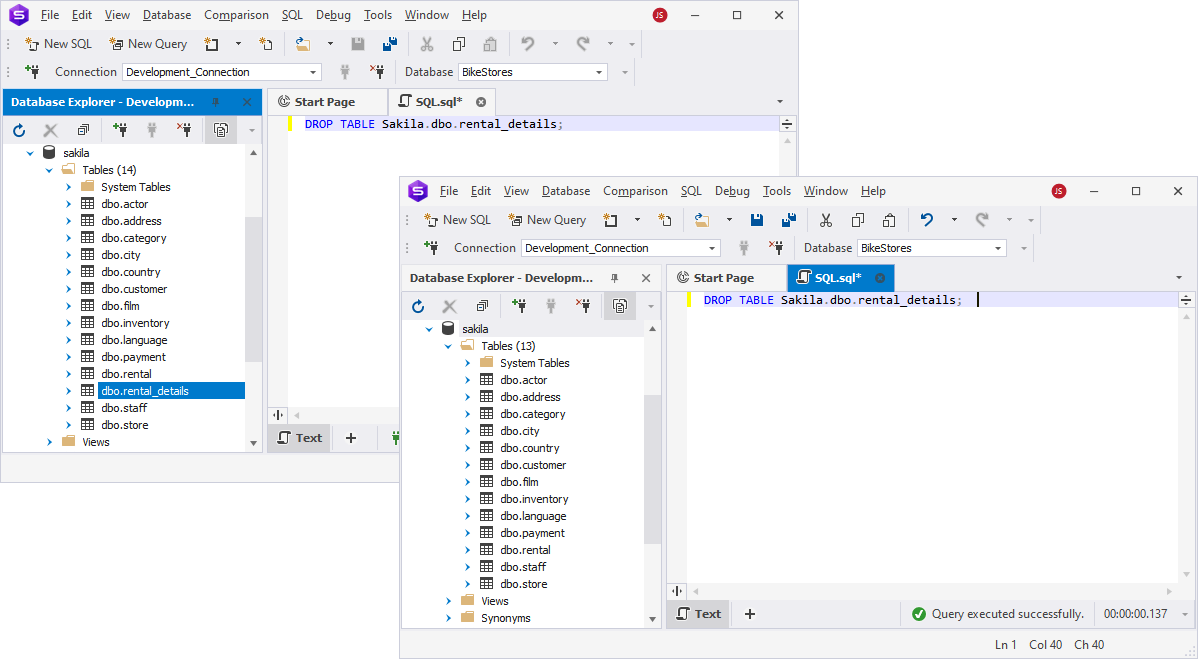
For example, the following command deletes the film_text table from the current database:
To drop a table from another database, use the fully qualified name:
DROP TABLE sakila.dbo.film_text;
However, this command will fail if the target table is referenced by a foreign key constraint in another table. In that case, you must first remove or update the dependent relationship.
Note
Keep in mind that dropping a table does not remove related stored procedures, views, or functions. You should review dependencies to avoid unexpected errors.
To avoid errors when a table might not exist, consider using the DROP TABLE IF EXISTS statement (we'll cover the details of using this operator later).
How to use DROP TABLE in SQL Server
In real-world scenarios, the SQL DROP TABLE command is essential for maintaining a clean and efficient database environment. For example, during development cycles or after feature deprecations,
you may need to remove outdated tables like film_text from the sakila database to eliminate unnecessary storage and simplify your schema. In this case,
the DROP TABLE SQL Server command comes in handy.
Here are more use case scenarios when you might consider using DROP TABLE:
- Remove obsolete tables to reduce storage and schema clutter.
- Reset dev/test environments with clean table recreations.
- Reduce production errors by eliminating unused structures.
- Support schema refactoring through controlled table removal.
Generally, using the DROP TABLE SQL Server command helps free up system resources and avoid confusion caused by unused or legacy tables.
Keep reading to explore in detail the intricacies of using DROP TABLE in SQL Server for different scenarios.
Drop a single table from a different database
To drop a table in SQL from a different database without switching context, use the full database name in your command.
For instance, you can still drop tables from the AdventureWorks2022 database while you're connected to a different one:
DROP TABLE AdventureWorks2022.dbo.NewEmployee;
This syntax allows you to delete tables across databases on the same SQL Server instance, which is particularly useful when cleaning up legacy or temporary data in archived systems.
Note
Keep in mind that to drop a table in SQL from another database, you must have the necessary permissions on that target database. Otherwise, the operation will fail even if the command syntax is correct.
This variation of the SQL DROP TABLE method streamlines multi-database maintenance and ensures more efficient resource management without manual context switching.
Drop multiple tables from the database
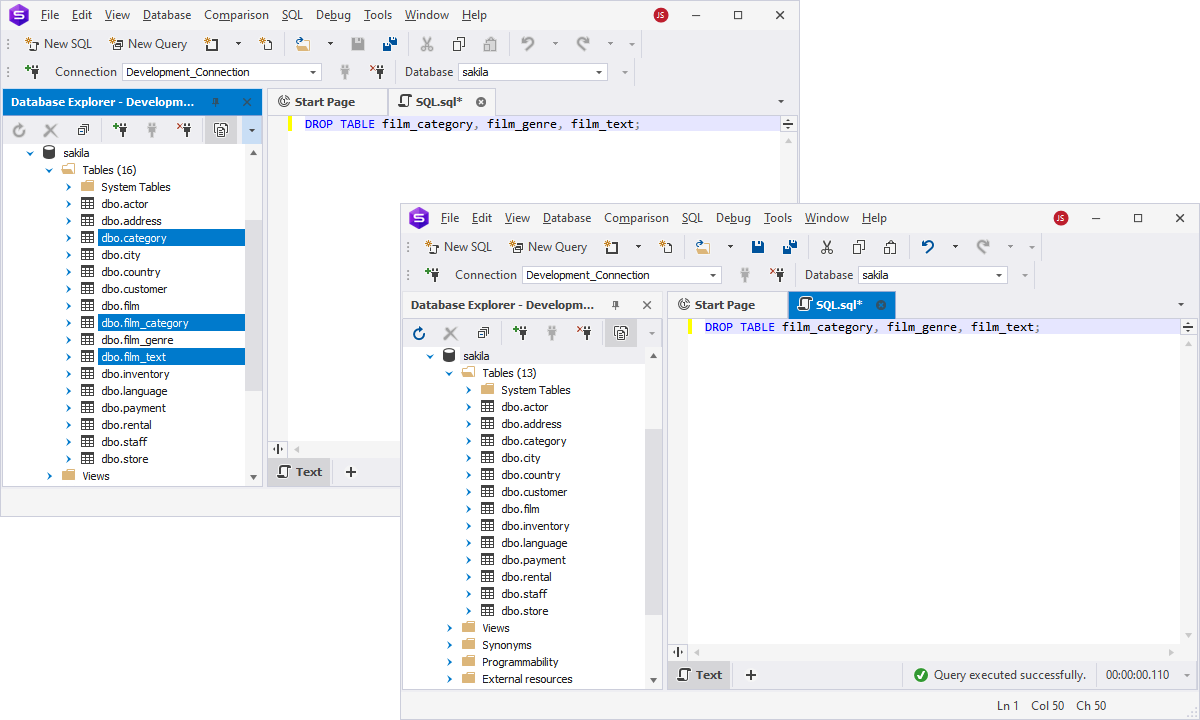
To let SQL drop multiple tables at once, list them in a single statement separated by commas:
DROP TABLE dbo.TestDepartment, dbo.TestEmployee, dbo.TestShift;
This approach is ideal for batch cleanup tasks, such as removing deprecated logs, archived data, or temp tables after processing. Using one command instead of several
not only simplifies maintenance but also helps optimize your SQL scripts for speed and clarity.
Whether you're refactoring old structures or clearing out staging tables, the ability to drop multiple tables in a single step makes routine database management more efficient.
Drop a temporary table from the database
Temporary tables in SQL Server (e.g., #TempTable) are automatically deleted when the session ends or the connection closes. However, if you want to drop a temporary table in SQL before the session ends,
such as during mid-script cleanup or after a specific step, you can remove it manually using the DROP TABLE IF EXISTS statement:
DROP TABLE IF EXISTS #TempTable;
This pattern ensures a safe deletion without throwing errors if the table doesn't exist. It's especially helpful in dynamic scripts where table presence can vary.
For more on the DROP TABLE IF EXISTS clause, see the dedicated section below.
Use this approach when handling cleanup tasks within longer-running sessions or scripts, where early removal of temp data improves performance or avoids conflicts.
Using the DROP TABLE IF EXISTS clause
The DROP TABLE IF EXISTS clause in SQL Server helps you avoid runtime errors when attempting to delete a table that may not exist. Once you're using it, instead of throwing an error,
SQL Server ignores the operation if the table is missing.
The syntax would be as follows:
DROP TABLE IF EXISTS table_name;
This command checks for the presence of table_name in the current database and deletes it only if it exists, making it ideal for cleanup scripts and automated deployments.
The DROP TABLE IF EXISTS SQL Server syntax is especially useful when writing reusable or environment-agnostic scripts where table availability may vary.
It eliminates the need for additional checks and helps ensure smooth, error-free execution.
Note
This feature was introduced in SQL Server 2016 and applies only to tables. You cannot use it on views, procedures, or other objects.
DROP TABLE support in different DBMSs
The DROP TABLE command is not exclusive to SQL Server—it exists in all major database management systems, although its behavior can vary depending on the platform. Below is a comparison table that highlights how DROP TABLE is used across different DBMSs.
| Feature / Platform |
SQL Server (T-SQL) |
MySQL / MariaDB |
PostgreSQL |
Oracle NoSQL |
IBM (DB2/Informix) |
| Basic syntax |
DROP TABLE table_name; |
DROP TABLE table_name; |
DROP TABLE table_name; |
DROP TABLE table_name; |
DROP TABLE table_name; |
| Supports IF EXISTS |
✅ Yes (from SQL Server 2016+) |
✅ Yes |
✅ Yes |
✅ Yes |
❌ No (error if table doesn't exist) |
| Drop multiple tables |
❌ Not directly |
✅ Yes: DROP TABLE t1, t2; |
✅ Yes |
❌ No |
❌ No |
| Cascading option |
❌ No native CASCADE |
❌ No native CASCADE |
✅ Yes: DROP TABLE t1 CASCADE; |
⚠️ Must drop child tables first |
⚠️ May require manual handling of dependencies |
| Removes data |
✅ Yes |
✅ Yes |
✅ Yes |
✅ Yes |
✅ Yes |
| Removes table structure |
✅ Yes |
✅ Yes |
✅ Yes |
✅ Yes |
✅ Yes |
| Removes indexes |
✅ Yes |
✅ Yes |
✅ Yes |
✅ Yes |
✅ Yes |
| Removes constraints |
✅ Yes |
✅ Yes |
✅ Yes |
✅ Yes |
✅ Yes |
| Can drop temporary tables |
✅ Yes (DROP TABLE #temp) |
✅ Yes |
✅ Yes |
✅ N/A |
✅ Yes |
| Rollback support |
✅ Yes |
❌ No |
❌ No |
❌ No |
❌ No |
| Error if the table is missing |
❌ Unless IF EXISTS used |
❌ Unless IF EXISTS used |
❌ Unless IF EXISTS used |
❌ Unless IF EXISTS used |
✅ Yes – throws error |
| Special notes |
Use IF OBJECT_ID(...) IS NOT NULL before drop |
Allows dropping multiple tables in one go |
CASCADE helpful for views & FKs |
Asynchronous deletion; cannot drop parents before children |
May need to handle dependent objects manually |
How to apply DROP TABLE in dbForge Studio
In our demonstration, we utilized T-SQL commands using the GUI client, dbForge Studio for SQL Server. However, the Studio provides the flexibility to either execute SQL commands directly
against the databases or perform the task visually through the Database Explorer interface. Let's check both methods.
How to DROP TABLE via T-SQL in dbForge Studio for SQL Server
- Open a new SQL editor or query window within dbForge Studio for SQL Server.
- Enter the SQL command to drop the table. The basic syntax, as was discussed before, is:
- Replace table_name with the actual name of the table you want to delete.
- Execute the SQL statement by clicking the Execute button.
How to drop a table via the graphic interface in dbForge Studio for SQL Server
This user-friendly approach simplifies the process of table deletion even further, especially when you are not familiar with T-SQL.
To drop a table using just GUI, follow these instructions:
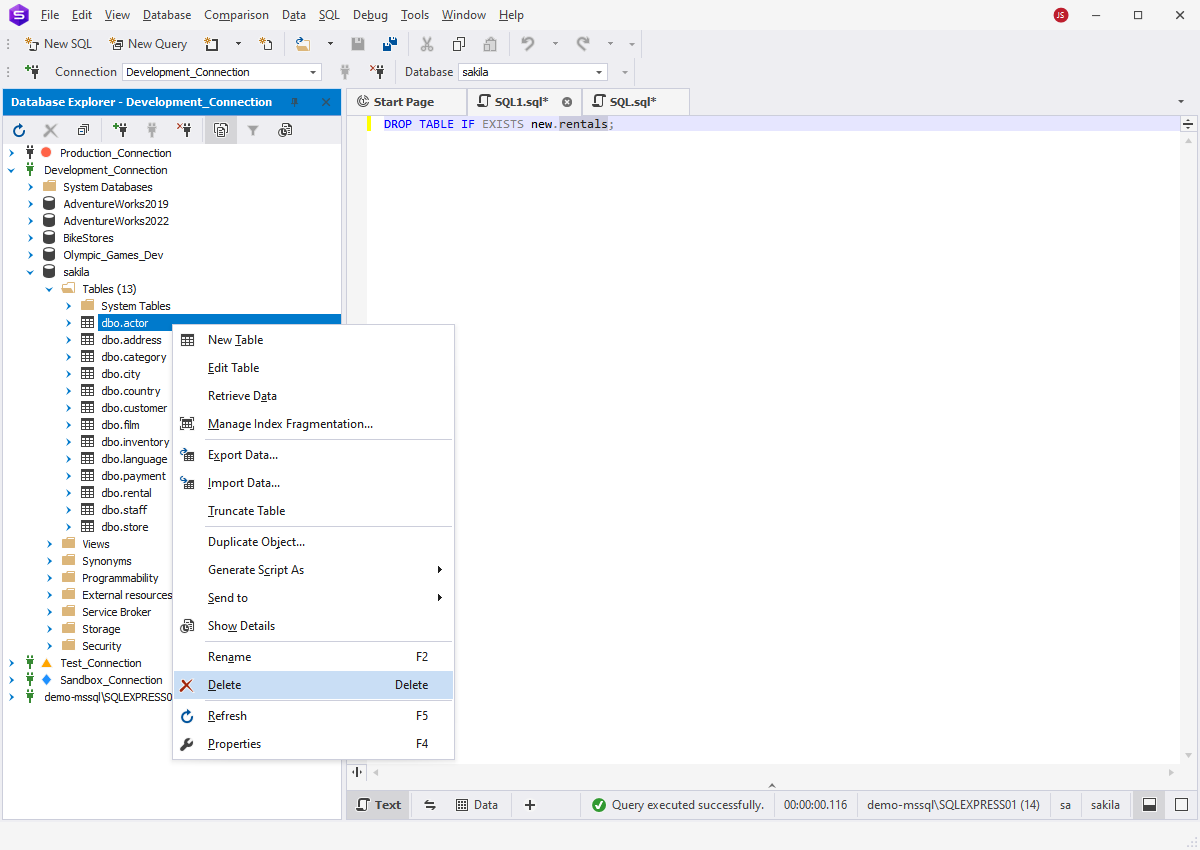
- Expand the Tables node for the necessary database.
- Select the table you want to delete.
- Right-click the table and select Delete from the context menu.
The Delete option in this menu operates as the DROP TABLE command, deleting the entire table permanently.
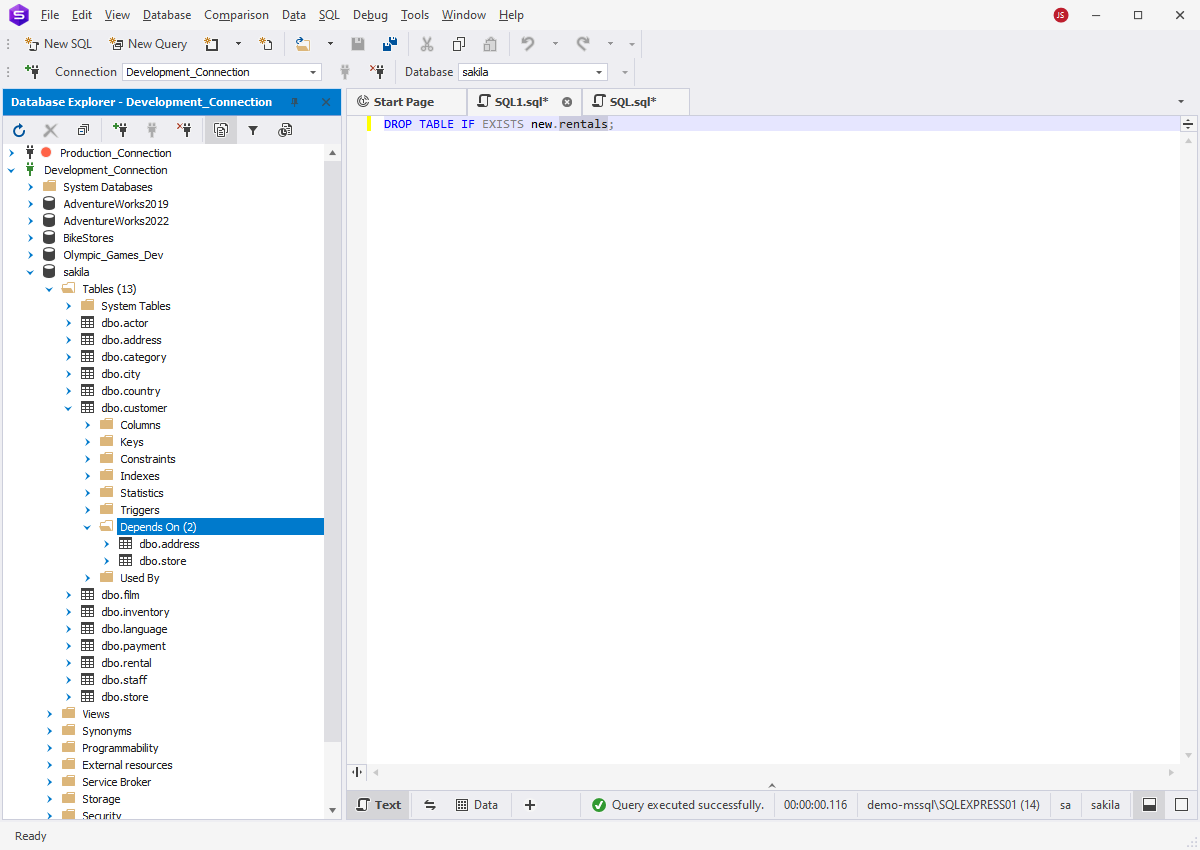
However, the Database Explorer feature in dbForge Studio for SQL Server offers an additional benefit. It provides a visual means to identify tables that may have
references to the table you wish to delete:
- Expand the specific table mode in Database Explorer.
- Check the Depends On folder.
This feature allows you to view all tables linked to the target table, making it easy to verify dependencies and eliminate tables or other objects that could hinder the deletion process.
Furthermore, dbForge Studio for SQL Server can generate scripts to create or delete multiple objects simultaneously, enabling you to drop all related objects with a single click.
Moreover, dbForge Studio for SQL Server comes with syntax highlighting, dependency previews, and safety prompts, helping you avoid accidental deletions and
ensuring clean schema management once you are using the DROP TABLE SQL Server command.
DROP vs DELETE vs TRUNCATE in SQL Server
While all three commands remove data in some way, they serve very different purposes:
- DROP completely removes the table along with its structure, indexes, constraints, and all stored data. Use it when you no longer need the table at all.
- DELETE removes specific rows while keeping the table's structure intact. It can use a WHERE clause to target only the data you want to remove
and will fire any associated DELETE triggers.
- TRUNCATE quickly removes all rows from a table while preserving its structure. It resets identity values and generally runs faster than DELETE for full-table cleanup.
| Feature |
DROP |
DELETE |
TRUNCATE |
| Removes table structure? |
Yes—drops the entire table |
No—only deletes rows |
No—only deletes rows |
| Removes data? |
Yes—all data gone |
Yes—specified rows (can use WHERE) |
Yes—all rows removed |
| Applicable to WHERE clause? |
No |
Yes |
No |
| Can be rolled back? |
Yes (if wrapped in transaction) |
Yes |
Yes (in most cases) |
| Affects table schema? |
Yes—the table no longer exists |
No |
No |
| Resets identity column? |
Yes |
No |
Yes |
| Requires extra permissions? |
Yes (ALTER/DROP permission) |
Yes (DELETE permission) |
Yes (minimum ALTER on table) |
| Triggers execution? |
No |
Yes—DELETE triggers fire |
No |
| Use case |
Remove table completely |
Remove specific rows |
Quickly remove all rows, keep structure |
Understanding these differences ensures you choose the right command for your use case, whether you're dropping obsolete objects, clearing test data, or resetting tables without affecting schema design.
Conclusion
The DROP TABLE SQL Server command is used for keeping your schema clean and efficient. In real-world scenarios, it's used to remove outdated structures, clear staging or temporary tables,
and handle automated cleanup routines.
To prevent the DROP TABLE error, always consider adding IF EXISTS checks, ensuring proper permissions, and using tools that provide safety prompts and syntax validation.
Try dbForge Studio for SQL Server, which combines both T-SQL and visual options, helping you execute
schema changes with confidence and precision.
FAQ
What is the correct SQL syntax to drop a table?
Using DROP TABLE in SQL is the go-to method for deleting a table. The basic DROP TABLE syntax in SQL Server is:
DROP TABLE [IF EXISTS] schema_name.table_name;
When should I use DROP TABLE instead of DELETE or TRUNCATE?
You should use the DROP TABLE SQL command when you want to permanently remove both the table structure and its data from the database. Unlike DELETE (which removes specific rows) or
TRUNCATE (which quickly removes all rows but keeps the structure), DROP TABLE frees storage, resets identity values, and deletes the schema object itself.
If you're comparing DROP TABLE vs DELETE or DROP TABLE vs TRUNCATE, DROP TABLE is best for schema cleanup, decommissioning old tables, or resetting a database environment entirely.
How does DROP TABLE differ from DELETE and TRUNCATE in SQL?
DROP TABLE completely removes the table and its structure from the database. DELETE removes specific rows but keeps the table and its structure intact.
TRUNCATE deletes all rows from a table while preserving the table's structure.
What does DROP TABLE IF EXISTS do in SQL scripts?
DROP TABLE IF EXISTS deletes a table only if it exists, preventing errors when attempting to drop a non-existent table. It's often used in deployment, testing, or maintenance scripts for safe and error-free table removal.
How does DROP TABLE IF EXISTS help prevent errors?
Using DROP TABLE IF EXISTS in SQL Server helps you avoid a common DROP TABLE error that occurs when trying to delete a table that doesn't exist. This clause checks for the table's
existence before attempting to remove it, ensuring scripts run smoothly without manual existence checks.
Can you drop multiple tables in a single SQL statement?
Yes, when you’re using DROP TABLE SQL Server command, it can be applied to multiple tables at once. For example:
DROP TABLE dbo.Table1, dbo.Table2, dbo.Table3;
In this syntax, to let SQL drop multiple tables, you have to list them in a single DROP TABLE statement, separated by commas.
Does DROP TABLE remove indexes and constraints in SQL databases?
Yes, DROP TABLE removes the table along with all associated indexes, constraints, and other structural elements.
What happens if I try to drop a table with foreign key constraints?
If you try to drop a table that is referenced by foreign key constraints, SQL Server will block the operation and return a DROP TABLE error. To proceed, you must
first remove or modify the foreign key constraints that reference the table. This can be done by dropping the constraints explicitly or by dropping the dependent tables first.
Understanding how to drop table constraints helps prevent unexpected interruptions during schema changes.
What happens if you try to drop a non-existent table in SQL?
If the specified table doesn't exist, SQL Server will throw an error when executing the DROP TABLE command.
How do you drop a table safely without causing errors in SQL Server?
Use DROP TABLE IF EXISTS table_name;. The IF EXISTS clause checks whether the table exists before deleting it. If the table exists, the command drops it; if not, it skips the deletion without raising an error.
How do I drop a temporary table manually?
Knowing how to run an SQL drop table for temp objects helps keep your workspace clean and efficient. To manually remove a temporary table, use the DROP TABLE statement followed by
the table name, just like with regular tables.
For example, DROP TABLE #TempTable; removes a local temporary table, while DROP TABLE ##GlobalTempTable; removes a global one. Using drop temporary table SQL commands
ensures resources are freed promptly.
Is DROP TABLE part of DDL or DML in SQL?
DROP TABLE is a DDL (Data Definition Language) command. DDL defines and manages database structures like tables, indexes, and schemas. Since it removes the table's structure, it is classified as a DDL operation.
Can foreign key dependencies prevent a table from being dropped in SQL?
Yes. A foreign key constraint prevents you from dropping a table until you remove the referencing table or constraint.
Does DROP TABLE work the same way in MySQL, PostgreSQL, and SQL Server?
While DROP TABLE has the same basic purpose—permanently deleting a table and its structure—there are differences among MySQL, PostgreSQL, and SQL Server. All three support DROP TABLE IF EXISTS to avoid errors. PostgreSQL supports DROP TABLE ... CASCADE to automatically remove dependent objects, while MySQL and SQL Server do not; in those systems, dependencies must be manually removed.
What permissions are required to execute DROP TABLE?
To execute DROP TABLE in SQL Server, you need the appropriate permissions. Typically, it should be ALTER permission on the schema or CONTROL permission on the table.
In some cases, higher-level rights like db_owner can also allow this action. Understanding SQL DROP TABLE permission requirements is essential to avoid errors and ensure only
authorized users can execute DROP TABLE in SQL environments.
How can I drop a table from another database?
In SQL Server, you can drop a table from another database by specifying the database name, schema, and table in the command. For example:
DROP TABLE DatabaseName.SchemaName.TableName;
Always ensure you're running the command in the correct context to avoid accidental deletions when using DROP TABLE SQL Server commands.
Can I use DROP TABLE inside automated scripts?
Yes, you can use DROP TABLE inside automated scripts, especially with the DROP TABLE IF EXISTS syntax to prevent runtime errors if the table doesn't exist. This approach
ensures your DROP TABLE SQL commands run safely in scheduled jobs, deployment pipelines, or database maintenance scripts without causing interruptions.
How can I drop a table using SQL Server Management Studio (SSMS)?
To drop a table in SQL Server Management Studio (SSMS), open Object Explorer, navigate to your database, expand the Tables folder, right-click the table you want to remove,
and choose Delete. Confirm the action to execute the DROP TABLE SQL Server command in the background. This GUI method is a quick alternative to running a manual DROP TABLE SSMS query.