What is a cursor in SQL? Syntax, examples, and SQL Server usage
SQL is primarily designed for set-based data processing, working with groups of rows rather than processing each row individually. This approach is fast and efficient for most database operations. However, some tasks require processing query results one row at a time. In these situations, SQL provides a solution in the form of a cursor.
This article explains what a SQL cursor is, how it works, its different types, use cases, and key considerations for applying it.
What is a cursor in SQL?
A SQL cursor is a database object that processes query results one row at a time. It is useful when your scenario requires row-by-row processing, storing the results of a SELECT query temporarily for subsequent UPDATE, DELETE, or other operations.
Cursors serve to apply custom business logic, perform step-by-step updates, execute conditional operations within loops or complex stored procedures, and carry out tasks that cannot be done efficiently with a single set-based SQL query.
The table below compares the key characteristics of SQL cursors with those of regular set-based SQL queries.
| Feature | SQL cursor | Regular SQL query |
|---|---|---|
| Processing method | Processes rows one by one | Works with full sets of rows |
| Best for | Row-specific logic and sequential processing | Bulk updates, filtering, reporting, aggregation |
| Performance | Usually slower | Usually faster |
| Code complexity | Longer and more procedural | Shorter and easier to maintain |
| Common use | Loops, stored procedures, row-by-row operations | SELECT, UPDATE, JOIN, GROUP BY |
How does a SQL cursor work?
A SQL cursor works like a pointer that moves through the rows returned by a query one at a time. It temporarily stores the query result set and processes rows one by one until every row has been handled.
A cursor relies on the 5-step lifecycle to process data:
- DECLARE: The user gives the cursor a name and defines the SELECT query that populates the result set.
- OPEN: The database engine executes the query, retrieves the result set, and initializes the cursor just before the first row.
- FETCH: The cursor extracts data from the current row into local variables (typically inside a loop, like a WHILE loop), then the pointer moves forward to subsequent rows automatically.
- CLOSE: The cursor releases the current result set and drops any row-level locks but keeps the underlying structure intact.
- DEALLOCATE: The system completely erases the cursor definition and frees up all cached memory resources. This step is engine-specific and used in T-SQL.
SQL cursor syntax
The basic cursor syntax pattern in SQL Server looks as follows.
-- Declare variables

DECLARE @Id INT;
DECLARE @Name NVARCHAR(100);

-- 1. Declare the cursor

DECLARE MyCursor CURSOR FOR SELECT
  Id
 ,Name
FROM Employees;

-- 2. Open the cursor

OPEN MyCursor;

-- 3. Fetch the first row

FETCH NEXT FROM MyCursor
INTO @Id, @Name;

-- 4. Loop through all rows

WHILE @@FETCH_STATUS = 0
BEGIN
-- Process the current row
PRINT CONCAT(@Id, ' - ', @Name);
-- Fetch the next row
FETCH NEXT FROM MyCursor
INTO @Id, @Name;
END;

-- 5. Close and release the cursor

CLOSE MyCursor;
DEALLOCATE MyCursor;
Although the concept of a cursor is common across the major database management systems, the exact syntax and available options differ between them significantly.
- SQL Server uses DECLARE CURSOR, OPEN, FETCH, CLOSE, and DEALLOCATE.
- MySQL supports cursors only within stored programs (procedures, functions, events, or triggers), using DECLARE CURSOR, OPEN, FETCH, and CLOSE, typically with a handler to detect the end of the result set.
- Oracle uses cursors with PL/SQL constructs such as OPEN, FETCH, CLOSE, and cursor attributes like %FOUND and %NOTFOUND.
- PostgreSQL supports cursors via DECLARE, OPEN (depending on context), FETCH, MOVE, and CLOSE, with differences between SQL and PL/pgSQL usage.
- Db2 supports DECLARE CURSOR, OPEN, FETCH, and CLOSE, with syntax that differs somewhat from SQL Server.
Therefore, if you need to use a cursor in your code, consult the documentation for your database management system to understand its specific syntax, behavior, and limitations.
SQL cursor example
Let us see how a cursor works in practical scenarios. To illustrate the examples in our article, we use dbForge Studio for SQL Server, a robust AI-powered IDE for the entire lifecycle of SQL Server databases, and a popular sample database, AdventureWorks2025.
Assume that we need to calculate a 10% bonus for each employee based on their current payment rate and get the results as a temporary table. In practice, we need our query to perform the following steps:
- Process each employee individually and get the payment rate value.
- Calculate a 10% bonus for each employee.
- Store each result.
- Compile a single result set for further analytical and reporting operations.
We can perform all these steps using one query with a SQL cursor. Have a look at the query below.
-- Variables used by the cursor
DECLARE @BusinessEntityID INT;
DECLARE @FirstName NVARCHAR(50);
DECLARE @LastName NVARCHAR(50);
DECLARE @Rate MONEY;
DECLARE @Bonus MONEY;

-- Table to store the results
DECLARE @BonusReport TABLE (
  EmployeeID INT
 ,EmployeeName NVARCHAR(101)
 ,CurrentRate MONEY
 ,Bonus MONEY
);

-- 1. Declare the cursor
DECLARE EmployeeCursor CURSOR LOCAL FAST_FORWARD READ_ONLY FOR SELECT
  p.BusinessEntityID
 ,p.FirstName
 ,p.LastName
 ,eph.Rate
FROM HumanResources.EmployeePayHistory AS eph
INNER JOIN HumanResources.Employee AS e
  ON eph.BusinessEntityID = e.BusinessEntityID
INNER JOIN Person.Person AS p
  ON e.BusinessEntityID = p.BusinessEntityID
WHERE eph.RateChangeDate = (SELECT
    MAX(RateChangeDate)
  FROM HumanResources.EmployeePayHistory AS eph2
  WHERE eph2.BusinessEntityID = eph.BusinessEntityID)
ORDER BY p.LastName, p.FirstName;

-- 2. Open the cursor
OPEN EmployeeCursor;

-- 3. Fetch the first row
FETCH NEXT FROM EmployeeCursor
INTO @BusinessEntityID, @FirstName, @LastName, @Rate;

-- 4. Process each employee
WHILE @@FETCH_STATUS = 0
BEGIN
-- Calculate a 10% bonus
SET @Bonus = @Rate * 0.10;

-- Save the result
INSERT INTO @BonusReport (EmployeeID, EmployeeName, CurrentRate, Bonus)
  VALUES (@BusinessEntityID, CONCAT(@FirstName, ' ', @LastName), @Rate, @Bonus);

-- Fetch the next employee
FETCH NEXT FROM EmployeeCursor
INTO @BusinessEntityID, @FirstName, @LastName, @Rate;
END;

-- 5. Close and remove the cursor
CLOSE EmployeeCursor;
DEALLOCATE EmployeeCursor;

-- Return the completed report
SELECT
  EmployeeID
 ,EmployeeName
 ,CurrentRate
 ,Bonus
FROM @BonusReport
ORDER BY EmployeeName;
We are using the SQL Server GUI tool to execute this query against the AdventureWorks2025 database and view the results.
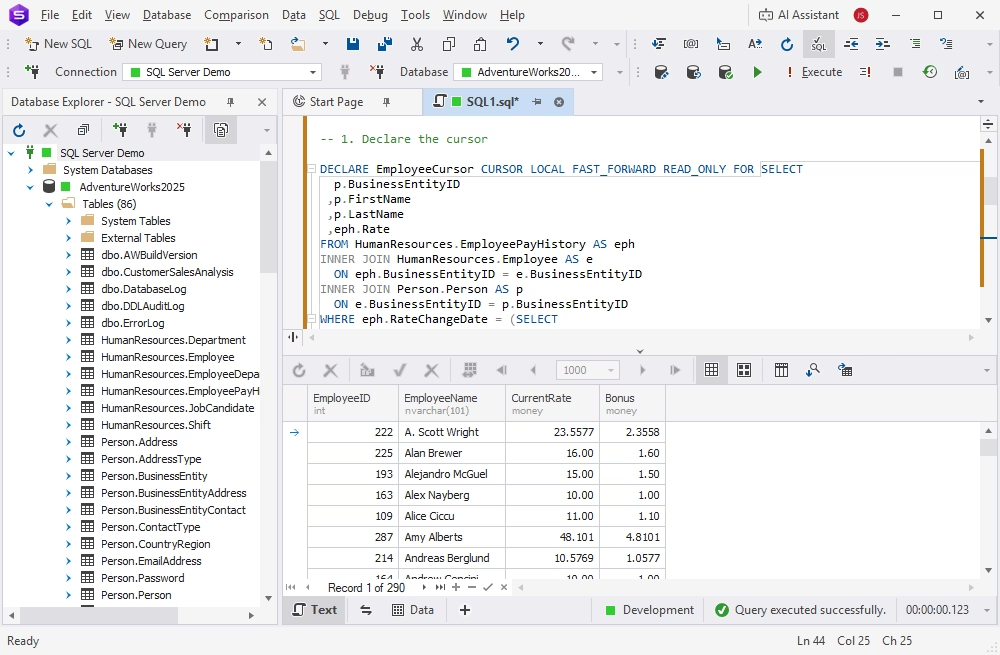
This case is an example of utilizing a SQL cursor for performing sequential business logic with a practical result for the user.
Types of cursors in SQL
SQL offers two main types of cursors, each suited for specific scenarios.
Implicit cursor
An implicit cursor is used in PL/SQL when we perform INSERT, UPDATE, or DELETE operations. This cursor holds the data planned for the insertion or identifies those rows that we are going to update or delete.
This cursor type does not require separate declaration, as it is created and fully managed by the SQL engine.
The following attributes are useful when dealing with implicit cursors:
| Attribute | Description |
|---|---|
| %FOUND | True if the SQL operation affects at least one row |
| %NOTFOUND | True if no rows are affected |
| %ROWCOUNT | Returns the number of rows affected |
| %ISOPEN | Checks if the cursor is open |
Explicit cursor
An explicit cursor is a user-defined cursor created for a specific operation, with control over every step of its lifecycle.
Explicit cursors are useful when you need to:
- Loop through results manually
- Handle each row with custom logic
- Access the row attributes during processing
Implicit and explicit cursors are the most basic cursor types in SQL. However, you will find additional options in different database management systems, such as SQL Server.
SQL Server-specific cursors
In SQL Server, several specific cursor types exist:
- FORWARD_ONLY (default): Can scroll forward only; ideal for read-only operations.
- STATIC: Represents a snapshot of data; any new changes in the underlying data don't affect the result set.
- DYNAMIC: Reflects changes made to the data while the cursor is open.
- KEYSET: Similar to dynamic, but it provides better performance due to maintaining a unique identifier for each row.
- FAST_FORWARD: It is a read-only, non-updatable cursor optimized for simple forward scrolling.
SQL cursor pros and cons
As you can see, SQL cursors can be really useful in some scenarios. However, like any other tool, cursors can't be the default choice for operations. Besides, SQL engines are already optimized for set-based operations, not sequential processing.
Let us consider the advantages and disadvantages of SQL cursors.
| Pros | Cons |
|---|---|
| Enables row-by-row processing when each row needs custom logic | Slower and more resource-consuming than set-based SQL operations |
| Useful for complex procedural logic in stored procedures | Makes SQL code longer and harder to maintain because of the 5-step lifecycle |
| Helps when processing order matters | May consume more memory and server resources |
| Can be useful for administrative tasks, logging, and custom validation | Long-running cursors can cause locking and blocking issues |
| Gives developers precise control over each fetched row | Large datasets are generally much better handled with set-based SQL operations |
When to use a cursor in SQL
When working with SQL Server databases, developers and administrators typically prefer using set-based operations (SELECT, INSERT, UPDATE, DELETE, MERGE, JOINs, and window functions) because it is faster and more efficient. Still, some scenarios make the usage of a cursor preferable. Let us examine the use cases where applying a cursor will be beneficial.
Row-by-row business logic
When each record requires different business rules, and you can't express them all in a single SQL statement, a SQL cursor will resolve the case.
For instance, a company must calculate the employees' bonuses based on several criteria at once, such as the job position, the number of years of service, performance rating, and manager's approval. Therefore, the task requires different calculations for each employee, and a cursor will process each one separately.
Sequential processing
In some scenarios, each next step depends on the results of the previous step. This means that you need to ensure processing records in a specific order so as not to spoil the calculation logic. A cursor allows sequential processing in this case.
Assume that you need to update the inventory chronologically, taking into consideration each new sale before the next transaction gets processed. It is possible to configure the inventory transaction processing using a SQL cursor.
Custom validation
A common use case is when you need to check every row individually and apply different measures to invalid rows.
For example, you need to import the users' data and check the email formats, the presence of all required fields, and the uniqueness of the IDs in the process. Additionally, you need to log invalid records without breaking the data import process. Therefore, a cursor that processes each row individually will ensure all the checks and logging of the data.
Administrative tasks
Database administrators often use cursors for maintenance tasks on multiple database objects, like looping through every database and running commands to rebuild indexes, update statistics, run backups, etc. When each database is processed individually, cursors help perform this task efficiently.
Complex stored procedure logic
When processing each row requires calling another stored procedure or performing multiple dependent operations, use a cursor.
Assume you need to perform several actions for each customer order, like calculating the shipping costs, updating the order status, generating an invoice, and sending the payment receipt. Each order involves several steps, and processing orders one by one may be appropriate.
When not to use a cursor
Still, though cursors are helpful in some scenarios, in most cases they may be inefficient and affect overall performance. Processing data one row at a time and repeated operations often cause significant overhead. Set-based SQL operations are much better optimized.
Avoid using cursors in the following use cases.
- Bulk updates: It is much more efficient to update many rows with one UPDATE statement.
- Aggregations: Use aggregate functions such as SUM(), AVG(), COUNT(), MIN(), and MAX() for calculations.
- Simple transformations: Use CTE expressions and JOINs to modify values.
- Reporting: SQL statements and functions can do the task without processing rows one by one.
| Use a cursor | Avoid a cursor |
|---|---|
| Each row needs different business logic | The same operation applies to many rows |
| Processing order matters | A single UPDATE, INSERT, or DELETE can solve the task |
| You need procedural logic inside a stored procedure | You are building reports or aggregations |
| You perform administrative tasks for each separate database | The dataset is large |
| You need custom validation or logging per row | A JOIN, CTE, or window function can handle the logic |
SQL cursor performance and best practices
SQL Server cursors are often slower than set-based SQL. The cause is the same: a cursor processes data row-by-row, which makes the task take longer, keeps locks on rows or tables, and consumes much more resources, especially with large datasets.
In many cases, the repeated cycle created by a cursor is significantly less efficient than a single set-based operation. Besides, SQL Server can optimize the query to process many rows simultaneously.
Are there ways to make cursors more efficient if they must be applied? Let us consider some best practices.
Use the most efficient cursor type
Choose the simplest cursor that meets your requirements. For example, in SQL Server, the FAST_FORWARD cursor is usually the fastest option. Avoid more expensive cursor types unless you need their additional functionality.
Limit the data to process
Avoid selecting unnecessary columns in your query to process the smallest possible result set. For that, filter rows before opening the cursor with the WHERE clause. Thus, you handle only those rows that actually require that sequential processing.
Keep transactions as short as possible
Run the cursor outside of a transaction; if the scenario requires a transaction, keep it short. This approach minimizes lock duration and reduces blocking.
Always close and deallocate the cursor
When the operation is complete, deallocate the cursor and release the resources.
Test performance
Before proceeding to perform the task, explore the options: using a cursor vs a set-based alternative. Use the execution plans, analyze queries with AI (this option is present in modern IDEs like dbForge Studio for SQL Server). If a set-based solution delivers the same result, choose it instead of applying the cursor.
| Best practice | Why it matters |
|---|---|
| Use cursors only when set-based SQL is not practical | Prevents unnecessary performance issues |
| Filter the result set before opening the cursor | Reduces the number of processed rows |
| Select only required columns | Lowers memory and processing overhead |
| Use READ_ONLY when data does not need to be updated | Reduces unnecessary cursor overhead |
| Use FAST_FORWARD for simple forward-only reads | Often better for simple SQL Server cursor loops |
| Avoid nested cursors | Prevents performance and maintenance problems |
| Always use CLOSE and DEALLOCATE | Releases database resources correctly |
SQL cursor alternatives
As we mentioned earlier, set-based options are more efficient and should be used instead of a cursor whenever it is possible. Here we explore the alternatives to using SQL cursors.
Set-based queries
Set-based queries process all matching rows in a single operation, making them the best solution for most data manipulation tasks, including bulk updates, inserts, deletes, data transformations, and reporting.
JOINs
A JOIN statement combines data from two or more related tables, without looping through rows. JOINs are the best option when you need to combine related data, update a table based on another one, or report data.
Common Table Expressions (CTEs)
A Common Table Expression represents the result set of a query that exists temporarily and is used only within the context of a larger query. CTEs help you simplify complex queries, organize multi-step logic, and perform recursive operations (e.g., work with hierarchies).
Window functions
Window functions perform calculations across related rows without collapsing the result set. With them, you can eliminate many cursor-based operations for ranking, running totals, sequence calculations, or comparing current and previous rows.
Temporary tables
Temporary tables store intermediate results that can be reused across multiple SQL statements. They help when you need to use complex processing, as they allow breaking sophisticated logic into several set-based steps. Temporary tables are a good solution for intermediate calculations and query optimization.
WHILE loops
A WHILE loop repeats a block of SQL statements while a specified condition remains true. It can be similar to a cursor when you need to process data row by row, but it does not automatically iterate through the full result set. You can use a WHILE loop for repeating an operation a certain number of times, batch processing, or administrative scripts.
| Alternative | Best used for | Why it can be better than a cursor |
|---|---|---|
| Set-based query | Bulk updates, inserts, deletes | Usually faster and simpler |
| JOIN | Updating or selecting related data | Avoids row-by-row processing |
| CTE | Breaking complex logic into readable steps | Keeps SQL declarative |
| Window functions | Ranking, running totals, deduplication | Handle ordered calculations without loops |
| Temporary table | Storing intermediate results | Useful for multi-step processing |
| WHILE loop | Procedural logic in SQL Server | Can help in some cases, but it may still process rows one by one |
Conclusion
SQL cursors are designed for specific tasks, and when used in the right scenarios, they can be really effective. In this article, we explored when to use SQL cursors, their advantages and disadvantages, best practices for working with them, and the most effective alternatives. With this, you can be sure to use a cursor when it is the right solution and apply it appropriately.
If you work with SQL Server cursors, dbForge Studio for SQL Server can help you improve the process. The Studio provides a full set of database development and administration tools, including a powerful SQL editor with a broad range of coding assistance features. Moreover, its integrated AI Assistant can generate cursor-based SQL code, recommend best practices for your scenarios, and even suggest an alternative when a cursor is not the optimal choice.
You can try dbForge Studio for SQL Server in your work. Download the fully functional free trial and see how its robust tools help you overcome all your daily challenges!
FAQ
A cursor is a database object that lets you process the result set of a query one row at a time instead of all rows at once. It is useful when the scenario requires row-by-row processing.
In SQL Server, a cursor is a T-SQL feature used to iterate through query results sequentially. SQL Server supports several specific cursor types (e.g., STATIC, DYNAMIC, KEYSET, FAST_FORWARD) with different conditions and suitable for different requirements.
A SQL cursor typically follows five sequential steps:
- DECLARE the cursor with a query
- OPEN the cursor to execute the query
- FETCH one row at a time into variables and process each row, repeating the step until no rows remain
- CLOSE the cursor
- DEALLOCATE the cursor to free resources
To declare a cursor in SQL Server, use the dedicated statement: DECLARE cursor_name CURSOR FOR followed by the SELECT query that will retrieve the rows you want to process.
You should use a cursor only when row-by-row processing is necessary. For instance, when you need to perform complex calculations that depend on previous rows, or call stored procedures for each row, or apply business logic that can't be implemented with set-based operations, using cursors can be appropriate. However, it is always better to analyze the alternatives to using a cursor in each case and apply only the most efficient option.
Cursors are generally slow in performance because they process rows one at a time. As a result, they consume memory and can increase locking.
There are several efficient alternatives, such as JOINs, Common Table Expressions (CTEs), window functions, temporary tables, and WHILE loops. Whenever possible, use set-based operations: they are faster and allow query optimization for optimal performance.