Connect your AI tools to live HubSpot data

MCP Server for HubSpot is a free, self-hosted solution that connects AI tools to your HubSpot data. It provides a natural-language way to find customer and sales information and investigate CRM activity without building or maintaining a custom AI-to-CRM integration.

  • Explore contacts, companies, and deals
  • Review records, properties, and associations
  • Find sales and customer information faster
  • Keep AI access secure and controlled

What is Devart MCP Server for HubSpot?

Devart MCP Server for HubSpot brings HubSpot customer, sales, and service information into MCP-compatible AI workflows. Running in your environment, it lets AI assistants answer natural-language questions about contacts, companies, deals, tickets, and the associations that connect them.

Devart ODBC Driver for HubSpot provides access to HubSpot objects, properties, associations, and records and handles communication with the HubSpot API. MCP Server uses this data interface to fulfill requests from AI clients, giving them a ready-made path to CRM information without a separate HubSpot integration for each tool.

How Devart MCP Server for HubSpot works

Why connect AI to HubSpot data through MCP?

Connecting AI to HubSpot through MCP turns a conventional AI chat into a practical way of working with live marketing and sales data. It is much faster than manual exports, custom reports, or building against the API by hand.

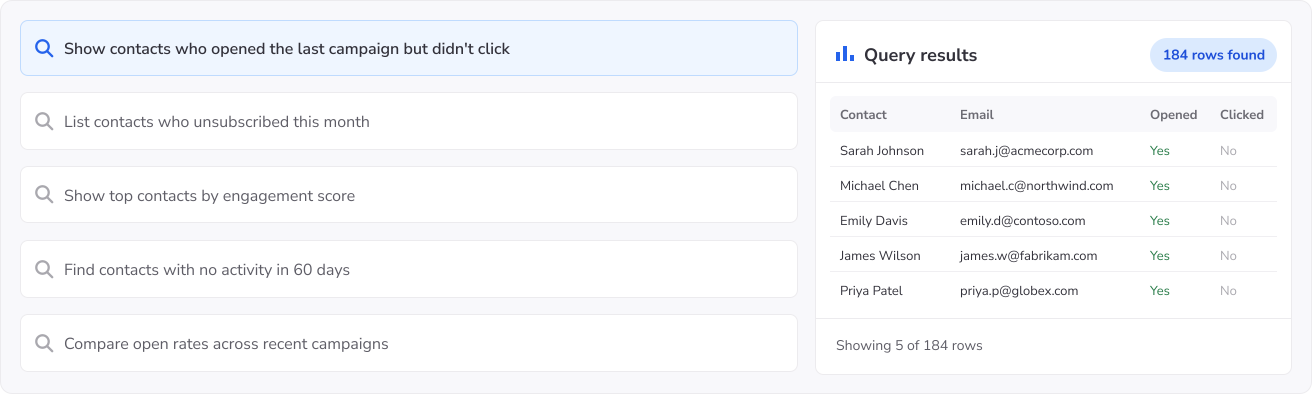
Ask HubSpot in plain language

Retrieve records, inspect objects and properties, and investigate issues in the most natural and convenient way.

Ask HubSpot in plain language

Built for teams working with HubSpot

MCP Server for HubSpot gives teams a natural-language interface to CRM data for sales analysis, marketing insights, customer support, validation, and controlled AI access.

Team
Request
Devart MCP Server for HubSpot How MCP Server for HubSpot helps
Sales & RevOps teams
Show deals closing this month by stage.
Queries HubSpot and groups matching deals by pipeline stage, without requiring users to build a report or export the data.
Marketing & lifecycle teams
Which contacts have had no engagement in 60 days?
Finds contacts based on activity and properties to help teams identify audiences for campaigns and follow-ups.
Support & success teams
Find the activity related to this ticket.
Retrieves records and activities associated with a ticket, giving teams the context they need without navigating between multiple views.
Platform & security teams
How can we give teams AI access to HubSpot without giving them direct access to the account?
Provides a self-hosted layer for controlled AI access to HubSpot while keeping connectivity within your environment.

Built for simpler, safer HubSpot AI access

Devart MCP Server for HubSpot gives teams a more practical way to bring AI into data workflows — with secure deployment, easier setup, and less custom integration work.

Self-hosted deployment

Self-hosted and controlled

Keep AI-to-data access inside your environment with a secure, controlled HubSpot MCP layer.

Fast setup

Fast setup in a few clicks

Start faster with a ready MCP Server instead of building and maintaining a custom integration from scratch.

Compatibility with AI tools

Easy AI tool integration

Connect Claude, VS Code, Cursor, Codex, and other MCP-compatible tools to HubSpot with less friction.

Free to use

Free to use

The MCP Server is free — no license key, no activation, no expiry. It connects through Devart ODBC Driver for HubSpot, which is licensed separately.

Browser window showing a connected workflow diagram

Built for real HubSpot workflows

Support analysis, troubleshooting, investigation, and plain-language access across everyday data work.

Responsive support

Backed by support

Adopt HubSpot AI workflows with expert product guidance and dedicated support throughout setup and rollout.

How to get started with an MCP Server for HubSpot

1

Download MCP Server

Install the self-hosted server and open the setup.

2

Access your HubSpot

Use an existing DSN or create a custom HubSpot connection.

3

Connect your AI tool

Integrate Claude, VS Code, Cursor, Codex, or another compatible MCP tool.

4

Ask in plain language

Begin querying your HubSpot data in natural language through the MCP layer.

Devart MCP Server for HubSpot

Get started with MCP Server for HubSpot

Download and set up the free, self-hosted MCP Server to securely connect your AI tools to HubSpot and start asking questions in plain language.

Who benefits from Devart MCP Server for HubSpot?

Technical teams

HubSpot admins, operations specialists, developers, and data engineers who need to work with CRM data without building a separate API integration for every request. They can use natural-language queries to explore contacts, companies, deals, tickets, properties, and associations, retrieve relevant records, investigate data relationships, validate CRM data, and get the context they need when configuring, troubleshooting, or extending HubSpot.

Business teams

Sales, marketing, RevOps, and support teams that need answers from HubSpot in plain language, without waiting on reports or exports.

AI and automation teams

Teams building copilots, agent workflows, and internal assistants that need secure, governed access to live HubSpot data as part of automated workflows.

Need an MCP Server for multiple data sources?

A single MCP layer for all your databases and cloud services.

Frequently asked questions

What is MCP Server for HubSpot?

MCP Server for HubSpot lets AI assistants work with HubSpot CRM information through the Model Context Protocol (MCP). Users can ask questions about contacts, companies, deals, tickets, and related records in natural language while MCP Server manages the connection to HubSpot.

How does MCP Server connect AI to HubSpot?

Requests arrive from the AI client as MCP tool calls. MCP Server fulfills them using Devart ODBC Driver for HubSpot, which communicates with HubSpot and makes supported objects, properties, associations, and records available for querying. The resulting information is then passed back to the requesting AI client.

Can AI query live HubSpot data through MCP?

Yes. Questions can be answered using current records available through the configured HubSpot connection. AI can examine record properties and move across available associations, making it possible to investigate CRM activity without first creating a separate dataset.

Is MCP Server for HubSpot secure?

You control the MCP Server deployment and the HubSpot connection assigned to it. The access granted to that connection determines what HubSpot information can be retrieved, so existing permissions remain part of the boundary for AI access.

Is MCP Server for HubSpot free?

Yes. There is no license fee or expiration period for MCP Server for HubSpot, and it does not require activation. HubSpot connectivity relies on Devart ODBC Driver for HubSpot, which is licensed independently and can be evaluated during a 30-day trial.

What can AI assistants do with HubSpot through MCP?

AI can find customer records, examine deal pipelines, review tickets and related activities, compare records by selected properties, follow associations between CRM objects, and prepare ad-hoc summaries from HubSpot data.

Do I need to write API calls to use HubSpot through MCP?

No. MCP gives the AI client an interface for requesting HubSpot information, while Devart ODBC Driver for HubSpot handles communication with the data source. This avoids implementing HubSpot API calls specifically for your AI integration.

Can AI follow associations between HubSpot contacts, companies, and deals?

Yes. Available associations can be used to move from a contact to its company, associated deals, tickets, and other related records. This helps AI answer questions that require context from several connected CRM objects rather than a single record.

Can AI work across HubSpot deal pipelines and stages?

Yes. AI can group and compare available deals by pipeline or stage and analyze properties such as values and other relevant fields. This can help users examine pipeline composition and investigate particular groups of deals through natural-language questions.

Which AI tools work with MCP Server for HubSpot?

Claude, Visual Studio Code, Cursor, Codex, Windsurf, Cline, and Zed are examples of clients that can use MCP Server for HubSpot. Because communication is based on MCP, the HubSpot connection is not tied to one AI application and can be used with other MCP-capable clients.