Connect your AI tools to live MySQL data

MCP Server for MySQL is a free, self-hosted solution that gives AI tools access to live MySQL data. Natural-language access makes it easier to investigate database content and resolve everyday data questions without developing and maintaining a custom AI integration.

  • Explore schemas, tables, and relationships
  • Inspect keys, indexes, and database objects
  • Investigate slow queries and performance issues
  • Keep MySQL data within your environment

What is Devart MCP Server for MySQL?

Devart MCP Server for MySQL provides a self-hosted bridge between MySQL and AI assistants or agents that support the Model Context Protocol (MCP). Instead of connecting an AI tool directly to the database, the server provides access to MySQL through MCP tools. Your AI client turns a plain-language request into a tool call, the server executes the requested operation against MySQL, and structured results are returned to the client. This gives AI tools a standard way to interact with MySQL while the connection remains within your infrastructure.

Database communication is provided through Devart ODBC Driver for MySQL. The driver manages connectivity and gives the MCP Server access to MySQL data and metadata, eliminating the need to develop a separate integration for each AI client.

How Devart MCP Server for MySQL works

Why connect AI to MySQL data through MCP?

Connecting AI to MySQL through MCP turns a conventional AI chat into a practical way of working with live data. It is much faster than manual data export or SQL querying.

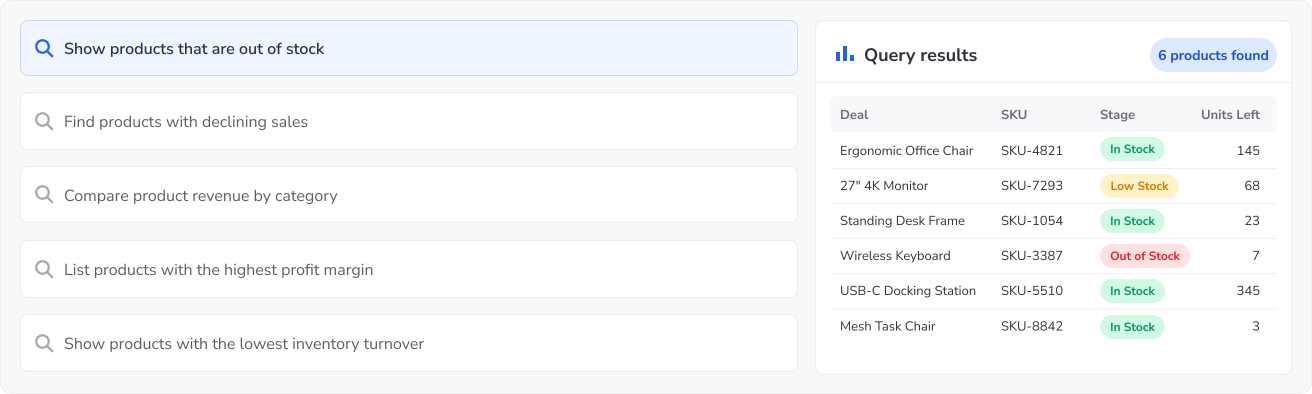
Ask MySQL in plain language

Retrieve data, inspect schemas, and investigate issues in the most natural and convenient way.

Ask MySQL in plain language

Built for teams working with MySQL

MCP Server for MySQL gives teams a natural-language interface to MySQL for analysis, development, troubleshooting, validation, and controlled AI access.

Team
Request
Devart MCP Server for MySQL How MCP Server for MySQL helps
Analysts & BI teams
Show total sales by region for the last 12 months.
Queries MySQL and returns sales grouped by region, without requiring analysts to write SQL or prepare manual exports.
Developers, DBAs & data engineers
Which queries scan whole tables?
Examines table structures, indexes, and query plans to help teams investigate inefficient queries and database performance issues.
QA, support & operations teams
Find the data related to ticket #774105.
Retrieves related records across tables to help teams reproduce, investigate, and verify issues without manual lookups.
Platform & security teams
How can we give teams AI access to MySQL without giving them direct database access?
Provides a self-hosted layer for controlled AI access to MySQL while keeping database connectivity within your environment.

Built for simpler, safer MySQL AI access

Devart MCP Server for MySQL gives teams a more practical way to bring AI into data workflows — with secure deployment, easier setup, and less custom integration work.

Self-hosted deployment

Self-hosted and controlled

Keep AI-to-data access inside your environment with a secure, controlled MySQL MCP layer.

Fast setup

Fast setup in a few clicks

Start faster with a ready MCP Server instead of building and maintaining a custom integration from scratch.

Compatibility with AI tools

Easy AI tool integration

Connect Claude, VS Code, Cursor, Codex, and other MCP-compatible tools to MySQL with less friction.

Free to use

Free to use

The MCP Server is free — no license key, no activation, no expiry. It connects through Devart ODBC Driver for MySQL, which is licensed separately.

Browser window showing a connected workflow diagram

Built for real MySQL workflows

Support analysis, troubleshooting, investigation, and plain-language access across everyday data work.

Responsive support

Backed by support

Adopt MySQL AI workflows with expert product guidance and dedicated support throughout setup and rollout.

How to get started with an MCP Server for MySQL

1

Download MCP Server

Install the self-hosted server and open the setup.

2

Access your MySQL

Use an existing DSN or create a custom MySQL connection.

3

Connect your AI tool

Integrate Claude, VS Code, Cursor, Codex, or another compatible MCP tool.

4

Ask in plain language

Begin querying your MySQL data in natural language through the MCP layer.

Devart MCP Server for MySQL

Get started with MCP Server for MySQL

Download and set up the free, self-hosted MCP Server to securely connect your AI tools to MySQL and start asking questions in plain language.

Who benefits from Devart MCP Server for MySQL?

Technical teams

Developers, DBAs, data engineers, analytics engineers, and architects who need to understand MySQL databases and troubleshoot issues without leaving their AI tools. They can use natural-language queries to explore schemas, tables, relationships, and indexes, inspect live data and query plans, investigate inefficient queries, validate data, and get the context they need when developing, debugging, or maintaining MySQL applications.

Business teams

Sales ops, RevOps, finance, support, accounting, and operations teams that need answers from MySQL data in plain language, without waiting on SQL queries or manual exports.

AI and automation teams

Teams building copilots, agent workflows, and internal assistants that need secure, governed access to live MySQL data as part of automated workflows.

Need an MCP Server for multiple data sources?

A single MCP layer for all your databases and cloud services.

Frequently asked questions

What is MCP Server for MySQL?

Devart MCP Server for MySQL is a free, self-hosted solution that connects MCP-compatible AI assistants and agents to MySQL databases. It enables natural-language interaction with live data and database objects without requiring a custom integration.

How does MCP Server connect AI to MySQL?

The server acts as an intermediary between your AI client and MySQL. It receives MCP tool calls, executes SQL queries through the configured database connection, and returns structured results. Database connectivity is provided by Devart ODBC Driver for MySQL.

Can AI query live MySQL data through MCP?

Yes. AI assistants can retrieve current records, examine table relationships, and analyze database content directly from MySQL. Results reflect the data available when each query runs, rather than relying on previously exported datasets.

Is MCP Server for MySQL secure?

The server runs within your own infrastructure, allowing you to manage database connections and permissions. AI clients interact with MySQL through the MCP Server rather than connecting to the database themselves. Database privileges determine which operations are permitted.

Can I keep AI access to MySQL read-only?

Yes. Configure the MCP Server to use a MySQL account with only the required SELECT privileges. Queries execute under that account, preventing modifications to data when the account has no additional write permissions.

Is MCP Server for MySQL free?

Yes. The MCP Server is free to download and use, with no license key, activation, or expiration. The required Devart ODBC Driver for MySQL is licensed separately and includes a 30-day trial.

What can AI assistants do with MySQL through MCP?

AI assistants can help with a range of database development and analysis tasks:

  • Examine tables, columns, indexes, and relationships.
  • Investigate slow queries and full table scans.
  • Retrieve related records for troubleshooting.
  • Generate SQL for ad-hoc analysis and reporting.

Available operations depend on the configured database permissions and the capabilities of your AI client.

Do I need to build a custom API integration to connect MySQL to AI?

No. Install the MCP Server, configure your MySQL connection, and register the server with an MCP-compatible AI client. The Model Context Protocol provides the communication interface, eliminating the need to develop a separate API integration.

Can one MCP Server for MySQL connect to multiple databases?

Yes. A single instance can manage multiple MySQL connections, allowing AI assistants to work with different databases. For environments that combine MySQL with other database systems, such as PostgreSQL or SQL Server, Devart MCP Server Universal provides a multi-database solution.

Which AI tools work with MCP Server for MySQL?

The server works with MCP-compatible clients, including Claude, Visual Studio Code, Cursor, Codex, Windsurf, Cline, and Zed. Compatibility depends on each client's MCP support and configuration.