High-Performance Access to Dynamics 365
With an ODBC Driver

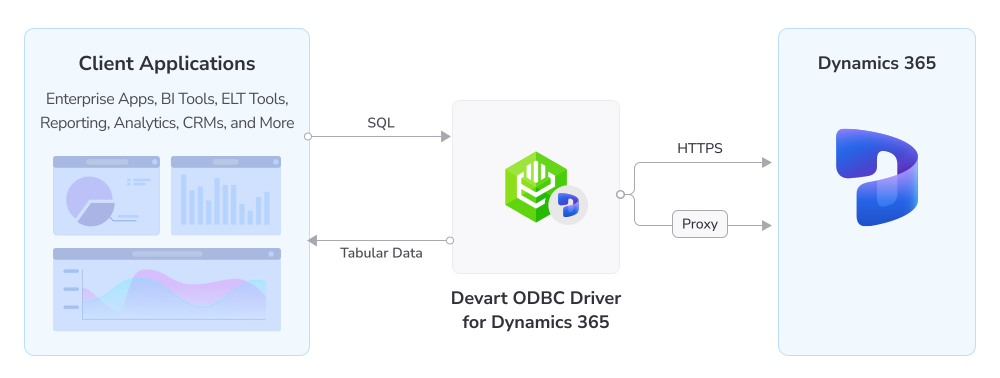
Devart ODBC Driver for Dynamics 365 is a high-performance data integration connector for developers and data analysts, with enterprise-level features for accessing Dynamics 365 (formerly Dynamics CRM) from ODBC-compliant reporting, analytics, BI, and ETL tools.

The Driver, with implemented OAuth, allows you to simply enter credentials and start using its features without the need to register it, thereby streamlining and securing data access via the HTTPS protocol.

  • Verified compatibility with multiple BI and ETL tools
  • Quick access to real-time data
  • Bulk operations support for improved efficiency
  • Full Unicode support
  • OAuth 2.0 support

How ODBC Driver for Dynamics 365 works

Advanced SQL query engine

Our ODBC Driver provides an unrivalled opportunity to work with Dynamics 365 CRM objects as if they were standard SQL tables. The extended SQL syntax enables you to leverage the full power of SQL in SQL-92 compatible SELECT statements:

  • Complex JOIN operations
  • WHERE conditions
  • Subqueries
  • GROUP statements
  • Aggregate functions
  • ORDER statements
  • ...and much more

Features

Standard SQL querying

SQL query support

You can query Dynamics 365 data using standard SQL to filter, sort, join, and aggregate CRM records without learning proprietary APIs.

Compatibility with multiple ODBC-compliant tools

Broad tool compatibility

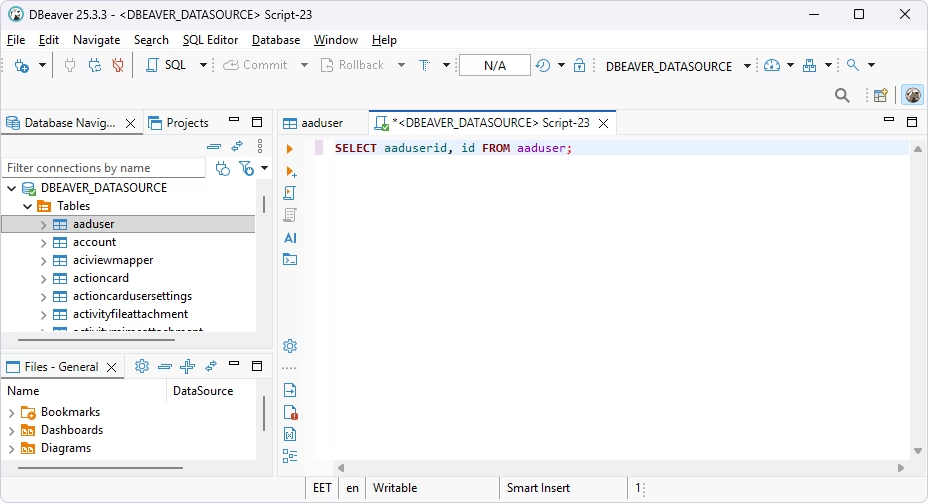
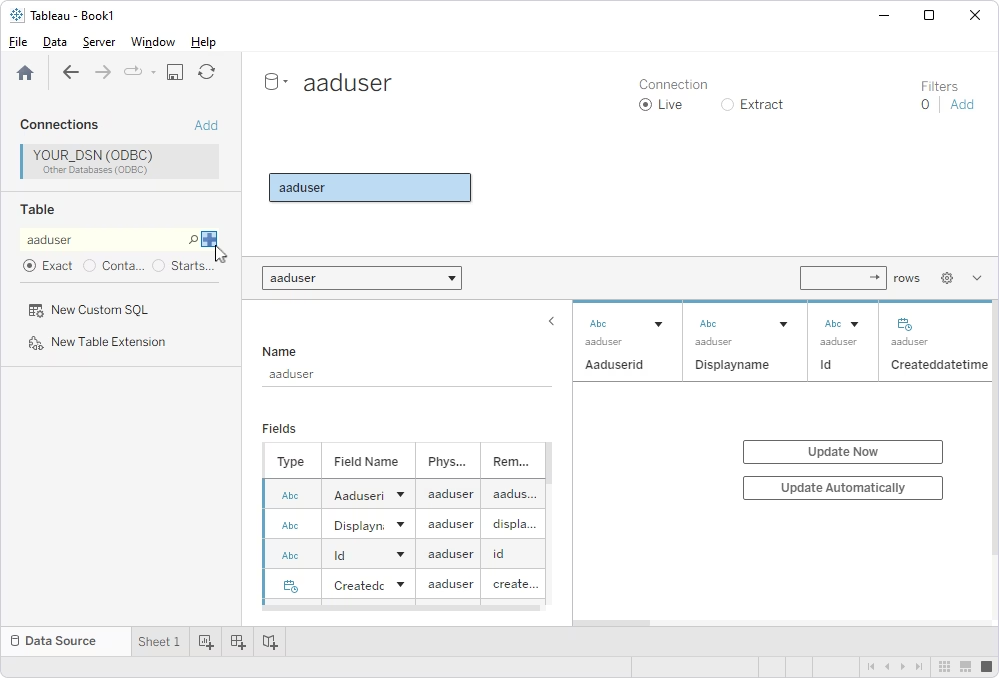
The Driver works with 250+ ODBC-compliant applications, including Power BI, Tableau, Excel, DBeaver, and many more.

Support for multiple platforms

Cross-platform connectivity

The ODBC Driver is fully compatible with Windows, macOS, and Linux and supports both 32-bit and 64-bit applications.

Secure authentication

Secure access

The Driver supports OAuth 2.0 and other Dynamics 365 authentication mechanisms for authorized, policy-compliant connections.

Bulk data updates

Bulk data operations

Large volumes of CRM records can be read or written in a single operation, reducing round trips and improving throughput.

Access to all data in Dynamics CRM

Full CRM schema access

You can access all Dynamics CRM data and metadata, including custom entities, custom fields, and calculated values.

Efficient database connections

Connection pooling

The Driver reuses existing database connections across requests, reducing overhead and improving performance in high-concurrency environments.

Unified view of all customer data

Unified customer data view

Our ODBC Driver consolidates data from sales, marketing, and support modules into a single, consistent view, eliminating silos across your CRM.

Pricing

ODBC Driver for Dynamics 365

Starts from

$179.95
per year
Try the Driver

Key features:

  • Simple installation in a few clicks (no additional software required)
  • Integration with 250+ tools
  • OEM licensing mode available
  • Priority support
  • Instant access to real-time data from anywhere
  • Secure authentication with OAuth 2.0

ODBC Drivers Universal Bundle

Starts from

$499.95
per year
Try the Universal Bundle

Key features:

  • Support for all 92 ODBC Drivers
  • Easy access to live data from anywhere
  • Full support for standard ODBC API functions and data types
  • No need for database client libraries
  • Support for ODBC-compliant reporting, analytics, BI, and ETL tools
  • Secure connections via SSL, SSH, and HTTPS tunneling

Verified compatibility with 200+ tools

Devart ODBC Drivers are verified to be compatible with leading analytics and reporting tools, various IDEs and programming languages. Get fast and secure access to your data in any application using our ODBC Drivers!

Roles

Hand holding a pencil over a sheet of paper

Managers and analysts

Access, analyze, and report on live CRM data from Dynamics 365 via ODBC using familiar BI, analytics, and reporting tools. Efficiently connect to your data sources, execute queries, and benefit from data-powered insights into sales performance, customer activity, and support operations.

IT & data teams

Configure connections, control access, monitor performance, and ensure stable data exchange between Dynamics 365 and your internal systems or third-party platforms.

Developers

Rely on real-time Dynamics 365 CRM data accessible via a consistent ODBC interface to build and deploy applications in SQL, C++, Python, .NET, and other languages.

ODBC Universal Bundle

Get high-performance ODBC Drivers for 92 databases and cloud services in a single Universal Bundle with a 95% discount

Ready to get started?

Get a 30-day free trial now

Get a 30-day free trial now

You can download our ODBC Driver for a free 30-day trial. It is a great way to see the Driver in action with no hurry.

Enjoy bulk discounts

Enjoy bulk discounts

We offer flexible options to meet your budget in the optimal way. You can get bulk discounts for multiple purchases.

Need a hand?

Need a hand?

If you need any help or have questions about our connectivity solutions or purchasing options, feel free to get in touch.

FAQ

How do I install the ODBC Driver for Dynamics 365?

Download the installation package for your operating system from the Devart website. On Windows, run the executable and follow the installation wizard, entering your activation key when prompted. On Linux, install the DEB or RPM package via the command line using dpkg or rpm. On macOS, run the .pkg file and complete the setup wizard. After installation, create a DSN in the ODBC Data Source Administrator to configure your connection to Dynamics 365.

How do I use ODBC with Dynamics 365?

Once the Driver is installed and a DSN is configured, any ODBC-compliant application can connect to Dynamics 365 using that DSN. In tools like Power BI, Excel, or DBeaver, select ODBC as the connection type and choose your Dynamics 365 DSN from the list. You can then query CRM data using standard SQL — no knowledge of the Dynamics 365 API is required.

Can I use the ODBC Driver for Dynamics 365 without installing additional client software?

Yes. The Devart ODBC Driver for Dynamics 365 connects directly to your CRM environment without requiring any additional Microsoft client libraries or SDKs. The Driver is a standalone installation that handles all communication with the Dynamics 365 API internally.

How does the Driver handle Dynamics 365 API limits and throttling?

The Driver includes built-in mechanisms to manage Dynamics 365 API rate limits and throttling. It optimizes request batching, uses metadata caching to reduce unnecessary API calls, and handles retry logic automatically, ensuring stable and uninterrupted data access even under heavy load.

Which authentication methods are supported?

The Driver supports OAuth 2.0 authentication, which is the standard mechanism used by Dynamics 365 Online. For on-premises deployments, it also supports Windows Authentication and claims-based authentication, covering the most common security configurations used in enterprise environments.

Can I use the Driver on Linux or macOS, or is it Windows-only?

The Driver is fully cross-platform and runs on Windows, macOS, and Linux. It supports both 32-bit and 64-bit applications across all three operating systems, making it suitable for teams working in mixed or non-Windows environments.