Professional MySQL Editor for Database Developers
dbForge Studio for MySQL is a comprehensive AI-powered IDE designed to assist with the management of the entire database lifecycle. The Studio supports MySQL and MariaDB, as well as Amazon RDS, Amazon Aurora, and many more cloud databases and services. dbForge Studio is equipped with many useful features, including MySQL Editor, which comes with a lot of powerful capabilities:
- Color coding
- Document Outline window
- MySQL Query History
- Execution warnings
- Collapsing and expanding regions of code
- Viewing server messages and errors
- Running scripts, selected SQL fragments, and statements
- Free Express Edition and free 30-day Enterprise trial version
What is a MySQL code editor?
A MySQL code editor is a specialized environment for writing, editing, formatting, executing, and debugging SQL code. It provides software and database developers and DBAs with a set of tools that helps them create and maintain databases, improve work quality and productivity, and minimize errors. To accelerate and simplify SQL writing and editing, MySQL code editors typically include such features as syntax highlighting, query formatting, intelligent code completion, and error detection.
For MySQL developers and database administrators, writing and executing SQL queries is a significant part of their daily work. They create and modify databases and tables, develop procedures, functions, and triggers, and troubleshoot SQL issues. While a simple standalone editor may be sufficient for these tasks, many database professionals opt for comprehensive MySQL IDEs that offer a multi-featured code editor as one of the many tools that support database design, maintenance, and administration.
Why do developers use a dedicated MySQL editor instead of basic query windows?
While many database management tools include a basic SQL query window, it often only provides the minimum functionality needed to execute SQL queries. For large and complex databases, this may not be enough, as managing enterprise-grade databases with massive datasets requires more advanced features. Database developers and administrators using basic SQL execution windows face a number of challenges that can affect their productivity:
- Lack of code navigation. Unlike professional MySQL IDEs, basic editors have limited support for browsing the structure of large SQL statements, quickly moving to object definitions, or navigating between stored procedures, views, and functions. Instead, they need to scroll their SQL manually, which slows down the process.
- Poor code readability. Simple query windows typically lack code highlighting, formatting, or outlining, which makes SQL difficult to read and understand. In large scripts, identifying relationships, nested queries, or matching blocks becomes difficult.
- Lack of coding assistance. Such features as context-aware code completion, object suggestions, and real-time syntax validation can significantly accelerate SQL development. However, these capabilities are usually offered in comprehensive MySQL IDEs, while basic editors do not support them.
- Limited error prevention. Syntax errors, invalid object references, or queries that may result in data loss are often discovered after execution. Advanced SQL editors, contrary to basic execution windows, include mechanisms that can detect such issues early by validating the code in real time, highlighting errors, and displaying execution warnings for potentially unsafe statements.
A simple SQL editor may be a perfect solution for individual developers and small projects; however, for enterprise-scale database management, a multi-featured IDE is a better choice. By automating routine tasks and helping developers write accurate, maintainable SQL more efficiently, a modern MySQL editor enables teams to spend less time troubleshooting code and more time building reliable database applications.
MySQL Editor features
MySQL Editor comes with a broad set of features that can significantly facilitate database development and administration. Let's look at some of them.
Intelligent code completion
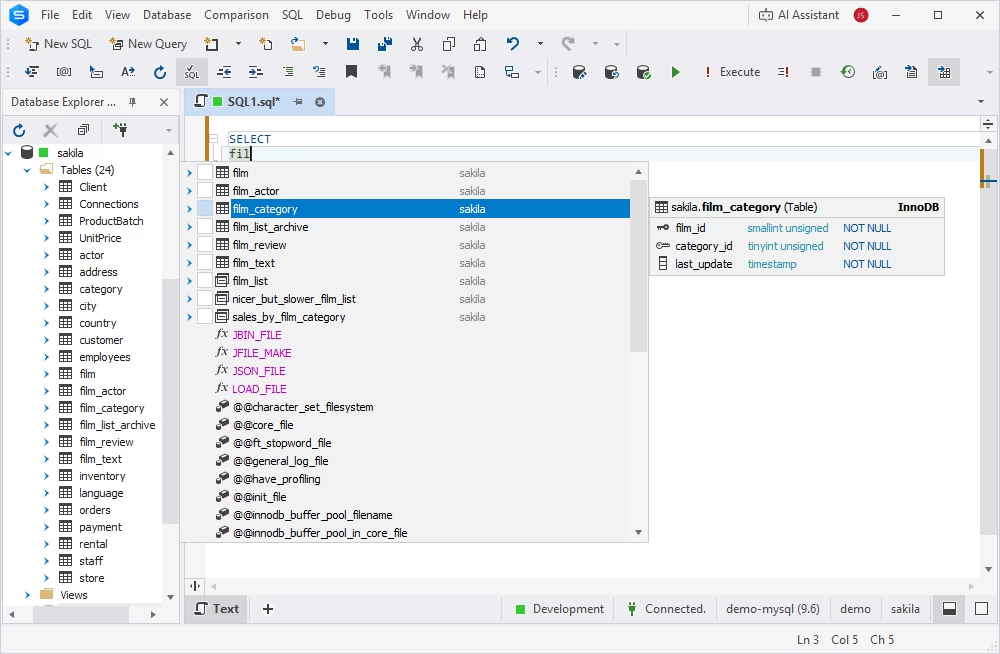
MySQL Editor greatly improves and accelerates SQL coding with its code completion capabilities. It suggests keywords and database objects as you type, using your database context. With code completion, you spend less time typing and searching for object names, allowing you to focus on query logic rather than SQL syntax.
Code completion allows you to write SQL statements faster, minimize typing, and reduce syntax and object reference errors.
Syntax highlighting
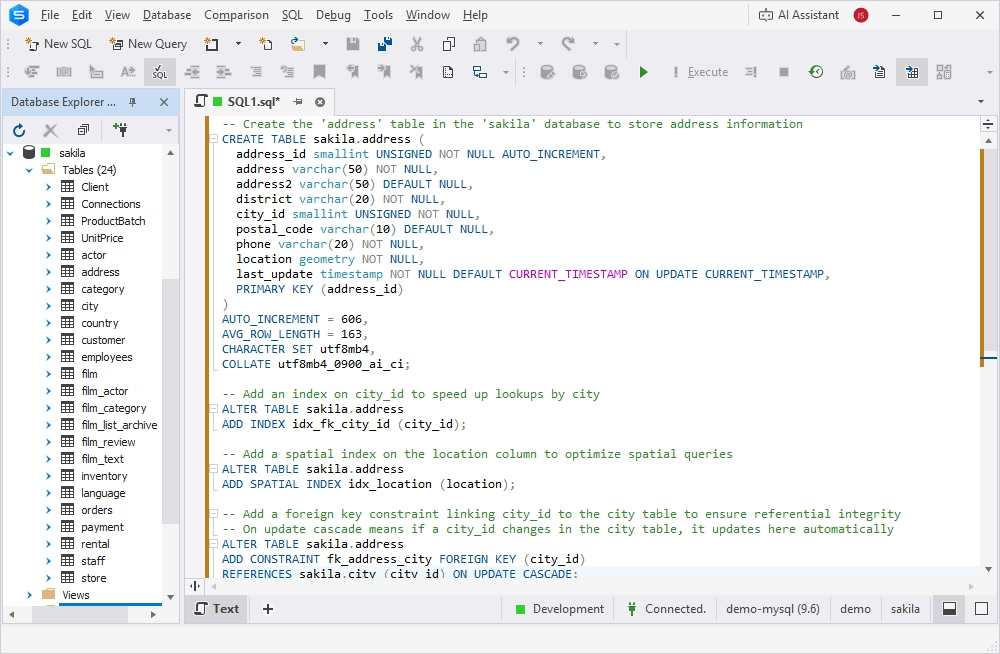
In MySQL and MariaDB Editor, the code you enter is immediately assigned a category, with each category identified by a color. For example, comments are colored in moss green. The color helps you quickly and easily find the necessary text in a query, no matter how large it is.
This feature greatly enhances code readability and coding efficiency.
Simple outlining via MySQL Editor
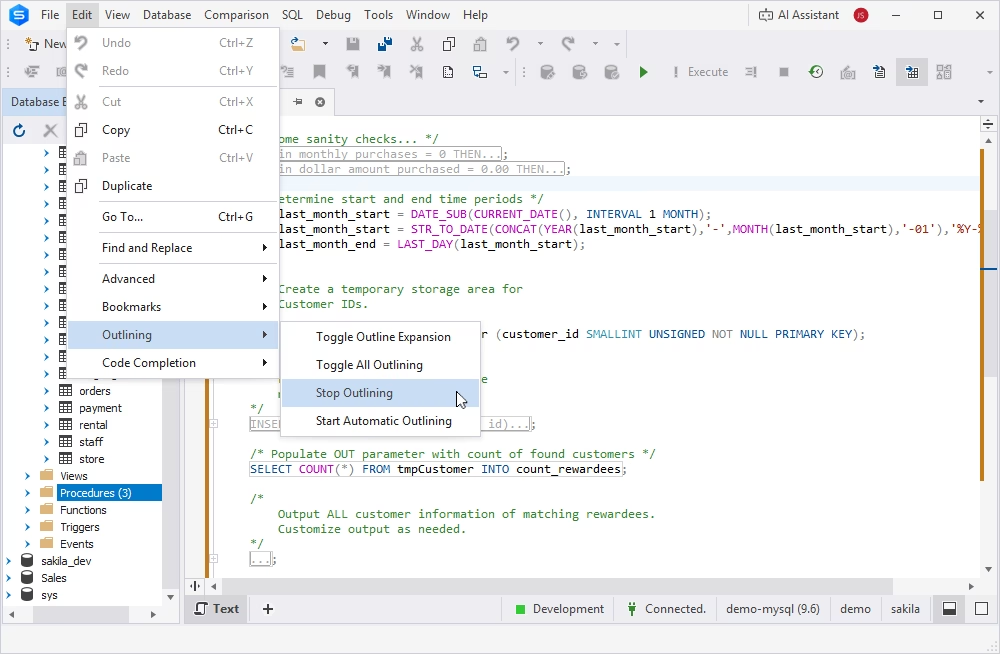
MySQL code editor can make the tough task of navigating through sections of code much easier by allowing you to collapse a region of code. The collapsed section appears under a plus sign (+). You can then expand it by clicking this sign.
The contents of the collapsed section are displayed as a tooltip when you hover over it. It is also possible to stop outlining in the Editor if necessary.
Outlining makes it easier to work with large sections of code. You can expand the regions you want to make changes to, collapse them when you are done, and then switch to other regions.
Document Outline window
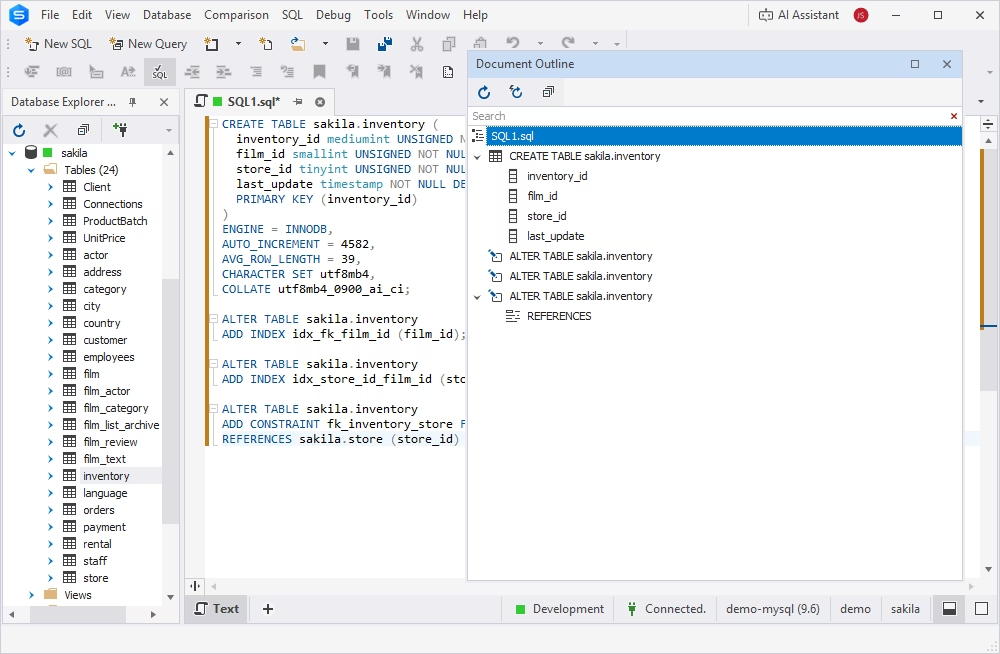
The Document Outline window exposes a hierarchical view of query parts and thus provides quick and easy navigation through them. It can be used while building large queries to access all its elements and capture the exact logical structure of a query.
The Document Outline window is really useful when you need to visualize the structure of a large SQL document.
MySQL Query History
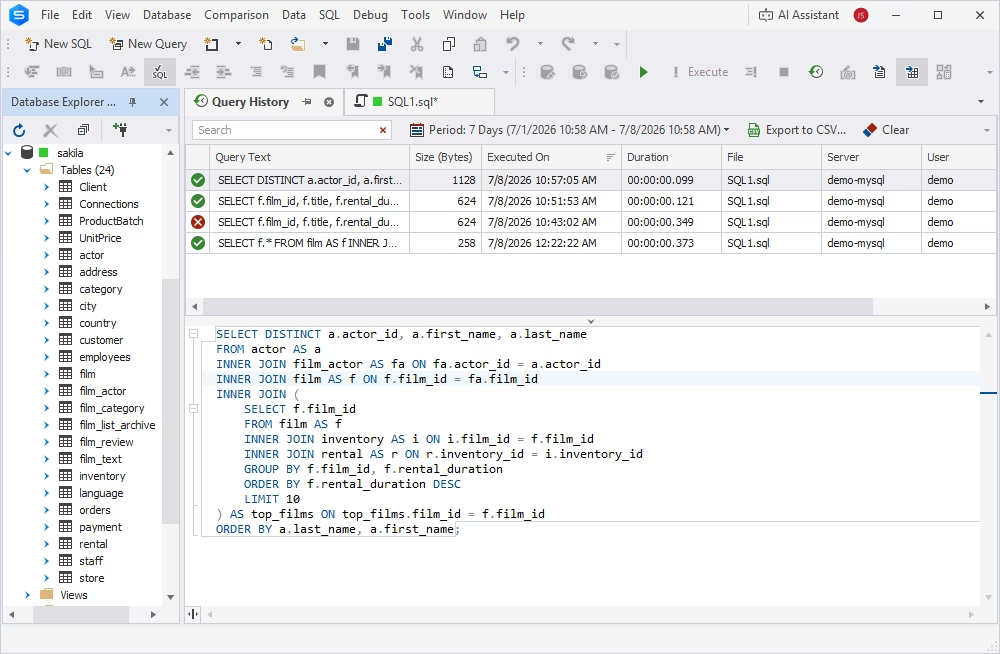
MySQL Query History displays basic information about the executed SQL statements for a certain period of time. The feature allows viewing, editing, and reusing the queries that were executed in the past. It can be useful when you need to recover certain scripts or analyze your actions on a specific database.
This option can be configured to meet your needs. You can specify a period over which the query history will be stored, the maximum size of stored scripts, a folder to store the history, etc.
Execution warnings
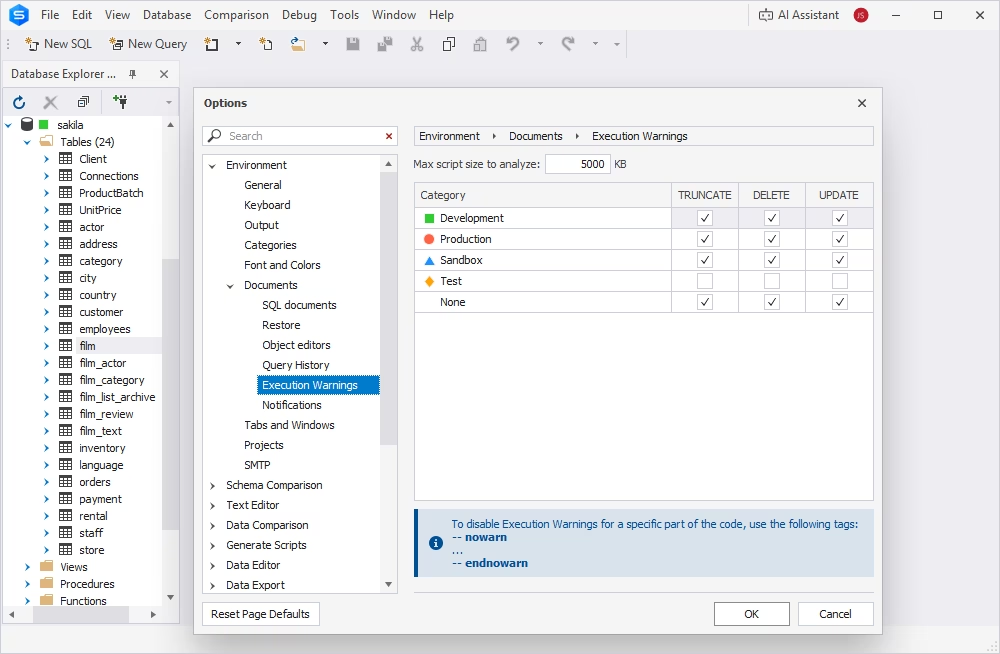
MySQL code editor built into dbForge Studio for MySQL displays a warning message if you are about to execute a DELETE, UPDATE, and/or TRUNCATE statement without the WHERE clause. That could lead to data loss, and the feature is designed to prevent that.
You can customize execution warnings to best suit your needs. It is possible to specify the maximum script size to analyze and enable execution warnings for certain environments.
MySQL code editor for database development tasks
The features of an advanced MySQL code editor can be useful in a variety of database development, maintenance, and administration tasks. Using the features of dbForge Studio for MySQL, let's look at the practical use cases where they shine the most.
Writing and testing queries
For software and database developers whose work involves creating, executing, and debugging SQL queries, an advanced MySQL database editor can be a very handy tool. Syntax highlighting, intelligent code completion, SQL formatting, and error detection can improve the code quality and readability, and reduce errors. At the same time, MySQL Query History lets you analyze previously executed queries and rerun them as necessary. Execution warnings notify you about potential issues, helping prevent mistakes.
Editing stored procedures and functions
Stored procedures and functions may contain hundreds of lines of code. For database professionals working with stored procedures, code readability and navigability are essential. In this respect, syntax highlighting provides visual differentiation of SQL objects, code formatting ensures a clear SQL hierarchy, and outlining allows you to collapse code sections that aren't currently in focus. In addition, the Document Outline window available in MySQL Editor displays the structure of stored procedures and functions for quick and easy navigation.
Managing database objects
Database developers and administrators who often create and maintain tables, views, triggers, and other objects can benefit from such features as syntax highlighting, code outlining, and the Document Outline window. These capabilities provide improved visibility into the SQL script structure and enable easy navigation between code components.
Working with MariaDB
dbForge Studio for MySQL natively supports MariaDB databases, providing the same code editing functionality that is available for MySQL databases. If you need to manage and maintain a MariaDB database, you can use the same Editor features: syntax highlighting, code outlining, execution warnings, and others.
Who benefits from a professional MySQL editor?
An advanced MySQL editor, such as the one provided by dbForge Studio for MySQL, can improve efficiency and productivity for many database professionals interacting with MySQL. A multi-featured MySQL editor can address different pain points and fulfill different expectations for database developers, DBAs, data analysts, or software developers.
MySQL developers
For MySQL developers, a code editor is the primary workspace for writing and maintaining SQL. Features such as syntax highlighting, intelligent code completion, SQL formatting, and real-time error detection help them write queries faster and with greater accuracy. When developing stored procedures, functions, triggers, and views, advanced navigation, code outlining, and debugging capabilities make it easier to work with large SQL scripts and maintain complex database logic.
Database administrators
DBAs use a MySQL editor to maintain database stability, optimize performance, and implement schema changes safely. Advanced editing tools simplify the creation and modification of tables, indexes, constraints, and other database objects at the same time reducing the risk of syntax and configuration errors. Built-in SQL formatting capabilities improve code readability and enable easy navigation, while execution warnings help DBAs minimize the risk of executing potentially unsafe statements and ensure that changes are applied correctly.
Data analysts
Data analysts focus on retrieving and exploring data rather than developing database applications. A professional editor for MySQL helps them build complex SELECT statements with intelligent code completion, validate SQL syntax in real time, and format queries for readability. The Query History makes it easier to refine analytical queries, compare results, and reuse frequently executed SQL statements.
Development teams
Software development teams benefit from a MySQL editor that helps them establish consistent coding practices through automatic formatting, code reuse, and intelligent SQL validation. By providing a common, feature-rich development environment, a professional MySQL editor enables teams to work more efficiently and deliver higher-quality database applications.
Why you should use the MySQL GUI Editor by Devart
dbForge Studio for MySQL is a feature-rich GUI tool designed to facilitate your MySQL database development, administration, and maintenance. The Studio provides advanced features for MySQL code completion and code beautifying, comparing and synchronizing databases, building visual queries, generating data, analyzing data, debugging complex queries, and many, many more. Try the Studio for free and increase your workflow efficiency.
FAQ
A MySQL editor focuses on writing and editing SQL code, while a MySQL IDE provides a complete database development environment. Usually, a MySQL IDE includes a MySQL editor as one of the database management and design tools.
One of the best MySQL editors is included in dbForge Studio for MySQL. The Studio is a full-featured IDE designed to support the entire database management lifecycle, and its MySQL Editor provides all capabilities necessary for efficient database design, maintenance, and administration: syntax highlighting, code completion, code outlining, Query History, Document Outline, and execution warnings.
Yes. dbForge Studio for MySQL offers a fully functional free trial, which you can download from Devart's official website.
A modern MySQL code editor should enable efficient writing, editing, and troubleshooting of SQL code by providing the following core features:
- Intelligent code completion
- Syntax highlighting
- Code formatting
- Code outlining
- Error highlighting
- Execution warnings
A MySQL editor can help you prevent errors in your SQL by highlighting them as you type. In addition, an efficient MySQL editor safeguards against data loss by warning about potentially unsafe queries, for example, deleting all rows from a table.
Yes. A MySQL editor improves SQL readability and navigation through syntax highlighting, code formatting, and outlining. These features can accelerate SQL development and minimize errors. At the same time, intelligent code completion helps you construct SQL statements and provides context-aware object suggestions.
Unlike a basic MySQL editor, dbForge Studio for MySQL provides extended SQL design and management capabilities. It is a complete database management IDE that allows you to create, maintain, and administer MySQL and MariaDB databases in a unified UI. Among its features, dbForge Studio provides a powerful SQL editor with intelligent code completion, syntax highlighting, formatting, and more. With its rich SQL editing capabilities, dbForge Studio ensures high code readability, easy navigation, and error minimization—the benefits that basic MySQL editors typically do not provide.