Moving from Oracle to MariaDB is more than copying schemas and data. The real challenge lies in preserving application behavior—ensuring complex schema logic, PL/SQL code, triggers, and stored routines continue to work while avoiding data inconsistencies and minimizing downtime during cutover.
This guide walks you through every stage of an Oracle-to-MariaDB migration, from assessing schema compatibility and planning the migration strategy to converting database objects, transferring data, validating results, and preparing for production deployment. Whether you're a DBA, developer, architect, or data engineer, you'll learn how to reduce migration risk, avoid common compatibility issues, and execute a predictable, well-tested migration from assessment through production cutover.
Migration procedure
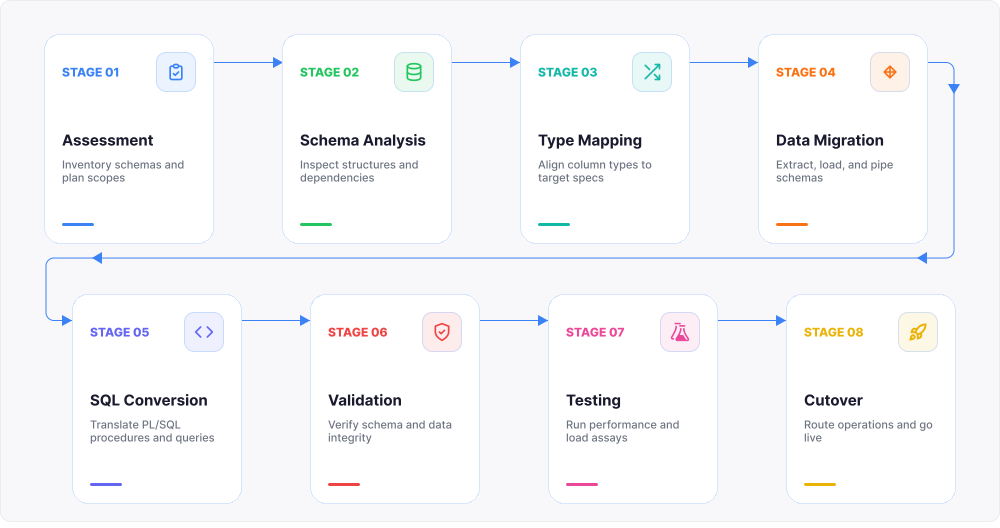
- Assess the Oracle database, inventory schemas, dependencies, and application requirements.
- Analyze the schema to identify portable objects, Oracle-specific features, and objects that require rewriting.
- Map Oracle data types, built-in functions, and database features to their MariaDB equivalents.
- Create the target MariaDB schema and migrate the data.
- Convert Oracle-specific SQL, PL/SQL, packages, procedures, functions, and triggers.
- Validate data integrity by comparing source and target databases and verifying migrated objects.
- Test application functionality, SQL compatibility, and database performance.
- Cut over production workloads with a rollback plan in place.
dbForge Edge
A comprehensive solution that unifies development, management, and analysis across multiple databases within a single suite.
Why companies migrate from Oracle to MariaDB
Cost is the most common driver. Oracle's licensing model scales with cores, options, and support tiers, and many teams outgrow that budget faster than they outgrow the database itself. MariaDB, an open-source engine, removes per-core licensing fees and lowers long-term total cost of ownership.
Beyond cost, teams look for flexibility. Oracle bundles many capabilities into paid options, such as partitioning and advanced tuning packs, that MariaDB includes by default or handles through simpler configuration, making it easier to scale infrastructure without renegotiating licenses.
Modernization matters too. Organizations moving workloads to containers, cloud-native platforms, or CI/CD-driven deployments often find MariaDB's lightweight footprint and open tooling ecosystem a better fit than Oracle's enterprise-oriented stack, while also reducing dependence on a single vendor's roadmap and pricing changes.
What changes when you move from Oracle to MariaDB
Moving from Oracle to MariaDB means re-evaluating almost every layer of the schema and codebase, not just the data. Object definitions, identifiers, data types, built-in functions, and PL/SQL constructs all behave differently between the two systems.
Some elements convert directly: basic tables, primary keys, and simple column types usually map with minor syntax edits. Others need remapping—such as Oracle-specific data types, sequence-based ID generation, and many built-in functions have no one-to-one MariaDB equivalent. A smaller set needs redesign: packages, hierarchical queries built with CONNECT BY, and Oracle-only features such as synonyms or materialized views require rethinking the logic rather than a straight syntax swap.
Identifiers are worth flagging early too: Oracle's default uppercase-folding behavior for unquoted identifiers differs from MariaDB's case-sensitivity rules on some platforms, which can quietly break scripts that assume Oracle's naming behavior.
Pre-migration assessment: what to check before you migrate
Assessment is the planning checkpoint before execution: inventory what exists in Oracle before you touch production data. Teams that skip this step typically discover incompatible syntax and missing objects mid-migration, when fixing them is far more expensive than catching them upfront.
Inventory your Oracle schema and codebase
List every table, view, index, constraint, sequence, trigger, procedure, package, and synonym in the schema before planning begins. Export the DDL and keep it as the baseline reference for the entire project.
Don't stop at schema objects—inventory application code and reports that query the database directly. Hardcoded Oracle functions, hints, or hierarchical queries in application SQL matter as much as anything inside the database. Also record row counts and which tables see the heaviest traffic, since this shapes later decisions about transfer method and validation depth.
Run a schema compatibility assessment
Run your Oracle DDL through a compatibility assessment before writing conversion scripts by hand. Assessment tools flag data types without direct MariaDB equivalents, PL/SQL constructs that won't parse under MariaDB's Oracle mode, and object dependencies that affect creation order.
The output should be a report, not just a pass/fail result—which objects convert automatically, which need edits, and which need a rewrite. This report becomes your migration backlog and lets you estimate effort before committing to a timeline, catching edge cases while they're still cheap to fix.
Decide what can be converted automatically and what needs manual work
Not every object deserves the same effort. Tables, straightforward views, and basic constraints usually convert automatically with a mapping tool, so reserve manual work for what actually needs it.
Procedures, packages, and triggers with Oracle-specific PL/SQL—cursors, exception handling, dynamic SQL—typically need manual rewriting, even with a compatibility mode in place. Hierarchical queries, synonyms, and materialized views almost always require redesign rather than translation, so budget dedicated developer time for procedural logic rather than forcing an automatic conversion.
The following table provides a high-level estimate of the migration effort required for common Oracle database objects. Actual complexity depends on the object's implementation and its use of Oracle-specific syntax.
Automatic vs. manual conversion
| Oracle object |
Typical migration effort |
Migration notes |
| Tables |
Low |
Review storage engines, defaults, generated columns, and table options. |
| Primary keys |
Low |
Usually convert directly; validate key definitions after migration. |
| Foreign keys |
Low |
Recreate in dependency order and validate referential integrity after loading data. |
| Basic indexes |
Low |
Convert definitions, then review MariaDB query plans and indexing strategy. |
| Simple views |
Low |
Review the underlying SQL for Oracle-specific functions and syntax. |
| CHECK constraints |
Review |
Verify expression compatibility and target MariaDB behavior. |
| Sequences |
Review |
Keep MariaDB sequences or replace them with AUTO_INCREMENT, depending on application logic. |
| Procedures |
Review or manual |
Rewrite Oracle-specific PL/SQL syntax, exception handling, and dynamic SQL. |
| Functions |
Review or manual |
Replace unsupported built-in functions and procedural constructs. |
| Triggers |
Manual |
Rewrite PL/SQL trigger logic and retest execution order and side effects. |
| Packages |
Manual |
Split package logic into standalone procedures and functions or redesign the module. |
| Synonyms |
Manual |
Replace with views or direct object references. |
| Materialized views |
Manual |
Replace with tables refreshed by scheduled jobs or application logic. |
| Hierarchical queries |
Manual |
Rewrite CONNECT BY queries as recursive CTEs. |
| Database links |
Manual |
Replace with the CONNECT engine, ETL processes, replication, or application-level integration. |
Should you migrate Oracle to MariaDB?
The right answer depends on how much of your Oracle environment relies on Oracle-specific features versus straightforward schema and data. Use the matrix below as a quick sanity check before committing to a full migration project.
| Your environment |
Recommendation |
Why |
| Mostly tables and views |
✅ Good candidate |
Minimal conversion effort |
| Heavy PL/SQL usage |
🟡 Requires planning |
Packages and procedural code need review |
| Oracle-specific features |
🟡 Moderate complexity |
Some features require redesign |
| Large enterprise schema |
✅ With phased migration |
Plan incremental validation |
| Mission-critical systems |
✅ With parallel testing |
Validation and rollback are essential |
Data type and SQL syntax differences to address early
Data type mapping and function replacement affect both DDL and runtime SQL, so handle them before, not during, data transfer. Getting this wrong means failed inserts, silent truncation, or subtly wrong query results after cutover. The three areas covered below cause the most migration issues.
Oracle-to-MariaDB data type mapping
Data type mapping should be completed before schema creation and data transfer. Some Oracle types map directly to MariaDB, while others require decisions about precision, storage, character encoding, or time zone handling.
| Oracle data type |
MariaDB target type |
Migration effort |
Migration notes |
| NUMBER(p,0) |
TINYINT, SMALLINT, INT, BIGINT, or DECIMAL |
Review |
Select the smallest type that supports the required range. |
| NUMBER(p,s) |
DECIMAL(p,s) |
Review |
Preserve precision and scale explicitly. |
| NUMBER without precision |
DECIMAL, DOUBLE, or application-specific numeric type |
Manual decision |
Inspect actual values before choosing the target type. |
| FLOAT |
DOUBLE or DECIMAL |
Review |
Oracle FLOAT uses binary precision; verify the required accuracy. |
| BINARY_FLOAT |
FLOAT |
Review |
Test floating-point calculations and comparison behavior. |
| BINARY_DOUBLE |
DOUBLE |
Review |
Test floating-point calculations and special values. |
| VARCHAR2 |
VARCHAR |
Review |
Verify length semantics, maximum row size, and character encoding. |
| NVARCHAR2 |
VARCHAR with an appropriate Unicode character set |
Review |
Confirm character set and collation settings. |
| CHAR |
CHAR |
Low |
Review blank-padding behavior. |
| NCHAR |
CHAR with an appropriate Unicode character set |
Review |
Confirm Unicode storage and comparison behavior. |
| DATE |
DATETIME or TIMESTAMP |
Review |
Oracle DATE stores both date and time; MariaDB DATE does not. |
| TIMESTAMP |
DATETIME(fsp) or TIMESTAMP(fsp) |
Review |
Match fractional-second precision and valid value ranges. |
| TIMESTAMP WITH TIME ZONE |
DATETIME plus a separate time zone or offset column |
Manual |
MariaDB has no direct equivalent that preserves the original time zone region. |
| TIMESTAMP WITH LOCAL TIME ZONE |
DATETIME stored in a normalized time zone |
Manual |
Define conversion and display rules explicitly. |
| INTERVAL YEAR TO MONTH |
Integer month count or structured columns |
Manual |
Convert interval arithmetic in SQL and application code. |
| INTERVAL DAY TO SECOND |
TIME, numeric duration, or structured columns |
Manual |
MariaDB TIME may not match all Oracle interval semantics. |
| CLOB |
LONGTEXT |
Review |
Verify maximum size, character encoding, and client handling. |
| NCLOB |
LONGTEXT with an appropriate Unicode character set |
Review |
Confirm Unicode storage and migration tooling support. |
| BLOB |
LONGBLOB |
Review |
Validate binary content and large-object transfer settings. |
| RAW |
VARBINARY |
Review |
Match the required maximum length. |
| LONG RAW |
LONGBLOB |
Manual |
Oracle LONG RAW is deprecated; modernize where possible. |
| LONG |
LONGTEXT |
Manual |
Oracle LONG is deprecated and has usage restrictions. |
| ROWID |
CHAR, VARCHAR, or a new primary key |
Manual |
Do not treat Oracle physical row identifiers as stable application keys. |
| UROWID |
VARCHAR or redesigned identifier |
Manual |
MariaDB has no equivalent universal row identifier. |
| XMLTYPE |
LONGTEXT, JSON, or normalized relational tables |
Manual |
Rewrite Oracle XML functions and indexes. |
| JSON |
JSON |
Review |
MariaDB implements JSON as a validated text alias; rewrite Oracle-specific JSON expressions. |
| BFILE |
File path or URI stored as text |
Manual |
Move external files separately and redesign access logic. |
| Spatial types |
MariaDB geometry types |
Manual |
Verify supported geometry types, SRIDs, functions, and spatial indexes. |
| User-defined object types |
Relational tables, JSON, or application objects |
Manual |
Redesign object-type attributes, methods, and references. |
| Collections and nested tables |
Child tables or JSON arrays |
Manual |
Redesign storage and query logic. |
Built-in function differences
Oracle and MariaDB often provide equivalent functionality under different function names or with different argument and return-value behavior. Review every replacement in its actual query context rather than applying a global text substitution.
Oracle-to-MariaDB function mapping
| Oracle expression |
MariaDB equivalent |
Migration notes |
| NVL(a, b) |
IFNULL(a, b) or COALESCE(a, b) |
Verify implicit type conversion rules. |
| NVL2(expr, value1, value2) |
IF(expr IS NOT NULL, value1, value2) or CASE |
Use CASE for complex expressions. |
| DECODE(...) |
CASE |
Rewrite explicitly; null comparison behavior may differ. |
| TO_DATE(text, format) |
STR_TO_DATE(text, format) |
Convert Oracle format masks to MariaDB format specifiers. |
| TO_CHAR(date, format) |
DATE_FORMAT(date, format) |
MariaDB uses different format tokens. |
| TO_CHAR(number, format) |
FORMAT(), CAST(), or application formatting |
No direct general-purpose equivalent exists. |
| TO_NUMBER(text) |
CAST(text AS DECIMAL) |
Validate decimal separators and invalid input handling. |
| SYSDATE |
NOW() or CURRENT_TIMESTAMP |
Review whether statement-time or invocation-time behavior matters. |
| SYSTIMESTAMP |
CURRENT_TIMESTAMP(fsp) |
MariaDB does not preserve Oracle time zone semantics automatically. |
| TRUNC(date) |
DATE(date) or DATE_FORMAT() |
Different units require different expressions. |
| TRUNC(number) |
TRUNCATE(number, decimals) |
Supply the number of decimal places explicitly. |
| ROUND(date) |
Custom date expression |
MariaDB ROUND() is numeric; date rounding must be rewritten. |
| ADD_MONTHS(date, n) |
DATE_ADD(date, INTERVAL n MONTH) |
Test end-of-month behavior. |
| MONTHS_BETWEEN(date1, date2) |
TIMESTAMPDIFF(MONTH, date2, date1) plus custom logic |
Results may differ for partial months. |
| LAST_DAY(date) |
LAST_DAY(date) |
Usually maps directly. |
| NEXT_DAY(date, day) |
Custom DATE_ADD() expression |
No direct equivalent. |
| EXTRACT(part FROM value) |
EXTRACT(part FROM value) |
Verify supported parts and return types. |
| SUBSTR() |
SUBSTRING() or SUBSTR() |
Review negative positions and multibyte strings. |
| INSTR() |
LOCATE() or INSTR() |
Argument order and occurrence handling can differ. |
| LENGTH() |
CHAR_LENGTH() |
MariaDB LENGTH() returns bytes, not characters. |
| LENGTHB() |
LENGTH() |
Returns byte length in MariaDB. |
| LPAD() |
LPAD() |
Usually maps directly. |
| RPAD() |
RPAD() |
Usually maps directly. |
| REGEXP_LIKE() |
REGEXP_LIKE() or REGEXP |
Verify regex engine and flags for the target version. |
| LISTAGG() |
GROUP_CONCAT() |
Review ordering, separator, and result-length limits. |
| WM_CONCAT() |
GROUP_CONCAT() |
WM_CONCAT is undocumented in Oracle and should be replaced. |
| GREATEST() |
GREATEST() |
Verify null-handling behavior. |
| LEAST() |
LEAST() |
Verify null-handling behavior. |
| EMPTY_CLOB() |
Empty string or initialized LONGTEXT value |
Oracle empty-string and null semantics differ. |
| EMPTY_BLOB() |
Empty binary value |
Validate application and driver behavior. |
| SYS_GUID() |
UUID() or binary UUID generation |
Target format and storage length differ. |
| DBMS_RANDOM.VALUE |
RAND() |
Randomness and seed behavior differ. |
| USER |
CURRENT_USER() or USER() |
These MariaDB functions return different account information. |
| ROWNUM |
LIMIT, ROW_NUMBER(), or both |
Rewrite according to whether filtering or numbering is required. |
| ROWID |
Primary key or generated row number |
MariaDB does not expose an Oracle-equivalent physical row ID. |
| || (concatenation) |
CONCAT() |
MariaDB also supports || for concatenation in some SQL modes, but CONCAT() is more portable across configurations. |
Build and maintain a project-specific mapping list because the correct replacement often depends on data types, null behavior, format masks, and query context.
Oracle features without direct MariaDB equivalents
Some Oracle features have no direct MariaDB equivalent. These features should be identified during assessment and treated as redesign tasks rather than simple syntax conversions.
Oracle features that require redesign
| Oracle feature |
Recommended MariaDB approach |
Migration notes |
| Packages |
Supported in Oracle compatibility mode for many use cases; otherwise convert to standalone procedures/functions, application modules, or naming conventions |
Complex packages may still require redesign — package variables, private members, initialization blocks, and overloaded routines require separate design decisions. |
| Synonyms |
Views or direct schema-qualified references |
Review every dependent query, procedure, and application reference. |
| Materialized views |
Regular tables refreshed by the Event Scheduler, ETL jobs, or application processes |
Define refresh frequency, refresh method, and consistency requirements. |
| CONNECT BY |
Recursive common table expressions |
Rewrite LEVEL, PRIOR, sibling ordering, and cycle detection explicitly. |
| Database links |
CONNECT engine, ETL pipelines, replication, federated access, or application services |
Choose an approach based on latency, write requirements, and transaction boundaries. |
| Oracle SQL hints |
Query and index optimization for MariaDB |
Remove Oracle hints and tune the query using MariaDB execution plans. |
| Flashback Query |
Backups, binary logs, temporal tables implemented by the application, or audit tables |
MariaDB does not provide a direct equivalent to Oracle Flashback Query. |
| Flashback Table |
Backup restore, point-in-time recovery, or application-managed history |
Define recovery procedures before cutover. |
| Autonomous transactions |
Separate connection or application-level transaction |
Review logging and auditing routines carefully. |
| Global temporary tables |
MariaDB temporary tables or redesigned staging tables |
Oracle and MariaDB differ in table definition lifetime and row lifetime. |
| Private temporary tables |
Temporary tables created per session |
Rewrite creation and cleanup logic. |
| Advanced Queuing |
External message broker, application queue, or table-based queue |
Redesign delivery guarantees, retries, and transaction integration. |
| Oracle Scheduler chains |
MariaDB Event Scheduler plus external orchestration |
Complex dependencies are usually better handled by an external scheduler. |
| Fine-grained auditing |
MariaDB audit plugin, server logs, or application auditing |
Rebuild policies according to target compliance requirements. |
| Virtual Private Database |
Views, row-level predicates in application logic, or security middleware |
MariaDB has no direct equivalent to Oracle VPD policies. |
| Edition-based redefinition |
Blue-green deployment, versioned schemas, or application routing |
Requires a deployment-level redesign. |
| Domain indexes |
MariaDB-supported indexes or application-specific search engines |
Identify the index implementation and supported query operators. |
| Bitmap indexes |
B-tree indexes, generated columns, summary tables, or analytics platform |
MariaDB has no direct bitmap-index equivalent. |
| Function-based indexes |
Generated columns with indexes |
Rewrite the expression and validate determinism. |
| Oracle object types |
Relational schema, JSON, or application-domain objects |
Type methods and inheritance require redesign. |
| Nested tables and varrays |
Child tables or JSON arrays |
Rewrite collection operators and joins. |
| BFILE |
File paths, object storage URLs, or application-managed files |
Move external files separately from database data. |
| DBMS_OUTPUT |
Application logging, result sets, or server logs |
Replace debugging output with an appropriate logging mechanism. |
| UTL_FILE |
Application file handling or controlled server-side processes |
Review filesystem permissions and deployment architecture. |
| UTL_HTTP |
Application HTTP client or external integration service |
Move outbound network calls outside database routines where possible. |
| DBMS_PIPE and DBMS_ALERT |
Message broker, notifications table, or application events |
Redesign inter-session communication. |
How MariaDB Oracle compatibility mode can reduce rewrite work
MariaDB reduces rewrite work through SQL_MODE=ORACLE, a compatibility mode that adapts SQL parsing and PL/SQL support to behave closer to Oracle. Enabling it allows many Oracle PL/SQL constructs to be migrated with fewer changes and reduces the amount of manual rewriting required.
Oracle compatibility mode does NOT provide:
- Automatic package conversion
- Materialized views
- Synonyms
- CONNECT BY compatibility
- Flashback support
Under this mode, MariaDB supports Oracle-style PL/SQL blocks, packages, sequences, and several Oracle-specific functions that don't exist under the default SQL mode. This meaningfully narrows the gap for procedural code, usually the most time-consuming part of a migration.
Compatibility mode doesn't remove migration effort entirely, though. It applies at the session or server level, so mixed workloads need careful configuration, and Oracle-only features such as synonyms, materialized views, or hierarchical queries still have no equivalent even with the mode enabled. Treat it as an accelerator for procedural code, not a substitute for the assessment and testing steps covered in this guide.
Step-by-step workflow to migrate data from Oracle to MariaDB
A reliable migration follows the same sequence regardless of tooling: connect source and target, create the target schema, transfer the data, and validate the result. One possible implementation is shown below, using MariaDB's CONNECT storage engine, an Oracle ODBC driver for connectivity, and a data comparison tool for loading and validation.
Prepare the target MariaDB environment
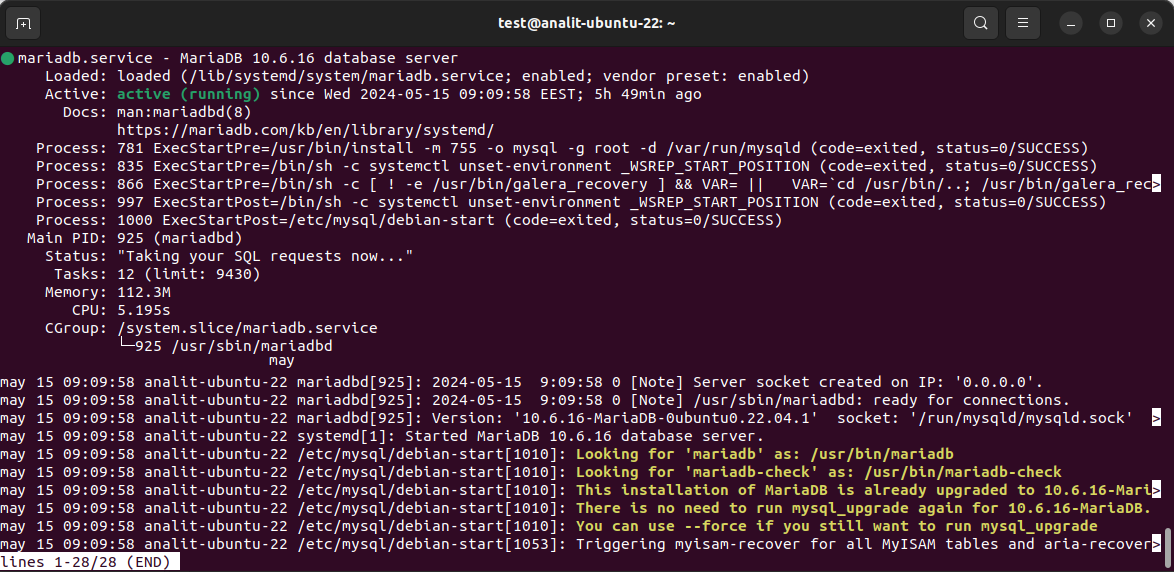
Install MariaDB and enable the CONNECT storage engine on the target server:
sudo apt-get install mariadb-server
sudo mysql_secure_installation
sudo apt-get install mariadb-plugin-connect
Create CONNECT tables
Create CONNECT tables in MariaDB that reference the required Oracle tables, reading live data directly over ODBC without exporting a dump file first:
CREATE TABLE EMP ENGINE = CONNECT TABLE_TYPE = ODBC
BLOCK_SIZE = 10 TABNAME = 'SCOTT.EMP'
CONNECTION = 'DSN=DEVART_ORACLE;';
Review the automatically generated column definitions before relying on them, and add primary or foreign keys if necessary—these typically aren't inferred from the linked ODBC tables.
Create the target schema
Create native MariaDB tables using the appropriate storage engine (for example, InnoDB), applying the data type mapping covered earlier and adjusting data types, constraints, and indexes where required:
CREATE TABLE EMP (
    EMPNO SMALLINT NOT NULL PRIMARY KEY,
    ENAME VARCHAR(40),
    JOB VARCHAR(36),
    HIREDATE TIMESTAMP,
    SAL DECIMAL(9,2),
    DEPTNO SMALLINT
);
Compare source and target data
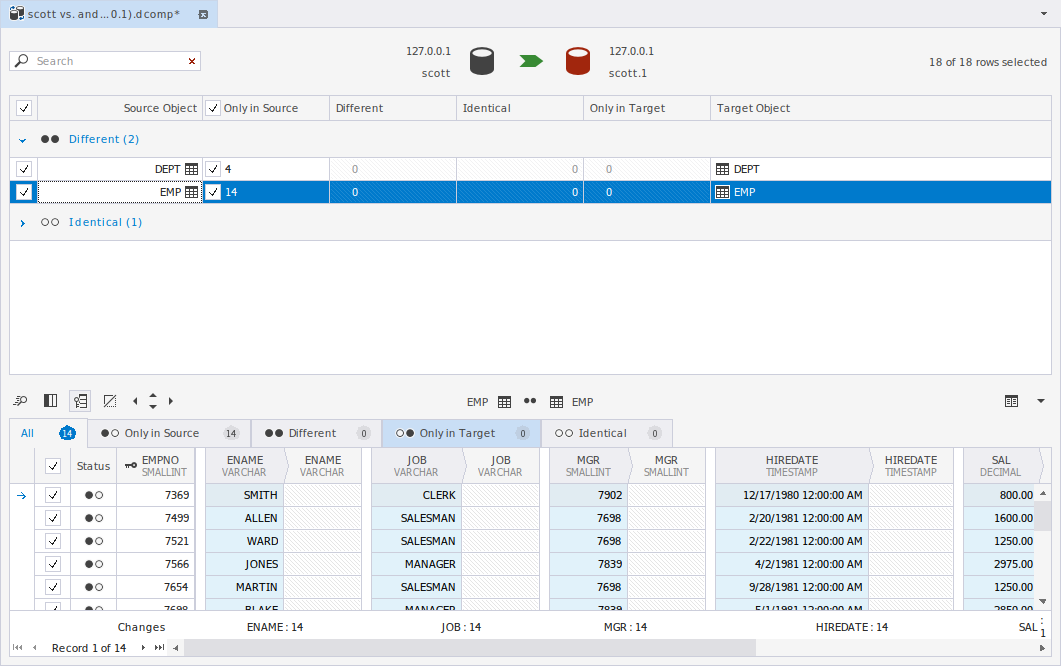
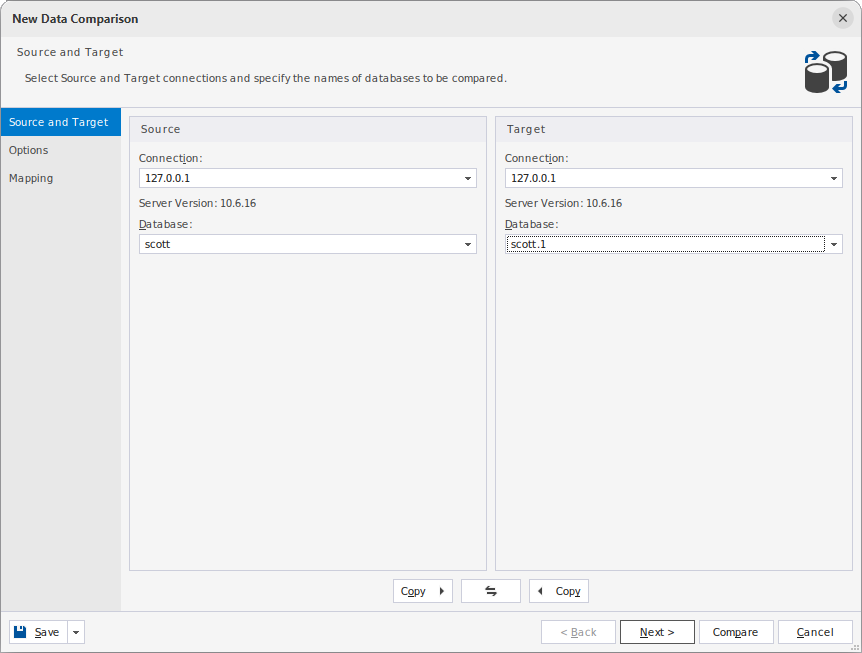
Use Data Compare in dbForge Studio for MySQL to compare the Oracle-linked CONNECT tables with the native MariaDB tables, instead of writing manual INSERT...SELECT statements for every table. Point the tool at the CONNECT-linked tables as the source and the native MariaDB tables as the target, then run a comparison.
Generate and execute the synchronization script
Review the generated synchronization script, then apply it to populate the target tables. Rerun it if additional changes are required—the same script works for incremental loads as well as the initial full transfer, but review it closely for large tables and adjust batching or filtering as needed.
Validate the migration
Run Data Compare again to verify that the target data matches the Oracle source before application testing and production cutover. A clean second comparison, with no remaining differences, is the practical signal that a table has migrated successfully.
For large or frequently changing tables, repeat this comparison close to cutover to catch any Oracle-side changes that happened during migration.
How to handle procedures, packages, triggers, and PL/SQL logic
Migrating logic is usually harder than moving tables, because procedural code depends on control-flow constructs and error handling that don't map one-to-one between Oracle PL/SQL and MariaDB's SQL, even under Oracle compatibility mode.
PL/SQL conversion examples
The following examples show common Oracle-to-MariaDB conversion patterns. Actual changes depend on the target MariaDB version and whether SQL_MODE=ORACLE is enabled.
Replace NVL() with IFNULL()
SELECT employee_id,
       NVL(commission_pct, 0) AS commission_pct
FROM employees;
SELECT employee_id,
       IFNULL(commission_pct, 0) AS commission_pct
FROM employees;
Replace DECODE() with CASE
SELECT employee_id,
       DECODE(status,
              'A', 'Active',
              'I', 'Inactive',
              'Unknown') AS status_name
FROM employees;
SELECT employee_id,
       CASE status
           WHEN 'A' THEN 'Active'
           WHEN 'I' THEN 'Inactive'
           ELSE 'Unknown'
       END AS status_name
FROM employees;
Replace a package with standalone routines
CREATE OR REPLACE PACKAGE employee_api AS
    PROCEDURE update_salary(
        p_employee_id IN NUMBER,
        p_salary IN NUMBER
    );
END employee_api;
/

CREATE OR REPLACE PACKAGE BODY employee_api AS
    PROCEDURE update_salary(
        p_employee_id IN NUMBER,
        p_salary IN NUMBER
    ) IS
    BEGIN
        UPDATE employees
        SET salary = p_salary
        WHERE employee_id = p_employee_id;
    END update_salary;
END employee_api;
/
DELIMITER //

CREATE PROCEDURE employee_api_update_salary(
    IN p_employee_id BIGINT,
    IN p_salary DECIMAL(12, 2)
)
BEGIN
    UPDATE employees
    SET salary = p_salary
    WHERE employee_id = p_employee_id;
END//

DELIMITER ;
Simple functions often require only syntax changes, while packages, exception handling, dynamic SQL, and complex triggers usually require manual redesign and testing.
Cursors generally convert with minor syntax changes, but exception handling is a common failure point: Oracle's exception blocks and pragma-based custom exceptions need rewriting using MariaDB's DECLARE HANDLER syntax, which behaves differently in scope and propagation. Variables and control structures such as loops and IF/CASE blocks usually convert with light editing.
Package-based logic is often the hardest part of a migration. Under MariaDB's default SQL mode, there's no direct equivalent to Oracle packages, so package-level variables, private procedures, and grouped functionality need to be reorganized into separate, appropriately scoped procedures and functions. Oracle compatibility mode (covered later in this guide) adds support for Oracle-style packages, but it doesn't automatically convert existing packages or fully replicate Oracle package behavior. To manage this efficiently, sort procedural code into three buckets during assessment—directly portable, partly portable, and rewrite-required—so the most complex objects don't stall the rest of the migration.
Testing, validation, and cutover planning
Migration isn't complete once data and schema exist in MariaDB—it's complete once you've confirmed the system behaves correctly under real conditions. Treat testing and cutover as a distinct phase with its own checklist.
Start with data validation: row counts, checksums, or full data comparison between source and target, plus spot checks on edge cases such as NULLs and large text or binary fields. Follow with functional testing—run the application's actual queries and stored procedure calls against MariaDB and confirm results match Oracle's, paying particular attention to the function and syntax differences covered earlier in this guide.
Run performance benchmarks under realistic load, since index behavior and query plans differ enough between Oracle and MariaDB that some queries will need new indexes. Replace Oracle-specific connectors in the application stack, review database privileges, and define rollback criteria and a cutover plan before going live.
Oracle-to-MariaDB migration tools: Manual vs. automated approaches
Tool choice depends on schema complexity, how much procedural code you have, downtime tolerance, and how much validation the migration needs. The three approaches below aren't mutually exclusive—most migrations combine at least two.
When a GUI-based migration workflow makes sense
A GUI-based workflow makes sense when you need visibility into every step—connecting to source and target, reviewing generated schema, and inspecting data differences before they're applied. This matters most for migrations with moderate complexity, where full automation risks silent errors but a fully manual process is too slow.
It's also the practical choice when the migration team includes developers or analysts who need control over data type mapping and validation without writing custom scripts for every table.
When automated conversion tools are worth it
Automated conversion tools are worth it once you're migrating many similar objects—tables with consistent structure, or PL/SQL objects that mostly follow the same patterns. The upfront setup pays off through repeatability, especially if you need to re-run the conversion across dev, staging, and production.
They're also valuable for the assessment step: scanning hundreds of objects manually isn't practical, but an automated compatibility report turns it into a same-day task. Budget manual review time for their output rather than trusting it blindly.
When manual migration is still necessary
Manual migration is still necessary for Oracle-only constructs with no tool-generated equivalent—packages, hierarchical queries, materialized views, and complex dynamic SQL usually need a developer to redesign the logic rather than convert it.
Even in largely automated or GUI-driven migrations, expect some manual work at the edges: fixing edge-case data type mismatches or rewriting a handful of stored procedures that rely on Oracle-specific behavior.
How dbForge Edge can help with Oracle-to-MariaDB migration work
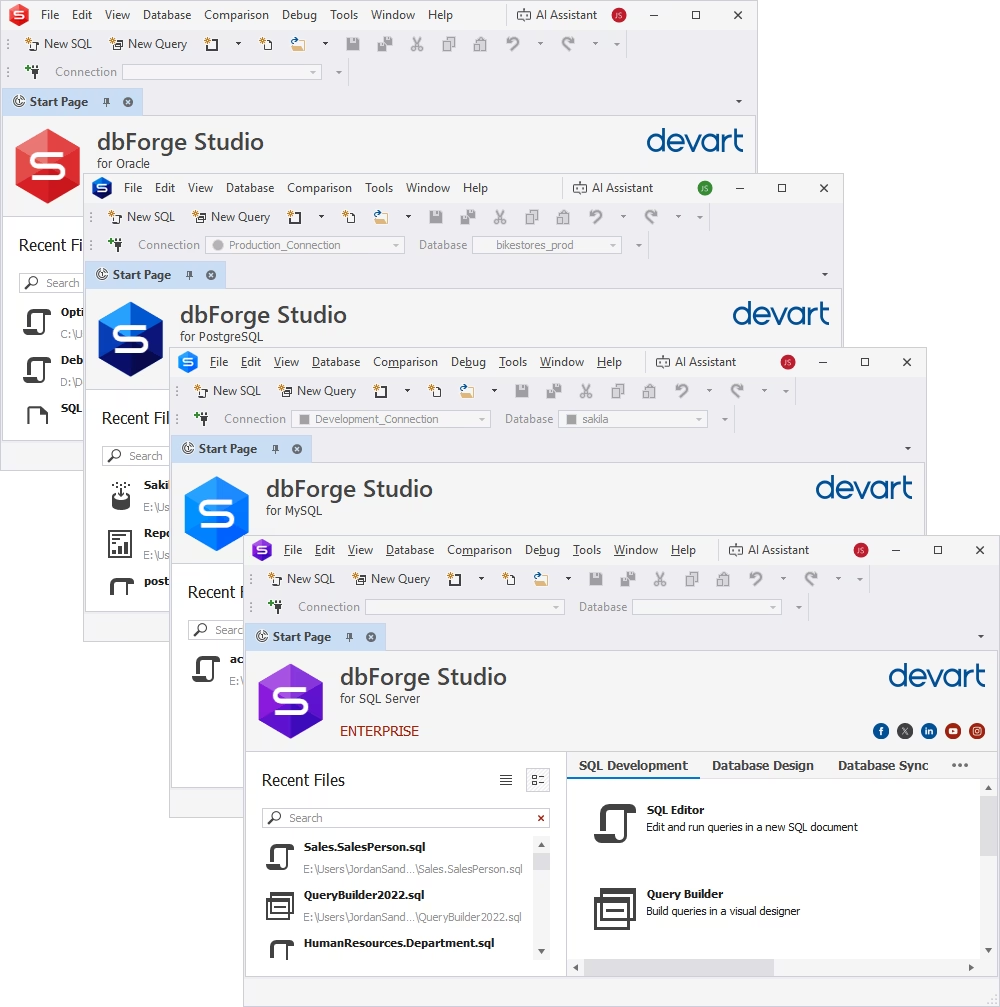
Migration teams need more than a one-time transfer utility—they need a workspace for schema inspection, SQL development, data comparison, and validation across the whole project. Instead of switching between multiple standalone tools, dbForge Edge—a universal database tool—brings together dedicated IDEs for Oracle, MySQL and MariaDB, SQL Server, and PostgreSQL in a single bundle, allowing migration teams to perform the entire workflow from one integrated environment.
For the workflow described in this guide, dbForge Studio for MySQL—a MySQL GUI with its own MariaDB GUI client—provides the core migration capabilities. You can create and manage the target MariaDB schema, compare Oracle data exposed through CONNECT tables with native MariaDB tables, generate synchronization scripts, and rerun comparisons at any stage of the migration to verify the results before production cutover.
At the same time, dbForge Studio for Oracle—a comprehensive IDE for Oracle—helps you inspect the source schema, review database objects, and analyze SQL and PL/SQL code before conversion. Its SQL editor, code completion, and navigation features simplify understanding existing Oracle code and preparing it for migration.
Since all dbForge Edge components share a consistent interface and licensing model, DBAs, developers, architects, and analysts can work with Oracle and MariaDB using purpose-built tools without changing products throughout the migration lifecycle.
Try dbForge Edge free for 30 days to evaluate the workflow on your own Oracle and MariaDB environments.
dbForge Edge
A comprehensive solution that unifies development, management, and analysis across multiple databases within a single suite.
Common Oracle-to-MariaDB migration mistakes to avoid
Most failed or rolled-back migrations trace back to a small set of avoidable mistakes, not fundamentally difficult technical problems.
Treating migration like a simple export/import task
Export/import moves rows, but it doesn't validate that the target schema, data types, and constraints preserve the source's behavior. Teams that treat migration as a data copy job often discover—only after go-live—that constraints weren't enforced or that Oracle-specific defaults silently didn't carry over.
Ignoring Oracle-specific SQL and PL/SQL
Assuming Oracle SQL and PL/SQL will run unchanged on MariaDB, even with compatibility mode enabled, is a frequent source of late-stage failures. Functions such as TO_DATE() or DECODE(), hierarchical queries, and package-based logic don't silently degrade—they fail outright or return subtly wrong results that pass a quick smoke test.
Skipping structured validation before cutover
Confirming that data "looks right" isn't the same as validating row counts, constraints, and application behavior systematically. Run the full validation sequence—data comparison, constraint checks, functional testing, and performance benchmarking—before every cutover, not just the first one.
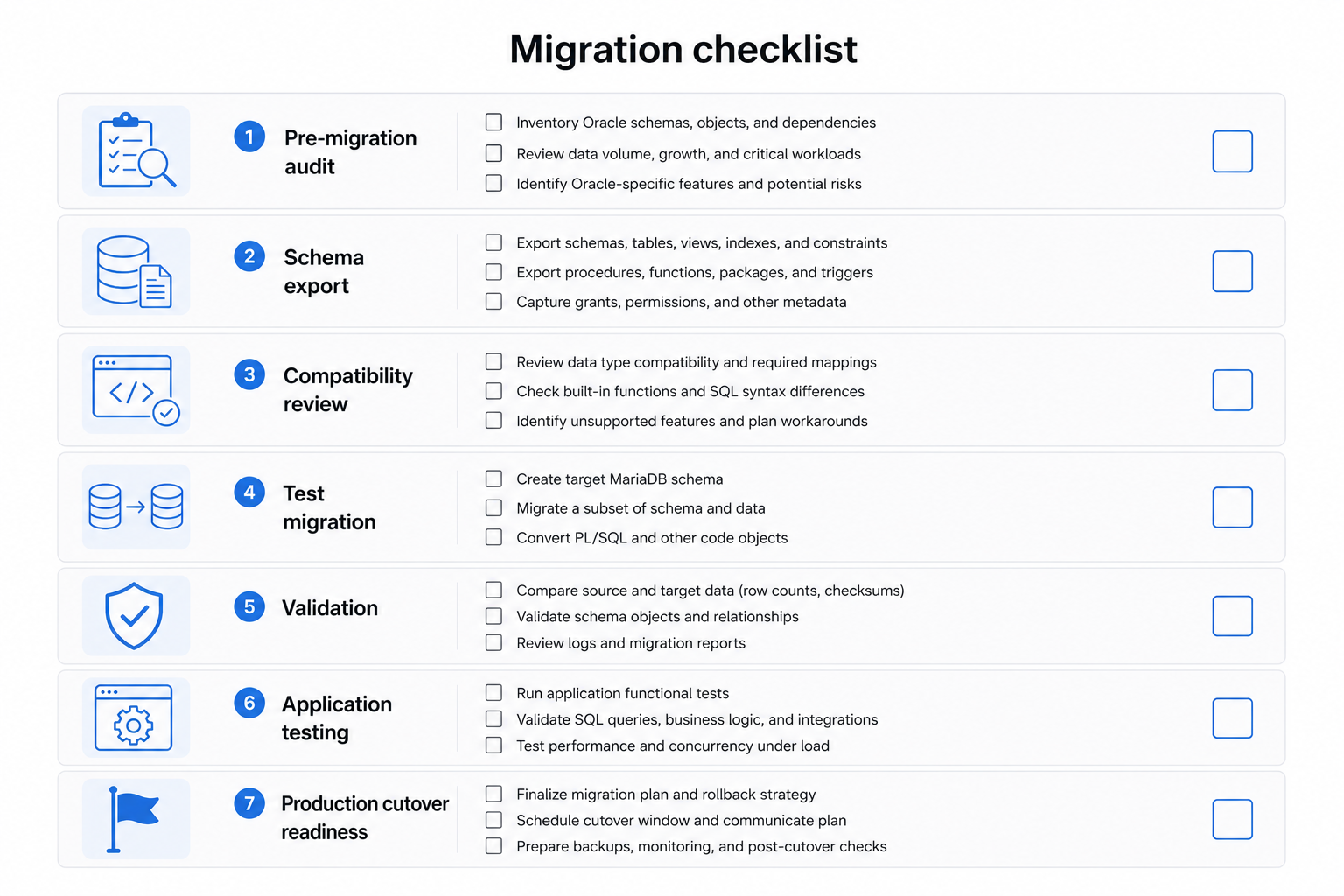
Avoiding these mistakes is only part of a successful migration. Before moving to production, use the following checklist to verify that all critical migration tasks have been completed.
Conclusion
A successful Oracle-to-MariaDB migration follows the same order every time: assess the schema and code first, map data types and functions carefully, migrate data through a controlled and repeatable workflow, rewrite SQL and PL/SQL differences early rather than at cutover, and validate thoroughly before going live. Skipping assessment or validation is the most common reason migrations turn into rollback events rather than successful cutovers.
If you're planning an Oracle-to-MariaDB migration, start by scoping your own schema and procedural code against the checklist in this guide, then evaluate whether a GUI-driven workflow like the one described here fits your team's complexity and validation needs. Try dbForge Edge free for 30 days to review your Oracle schema, compare data, and validate your MariaDB target before you commit to a production cutover.
FAQ
How do I migrate data from Oracle to MariaDB without losing schema integrity?
Treat schema conversion as its own step, not a side effect of data transfer. Export the full Oracle DDL, map every data type and constraint to its MariaDB equivalent, and create the target schema explicitly before loading data. Validate primary keys, foreign keys, and constraints separately from row counts, since a successful data load doesn't guarantee constraint enforcement matches the source.
What are the biggest Oracle-to-MariaDB migration challenges for enterprise databases?
The biggest challenges are procedural code such as packages, triggers, and PL/SQL with Oracle-specific constructs, data type mapping at scale across many tables, and validating correctness without extended downtime. Enterprise schemas also tend to have more Oracle-only features, such as synonyms and hierarchical queries, that require redesign rather than direct conversion.
What should I check before I migrate Oracle to MariaDB in production?
Complete a full schema and code inventory, run a compatibility assessment, and classify every object as directly portable, needing remapping, or requiring a rewrite. Confirm you have a tested rollback plan and a validation checklist ready, since production migrations need a clear point of no return defined in advance.
Can I migrate from Oracle to MariaDB without rewriting most SQL queries in the application?
Some rewriting is unavoidable, but MariaDB's Oracle compatibility mode (SQL_MODE=ORACLE) reduces how much of it you need, especially for PL/SQL blocks and procedures. Application SQL that relies on Oracle-specific functions or hierarchical queries will still need changes, so scope this during assessment rather than assuming compatibility mode covers everything.
How can I test performance and data accuracy after an Oracle-to-MariaDB migration?
Test data accuracy with row-level data comparison between source and target, not just row counts. Test performance by running your actual application workloads against MariaDB and reviewing query execution plans, since indexing behaves differently between the two engines and previously fast queries may need new indexes.
Is Oracle-to-MariaDB migration difficult?
Difficulty depends on how much procedural code and how many Oracle-only features the database uses. Migrating tables and basic schema is usually straightforward; migrating packages, hierarchical queries, and complex triggers is the harder part. A structured assessment upfront turns an open-ended, difficult-sounding project into a scoped one.
How can dbForge Edge help with Oracle-to-MariaDB migration planning and validation?
dbForge Edge combines a MySQL/MariaDB Studio and an Oracle Studio in one environment, so you can review the Oracle source, develop MariaDB-side SQL, and run data comparisons for validation without switching tools. Its Data Compare feature specifically supports the transfer and re-validation workflow described in this guide.
Why should I try dbForge Edge before migrating to MariaDB from Oracle in a live environment?
Trying dbForge Edge first lets you test the connection, schema review, and data comparison workflow against a non-production copy of your databases, so you can catch compatibility issues and validation gaps before they affect a live cutover. The free 30-day trial covers the full toolset needed for this.