SQL query optimization: How to tune performance effectively
Slow-running queries often become a source of delays and excessive resource consumption. Large data volumes, complex JOINs, inefficient filters, missing and unused indexes can cause performance bottlenecks that affect your application. For database developers and DBAs, finding the real cause is often more difficult than simply identifying that a query is slow. SQL query optimization provides a systematic way to address these problems. It helps improve performance by minimizing execution time, resource usage, and server load.
This guide covers practical techniques like indexing, query refactoring, and execution plan analysis. By applying these methods, you can effectively implement SQL optimization and benefit from:
- Faster response times for critical queries.
- Reduced server CPU and memory consumption.
- Smoother application performance under load.
- Improved SQL database optimization across workloads.
- Lower risk of blocking and deadlocks during peak usage.
These gains are achievable with a few core techniques used consistently. Let's explore the most effective SQL query optimization tips, so you can write faster, leaner, and more reliable queries.
SQL query optimization basics
SQL query optimization refers to refining a query's structure to reduce resource usage and improve speed. It's a crucial step in improving SQL Server query performance and ensuring fast, consistent results.
A common example is when a developer rewrites a nested subquery into a JOIN to reduce execution time.
-- Less efficient
SELECT Name
FROM Employees
WHERE DepartmentID IN (SELECT ID FROM Departments WHERE Name = 'Sales');

-- Optimized version
SELECT e.Name
FROM Employees e
INNER JOIN Departments d ON e.DepartmentID = d.ID
WHERE d.Name = 'Sales';
In the first version, SQL Server may perform a full scan for each row. The second version allows the optimizer to perform an index seek, drastically cutting the response time.
Other common optimization techniques include:
- Replacing SELECT * with specific columns
- Avoiding implicit data type conversions
- Indexing frequently filtered columns
The goal is to make a query work at scale. SQL optimization can speed up queries by 10 times or more, especially under load.
Best tools for SQL query and index performance tuning (compared)
The table below provides an overview of popular SQL performance optimization tools with the most common use cases.
| Tool | Type | What it does for tuning | Best for |
|---|---|---|---|
| dbForge Studio for SQL Server | GUI IDE | Query Profiler, execution plan viewer, Index Manager, AI Assistant | All-in-one tuning and development |
| SSMS execution plans | Built-in | Visualizes the query plan; flags scans and missing indexes | Ad-hoc plan analysis |
| Query Store | Built-in (SQL Server) | Tracks query performance over time; finds regressions | Monitoring and regression detection |
| Database Engine Tuning Advisor | Built-in | Recommends indexes and statistics for a workload | Index recommendations |
| Redgate SQL Monitor / SolarWinds DPA / SentryOne | Third-party monitoring | Performs continuous performance monitoring and alerting | Production monitoring |
| EXPLAIN / EXPLAIN ANALYZE | Built-in (PostgreSQL, MySQL) | Shows the plan and actual timings | Cross-database plan analysis |
| pg_stat_statements / Performance Schema | Built-in (PostgreSQL, MySQL) | Presents aggregated query statistics | Finding the slowest queries |
15 query optimization tips for better performance
Below is a breakdown of 15 proven strategies for tuning SQL queries, categorized by type and expected performance impact.
| Optimization tip | Category | Effect on performance | Tool / technique mentioned |
|---|---|---|---|
| Add missing indexes | Indexing | High | dbForge Studio, sys.dm_db_missing_index_* views |
| Check for unused indexes | Indexing | Medium | CAST(), filtered indexes |
| Avoid using multiple OR conditions in the filter predicate | Query rewrite | High | UNION instead of OR |
| Use wildcards at the end of a phrase only | Query structure | Medium | LIKE with computed REVERSE() column |
| Avoid too many JOINs | Query structure | High | JOIN elimination |
| Avoid using SELECT DISTINCT | Query structure | Medium | EXISTS instead of JOIN + DISTINCT |
| Use SELECT fields instead of SELECT * | Query optimization | High | Covering indexes |
| Use TOP to sample query results | Query optimization | Medium | SELECT TOP |
| Run the query during off-peak hours | Execution strategy | Medium | WITH (NOLOCK), snapshot isolation |
| Minimize the usage of any query hint | Query optimization | Low | NOLOCK, RECOMPILE, OPTIMIZE FOR |
| Minimize large write operations | Data management | Medium | Filegroups, compression, partitioning |
| Create JOINs with INNER JOIN (not WHERE) | Query structure | Medium | INNER JOIN vs. WHERE |
| Optimize subqueries & use CTEs | Query structure / optimization | Medium–High (depends on query complexity) | WITH CTE, temp tables, subqueries |
| Try AI-powered query optimization | AI assistance | High | ChatGPT or dbForge AI Assistant, ML-based optimization |
| Check the built-in query optimization features | Query optimization | High | SSMS execution plan viewer (SQL Server), dbForge Studio's Query Profiler (SQL Server) |
Monitoring metrics can be used to evaluate query runtime, detect performance pitfalls, and show how they can be improved. In most cases, they may include:
- Execution plan: Detailing how the SQL Server query optimizer processes a statement, including operation order, index usage, and estimated costs to guide query tuning.
- Input/output statistics: Showing the number of logical and physical reads performed during execution, helping identify inefficient data access and potential memory pressure.
- Buffer cache: Storing frequently accessed data pages in memory to reduce disk reads and improve response times.
- Latency: Measuring the time taken for queries or operations to complete, helping pinpoint bottlenecks in execution.
- Indexes: Providing optimized access paths to data, reducing full table scans and improving retrieval speed.
- Memory-optimized tables: Keeping data in memory to accelerate both read and write operations, particularly in high-throughput workloads.
Now, let's discuss the best SQL Server performance tuning practices and tips you may apply when writing SQL queries.
Tip 1: Add missing indexes
To fix queries slowed down by missing indexes, start by locating them: monitor missing index warnings in dynamic management views like sys.dm_db_missing_index_details.
-- View missing index suggestions
SELECT *
FROM sys.dm_db_missing_index_details;
You can also use tools such as dbForge Studio for SQL Server, which highlights missing indexes through its Query Profiler interface.
After you have identified missing indexes, add them to your database.
-- Example: adding a helpful non-clustered index
CREATE NONCLUSTERED INDEX IX_Customers_LastName
ON Customers (LastName);
Adding a missing index like this can drastically reduce query times, often by 50–90%, depending on the dataset and query complexity. A correctly defined index causes a query to perform an index seek rather than a table scan, which is a more efficient and less resource-intensive operation.
Tip 2: Check for unused indexes
To optimize index usage, you may need to modify your queries. For example, the following query does not use indexes due to implicit data type conversion, where int data is converted to varchar before comparison.
SELECT *
FROM TestTable
WHERE IntColumn = '1';
To optimize it, use the CAST() function that converts a value of any type into a specified data type.
SELECT
  *
FROM TestTable
WHERE IntColumn = CAST(@char AS INT);
The following query also involves implicit data conversion, where indexes are not used.
SELECT
  *
FROM TestTable
WHERE DATEPART(YEAR, SomeDate) = '2026';
You can optimize index usage by modifying the query as follows.
SELECT
  *
FROM TestTable
WHERE SomeDate >= '20260101'
AND SomeDate < '20270101';
Filtered indexes can affect performance too. Suppose we have an index on the Customer table.
CREATE UNIQUE NONCLUSTERED INDEX IX ON Customer (MembershipCode) WHERE MembershipCode IS NOT NULL;The index won't work for the following query.
SELECT
  *
FROM Customer
WHERE MembershipCode = '258410';
Optimize it as follows to use the index and prevent unnecessary table scans.
SELECT
  *
FROM Customer
WHERE MembershipCode = '258410'
AND MembershipCode IS NOT NULL;
Tip 3: Avoid using multiple OR conditions in the filter predicate
Try not to use multiple OR conditions in the WHERE clause, because SQL Server's optimizer may not be able to use indexes effectively across all OR conditions, often defaulting to a full table scan.
In the following example, even if one column has an index, the OR logic breaks the optimization path, forcing the engine to scan the entire table.
SELECT *
FROM Users
WHERE Name = @P OR Login = @P;
Here are better alternatives:
- Apply UNION to split queries, allowing each part to use indexes independently.
SELECT * FROM Users WHERE Name = @P
UNION
SELECT * FROM Users WHERE Login = @P;- Use IN when possible, especially if all conditions target the same column.
SELECT
  *
FROM Orders
WHERE Status IN ('Pending', 'Processing', 'Shipped');- Ensure proper indexing on all referenced columns, especially if you're using multiple OR branches across different fields.
Performance insight: Full table scans caused by poorly structured OR logic can increase I/O and CPU usage, especially on large tables. Rewriting the query helps the optimizer perform index seeks instead of scans, resulting in much faster execution.
Tip 4: Use wildcards at the end of a phrase only
To maintain index efficiency, avoid placing wildcards (%) at the beginning of a search string. Leading wildcards force SQL Server to perform an index scan instead of an index seek, significantly increasing the time it takes to retrieve results, especially on large tables.
Compare the following queries.
-- Causes index scan (slow)
SELECT * FROM Customers WHERE LastName LIKE '%son';

-- Uses index seek (fast)
SELECT * FROM Customers WHERE LastName LIKE 'John%';
In the first example, SQL Server cannot predict where in the index tree to begin the search, so it scans the entire index. In the second, it can seek directly to rows starting with “John”, making it much faster and more efficient.
However, if your use case demands searching by suffix (e.g., last four digits of a card number), you can create a computed column using REVERSE() to preserve index usage.
ALTER TABLE Customers
ADD ReversedCardNo AS REVERSE(CardNo) PERSISTED;

CREATE INDEX IX_ReversedCardNo ON Customers(ReversedCardNo);

-- Now search like this:
SELECT *
FROM Customers
WHERE ReversedCardNo LIKE REVERSE('1234') + '%';
This technique helps optimize SQL code while retaining flexible search patterns, without sacrificing performance.
Tip 5: Avoid too many JOINs
When using JOINs, consider the following optimization techniques.
- Keep JOINs below five unless absolutely necessary.
- Remove unnecessary relationships or subqueries where the same data can be fetched more efficiently.
- Where possible, denormalize data for reporting or analytics layers to reduce JOIN depth.
- Split complex JOINs into temporary tables or CTEs to reduce execution load and improve SQL query speed.
When too many JOINs are used (typically more than three to five), the planner has to evaluate a rapidly growing number of JOIN paths. This can overload memory, exhaust the JOIN buffer, and lead to long execution times.
What happens internally:
- Nested loop JOINs are common but inefficient when the inner table lacks proper indexing.
- SQL Server may generate bloated execution plans that cause temporary table spooling, hash JOINs, or even Cartesian products.
- In the worst case, queries perform full scans and compound I/O costs across all joined tables.
The following SQL uses unnecessary JOINs that affect performance.
SELECT DISTINCT o.ID, o.OrderDate, o.CustomerID
FROM Orders o
JOIN Customers c    ON o.CustomerID = c.ID
JOIN OrderItems oi  ON oi.OrderID = o.ID
JOIN Products p     ON oi.ProductID = p.ID
JOIN Categories cat ON p.CategoryID = cat.ID
JOIN Regions r      ON c.RegionID = r.ID
WHERE cat.ID = 5
  AND r.ID = 3;
To optimize, replace multiple JOINs with a subquery as follows.
SELECT o.ID, o.OrderDate, o.CustomerID
FROM Orders o
JOIN Customers c ON o.CustomerID = c.ID
WHERE c.RegionID = 3
  AND EXISTS (
      SELECT 1
      FROM OrderItems oi
      JOIN Products p ON oi.ProductID = p.ID
      WHERE oi.OrderID = o.ID
        AND p.CategoryID = 5
  );
Tip 6: Avoid using SELECT DISTINCT
While SELECT DISTINCT can help eliminate duplicate rows, consider other options first:
- Fix the JOIN logic: Limit JOINs using proper filters or EXISTS clauses.
- Use GROUP BY: More controllable and often faster for deduplication.
- Apply aggregation: Summarize or limit records at the source rather than cleaning after retrieval.
Duplicate results are usually a sign of a bad JOIN condition or unintended row multiplication. Below is a common example.
-- Problematic: duplicates caused by an overly broad JOIN
SELECT DISTINCT o.OrderID, c.Name
FROM Orders o
JOIN Customers c ON o.CustomerID = c.ID
JOIN Feedback f ON f.OrderID = o.OrderID;
In this case, multiple feedback entries per order inflate the result set. Applying DISTINCT hides the symptom but won't address the cause. Try changing the JOIN logic instead.
SELECT o.OrderID, c.Name
FROM Orders o
JOIN Customers c ON o.CustomerID = c.ID
WHERE EXISTS (
    SELECT 1
    FROM Feedback f
    WHERE f.OrderID = o.OrderID
);
Unless your use case absolutely requires deduplication, avoid SELECT DISTINCT as a shortcut. It rarely aligns with the basics of query optimization and often masks deeper query design flaws.
Tip 7: Use SELECT fields instead of SELECT *
To save database resources, use SELECT statements specifying the exact columns you need to get data from rather than the entire table. For example, the following query retrieves all data from the Users table, including users' avatar pictures. The result table will contain lots of data and will consume too much memory and CPU.
SELECT
  *
FROM Users;
If you explicitly specify the columns to retrieve, the result will only include the required data, lowering the query cost.
SELECT
  FirstName
 ,LastName
 ,Email
 ,Login
FROM Users;
If you need to retrieve this data regularly, for example, for authentication purposes, use covering indexes, the biggest advantage of which is that they contain all the fields required by the query and can significantly improve its performance.
CREATE NONCLUSTERED INDEX IX_Users_Login
ON Users (Login)
INCLUDE (FirstName, LastName, Email);
Tip 8: Use TOP to sample query results
To reduce resource consumption, verify your SQL by limiting the number of records to be retrieved from the database. Use SELECT TOP to only fetch several rows as a sample.
For example, the following query only retrieves five records matching the condition.
SELECT TOP 5
  p.BusinessEntityID
 ,p.FirstName
 ,p.LastName
 ,p.Title
FROM Person.Person p
WHERE p.FirstName LIKE 'Ade%';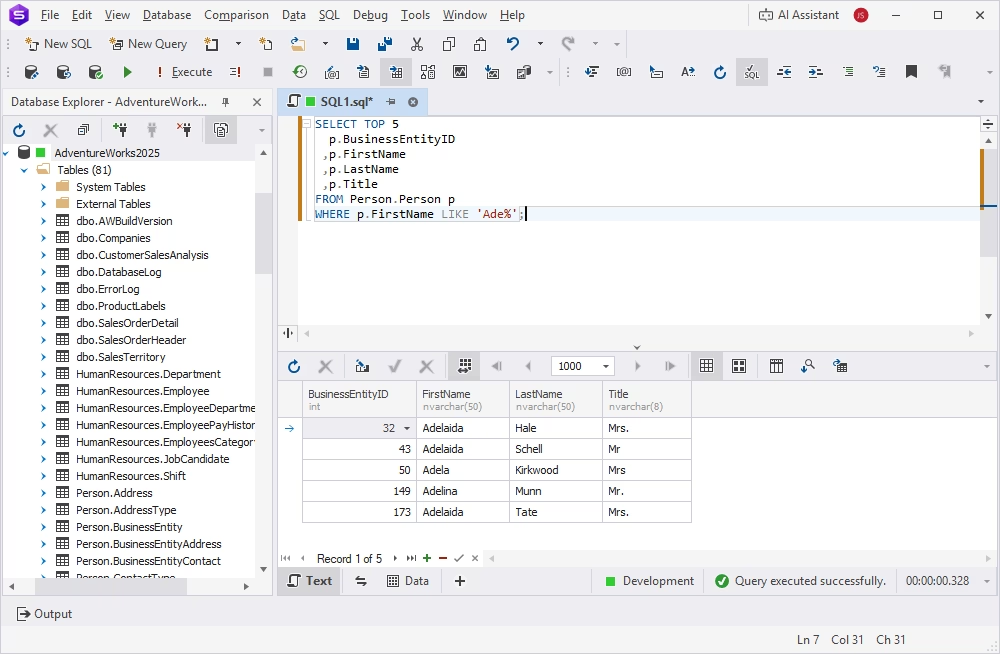
For more information about the TOP command, refer to Using the SELECT TOP Clause in SQL Server.
Tip 9: Run the query during off-peak hours
Another SQL tuning technique is to schedule the query execution during off-peak hours, especially if you need to run multiple SELECT queries from large tables or execute complex queries with nested subqueries, looping queries, etc.
If you are running a heavy query against a database, SQL Server locks the tables you are working with to prevent concurrent use of resources by different transactions. That means that other users are not able to work with those tables. Thus, executing heavy queries at peak times leads not only to server overload but also to restricting other users' access to certain amounts of data. One of the popular mechanisms to avoid this is to use the WITH (NOLOCK) hint.
This method allows the user to retrieve the data without being affected by the locks. The biggest drawback of using WITH (NOLOCK) is that it may result in working with dirty data. We recommend that you give preference to snapshot isolation, which helps avoid data locking by using row versioning and guarantees that each transaction sees a consistent snapshot of the database.
Tip 10: Minimize the usage of any query hint
Unless you're sure what you're doing, avoid relying on query hints. These directives override the SQL Server optimizer's judgment, which can degrade performance, cause plan regressions, or even break business logic, especially when the underlying data changes.
In the following example, FORCESEEK forces the query to use a specific index, even if a table scan or hash JOIN would be faster for the data distribution at runtime. If the index becomes fragmented or the data grows, this hint may lead to longer execution times or I/O spikes. To improve performance, this hint should be removed from the query.
SELECT *
FROM Sales
WHERE Region = 'West'
OPTION (FORCESEEK); -- Forces index seek even when it's not optimal
Other common hints include:
- OPTION (HASH JOIN): Forces a specific JOIN strategy.
- OPTION (RECOMPILE): Disables plan reuse and increases CPU usage.
- WITH (NOLOCK): Allows dirty reads and risks data inconsistency.
While these hints can solve short-term issues, they should only be used after careful testing with tools like the dbForge Query Profiler, which shows how hints affect the execution plan.
Tip 11: Minimize large write operations
To minimize the impact of large UPDATE, DELETE, or INSERT operations that can slow query performance, increase lock contention, and cause excessive transaction log growth, use the following best practices.
- Use batching to control transaction size: Break the workload into smaller chunks to reduce locks and log usage.
-- Batched delete to reduce lock contention
WHILE 1 = 1
BEGIN
 DELETE TOP (1000)
 FROM Orders
 WHERE Status = 'Cancelled';

 IF @@ROWCOUNT = 0 BREAK;
END- Disable nonclustered indexes temporarily: Before massive writes, drop or disable non-critical indexes, then rebuild them afterward to improve speed.
- Use table partitioning for targeted writes: Partition tables to isolate and truncate large subsets of data, especially for time-based data.
- Apply minimal logging with TABLOCK or BULK INSERT: When inserting large volumes of data, use bulk load operations to significantly cut down I/O overhead.
- Avoid triggers during high-volume writes: If possible, turn off triggers that perform row-by-row validations or logging during a bulk operation.
Tip 12: Create JOINs with INNER JOIN rather than WHERE
Always use INNER JOIN instead of the WHERE clause to link multiple tables. While both return the same results, INNER JOIN makes the code more maintainable and prevents accidental Cartesian products.
The SQL INNER JOIN statement returns all matching rows from joined tables, while the WHERE clause filters the resulting rows based on the specified condition. Retrieving data from multiple tables based on the WHERE keyword condition is called a NON-ANSI JOIN, while INNER JOIN belongs to ANSI JOINs.
It does not matter for SQL Server how you write the query—using ANSI or NON-ANSI JOINs—it's just much easier to understand and analyze queries written using ANSI JOINs. You can clearly see where the JOIN conditions and the WHERE filters are, whether you missed any JOIN or filter predicates, whether you joined the required tables, etc.
From the performance point of view, using INNER JOINs rather than WHERE clauses does not have any significant effect on the execution time or resource consumption. However, INNER JOINs produce more maintainable code and ensure consistency with other JOIN types.
The following queries, while using different approaches, return the same results. The one using the INNER JOIN is easier to maintain.
Query with an INNER JOIN
SELECT
  d.DepartmentID
 ,d.Name
 ,d.GroupName
FROM HumanResources.Department d
INNER JOIN HumanResources.EmployeeDepartmentHistory edh
  ON d.DepartmentID = edh.DepartmentID;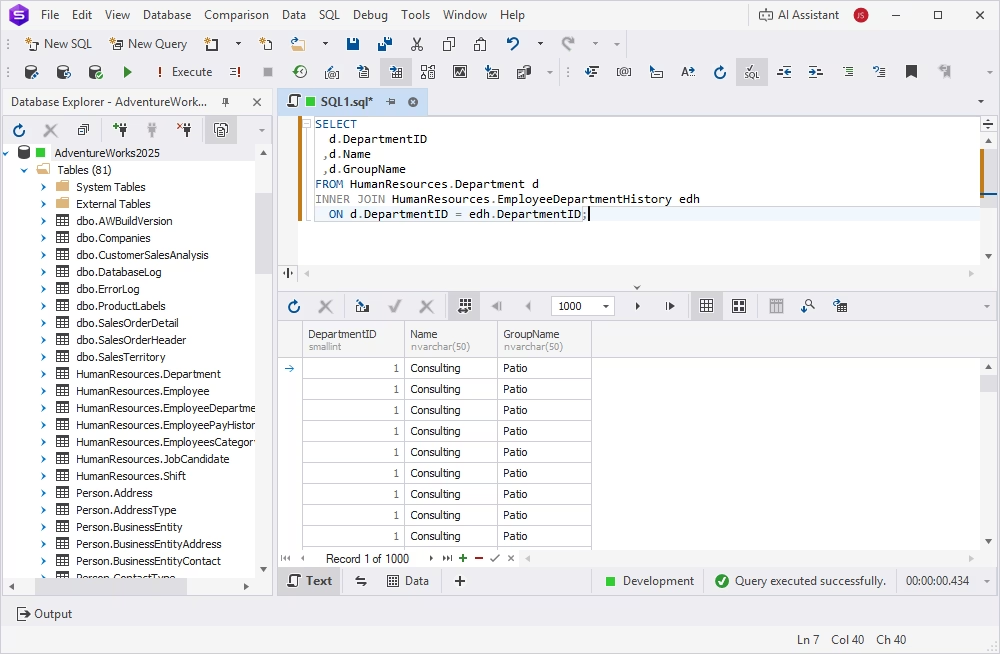
Query with a WHERE clause
SELECT
  d.Name
 ,d.GroupName
 ,d.DepartmentID
FROM HumanResources.Department d
    ,HumanResources.EmployeeDepartmentHistory edh
WHERE d.DepartmentID = edh.DepartmentID;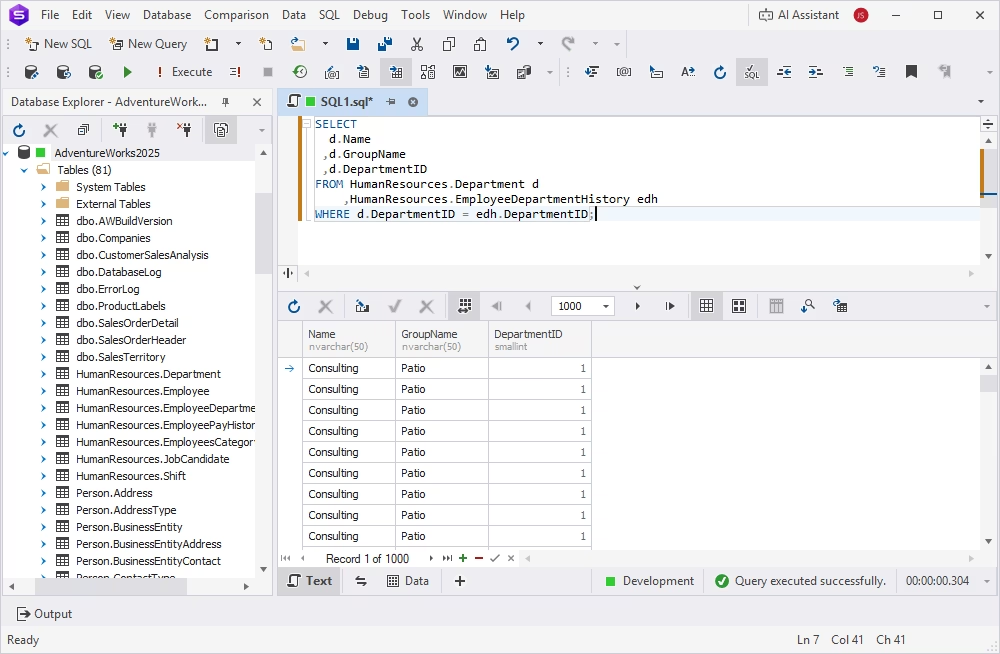
Tip 13: Optimize subqueries and use CTEs
Replace nested subqueries with Common Table Expressions (CTEs). A CTE defines a result set once and lets you reuse it, keeping your SQL modular and easier to maintain. CTEs are also the right tool for recursive or hierarchical queries.
-- Inefficient: repeated subqueries
SELECT o.OrderID, o.CustomerID
FROM Orders o
WHERE o.CustomerID IN (SELECT CustomerID FROM VIP_Customers)
AND o.OrderID NOT IN (SELECT OrderID FROM CancelledOrders);

-- Optimized: CTEs reduce redundancy
WITH VIP AS (
SELECT CustomerID FROM VIP_Customers
),
Cancelled AS (
SELECT OrderID FROM CancelledOrders
)
SELECT o.OrderID, o.CustomerID
FROM Orders o
JOIN VIP v ON o.CustomerID = v.CustomerID
LEFT JOIN Cancelled c ON o.OrderID = c.OrderID
WHERE c.OrderID IS NULL;
In such cases, staging or temp tables are a safer choice, since they let you index intermediate results and control resource usage more effectively. Subqueries, on the other hand, make sense for simple, single-use conditions inside a WHERE or HAVING clause, where defining a full CTE would only add overhead.
Tip 14: Try AI-powered query optimization
Take advantage of AI-based optimization processes to handle massive volumes of execution data and complex code. Tools like dbForge AI Assistant and Azure SQL Intelligent Query Processing use cost-based optimization, adaptive plans, and auto-indexing to analyze SQL performance in real time and suggest instant improvements.
In a nutshell, AI can help you with:
- Rewriting inefficient queries based on execution patterns.
- Detecting missing indexes and suggesting the best columns to index.
- Identifying outdated or inefficient hints and replacing them with better alternatives.
- Simulating multiple execution plans and picking the optimal one.
- Predicting performance regressions before deployment.
For example, dbForge AI Assistant can highlight an expensive query segment in the plan and recommend alternatives using natural language guidance. Likewise, Azure SQL's automatic tuning can fix plan regressions and apply index changes without manual intervention.
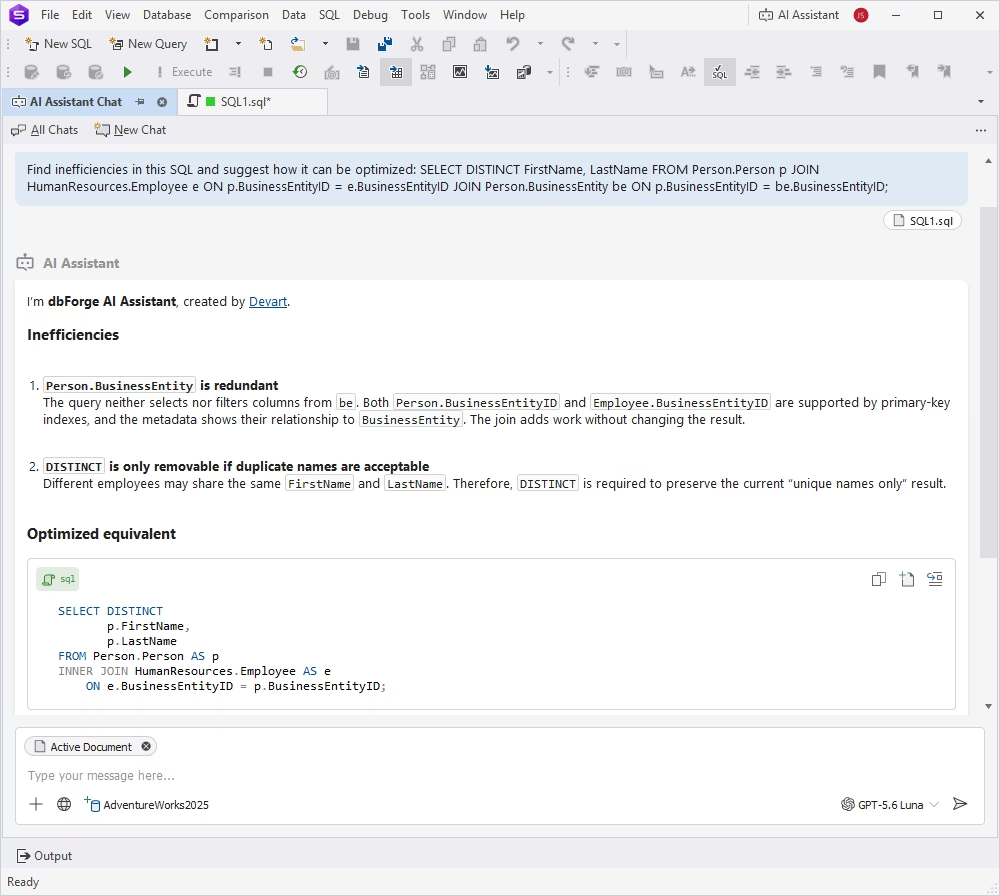
AI-powered optimization is especially useful in large or evolving systems where query patterns shift often, and manual tuning becomes time-consuming or error-prone. Moreover, these tools integrate with modern DevOps pipelines and can automate tuning at scale.
If you're working with dynamic workloads or production-critical databases, using AI can significantly improve SQL tuning velocity and consistency.
Tip 15: Check the built-in query optimization features
Before applying advanced tuning techniques, start with the tools your database already provides. These built-in query optimization tools give you a clear view of how queries behave, and where they go wrong.
Step 1: Visualize the execution plan
Use tools like:
- SSMS execution plan viewer (SQL Server): Visualizes the execution plan graph and highlights I/O cost, table scans, and missing indexes.
- dbForge Query Profiler in the Studio for SQL Server: Offers in-depth plan analysis, resource tracking, and visual comparison between query runs. Provides a graphical EXPLAIN plan that transforms raw EXPLAIN output into a visual tree, highlights JOIN order and access types, compares plans before and after query changes, and saves plans for later review.
- MySQL EXPLAIN / EXPLAIN ANALYZE: Breaks down how queries are executed, showing JOIN type, index usage, and estimated row counts.
Step 2: Interpret and act
Once you've identified inefficiencies:
- Create missing indexes suggested in the plan.
- Rewrite queries that trigger nested loops or full scans.
- Restructure JOINs based on estimated row count differences.
- Use these tools to validate improvements after tuning.
By routinely using these tools to optimize SQL queries, you gain a repeatable way to detect and fix problems, without relying on guesswork.
SQL query optimization best practices
To consistently write high-performance SQL queries, follow these five core best practices:
- Always analyze the execution plan: Use tools like SSMS, dbForge solutions, or MySQL EXPLAIN to visualize the query execution path. Focus on I/O cost, missing indexes, and operators like table scans or nested loops.
- Avoid unnecessary columns: Don't use SELECT * unless absolutely necessary. Query only the columns you need. This reduces memory usage and network load and improves cache efficiency.
- Minimize JOINs and simplify query design: Follow query design patterns that reduce complexity. Break down large JOIN chains into smaller steps or use denormalized views when possible.
- Use indexes strategically: Ensure that commonly filtered or joined columns are indexed, but avoid over-indexing. Monitor index usage regularly and clean up unused ones.
- Profile and test under real-world loads: Optimize based on real execution statistics rather than assumptions. Profile queries during peak traffic to ensure consistent performance.
By applying these SQL Server best practices for performance, you can improve execution speed, reduce server strain, and build scalable systems that run efficiently in production.
For further learning, see how to run an SQL query and explore SQL Server query optimization tips.
Conclusion
In this article, we have covered many fine-tuning techniques and tips to improve performance. We hope that they will work for you and help you avoid any performance issues that may arise.
Try them in your SQL database development and administration workflows by downloading dbForge Studio for SQL Server for free and exploring the features it provides. The following video provides an overview of what the Studio has to offer to database developers, DBAs, and data analysts.
FAQ
Key optimization techniques in SQL include indexing for faster data retrieval, query restructuring for higher efficiency, execution plan analysis to identify bottlenecks, partitioning to distribute data for faster access, and the use of proper JOINs.
The choice of the best SQL query and index performance tuning tools depends on your goals. However, if you are looking for a tool that provides a single environment for query analysis, execution plan evaluation, index investigation, and SQL optimization, consider dbForge Studio for SQL Server, a comprehensive IDE for database management.
For historical query performance analysis and regression detection, check out the Query Store, an integrated SQL Server feature intended for performance troubleshooting.
If you need a tool that can efficiently find missing and unused indexes and suggest optimizations, consider the following options:
- dbForge Studio for SQL Server: An advanced IDE for managing the entire database lifecycle that offers an integrated index tuning tool—Index Manager—designed specifically to analyze and maintain database indexes.
- SQL Server DMVs: The built-in dynamic management views serving as the primary source for index usage and missing-index information.
- Database Engine Tuning Advisor: A built-in SQL Server index advisor that analyzes query processing and suggests optimizations.
To optimize performance in SQL, consider analyzing execution plans to detect slow operations, using indexes for faster searches, optimizing JOINs and WHERE clauses, and using batch processing. Also, it is recommended to avoid nested subqueries when possible and to monitor server performance metrics like CPU and memory usage.
The three major steps in query optimization include parsing and translation, which are often used to validate SQL queries and convert them to internal format; the optimization step to compare multiple execution plans; and the evaluation step, which is necessary to choose the optimal plan.
The SQL Server Query Optimizer is a component that creates query execution plans, analyzes efficiency, and chooses a query plan using a set of heuristics to balance compilation time and plan optimality in order to perform queries with the minimum amount of resources used.
There is no single best query optimization technique because the choice depends on the use case. However, indexing, execution plan analysis, and query restructuring often have the most impact.
Database performance tuning is the process of optimizing database operations to improve speed and efficiency. This process often includes query optimization, index tuning, memory and CPU management, and optimization of data storage and retrieval.