SQL Server LIKE Operator
One of the most common tasks in everyday work is retrieving data from databases and filtering it based on specific criteria. But what if you need to find records without knowing the exact value you're searching for, only a general pattern?
This is where the LIKE operator becomes especially useful. It allows you to search for data by matching patterns within strings, using special wildcard characters for flexible search conditions.
In this guide, we'll explore how the LIKE operator works in SQL Server. You'll learn its syntax, understand how wildcards function, and see practical examples you can apply immediately in your work. Let's get started.
What is the SQL Server LIKE operator?
The LIKE operator in SQL Server is a logical operator that checks if a character string matches a specified pattern. The pattern may include regular and wildcard characters; regular characters must match exactly, and wildcard characters can match different parts of the string. Such wildcard characters make the LIKE operator more flexible.
The LIKE operator is used in the WHERE clause and serves to filter rows for the SELECT, UPDATE, and DELETE commands.
SQL Server LIKE operator syntax
The basic syntax of the LIKE operator is as follows:
column | expression LIKE pattern [ESCAPE escape_character]
Parameters:
- column/expression – the target column to search in
- pattern – the sequence of characters to search for in the column or expression
- escape character (optional) – the character used to treat wildcard characters as literals
Now, let us see how the LIKE operator with regular and wildcard characters works in practice. We will use dbForge Studio for SQL Server, a powerful multi-featured IDE for SQL Server databases, and the AdventureWorks2025 test database to illustrate our examples.
Wildcards used in SQL Server LIKE
The pattern can include the following valid wildcard characters:
- The percent (%) – any string of characters
- The underscore (_) – any single character
- The brackets [] – any single character or list of characters within the specified set, closed in brackets
- The [^] – any character that is not within a list or a range
% (percent wildcard)
The percent wildcard matches any sequence of characters—zero, one, or many. Typically, it is used when part of the search value is unknown or when flexible matching is required. You can use % to find values that begin with a specific pattern, end with a specific pattern, or contain a specific pattern.
For example, the % wildcard is useful when you search for names or surnames that start with a certain letter, email addresses that end with a specific domain, text that includes a particular keyword, etc. The LIKE operator combined with % makes these types of searches easy and efficient.
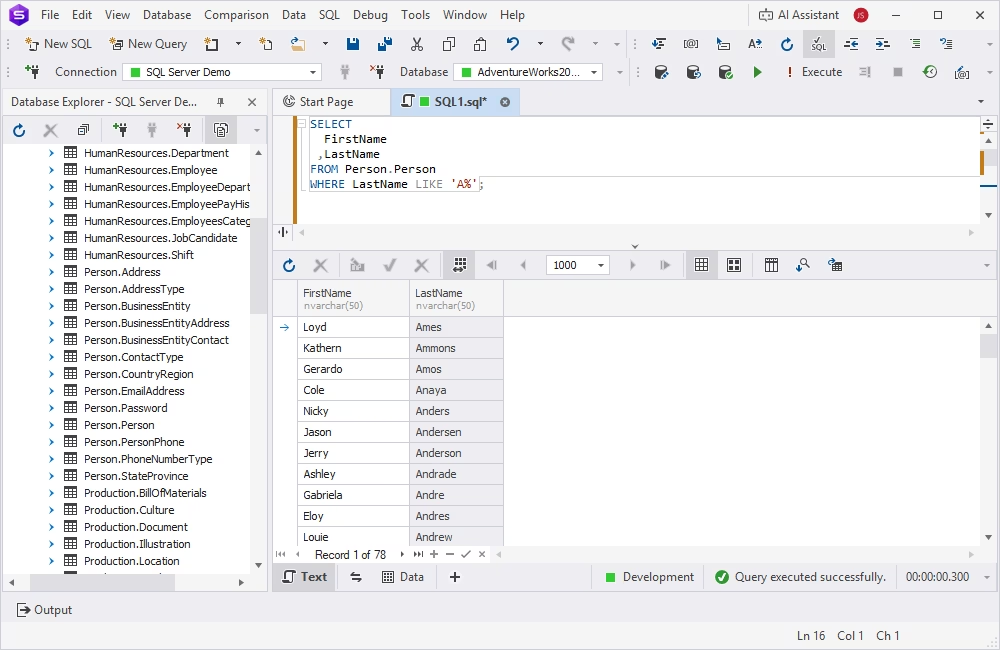
Assume we need to retrieve the list of employees whose last names start with the letter 'A'—the LIKE operator with the % wildcard will do the job.
SELECT
  FirstName
 ,LastName
FROM Person.Person
WHERE LastName LIKE 'A%';
_ (underscore wildcard)
The underscore wildcard matches exactly one character. This option becomes helpful when the position of a certain character in a string is known, but not its exact value. Another common use scenario is matching the fixed-length pattern. For instance, when it is necessary to find records with a specific length or structure or to match codes with one unknown character, the underscore wildcard does the job.
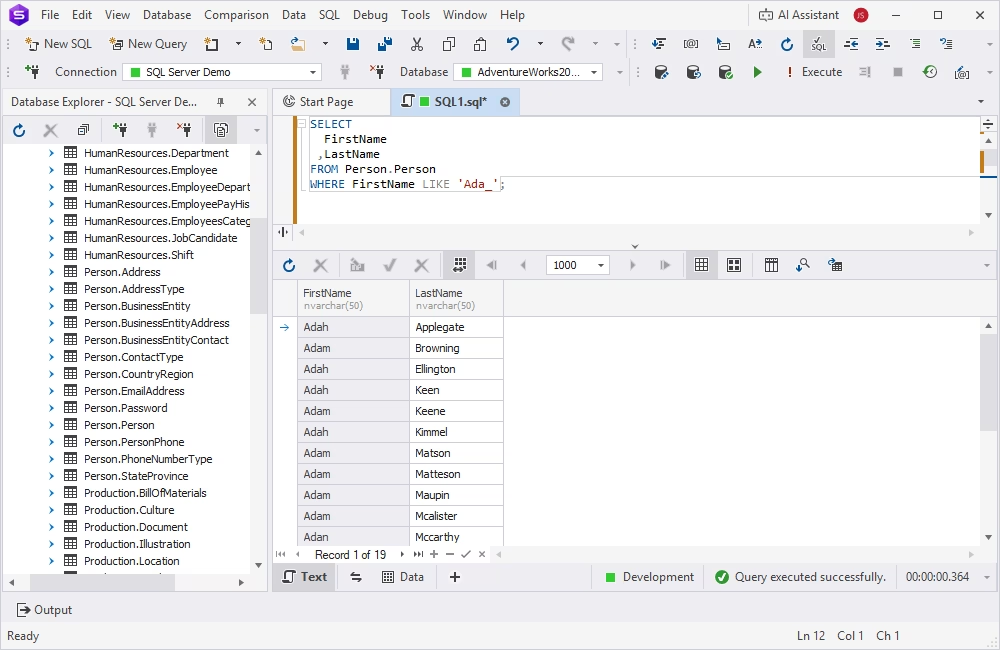
Have a look at the simple example below. We need to find all employees with names starting with 'Ada' and containing 4 characters only.
SELECT
  FirstName
 ,LastName
FROM Person.Person
WHERE FirstName LIKE 'Ada_';
[ ] (bracket wildcard)
When using the bracket wildcard, the query will match any single character within a set or range specified in brackets. As a rule, this wildcard type applies to scenarios when multiple possible characters can appear in one position. Another common use case is to define the range. For instance, you may need to filter records that start with different specific letters.
Frequently, the bracket wildcard is used in combination with other wildcard types, such as percent or underscore. The purpose is to implement more flexible filtering with several conditions at once (we will explore this scenario further in this article).
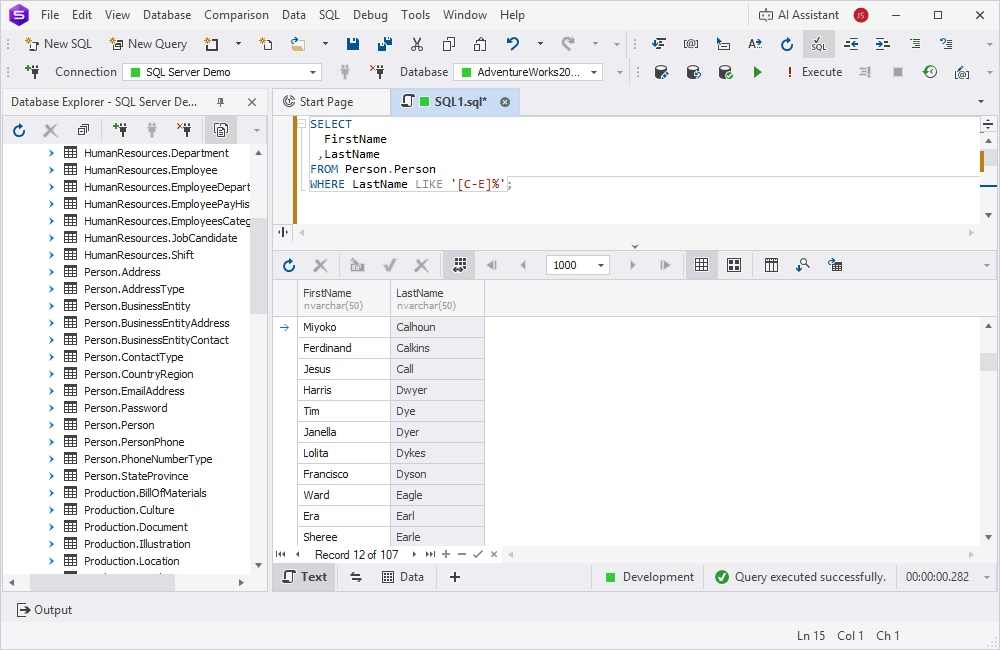
Let us consider a simple use case: retrieve the list of employees with last names starting with letters C, D, or E. In that case, we can specify the range in brackets and also apply the % wildcard for the other characters in the last names. The query is:
SELECT
  FirstName
 ,LastName
FROM Person.Person
WHERE LastName LIKE '[C-E]%';
[^] (NOT wildcard)
The NOT wildcard matches any single character NOT present in the specified set. The most common use scenario for this wildcard type is excluding certain unwanted patterns from a position.
As described in the previous section, the NOT wildcard is also used in combination with other wildcard types, like the percent wildcard. Its purpose is to specify several filtering conditions in a statement.
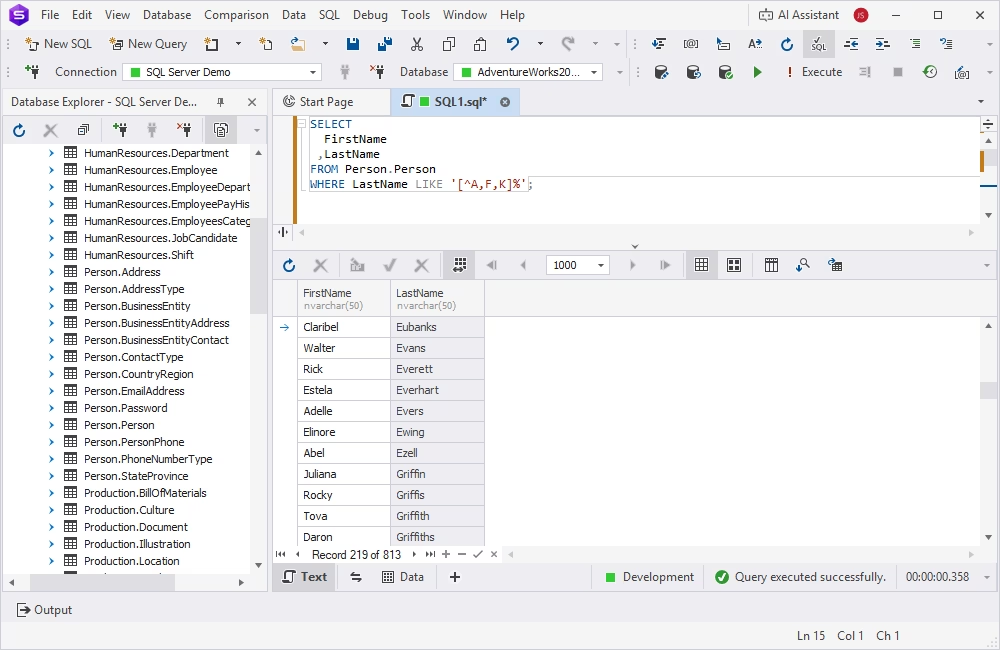
Let us get a list of all customers except for those whose last names start with A, F, or K. For that, we apply the [^] wildcard with the % wildcard.
SELECT
  FirstName
 ,LastName
FROM Person.Person
WHERE LastName LIKE '[^AFK]%';
Practical examples of SQL Server LIKE
Our next step is to explore practical examples of using the LIKE operator in SQL Server. We are going to examine both simple queries with the most common wildcards and more complex cases where we need to combine LIKE with other operators to apply multiple conditions.
Basic LIKE queries
Basic LIKE queries are simple pattern-matching searches that mostly use the percent wildcard or the underscore wildcard types. The most common use scenarios where basic LIKE queries are applicable include:
- Searching with only a part of the value known
- Quick filtering without complex logic
- Searching for values with predictable patterns (postal codes, email addresses, etc.)
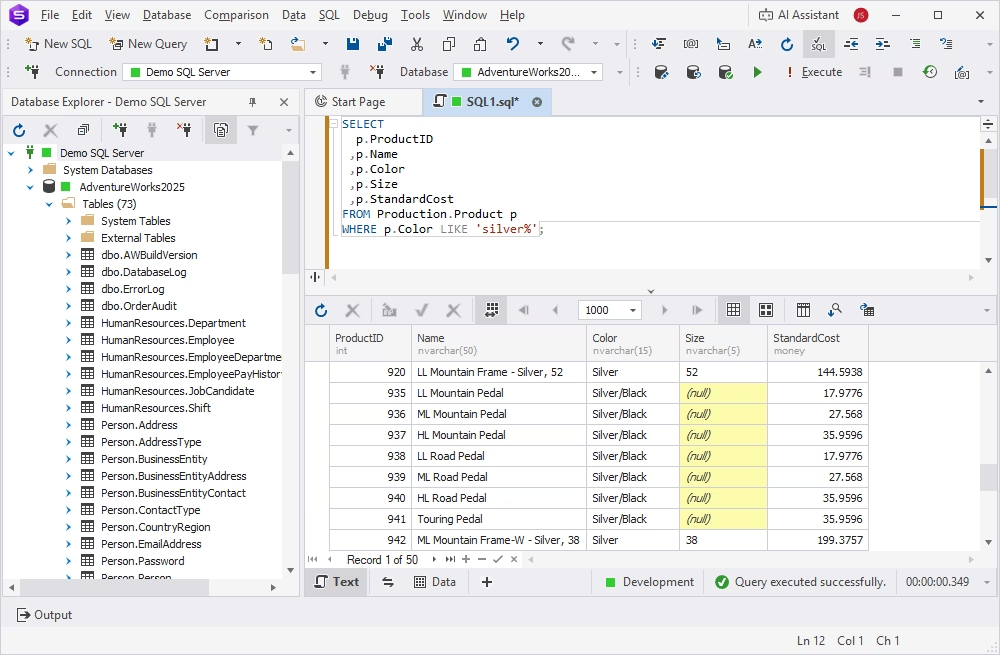
Let us search for products according to their color, silver or mixed with silver. The query to use is:
SELECT
  p.ProductID
 ,p.Name
 ,p.Color
 ,p.Size
 ,p.StandardCost
FROM Production.Product p
WHERE p.Color LIKE 'silver%';
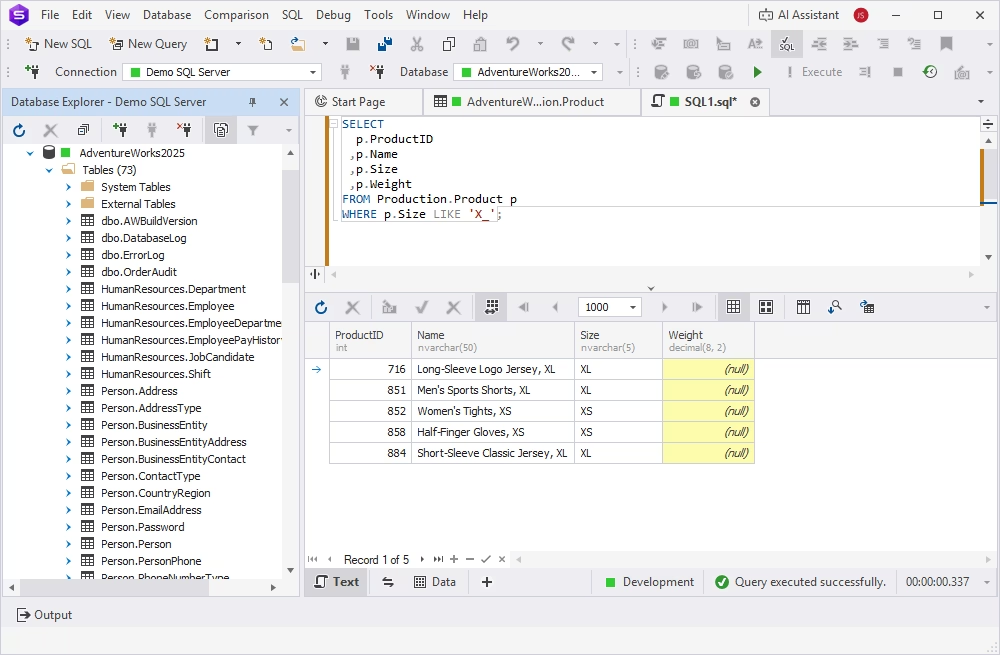
Another example uses the underscore wildcard. We want to search for products with the size value starting with X and having only two characters (XS or XL).
SELECT
  p.ProductID
 ,p.Name
 ,p.Size
 ,p.Weight
FROM Production.Product p
WHERE p.Size LIKE 'X_';
Combining LIKE with other conditions
Scenarios for simple queries with pattern matching only are quite rare in real-world scenarios. As a rule, users need to narrow results with additional filters, apply business logic, or combine several search patterns. In such cases, it is possible to combine the LIKE operator with other operators, such as AND/OR, to apply multiple conditions to the search.
The most common are the following combinations of LIKE with additional operators:
- LIKE + AND – to narrow results
- LIKE + OR – to apply multiple patterns
- LIKE + NOT – to apply exclusions
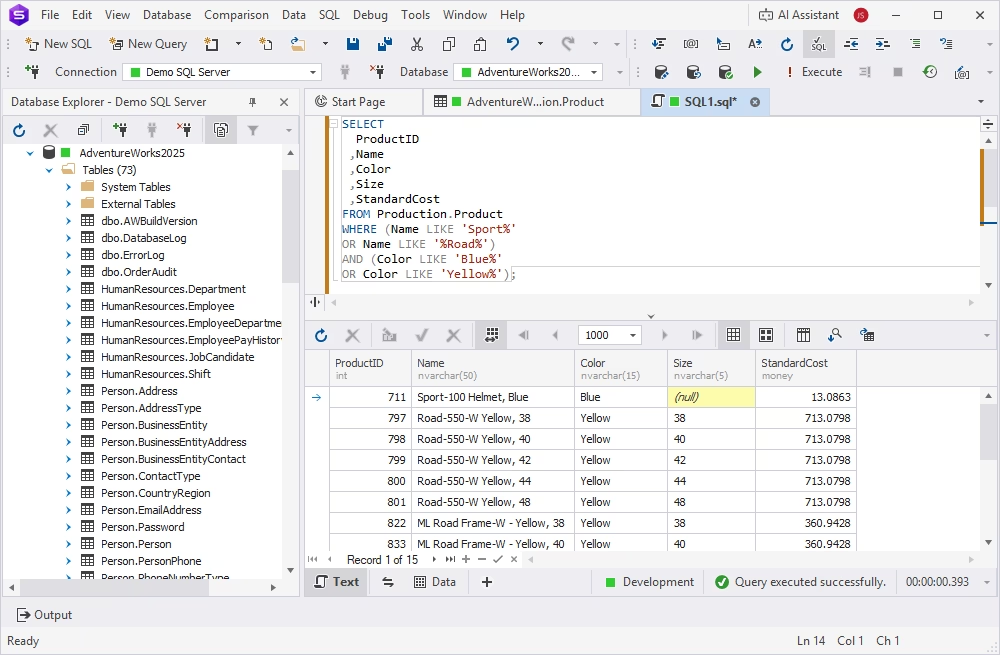
Let us see how it works in practice. Assume we need to select the list of products according to their names and colors. We want to see the products with names containing 'sport' or 'road' and with colors 'Blue' or 'Yellow'. In this query, we need to use the LIKE operator with the % wildcards, the OR and the AND operators.
SELECT
  ProductID
 ,Name
 ,Color
 ,Size
 ,StandardCost
FROM Production.Product
WHERE (Name LIKE 'Sport%'
OR Name LIKE '%Road%')
AND (Color LIKE 'Blue%'
OR Color LIKE 'Yellow%');
Using LIKE with escape characters
Sometimes your data contains characters that are normally treated as wildcards, such as the percent sign, underscore, or brackets. Such cases are common when working with codes, file names, or identifiers. If so, wildcard characters may return incorrect results unless they are escaped as follows:
LIKE 'pattern' ESCAPE 'x'
Here, 'x' is the sign used to escape a character. The most common escape character is \ (backslash).
For instance, we need a list of email addresses that include the underscore.
SELECT
  EmailAddress
FROM Person.EmailAddress
WHERE EmailAddress LIKE '%\_%' ESCAPE '\';
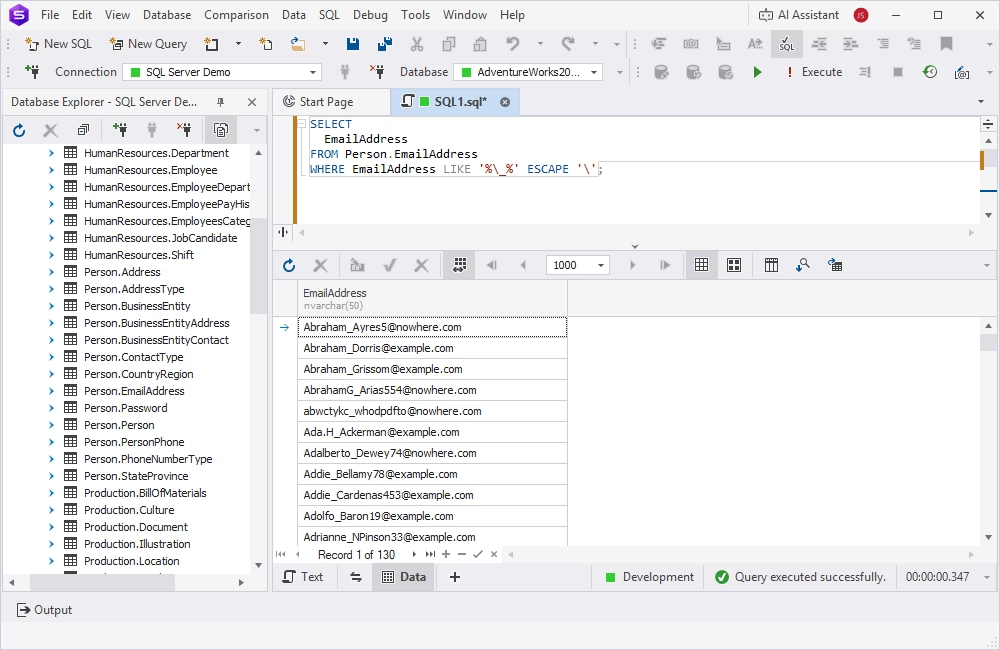
In this query, we used the % wildcard to match any number of characters before or after the underscore and used ESCAPE '\' to specify that the backslash tells the query to treat the underscore as a regular symbol and not a wildcard.
Comparison table of wildcard types in the LIKE operator
| Wildcard type | Pattern | Description | SQL query example |
|---|---|---|---|
| Percent (%) | 'T%' | Matches any string starting with T | SELECT customer_id,first_name,last_name FROM sales.customers WHERE last_name LIKE 'T%' ORDER BY first_name; |
| Underscore (_) | '_u%' | Matches any string where the second character is 'u' | SELECT customer_id, first_name, last_name FROM sales.customers WHERE last_name LIKE '_U%' ORDER BY first_name; |
| Character list [ ] | '[YZ]%' | Matches any string starting with 'Y' or 'Z' | SELECT customer_id, first_name, last_name FROM sales.customers WHERE last_name LIKE '[YZ]%' ORDER BY last_name; |
| Character range [A-C] | '[A-C]%' | Matches any string starting with 'A', 'B', or 'C' | SELECT customer_id, first_name, last_name FROM sales.customers WHERE last_name LIKE '[A-C]%' ORDER BY first_name; |
| Negated range [^ ] | '[^A-X]%' | Matches any string where the first character is not in 'A' to 'X' | SELECT customer_id, first_name, last_name FROM sales.customers WHERE last_name LIKE '[^A-X]%' ORDER BY last_name; |
| Escape character (\) | '0\%%' | Treats '%' as a literal instead of a wildcard | SELECT feedback_id, comment FROM sales.feedback WHERE comment LIKE '0\%%' ESCAPE '\'; |
How to use the LIKE operator in dbForge Studio for SQL Server
To illustrate all the examples earlier in this article, we utilized dbForge Studio for SQL Server. It is a robust AI-powered SQL Server IDE, a more advanced alternative to the default SSMS, that covers the entire database life cycle, from design and development to testing and automation. Plenty of integrated features and exceptional flexibility of settings allow you to perform all kinds of database tasks in SQL Server, both on-premises and in the cloud. Let us see how to use dbForge Studio when working with the LIKE operator.
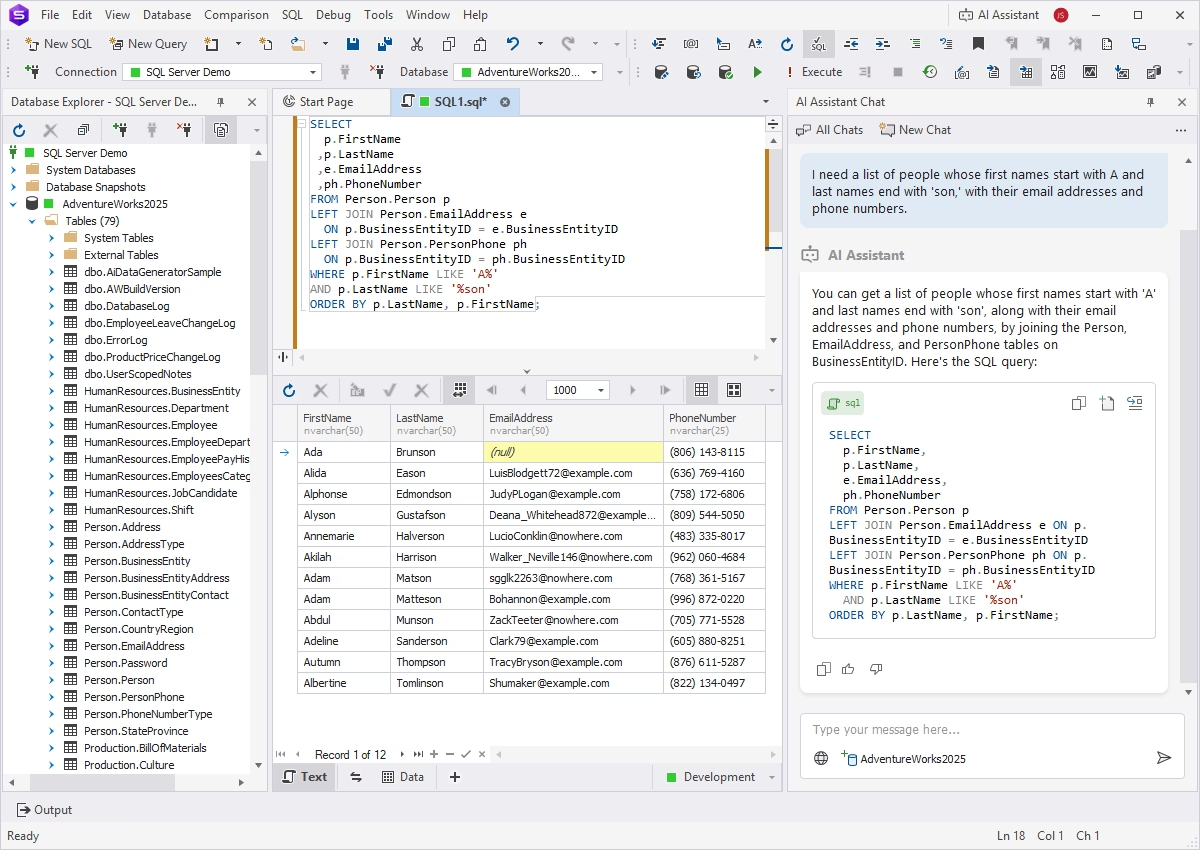
SQL Editor
SQL Editor is a tool for writing and executing the LIKE queries against the target databases. It retrieves the results immediately and displays them in a user-friendly format. Also, this tool provides a range of coding assistance features, including smart code completion, context-based object suggestions, code formatting, debugging, and analysis. Additionally, an integrated AI Assistant can generate accurate SQL queries on demand, translate prompts from plain language, and help troubleshoot, analyze, and optimize existing queries.
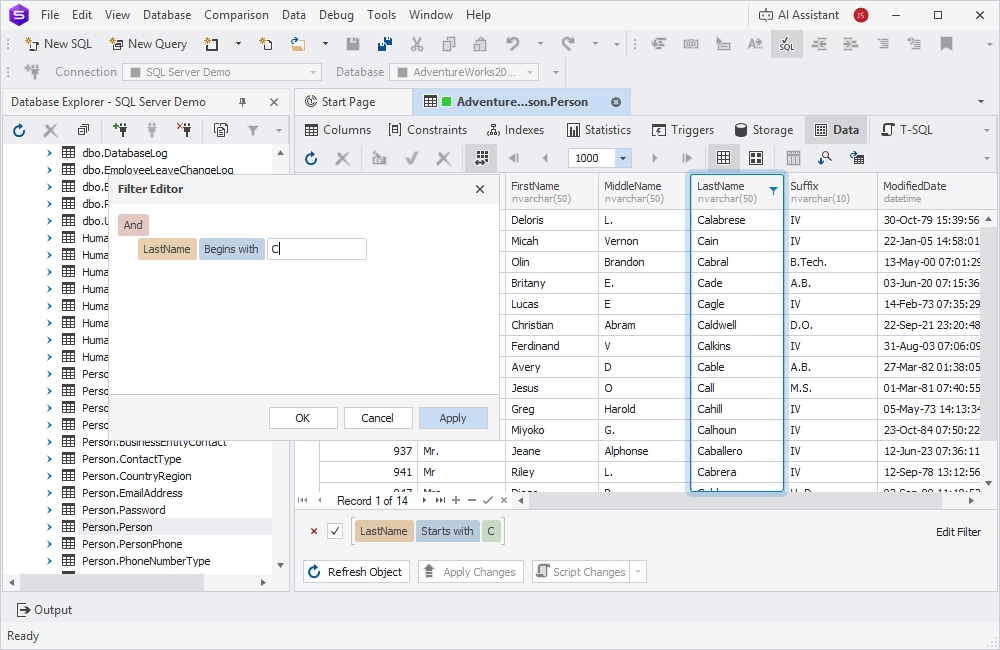
Object Viewer
dbForge Studio for SQL Server provides Object Viewer, a tool for quick viewing, analyzing, and direct data editing in a visual format. Among the many options available in this tool, you can apply LIKE-based filters without writing code manually. Object Viewer converts visual filters into SQL queries and executes them in the background.
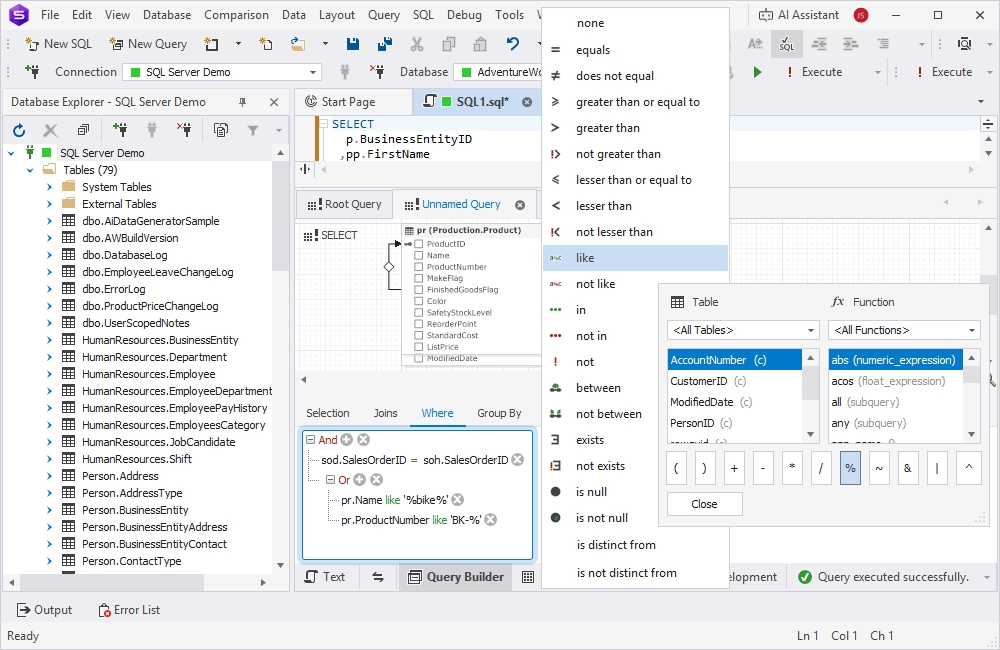
Query Builder
Query Builder is a tool for constructing queries of any complexity visually from ready blocks. When working with the LIKE operator, it allows you to quickly define conditions in the WHERE clause, select LIKE and additional operators, specify wildcards, and configure parameters. The tool then converts the visual query into valid SQL code.
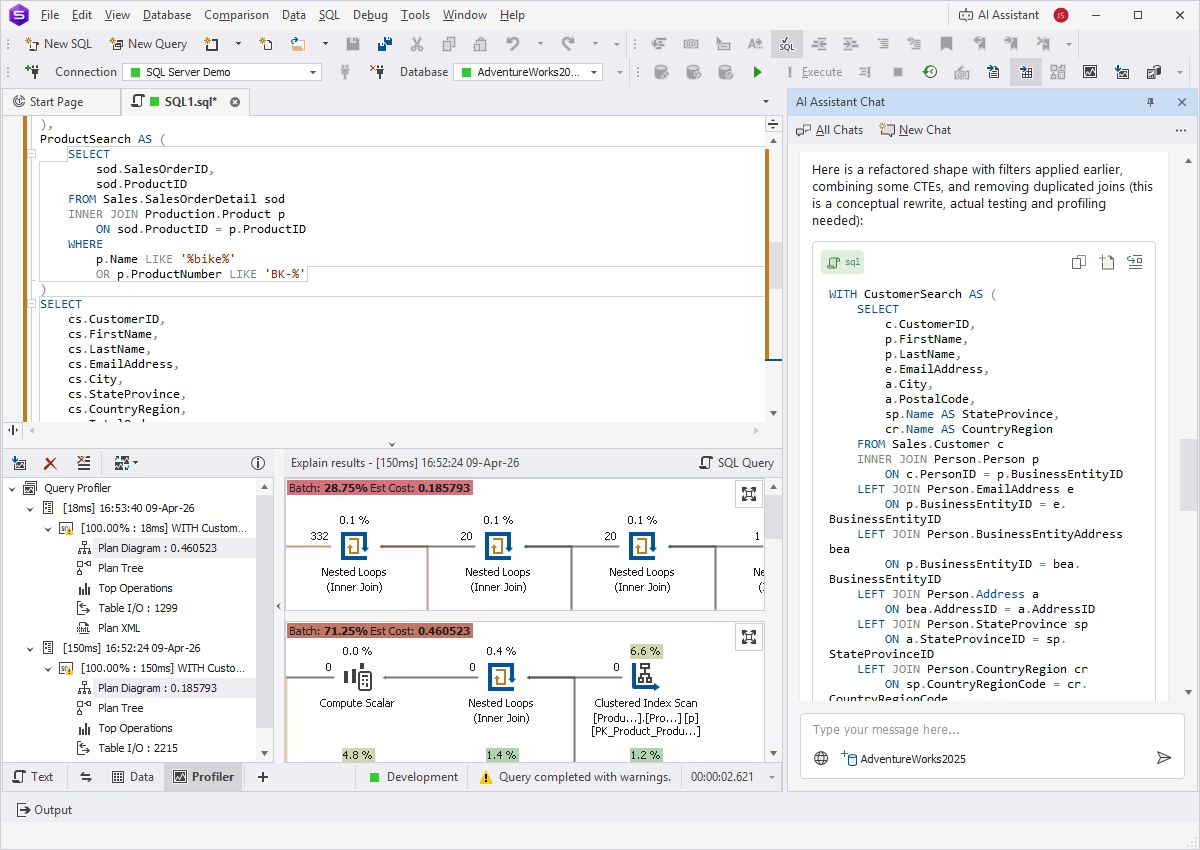
Performance optimization
Complex queries, especially those with multiple conditions, JOINs, and subqueries, can be resource-consuming and require analysis and optimization before execution. dbForge Studio for SQL Server provides a Query Profiler that analyzes queries and displays execution plans and statistics. The AI Assistant can also suggest optimized query versions, allowing you to compare execution plans and choose the most efficient option.
Conclusion
The LIKE operator is a helpful tool for quick and flexible data filtering, and any database specialist working with SQL Server should master it. This guide provides information about syntax, usage, and best practices to help you apply your knowledge.
Mastering the LIKE operator becomes easier with dbForge Studio for SQL Server, which offers a full toolset for database development, management, and administration, and supports LIKE-based operations with a visual approach.
Try dbForge Studio for SQL Server, download a fully functional 30-day free trial and evaluate it in your daily workflow!
FAQ
The percent (%) wildcard represents zero, one, or multiple characters. When you use two percent signs together (%%), it functions identically to a single percent sign, matching any string of any length, including empty strings. As a result, a condition like WHERE column LIKE '%%' in most cases returns every row in the table where that column is not NULL.
Yes, using multiple LIKE conditions is a common practice in SQL queries. Typically, the OR/AND operators are used to combine these LIKE conditions. Using OR means that matching any specific condition is enough, while AND requires matching all conditions.
The LIKE operator in SQL is a helpful tool, but it should be used with caution. When you need simple pattern matching or search for partial text, the LIKE operator with a wildcard will do the job. However, it is better to avoid using the wildcards at the start (e.g., %der), as it prevents index usage and thus impacts performance.