Save Big on Black Friday! Up to 40% Off
ends in   {{days}}
Days
{{timeFormat.hours}}
:
{{timeFormat.minutes}}
:
{{timeFormat.seconds}}

Database DevOps tools for SQL Server automation

dbForge DevOps Automation for SQL Server is designed to take conventional database development and deployment to a whole new level. This solution unites dbForge SQL Tools into a single DevOps toolchain and uses PowerShell to automate the way you build, test, and deploy SQL Server databases.

  • Embrace the DevOps approach to automate database development
  • Involve dbForge tools to cover the entire database lifecycle
  • Build up a safe and effective database CI/CD process
  • Make database updates frequent and consistent
  • Minimize risks during the deployment of SQL Server databases
  • Reduce the overall costs of database development
DevOps Automation integrates into:

Jenkins

Build CI/CD pipelines with the integrated Jenkins plugin

TeamCity

Build CI/CD pipelines with the integrated TeamCity plugin

Azure DevOps

Build CI/CD pipelines with the integrated Azure DevOps plugin

Bamboo

Build CI/CD pipelines with the integrated Bamboo plugin

Features

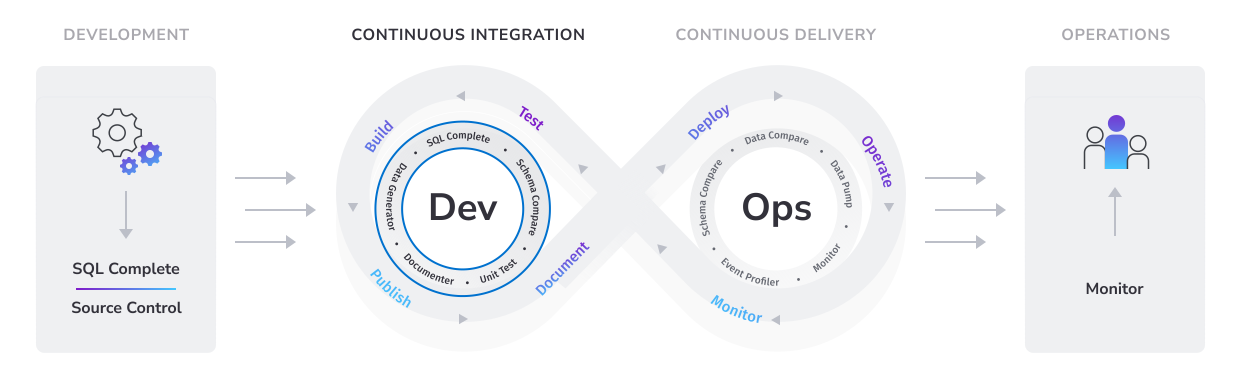
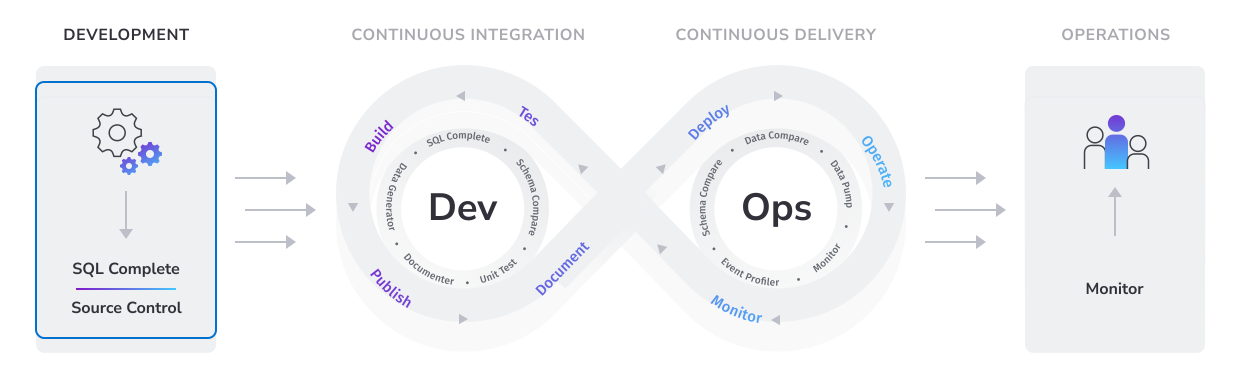
The first step in the CI/CD pipeline is the creation of a database, either locally or on a SQL Server instance. Then you generate a NuGet package from a source control repository. Next, you can build a runnable instance, and this is where DevOps Automation comes into play. Use the Invoke-DevartDatabaseBuild PowerShell cmdlet to handle the build stage of your project and get a new database.

After a new database is created, you need to fill it with data. Enter dbForge Data Generator, a smart and powerful tool that effortlessly creates any amount of column-intelligent, realistic test data of any required type. It will take you just a few clicks to take this step. Simply call the Invoke-DevartDatabaseTest PowerShell cmdlet using the -Include TestData parameter.

Unit testing is one more crucial stage that ensures that the implemented functionality meets all the specified requirements or works properly after the introduction of changes. To install the test framework and design unit tests, you can use another handy add-in called dbForge Unit Test. Alternatively, you can use the Invoke-DevartDatabaseTest PowerShell cmdlet.

Once the testing phase is completed, and you have a runnable instance that has passed all the predefined tests, you are ready to format your SQL scripts in order to embed them in a NuGet package. To perform this task most effectively, you can use dbForge SQL Complete. You can also call the Invoke-DevartFormatScript PowerShell cmdlet for this purpose.

You can keep your database documentation complete and relevant at all times by automating its generation. To document your database, use the New-DevartDatabaseDocumentation PowerShell cmdlet. As a result, you receive extensive database information including inter-object dependencies and DDL in one of the three output formats – HTML, PDF, or Markdown.

Before moving on to the final stage, you need to prepare a package for deployment by creating a database script folder and then generating a NuGet package, which will be used as a source for deployment. CD requires this process to be automated. To create a NuGet package that contains a validated database source, use the Publish-DevartDatabaseProject PowerShell cmdlet.

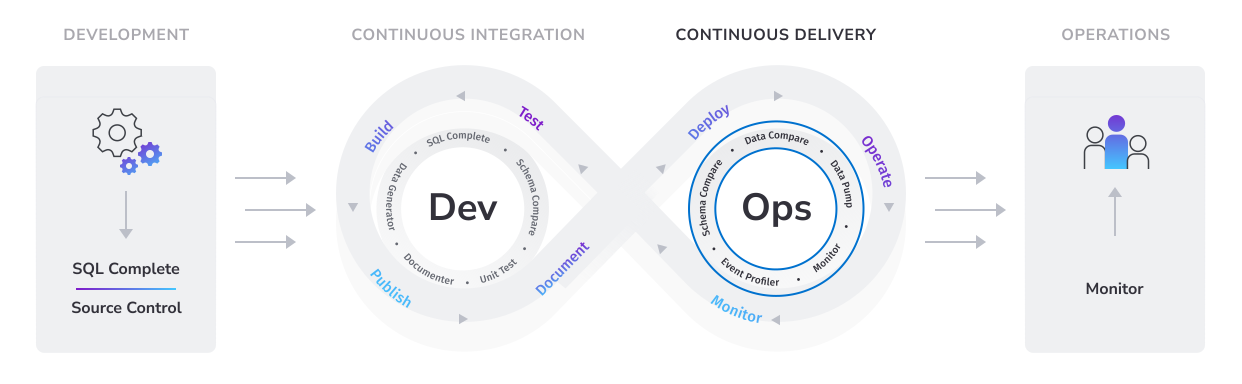
This stage involves the creation of a schema synchronization script after comparing the source database in the NuGet package (which contains changes) with the target database awaiting the update. This script will then be used for the release. At this stage, you can use the Invoke-DevartSyncDatabaseSchema PowerShell cmdlet. In the end, you get a successfully created schema synchronization script.

Data import into a test database is an important step that can be used at different stages of the CI/CD process. To perform it, you can use dbForge Data Pump that supports import from 10 most popular data formats and includes a number of advanced options and templates for recurring scenarios. You can also call the Invoke-DevartDataImport PowerShell cmdlet to import data from the command line.

During the database development cycle, you may encounter a situation when you need to quickly extract data from a production database. To do that, you can use dbForge Data Pump that allows exporting data to 14 most widely used data formats. You can also call the Invoke-DevartDataExport PowerShell cmdlet to export data from the command line.

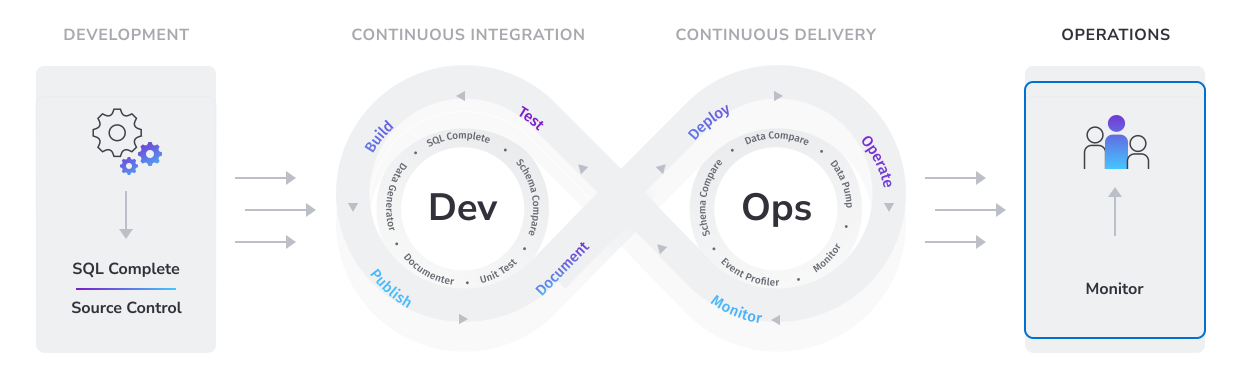
After the completion of the previous stages, you can publish the NuGet package to a designated NuGet feed to share it with your teammates or customers. This stage is highly important as the CI/CD pipeline requires cross-team collaboration between the Development, Test, and Operations teams. To publish a NuGet package from the command line, call the Publish-DevartDatabaseProject PowerShell cmdlet.

Pricing

Get started with dbForge SQL Tools

Get started with dbForge SQL Tools for free

Why not try the bundle before buying it? Download dbForge SQL Tools for a free 30-day trial and see its rich database development features and automation capabilities in action.

Trusted by thousands of data-driven companies
Barkley
Arconic
Polaris
Jabil
Hewlett Packard Enterprise
Lam Research
Microsoft
Trusted by thousands of data-driven companies
Barkley Arconic Polaris Jabil HP Lam Microsoft

How developers, DBAs, and data architects benefit from the ultimate SQL Server tools

150%

Productivity growth

GoodSoftware.com automated data migration and monitoring with dbForge SQL Tools — and thus achieved a steady 150% productivity growth.

$1,000+

Cost savings per year

Integral Hospitality Consulting accelerated SQL development by 75% and achieved considerable cost savings after adopting dbForge Studio.

2x-4x

Development speed

Contract Resources (NZ), BookingStudio A/S, and Coyote Software reported a drastically increased coding speed after adopting SQL Complete.

1.5x

Faster data management

The IT Service reported a 1.5x faster database comparison and synchronization after integrating Schema and Data Compare into their daily operations.

Ready to get started?

Get your 30-day trial

Get your 30-day trial

Give dbForge DevOps Automation a go during a FREE 30-day trial and see all of its powerful and versatile capabilities in action.

Enjoy bulk discounts

Enjoy bulk discounts

We offer flexible purchasing options to meet your budget. Also, if you need multiple licenses, you will get a bulk discount.

Need a hand?

Need a hand?

If you need any help or have questions about our tools or purchasing options, feel free to get in touch with our team.

Frequently asked questions

What is SQL Server DevOps?

SQL Server DevOps refers to the application of DevOps principles and practices to the development, deployment, and maintenance of SQL Server databases. In other words, DevOps brings together development (Dev) and operations (Ops) to automate the entire process.

What are the key benefits of using DevOps tools for SQL Server database development?

The use of DevOps tools for SQL Server database development drastically reduces manual routine work, nearly eliminates the risk of error, and automates the entire database lifecycle from the earliest stages to deployment.

How do database DevOps automation tools improve CI/CD pipelines?

Database DevOps automation tools improve CI/CD pipelines by turning manual, error-prone operations with databases into automated, repeatable, and reliable processes. One of the most prominent tools from this category is dbForge DevOps Automation for SQL Server, which provides a comprehensive set of PowerShell cmdlets to automate recurring operations at every stage of CI/CD.

What role does dbForge play in SQL Server DevOps automation?

dbForge offers multiple interoperable tools that can be united in a single DevOps toolchain to cover every aspect of SQL Server database development, saving lots of time and effort in the process.

How can DevOps SQL practices reduce risks in database deployment?

There are many notable benefits of automation that eventually ensure trouble-free deployment. Taken in general, extensive automation keeps manual work to a minimum, thus reducing the risk of human error that might manifest itself at later stages. Additionally, a well-streamlined DevOps process ensures full consistency between development, test, and production environments. Next, when it comes to automated unit testing, broken SQL code is prevented from reaching production. Finally, automated backups make space for instant recovery if something goes wrong.

What database DevOps tools help manage schema changes most effectively?

dbForge Schema Compare is the optimal tool for identifying changes in SQL Server schemas. dbForge Data Compare is a twin tool that helps locate and manage changes in table data. Finally, if you are interested in establishing an effective collaboration on databases, check dbForge Source Control, a powerful SSMS add-in that offers integration with multiple version control systems.