SQL Source Control for SQL Server in SSMS

dbForge Source Control is an SSMS add-in that brings version control capabilities directly into the familiar environment. It fills the gap created by the absence of native version control features in SSMS, allowing teams to work more effectively within their preferred IDE.

  • Version-control database schemas and static table data
  • Use either a dedicated or a shared development model
  • Commit and revert changes with dependency awareness
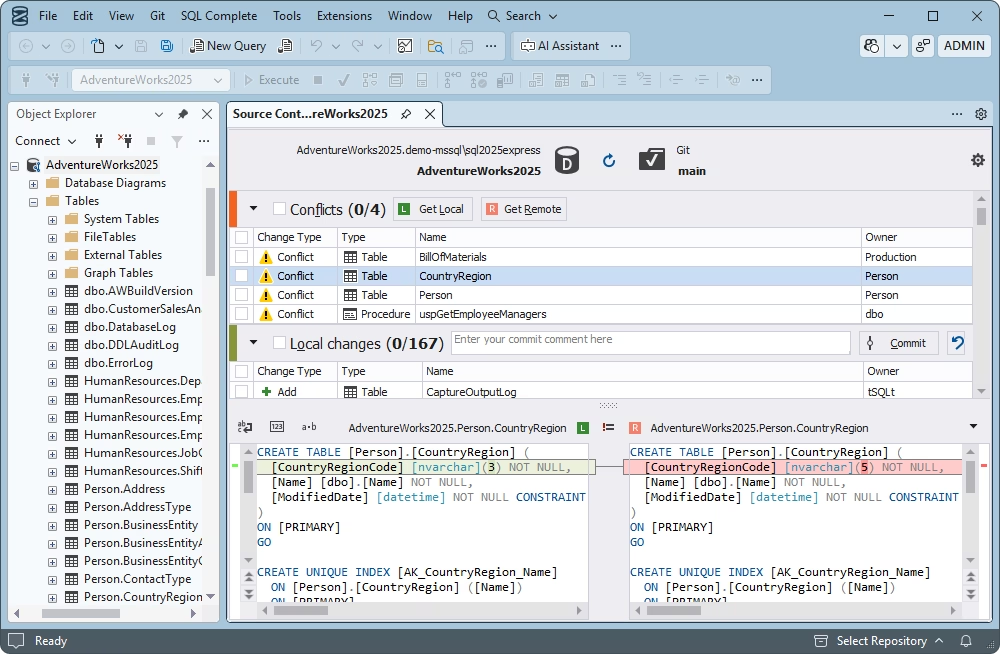
  • View conflicts, resolve inconsistencies, and track changes
  • Automate database development with the DevOps approach
  • Integrate Source Control directly with SSMS

Supported version control systems

dbForge Source Control supports all the major version control systems, including Azure DevOps Server (previously known as Team Foundation Server a.k.a. TFS), Apache Subversion (SVN), TFVC, Git (including GitHub, GitLab, and Bitbucket), Mercurial (Hg), Perforce (P4), and SourceGear Vault.

Git solutions supported by Source Control

Azure DevOps

Azure DevOps

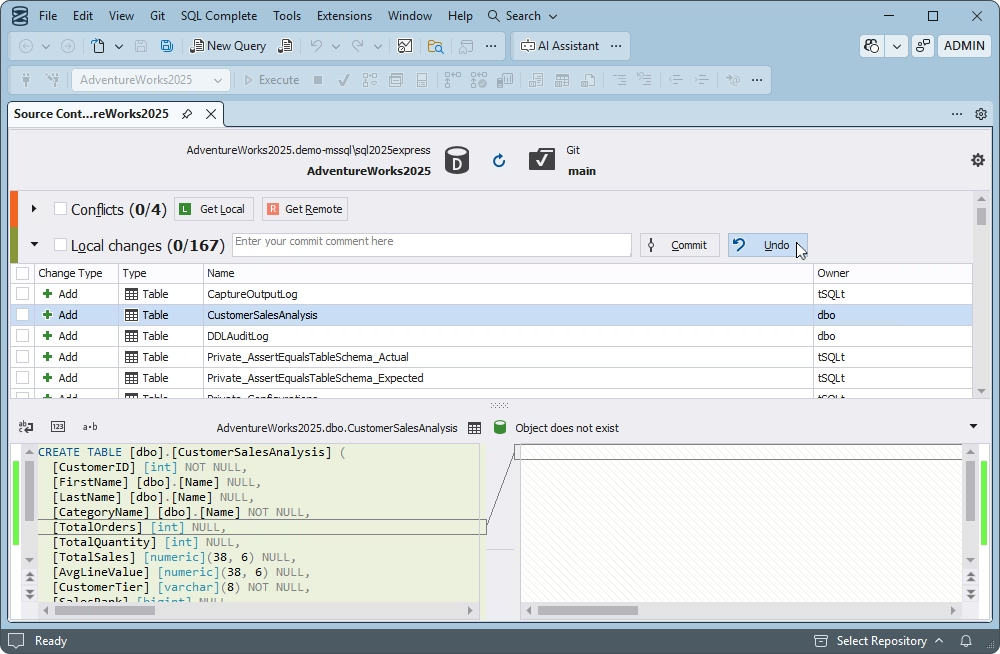
  • Make and revert commits
  • Get local or remote changes
  • View and resolve conflicts
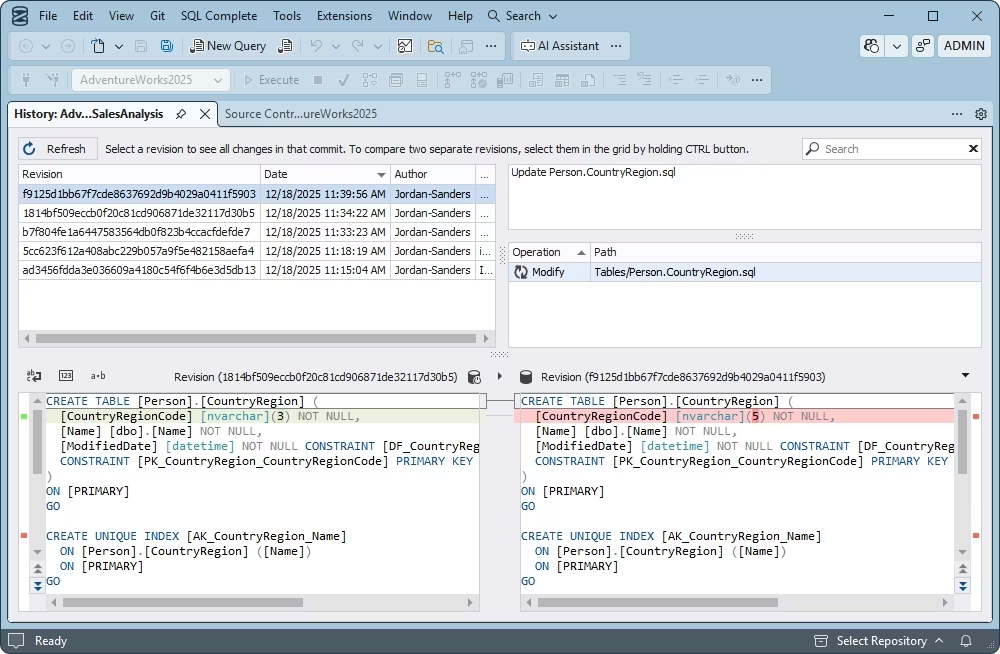
  • Track the history of changes
  • Link and unlink static data
GitHub

GitHub

  • Create an empty repository from scratch
  • Commit and revert changes
  • View and resolve conflicts
  • Associate commits with GitHub Issues
  • Switch between branches easily
GitLab

GitLab

  • Make and revert commits
  • Get local or remote changes
  • Handle conflicts
  • Associate commits with GitLab issues
  • Link and unlink static data
Bitbucket

Bitbucket

  • Commit and revert changes
  • Update your local repository
  • Track the history of changes
  • View and resolve conflicts
  • Work with shared and dedicated models

Everything your software team needs in a single tool

Management of database changes in SSMS becomes significantly more efficient with integrated source control. It helps developers track all modifications to database objects and prevent unintended changes.

With this feature in SSMS, teams can work more reliably, with better consistency and accountability.

Key advantages:
  • Schema change tracking and monitoring
  • Prevention of unintended modifications
  • No-conflict concurrent development support
  • Rollback and recovery for restoring stable versions
  • Consistent deployment across environments
  • Comprehensive auditing

With SQL Server version control available in SSMS, collaboration in database development becomes significantly more efficient.

Multiple developers can work on the same database without conflicts through branching, merging, and object locking. This option minimizes the risk of overwriting and improves coordination across teams.

Key advantages:
  • Branching for isolated feature/fix development
  • Retrieval of changes made by other developers
  • Object locking to avoid conflicts
  • Conflict prevention and resolution
  • Change tracking for more transparent communication and history

Source control in SSMS is incomplete without a mechanism for rollback and recovery, allowing users to track and revert changes to previous stable versions of database objects.

This option minimizes the risk of data loss and errors, ensuring stable, reliable environments for teams.

Key advantages:
  • Version history for reviewing and recovery
  • Quick reversion of faulty changes
  • Safe area for work and experiments
  • Fast restoration of stable versions
  • Version consistency and reliability

The feature of source control in SSMS helps teams ensure compliance and meet the required auditing standards. It maintains a detailed, chronological history of all database changes, capturing who made each change, as well as when and why.

Key advantages:
  • Detailed change tracking with timestamps
  • Full audit for internal and external reviews
  • Identification of each contributor
  • Documented change history for regulatory compliance
  • Transparency for governance and quality control

Source Control included in the dbForge SQL Tools bundle

dbForge Source Control

Starts from

$199.95
per year
Try the tool

Key features:

  • Support for multiple version control systems
  • Version control of schemas
  • Version control of static data
  • Quick comparison of database versions
  • Shared and dedicated development models
  • Rollback of changes
  • Easy resolution of conflicts
  • History of changes
Trusted by thousands of data-driven companies
Barkley
Arconic
Polaris
Jabil
Hewlett Packard Enterprise
Lam Research
Microsoft
Trusted by thousands of data-driven companies
Barkley Arconic Polaris Jabil HP Lam Microsoft

Benefits of SQL source control for development and business operations

Faster and safer development

Faster and safer development

Source control reduces the risk of human error and helps teams develop and test databases more efficiently.
Reduced downtime and risks

Reduced downtime and risks

A detailed history of changes and rollback capabilities allow teams to identify and revert problematic changes quickly.
Improved software deployment

Improved software deployment

The add-in integrates with CI/CD pipelines, supporting consistent, automated, and tested database deployments.
Cost efficiency and business continuity

Cost efficiency and business continuity

With source control, teams can significantly lower operational costs and achieve uninterrupted business operations.

What our customers say

Ready to get started?

Get started with dbForge Source Control at no cost

Get a free trial

Download dbForge Source Control for a free trial today and see how it makes your database management twice as effective.

Buy multiple licenses with a substantial discount

Enjoy bulk discounts

We provide flexible purchase options, including bulk discounts for multiple licenses, to meet the budget of every customer.

Need a hand?

Need a hand?

If you need any help or have questions about our tools or purchasing options, just get in touch with our team.

Frequently asked questions

What is source control in SQL Server?

Source control in SQL Server is a system that allows managing and tracking changes to database objects, including (but not limited to) tables, views, stored procedures, and scripts. Additionally, source control in SQL Server is the practical process of integrating version control systems (e.g., Git) with database development tools, such as SSMS, to manage, track, and audit changes to database schemas and their objects. Integration of source control enables teams to collaborate better, maintain a history of modifications, branch and merge development work, revert to previous versions, and ensure consistent, controlled deployments across different environments.

How do you link a database to source control?

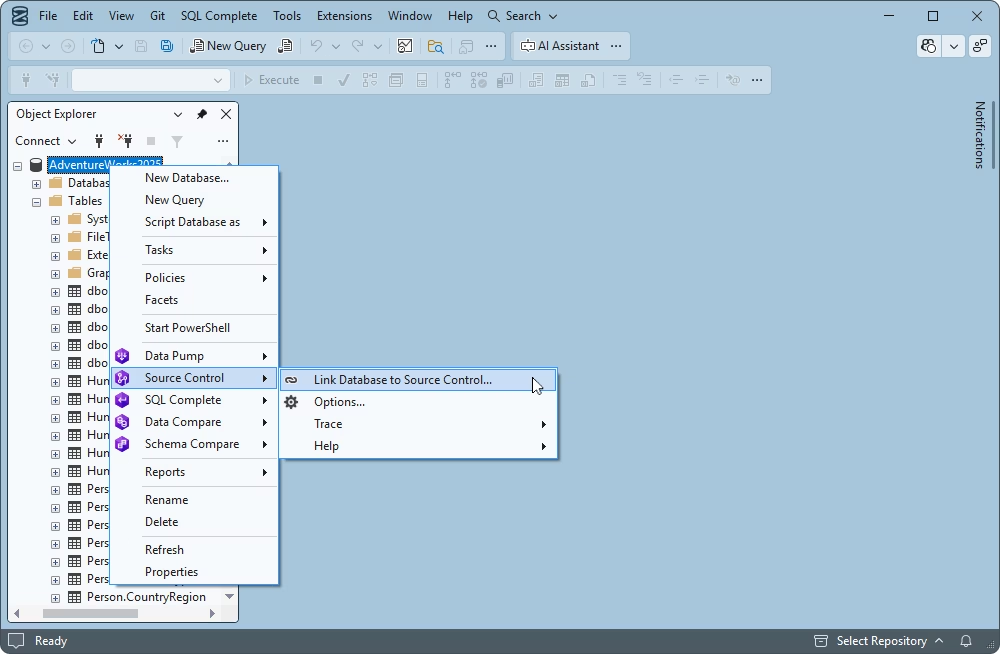
If you're using SQL Server Management Studio (SSMS), the easiest way to integrate source control is via a third-party SSMS add-in such as dbForge Source Control for SQL Server. This tool supports all popular version control systems, including Git, SVN, and Mercurial. After cloning your local repository, a smart wizard walks you through linking your database to source control. Once connected, you can commit, revert changes, and resolve conflicts directly within the interface of SSMS.

What features should a tool for MSSQL source control provide?

Version control, change tracking, and team collaboration are essential for effective database development. dbForge Source Control for SQL Server delivers all these capabilities, offering change tracking, object diff viewing, and conflict resolution—directly within SQL Server Management Studio (SSMS).

Does dbForge Source Control work as an SSMS source control plugin?

Yes. dbForge Source Control is an SSMS add-in that allows you to version-control your database management in the SSMS environment.

Can I use Git for SQL Server source control in SSMS?

Absolutely. With dbForge Source Control, you can continue using Git as your preferred version control system in SSMS by linking your database to Git and setting up a connection to your Git hosting platform of choice (GitHub, GitLab, Azure DevOps, or Bitbucket).

Can I version-control SQL Server schema and static data changes?

Yes. With dbForge Source Control, a plugin for SSMS, you can track and audit schema and data changes in your SQL Server databases.

What is the difference between SQL source control and SQL version control?

SQL source control is the broader practice built on the concept of treating database schemas and scripts as code, with defined workflows for review, branching, merging, and controlled deployment across environments.

SQL version control refers to the technical mechanism of storing and tracking database changes in a version control system—accessing the history, comparing revisions, and rolling back when needed.

Does dbForge Source Control support Azure DevOps, TFS, and TFVC?

Yes. dbForge Source Control is compatible with the major version control systems, including Azure DevOps, TFS, and TFVC.

Can I use SVN for SQL Server database source control?

Yes. If you use dbForge Source Control to version-control SQL Server databases in SSMS, you can link your database to SVN and continue managing and tracking database changes in your familiar environment.