

Database branching solves a strange mismatch in modern development: code gets its own branch, but the database often doesn’t. Developers can work independently in Git, then end up sharing the same development database, waiting for a fresh copy, or trying not to break each other’s schema changes.
The result is a lot of database sprawl. According to K2view’s 2026 State of Enterprise Data Compliance survey, the average enterprise maintains 29 copies of its production databases across development, testing, and analytics. And 76% reported a sensitive-data incident in one of these lower environments over the previous three years.
Database branching offers another way to work, but the term covers a couple of different approaches. A branching database can mean an isolated, writable database environment created from an existing state. It can also refer to the source-control workflow around schemas and migrations. Git-like database branching is a useful shorthand for both, but the comparison only goes so far once persistent data enters the picture.
This article explains how database branching handles those differences, how it fits into CI/CD, and where the model starts to break down.

- What is database branching?
- Why database branching is needed
- How database branching works
- Storage-level and zero-copy database branching
- Database branching architecture
- Database branching for CI/CD and pull requests
- Database branching strategies
- Common database branching problems and fixes
- Database branching tools and platforms
- Conclusion
- FAQ
What is database branching?
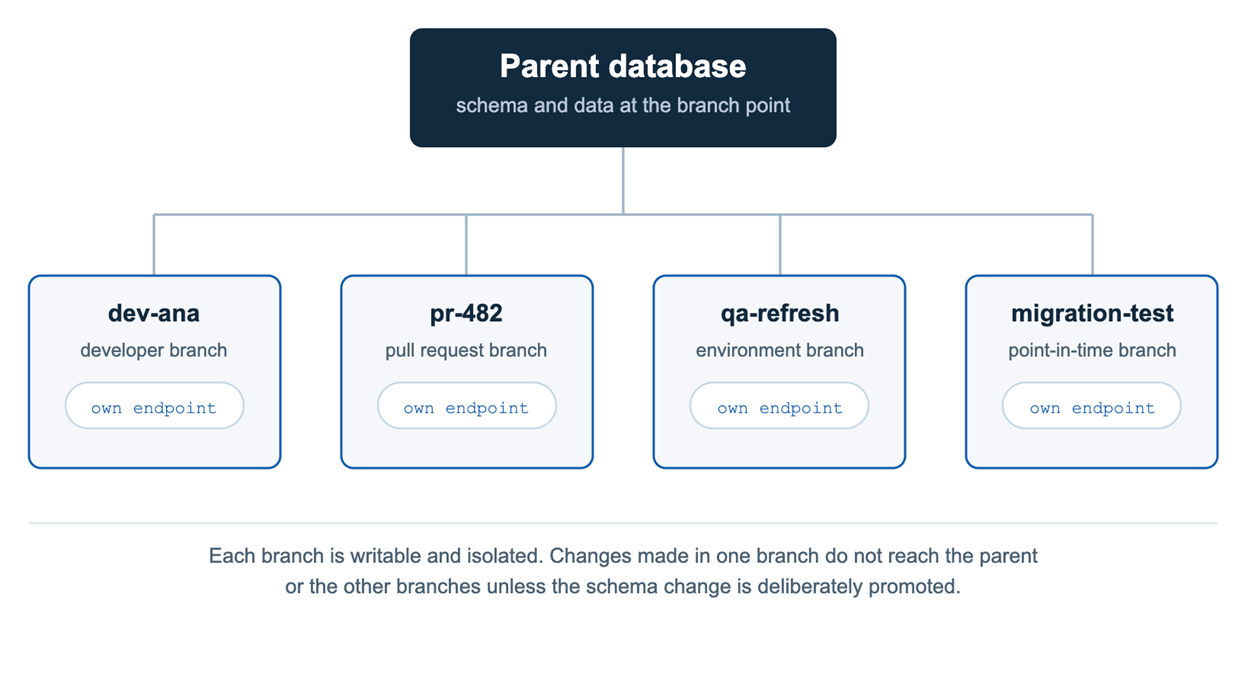
Database branching creates an isolated, writable database environment from a known database state. Depending on the platform, a branch can include the schema only or both the schema and data. A typical database branch has:
- Its own connection endpoint and credentials
- Independent schema and data changes
- Reset and deletion controls
- Point-in-time creation
- CI/CD and development hooks
The important difference from Git is what happens at merge. Database branches generally don’t merge changed rows back into the parent. Teams promote schema changes instead, usually through migration scripts, versioned DDL, or reviewed diffs.
Why database branching is needed
DORA’s research found that elite teams meeting their reliability targets were 3.4 times more likely to have strong database change management practices than low performers. The reason is practical: database changes can easily become a bottleneck when several developers are working against the same environment.
Developers may have their own Git branches, but their applications often still connect to one shared development database. One developer runs a migration and changes the schema for everyone. Another needs to test a destructive change but has to check who else is using the database first. Even routine changes start to require coordination.
Database branching removes much of that friction by giving each developer or test run an isolated database environment. Schema changes, migrations, and tests stay within that branch instead of affecting everyone using the shared database.
However, that doesn’t remove the need for review or database change management. It makes those practices easier to build into the normal development workflow: make the change in isolation, test it, review what changed, and then decide what moves forward.
How database branching works
A database branch starts from a known point in a parent database. The platform creates a separate writable environment with its own endpoint, and development continues there without changing the parent.
The basic workflow looks like this:
- Create a branch from the parent, or from a point in its history.
- Point the application or CI job at the branch.
- Apply schema changes, migrations, or test data, then run the tests.
- Keep the approved schema changes, or reset or delete the branch.
How the branch is created depends on the platform. Some systems share the underlying storage and save only the data that changes after branching. Others provision a separate database instance. We’ll look at the storage-level approach in more detail below.
Schema-only vs schema-and-data branches
A database branch can contain just the schema or the schema and its data. The choice comes down to what you need to test and how much production data you want to expose.
A schema-only branch gives developers the database structure without copying production rows. That makes sense when the work is mostly about schema changes or migrations and doesn’t depend on real data. It also avoids creating another copy of sensitive production data in a development or test environment. That’s worth considering when just 4% of surveyed organizations say their development and test environments are fully compliant with privacy requirements.
A schema-and-data branch is useful when tests require more than just the structure. In many cases this means realistic static data — small reference tables (lookup / parent tables) such as user types, statuses, countries, cities, currencies, and similar dictionaries. These tables usually contain only a few to a few hundred rows, change rarely, and rarely hold sensitive data, yet applications and migrations often fail to work without them.
In other situations you genuinely need production-scale volumes and data shapes: to validate a migration against realistic row counts, reproduce a bug that depends on a particular data distribution, or check whether a new index actually changes the query plan. In those cases the data requires the same attention to access control, masking, retention, and cleanup as any other copy of production data.
Where raw production data isn’t appropriate, teams can use masked data or generated test data instead.
Storage-level and zero-copy database branching
Storage-level database branching avoids making a full copy of the database when a branch is created. Instead, the new branch initially points to the same underlying storage as its parent. That’s why creating a branch can take roughly the same amount of time whether the database is 10 GB or several terabytes.
The usual mechanism behind this is copy-on-write:
- The branch initially shares unchanged pages with its parent.
- Reads can continue to use that shared data.
- When data is modified, the changed pages are written separately for that branch.
- The branch consumes more storage only as it diverges from the parent.
This is also what zero-copy branching means. The name can be slightly misleading: no full copy is made at creation time, but the branch still uses additional storage for every change it makes. A short-lived branch with few writes stays small; a long-lived, write-heavy branch can accumulate a significant amount of its own data.
It’s also worth separating branches from snapshots. Both can start from a known database state, but a snapshot preserves that state and is typically read-only. A branch is writable and develops its own independent state once changes begin.
State-based vs migration-based approaches
Database branching works on top of how teams manage schema changes. Two main approaches exist.
Migration-based (also called incremental or versioned) teams write ordered change scripts and track which ones have already been applied. Each new change is an explicit, reviewable step. This model pairs naturally with short-lived database branches: the same sequence of migrations can be replayed from a clean starting point, and CI can verify that everything runs in the correct order.
State-based (also called declarative or desired-state) teams maintain a description of the desired final schema. A comparison tool then generates the DDL needed to move the current database to that state. The approach can feel simpler for small schemas, but it makes the exact order of operations and data migrations harder to control.
Most teams that adopt database branching prefer the migration-based model. Branches become disposable environments where the full change history can be tested, while only reviewed migration scripts are promoted. Storage-level branching supplies the isolated database; the migration discipline still governs how schema changes move forward.
Database branching architecture
Under the hood, a database branching architecture solves a few separate problems: where the branch starts, how its changes are isolated, where queries run, and how applications connect to it. The main components look like this:
| Component | What it does |
|---|---|
| Parent database | Provides the state the branch starts from |
| Branch metadata | Tracks the branch’s origin, lineage, and creation point |
| Storage layer | Provides the data the branch starts with |
| Delta layer | Keeps changed or newly written data separate from the parent |
| Compute | Runs queries and workloads for the branch |
| Branch endpoint | Gives the branch its own connection details and credentials |
| Management layer | Creates, resets, and deletes branches through an API, CLI, or dashboard |
| Lifecycle controls | Tracks branch age, storage use, and expiry |
Not every platform implements these pieces in the same way. The biggest difference is usually how storage and compute are handled.
When storage is separated from compute, creating a branch can be mostly a metadata operation: the platform establishes the new branch and points it at existing data rather than copying everything first. Other systems provision more infrastructure for each branch, which takes longer and costs more.
That also explains why “instant branching” doesn’t necessarily mean an application can connect instantly. The branch itself may be created quickly, while compute startup, extensions, configuration, or networking still take additional time.
Database branching for CI/CD and pull requests
The most useful place for database branching for CI/CD is inside the pull request workflow. Open a PR, create a database branch, apply the migrations, point the preview app or test suite at it, and run the checks. When the PR is merged or closed, delete the branch.
So the code and the database changes that go with it get tested together, and neither runs against the database everyone else is using.
GitLab’s database migration pipeline shows what this looks like in practice. It runs migrations against a thin clone of production data during a merge request and reports things like queries, runtimes, and size changes back to the request. So a migration that looks fine on a small test database but struggles with production-sized data has a chance to fail before deployment.
There are a few checks worth running on each branch:
- Apply the migrations from a clean state and check their order
- Compare the resulting schema with the target
- Run database and application integration tests
- Flag destructive changes such as dropped columns or narrowed data types
- Check that sensitive data hasn’t ended up in the branch or its logs
The important bit is that the database branch is temporary. You don’t merge its test data into production. What moves forward is the migration or schema change that was tested and reviewed.
Those changes still need to live under database source control and go through the usual review and deployment process. Branching gives you somewhere isolated to test them; it doesn’t replace the rest of database DevOps.
See also: Best Git GUI Clients for Windows
Database branching strategies
There isn’t one branching strategy that works for every workflow. The useful questions are how long a branch should live and what triggers its creation. Most database branching strategies come down to four patterns.
- Per-developer database branches. Each developer gets a branch and keeps it for ongoing work. This clears the queue around a shared development database, but long-lived branches drift and need resetting from the parent.
- Branch per pull request. CI creates a database branch when a PR opens and deletes it on close. These on-demand database branches suit preview environments and integration tests: each PR gets its own database, and concurrent runs don’t interfere.
- Environment branches. Longer-lived branches used for staging, QA, or demos. Rather than being created per change, they’re refreshed on a schedule or when the team needs a clean state.
- Point-in-time branches. These start from an earlier database state rather than the current one, which helps when you need to reproduce an incident, inspect the database before a bad deployment, or recover something deleted by mistake.
Which strategy makes sense depends on the problem you’re trying to solve:
| Your situation | Strategy that fits |
|---|---|
| Several developers are constantly colliding in one dev database | Per-developer branches, refreshed regularly |
| Lots of PRs and integration tests are running at the same time | Branch per pull request, deleted on close |
| QA or demos need a stable database for longer periods | Environment branch, refreshed on a schedule |
| You need to investigate what happened before or after an incident | Point-in-time branch |
Common database branching problems and fixes
Branching solves shared-database contention, but it introduces a few problems of its own.
| Problem | Why it happens | Fix |
|---|---|---|
| Branch sprawl | Temporary branches aren’t deleted, while changed data keeps consuming storage | Set expiry at creation and delete PR branches automatically |
| Stale branches | Long-lived branches fall behind the parent | Reset regularly and compare with the target before promotion |
| Migration conflicts | Separate branches introduce migrations that conflict or run in the wrong order | Run the full migration sequence from a clean state in CI |
| Sensitive data exposure | Schema-and-data branches bring production data into lower environments | Use schema-only branches, masked data, or generated test data |
| Data merge conflicts | Teams expect changed rows to merge like code | Treat branch data as temporary and promote schema changes instead |
The easy part is creating branches. The harder part is remembering to clean them up. If you do not, old branches pile up fast. Set temporary branches to expire, remove PR branches when they close, and check the long-lived ones from time to time.
Database branching tools and platforms
Branching doesn’t mean the same thing on every platform. Database branching tools may as well be different: some of them branch the underlying data, some create isolated database environments, and others focus mainly on schema changes.
Neon handles PostgreSQL database branching at the storage layer using copy-on-write. It reports roughly 500,000 branches created per day, which shows how practical short-lived branches have become. PlanetScale focuses on the schema side: development branches can carry MySQL schema changes that move forward through deploy requests.
Cloud cloning is the same idea under another name. Amazon Aurora uses copy-on-write cloning to create a writable cluster without a full upfront copy. For self-hosted PostgreSQL, Database Lab Engine from Postgres.ai uses ZFS or LVM thin cloning and reports cloning a one-terabyte database in about ten seconds.
So, check what is actually being branched. A platform may give you an isolated database without covering the whole change workflow: schema objects still need version control, migrations need review, branches need comparing with their targets, and deployment scripts need testing.
That’s where database source control, schema comparison, and dbForge Edge, a universal database tool, fit around branching, especially when one release spans more than one engine, be it SQL Server, MySQL, PostgreSQL Oracle, or related cloud services.
dbForge Edge gives teams one place to work across those different database systems instead of relying on separate tools for each engine. It also brings source control, schema comparison, data tools, and deployment workflows together, which can make cross-database changes easier to manage and review.
Conclusion
Database branching gives developers something they’ve had for application code for years: a safe place to make changes without getting in everyone else’s way. It works well for development, migration testing, pull requests, and any workflow where a shared database becomes a bottleneck.
Fast provisioning is the easy part. The real work is what happens around the branch: migrations still need to be reviewed, schemas validated, test data kept safe, and temporary branches cleaned up.
Get that lifecycle right and database branches stay useful and disposable. Ignore it, and it’s easy to replace a pile of database copies with a pile of forgotten branches.
FAQ
What is database branching?
Database branching is the creation of an isolated, writable database environment from an existing database state. The branch inherits the parent’s schema and, on some platforms, its data. Changes stay isolated until the schema change is deliberately promoted.
What is storage-level database branching?
Storage-level database branching creates metadata pointers to existing storage instead of copying the database. Unchanged pages stay shared with the parent, and only modified or newly written data consumes extra space, which makes branch creation largely independent of database size.
What is database branching for CI/CD?
Database branching for CI/CD means creating a temporary database branch during a pipeline run, usually tied to a pull request. Migrations run against it, tests execute in isolation, and the branch is deleted when the PR closes. Only reviewed migration scripts move forward.
Can database branches be merged?
Schema changes can be merged, data usually cannot. PlanetScale diffs and merges schema definitions through deploy requests, but changed rows on two diverging branches have no safe automatic resolution. Treat branch data as disposable and promote migration scripts instead.
What is PostgreSQL database branching?
PostgreSQL database branching means creating isolated Postgres environments from a parent database, either on managed platforms that branch at the storage layer or through self-hosted thin cloning on ZFS or LVM. It gets attention because Postgres reached 55.6% usage in the 2025 Stack Overflow Developer Survey, making it the most-used database among developers.