SQL Unit Testing Tool for SSMS With the tSQLt Framework

dbForge Unit Test is an intuitive and convenient add-in for implementing automated unit testing directly in SQL Server Management Studio. The add-in is based on the open-source tSQLt framework and allows developing stable and reliable code that can be properly regression-tested at the unit level.

  • Get started with built-in unit test examples
  • Install tSQLt on any database with a single click
  • Write unit tests in regular T-SQL
  • Run multiple SQL Server unit tests at once
  • Launch object testing in isolation without adding extra data for IDs
  • Automate the execution of unit tests from the command line
Features

Unit tests in regular T-SQL

dbForge Unit Test is based on the open-source tSQLt framework, a set of T-SQL tables, views, stored procedures, and functions.

SQL unit testing has never been easier. You don't need to continuously switch between different tools to write your code and create unit tests. With dbForge Unit Test for SQL Server, you can do everything directly in SSMS.

Extensive tSQLt management

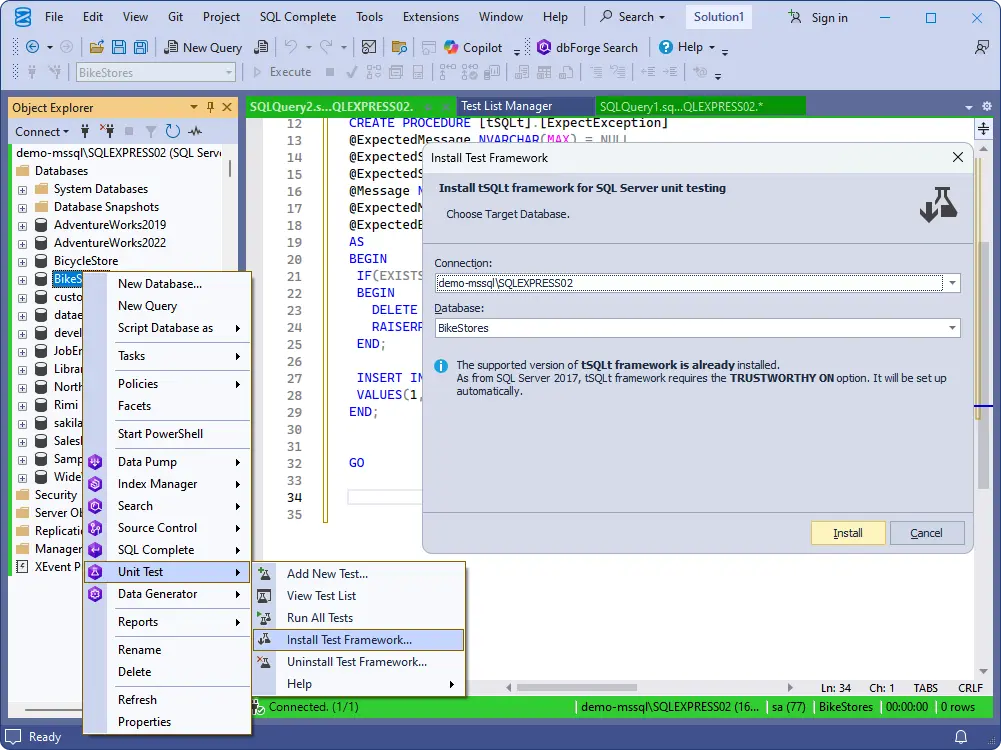
You can install or uninstall tSQLt on any database with a single click. When uninstalling the framework, you can either save tests in the database or remove them along with tSQLt.

Installing the framework adds a number of stored procedures and functions, as well as an SQL CLR object to the database. You can use the framework to implement unit tests in T-SQL.

Uninstalling the framework removes the tSQLt-related stored procedures, functions, and the CLR object from the database. You can select not to remove the tests you've created.

Pre-written unit test examples

dbForge Unit Test comes with a library of pre-written unit test examples. This will allow you to quickly start working with valid unit tests. You can add them to any database and apply best practices for test-driven development.

Single-tab Test List Manager

Test List Manager is a convenient tab for managing, creating, removing, modifying, and running unit tests. Below, there is a separate Test Results tab where you can inspect the results of each test you have executed.

Test class management

Test cases in tSQLt are grouped into test classes, so that you can gather similar SQL unit tests in the same test class.

With dbForge Unit Test for SQL Server, you can conveniently create and organize test classes in Test List Manager.

Easy customization of unit tests

Using the context menu of Test List Manager, you can easily create, edit, delete, and rename your tests. Again, it's all done directly in SQL Server Management Studio.

SSMS integration

dbForge Unit Test integrates seamlessly with SQL Server Management Studio, allowing you to design, execute, and manage SQL unit tests directly within the SSMS environment. The add-in extends the familiar SSMS interface with dedicated panels, context menus, and test-management tools, enabling you to create automated tests without leaving your standard development workflow. This integration streamlines testing, reduces context switching, and makes database test automation accessible to both developers and DBAs working inside SSMS.

Get the add-in separately or as part of dbForge SQL Tools

dbForge Unit Test

Starts from

$169.95
per year
Try the tool

Key features

  • Integration with SSMS
  • Installation of the tSQLt framework
  • Implementation of tests in T-SQL
  • Isolated testing
  • Simultaneous execution of multiple tests
  • No effect on actual databases
  • Pre-written test examples
  • Automated execution from the command line
Trusted by thousands of data-driven companies
Barkley
Arconic
Polaris
Jabil
HP
Lam
Microsoft
Trusted by thousands of data-driven companies
Barkley Arconic Polaris Jabil HP Lam Microsoft

Why choose dbForge Unit Test

Tests in regular T-SQL

Tests in regular T-SQL

dbForge Unit Test is based on the open-source tSQLt framework. Thus, you can write unit tests in T-SQL and run them against your SQL Server databases with ease and convenience.

Complete documentation

Complete documentation

Each and every dbForge product, including Unit Test, is accompanied by in-depth documentation that will help you get started with the add-in most effectively.

Pre-written tests

Pre-written tests

Add a collection of predefined unit test examples to any required database making it more effective right away. These examples are based on our best practices for test-driven database development.

Safe refactoring

Safe refactoring

It's rather challenging to perform refactoring on large databases and constantly keep an eye on every change. In this case, unit tests can help you detect issues before they cause any harm.

Reduced costs

Reduced costs

You can overcome any budget constraints by purchasing an SSMS add-in instead of more expensive specialized apps. Moreover, multiple licenses of dbForge solutions come with a nice discount.

DevOps integration

DevOps integration

dbForge Unit Test, taken together with dbForge DevOps Automation, makes it easy to set up a database DevOps process without compromising quality, performance, or reliability.

Success story from our customer

1.5x
faster comparison and synchronization
2x
faster SQL coding
"We are able to deliver code of significantly better quality, and better tested in a shorter time than was possible before our investment in Devart tools... Our customers get access to more robust applications, against more realistic data."
Andrew Richards, Managing Director
Success story from our customer
G2 Users Love Us
Software Suggest Top trending
SourceForce Customers Love Us

Ready to get started?

Get started

Get your 30-day trial

Give dbForge Unit Test a go during a FREE 30-day trial and see all of its comprehensive testing capabilities in action.

Buy multiple licenses with a substantial discount

Enjoy bulk discounts

We offer flexible purchasing options to meet your budget. Also, if you need multiple licenses, you will get a bulk discount.

Need a hand?

Need a hand?

If you need any help or have questions about our tools or purchasing options, feel free to get in touch with our team.

Frequently asked questions

Does SQL Server have native support for unit testing?

SQL Server does not have native, built-in support for unit testing. However, there are frameworks and tools that will help you set up SQL Server unit testing with ease.

The most notable framework is tSQLt, an open-source framework that allows writing unit tests directly in T-SQL.

One of the most notable tools is dbForge Unit Test, which can be integrated into SSMS and used to automate database unit testing.

How do I write unit tests for SQL stored procedures?

Writing unit tests for stored procedures in SQL Server involves isolating the procedure's logic and verifying that it behaves correctly under various inputs and conditions. Since SQL Server does not have native unit testing, the best approach is to use the tSQLt framework. It allows you to write unit tests directly in T-SQL and verify outcomes.

Can I create unit tests without writing T-SQL manually?

Yes, you can create SQL Server unit tests without writing T-SQL manually, but you'll still need some familiarity with SQL concepts. The tools that enable this typically provide a graphical interface or higher-level abstraction over T-SQL.

Can I run unit tests inside SQL Server Management Studio?

SSMS does not have integrated tools for unit testing. However, you can easily enhance it with a specialized add-in. You might as well try dbForge Unit Test, which is available for a free 30-day trial. During this trial, you will be able to install the add-in and see it in action.

What's the difference between tSQLt and dbForge Unit Test?

tSQLt is an open-source testing framework. dbForge Unit Test is a software product based on this framework. You can integrate it into SSMS to write unit tests for SQL Server databases.

Does dbForge Unit Test have SSMS integration?

Yes, dbForge Unit Test is regularly updated to be fully compatible with all relevant versions of SSMS, up to the latest one.

Does dbForge Unit Test work with the tSQLt framework?

Yes, dbForge Unit Test is based on this framework.

What databases does dbForge Unit Test support?

dbForge Unit Test supports Microsoft SQL Server alongside a number of related databases and analytics services, including Azure SQL Database, ApsaraDB RDS, Azure Synapse Analytics, and Microsoft Fabric.